


 Video Converter Ultimate
 Skärminspelare
 Video reparation
Enastående sätt att enkelt konvertera VOB till 3GP [Bästa omvandlare]
Vill du spela upp din VOB-fil på din 3G-enhet men kan inte göra det? Då är den bästa lösningen för dig att konvertera din VOB-fil till en 3GP-fil. 3GP-filer är de filer som 3G-enheter stöder. Så om du letar efter det bästa sättet att avkoda din VOB-fil till 3GP kan den här artikeln vara svaret för dig. Vi har tagit fram de enklaste och bästa sätten att konvertera VOB till 3GP.

Del 1. Hur man konverterar med FVC Video Converter Ultimate
FVC Video Converter Ultimate är en av de bäst presterande konverterarna som finns på webben. Denna kostnadsfria offline-konverterare kan konvertera många olika filformat, inklusive VOB, 3GP, MP4, MKV, MOV, AVI, FLV och över 1000 andra format. Med den här konverteraren kan du också trimma längden på din video och till och med lägga till effekter för att förbättra din videofil. Dessutom, om du vill slå ihop flera filer, erbjuder den här konverteraren batchkonvertering. Så om du vill konvertera din VOB till 3GP utan ansträngning, läs mer nedan och ladda ner den gratis.

FVC Video Converter Ultimate
5 689 200+ nedladdningar- Kan konvertera för över 1000+ filformat tillgängliga på webben.
- Kan batchkonvertera flera filformat.
- Den har en ultrasnabb konverteringsprocess och hårdvaruacceleration.
- Den har avancerade redigeringsfunktioner för att klippa, lägga till undertexter och lägga till vattenstämplar till din fil.
- Tillgängligt på alla mediaplattformar som Windows och Mac.
Gratis nedladdningFör Windows 7 eller senareSäker nedladdning
Gratis nedladdningFör MacOS 10.7 eller senareSäker nedladdning
Här är stegen för hur man konverterar VOB till 3GP med FVC Video Converter Ultimate:
Steg 1. Ladda först ner appen genom att klicka på knappen Download för Windows eller Mac. Följ sedan installationsprocessen och öppna appen.
Gratis nedladdningFör Windows 7 eller senareSäker nedladdning
Gratis nedladdningFör MacOS 10.7 eller senareSäker nedladdning
Steg 2. Klicka på knappen Add Files eller på knappen med +-tecknet. Dina datorfiler visas, välj sedan din VOB-fil för att lägga till den i kön.
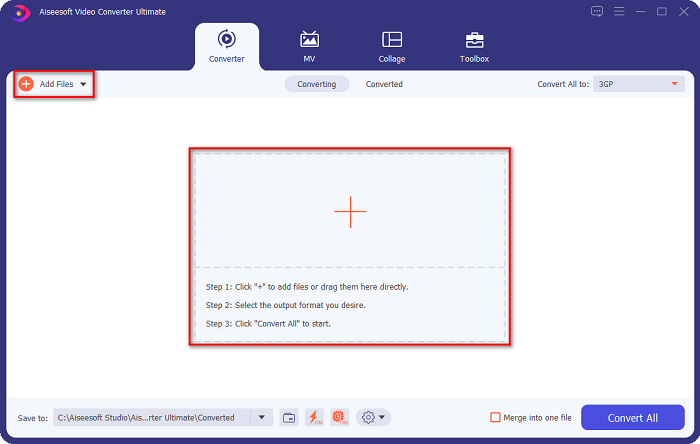
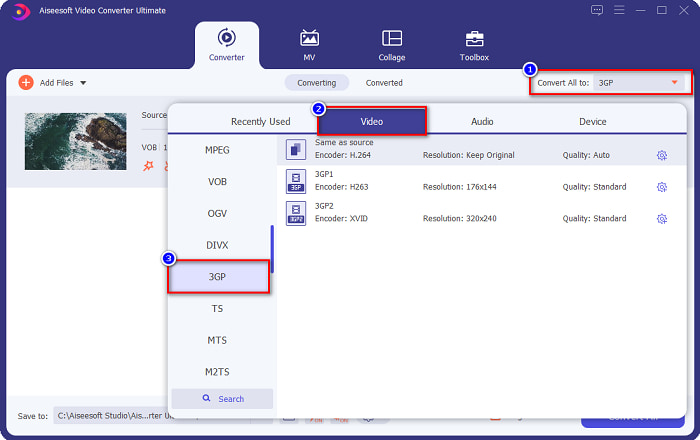
Steg 3. För det tredje steget klickar du på knappen Convert All to för att välja det utdataformat du vill ha. Klicka på 3GP och gå sedan vidare till nästa steg.
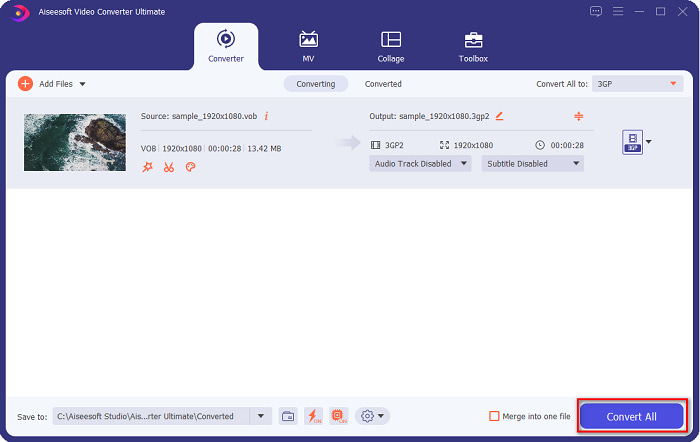
Steg 4. När du har valt önskat utdataformat klickar du på knappen Convert All för att starta konverteringen. Vänta bara några sekunder, och voilà! Med dessa enkla steg kan du enkelt konvertera din VOB-fil till 3GP.
Del 2. Hur man konverterar VOB till 3GP gratis online
Om du vill konvertera din VOB-fil till en 3GP-fil utan att ladda ner, kan du använda onlinekonverterare som finns tillgängliga på webben. Bekvämligheten och effektiviteten med att använda en onlinekonverterare är utan tvekan bra. Därför gav vi två sätt att konvertera din VOB-fil till ett 3GP-filformat.
FileProInfo
FileProInfo är en online-konverterare med ett lättanvänt grafiskt gränssnitt, vilket gör den till ett nybörjarvänligt verktyg. Den stöder nästan alla vanliga filformat som finns på internet. Dessa onlinekonverterare innehåller dock många störande annonser. Trots detta är det fortfarande många som använder den här konverteraren.
Steg 1. Sök efter FileProInfo i din webbläsare för att gå till deras webbsida. På programmets huvudgränssnitt klickar du på knappen Select VOB file. Välj sedan din VOB-fil för att ladda upp den.

Steg 2. Välj sedan önskat filformat för utdata i rutan bredvid ordet to.

Steg 3. Klicka slutligen på Convert VOB File längst ned i programmets gränssnitt. Vänta sedan tills din konvertering är klar.
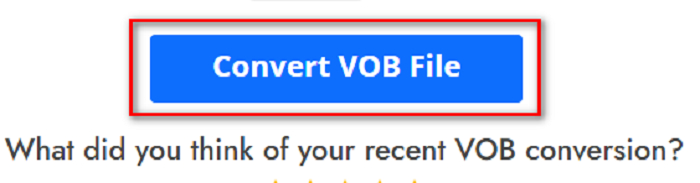
Och det är det! Utan att svettas kan du konvertera din VOB-fil till 3GP.
Konvertera 365
Convert365 är en onlinekonverterare från VOB till 3GP som låter dig konvertera de flesta standardformat, inklusive VOB, 3GP, AVI, MOV, MP4, MPEG och fler. Och om du letar efter en onlinekonverterare som kan normalisera ljudvolymen har detta verktyg den funktionen. Eftersom det är ett onlinverktyg kan du dock uppleva långsam konvertering eftersom det är beroende av internetuppkoppling. Följ dessutom stegen nedan för att konvertera VOB-filen till 3GP med hjälp av Convert365.
Steg 1. Sök efter Convert365 i din webbläsare, klicka på knappen Add Files och välj din VOB-fil när dina datorfiler visas.

Steg 2. Klicka sedan på drop-down-knappen bredvid Convert to och välj ditt utdataformat. Klicka på filformatet 3GP.
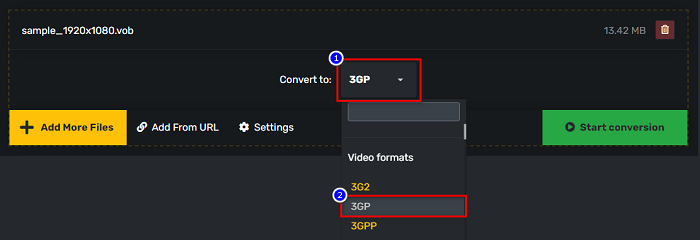
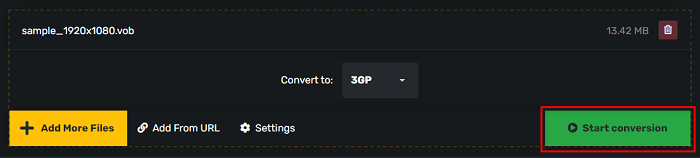
Steg 3. Och till sist, klicka på Start conversion knappen för att konvertera din VOB till en 3GP-fil.
Del 3. Vilken VOB till 3GP-omvandlare ska jag använda
När du väljer den bästa omvandlaren för att konvertera VOB till 3GP måste du alltid ta hänsyn till hastigheten, filerna som den stöder och det unika med omvandlarens funktioner. Vi rekommenderar att du använder offlineverktyget FVC Video Converter Ultimate bland de bästa online- och offlineomvandlarna som visas ovan. Denna omvandlare erbjuder många distinkta funktioner som andra omvandlare inte har, som GIF-skapare 3D-tillverkare, vattenstämpelborttagare och många fler.
Dessutom, även om det kan ge professionella utgångar, har det också ett lättanvänt gränssnitt så att du inte kommer att ha svårt att använda det.
Del 4. Mer om VOB och 3GP
VOB eller Video Object är ett filbehållarformat som DVD-skivor använder. Den innehåller video, ljud, undertexter och menyinnehåll. Den här typen av filer har begränsningar och kopieringsbegränsningar för att skydda dem från att kopieras direkt. Däremot är 3GP-filer filformat som bara kan spelas på tredje generationens mobila enheter. Dessa filformat är utvecklade av Third Generation Partnership Project (3GPP). Dessutom innehåller den här typen av filer bara en liten filstorlek, jämfört med VOB-filer, eftersom de är gjorda för delning till 3G-enheter. 3GP kan lagra video- och ljudfiler som vanligtvis används i 3G-telefoner.
Del 5. Vanliga frågor om att konvertera VOB till 3GP
Kan du spela 3GP på macOS?
3GP-filer är omöjliga att spela upp på macOS, särskilt i de nyare versionerna av QuickTime. Du kan dock konvertera din 3GP-fil till ett format som macOS stöder, nämligen MOV. För att få veta mer om konvertering av 3GP-filer till MOV, klicka på den här länken.
Kommer konvertering av VOB till 3GP att påverka kvaliteten på din fil?
Absolut ja. Filstorleken kommer att påverkas när du konverterar VOB till 3GP. Eftersom 3GP bara innehåller video- och ljudfiler och har en mindre filstorlek, blir filstorleken på din VOB-fil mindre.
Är 3GP filformat en vanlig fil?
Tyvärr, nuförtiden, är 3GP-filformat inte så vanliga eftersom det finns färre 3G-telefoner nuförtiden. Den vanligaste filen för mobilanvändare nuförtiden är filformatet MP4.
Slutsats
Eftersom vi presenterar de bästa och enklaste att använda omvandlarna för att konvertera VOB till MOV på Windows och Mac, drar vi slutsatsen att FVC Video Converter Ultimate är det bästa bland de presenterade online- och offlinekonverteringsverktygen. Den har inte bara unika funktioner att prova, den erbjuder också höghastighetskonvertering. Har du fortfarande tvivel om denna omvandlare, ladda ner den nu och prova den bästa VOB till 3GP-omvandlaren.
-
 Bästa sätten att konvertera VOB till FLV [Gratis och online ingår]
 Vill du konvertera en VOB-fil till en FLV-fil? Du kan enkelt slutföra uppgiften med antingen stationära eller online-omvandlare. Läs den här guiden och lär dig hur du omvandlar VOB till FLV enkelt och snabbt.
-
 3 Handy Converters tillgängliga för att ändra VOB-fil till AVI-format [2021]
 Har du problem eftersom VOB-filer inte stöds för att spelas upp? Låt oss sedan försöka konvertera den med de 3 sätten som presenteras nedan med detaljerade steg för varje omvandlare.
-
 Utmärkta metoder att använda för att konvertera VOB till MOV
 Videonedladdningar online är bekväma, men vad händer om videon är i VOB-format och din spelare inte stöder det? Det här inlägget kommer att lära dig hur du konverterar VOB till MOV.
