


 Video Converter Ultimate
 Skärminspelare
 Video reparation
Lär dig de tre sätten att konvertera VOB till AVI online och offline
VOB-filer används för att lagra privata strömmar och den använder förlustvideokomprimering som MPEG-2. Dessutom har de nästan samma struktur om vi skulle jämföra de två. Men .vob-filer har en begränsning och specifikation innan du ens kan använda dem. Och på grund av det kan du inte enkelt spela upp en VOB-fil på din lokala mediaspelare. Så nu, för att spara tid på att söka hur man öppnar det, föreslår vi att du måste konvertera det genom att välja en omvandlare nedan. I så fall presenterar vi den bästa konverteraren vi kan komma med och lär dig hur du konverterar VOB till AVI online eller offline med verktygen som finns på listan.
Del 1. Hur man konverterar VOB till AVI Online
Om du har en snäv budget föreslår vi att du använder ett kostnadsfritt verktyg. När vi sökte på internet upptäckte vi att det finns ett verktyg som är känt som den bästa online‑konverteraren, nämligen FVC Free Video Converter. Dessutom är det här verktyget mycket enkelt att använda för alla som har testat det, och de flesta blir imponerade av hur bra det fungerar. Så om du också vill bli imponerad av hur bra den här konverteraren är kan du prova att ändra en VOB‑fil till AVI‑format genom att följa stegen nedan.
Steg 1. För att gå direkt till konverterarens webbplats klickar du på den här länken.
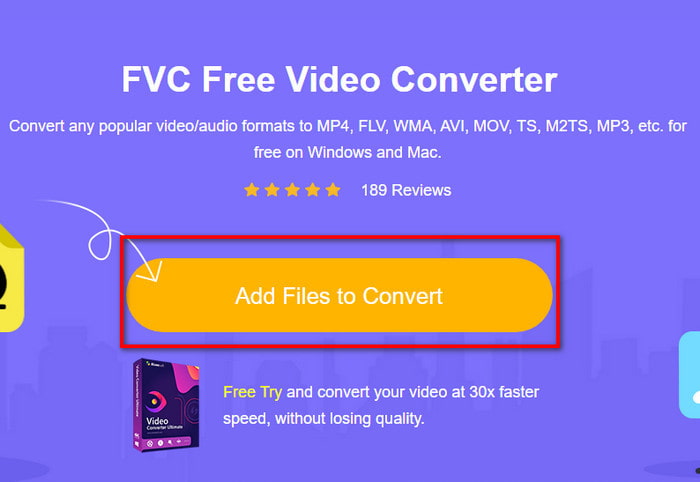
Steg 2. På webbplatsen klickar du på Add Files to Convert för att ladda ner installationsfilen. Du behöver inte oroa dig, den är bara några kilobyte. Klicka sedan på den igen för att starta verktyget och leta upp filen i mappen. När du har hittat den klickar du på Open för att fortsätta.
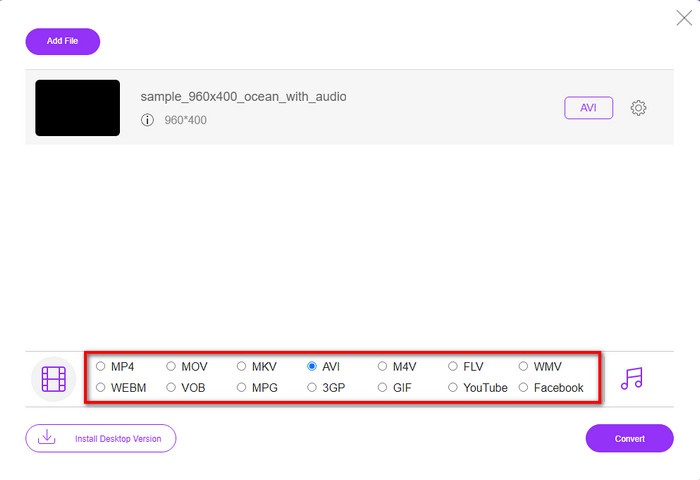
Steg 3. Ett nytt gränssnitt för FVC visas på skärmen. I listan nedtill väljer du AVI‑format eller något annat format du vill konvertera till.
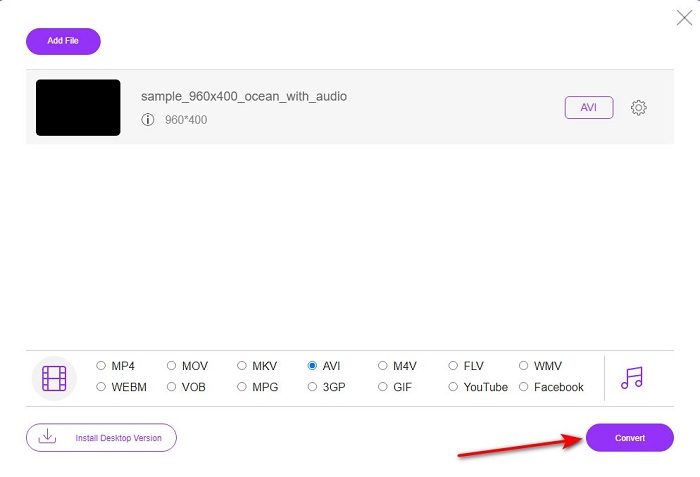
Steg 4. När du har valt format kan du börja konverteringen genom att klicka på Convert.
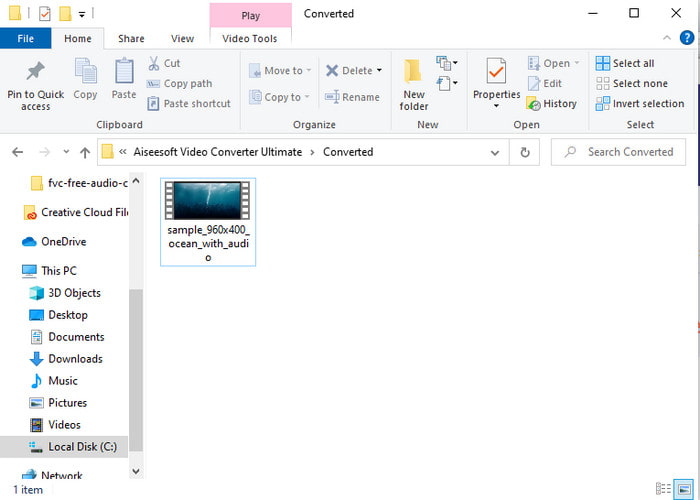
Steg 5. Detta tar uppskattningsvis mindre än en minut. När konverteringen är klar öppnas en mapp med den nykonverterade filen.
Del 2. Hur man konverterar VOB till AVI på Windows och Mac
Använd Phenomenal Converter: FVC Video Converter Ultimate
Om du funderar på att ladda ner VOB till AVI-omvandlare måste detta vara det bästa av det bästa valet du skulle älska att göra. FVC Video Converter Ultimate lever alltid upp till sitt namn som det ultimata verktyget som löser alla ultimata situationer du kan komma på, speciellt vid konvertering. Denna programvara skiljer sig mycket från de två verktyg som nämns. Kanske funderar du på varför, och det är bara för att det passar alla perfekt, oavsett om du är proffs eller nybörjare. Den övergripande prestandan vi upplever när vi provar det här verktyget är redan fantastisk och vi är imponerade över hur snabbt konverteringen kan göras. Och nu, om du vill uppleva den fenomenala omvandlingen, vi talar om, följ sedan de angivna stegen nedan.
Steg 1. Innan du kan använda det måste du först ladda ner verktyget. Installera det sedan när nedladdningen är klar, gör den grundläggande inställningen och klicka på Start Now.
Gratis nedladdningFör Windows 7 eller senareSäker nedladdning
Gratis nedladdningFör MacOS 10.7 eller senareSäker nedladdning
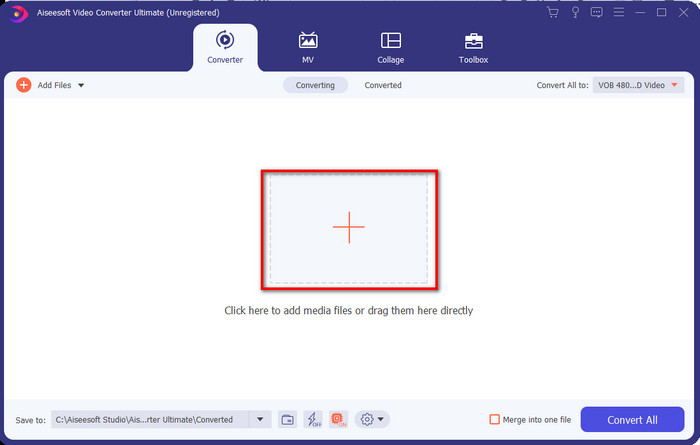
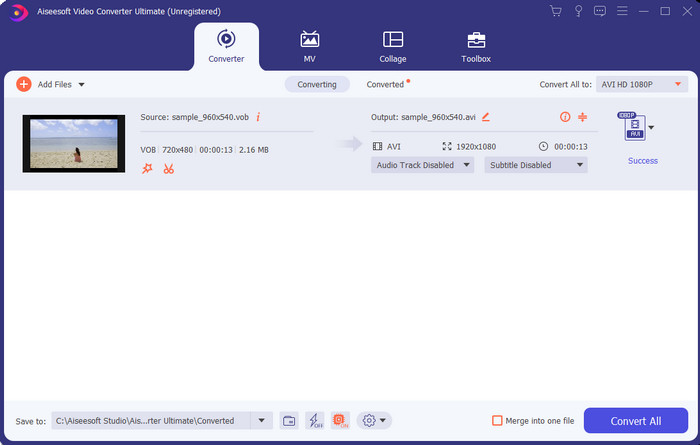
Steg 2. När installationen är klar öppnar du programvaran. Ett gränssnitt som detta visas på skärmen. I den mittersta delen av gränssnittet klickar du på +-knappen så visas en mapp på skärmen. Klicka på Open för att gå vidare till nästa steg i processen.
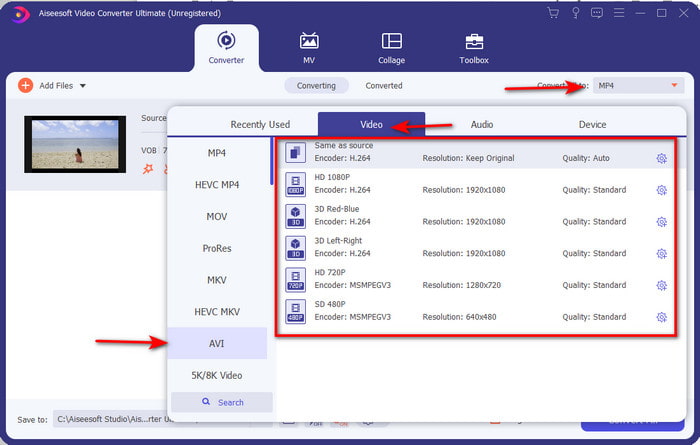
Steg 3. Klicka på knappen Convert All uppe till vänster i gränssnittet och välj AVI‑format i listan över videokategorier.
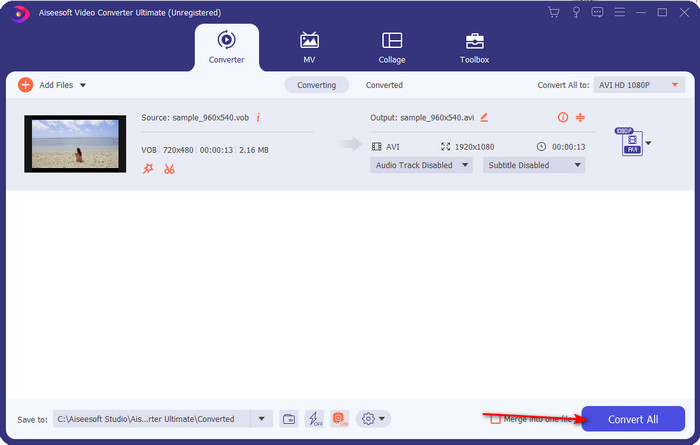
Steg 4. När du är klar med att välja format klickar du på Convert All för att starta konverteringen.
Steg 5. Du behöver inte oroa dig för långa väntetider, eftersom det bara tar några sekunder. Därefter öppnas en mapp automatiskt på skärmen med den mediefil du nyss konverterade. Klicka på den för att titta och njuta av den nya versionen av din .vob‑fil.
Använd det kostnadsfria verktyget: Handbroms
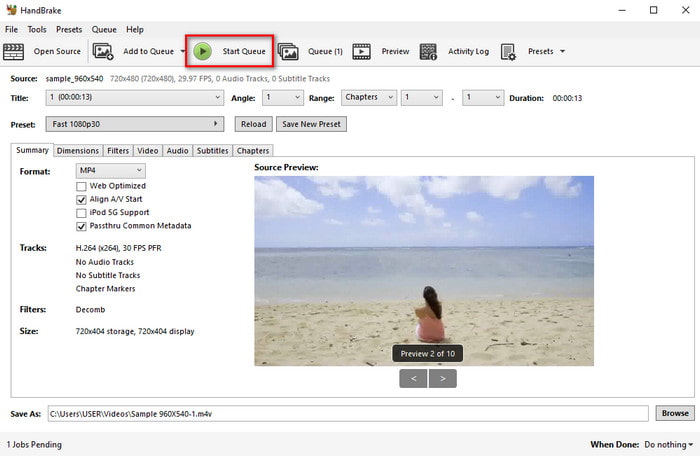
Om du letar efter ett gratisverktyg kan HandBrake hjälpa dig, och du behöver ingen internetuppkoppling för att använda det, precis som med FVC Video Converter Ultimate. Det är dessutom gratis att ladda ner och använda för alla som har en stationär dator hemma, på jobbet eller någon annanstans. Men om du laddar ner verktyget behöver du också hämta en separat fil som heter .NET 5.0 innan du kan använda det. Vissa användare upplever detta som lite irriterande eftersom man måste ladda ner ytterligare en fil efter själva programmet. Men om du vill genomföra en effektiv och kostnadsfri konvertering kan du testa HandBrake för att konvertera VOB till AVI och följa stegen nedan.
Steg 1. Installera verktyget på datorns hårddisk först.
Steg 2. Klicka på File och leta upp .vob‑filen i din mapp.
Steg 3. Klicka på Format och välj ett av de tillgängliga alternativen, klicka sedan på Start Queue.
Del 3. Vilken är den bästa konverteraren för att konvertera VOB-filer till AVI-format
| Funktioner | FVC Free Video Converter | FVC Video Converter Ultimate | Handbroms |
| Konvertera format |  | | |
| Hårdvara och omvandlingsacceleration |  | | |
| Internetanslutning | | | |
| Video Enhancer eller redigering | | | |
| Program som stöds | Webbaserat verktyg | Desktopbaserat verktyg | Desktopbaserat verktyg |
Del 4. Vanliga frågor om VOB och AVI
Vilka andra filer kan VOB innehålla?
VOB är ett multiplex DVD-format och på grund av det kan det inte bara innehålla videor och ljud utan även undertexter, navigeringsinnehåll och menyer.
Varför kan jag inte spela VOB-filer på min mediaspelare?
En av anledningarna till att VOB inte går att spela upp i din mediespelare är att detta format bara har ett begränsat stöd i många spelare. Du kan klicka här för att få fram VOB‑spelare som finns tillgängliga. Om du fortfarande har det här problemet är en möjlig lösning att konvertera filen med någon av konverterarna ovan.
Varför är VOB-filer för stora?
Den enda anledningen till att detta format är så stort är att det innehåller olika data som en DVD borde ha. Vi kan inte heller utesluta möjligheten till videons längd. Eller klicka här för att lära dig hur du komprimerar VOB-filer.
Slutsats
Så nu, om du vill konvertera VOB-filen så kan det enkelt göras med hjälp av de verktyg som finns tillgängliga ovan. Annat än det är FVC Video Converter Ultimate omvandlaren som verkligen sticker ut bland de andra online- och offlineverktygen som nämns. Eftersom du enkelt kan konvertera VOB till AVI i Windows och även på Mac. Om du fortfarande inte har någon aning om vad du ska använda så rekommenderar vi starkt att du måste ladda ner det fenomenala verktyget för att uppleva en tydlig utgång och bli förvånad.
-
 VOB till MP4 - 3 sätt att konvertera VOB-filer till MP4 gratis i bulk
 Den här artikeln introducerar 3 gratis VOB till MP4-omvandlare och relaterade handledning. Du kan enkelt konvertera VOB till MP4-filer gratis på Windows / Mac / online med lätthet.
-
 Bästa sätten att konvertera VOB till FLV [Gratis och online ingår]
 Vill du konvertera en VOB-fil till en FLV-fil? Du kan enkelt slutföra uppgiften med antingen stationära eller online-omvandlare. Läs den här guiden och lär dig hur du omvandlar VOB till FLV enkelt och snabbt.
-
 Vad är VOB -fil och hur man gör VOB -fil till GIF gratis
 Vill du veta mer om VOB-filer och hur man delar dem efter att ha rippats? eller Varför behöver du konvertera VOB till GIF? Läs sedan den här artikeln noggrant.
