


 Video Converter Ultimate
 Skärminspelare
 Video reparation
 Säker nedladdning
4 enkla metoder för att konvertera WEBM till DIVX
Att konvertera videofiler är den bästa åtgärden när videon inte stöds i ett visst program. I det här inlägget får du lära dig de enklaste metoderna för att omvandla din WEMB-fil till DIVX-format. Du kan hitta många WEBM till DIVX-konverterare online och offline, men vissa av dem är ineffektiva och krångliga att använda. Därför har vi testat många program för att kunna visa dig de mest användbara och utmärkta konverterarna med lättförståeliga metoder som du kan ladda ner till din Mac, Windows-dator och använda online. Är du ivrig att få veta mer om dessa fantastiska metoder? Då är det bara att läsa vidare i den här informativa artikeln.

Del 1: Konvertera WEBM till DIVX Offline med bästa kvalitet
Att konvertera olika filer är svårt, särskilt när du inte känner till processen och inte vet vilket program du ska använda. Vill du alltså konvertera WEBM-filen till DIVX med utmärkt kvalitet? Ladda då ner Video Converter Ultimate på din Windows- eller Mac-dator. Det här programmet är lätt att använda när du konverterar olika filer eftersom det har enkla arbetssteg och ett användarvänligt gränssnitt, vilket gör att procedurerna inte blir komplicerade. Dessutom stöder det över 1000 format, inklusive WEBM, DIVX, ASF, OGV, MTV, GIF, MPEG, DPG, MOV, M4V, MP4, FLV osv. Dessutom kan Video Converter Ultimate förbättra dina videor eftersom det har utmärkta videoredigeringsverktyg. Vi kan göra mycket mer med din WEBM-video. För att komprimera din video går du till Verktygslådan och väljer Videokompressor. För att lägga till vattenstämplar i din WEBM-video väljer du dessutom verktyget för videovattenstämpel.
Funktioner
◆ Konvertera många videor upp till 1000+ filformat.
◆ Konvertera filer 30 gånger snabbare än andra konverterare.
◆ Erbjuder collagetillverkare med gratis filter och teman.
◆ Kan skapa en musikvideo.
◆ Erbjuder en verktygslåda för förbättring av en video, till exempel en videokompressor, färgkorrigering, ljudsynkronisering, förstärkare och mer.
Fördelar
- Den har ett lättanvänt gränssnitt och är lämplig för nybörjare.
- Det är en gratis nedladdningsapplikation.
- Det tillåter batchkonvertering.
- Kan konvertera filer utan att förlora kvalitet.
Nackdelar
- För att använda proversionen, köp ett abonnemang.
Konvertera WEBM till DIVX med Video Converter Ultimate.
Steg 1: Installera Video Converter Ultimate på din dator. Starta sedan programmet.
Gratis nedladdningFör Windows 7 eller senareSäker nedladdning
Gratis nedladdningFör MacOS 10.7 eller senareSäker nedladdning
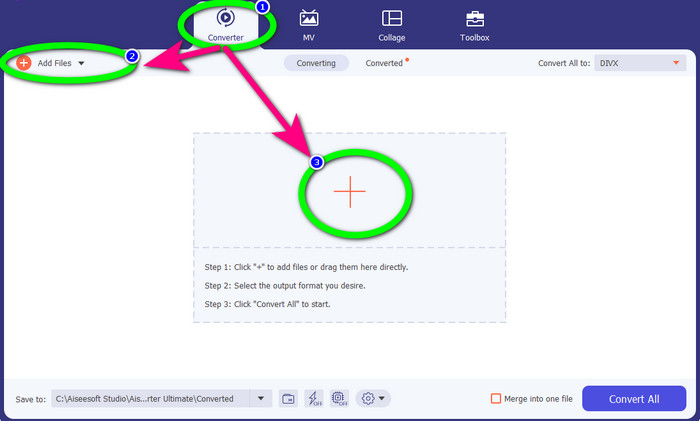
Steg 2: När gränssnittet visas väljer du panelen Converter och klickar på knappen Add Files eller Plus-ikonen för att lägga till WEBM-filen.
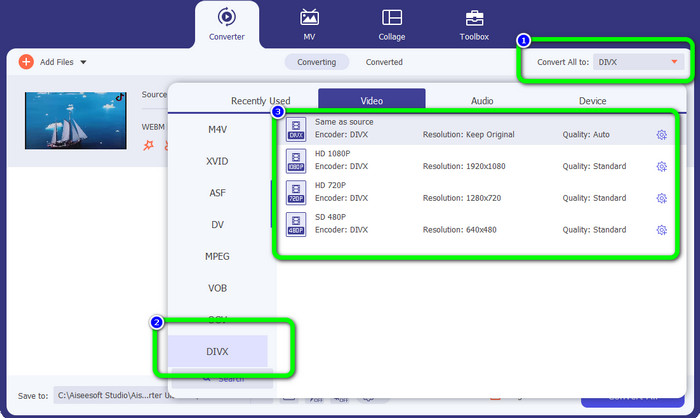
Steg 3: När du har lagt till WEBM-filen klickar du på knappen Convert All. Välj det format du vill ha, vilket är DIVX-filformatet. Du kan också välja videokvalitet från 480p upp till 1080p.
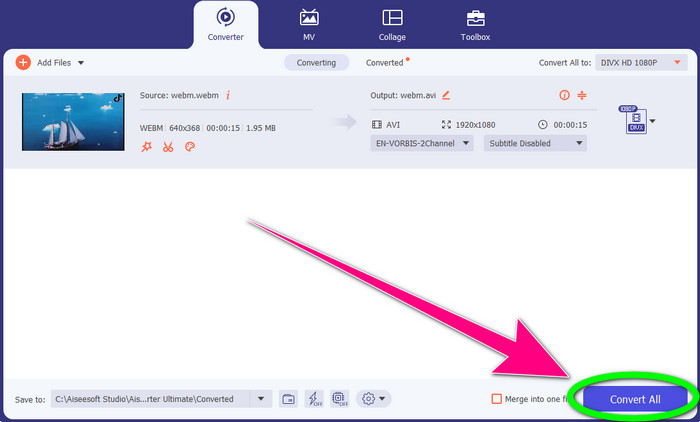
Steg 4: Du kan nu klicka på knappen Convert All för att konvertera WEBM-filen till DIVX-format.
Del 2: 3 sätt att konvertera WEBM till DIVX Online
Använda WEBM.to
Letar du efter en WEBM till DIVX-konverterare online? WEBM.to är ett verktyg du inte vill missa. Det kan konvertera olika filer direkt i webbläsaren, som Google Chrome, Mozilla Firefox, Microsoft Edge osv. Det stöder filformat som MOV, FLV, M4V, TS, MT2S och fler. Precis som konverteraren ovan är WEBM.to enkelt att använda eftersom det enbart fokuserar på filkonvertering. Slutligen är din fil säker här eftersom den automatiskt raderas efter 24 timmar. Nackdelen är att konverteringsprocessen är långsam. Det fungerar inte heller bra om du inte har en stabil internetanslutning. Låt oss konvertera din WEBM-fil till DIVX med det här onlineredskapet.
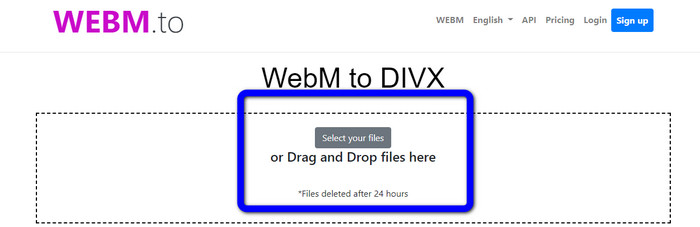
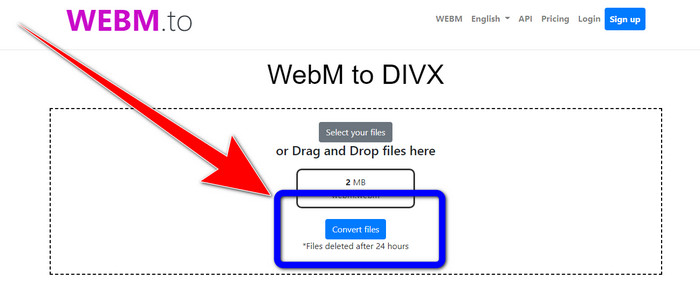
Steg 1: Besök webbplatsen WEBM.to. Klicka på knappen Select your files för att importera din WEBM-fil. Du kan också dra din fil till rutan.
Steg 2: Klicka på knappen Convert Files efter att du har lagt till WEBM-filen. Vänta tills konverteringsprocessen är klar och spara sedan din slutliga video.
Använder Evano
Du kan också använda Evano för att konvertera WEBM till DIVX. Detta onlineverktyg är också pålitligt. Det kan konvertera olika filformat som MP4, AVI, DIVX, XVID, 3GP, FLV, VOB, MOV osv. Så du kan konvertera WEBM till FLV med det här verktyget. Dessutom är EVANO inte bara en konverterare utan även en ljudredigerare och optimerare, så du kan göra ännu mer med det här verktyget. Men det finns en begränsning när du använder gratisversionen. Du kan bara konvertera filer med en maximal storlek på 100 MB. Det innebär att du måste köpa en prenumeration för att få obegränsad filstorlek. Du måste också ha en snabb internetanslutning. Det är en webbaserad applikation och en bra uppkoppling är starkt rekommenderad. Följ stegen nedan för att konvertera WEBM till DIVX med Evano.
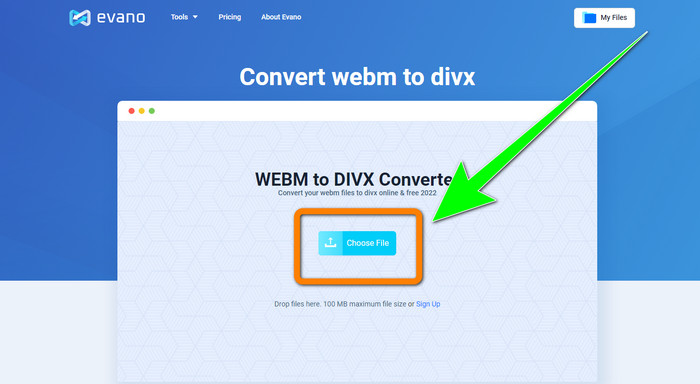
Steg 1: Gå till Evanos webbplats. Tryck på knappen Choose File för att lägga till WEBM-filen.
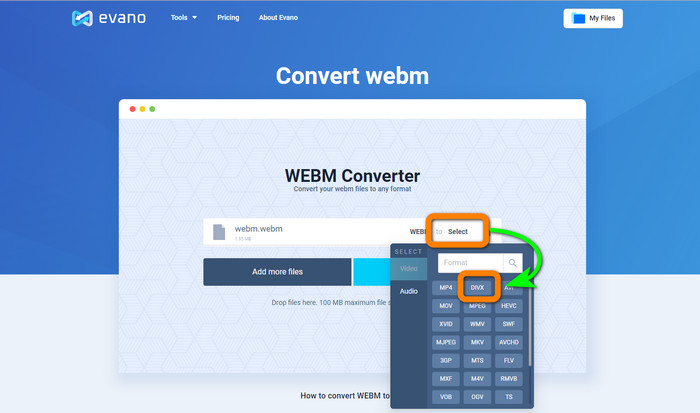
Steg 2: Klicka på knappen Select för att gå vidare till formatalternativen. Välj sedan DIVX-filformatet.
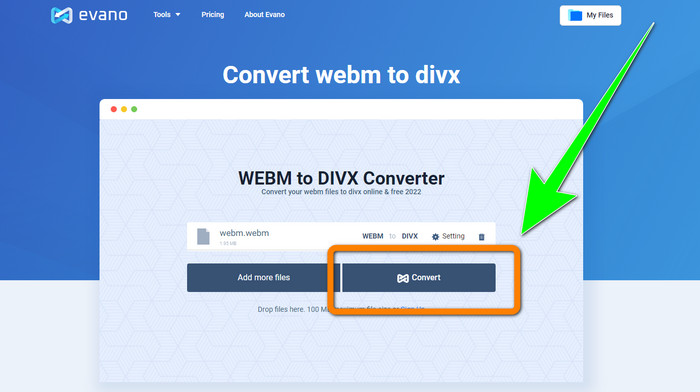
Steg 3: För det sista steget klickar du på knappen Convert. Vänta tålmodigt på konverteringsprocessen och spara videon i DIVX-filformat.
Använder FileProInfo
FileProInfo är en av de onlinekonverterare du enkelt kan använda för att konvertera WEBM till DIVX. Med hjälp av det här onlineverktyget behöver du inte längre oroa dig för hur du ska konvertera din fil till andra format. Du kan också använda verktyget för att konvertera WEBM till MKV. Dessutom har det enkla metoder för filkonvertering. Förutom konvertering kan du även använda detta verktyg för plagiatkontroll, fullständiga webbplatsgranskningar, ping-verktyg för webbplatser och mer. Nackdelen är att FileProInfo ibland inte fungerar. Och när det gäller själva konverteringen går processen mycket långsamt. Precis som andra onlinekonverterare har den en maximal filstorlek på 150 MB. Så låt oss gå vidare till att konvertera WEBM-filen till DIVX med det här onlineverktyget.
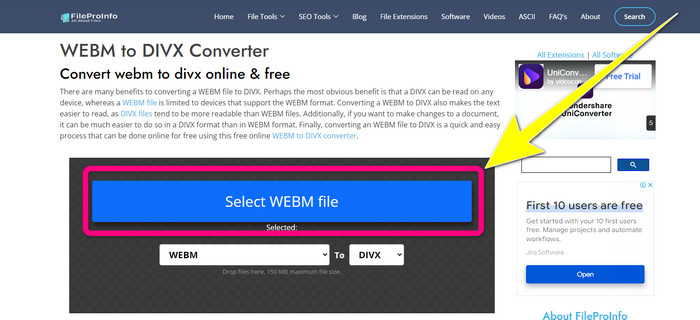
Steg 1: Gå till webbplatsen FileProInfo. Klicka på den blå rutan för att lägga in WEBM-filen.
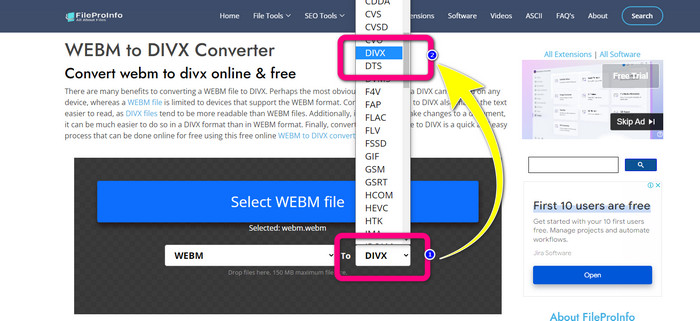
Steg 2: När du har lagt in WEBM-filen går du vidare till formatalternativen och väljer DIVX-filformatet.
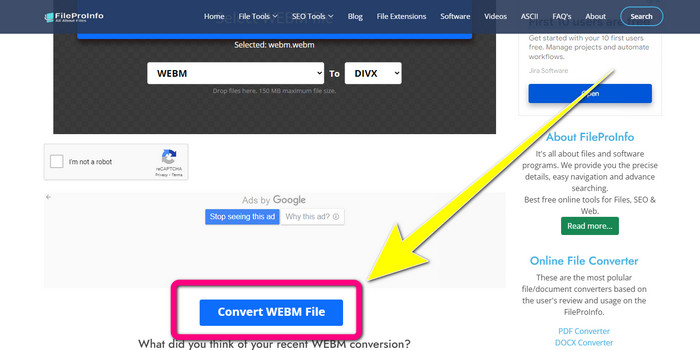
Steg 3: Scrolla ner och klicka på knappen Convert WEBM file.
Del 3: WEBM vs. DIVX
| WEBM | DIVX | |
| Video filtillägg | Ett multimediaformat med öppen källkod, icke-royalty, som kallas WebM, används för streaming av innehåll på internet. Det inkluderar komprimerade ljudströmmar med Oupus- eller Vorbis-codec och komprimerade videoströmmar med antingen VP8 eller VP9. På grund av sin lätta design och realtidsdistributionsmöjligheter har det blivit ett av de mest populära filformaten för att streama videor online. | En högkvalitativ, högkomprimerad videocodec som stöder upplösningar på upp till 1080 HD och komprimerar videor till en bråkdel av standardstorleken utan att offra mycket av kvaliteten. |
| Utvecklad av | Google Inc. | DIVX Network Inc. |
| Fördelar | Lojalitetsfri och öppen källkod, stöder de flesta codecs. | Liten i storleken, gratis att använda |
| Nackdelar | Brist på interaktiva element | |
| Associerade program | VLC Media Player, Mozilla Firefox, Google Chrome, Windows Media Player | XBox 360, bilstereo, DVD-spelare, Blu-ray-spelare |
Del 4: Vanliga frågor om att konvertera WEBM till DIVX
1. Vilka är fördelarna med att konvertera WEBM till DIVX?
DIVX-filformatet är mer läsbart och allmänt accepterat än WEBM-filen. Konvertering till DIVX-filer kan också hjälpa till med säkerheten.
2. Vilket är bättre, WEBM eller MP4?
När det gäller videofilstorlek är WEBM mindre än MP4. Men när det gäller kvalitet och kompatibilitet är MP4 bättre.
3. Har WEBM ett ljud?
Ja självklart. WebM-projektet med öppen källkod marknadsför WebM, ett digitalt multimediacontainerfilformat som kan innehålla både ljud och video. WEBM är bara ett containerformat. En delmängd av Matroska multimediacontainerformat finns i den.
Slutsats
Det här är de bästa programmen du kan använda för att konvertera WEBM till DIVX med effektiva metoder. Så vad väntar du på? Ladda ner och använd Video Converter Ultimate nu. Det kan konvertera dina filer snabbare och enklare.
-
 Lättlärda metoder för hur man konverterar Xvid till DivX
 Letar du efter den bästa lösningen för att konvertera Xvid till DivX gratis? Den här artikeln hjälper dig att lösa ditt problem. Så läs inlägget kontinuerligt.
-
 Hur man konverterar MPG till DivX utan att ha kvalitetsförlust
 Letar du efter ett problemfritt program som du kan använda för att konvertera MPG till DivX? Den här artikeln kommer att ge dig olika effektiva metoder som du måste prova.
-
 Hur man konverterar DIVX till 3GP på Windows, Mac och online
 Hur konverterar man DIVX till 3GP? Om du letar efter ett svar, läs den här artikeln. Vi kommer att visa dig fantastiska procedurer med hjälp av olika omvandlare.
