


 Video Converter Ultimate
 Skärminspelare
 Video reparation
 Säker nedladdning
Utmärkta knep för att enkelt konvertera WMV till M4V Du kan prova
Är du en av användarna som letar efter utmärkta och enkla metoder för att konvertera din WMV till M4V? Det finns olika konverterare som du kan hitta på webben. Men vissa av dem stöder inte filformaten WMV och M4V. Om det är ditt problem kan den här artikeln ge dig den enklaste lösningen med hjälp av bra program. Du kommer också att upptäcka deras funktioner för att få en uppfattning om vad mer dessa program kan göra. Läs artikeln från början till slut för att ta reda på fler viktiga detaljer.

Del 1: Introduktion till WMV och M4V
WMV filformat
| namn | WMV |
| Filtillägg | .wmv |
| Beskrivning | WMV (Windows Media Video) förkortning står för en grupp video-codecs som Microsoft först lanserade på sitt Windows Media-ramverk. Det skapades först för att konkurrera med RM-formatet i appar för streaming på internet. Den rymmer komprimerade videofiler och hjälper till och med Blu-ray/DVD-skivor att leverera innehåll. |
| Filkategori | Video |
| Utvecklad av | Microsoft |
| Tillhörande program | VLC Media Player MPlayer Klassisk mediaspelare Windows mediaspelare |
| MIME-typ | video/x-ms-asf video/Mpeg |
| Tekniska detaljer | Multimediainnehållet som har kodats finns i en WMV-fil som använder containerformatet Advanced Systems Format (ASF). ASF-filer bör använda .ASF-filtillägget snarare än .WMV-filtillägget, även om ASF kan innehålla multimedia i andra kodningar än WMV-filstandarden tillåter. |
M4V filformat
| namn | M4V |
| Filtillägg | .m4v |
| Beskrivning | Apple skapade filformatet M4V, ett videobehållareformat som liknar MP4-standarden. Den största skillnaden är att M4V-filformat kan ha DRM-kopieringsskydd. I sin iTunes Store kodar Apple videofiler med M4V-formatet. |
| Filkategori | Video |
| Utvecklad av | Apple Inc. |
| Tillhörande program | VLC Media Player KMPlayer Klassisk mediaspelare Zoom spelare |
| Tekniska detaljer | M4V-filer kan skyddas med Apples FairPlay-kopieringsskydd för att förhindra obehörig replikering. Endast datorer som är godkända (via iTunes) med kontot som används för att köpa videon kan spela upp en FairPlay-skyddad M4V-fil. |
Del 2: Bästa sättet att konvertera WMV till M4V för Mac och Windows
Det bästa sättet att konvertera WMV till M4V är med FVC Video Converter Ultimate. Den här konverteraren kan laddas ner både till Windows och Mac. Den kan konvertera över 100 videoformat, såsom WMV, M4V, MP4, AVI, FLV, MKV, MOV och fler. Vid konvertering kan du konvertera flera filer samtidigt eftersom programmet klarar batchkonvertering. Du kommer heller inte att bli besviken när det gäller själva konverteringsprocessen. Denna konverterare erbjuder en hög hastighet vid konvertering, där du kan konvertera filer upp till 30x snabbare än genomsnittlig hastighet.
Dessutom har Video Converter Ultimate en annan huvudfunktion. Om du är intresserad av att konvertera dina bildfiler kan du göra det.
Funktioner
◆ Konvertera olika videofilformat, såsom M4V, WMV, FLV, AVI, MP4, MOV, VOB, etc.
◆ Erbjuder videoredigeringsverktyg, som en videoförstärkare, kompressor, cropper, trimmer, reverser, etc.
◆ Kan skapa ett collage.
◆ Det går att göra en musikvideo.
◆ Tillåter batchkonvertering.
◆ Ändra hastigheten på videon.
◆ Konvertera bildfilformat som PNG, JPG, BMP, WEBP och mer.
Låt oss konvertera WMV till M4V på Mac med FVC Video Converter Ultimate. Använd de enkla guiderna nedan.
Steg 1: Ladda ner och installera FVC Video Converter Ultimate på din Mac genom att klicka på nedladdningsknappen nedan för Mac-versionen.
Gratis nedladdningFör Windows 7 eller senareSäker nedladdning
Gratis nedladdningFör MacOS 10.7 eller senareSäker nedladdning
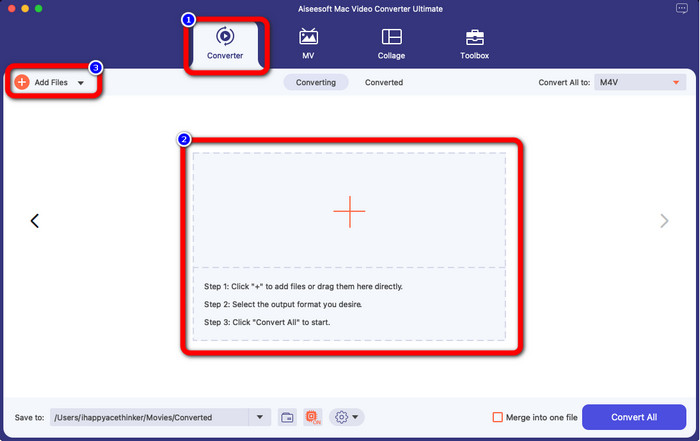
Steg 2: Starta programmet och välj panelen Converter. Klicka sedan på ikonen + eller knappen Add Files för att lägga till din WMV-videofil.
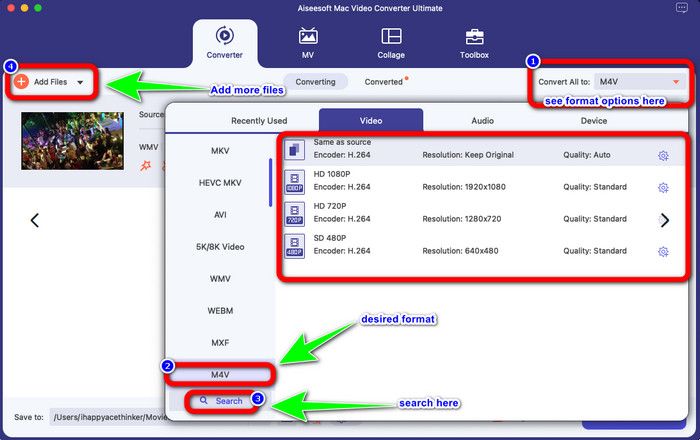
Steg 3: När du har lagt till din video klickar du på knappen Convert All to för att visa formatvalen och väljer filformatet M4V. Du kan också söka efter önskat format i sökrutan längst ned i gränssnittet. Du kan fortfarande klicka på knappen Add Files för att lägga till fler videor för att göra en batchkonvertering.
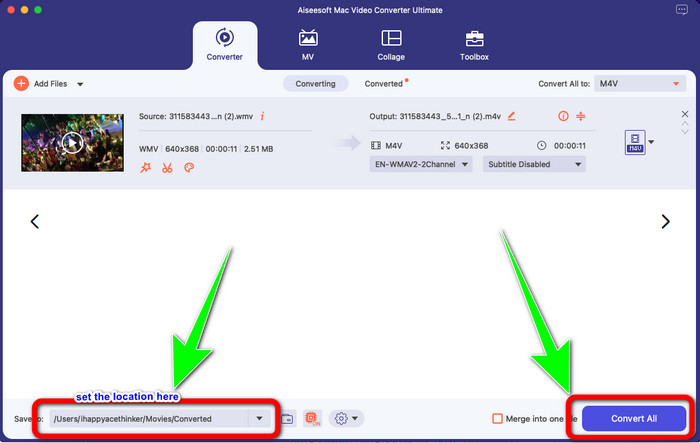
Steg 4: När du har valt ditt önskade filformat, M4V, kan du välja platsen där du vill spara din video. Klicka sedan på knappen Convert.
Del 3: Gratis sätt att konvertera WMV till M4V
För att konvertera WMV till M4V gratis kan du använda Convertfiles. Detta onlineprogram kan också konvertera flera filer. Det har enkla instruktioner med ett lättöverskådligt gränssnitt, vilket passar alla användare. Förutom att konvertera videor kan du även konvertera bilder, ljud, presentationer med mera. Dock händer det ibland att den här konverteraren inte fungerar så bra. Den har en långsam konverteringsprocess och annonserna är störande.
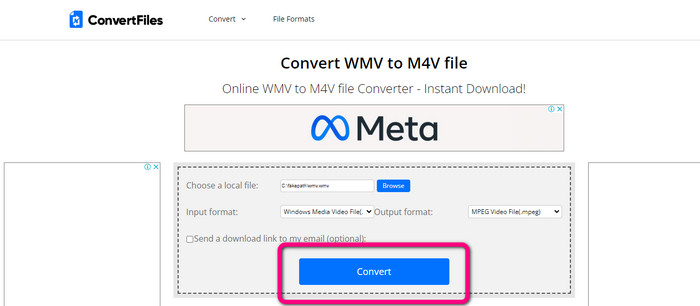
Steg 1: Gå till webbplatsen Convertfiles.
Steg 2: Ladda upp WMV-filen som du vill konvertera.
Steg 3: Välj M4V-fil som utdataformat under Output format. Klicka sedan på knappen Convert.
Del 4: Utmärkt metod för att konvertera WMV till M4V Online
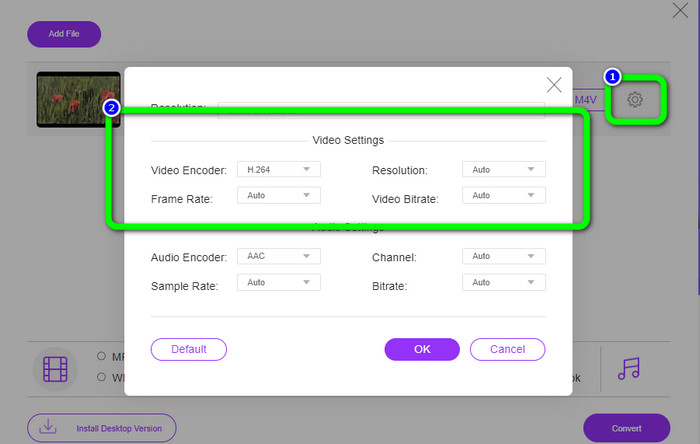
En annan metod för att konvertera WMV till M4V online är att använda FVC Free Video Converter Online. Med hjälp av detta onlineverktyg är det enkelt att konvertera WMV. Det konverterar också fler filer som AVI, MP4, FLV, MKV, VOB osv. Dessutom, även om det är en kostnadsfri onlinekonverterare, behöver du inte oroa dig för kvaliteten på din video. Du kan spara din konverterade video med originalkvalitet. Vidare kan du även ändra videons bithastighet, bildfrekvens och upplösning.
Funktioner
◆ Kan ändra videons bithastighet, bildhastighet och upplösning.
◆ Erbjuder batchkonvertering.
Följ de detaljerade stegen nedan för att konvertera WMV till M4V med FVC Free Video Converter Online.
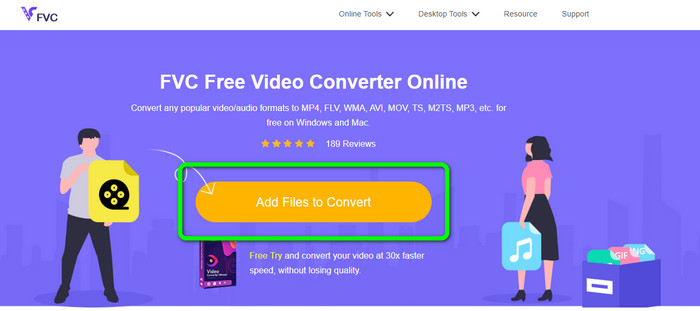
Steg 1: Besök webbplatsen FVC Free Video Converter Online. Klicka sedan på knappen Add Files to Convert.
Steg 2: Om du vill ändra videons bithastighet, bildfrekvens och upplösning klickar du på ikonen Settings. Tryck sedan på OK när du är klar.
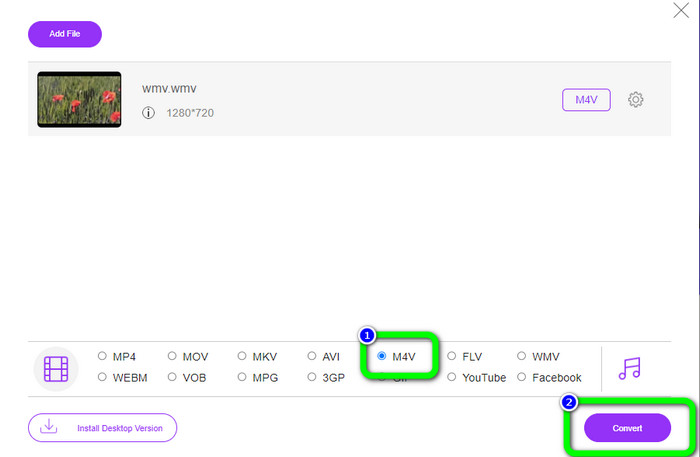
Steg 3: Längst ned i gränssnittet ser du formatvalen. Välj filen M4V som önskat utdataformat och klicka på knappen Convert för att ladda ner din video.
Del 5: Vanliga frågor om att konvertera WMV till M4V
1. Kan alla enheter spela M4V?
Tyvärr nej. Den inbyggda spelaren på Android‑enheter stöder inte M4V-filer. Du kan ladda ner en tredjeparts M4V-spelare som stöder M4V-formatet eller konvertera filen till ett kompatibelt format.
2. Finns det den bästa omvandlaren för att konvertera WMV till M4V?
Om du vill ha den bästa WMV till M4V‑konverteraren kan du använda FVC Free Video Converter Online. Den kan konvertera dina filer effektivt och utan krångel.
3. Vilket är bättre, M4V eller MOV?
M4V är bättre. Om du vill spela upp dina filer på en bärbar enhet, såsom iPhone, iPod eller iPad, rekommenderas M4V starkt. Men på vissa enheter stöds endast MOV. I så fall kan du konvertera M4V till MOV.
Slutsats
Med all viktig information ovan kan du nu konvertera WMV till M4V enkelt och direkt. Om du föredrar en konverterare med hög konverteringshastighet kan du använda FVC Video Converter Ultimate. Du kan också använda FVC Free Video Converter Online om du vill ha en kostnadsfri onlinekonverterare.
-
 Hur komprimerar du M4V-filer till en mindre storlek (gratis och online)
 Om du letar efter ett enkelt sätt att minska storleken på din M4V-fil, bör du komma och läsa den här artikeln. Här kommer vi att dela det enklaste sättet att komprimera M4V-filer med dig
-
 Konkret guide för att gå med M4V-filer på Windows och Mac gratis
 Om du letar efter en lösning för att kombinera M4V-videofiler till en, missa aldrig detta avsnitt. Här kommer vi att prata om de två bästa metoderna för att kombinera M4V-videofiler
-
 Snabba och enkla tips för att konvertera WMV till MOV [Beprövat]
 Vill du veta vilka som är de bästa och lättanvända omvandlarna som konverterar WMV till MOV? Fortsätt läsa den här artikeln eftersom den diskuterar alla möjliga val du behöver överväga att använda
