


 Video Converter Ultimate
 Skärminspelare
 Video reparation
 Säker nedladdning
Steg-för-steg om hur man lägger till albumomslag till MP3 med den bästa programvaran på skrivbordet
Att lägga till omslagsbild för album kan vara praktiskt, särskilt om du vill hjälpa lyssnaren att känna sig mer knuten till musiken de lyssnar på. Med sådan albumgrafik kan användare få en glimt av vad musiken handlar om, framför allt den digitala. I vissa fall har en MP3-fil inget riktigt albumomslag eller så är det inte bifogat filen. Om du upplever samma sak är det viktigt att lära sig hur man lägger till albumomslag till MP3-musik på datorn. För att få veta mer om detta ämne, fortsätt läsa den här artikeln där vi ger kompakt kunskap om problemet.

Del 1. Hur man lägger till albumomslag till MP3 med Video Converter Ultimate [Recommended Tag Editor]
Letar du efter den ultimata programvaran för att lägga till albumomslag till MP3? FVC Video Converter Ultimate är den rekommenderade taggredigeraren för denna uppgift. Denna programvara rekommenderas inte utan anledning. Till skillnad från annan programvara finns det ofta begränsade format för omslagsbilder du kan ladda upp och använda som omslag för din MP3-musik, men så är det inte med det här verktyget. Med denna ultimata programvara kan du lägga till albumomslag på dina MP3-, WAV-, WMA-, AAC-, FLAC-filer och 1000+ video- och ljudformat. Fantastiskt, eller hur? Detta verktyg är förstahandsvalet för att lägga till en bild som omslag till ditt album. Vill du veta hur man använder den ultimata programvaran? I så fall kan du läsa och noggrant följa genomgången vi har med nedan.
Steg 1. Klicka på nedladdningsknappen nedan och välj vilket operativsystem du använder. När du har laddat ner programvaran fortsätter du med att installera verktyget. När allt är klart klickar du på Starta nu för att öppna programvaran på din dator.
Gratis nedladdningFör Windows 7 eller senareSäker nedladdning
Gratis nedladdningFör MacOS 10.7 eller senareSäker nedladdning
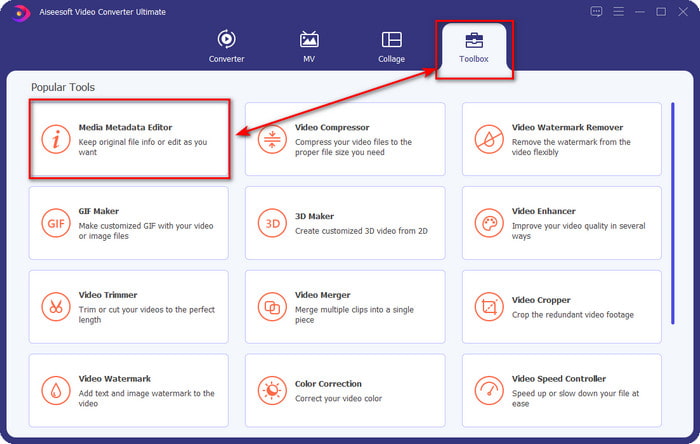
Steg 2. Gå vidare till avsnittet Verktygslåda och klicka på Media Metadata Editor under det.
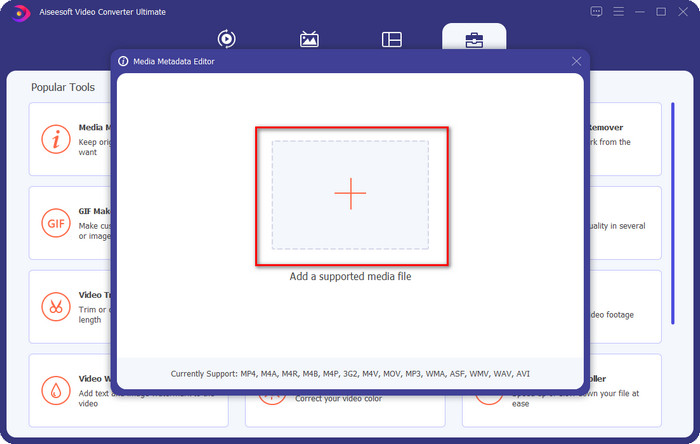
Steg 3. Välj den musikfil du vill lägga till albumomslag på genom att klicka på +-knappen. För att infoga musikfilen du har valt klickar du på Öppna.
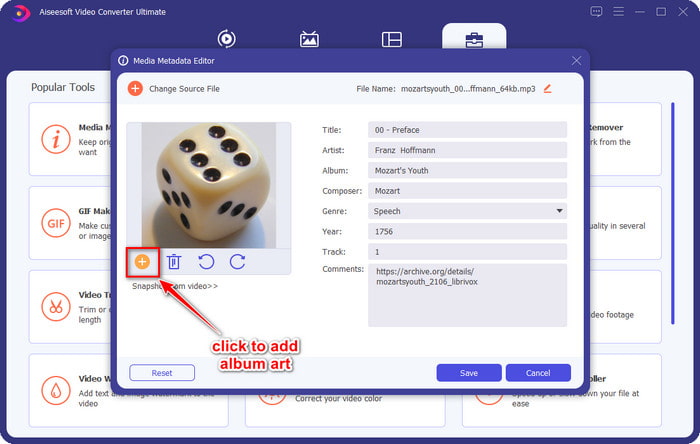
Steg 4. Klicka sedan på +-knappen nere till vänster i gränssnittet, leta upp den albumomslagbild du vill använda och klicka på Öppna. Lägg till annan metadata du vill ha i textrutan om du behöver det.
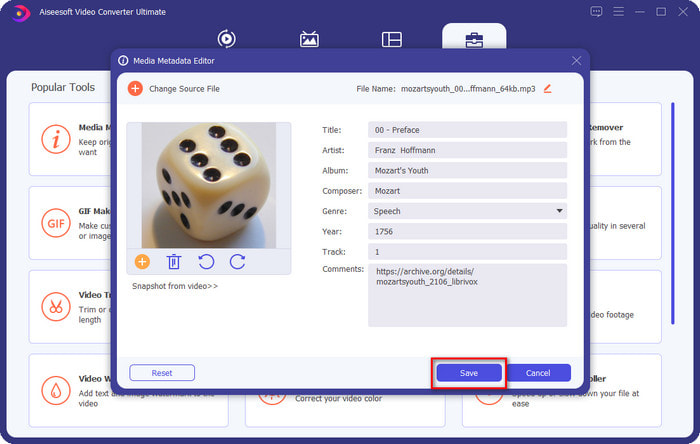
Steg 5. När du är klar med att lägga till albumomslag och metadata i MP3-filen kan du nu klicka på Spara för att bifoga omslagsbilden till MP3-filen du har laddat upp. Enkelt, eller hur? Allt blir möjligt och lättare om du använder det ultimata verktyget för att lösa problemet.
Del 2. Hur man lägger till albumomslag till MP3 med VLC Media Player Free Metadata Editor]
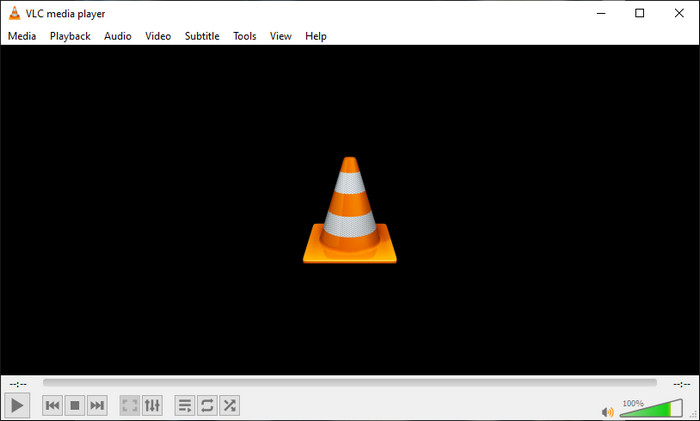
VLC Media Player är den bästa mediespelaren som de flesta av oss har. Det här verktyget kan spela upp vilken videofil som helst, och det klarar även av att redigera metadata, som att lägga till albumomslag till musikfiler. Med den här mediespelaren kan du fritt justera eller lägga till metadata. Om du vill ha en guide för hur man lägger till albumomslag till MP3 i Windows 10/11 eller på Mac med detta verktyg, är stegen nedan för dig.
Steg 1. Ladda ner mediespelaren till din dator och öppna den.
Steg 2. På huvudgränssnittet klickar du på Verktyg och under det klickar du på Information.
Steg 3. Högerklicka på VLC-ikonen nere i högra hörnet, lägg till albumomslaget och klicka på Spara.
Del 3. Hur man lägger till albumomslag till MP3 i iTunes [Inbyggd Metadata Editor på Mac]
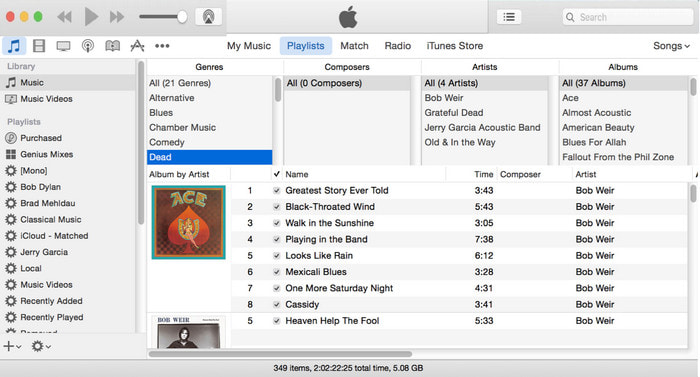
För Mac-användare är iTunes vår förstahandsvalda metadataredigerare för att lägga till bildomslag på vår MP3-fil. Denna inbyggda app kan hjälpa oss att redigera metadata i filerna vi har på Mac. Dock är programmet för närvarande inte tillgängligt på vissa Mac-versioner eftersom det nu har ersatts av tre separata appar som utför samma funktioner som iTunes. Men på vissa Mac-datorer med äldre versioner finns det kvar. Om du är en av Mac-användarna som vill veta hur man lägger till albumomslag till MP3 i iTunes kan du följa stegen nedan.
Steg 1. Öppna iTunes-programmet på din Mac.
Steg 2. Klicka på Music, sedan Library, och högerklicka på musikfilen som inte har något albumomslag.
Steg 3. I alternativen ovan klickar du på Artwork, sedan Add Artwork, välj bilden du vill ladda upp och klicka på OK för att tillämpa den.
Del 4. Vanliga frågor om hur man lägger till albumomslag på MP3
Kan jag lägga till albumomslag till MP3 på Audacity?
Tyvärr kan du inte lägga till bildkonsten på MP3-filen du har med Audacity. Det här verktyget stöder inte något bild- eller videoformat eftersom det är avsett att användas som en musikredigerare. Men du kan fortfarande använda Audacity som en metadataredigerare om du vill redigera din MP3-metadata.
Varför saknas mitt albumomslag i min ljudfil?
Det finns tre anledningar till att ditt albumomslag saknas i din ljudfil. Det första skälet är att filen du ska ladda ner inte innehåller albumomslag, särskilt om det är piratkopiering. De flesta av musikfilerna vi har laddat ner på webben kommer inte med skivomslag för att undvika copywriting-problem. Därefter försvann filen eftersom bilden inte var korrekt bifogad. Vissa användare stöter på det här problemet och det är svårt att hantera det, så det är viktigt att använda en professionell albumbildsadderare. Slutligen är bilden skadad; om filen du har laddat upp inte är tillgänglig som albumomslag eller om musikfilen du har är skadad kan detta vara orsaken bakom det.
Vilken är den bästa metadata jag kan använda?
Om metadataredigerarna vi har gett ovan är för begränsade kan du klicka på den här länken för att gå till en ny artikel och samla alla de bästa metadataredigerarna du kan använda.
Slutsats
Nu när vi har idén att lägga till albumomslag på MP3 är det dags att välja vilket verktyg vi tycker passar oss bäst. Om du är en Mac-användare och inte vill ladda ner någon programvara på skrivbordet måste du välja iTunes. Men iTunes fasas ut på den uppdaterade versionen av Mac. Om du vill ladda ner ett gratis verktyg som kan hjälpa dig att lägga till omslaget till din musik, då är VLC ett utmärkt val. Verktyget är dock inte ett professionellt verktyg. Så om du vill ha expertprogramvara som kan ta dig i denna uppgift tillgänglig på både operativsystem, Windows och Mac, använd den ultimata programvaran. Ladda ner programvaran på ditt skrivbord för att ha det professionella verktyget inom räckhåll genom att klicka på nedladdningsknappen ovan.
-
 Hur man enkelt visar metadata för foton och videor på iOS
 Vill du veta hur man ser metadata på iPhone och iPad? Att sedan läsa den här artikeln kan hjälpa dig att lösa det här problemet utan ansträngning.
-
 Bästa teknikerna för hur man redigerar iD3-taggar på iTunes [Effektiva tips]
 Behöver du veta hur man redigerar taggar på iTunes? Då är du på rätt plats. När vi diskuterade metoderna kan du följa för att redigera taggarna med iTunes.
-
 Hur man redigerar egenskaper för WAV-filer på Windows 10/11 och Mac [Löst]
 Letar du efter ett sätt att redigera egenskaperna för dina WAV-filer på Windows 10/11? Den här frågan kommer att ha ett svar om du fortsätter att läsa den här artikeln.
