


 Video Converter Ultimate
 Skärminspelare
 Video reparation
Bemästra konsten att lägga till vattenstämpel på iMovie med detaljerade steg
En av de bästa redigerarna du kan använda på Mac är iMovie. Det här verktyget erbjuder ett mycket intuitivt gränssnitt för Mac‑användare. Även om verktyget är utmärkt och lätt att hantera söker vissa användare ändå en guide för hur man använder det. Så om du är Mac‑användare och vill lära dig hur du lägger till en vattenstämpel i en video i iMovie kan du följa guiden vi presenterar nedan för att få ut det mesta av verktyget.

Del 1. Handledning om hur man lägger till vattenstämpel till en video i iMovie på macOS
Vi har redan introducerat iMovie, så de efterföljande detaljerna kommer att lära dig hur du sätter en vattenstämpel på en video i iMovie. För att lära dig hur du lägger till kan du följa den detaljerade guiden nedan och läs den noggrant för att förstå hela idén.
Steg 1. Starta iMovie på din Mac, och om du inte kan hitta det kan du snabbt gå till Finder och söka efter det.
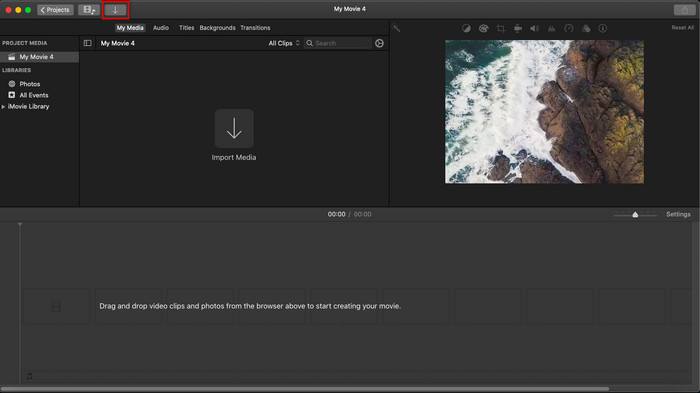
Steg 2. Klicka på knappen Importera för att ladda upp videon och bilden du vill använda som vattenstämpel. Dra video- och bildfilen till Tidslinjen nedtill, precis som med bilder. Se till att videon ligger överst på videotidslinjen. Gör några justeringar av bilden genom att dra, ändra storlek med mera.
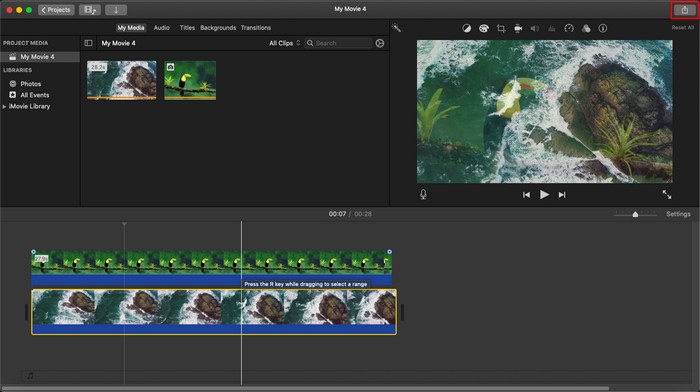
Steg 3. Om du är nöjd med justeringarna klickar du på Exportera uppe till höger i verktyget och sedan Exportera fil.
Fördelar
- Det är gratis att använda i alla Apple-enheter som macOS och iOS-enheter.
- Gör snabba redigeringar på de råa videorna för att få dem att se bra ut.
- Viktiga upp till genomsnittliga redigeringsfunktioner är tillgängliga.
Nackdelar
- Den stöder mindre format, så om du vill redigera videon här måste du konvertera den till MOV eller något format som är kompatibelt med Apple-enheter.
- Mindre stöd för professionell redigering.
Del 2. Bästa verktyget att använda och sätta vattenstämpel på video på Mac-datorer på ett mindre krångel sätt
Om du tycker att det är svårt att lägga till en vattenstämpel i iMovie kan du i stället använda det bästa alternativet, Video Converter Ultimate. Det här verktyget erbjuder ett mycket enklare sätt att lägga till en vattenstämpel i din video. Föreställ dig detta: det här ultimata verktyget är ännu mer lättillgängligt än iMovie, som redan är lätt att använda. Trots sin enkelhet ger det ett slutresultat av toppkvalitet, och en av dess fördelar jämfört med iMovie är att det stöder fler bildformat som du kan ladda upp. Vill du veta mer? Då kan du läsa om funktionerna som vi presenterar nedan för dig.

FVC Video Converter Ultimate
5 689 200+ nedladdningar- Ger kompletta redigeringsfunktioner som du kan använda för att göra din video mer enastående än den andra.
- Den stöder ultrasnabba processer och hårdvaruacceleration för att snabbt importera och exportera videon.
- Den stöder videoformat som MOV, MKV, AVI, MP4, FLV, RMVB och mer.
- Den har ett mycket interaktivt gränssnitt för att få den bästa upplevelsen.
- Tillgänglig på alla stationära plattformar som Windows och Mac.
Gratis nedladdningFör Windows 7 eller senareSäker nedladdning
Gratis nedladdningFör MacOS 10.7 eller senareSäker nedladdning
Är det inte fantastiskt att ha alla dessa funktioner på ett verktyg? Om vi är på samma sida, låt oss gräva ner i detaljerna om hur man vattenstämplar en video i iMovie men på ett mer enkelt sätt med det ultimata verktyget.
Steg för hur man infogar vattenstämpel på video med det ultimata verktyget
Steg 1. Ladda ner programvaran till din Mac, följ installationsanvisningarna och tryck på Starta nu för att öppna verktyget.
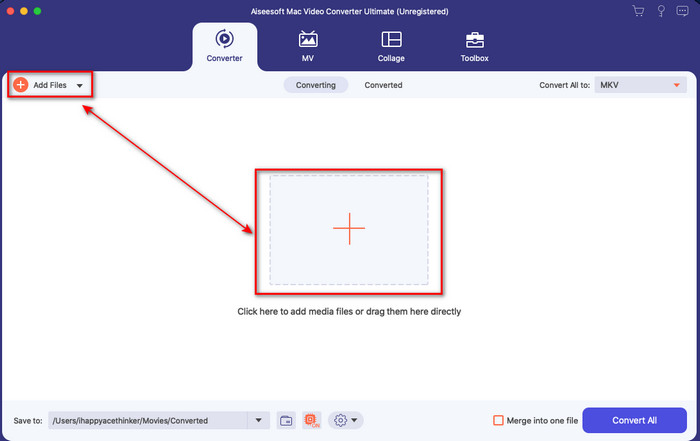
Steg 2. Ladda upp videofilen du vill ha genom att klicka på knappen + eller Lägg till filer. Leta upp videon i mappen som visas på skärmen och tryck på Öppna för att ladda upp den.
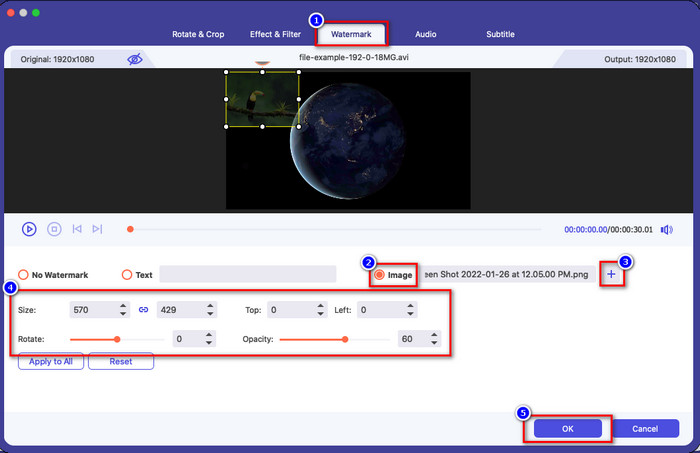
Steg 3. Klicka på knappen med trollstaven för att öppna redigeringsfönstret i verktygets gränssnitt. Klicka sedan på avsnittet Vattenstämpel, markera Bild, klicka på knappen + för att lägga till den bild du vill ha. Justera sedan bildens opacitet eller rotera den och klicka på OK för att spara ändringarna du gjort.
Valfritt. Om du vill byta format klickar du på Konvertera alla till, väljer ett format i listan och klickar på det. Om du inte vill byta format kan du gå vidare till sista steget.
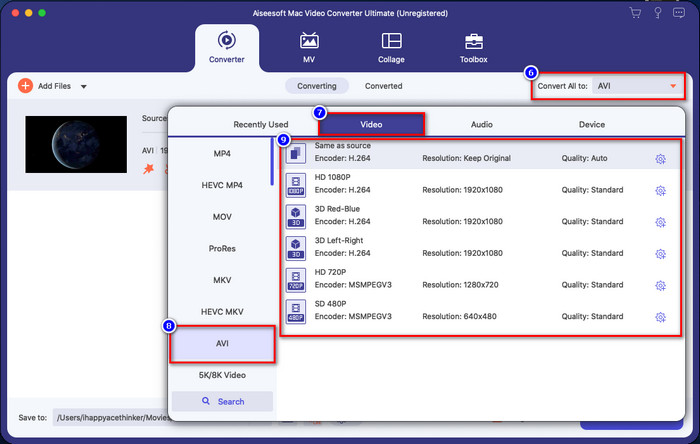
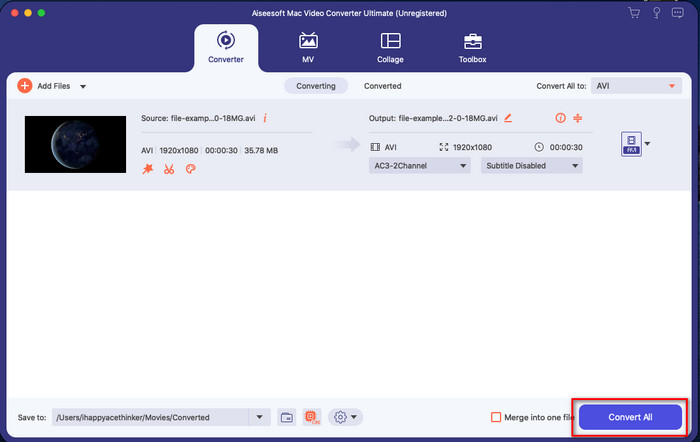
Steg 4. För att exportera videon med vattenstämpel klickar du på Konvertera alla. Du behöver inte vänta särskilt länge tack vare den ultrasnabba konverteringsprocessen. Därmed har du lagt till en bildvattenstämpel i din video på mindre än en minut.
Fördelar
- Det är det bästa valet för alla användare som har liten eller ingen aning om hur man redigerar.
- Den stöder fler videoformat som du kan ladda upp för att spara tid och undvika att konvertera den.
- Tillgänglig på alla plattformar som Windows eller Mac för nedladdning.
Nackdelar
- Det är inte gratis att ladda ner, men det är inte för dyrt.
- Du måste ladda ner den på din enhet.
Del 3. Vanliga frågor om att lägga till vattenstämpel på iMovie
Är iMovie gratis att använda?
Ja, iMovie är gratis att använda om du har en Apple‑produkt, men du kan inte ladda ner det om du använder Android eller Windows. Observera att det inte finns något iMovie för andra plattformar. Om du alltså laddar ner ett iMovie till en dator eller telefon som inte är från Apple kan du räkna med att det inte fungerar lika bra som det riktiga iMovie, eller ännu värre, att det innehåller virus. För att undvika detta kan du klicka och läsa den här artikeln för att få veta mer om alternativ till iMovie.
Är iMovie den bästa redigeraren på Mac?
Vi kan säga att det är en av de bästa, men inte den bästa, eftersom olika redigerare tillhandahåller flera redigeringsfunktioner som du inte kan hitta på iMovie. Även om det saknas på vissa sätt, är det fortfarande en förstklassig redigerare som du kan använda på din Mac gratis för att göra videoredigering för vloggning, affärer, marknadsföring och mer.
Efter att ha exporterat videon på iMovie, har den en vattenstämpel?
Från och med denna dag finns inte videons vattenstämpel i de exporterade videorna. Så du kan njuta av de nedladdade videorna du redigerar på iMovie fritt utan den irriterande vattenstämpeln.
Kan jag använda .avi-videon på iMovie?
iMovie stöder inte ett brett urval av format, men du kan klicka och läsa den här artikeln och lära dig vad du kan göra för att göra din AVI‑fil kompatibel med iMovie.
Slutsats
Den här artikeln visar att du kan använda den inbyggda redigeraren som Apple tillhandahåller och lägga till vattenstämplar i videor med hjälp av de steg vi har lagt till och som du enkelt kan följa. Även om du fritt kan använda iMovie anser vi ändå att Video Converter Ultimate är det bästa verktyget för den här uppgiften vilken dag som helst. Så om du vill ha hjälp kan du ladda ner det till din Mac eller Windows genom att klicka på nedladdningsknappen ovan.
-
 3 metoder för att konvertera MPEG till WMV utan att förlora kvalitet
 Vill du titta på dina videor på din favoritspelare, men den stöder inte formatet som videon är? Läs den här artikeln när vi ger dig de mest effektiva sätten att konvertera MPEG till WMV.
-
 2 av favoritkonverteringsalternativen för att konvertera F4V till WMV [2022]
 Är du en av användarna som letar efter det bästa sättet att konvertera F4V till WMV? Om så är fallet, försök att läsa den här texten för att veta mer om hur man gör det och vilka verktyg som finns tillgängliga.
-
 Bästa MXF till WMV-omvandlare för att konvertera MXF till WMV gratis
 Vill du veta det enklaste sättet att ändra din MXF-fil till WMV-format? Om du är redo att utforska hur du gör det måste du läsa den här artikeln noggrant.
