


 Video Converter Ultimate
 Skärminspelare
 Video reparation
 Säker nedladdning
Komprimera video för SMS Android? Grundliga lösningar finns här
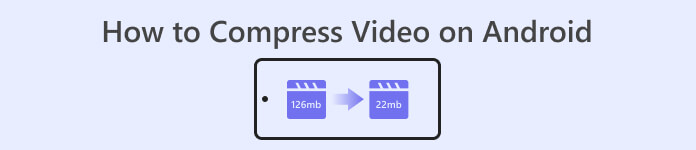
Om du är en Android‑användare som ofta spelar in videor har du kanske märkt att de tar upp mycket utrymme på enheten. Det kan vara frustrerande eftersom det begränsar hur mycket innehåll du kan lagra. Dessutom kan lagring av flera videor på Android försämra enhetens prestanda, göra processerna långsamma och få den att fungera sämre. Som tur är finns det sätt att lära sig hur man komprimerar en video på Android utan att kompromissa med kvaliteten. Några av dessa lösningar nämns i den här artikeln. Du kan läsa och analysera dem nedan medan vi går igenom deras funktioner.
Del 1. Hur man komprimerar en video på Android
1. Komprimera videostorlekskompressor
Letar du efter en välsökt videokompressor på din Android-enhet? Compress Video Size Compressor är ett verktyg som utan tvekan kommer att ringa en klocka i ditt sinne. Från dess namn kan detta videoverktyg komprimera videostorlek som passar din Android-enhet. Användare kan använda ett brett utbud av kompatibla videobehållare på sina videor. De kan använda MP4, MKV, 3GP, MTS, MPG, WMV, M4V, VOB, FLV, MOV, MPEG, AVI och mer. Detta verktyg är unikt som ett videokomprimeringsverktyg eftersom det kan komprimera video manuellt genom att mata in det exakta antalet filstorlekar som användarna behöver för sin video. Den här funktionen är gynnsam för användare som behöver ett exakt antal videofilstorlekar när de lagrar sina videor på Android. Kontrollera den listade metoden nedan om hur du använder den här appen.
Nyckelfunktioner
◆ Den levereras med en satsvis komprimeringsprocess.
◆ Användare kan välja en anpassad upplösning för sin video.
◆ Det kan spara video direkt på din Android-enhet eller Galleri-app.
Användarguide:
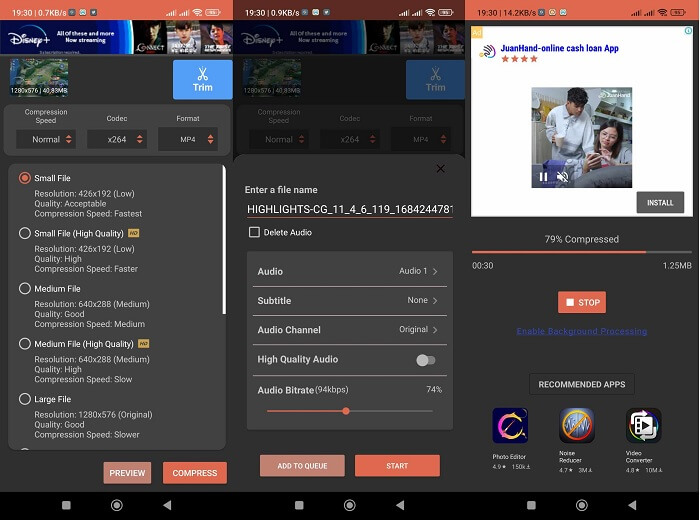
Steg 1. Gå till Play Butik och öppna Compress Video Size Compressor genom att söka efter den i appens sökfält. Tryck på ikonen Installera för att hämta den till din enhet.
Steg 2. Starta appen på din Android‑enhet och tryck på knappen Import för att lägga till videon du behöver komprimera.
Steg 3. När du har valt videon analyserar verktyget den och ger olika alternativ för komprimerade videor. Välj små filer som ändå har en acceptabel videokvalitet.
Steg 4. Tryck på komprimera och spara videofilen på din enhet. Du kan också välja ett alternativ som raderar den ursprungliga större filen.
Fördelar
- Kompression av hög kvalitet och låg kvalitet är möjlig med denna app.
- Den levereras med en inbyggd videospelare för att spela upp komprimerade videor.
- Användare kan dela videor direkt med den här appen.
- Den levereras med HEVC-codecs.
- Det här verktyget har fördefinierade videokomprimeringsinställningar.
- Användare kan jämföra den komprimerade videon med originalfilen.
Nackdelar
- För många annonser i gränssnittet.
- Du måste utnyttja dess premiumplaner för att njuta av avancerade komprimeringsfunktioner.
2. FVC gratis videokompressor
Behöver du ett pålitligt verktyg för att komprimera video från din Android‑enhet? FVC Free Video Compressor är ett verktyg du bör prova. Den här webbaserade applikationen är tillräckligt flexibel för användare som vill undvika att installera appar för att komprimera videoklipp på Android. Det är ett pålitligt verktyg som gör att du slipper installera appar på din enhet eftersom det körs i datorns webbläsare. Det här verktyget kan justera filens bithastighet, samplingsfrekvens, bildfrekvens, volym och upplösning för att minska eller komprimera dess storlek. Det är också kompatibelt med olika videobehållare, inklusive MP4, MKV, AVI, MOV med flera. Det finns inga begränsningar i dess API; du kan använda appen gratis. Det som gör detta verktyg unikt jämfört med liknande appar är att dess utdatafil inte har någon vattenstämpel. Du kan därför använda det här verktyget som ett alternativ till andra appar som kan komprimera videor på Android.
Nyckelfunktioner
◆ Det fungerar på Chrome, Firefox, Mozilla, Opera Mini och andra webbläsare.
◆ Den levereras med ett skjutreglage för att reducera videofiler manuellt.
◆ Den levereras med en satskompressionsfunktion.
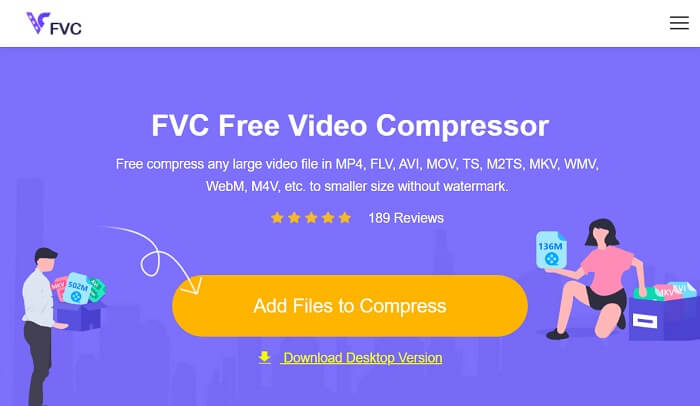
Steg 1. Öppna onlinetjänsten
Det första steget för att komprimera videofiler tagna från en Android-enhet är att komma åt FVC Free Video Compressor. Du kan söka i appen med Chrome, Firefox, Opera Mini eller en inbyggd webbläsare. Leta reda på appens huvudsida från sökresultaten och gå till dess huvudsida.
Steg 2. Importera video
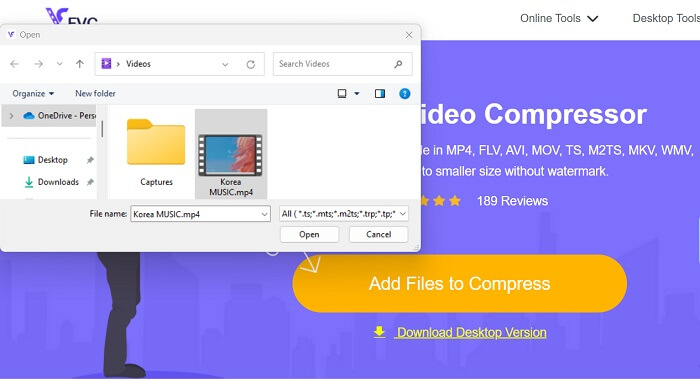
För att importera videofilen du behöver komprimera trycker du på Add Files to Convert, så öppnas din enhets mapp. Välj videofilen du måste komprimera och tryck på Öppna för att importera filerna.
Steg 3. Minska videofilens storlek
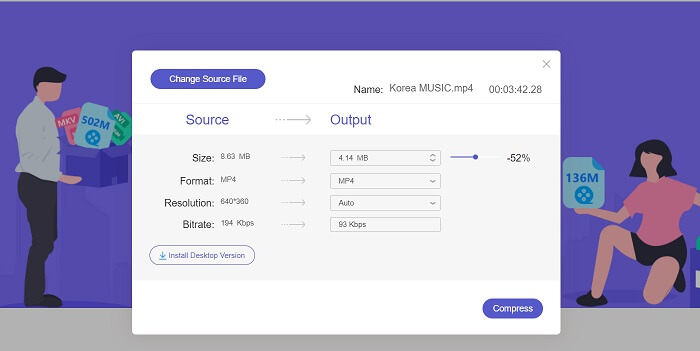
Därefter visas en dialogruta på skärmen. Skjut reglaget för att ställa in exakt hur stor procentuell minskning du vill göra av filen. Tryck på knappen Compress för att minska filstorleken. Du kan kontrollera utdatafilen på din dator och dubbelklicka på filen för att spela upp och förhandsgranska den komprimerade videon.
Fördelar
- Det kan komprimera 4K-videor.
- Användare kan också minska filstorleken på 3D-videor.
- Appen säkrar integriteten för dina videofiler.
- Du kan komprimera videon utan vattenstämpel på utmatningsvideon.
- Den kommer med en 30x komprimeringshastighet.
- Du kan enkelt ändra källfilen utan att stänga appen.
Nackdelar
- Lita på internethastigheten.
Del 2. Komprimera Android-video på en dator
Letar du efter ett effektivt verktyg för att komprimera dina videofiler på din enhet? Du kan alltid använda Video Converter Ultimate för att minska och justera videofilens storlek på din dator. Denna applikation är kompatibel med och tillgänglig på både Mac och Windows, så du kan skaffa den på vilken dator som helst. Dessutom har den stöd för ett brett spektrum av videoformat, inklusive MP4, MOV, MKV, WebM, AVI och fler. Den har ett reglage där användare kan komprimera en viss procent av videofilens storlek utan att klippa ner videons längd. Appen kan dessutom bearbeta 4K‑videor utan krångel. Den använder avancerad teknik för att bearbeta och komprimera dina videor. Att det här verktyget kan minska filstorleken utan begränsningar och restriktioner gör det till en unik kompressor. Läs och bedöm den detaljerade guiden om hur du använder detta verktyg.
Steg 1: Installera appen
Det första användare behöver göra är att ladda ner Video Converter Ultimate på sin dator eller laptop. För ett enkelt sätt att installera appen, tryck på ikonen Free Download nedan.
Gratis nedladdningFör Windows 7 eller senareSäker nedladdning
Gratis nedladdningFör MacOS 10.7 eller senareSäker nedladdning
Steg 2: Importera videofilen
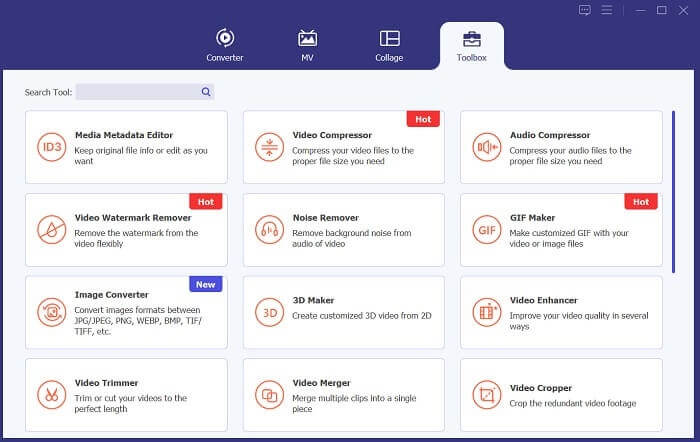
Nästa steg är att importera din video till appens gränssnitt. Du kan göra det genom att öppna verktygets gränssnitt och klicka på alternativet Toolbox. Välj funktionen Video Compressor från listan och klicka på +-ikonen.
Steg 3: Komprimera video
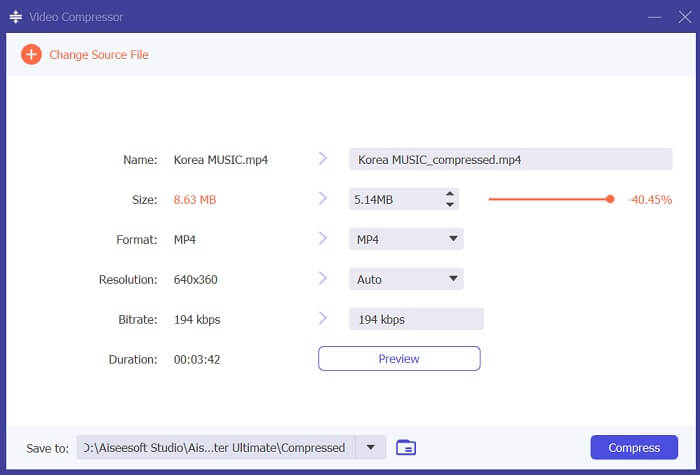
Då får du upp dina dator‑mappar. Välj videon du behöver konvertera och tryck på Open för att importera den. En ny sida visas där du kan minska filstorleken. Skjut reglaget eller ändra videoparametrar som upplösning, format och bithastighet. Tryck på alternativet Compress för att starta processen.
Vidare läsning:
Hur komprimerar man video för Twitter? 4 pålitliga metoder
3 utmärkta metoder för hur man trimmar video på Android
Del 3. Vanliga frågor om komprimering av video för Android
Hur zippar jag en video på min Samsung-telefon?
För att zippa en video på din Samsung-telefon kan du använda en filhanterarapp som stöder komprimering av filer. Leta först upp videofilen som du vill zippa till telefonens lagring. Välj sedan filen och välj att komprimera eller zippa den. Du kan också välja komprimeringsformat och komprimeringsnivå. När videofilen är zippad kan du dela den eller lagra den i telefonens lagring med en mindre filstorlek.
Varför kan jag inte skicka en stor video via e-post?
Du kanske inte kan skicka en stor video via e-post av flera anledningar. För det första har e-postleverantörer ofta storleksbegränsningar på filerna som bifogas e-postmeddelanden. Den här funktionen förhindrar att deras servrar överbelastas och säkerställer att e-postmeddelanden kan levereras snabbt och effektivt. Dessutom kan vissa e-postklienter begränsa vilka typer av videofiler som kan bifogas, till exempel videor i specifika format. I dessa fall kan du behöva använda en annan metod för att dela din video, som att ladda upp den till en fildelningstjänst och skicka länken till mottagaren.
Kommer komprimering av en video på Android att minska dess kvalitet?
Att komprimera en video på Android kan tappa kvalitet, särskilt om du väljer höga komprimeringsnivåer. Det finns dock sätt att minimera kvalitetsförlusten, som att välja rätt komprimeringsinställningar och använda en komprimeringsapp av hög kvalitet.
Slutsats
Sammanfattningsvis, om du är en Android‑användare som ofta spelar in videor har du kanske märkt att de tar upp mycket utrymme på enheten. Den här situationen kan vara frustrerande eftersom den begränsar hur mycket innehåll du kan lagra och kan göra att enhetens prestanda försämras. Att förstå hur man komprimerar en video på Android kan hjälpa dig att spara lagringsutrymme och förbättra prestandan hos din mobila enhet. Med rätt verktyg och tekniker, såsom de som nämns ovan, kan du utföra denna process utan att offra kvaliteten på dina videor.
-
 Enklaste sätten att snabba upp en video på dina Android-enheter [2023]
 Visste du att du kan snabba upp en video på din Android? Så om du vill veta hur du snabbar upp en video på din Android-telefon, läs den här texten.
-
 Hur man beskär en video på Android för att förnya ditt videoinnehåll
 Låt inte en överdimensionerad video sakta ner dig! Lär dig hur du ändrar storlek på videor på Android med vår steg-för-steg guide.
-
 Guide för hur man reparerar videor som inte spelas upp på Android -telefoner
 Vill du veta anledningarna till varför videor på din Android-enhet inte kan spelas upp? Om så är fallet, för att lösa problemet på egen hand kan du fortsätta läsa för att veta mer.
