


 Video Converter Ultimate
 Skärminspelare
 Video reparation
 Säker nedladdning
Ändra snabbt videometadata på iPhone som ett proffs på mindre än en minut
Nuförtiden har det blivit viktigt för många, särskilt iPhone‑användare, att ordna sina filer. Med rätt tagg kan vi bestämma filens plats och organisera mediefiler i vårt bibliotek eller våra mappar. I vissa fall upplever iOS‑användare det som besvärligt att leta efter en fil på iPhone när metadata är felaktiga, eftersom de då är svåra att hitta. Vill du veta hur vi kan lösa det? Den bästa lösningen för att åtgärda metadata på iPhone är att ändra dem enligt dina önskemål så att de blir synliga och välorganiserade. Bli mer kunnig och lär dig att ändra videometadata på iPhone genom att läsa den här artikeln.

Del 1. 2 av de bästa apparna för att ändra videometadata på iPhone
Metapho – Video- och fototaggredigerare på iPhone
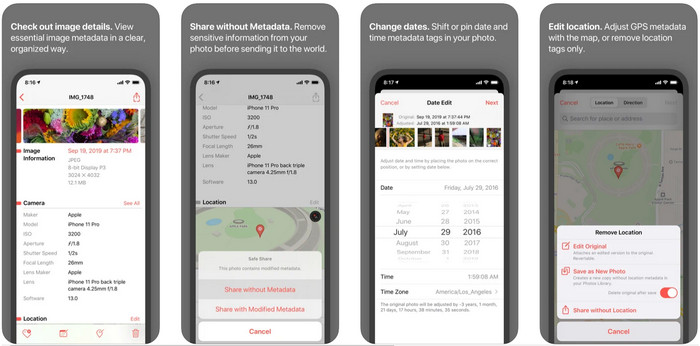
Metapho är en av de bästa taggredigerarna du kan ladda ner och använda för att ändra videometadata på en iPhone. Appen är en enkel redigerare som låter dig ändra datum, filnamn, storlek, enhetsmodell, slutartid och plats. Med den här appen kan du också se metadata för varje livefoto du tar och redigera dem korrekt om du vill. Även om appen verkar lovande måste du köpa den för att kunna redigera dina metadata; om du inte gör det kan du bara fritt visa metadata och ingenting annat. Men du behöver inte oroa dig eftersom det bara är ett engångsköp, så du kan njuta av appen så mycket du vill när du väl har köpt den.
Steg 1. Öppna App Store och ladda ner Metapho till din iPhone.
Steg 2. Öppna appen, välj en av filerna du vill öppna i Bilder och tryck på den för att fortsätta. Sedan visas en lista över redigeringsalternativ du kan göra med din tagg; redigera dem efter dina behov.
Steg 3. Tryck på knappen Spara när du är klar med att redigera taggarna.
Exif Metadata – Foto- och Live Photo Tag Editor på iPhone
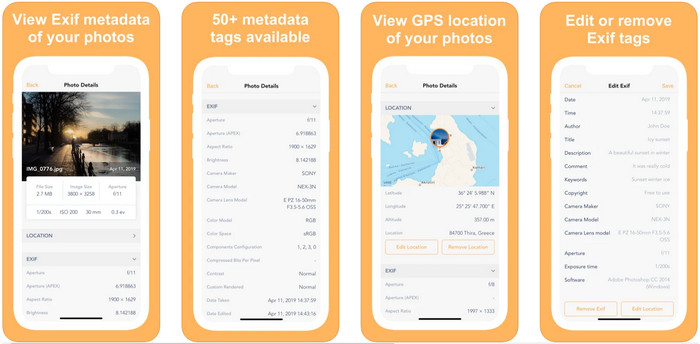
EXIF Metadata gör det en metadataredigerare ska göra för att hjälpa iPhone‑användare att redigera sina taggar. Det här verktyget har ett unikt gränssnitt och är mer tilltalande än Metapho. Med den här appen kan du gratis se mycket mer detaljerad information om din bild. Även om appen erbjuder en proversion finns den redigering du behöver redan i gratisversionen, men du kan skaffa proversionen för att lägga till mer information i dina metadata. En av nackdelarna med appen är att den bara stöder bildfiler, så att ändra metadata för video är omöjligt. Så om du vill ändra bildmetadata på en iPhone följer du stegen nedan.
Steg 1. Ladda ner och installera appen på din iPhone.
Steg 2. Öppna verktyget, tryck på knappen + och välj vilken bildtagg du vill ändra.
Steg 3. Tryck på Redigera, lägg till den information du behöver och tryck på Spara.
Del 2. Bästa Media Metadata Editor för Windows & Mac – FVC Video Converter Ultimate
All information du behöver ändra i dina metadata stöds inte i apparna som nämndes ovan. Om du vill ha mer detaljerad information i din tagg rekommenderar vi att du väljer den bästa taggredigeraren för Windows och Mac, FVC Video Converter Ultimate. Programmet kan hjälpa dig att lägga till mer tagginformation till din mediefil med bara några få klick. Oavsett om du är proffs eller nybörjare blir det mycket enklare att lägga till metadata i din fil med det här avancerade programmet.
Kanske är du orolig om din fil stöds här. Det här verktyget stöder mer än 1000+ format, och det format du har stöds faktiskt. För att ge dig ett försprång om hur du ändrar din iPhones videometadata, vänligen läs den detaljerade informationen som vi anlitar nedan för att följa dem eftersom framgången är på väg.
Steg 1. Genom att klicka på nedladdningsknappen nedan kan du skaffa det här ultimataverktyget på både Windows och Mac. Klicka på filen du har laddat ner för att installera programmet på din hårddisk och starta det sedan.
Gratis nedladdningFör Windows 7 eller senareSäker nedladdning
Gratis nedladdningFör MacOS 10.7 eller senareSäker nedladdning
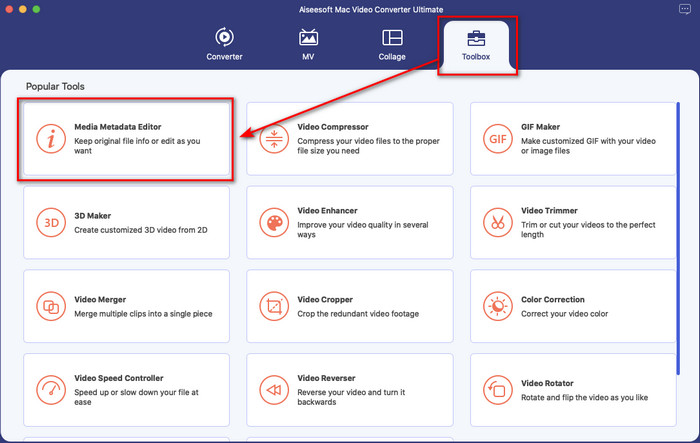
Steg 2. Gå till avsnittet Verktygslåda och klicka på Media Metadata Editor bland funktionerna.
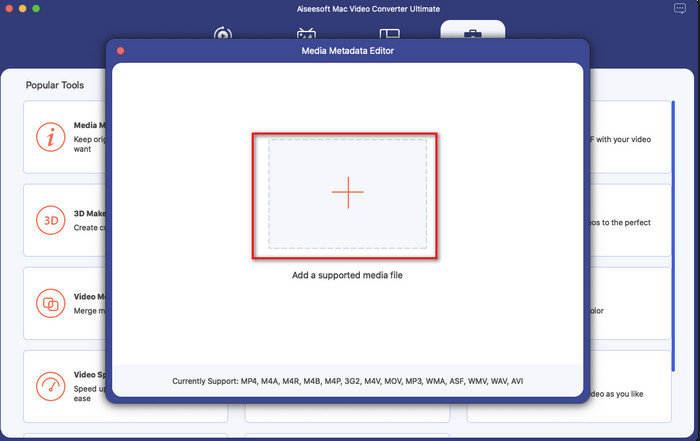
Steg 3. Tryck på knappen +, så visas en dialogruta med filer på skärmen; leta upp filen du vill lägga till metadata i och klicka på Öppna för att ladda upp den.
Steg 4. I det nya fönstret kan du nu redigera eller ta bort metadata i din fil; klicka i varje textruta och skriv in den information du vill lägga till som metadata. Dessutom kan du även lägga till ett albumomslag till din mediefil om du vill genom att trycka på +-knappen, leta upp albumbilden i filerna och klicka på Öppna för att infoga den.
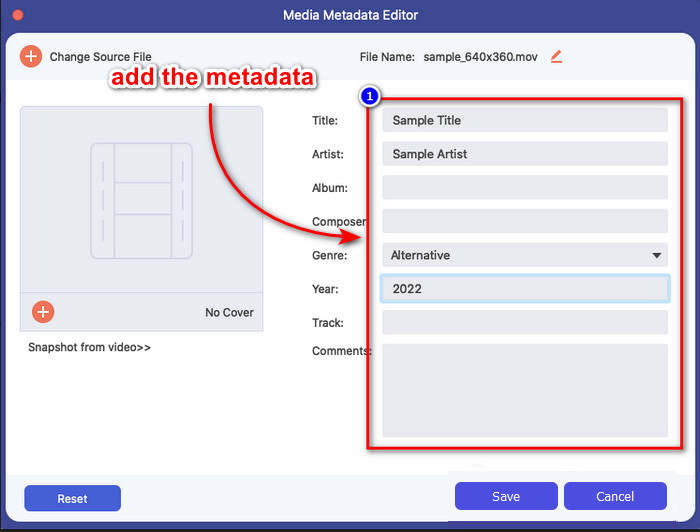
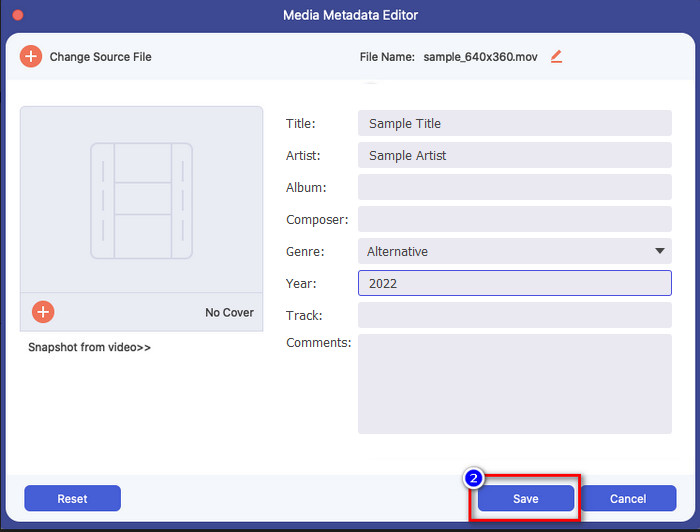
Steg 5. När du har gjort alla redigeringar och ändringar i din mediefil kan du nu klicka på Spara. På ett ögonblick har du ändrat metadata i din mediefil; med några enkla klick och med hjälp av verktyget blev allt möjligt.
Del 3. Vanliga frågor om iPhone Metadata Editor
Kan jag redigera metadata på iPhone?
Ja, du kan redigera metadata på din iPhone, men du får bara redigera platsen och se de grundläggande taggarna för filen, men inte redigera dem. Om du vill ändra filens metadata i detalj, föreslår vi att du använder en tredjepartsapp som räcker till dina behov på ditt metadataproblem.
Varför måste jag ta bort metadata?
Vi tar bort metadata av integritetsskäl. Vissa personer kan få mycket detaljerad information om oss via metadata; utan att du vet om det kan metadata lagra din exakta plats, datum, tid, koordinater och till och med mobilnummer. Om du inte vill att information om dig själv ska exponeras rekommenderar vi att du tar bort metadata från dina filer. Vill du veta hur? I så fall hjälper den här artikeln dig att ta bort metadata från din fil på mindre än en minut.
Är det lätt att ändra metadata på iPhone?
Absolut, ja, att ändra metadata på iPhone är enkelt med hjälp av rätt metadataredigerare. Även om uppgiften verkar lite svår är den fortfarande hanterbar för varje användare. Om du vill veta det bästa verktyget för att utföra denna uppgift, måste du läsa informationen om de två verktygen vi tillhandahållit ovan. För att hjälpa dig att slutföra byta taggen på iPhone som ett proffs.
Slutsats
Nu när du har kommit till slutet har vi lärt oss att det är enkelt att ändra videometadata på iPhone. Med hjälp av den här artikeln och din egen insats blev det möjligt. Nu behöver du bara välja vilket sätt du tycker passar dig bäst. Även om FVC Video Converter Ultimate inte finns till iPhone är det fortfarande ett av de bästa programmen du kan ha på din Mac eller Windows‑dator för att redigera taggar. Det här verktyget låter dig lägga till mycket detaljerad information om dina mediefiler för att hjälpa dig att hålla dem organiserade och lätta att hitta. Vill du veta vilka andra funktioner och verktyg programvaran har? Klicka på nedladdningsknappen ovan för att ta reda på det.
-
 Topp 3 FLAC-metadataredigerare på Mac och Windows [Uppdaterad 2022]
 Vill du ändra FLAC-metadata? I det här fallet måste du läsa den här artikeln eftersom vi tillhandahåller tillräcklig kunskap om den senaste FLAC-metadataredigeraren för att kunna använda.
-
 Bästa sätten att redigera MKV-metadata som en professionell [Lätt]
 Har du ingen aning om hur man redigerar MKV-metadata? Vissa användare tycker att det är svårt att redigera taggarna på MKV, om du är en av dem så läs den här artikeln.
-
 Bästa tekniken för hur man redigerar WebM-metadata snabbt
 Läs igenom hela informationen som vi tillhandahåller nedan när vi infogar en handledning om hur du redigerar WebM-metadata. Klicka på den här länken för att veta mer om det.
