


 Video Converter Ultimate
 Skärminspelare
 Video reparation
 Säker nedladdning
Tips och tricks om hur man gör en Slow-mo på CapCut med detaljerade steg
On emphasizing a specific detail in the video, adding a slow-mo effect can help you. Though changing the frame per second speed on the video is easy, choosing the right tool can be bothersome on most occasions. But with software like Cap Cut, you can quickly do the task effectively even though you don't have expertise. Instead of wasting time searching for a tutorial on how to do a slow-mo on CapCut, you can read this article as we provide an easy to follow steps. In the latter part, we will add the best alternative for you if you think that the software we will introduce doesn't fit your standards.

Del 1. Hur man gör Slow-mo på CapCut på Android- och iOS-enheter
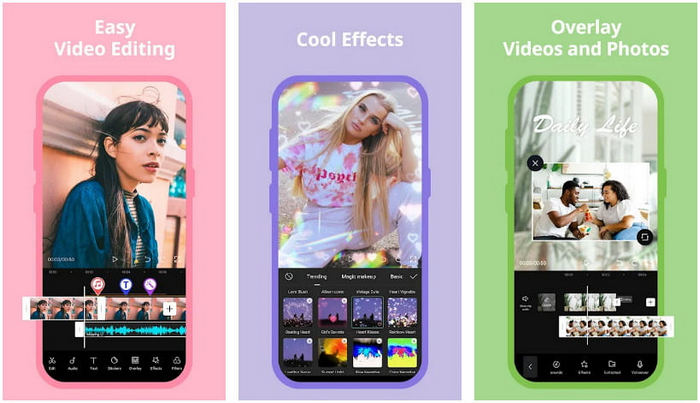
Informationen nedan kommer att fokusera på det detaljerade hur man saktar ner en video på CapCut. Så om du vill använda programvaran på din enhet för att sakta ner en video, är dessa steg nedan absoluta och testade innan du lägger till den här. Före allt annat är stegen här den mest grundläggande hastighetsregulatorn du kan få på CapCut.
Step 1. Download the Capcut on your device and open it right after installing it.
Step 2. After you open the app, click New Project, then add the video you want to slow-mo.
Step 3. Tap the video you upload on the Timeline and click the Speed menu, then choose between the Normal and Curve speed controller methods you want. For an easier way of slowing down a video, you must click the Normal.
Step 4. Move the video speed point to the left to slow down the video, click check, then Export.
Fördelar
- Det är en av de bästa hastighetskontrollerna du kan ladda ner på Android och iOS.
- Allt-i-ett-redigerare du kan ha gratis.
- Intuitivt gränssnitt för en enkel upplevelse för användarna.
Nackdelar
- Begränsade bearbetningsresurser på din enhet.
- Viktiga redigeringsfunktioner är fortfarande inte tillgängliga.
- Buggar och krascher händer ibland.
Del 2. Ultimate alternativ för CapCut för att sakta ner en video på skrivbordet
Although Capcut can do the slowdown, you will need on the video you have, and we still find that there are things that hold this tool to become an ultimate. Undoubtedly, FVC Video Converter Ultimate has the upper hand and has become the ultimate resolver of video speed controlling problems.
På grund av dess funktioner och funktioner har många användare blivit förtjusta i detta eftersom det är imponerande i allt det erbjuder. Det ändrar felfritt hastigheten på videon för att göra en vacker videoutgång på mindre än en minut. Även om du inte är proffs på videohastighetskontroll kan du fortfarande enkelt hantera programvaran. Imponerande eller hur? Det är mer än så; du kan följa detaljerna nedan när vi lär dig hur du gör slow-mo på Capcuts ultimata alternativ på mindre än en minut.

FVC Video Converter Ultimate
5 689 200+ nedladdningar- Det stöder en ultimat hastighet upp och saktar ner effekt att applicera.
- Importera din video här, för den stöder 1000+ format.
- Ytterligare multifunktionella funktioner och funktioner är tillgängliga.
- Den har ett intuitivt gränssnitt för en bättre användarupplevelse.
- Du kan ha programvaran på Windows och macOS.
Gratis nedladdningFör Windows 7 eller senareSäker nedladdning
Gratis nedladdningFör MacOS 10.7 eller senareSäker nedladdning
Step 1. Please click the download button below to have the ultimate software on your Windows and Mac. After that, click the file you've downloaded to install it promptly, and click Start Now to run the software on your system.
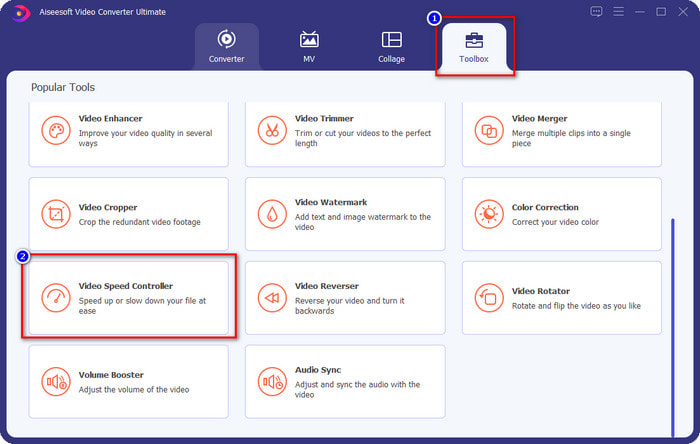
Step 2. When the tool runs into your system, click the Toolbox and locate the Video Speed Controller.
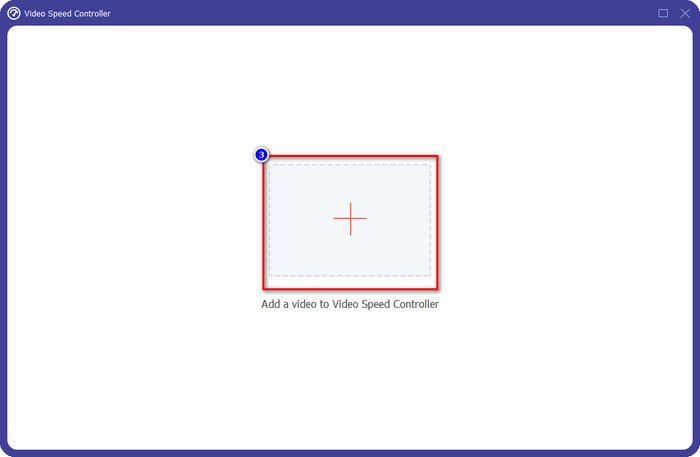
Step 3. Press the + button to open the folder on your desktop. Locate the video file you want to slow-mo and click Open to proceed.
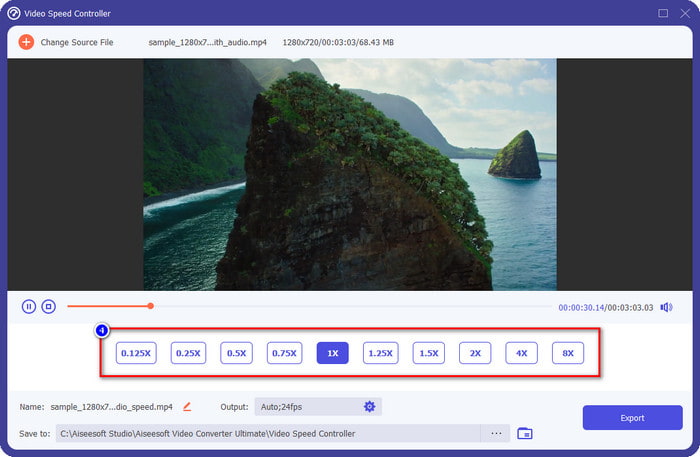
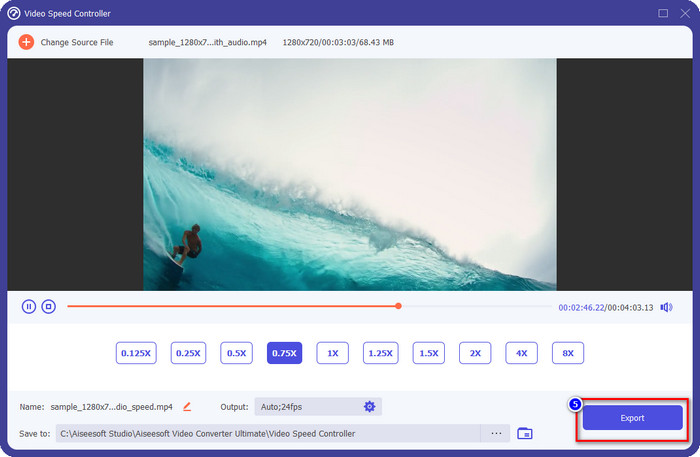
Step 4. After uploading the video file here, click the video speed you want on the options presented below. Every time you click one of them, a preview will happen on the preview pane. It will show you the video you upload but at your chosen speed.
Step 5. Everything is settled now; click Export to start the converting the regular speed video into a slow-mo. Easy right? Yes, it is; even though you aren't an editing expert, there is no need to worry if you choose to use this software.
Fördelar
- Det är den ultimata lösningen för att lösa videohastighetsproblemet och andra video- och ljudproblem.
- Även om du är nybörjare på att redigera hastigheten kan du snabbt bemästra det på mindre än en minut.
- Det kan importera och exportera videon utan att försämra råkvaliteten.
- Tillgänglig i alla Mac och Windows operativsystem.
Nackdelar
- Det är inte tillgängligt på iOS och Android.
Del 3. Vanliga frågor om hur man gör en Slow-Mo på CapCut
Finns det någon stationär version av CapCut?
Tyvärr är CupCat inte tillgängligt på Windows och Mac, så du kan inte ladda ner det på ditt skrivbord även om du vill ha det. I det här fallet får du inte ladda ner appen på andra tredjepartswebbplatser eller piratkopiering eftersom det är olagligt, och det kommer alltid att få konsekvenser efter det.
Kan jag köpa CapCut?
Om du har en stram budget är det inte nödvändigt att köpa eller prenumerera på CapCut eftersom det är gratis. Inga dolda avgifter när du laddar ner appen på din Android och iOS. Du kan njuta av all potential i denna videoredigerare gratis.
Hur snabbar man upp video på Tiktok med CapCut?
You can follow the steps we added above and download the Tiktok video you want to speed up. But if you want a comprehensive, detailed step on how to speed up video on Tiktok, you can read this article instead and rely on it.
Kommer den att använda en vattenstämpel efter att ha exporterat videon på Capcut?
Vattenstämpeln appliceras inte direkt på videon du redigerar här, men den läggs till i den sista delen av videon. Men du kan klippa videoklippet med en vattenstämpel genom att använda din utsedda videoredigerare eller FVC Video Converter Ultimate för att ta bort det permanent. Du kan exportera en video utan vattenstämpel genom att trycka på export utan vattenstämpel istället för att redigera.
Slutsats
Now that we know how to slow down a video on CapCut, we have now the chance to change the speed of the video we want. Despite being a free app on Android and iOS, there are still limitations that could hold you back while using this app. So, if you want to fill the gap that this app can't provide, it is a must to download the best alternative on the desktop, for it is the ultimate software to slow down the video. To download the ultimate tool, you must click the download button above to have it within your reach.
-
 5 professionella Slow Motion Video Makers för Windows/Mac/Online
 Vill du veta hur du får din video att spela upp i slowmotion? Läs sedan den här artikeln för att ta reda på vad de 5 professionella slow motion-videoskaparna är.
-
 Bästa sätten att använda iMovie för att göra videor i slow motion [löst]
 Har du någonsin använt iMovie-appen för att konvertera din video med normal hastighet till slow motion? Detta är möjligheten att veta mer om denna applikation, så fortsätt läsa.
-
 3 bästa slow motion-kameror du bör överväga att köpa
 Har du svårt att välja den bästa kameran för att göra slowmotion-videor? Fortsätt läsa och överväga dessa listade bästa slowmotion-kameraval för dig.
