


 Video Converter Ultimate
 Skärminspelare
 Video reparation
 Säker nedladdning
3 av de bästa FLAC-metadataredigerarna du bör känna till detta 2025
It is known to us that FLAC is the best lossless musical file format, and it is an ideal format for ripping the audio on CDs because it doesn't lose the raw audio if this is the format you choose. Amongst the lossless audio file, this is the best choice for it is compatible with any device. It produces a compression ratio of 30 to 50 percent without losing the original quality. With this audio format, you can have the metadata, album cover, and fast seeking all at once. Instances may occur, such as wrong tags on the FLAC file, because the format is not perfect like the other format. In less than five minutes, you will know the different FLAC metadata editors on Mac and Windows that you can use to fix the problem.

Del 1. Bästa FLAC Metadata Editor för Mac och Windows – FVC Video Converter Ultimate
FVC Video Converter Ultimate is the most effective software you must have regarding this metadata editing problem. This tool provides a professional and easy-to-understand GUI to help any users have a smooth sailing process of changing or fixing metadata at ease. Also, you can add multiple information or tags to your FLAC, such as title, author's name, date, album cover, and many more. Its competitor on metadata editing focuses on changing the metadata of a few audio and video formats. But with this software, you can easily upload any FLAC, MP3, WMA, WMV, and other 1000+ formats and edit their metadata as quickly as 1-2-3.
Dessutom kan detta verktyg inte bara ändra, fixa eller ta bort metadata; det kan också användas som en lösning på alla video-ljud-relaterade problem. Och med det kan vi försäkra dig om att när du väl använder verktyget behöver du inte oroa dig för att stöta på samma problem igen eftersom du fick den bästa lösningen. Vill du använda den förstklassiga FLAC-metadataredigeraren på Mac och Windows? Om så är fallet, fortsätt att läsa stegen nedan eftersom vi ger dig den lättanvända handledningen och slutför uppgiften effektivt.
Step 1. You can have the ultimate software on your desktop; click the appropriate OS to download the correct tool. Continue the installation process by opening the file you've downloaded, and press Start Now to continue.
Gratis nedladdningFör Windows 7 eller senareSäker nedladdning
Gratis nedladdningFör MacOS 10.7 eller senareSäker nedladdning
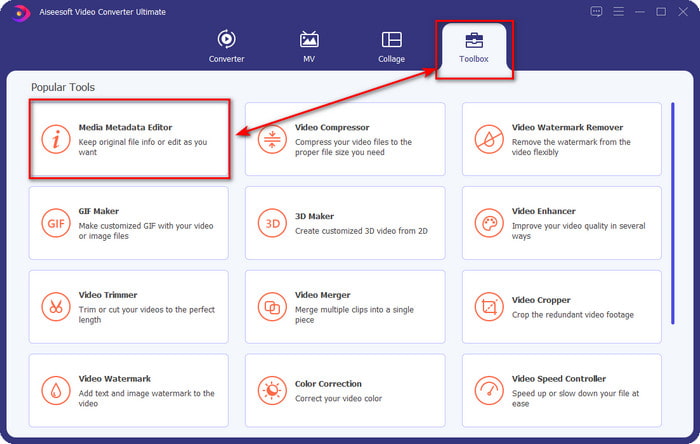
Step 2. Click Media Metadata Editor to open the tag editor feature on the Toolbox section.
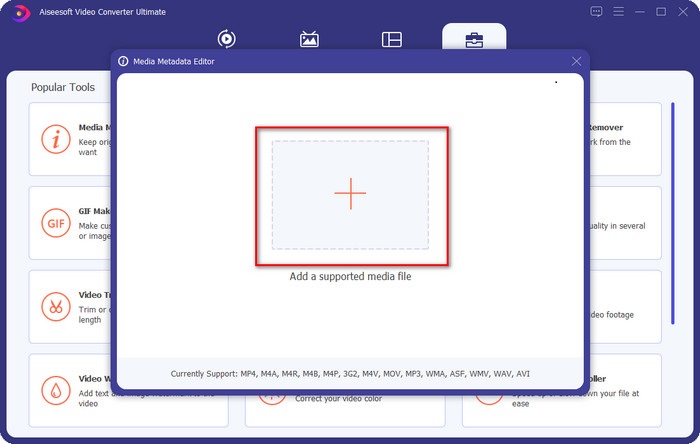
Step 3. You must click the + button to add the file, look it on the folder that will show, and click Open to add the FLAC file successfully.
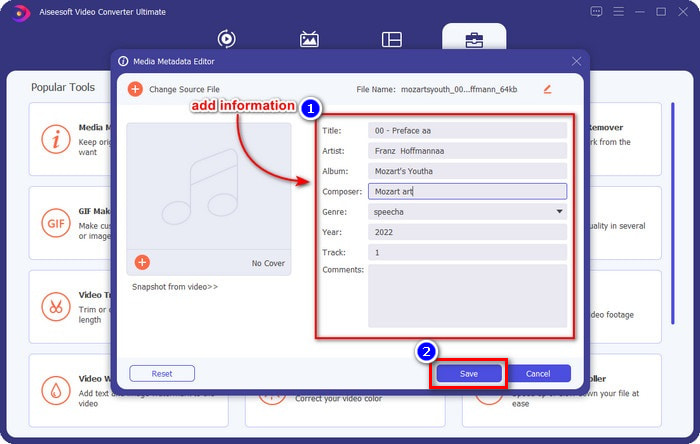
Step 4. In this panel, you can now change the metadata of your FLAC on each textbox. Then click Save to save the update you've made with the software. As easy as that, you've added tags on your FLAC and corrected them efficiently with the help of an ultimate tool.
Fördelar
- Det är det bästa valet för att redigera metadata i FLAC, MP4, WMA, WAV, TTA, OGG och 1000+ format till.
- Den stöder flera redigeringsfunktioner som du kan använda under Verktygslådan.
- Intuitivt grafiskt användargränssnitt, och det är lätt att använda.
- Nedladdningsbar på Windows och Mac operativsystem.
Nackdelar
- Att köpa verktyget är ett måste för att kunna utnyttja de otroliga funktionerna till en låg kostnad.
Del 2. Andra 2 bästa gratis FLAC Metadata Editors för Windows
Fregatt 3
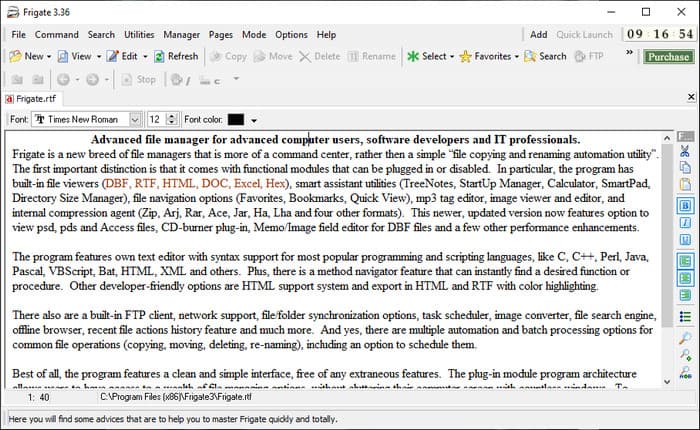
Frigate3 is a FLAC metadata editor that you would love to use on your Windows. With this tool, you can easily adjust the tags you have on your desktop. But before you download the tool, you must check out the two options it provides, the standard and pro versions. The standard version of this tool only includes the basic features you will have while using it. If you've downloaded the standard version, the file size is smaller than the pro one.
Även om du har laddat ner proversionen av den istället, kommer du att ha alla funktioner som den här programvaran tillhandahåller som inte är på standarden, men filstorleken är mycket större än standarden. Trots att det är en gratis Windows-programvara kan vi fortfarande se att verktyget är lite styvt att förstå, och dess GUI är inte så snyggt som den andra mjukvaran på marknaden. Även om detta är ett problem anses det fortfarande vara ett effektivt verktyg för att hantera denna uppgift.
Fördelar
- Gratis att ladda ner på Windows.
- Den stöder standard- och proversionerna av verktyget.
- Kan lägga till plug-ins.
Nackdelar
- GUI:n är inte bra som den andra metadataredigeraren.
- Ibland är verktyget svårt att starta.
- Nätverket är osäkert när du öppnar verktygets officiella webbplats.
MusicBrainz PiCard
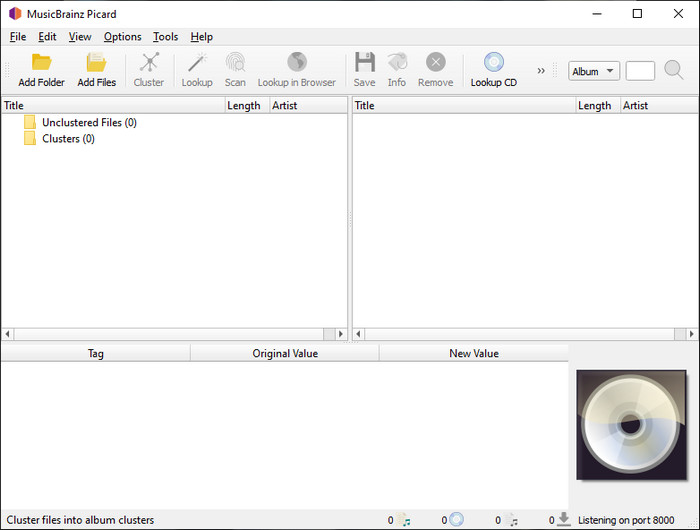
MusicBrainz PiCard is a Windows-based FLAC metadata editor you can freely download on your desktop to finish adding the metadata. If the audio file has a record on the database, you can retrieve the tags or update them with the help of this tool. Unlike other tools, this software can add multiple in-depth information such as the performers and instruments used on the music. But remember that the volunteers accumulate the tags on the MusicBrainz.
Dessutom är den här programvaran en dedikerad ljudetikettredigerare, vilket innebär att den bara stöder de flesta ljudformaten, oavsett om de är förlustfria, förlustfria eller båda. Även om det är ett omfattande uppslagsverk för musiktaggar och gör det användbart för allmänheten, är vissa taggar som det tillhandahåller opålitliga, så du måste lägga till dem manuellt. Ändå är verktyget användarvänligt och bättre än Frigate3, men det är inte lika bra som det ultimata verktyget.
Fördelar
- Den har en inbyggd databas för ljudtaggar.
- Enkelt användargränssnitt.
- Att lära sig hur man använder det är enkelt.
Nackdelar
- Ibland är metadata som samlas in i databasen opålitlig.
- Den är begränsad till endast ljudfiler.
Del 3. Vanliga frågor om FLAC Metadata Editor
Kan jag spela in FLAC av hög kvalitet?
Absolutely, yes, you can record audio in this format, but remember now all of the audio recorders support this format, and not all can record high-quality audio output. So, if you don't know how to record a high-quality FLAC lossless recorder, you must click this link to learn more about this topic.
Vilken är den bästa programvaran för att konvertera FLAC?
Utan tvekan är FVC Video Converter den bästa FLAC-omvandlaren du kan använda för att göra FLAC kompatibel med andra enheter utan att förlora den ursprungliga kvaliteten. Med det här verktyget kan du konvertera flera FLAC samtidigt, men kom ihåg att om du vill ha mer än en konverteringsnedladdning är det ultimata verktyget ett måste.
Stöder röstmemo FLAC som ljudutgång?
Voice Memo uses M4A instead of FLAC for storing audio recorded format. If you want to know more about voice memos, you can read the full-detailed scope we did on the built-in app; read it carefully to know if it is the best audio recorder on iOS devices by clicking this link.
Slutsats
FLAC is not just an audio format, but it is one of the best audio formats you must use to store high-quality audio on your devices. So, if you want to arrange the .flac on your library, then the help of the tool we review can help you handle the task efficiently. If you are a Windows user, we suggest reading the software we found to add metadata on Windows in part 2. But if you want a more reliable and pro tool to add metadata on FLAC, we suggest you use the FVC Video Converter Ultimate instead. With a tool like this, you can do pro editing on tags that the other Windows tool we present can’t provide. So, if you want to know more about the best FLAC metadata editor on Mac and Windows, you must download it to discover the other functions.
-
 Topp 5 videometadataredigerare för 2025 [Opartisk granskning]
 Vill du se din videometadata? Om så är fallet, läs detaljerna nedan för att förstå ämnet till fullo och veta vilket verktyg som passar dig bäst.
-
 7 populära musiketikettredigerare på Windows, Mac och mobila enheter
 Musiktaggar är populära att använda för att arrangera musiken i ditt bibliotek enligt data inuti. Vad händer om du vill ändra det? Läs detaljerna nedan för att veta mer.
-
 5 översta MP4-metadataredigerare [Uppdaterad 2025]
 Hur kan jag ändra mina MP4-metadata? Det bästa sättet att ändra metadata för din MP4 är att använda en taggredigerare som stöder MP4-format som exemplet vi listar nedan.
