


 Video Converter Ultimate
 Skärminspelare
 Video reparation
 Säker nedladdning
Tips och tricks för att effektivt ta bort Powtoon-vattenstämpeln på videor
Har du någonsin skapat den perfekta animeringen och när du exporterade den lade Powtoon till en vattenstämpel? Sådant händer oftast om du använder appens gratisversion. Förstörde vattenstämpeln din video? Oroa dig inte längre! Här kan du lära dig hur du tar bort Powtoon‑vattenstämpeln genom olika metoder vi har samlat här.

Del 1. Hur man tar bort Powtoon Watermark utan en prenumeration [Editor's Choice]
FVC Video Converter Ultimate är mer än en komplett lösning som du kan ladda ner till Windows eller Mac för att ta bort Powtoon‑vattenstämpeln. Även om du saknar erfarenhet av att ta bort vattenstämplar från videor du skapar kan du ändå klara av det här. Bekvämt och snabbt – det är vad FVC vill att du ska uppleva när du använder programvaran, och det har de lyckats mycket bra med. Så om du vill se hur du tar bort vattenstämplar kan du följa stegen vi lagt till här nedan.
Steg för hur du tar bort Powtoon‑vattenstämpeln med FVC Video Converter Ultimate:
Steg 1. Du kan få ett av de mest imponerande videoredigeringsprogrammen för Windows och Mac genom att klicka på nedladdningsknappen nedan. Installera sedan programvaran, gör en snabb konfiguration och starta programmet.
Gratis nedladdningFör Windows 7 eller senareSäker nedladdning
Gratis nedladdningFör MacOS 10.7 eller senareSäker nedladdning
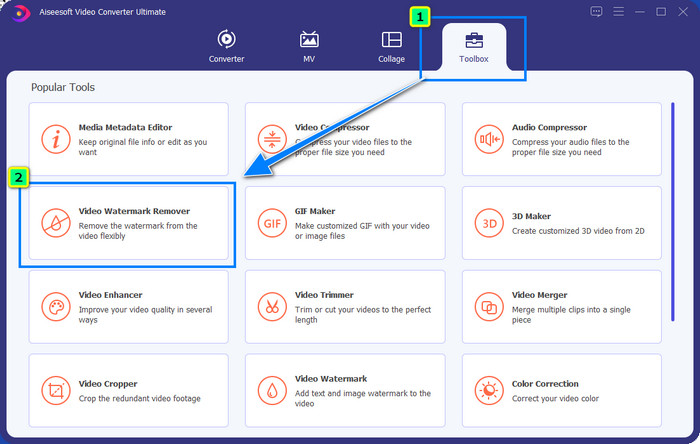
Steg 2. Gå till Toolbox och klicka på Video Watermark Remover för att ta bort vattenstämpeln som Powtoon har lagt till i din redigerade video.
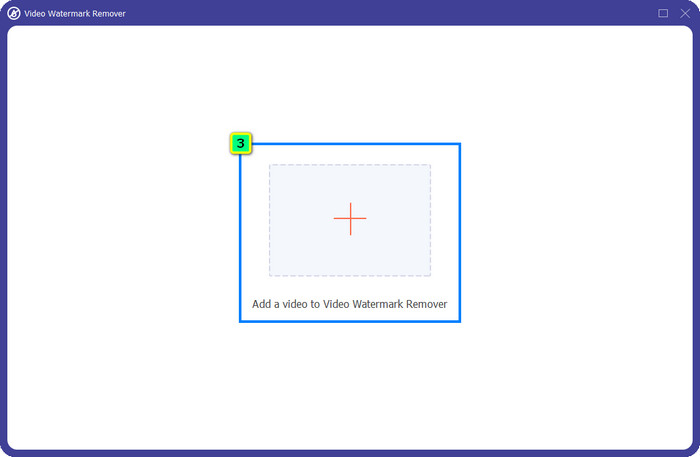
Steg 3. Tryck sedan på +-ikonen för att ladda upp videon du vill redigera, välj videofilen i mappen som visas och klicka på Open.
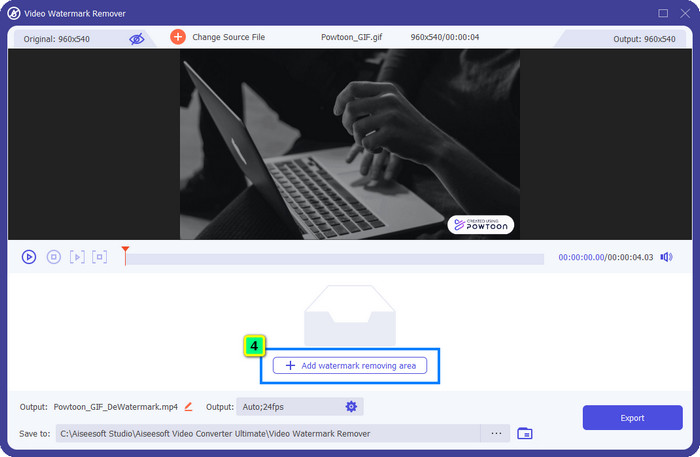
Steg 4. Klicka på Add Watermark Removing Area och placera markeringsrutan över vattenstämpeln; du kan justera den efter behov.
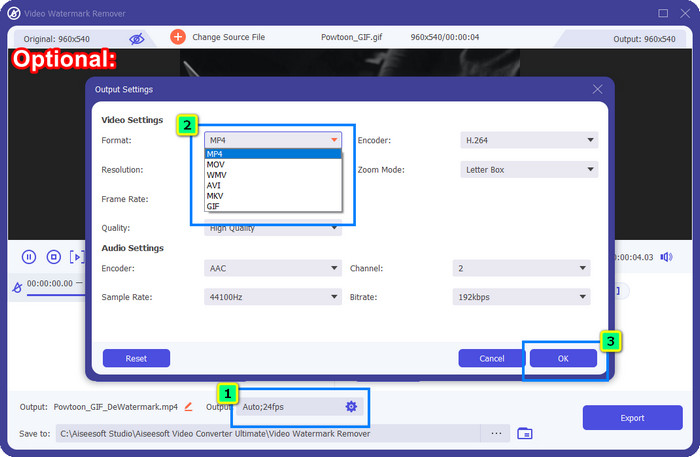
Valfritt: Vill du spara det färdiga resultatet i ett nytt format? Klicka på Output och sedan på Format och välj det nya videoformat du vill ha. Du kan justera andra video- och ljudinställningar och klicka på OK för att spara ändringarna.
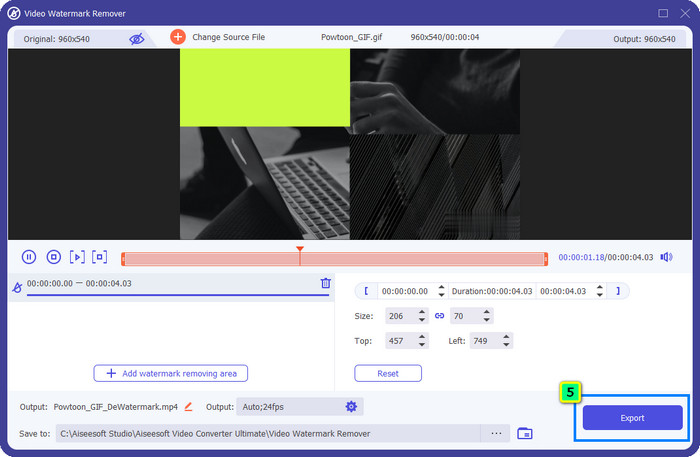
Steg 5. Tryck på Export-knappen för att ladda ner videon där du har tagit bort vattenstämpeln.
Del 2. Hur man tar bort Powtoon Watermark med prenumeration [Plan-baserat]
Har Powtoon en vattenstämpel? Ja, det lägger till en vattenstämpel när du använder gratisversionen. Men om du köper Pro eller Pro+ kan du exportera den slutliga produktionen utan vattenstämpeln. Så om du vill veta hur du köper programvaran för att njuta av videon du redigerade utan vattenstämpeln, följ stegen härnäst.
Steg för hur du köper Powtoon Pro och Pro+ Plan:
Steg 1. Öppna Powtoons officiella webbplats och klicka på Pricing för att se priserna på proversionen.
Steg 2. Välj det abonnemang du föredrar, Pro eller Pro+, och klicka på Get Plan.
Steg 3. Fyll i nödvändiga faktureringsuppgifter, gå vidare till betalningsmetod och klicka på Make Secure Payment.
Del 3. Hur man tar bort Powtoon Watermark Online gratis [Web-Service]
1. Media.io - Watermark Remover
Media.io - Watermark Remover kan ta bort Powtoon‑vattenstämpeln gratis. Den är tillgänglig i alla webbläsare, vilket innebär att du inte behöver ladda ner någon app för att använda den. Även om vattenstämpelborttagaren är gratis att använda behöver du ändå en stabil internetanslutning. Uppladdnings- och nedladdningsprocessen tar längre tid jämfört med det första verktyget för att ta bort vattenstämplar som vi nämnde här. Ändå är denna programvara ett utmärkt val för dig, och om du vill veta hur du använder den kan du följa stegen nedan.
Steg för hur du tar bort Powtoon‑vattenstämpeln med Media.io:
Steg 1. Öppna webbsidan och klicka på Choose File för att lägga till videon du vill ta bort vattenstämpeln från. Vänta på att filen laddas upp – det kan ta ganska lång tid beroende på internetanslutningen.
Steg 2. Tryck på Add Area och placera området för vattenstämpelborttagning där vattenstämpeln finns.
Steg 3. Tryck på Export för att spara den redigerade Powtoon‑videon på din lokala enhet – så enkelt är det.
2. Kapwing
Kapwing är ett annat specialiserat webbaserat verktyg som kan ta bort vattenstämpeln i din video genom att beskära den. Det erbjuder också ytterligare redigeringsfunktioner som du kan använda för att skapa en imponerande video, nästan som i Powtoon. Till skillnad från andra lösningar för vattenstämplar vi tar upp här ändrar detta program videons dimensioner eftersom du beskär bort vattenstämpeln. Om du inte har något emot att skära bort en del av bilden kan du följa stegen nedan för att bli av med Powtoon‑vattenstämpeln.
Steg för hur du beskär bort Powtoon‑vattenstämpeln med Kapwing:
Steg 1. Sök efter programmet i din webbläsare och öppna det.
Steg 2. Klicka på Add Media för att importera videon du vill beskära här.
Steg 3. När du har lagt in videoklippet klickar du på Crop för att justera bildförhållandet efter önskad storlek.
Steg 4. Om du vill spara slutresultatet klickar du på Done Cropping.
Del 4. Vanliga frågor om hur man tar bort Powtoon Watermark
Vilken är den bästa plattformen för att öka videoupplösningen på Powtoon?
Det finns otaliga sätt att höja upplösningen på din Powtoon‑video. Men vissa ger inte det resultat man förväntar sig. I stället för att chansa gör vi det tunga jobbet åt dig, och du behöver bara lägga några minuter på att läsa den här artikeln. Välj vilken av de 8 videoupplösnings‑omvandlarna som passar dina behov bäst.
Hur lägger man till en vattenstämpel i en video?
Det bästa sättet att lägga till en vattenstämpel i en video är med hjälp av programvara, oavsett om det är text, logotyp, stämpel, datum och tid eller liknande. Om du har tid över kan du läsa på och lära dig hur du lägger till vattenstämplar på olika plattformar på ett enkelt sätt.
Varför är Powtoon dyrt?
Powtoon blev dyrt på grund av den animerade redigeringen som du inte kan ha på en annan videoredigerare, vare sig online eller offline. Det är också på språng, så du behöver inte installera en startprogram för att börja använda det. Ändå är priset på det inte nåbart för många. Istället för att använda gratisversionen av Powtoon och ha en vattenstämpel, försök att använda det bästa videoredigeringsalternativet, FVC Video Converter Ultimate. Den erbjuder en mängd funktioner och funktioner som du säkert kan njuta av att använda.
Slutsats
Du kan spara videor från Powtoon utan vattenstämpel, men då måste du köpa ett abonnemang för att kunna spara den redigerade videon utan någon vattenstämpel. Gillar du inte tanken på att köpa en plan? Prova då de verktyg för att ta bort vattenstämplar som vi presenterar online. Är internetuppkopplingen långsam? Då rekommenderar vi att du använder FVC Video Converter Ultimate för att snabbt och professionellt ta bort vattenstämpeln från videon. Jämfört med otaliga andra program erbjuder FVC Video Editor den mest effektiva lösningen för att ta bort vad som helst i din video. Du kan dessutom finjustera resultatet med hjälp av de funktioner och verktyg som programmet erbjuder.
-
 Ta enkelt bort vattenstämpel från PDF med enkla steg
 Ta bort vattenstämpel från PDF genom att följa dessa enkla steg. Lär dig hur du enkelt tar bort vattenstämplar från din PDF-fil med dessa fantastiska verktyg.
-
 Enkla sätt att ta bort vattenstämpel från examensbilder
 Vill du veta de bästa sätten att ta bort vattenstämplar från examensbilder? Genom att läsa den här artikeln kommer du att kunna veta hur du enkelt tar bort vattenstämplar på gradbilder.
-
 Hur man tar bort vattenstämpel från video med Final Cut Pro [Komplett guide]
 Har du problem med vattenstämpeln på videor? Sa inte mer, för vi gav en handledning om hur man tar bort vattenstämpel från video med Final Cut Pro.
