


 Video Converter Ultimate
 Skärminspelare
 Video reparation
 Säker nedladdning
Hur Video Colorizer fungerar: Topp 3 verktyg att använda 2023
Har du de där gamla videorna som spelades in i svartvita toner? Förr kunde man minnas dagarna genom att bara spela upp dem, men nu kan du göra dina videor tidlösa genom att färglägga dem. Tack vare den digitala tidsåldern har många tekniska innovationer utvecklats, inklusive ett verktyg som kan färglägga svartvit video. I den här guiden presenterar vi de främsta och mest välfungerande programmen som kan använda färg och intelligenta algoritmer – och sömlöst anpassa färgerna i ditt material.

Del 1. Färglägg video offline
Att omvandla gamla filmer till färglagda versioner behöver inte längre vara krångligt om du använder kraftfull programvara som Video Converter Ultimate. Även om det här verktyget främst används för att konvertera video och ljud, har det också en videoredigeringsfunktion som låter dig väcka svartvita videor till liv igen. Dessutom erbjuder Video Converter Ultimate en förhandsvisningspanel i realtid där du kan se ändringarna du gör under redigeringen. Du kan också beskära, rotera och lägga till otaliga filter på ditt material för en extra kreativ touch. Följ den enkla guiden nedan för att färglägga svartvit video med det här utmärkta verktyget.
Steg 1. Starta den bästa videofärgläggaren
Ladda först ner installationsprogrammet för Video Converter Ultimate genom att klicka på det bästa operativsystemet för din enhet. Kör sedan installationsguiden för att starta programmet på din dator.
Gratis nedladdningFör Windows 7 eller senareSäker nedladdning
Gratis nedladdningFör MacOS 10.7 eller senareSäker nedladdning
Steg 2. Importera filen till programmet
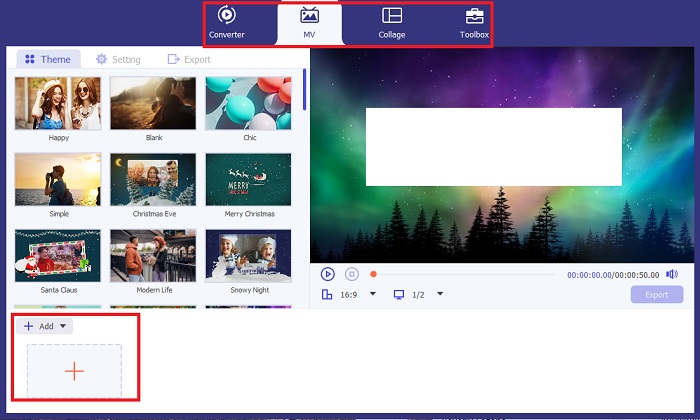
Gå sedan till avsnittet MV i Video Converter Ultimate för att komma åt videoredigeraren. Där klickar du på knappen Plus för att importera ditt råmaterial och väntar tills det har lästs in på skärmen.
Steg 3. Färglägg materialet
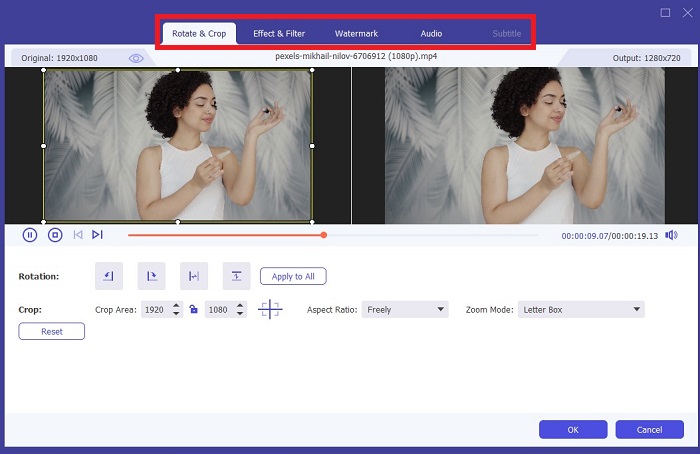
När du har laddat upp filen lägger du till färgjusteringarna genom att dra pilen. Det finns också förutbestämda filter för att lägga till en omedelbar effekt till din video.
Steg 4. Spara resultatet
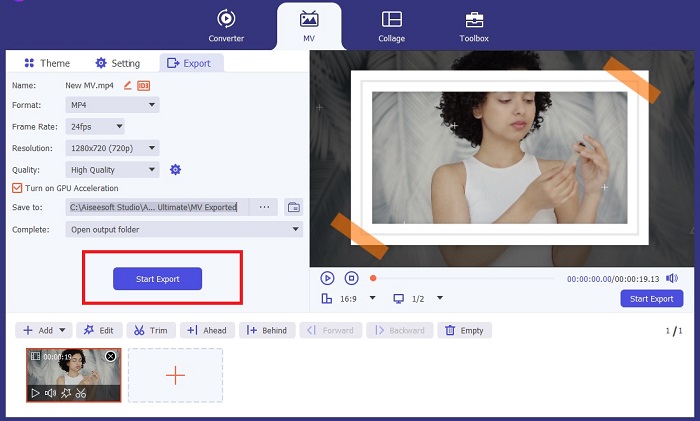
När du är nöjd med din färglagda video klickar du på knappen Export för att gå vidare till den sista processen. Ändra sedan filens fps, namn, upplösning och format och klicka på Start Export för att spara ditt resultat lokalt på datorn.
Del 2. Färglägg video online gratis
Onlineverktyg är bra sätt om du saknar lagringsutrymme för att installera offlineprogram. Med hjälp av AI-teknik kommer dina tråkiga videor eller foton att återupplivas direkt. PickFrom är en färgad video online gratis som hjälper användare att lägga till nyans till sina bilder med hjälp av en färgkalibreringsalgoritm. Det fungerar på de flesta webbläsare, inklusive Opera, Chrome, Safari och Internet Explorer. Utöver det är detta program 100% procent säkert och säkert, tack vare datakrypteringskanalerna, för att förhindra dataintrång.
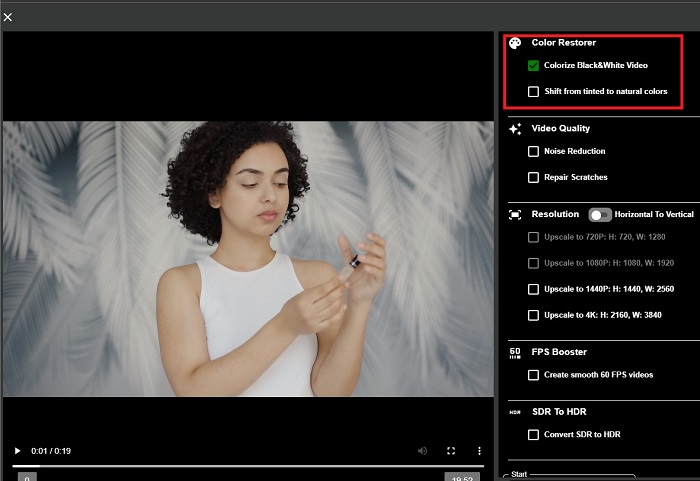
Steg 1. Öppna först din webbläsare och gå till PickFroms webbplats. Gå sedan till avsnittet Video Colorizer och klicka på Add Files för att ladda upp din råvideo.
Steg 2. Efter att videon har laddats upp visar verktyget automatiskt den AI-färglagda videoresultatet. Du kan också öppna Settings i Colorize Video-verktyget och välja upplösning för din fil mellan 780p och 1080p.
Steg 3. Välj till sist Output-format för filen genom att expandera fliken Format. Du kan välja mellan MP4, AVI och MKV. När du är nöjd med ditt resultat klickar du på knappen Start för att ladda ned din färglagda svartvita video.
Del 3. Färglägg video på mobilen
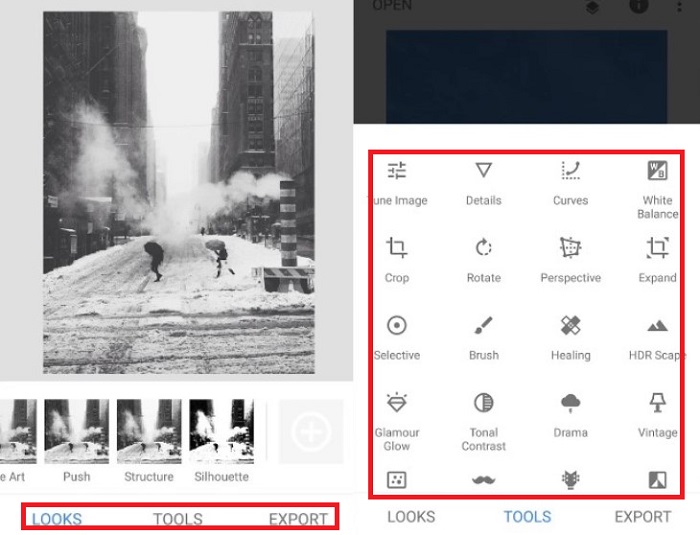
Vänd dina bilder på ett smart sätt genom att använda ett Google-utvecklat applikationsverktyg som heter Colorize! Som namnet antyder är det här programmet ett utmärkt val för iOS- och Android-användare när det gäller att applicera färger på dina inaktuella bilder. Utöver det kan du maximera appen för färgläggning av svartvit video genom att lägga till speciella filter och effekter till din utdata och genom att anpassa din utdatas urvalsförhållande. Här är snabbguiden för att lägga till färg till svartvit video med denna mobilapplikation.
Steg 1. Klicka på knappen Upload i programmet och välj den svartvita fil du vill fixa.
Steg 2. Under uppladdningen lägger verktyget automatiskt till färg i ditt projekt, och tiden det tar beror bara på dess längd eller storlek.
Steg 3. När den färglagda bilden visas kan du justera detaljerna i bilden genom att gå till avsnittet Enhance. Du kan justera nyans, mättnad och lyster i bilden. Därefter trycker du på knappen Download för att spara filen på din enhet.
Vidare läsning:
Effektiva lösningar för att göra videor ljusare på mindre än en minut
5 bästa videoredigerarna för Windows med tips för proffs och nybörjare [2023]
Del 4. Vanliga frågor om AI Colorize Video Software
Hur färglägger folk gamla videor?
Färgläggning av svartvita videor och foton nu är möjlig genom digitala manipuleringsverktyg, som videofärgare eller videoredigerare. Ibland måste du manuellt justera inställningarna för att uppnå dina önskemål eller använda ett AI-färgprogram för video.
Är det möjligt att färglägga svartvit video?
Defenitivt Ja! Att fixa den visuella tonen i dina bilder är 100% möjligt idag. Som ett råd är det bättre att normalisera dina videos färg innan du redigerar dem.
Varför måste jag färggradera video?
Färggradering är en viktig process som filmskapare måste utföra när de slutför sin produktion. Med denna process kan de uppnå en konsekvent färgton för att lägga till en enastående visuell effekt till sin publik.
Hur lång tid tar det att färglägga foton och videor?
Så länge du har rätt verktyg på din enhet kan du färglägga gamla foton och videor omedelbart. Å andra sidan, överväga din videos storlek och längd.
Är mina färgade videor korrekta?
Videofärgare ger dig en nästan exakt färg på videon. Du kan också be om vägledning från experter för att hjälpa dig att avgöra vad som är originalfärgen genom att kartlägga videon.
Slutsats
Och där har du det! Nu när du har lärt dig de tre bästa sätten att färglägga svartvit video med offline-, online- och mobilverktyg är det inte längre svårt att fatta beslut. Med en AI-videofärgläggare lägger verktyget automatiskt till färg i dina videor, men du kan fortfarande inte justera de viktigaste färginställningarna lika mycket som i offline-lösningar som Video Converter Ultimate.
-
 Problemfria metoder för att konvertera bilder till svartvitt
 Vill du få dina bilder att se nostalgiska ut? Vi har ett svar till dig. Det här inlägget kommer att erbjuda anmärkningsvärda sätt att konvertera en färgbild till svartvitt.
-
 En genomgångsguide: Bästa 7-volymsförstärkaren tillgänglig på alla plattformar
 Vill du veta vilka volymförstärkare som finns på PC, Mac, Online, Android och iOS? Läs sedan den här artikeln med olika verktyg du kan välja på.
-
 Top Instagram Video Resizers för att optimera ditt Instagram-innehåll
 Kolla in vår guide för att ändra storlek på videor för Instagram. Lär dig hur du polerar ditt innehåll och ökar engagemanget på världens mest populära sociala medieplattform.
