


 Video Converter Ultimate
 Skärminspelare
 Video reparation
[Komplett genomgång] 5 senaste MP3-klippare tillgängliga på Windows/Mac/Online
Vi vill ofta klippa ner ljudet vi lyssnar på och ställa in det som ringsignal, lyfta fram den viktiga delen eller beskära bort onödiga detaljer i ljudet. Även om det finns mängder av klippverktyg för alla plattformar är vissa ändå inte att lita på. Därför presenterar vi idag de klippverktyg vi har hittat på marknaden som du kan lita på, eftersom vi har testat alla dessa själva för att säkerställa att de är fria från skadlig kod och tillförlitliga. Innan vi valde ut dem följde vi en strikt och hög standard för användare som behöver ett pålitligt klippverktyg. För att du ska kunna surfa i full fart på nätet har vi nedan presenterat de fem MP3‑klipparna vi har hittat som är redo att klippa vilket ljudformat som helst.

Del 1. 2 Offline MP3 Cutter Softwares Windows & Mac
1. Video Converter Ultimate – Bästa MP3-klipparen [rekommenderas starkt]
Den bästa MP3‑ljudklipparen i den här listan är Video Converter Ultimate, som låter användare klippa vilket ljud som helst utan ansträngning. Med hjälp av detta ultimata verktyg kan du trimma ljudet för att ta bort oönskade partier, till och med slå ihop flera klippta ljudfiler till en enda fil och förstärka ljudet om du tycker att det är lite svagt. Dessutom erbjuder programvaran en ultrahög hastighet samtidigt som den tar hand om den ursprungliga ljudkvaliteten.
Till skillnad från alla fräsar, stöder detta verktyg ett brett spektrum av format, inte bara MP3 utan också FLAC, M4R, M4A, OGG, MKA, WAV, WMA och mer, och verkligen din ljudfil stöds här för att klippas. Kanske vet du inte hur du klipper din ljudfil och använder den för dina behov just nu. Idag är din lyckodag eftersom vi kommer att lära dig hur du använder MP3-klipparen och ringsignalsmaskinen gratis genom att följa handledningen nedan.
Steg 1. Ladda ner ljudklipparen till din dator genom att klicka på nedladdningsknappen nedan. Välj om du använder Windows eller Mac, installera programmet direkt och starta det. Kom ihåg att du behöver bekanta dig med verktygets gränssnitt, så blir det enklare att följa de kommande stegen.
Gratis nedladdningFör Windows 7 eller senareSäker nedladdning
Gratis nedladdningFör MacOS 10.7 eller senareSäker nedladdning
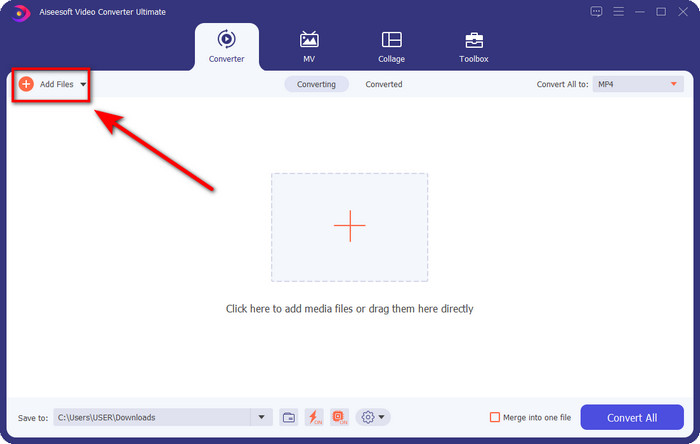
Steg 2. Dra ljudfilen du vill klippa till gränssnittet, eller klicka på Add Files och leta upp ljudfilen i datorns mapp som visas. Klicka på Open för att gå vidare till nästa steg.
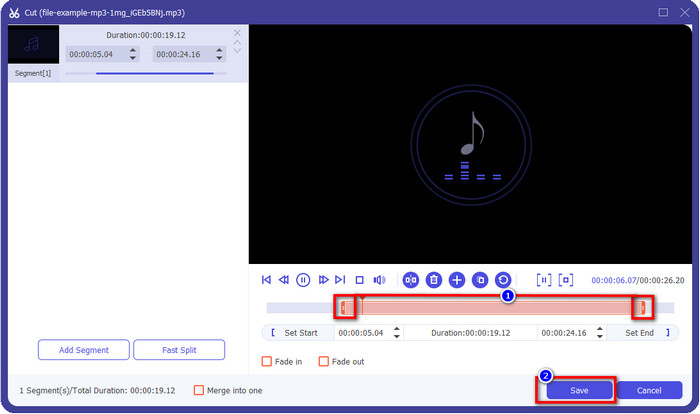
Steg 3. Efter att du har lagt in ljudfilen är det dags att klicka på knappen med saxikonet. Dra play in och play out till den längd du vill att ljudet ska ha. Kom ihåg att det markerade området mellan play in och play out är den enda del av ljudet som sparas. Tryck sedan på Save för att klippa ljudet.
Valfritt. Behöver du förstärka ditt ljud? Om så är fallet, klicka på trollstavs-knappen, justera volymreglaget genom att dra det uppåt och tryck på OK för att spara.
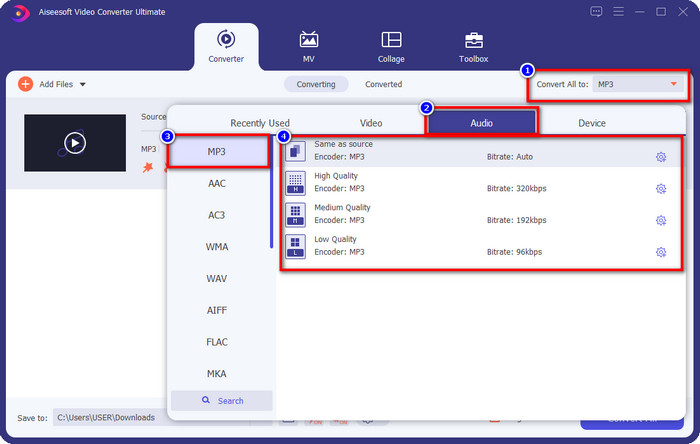
Steg 4. Gå till Convert All to, Audio och ställ in formatet på MP3. Även om du inte konverterar, kontrollera att namnet under Convert All to är MP3 och inte något annat format, så att du undviker att ändra filen till ett annat format.
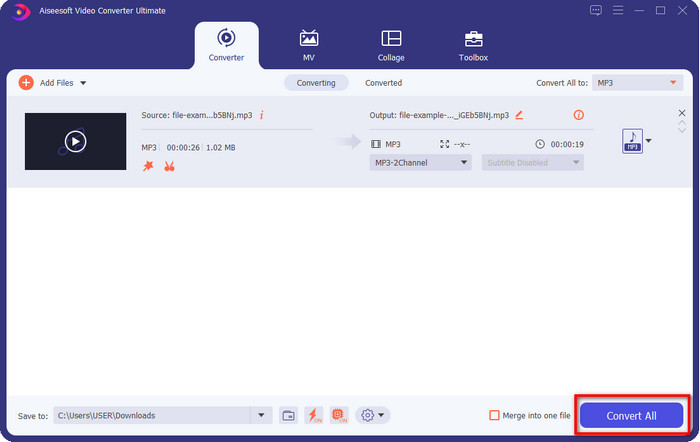
Steg 5. Genom att klicka på Convert All startar du sparandet av den klippta ljudfilen. Nu har du din ljudklippning klar med den bästa kostnadsfria MP3‑klipparen, så enkelt är det.
Fördelar
- Det kan klippa ditt ljud så snabbt som möjligt och bearbeta det på under en sekund.
- Avancerade funktioner är tillgängliga för att öka volymen.
- Den stöder alla operativsystem som Windows eller Mac.
- Sammanfoga flera ljudfiler är möjligt med ljudsammanslagningen av detta verktyg.
Nackdelar
- Att köpa verktyget behövs.
2. Fräckhet
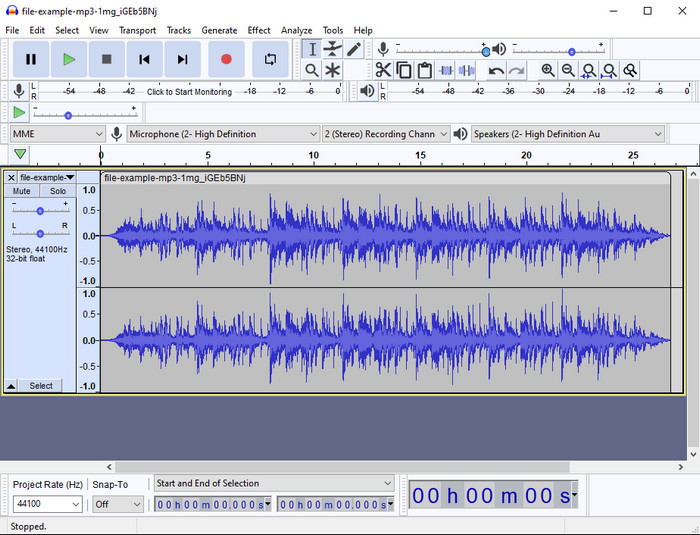
Audacity har under årens lopp erbjudit professionella redigeringsfunktioner för ljud. Den här appen är gratis att ladda ner och låter användare göra mixning med flera spår. Den är känd för att användas av poddare för att enkelt spela in och redigera poddar. Vissa av funktionerna är dock svåra att förstå, särskilt om du inte är van vid att använda specialiserad programvara som denna.
Även om du fortfarande kan lära dig hur man använder den, kommer det att ta tid att använda den här MP3-ljudtrimmerns fulla potential, och för att klippa ljud är det rättvist att säga att det klipper omedelbart och utan ansträngning om du behöver det.
Fördelar
- Gratis att ladda ner i alla program som Windows och Mac.
- Avancerade och professionella ljudredigerare finns tillgängliga för att få ditt ljud att låta bra.
- Det är bäst för att spela in podcaster och mer.
Nackdelar
- Många konkurrenter tillhandahåller ett användarvänligt användargränssnitt.
- Inte det bästa valet för nybörjare för ett omedelbart resultat av klippning och andra redigeringsändamål.
- Vissa rapporter visar att din data samlas in om du använder det här verktyget, men det finns inga starka bevis ännu.
Del 2. 3 Tillgängliga MP3-klippare online på webben
1. mp3cut.net
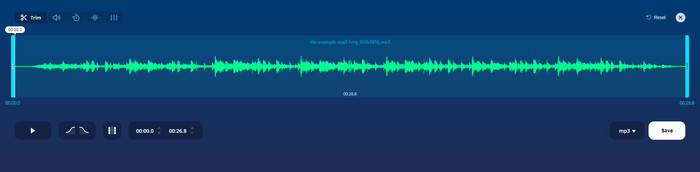
Du kan använda mp3cut.net om du behöver en MP3-skärare online för jobbet. Efter att ha laddat upp filen i denna onlineskärare kan du nu ta bort ljudet du vill rita på din ljudfil. Dessutom har verktyget också några mindre redigeringsfunktioner för att ändra hastigheten och tonhöjden på ljudet om du behöver.
Även om det har den här typen av förmåga kraschar verktyget för det mesta och kan inte spela upp ljudet för att lyssna om du klipper det korrekt. Så för att använda den igen måste du uppdatera din webbläsare och upprepa justeringen du gjorde om igen.
Fördelar
- Användarvänlig och tillgänglig via internet.
- På punkt, funktioner som hjälper dig att klippa ljud.
- Grundläggande redigeringsfunktioner är tillgängliga.
Nackdelar
- Den har annonser i webbgränssnittet.
- Ibland kraschar den och måste laddas om igen för att kunna använda den.
2. audiotrimmer.com
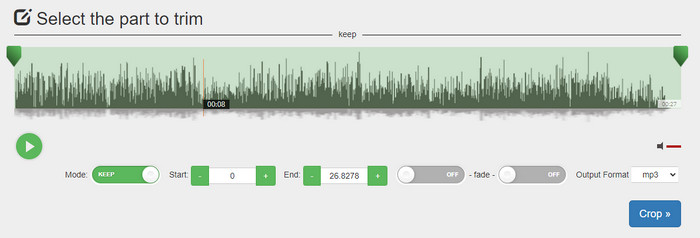
Ett annat kostnadsfritt MP3‑klippverktyg online är audiotrimmer.com. Det här verktyget erbjuder lättbegripliga och raka klippningsfunktioner; alla funktioner i verktyget är precisa. Med det kan du välja om du vill behålla en del av ljudet eller ta bort den. Dessutom har det en fade in- och fade out‑effekt precis som de andra trimmarna som nämns här. När vi testade fade in- och fade out‑effekten fungerade den dock inte; det lades inte till några effekter på vårt ljud. Men om du vill göra enkel klippning är detta ett webbaserat verktyg du absolut bör prova.
Fördelar
- Gratis och tillgänglig i alla webbläsare.
- Lätt att använda för att trimma ljud.
- Det har tona in och ut effekter.
Nackdelar
- Tona in och ut fungerar inte bra.
- Det finns många irriterande annonser om du kommer åt dem. Så var försiktig så att du inte klickar på dem.
3. Clideo

Ett av de bästa onlineverktygen för att klippa och slå ihop MP3‑filer är Clideo. De flesta användare gillar och föredrar detta verktyg på grund av dess redigeringsmöjligheter. Dessutom kan du också lägga till fade in och fade out på din ljudfil om du behöver det. Men efter export och uppspelning lades ingen fade in eller fade out till på vår ljudfil. Vi stötte på ett mindre problem med detta verktyg: uppladdning och nedladdning av filen. Till skillnad från det förstnämnda verktyget tar det tid att ladda upp ljud i dess klippare, och ibland misslyckades vi med att ladda upp ljudfilen här av okända skäl.
Även om vi stöter på några problem, är det fortfarande den bästa skäraren online, och den är också säker att använda.
Fördelar
- Bästa onlineskärare online.
- Professionellt användargränssnitt.
- Lätt att använda.
Nackdelar
- Processen att ladda upp och ladda ner kommer att ta för mycket av din tid.
- Tona in och ut fungerar men inte bra.
Del 3. Vanliga frågor om MP3 Cutters
Vilken är den bästa MP3-trimmern på Mac?
FVC Video Converter Ultimate finns även för Mac. Så om du behöver trimma ditt ljud på Mac bör du ladda ner det ultimata verktyget för att hantera dina ljudfiler på rätt sätt. Det ultimata verktyget är inte bara utmärkt för att klippa ditt ljud, du kan också förbättra ljudet genom att förstärka det. Dessutom, om du behöver hjälp med att konvertera, slå ihop, synka ljud med mera, rycker det ultimata verktyget in. Om du behöver veta mer om det ultimata verktyget ska du läsa detaljerna som presenterats ovan.
Minskar storleken av trimning av ljudet?
Filstorleken på ljudet minskar efter att du trimmat det. När vi jämförde den ursprungliga ljudfilen med klippfilen såg vi några förändringar i höjden. Så det betyder att ju kortare ljudfilen är, desto mindre storlek, men om din ljudfil har en mycket lång, förvänta dig att storleken också är betydande.
Kan jag använda Audacity för att slå samman flera ljud?
Ja, det kan du, Audacity stöder sammanslagning av flera ljudspår till en fil. Det är dock svårt, särskilt om du inte har en tydlig handledning att följa. Så om du behöver slå ihop ljud via Audacity kan du klicka på den här länken och lära dig hur man gör.
Slutsats
MP3‑klipparna som presenteras här har redan klarat de standarder vi satte upp för att kunna erbjuda dig de bästa verktygen för trimning. Den här artikeln visar hur viktigt det är att välja rätt och lämplig klippare utifrån dina behov. Även om verktygen här har samma grundfunktion erbjuder FVC Video Converter Ultimate en betydligt mer effektiv ljudklippning. Enligt vår forskning överträffar det ultimata verktyget alla standarder vi ställt upp. Så om du vill ha en toppklassig klippare i din hand är detta det bästa valet bland alla verktyg som finns på marknaden. För bra för att vara sant? Då bör du ladda ner verktyget och testa själv.
-
 Hur man klipper och slår samman låtar online - 4 bästa sätten du borde veta
 När du vill klippa och slå samman låtar online för att skapa ett musikstycke kan du lära dig mer om de 4 bästa onlineverktygen för att klippa låtarna och kombinera filer från artikeln.
-
 Upptäck den bästa MP4 -trimmern med procedur och information
 Vill du lära dig hur man klipper videor som de vloggare du tittar på? Fortsätt sedan att läsa det här inlägget för att veta vilka MP4-trimmers du kan använda.
-
 Nedladdning av MP3-spelare – 10 bästa gratis MP3-musikspelare från 2025
 Vad är den bästa MP3-musikspelaren? Hur lägger jag musik på en MP3-spelare? Hur laddar jag ned MP3-spelaren? Det här inlägget ger dig en detaljerad genomgång av de 10 bästa gratis MP3-spelarna för Windows PC och Mac.
