


 Video Converter Ultimate
 Skärminspelare
 Video reparation
 Säker nedladdning
Ta bort Bandicam-vattenstämpeln med de 3 bästa vattenstämplarna att använda
Bandicam är ett verktyg som alla gillar att använda, särskilt för att filma allt som händer medan du spelar, är i ett möte, tittar på något och liknande. Till skillnad från andra konkurrenter inom skärminspelning kan den här skärminspelaren hjälpa dig att spela in video i 480 FPS med DirectX/OpenGL/UWP/Vulkan-hookning och annan avancerad accelerationsteknik. Även om du inte har köpt premiumversionen kan du fortfarande använda den och spela in video i 60 eller 120 FPS, helst högt, men med en vattenstämpel. Sättet du kan spara en video i Bandicam utan vattenstämpel är genom att köpa fullversionen.
Lyckligtvis kan verktygen vi inkluderar i den här artikeln ta bort vattenstämpeln som Bandicam lägger till i den exporterade videon. Vill du veta vad dessa är? Då måste du fortsätta läsa den här artikeln för att förstå idén!

Del 1. Hur man tar bort Bandicam Watermark med hjälp av de 3 mest effektiva Watermark Remover
FVC Video Converter Ultimate
Det mest effektiva sättet att ta bort Bandicams vattenstämpel är att använda ett verktyg som kan hjälpa dig, som FVC Video Converter Ultimate. Det här verktyget kan upptäcka vattenstämpeln i din video genom att du placerar markeringsrutan över vattenstämpeln, och vips är den borta. Det fungerar som magi; det kommer inte att finnas några spår av vattenstämpeln i videon när du exporterar filen. Du kan nu äntligen njuta av att titta på inspelningen du gjorde i Bandicam utan att loggan är i vägen.
De mest troliga funktionerna i det här verktyget är konverterare, förbättrare, redigerare på Toolbox och mer. Du kan ha alla dessa funktioner och funktioner om du använder det här verktyget och laddar ner det på skrivbordet just nu. För att lära dig hur du tar bort Bandicam-vattenstämpeln med denna ultimata programvara kan du följa den kompletta skriftliga handledningen vi lägger till nedan.
Steg 1. Först och främst måste du ladda ner den officiella programvaran till din dator genom att klicka på nedladdningsknappen vi lagt till här. Du behöver inte oroa dig eftersom nedladdningslänken är säker för både Windows- och Mac-användare. När filen har laddats ner klickar du på den för att installera, följer WinRAR-installationsprocessen och klickar på Starta nu för att öppna verktyget.
Gratis nedladdningFör Windows 7 eller senareSäker nedladdning
Gratis nedladdningFör MacOS 10.7 eller senareSäker nedladdning
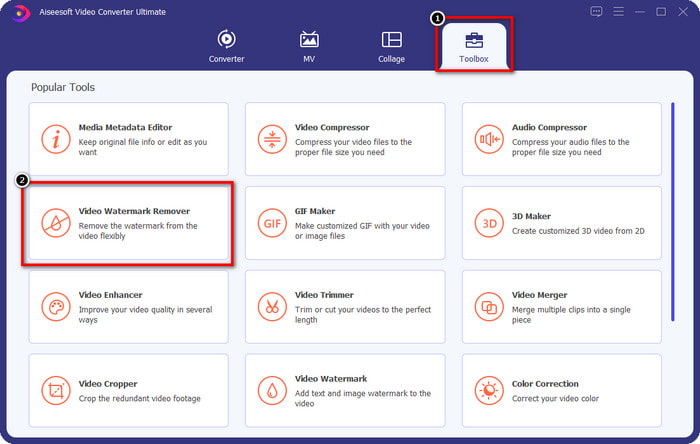
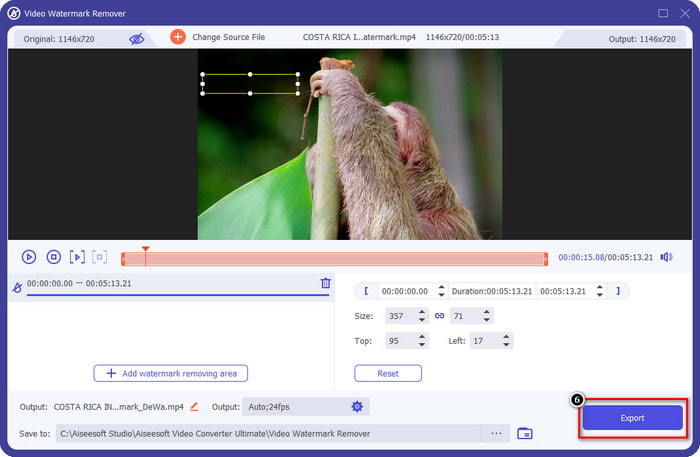
Steg 2. I verktygets huvudgränssnitt måste du gå till Verktygslåda, och därunder ser du Video Watermark Remover; klicka på den för att öppna funktionen.
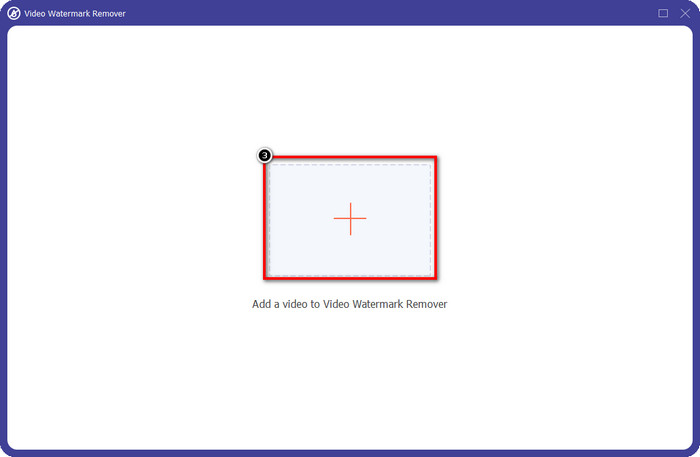
Steg 3. Ett nytt fönster visas på skärmen; klicka på +-ikonen för att ladda upp videofilen som har en vattenstämpel. Leta reda på videofilen på din lokala disk och klicka sedan på Öppna.
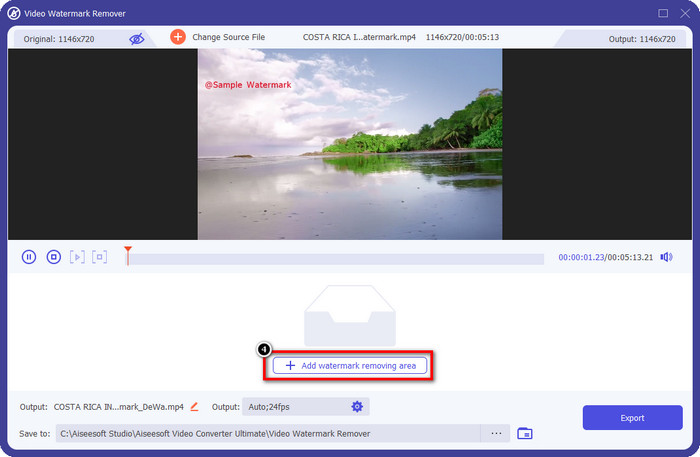
Steg 4. Efter allt detta klickar du på Add Watermark Removing Area för att börja använda funktionen så att du kan få Bandicam-videor utan vattenstämpel.
Steg 5. I förhandsgranskningen placerar du markeringsrutan över vattenstämpeln; du kan ändra storlek på den så att rutan passar vattenstämpeln.
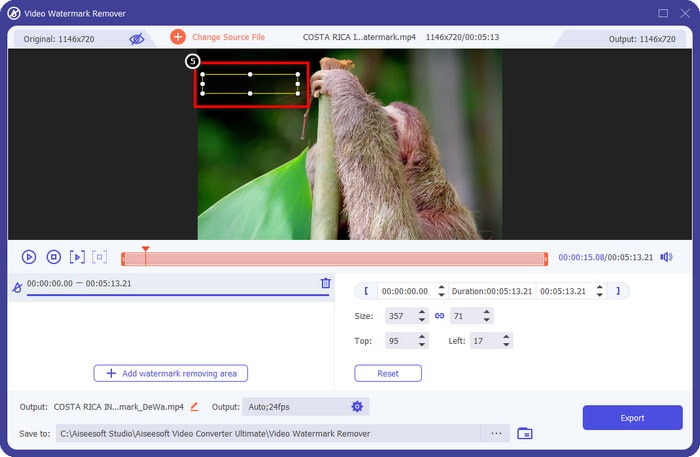
Steg 6. När du har placerat markeringsrutan över vattenstämpeln klickar du på Export för att ladda ner videon utan den vattenstämpel som Bandicam lägger till.
Ta bort logotypen nu!
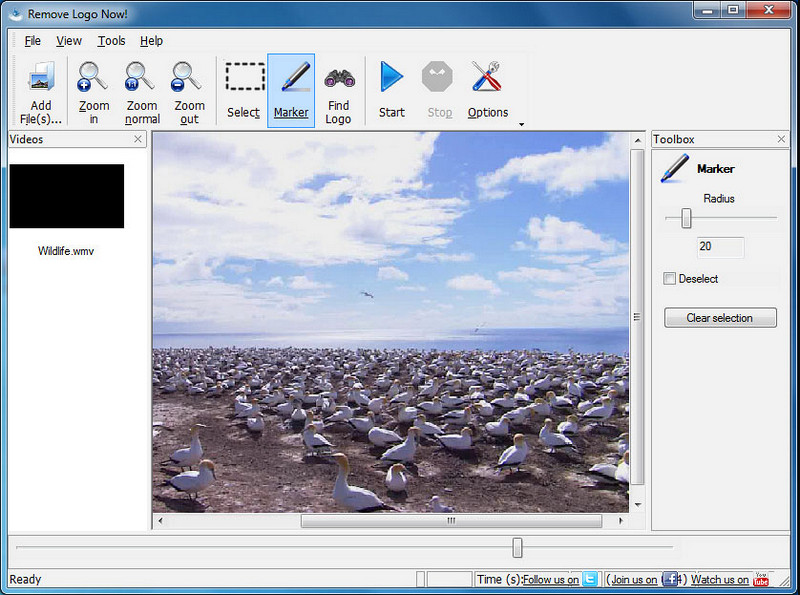
Remove Logo Now! är ett komplett verktyg för att ta bort vattenstämplar som du kan använda för att eliminera logotyper som sitter fast på dina videor. Detta verktyg kan automatiskt upptäcka vattenstämplar med hjälp av algoritmer, men du kan också spåra vattenstämpeln manuellt. Du kan använda verktyget för att ta bort vilken typ av vattenstämpel som helst utan ansträngning. Programvaran är dock begränsad till Windows-användare och gränssnittet är något föråldrat. Men om du vill prova det på din Windows-dator visar vi hur du tar bort Bandicams vattenstämpel gratis.
Steg 1. Du kan besöka dess webbplats för att ladda ner Remove Logo Now! Kontrollera gärna webbplatsens säkerhet för att se om det verkligen är den officiella webbplatsen för det här verktyget.
Steg 2. Öppna programvaran du installerade och klicka sedan på File för att ladda upp Bandicam-videon med en vattenstämpel.
Steg 3. Nu när videon är uppladdad klickar du på alternativet Find Logo för att automatiskt upptäcka vattenstämpeln i din video.
Valfritt: Om Find Logo inte kunde upptäcka vattenstämpeln i din video bör du använda Marker för att manuellt markera vattenstämpeln och sedan klicka på Clear Selection för att ta bort den.
Steg 4. Klicka på alternativet Start för att exportera videon och få en version av din inspelning utan Bandicams vattenstämpel.
Apowersoft Online Watermark Remover
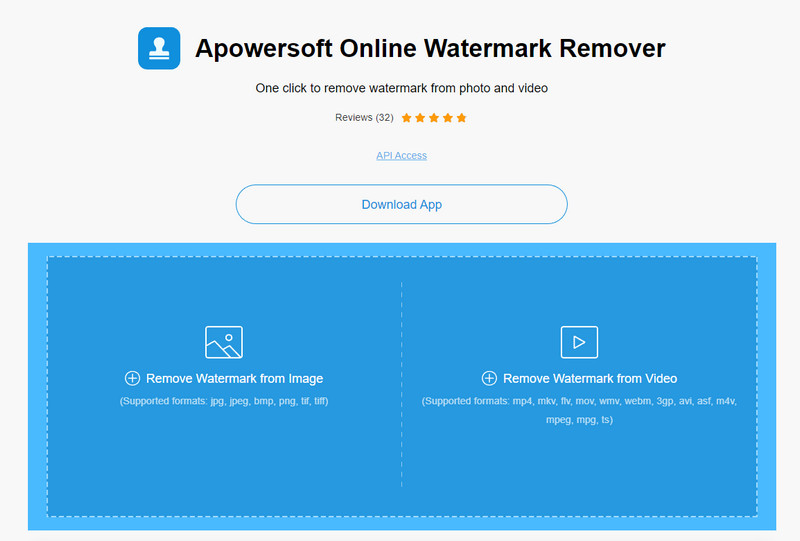
Apowersoft Online Watermark Remover är ett pålitligt och nedladdningsfritt verktyg som du kan använda för att effektivt bli av med vattenstämplar på bilder och videor. Verktyget är välkänt för sina funktioner för borttagning av vattenstämplar eftersom det gör jobbet utan att lämna rester i den exporterade videon. Även om det är ett webbaserat verktyg kommer du inte att uppleva någon försämring av videokvaliteten när den exporteras. I stället för att köpa Bandicams fullversion utan vattenstämpel kan du gå direkt till stegen nedan för att ta bort den.
Steg 1. Gå till din favoritwebbläsare och sök efter namnet på detta vattenstämpelborttagningsverktyg online.
Steg 2. Här kommer du att ha två alternativ: klicka på Remove Watermark from Video. Välj videofilen som har Bandicams logotyp på din disk och tryck sedan på Öppna. Vänta på uppladdningsprocessen; den kan ta tid, särskilt om videon är lång.
Steg 3. Rita en markeringsruta på videon och se till att vattenstämpeln är innanför den rektangulära formen.
Steg 4. Klicka på Erase för att ladda ner videofilen; nu är vattenstämpeln borttagen.
Relaterat:
Hur man tar bort vattenstämpeln från Renderforest‑exporterade videor
Hur man tar bort Viva Video‑vattenstämpeln på videor
Del 2. Vanliga frågor om hur man tar bort Bandicam Watermark
Har Bandicam ett vattenstämpel?
För de användare som använder den kostnadsfria provperioden kommer det att finnas en vattenstämpel när du exporterar den. För att undvika detta problem kan du köpa verktyget på Bandicams officiella webbplats.
Finns det begränsningar när du använder gratisversionen av Bandicam?
Det finns många begränsningar om du använder gratisversionen av Bandicam, 10 minuters inspelning, vattenstämpel, 60 till 120 FPS som stöds, filformat och bearbetningshastigheten. Även om detta kan vara ett problem för de flesta anses det fortfarande vara en av de bästa skärminspelare du kan använda på din Windows.
Hur tar man bort vattenstämpeln på Bandicam?
Det finns inget annat sätt att ta bort vattenstämpeln på Bandicam, och det är det genom att köpa proversionen av det. Öppna den officiella webbplatsen för Bandicam, klicka på Get Full Version, välj den licens du vill ha och klicka på Köp nu.
Slutsats
Bandicam är faktiskt en förstklassig skärminspelare som du kan använda gratis. Men en sak är säker; med gratisversionen kommer en vattenstämpel att läggas till på den exporterade videon. Med sätten vi lägger till i den här artikeln kan du framgångsrikt ta bort vattenstämpeln med den perfekta vattenstämpelborttagaren som kan vara ditt val. Vad händer om du inte vill använda ett verktyg för att ta bort vattenstämpeln? Sedan föreslår vi att du köper Bandicam för att ta bort vattenstämpeln på videorna. Det kommer att kosta dig, men proversionen är värd att använda. Vi hoppas att den här artikeln ger den information du behöver för att ta bort vattenstämpeln på Bandicam.
-
 Komplett genomgång av de effektiva PlaceIt-vattenmärkesborttagningarna [2022]
 PlaceIt-vattenstämpelborttagaren vi granskar här är effektiva verktyg du kan använda för att ta bort vattenstämpeln på videon du exporterar på PlaceIt.
-
 5 sätt att ta bort B612 vattenstämpel med de bästa verktygen
 Vill du veta hur man tar bort B612 vattenstämplar från dina foton? Du kan enkelt ta bort vattenstämpeln B612 från dina bilder med dessa enastående verktyg.
-
 Enkla steg för hur man tar bort WOW Slider Watermark [Löst]
 WOW Slider är en app för att skapa ett fantastiskt bildspel. Däremot bäddar den in vattenstämplar på sin produktion. Läs nedan för att lära dig hur du tar bort vattenstämpeln WOW Slider.
