


 Video Converter Ultimate
 Skärminspelare
 Video reparation
 Säker nedladdning
Outmanande metoder för hur man tar bort iSkysoft-logotypen från video
iSkysoft är ett utmärkt program med många fantastiska funktioner som gör att det sticker ut från andra alternativ. Det är ett enkelt program som låter dig konvertera videoformat till ett annat format och utföra grundläggande videoredigering. Men det tråkigaste med den här programvaran är att du får en stor iSkysoft-vattenstämpel på dina videor efter att du har använt programmet. Att ha en stor vattenstämpel/logotyp på videon är inte alls tillfredsställande att titta på. Som tur är finns det pålitliga program du kan använda för att ta bort störande objekt som iSkysofts logotyp/vattenstämpel. Du bör läsa den här artikeln om du är ivrig att hitta de bästa metoderna för att ta bort iSkysoft-logotypen från din video.

Del 1: Ta bort iSkysoft-logotypen från video på skrivbordet
iSkysoft-logotypen på skärmen är verkligen irriterande, särskilt när du tittar på dina favoritvideor. Men du behöver inte oroa dig längre. Du kan bli av med logotypen med hjälp av Video Converter Ultimate. Denna pålitliga programvara kan hjälpa dig att ta bort iSkysoft-logotypen från dina videor på två enkla sätt: verktyget Video Watermark Remover och verktyget Video Cropper. Med dessa verktyg kan du enkelt ta bort iSkysoft-logotypen från din video. Om en iSkysoft-logotyp finns i ett hörn av videon rekommenderas att du använder verktyget Video Cropper. Men om logotypen är placerad i den centrala delen kan du använda verktyget Video Watermark Remover. På så sätt kan du titta på dina favoritfilmer eller -videor utan att störas av logotypen.
Dessutom, förutom att ta bort vattenstämplar från dina videor, har Video Converter Ultimate fler funktioner. Den har en videoförstärkare, videosammanslagning, cropper, trimmer, rotator, konverterare och mer. Dessutom är en av huvudfunktionerna i denna applikation att konvertera olika videofilformat. Icke-professionella användare kan också använda denna applikation eftersom den har ett enkelt gränssnitt. Om du vill lära dig hur du tar bort iSkysoft-logotypen från din video kommer vi att visa dig de två enkla sätten som denna applikation erbjuder.
Använder Video Watermark Remover
Steg 1: Du måste först ladda ner Video Converter Ultimate till din dator för att använda denna utmärkta programvara. När du har laddat ner den följer du installationsprocessen och startar programmet.
Gratis nedladdningFör Windows 7 eller senareSäker nedladdning
Gratis nedladdningFör MacOS 10.7 eller senareSäker nedladdning
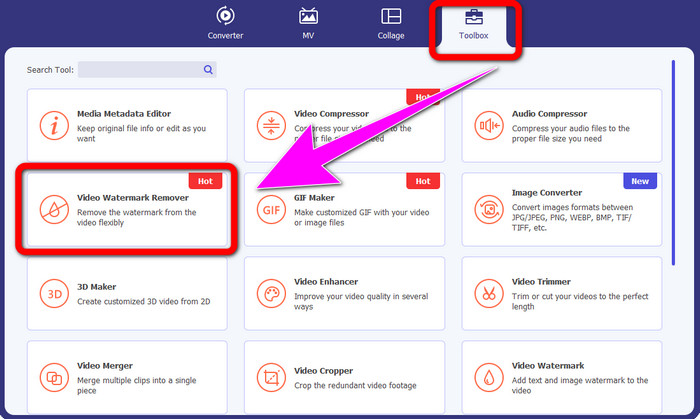
Steg 2: När du har startat programvaran går du vidare till panelen Toolbox och väljer verktyget Video Watermark Remover. Förvänta dig att ett nytt gränssnitt visas på skärmen.
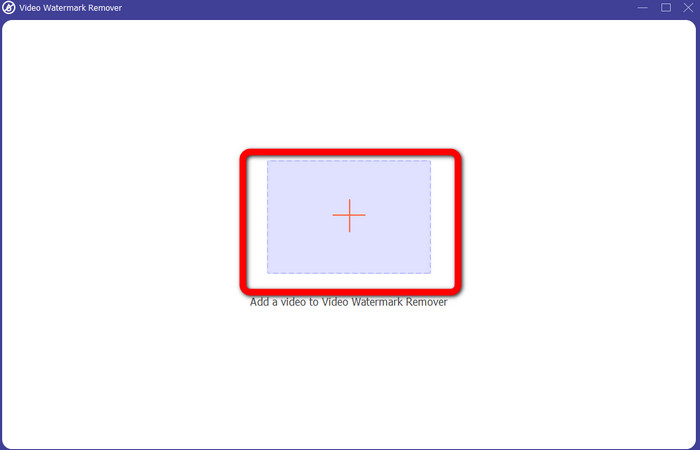
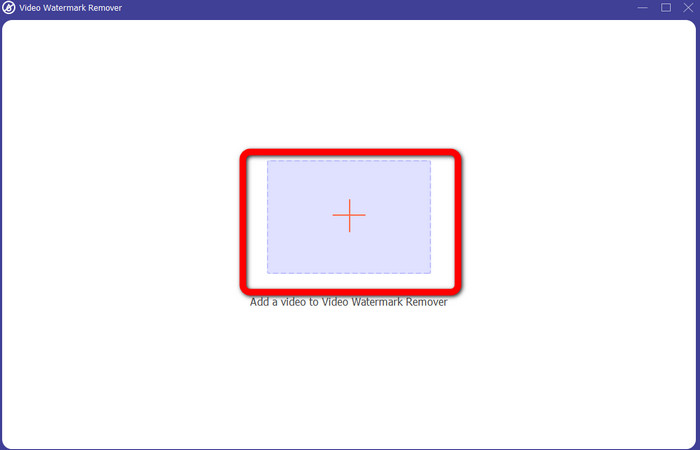
Steg 3: När du ser det nya gränssnittet klickar du på plusikonen och lägger till din video med iSkysoft-logotypen som du vill ta bort.
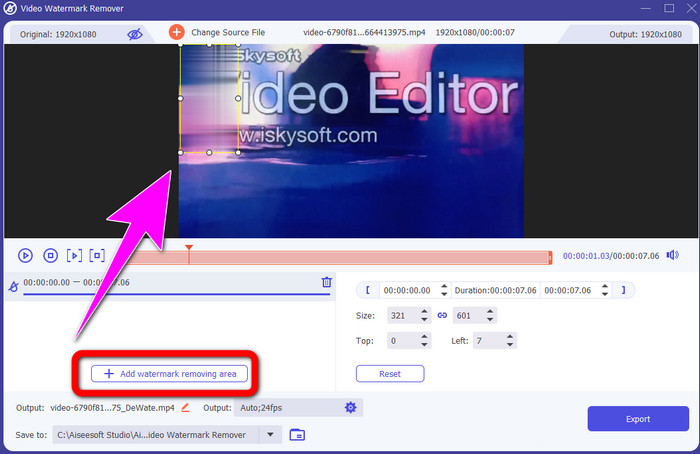
Steg 4: Klicka sedan på knappen Add Watermark Removing Area. Flytta rutan på videon och täck över iSkysoft-logotypen.
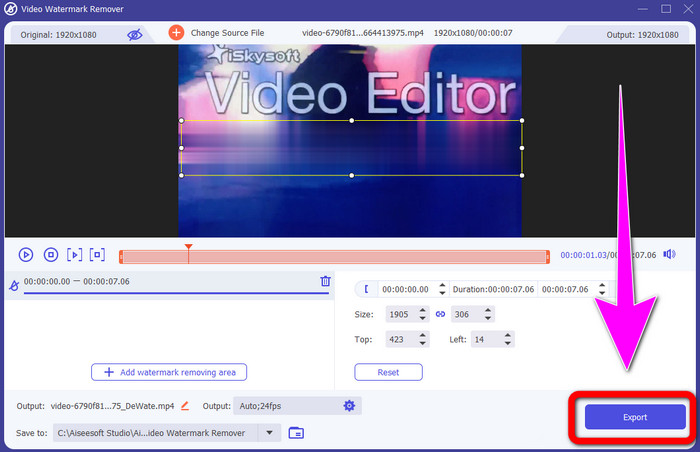
Steg 5: Klicka slutligen på knappen Export för att spara din slutliga video.
Använda Video Cropper
I den här delen kommer vi att visa dig hur du tar bort iSkysoft-logotypen från din video med hjälp av verktyget Video Cropper.
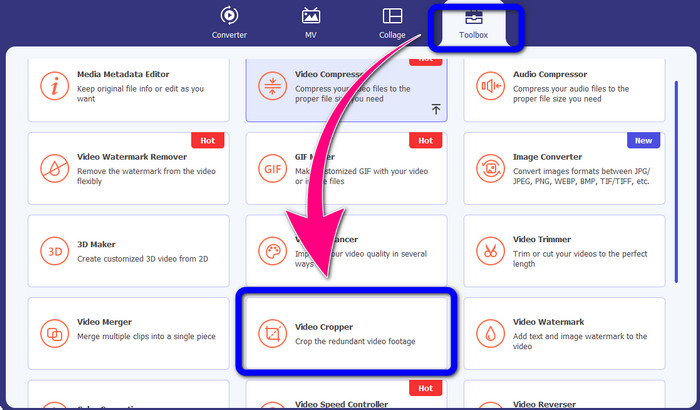
Steg 1: Kör programmet på din dator. Under panelen Toolbox ska du klicka på verktyget Video Cropper. Precis som med verktyget ovan kan du förvänta dig att ett nytt gränssnitt visas på skärmen.
Steg 2: Klicka på knappen Plus för att importera din video med iSkysoft-logotypen.
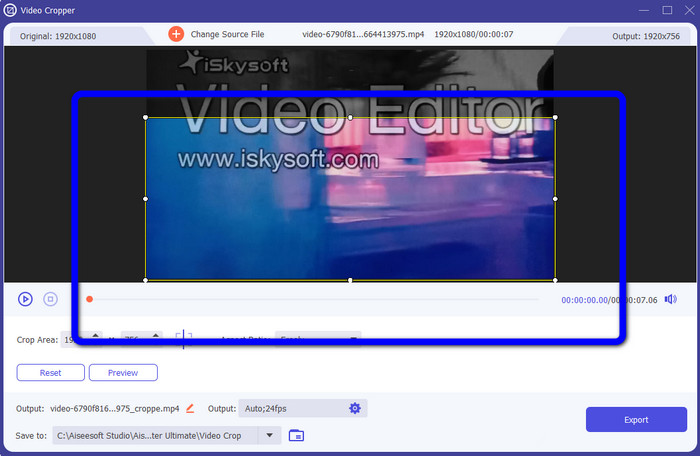
Steg 3: I det här steget kan du nu beskära videon för att ta bort iSkysoft-logotypen från din video. Använd musen för att flytta videons kanter.
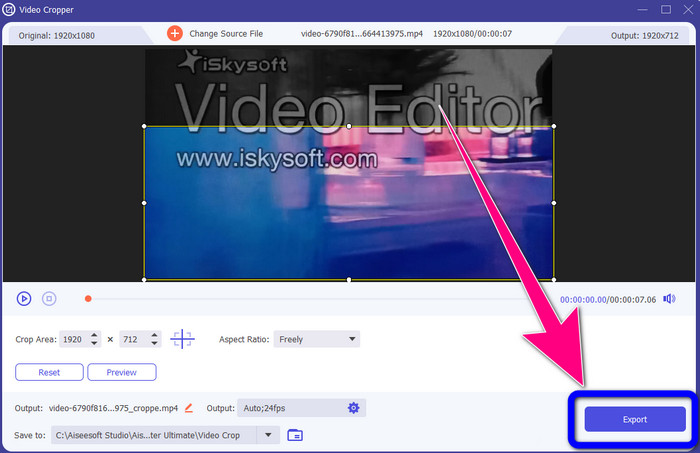
Steg 4: För det sista steget klickar du på knappen Export och sparar ditt resultat på datorn.
Del 2: Hur man tar bort iSkysoft-logotypen från video online
Använder HitPaw
Du kan också ta bort iSkysoft-logotypen online. Ett av de bästa verktygen du kan använda är HitPaw. Denna onlineapplikation kan enkelt ta bort logotypen från din video. Du kan använda den både på dator och online, vilket är bekvämt för alla. Dessutom är HitPaw säker att använda. Den säkerställer att videor kan redigeras och bara ses av dig själv. Dessutom behöver du inte oroa dig för begränsningar i denna programvara. Det finns inga gränser när det gäller att ta bort logotyper från dina videor. Du behöver inte köpa programmet eftersom det är gratis. Men om du tar bort logotypen eller någon
onödiga element från din video måste du vänta lite längre. Denna applikation har en långsam borttagningsprocedur, vilket är tidskrävande för användarna. Det beror också på din internetanslutning. Det kommer att fungera bra om du har en snabb anslutning. Men om du har en långsam anslutning, förvänta dig en viss fördröjning. Följ de enkla stegen nedan för att ta bort iSkysoft-logotypen från dina videor.
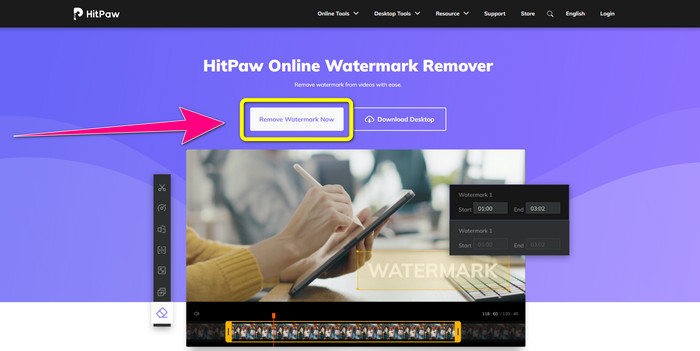
Steg 1: Besök webbplatsen för HitPaw. Klicka på knappen Remove Watermark Now - Choose File för att lägga in din video med iSkysoft-logotypen som du vill ta bort.
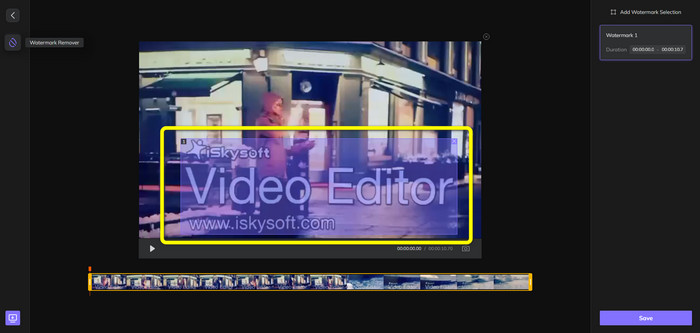
Steg 2: När du har bifogat din videofil visas en blå ruta på skärmen. Använd den här rutan för att täcka iSkysoft-logotypen. Du kan ändra storlek på rutan.
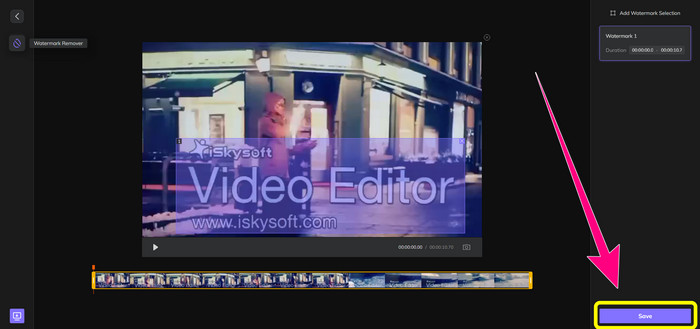
Steg 3: När du är klar med att täcka iSkysoft-logotypen i videon klickar du på knappen Save. Vänta på borttagningsprocessen och spara din video.
Använda Video Watermark Remover Online
Ett annat onlineverktyg du kan använda är Video Watermark Remover Online. Med den här applikationen kan du ta bort iSkysoft-logotypen från dina videor. Det är också en lättanvänd programvara, vilket passar icke-professionella användare. Du kan dessutom ta bort irriterande element från dina videor utan att förlora videokvaliteten. Men om du använder gratisversionen finns det en begränsning i hur många logotyper som kan tas bort från dina videor. Du kan bara ta bort logotyper eller vattenstämplar från 5 videor. Du måste köpa en prenumeration om du vill lägga till fler videor med Video Watermark Remover Online. Dessutom kan du inte spara ditt resultat i ett annat format. Du kan bara spara det i samma format, vilket inte är idealiskt. Slutligen har det en långsam filbearbetning. Följ de enkla anvisningarna nedan för att ta bort iSkysoft-logotypen från dina videor.
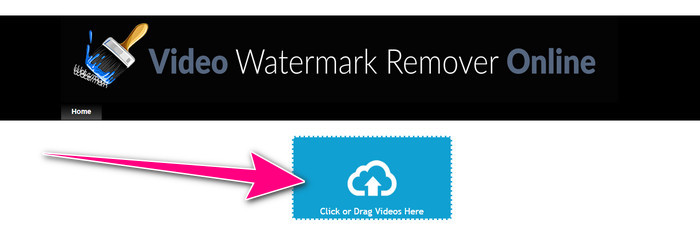
Steg 1: Gå till webbplatsen för Video Watermark Remover Online. Välj knappen Click or Drag Videos Here för att importera din videofil med iSkysoft-logotypen som du vill ta bort.
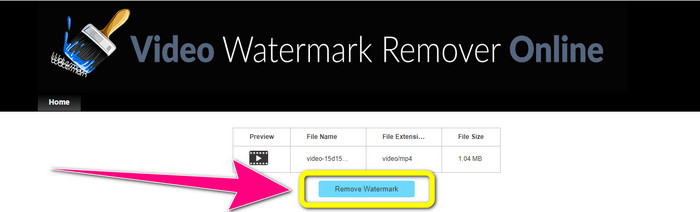
Steg 2: Klicka sedan på knappen Remove Watermark och vänta på borttagningsprocessen.
Relaterat till:
Snabbaste sättet att ta bort logotyp från video i Adobe Premiere Pro
Hur man tar bort logotyp från video med Windows Movie Maker
Del 3: Vanliga frågor om att ta bort iSkysoft-logotypen
Kan du ta bort en logotyp från en bild?
Ja, du kan använda FVC Free Watermark Remover för att ta bort logotypen från din bild enkelt och snabbt.
Är det olagligt att ta bort vattenstämpeln?
Enligt US Copyright Act, avsnitt 1202, är det olagligt att ta bort vattenstämplar utan ägarens tillåtelse.
Hur tar jag bort logotypen gratis?
Du kan använda den kostnadsfria testversionen av Video Converter Ultimate för att ta bort en logotyp från din video gratis.
Slutsats
Den här artikeln har gett utmärkta metoder för att ta bort iSkysoft-logotypen från din video med hjälp av verktyg för både dator och online. Men om du vill hitta en utmärkt logotypborttagare du kan använda, kan du ladda ner Video Converter Ultimate. Denna applikation erbjuder en snabb borttagningsprocess. Den är också lättillgänglig för alla användare.
-
 8 Enastående Video Watermark Removers online och offline
 Om du letar efter den bästa gratis programvaran för borttagning av videovattenstämplar du kan använda på dina Windows-, Mac-, iPhone- och Android-telefoner, är den här artikeln för dig
-
 Bästa metoderna för hur man tar bort Biteable Watermark från video
 Den här artikeln kommer att visa dig en mest pålitlig och fantastisk vattenstämpelborttagare. Dessa underbara applikationer hjälper dig att lösa den här typen av problem
-
 Lättlärda procedurer för att ta bort logotyp från video
 Letar du efter den bästa och enkla borttagningen av videologotyp? Då är den här artikeln bra för dig. Ta chansen att lära dig hur du tar bort en logotyp från en video.
