


 Video Converter Ultimate
 Skärminspelare
 Video reparation
 Säker nedladdning
Hur man tar bort iStock-vattenmärket på videor och bilder effektivt med steg
När du behöver ha en licensierad fil med visuellt media till hands kan du gå in på iStock för att ladda ned dessa filer. Alla kan inte använda webbplatsen gratis, vilket innebär att du måste köpa bilden med riktiga pengar. Även om du kan ladda ned filen här gratis, kommer det att läggas till en vattenstämpel i filen du laddar ned. Genom att lägga till en standardvattenstämpel på filen gör webbplatsen anspråk på att filen tillhör iStock. Blir du inte irriterad på vattenstämpeln? Om du känner likadant, läs den här bloggen ända till slutet så visar vi lösningen vi hittade på internet. Vi lägger också till vilka planer du kan skaffa på den nämnda webbplatsen och hur du tar bort iStock‑vattenstämpeln i varje fall.

Del 1. Hur man tar bort iStock Watermarkon videor och bilder med de 3 hjälpsamma sätten
1:a vägen. Köpa en kredit på iStock
Låt oss börja med att köpa kredit på iStock. Kredit på iStock är en valuta; denna webbplats känner igen krediten som motsvarar dina pengar. Du kan använda kredit för att köpa vilken fil som helst med ett visst belopp. Du kan spara iStock-bilder utan vattenstämpel om du köper en kredit. För att veta hur du gör det kan du helt läsa stegen vi lägger till nedan för att hjälpa dig hur du gör det.
Steg 1. Öppna den officiella webbplatsen och logga in på ditt konto där. Om du inte har skapat ett konto kan du göra det innan du köper den kredit du behöver.
Steg 2. På webbplatsen klickar du på Pricing för att se vilka planer det här verktyget erbjuder.
Steg 3. Det kommer att finnas en lista över krediter du kan köpa, välj hur många krediter du vill ha och klicka sedan på Purchase Credits.
Steg 4. Fyll i informationen och faktureringsuppgifterna du använder för att köpa kredit här.
2:a vägen. Ta bort iStock Watermark på videor med FVC Video Converter Ultimate
För att ta bort iStock‑vattenstämpeln på video behöver du använda den ultimata vattenstämpelborttagaren, FVC Video Converter Ultimate. Det är den mest använda vattenstämpelborttagaren som utan krångel tar bort vattenstämpeln från dina videor. Detta verktyg tar bort vattenstämpeln bildruta för bildruta och lämnar inga spår när du exporterar. Så om du tänker använda den här programvaran på din dator kan vi försäkra dig om att du får en video utan vattenstämpel på nolltid. Vill du använda programvaran? I så fall kan du fortsätta och följa stegen vi lägger till nedan för att hjälpa dig ta bort vattenstämpeln på videon du sparade från iStock.
Steg 1. Klicka på nedladdningsknappen vi lagt till nedan för att installera programmet på din dator. Välj rätt operativsystem för att få rätt version. Installera och konfigurera verktyget efter nedladdningen och klicka sedan på Start Now för att öppna programvaran och börja använda den.
Gratis nedladdningFör Windows 7 eller senareSäker nedladdning
Gratis nedladdningFör MacOS 10.7 eller senareSäker nedladdning
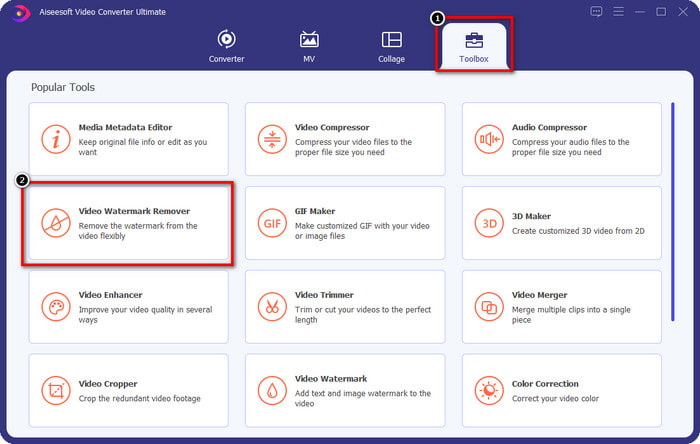
Steg 2. Nu när du har den här iStock‑vattenstämpelborttagaren måste du gå till Toolbox. Leta efter Video Watermark Remover för att använda den här funktionen.
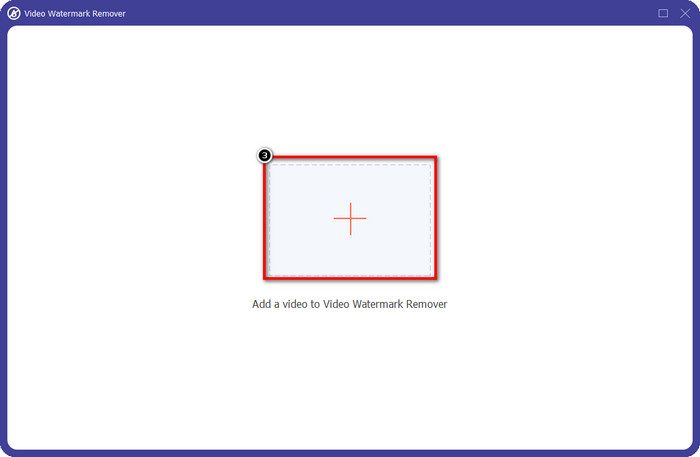
Steg 3. Tryck på +-knappen för att ladda upp videofilen du laddade ned från iStock som har en vattenstämpel. Hitta videofilen i filutforskaren som visas på skärmen och tryck sedan på Open för att ladda upp den.
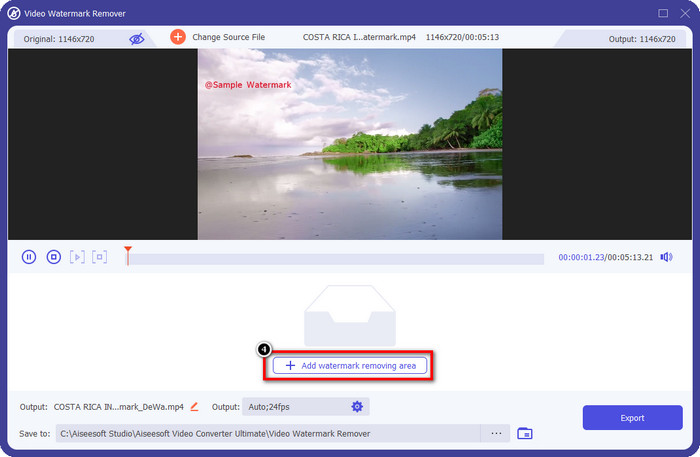
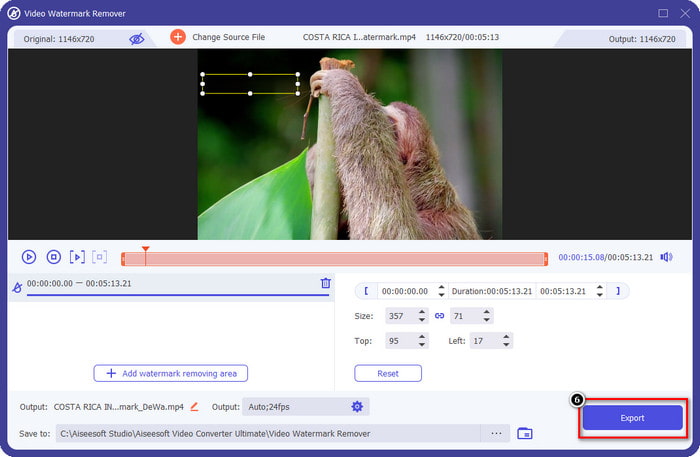
Steg 4. I det nya fönstret väljer du Add Watermark Removing Area för att markera området där vattenstämpeln sitter på videon du laddat upp.
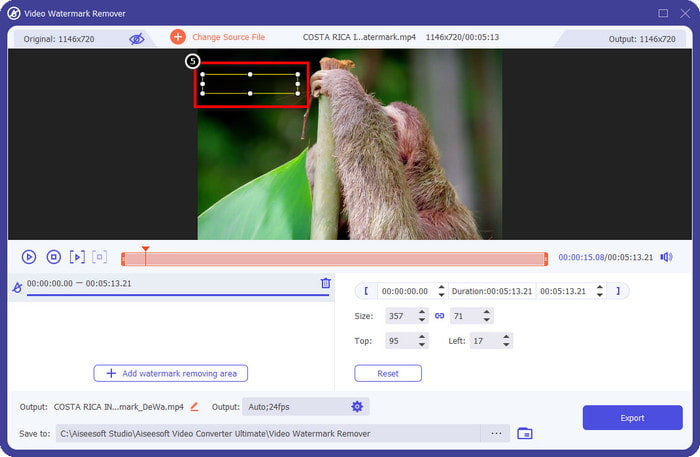
Steg 5. Justera den rektangulära formen i den övre mittersta delen och placera den över vattenstämpeln så att området täcks.
Steg 6. Börja exportera filen när du har gjort allt som står i detta steg genom att trycka på knappen Export. Därmed är du klar med att ta bort vattenstämpeln i din video med hjälp av det här ultimata verktyget.
3:e vägen. Ta bort iStock Watermark på bilder med FVC Free Watermark Remover
För att hantera vattenstämplar på bilder behöver du använda FVC Free Watermark Remover. Det är en användbar iStock‑vattenstämpelborttagare online som du kan använda för att effektivt ta bort vattenstämplar på bilder utan att ladda ner något till din enhet. Dessutom behöver du inte köpa eller teckna något här eftersom den är gratis att använda. Trots att det är ett onlinverktyg är dess prestanda när det gäller att ta bort vattenstämplar utan tvekan bättre än andra bildvattenstämpelborttagare du kan använda. Tror du inte på vad vi säger? Det finns bara ett sätt att bevisa för dig att det fungerar utmärkt: genom att följa stegen vi lägger till här.
Steg 1. Klicka på den här länken för att omedelbart använda den webbaserade vattenstämpelborttagaren för bilder.
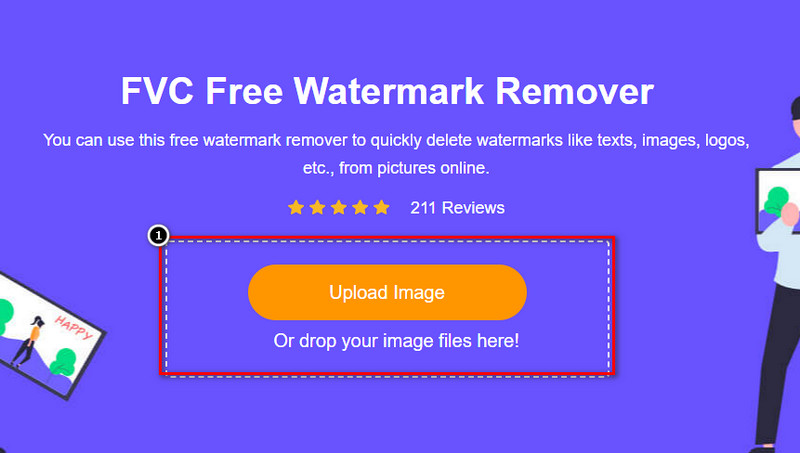
Steg 2. Tryck på Upload Image, välj bilden med vattenstämpel och vänta tills uppladdningsprocessen är klar.
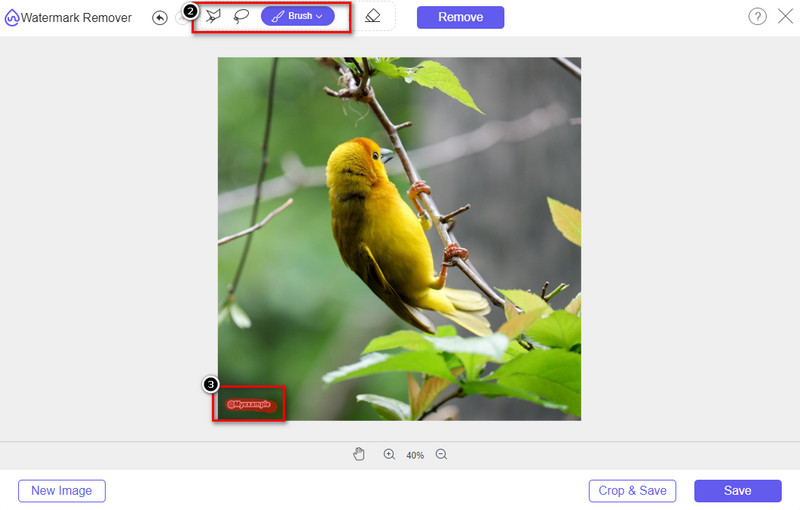
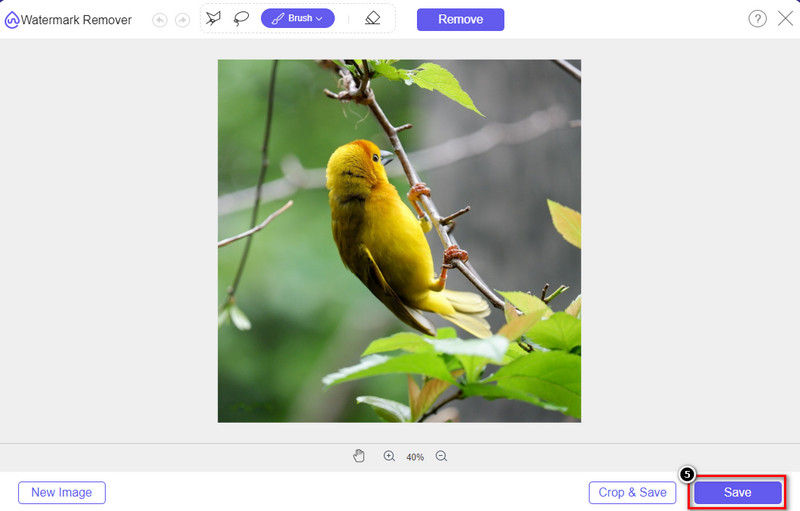
Steg 3. Rita över vattenstämpeln med dessa verktyg för att markera den.
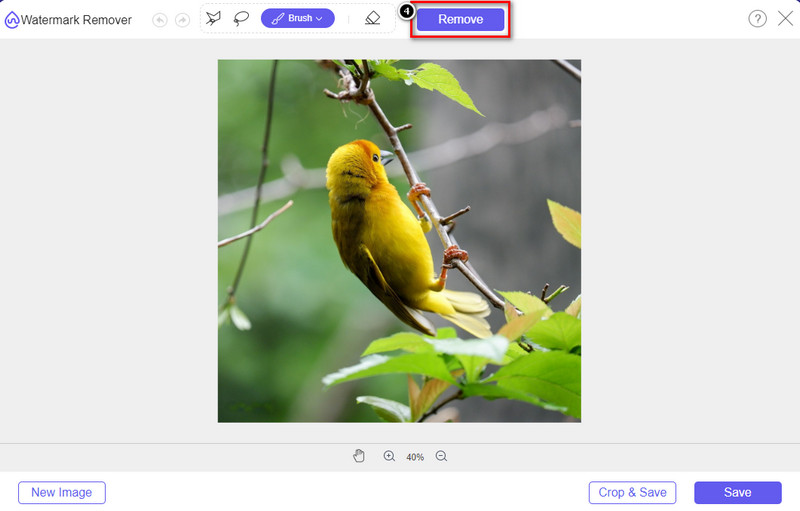
Steg 4. Klicka på Remove för att se hur det ser ut när vattenstämpeln tas bort här.
Steg 5. För att slutligen spara bildfilen, klicka på Save för att exportera bilden utan iStocks vattenstämpel.
Relaterat:
Hur man tar bort vattenstämpeln från Renderforest‑exporterade videor
Hur man tar bort Viva Video‑vattenstämpeln på videor
Del 2. Vanliga frågor om hur man tar bort iStock Watermark
Hur laddar man ner iStock-bilder utan vattenstämpel gratis?
Om du tänker ladda ner en bild på iStock omedelbart, kommer webbplatsen att applicera en vattenstämpel på bilden. Denna webbplats skyddar varje fil för att undvika upphovsrättsproblem och överdriven användning av en viss bild. Om du vill ladda ner en bild utan vattenstämpel måste du köpa lite kredit; du kan följa stegen vi lägger till ovan om hur du gör det.
Hur mycket är priset för en enskild kredit på iStock?
Priset för en kredit på iStock är värt $12. Du kan använda krediten för att köpa en mediefil här och ladda ner den utan vattenstämpeln på det visuella mediet du vill ha. Ju mer kredit du kommer att köpa, det kommer att finnas en rabatt per kredit; du kan kolla in de tillgängliga krediter som du kanske gillar.
Är det inte dyrt att köpa en fil på iStock?
Jämfört med den andra webbplatsen som tillhandahåller samma tjänst är det en av de billigaste webbplatserna du kan använda för att köpa en licensierad fil. När du väl köpt en fil här, kan du använda den obegränsat till skillnad från den andra, där när du väl köper, det fortfarande finns begränsningar för användningen av filen.
Slutsats
Nu när du vet hur du effektivt tar bort iStock-vattenstämpeln på videor och bilder kan vi säga att arbetet är klart. Så, vilket sätt föredrar du mest? Vill du köpa en kredit för att ha filen klar utan vattenstämpeln? Eller vill du använda verktygen vi lägger till här som kan hantera vattenstämpeln på bilder och video? Vad du än väljer kommer du fortfarande att ha filen perfekt och redo att användas utan att vattenstämpeln störs.
-
 Hur man tar bort vattenstämpel med Pixlr i detaljerade steg [Effektivt]
 Vill du veta hur man tar bort en vattenstämpel med Pixlr? Om så är fallet, fortsätt att läsa nedan för att veta hur du gör det och vilka alternativ du kan använda.
-
 Ta bort Animotica Watermark på exporterade videor med 3 beprövade sätt
 Har du någonsin undrat om det är möjligt att ta bort vattenstämpeln Animotica på videor du exporterade? Den här artikeln ger en hur man gör.
-
 Gratis sätt att ta bort VideoShop-vattenstämpeln på videor [enkelt]
 För att ta bort VideoShop-vattenstämpeln behöver din enhet en vattenstämpelborttagare. För att veta vad dessa är, läs den här artikeln.
