


 Video Converter Ultimate
 Skärminspelare
 Video reparation
 Säker nedladdning
Kompletta sätt att ta bort Picsart-filtervattenmärket på dina videor effektivt
Nuförtiden är det ett oumbärligt verktyg att ha en programvara för redigering av visuella medier på datorn som du kan lita på, som Picsart. Med den kan du justera några inställningar och förvandla din vanliga bild till ett fotografi som ingen tidigare har sett! Du kan få fler kunder eller en större publik med en iögonfallande bild du skapar. Men det finns ett problem med att använda Picsart, nämligen vattenstämpeln som läggs till efter export. Vattenstämpeln är ganska irriterande och kan bli distraherande i bilden om den inte tas bort. Så om du vill ha programvaran och en handledning om hur du tar bort Picsart-filtervattenstämpeln ska du fortsätta läsa den här artikeln och lära dig mer om det!

Del 1. Hur man tar bort Picsart Filter Watermark med den fria programvaran på skrivbordet
FVC Video Converter Ultimate - Number One Watermark Remover på Windows och Mac
Vi börjar med att presentera programvaran med vårt förstahandsval som kan hjälpa och lära dig hur du tar bort Picsart-vattenstämpeln. FVC Video Converter Ultimate är det oumbärliga vapnet i arsenalen som du behöver för att enkelt ta bort vattenstämplar på videor och samtidigt få ett professionellt resultat. Tack vare dess prestanda och ojämförliga funktioner har många användare redan provat den, och verktyget gjorde dem inte besvikna. Om du behöver hjälp med att ta bort vattenstämpeln på din video kan du prova att kopiera stegen vi lagt till nedan och följa dem.
Steg 1. Du kan skaffa den här ultimata programvaran på din enhet genom att klicka på rätt nedladdningsknapp nedan. Efter det måste du installera programvaran på din dator och klicka på Starta nu för att öppna programmet.
Gratis nedladdningFör Windows 7 eller senareSäker nedladdning
Gratis nedladdningFör MacOS 10.7 eller senareSäker nedladdning
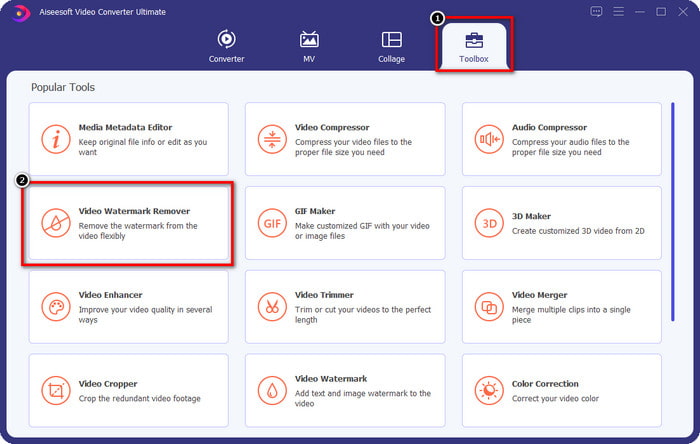
Steg 2. I avsnittet Verktygslåda ser du andra funktioner du kan använda som kan hjälpa dig att ge din video en fin touch. Men idag klickar du på Video Watermark Remover.
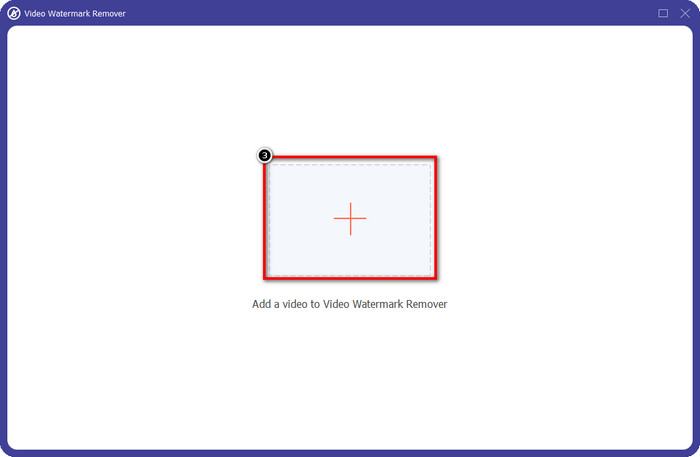
Steg 3. Ladda upp videon du har redigerat i Picsart genom att klicka på +-ikonen. Sök efter filen i mappen som visas på skärmen och klicka sedan på Öppna.
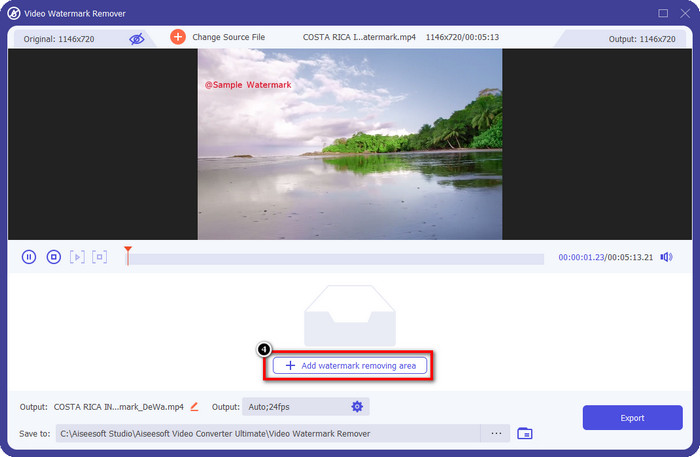
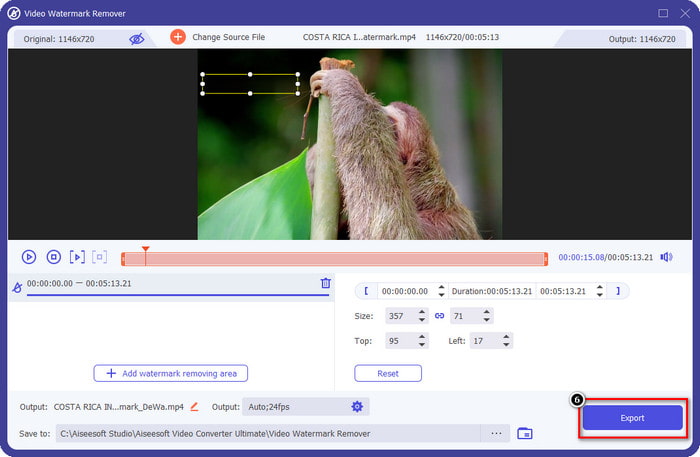
Steg 4. Tryck på Add Watermark Removing Area för att ta bort vattenstämpeln som är inbäddad i videon du laddade upp.
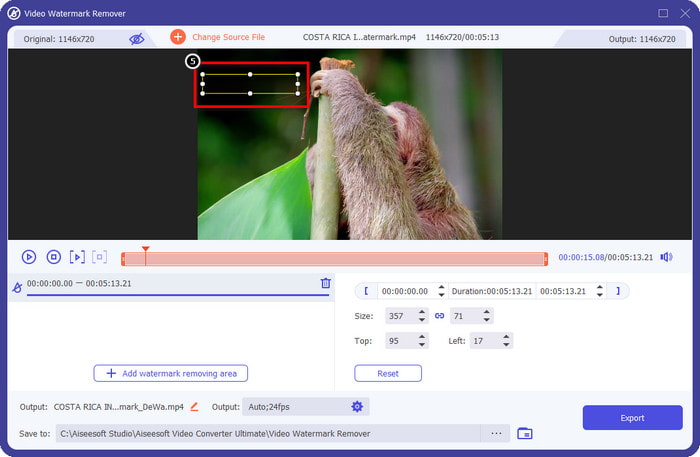
Steg 5. Håll i och placera markeringsrutan över vattenstämpeln och täck den. Du kan förstora eller förminska rutan efter eget önskemål.
Steg 6. När du är klar med att täcka vattenstämpeln med markeringsrutan klickar du på Export för att spara slutresultatet på din lokala enhet.
Foton på Windows-Täckvattenstämpel med 3D-design
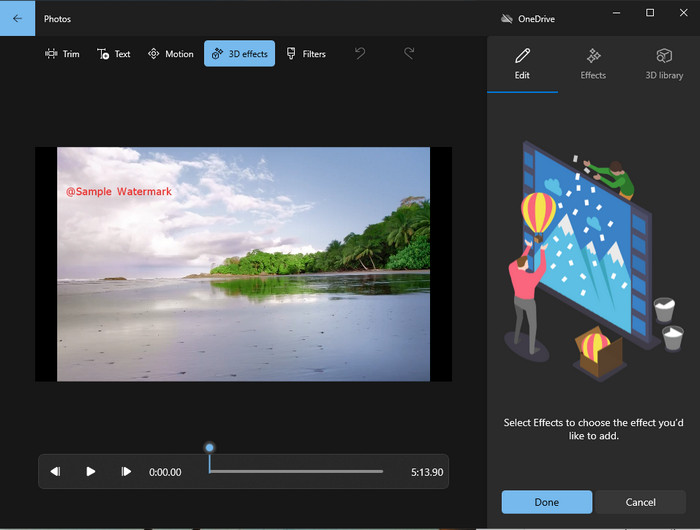
Om det inte är din grej att ladda ner programvara och du är Windows-användare bör du prova att använda Foton för att redigera vattenstämpeln i din video. Att lära sig hur man tar bort Picsart-vattenstämpeln med det här verktyget går ännu snabbare eftersom du slipper momentet att ladda ner en app. Verktyget tar inte bort vattenstämpeln i videon, men du kan täcka vattenstämpeln med 3D-designer. Trots detta är prestandan hos den här inbyggda bild- och videovisaren och redigeraren god. Osäker på det? Läs då stegen nedan och följ dem om du vill.
Steg 1. Klicka på Windows-knappen i aktivitetsfältet och sök efter Foton för att öppna det.
Steg 2. När du har öppnat den inbyggda redigeraren klickar du på +-tecknet för att ladda upp videon du vill redigera här.
Steg 3. Gå till 3D-effekter, klicka på 3D-bibliotek och sök efter den design du vill använda för att täcka vattenstämpeln. Placera den valda designen på den del som har en vattenstämpel.
Steg 4. Tryck på Slutför video för att spara slutresultatet på den lokala enheten i Windows.
Välj från Blur Video Online

PickFrom Blur Video Online kan hjälpa dig att ta bort PicsArt-vattenstämpeln på de videor du har på webben. Verktyget är okänt för många, men vi presenterar det idag. Vi tar med den här programvaran på grund av dess effektivitet när det gäller att ta bort vattenstämplar på videor du laddar upp. Dess gränssnitt är enkelt och avskalat; du går inte vilse när du använder programmet. Så om du vill ta bort vattenstämpeln, följ processen nedan.
Steg 1. Öppna din webbläsare, sök på namnet och klicka på det första resultatet för att öppna den webbaserade vattenstämpelborttagaren.
Steg 2. Klicka på Click to Add File så att du kan ladda upp videon här.
Steg 3. Markera Blur Part of the Video och placera sedan markeringsrutan över vattenstämpeln.
Steg 4. Tryck på Start för att ladda ner videon utan vattenstämpel.
Del 2. Hur man tar bort Picsart vattenstämpel genom att köpa premiumversionen
Du måste köpa programvaran om du inte vill hamna i problem med att ta bort Picsart guldvattenstämpeln. Det kommer att kosta dig ett visst belopp eftersom du måste betala för det innan du kan använda det och sedan exportera videon utan någon inbäddad vattenstämpel. Så om du vill ha en steg-för-steg handledning om att köpa Picsart, måste du följa nästa handledning vi lägger till.
Steg 1. Öppna Picsarts officiella webbplats och logga in på ditt konto där. Om du inte har ett konto måste du skapa ett genom att registrera dig här.
Steg 2. På huvudsidan klickar du på Pricing och ser priserna för varje tillgänglig produkt.
Steg 3. Välj den plan du vill ha, månadsvis eller årlig, och klicka sedan på Go to Payment.
Steg 4. Lägg till faktureringsuppgifterna genom att fylla i den information som krävs och klicka sedan på Purchase Now.
Relaterat:
Ta bort vattenstämpel från examensbilder
Del 3. Vanliga frågor om hur man tar bort Picsart vattenstämpel
Kan jag köpa Picsart Gold permanent?
Den stöder inte en engångsbetalningsbasis eller -plan, så om du vill använda Picsart Gold måste du använda månads- eller årsabonnemanget. Kolla in priset för varje plan genom att gå till dess officiella webbplats.
Kan jag skapa en anpassad prenumeration på Picsart?
Ja, du kan skapa en prenumeration för ett team på Picsart. Du kan ställa in hur många personer som ska använda appen.
Var kan jag komma åt Picsart?
Du kan ladda ner Picsart på Windows, Android och iOS. Tyvärr har appen ingen Mac-version just nu men var inte ledsen eftersom du kan använda andra medieredigeringsprogram som finns på ditt system.
Slutsats
Handledningen vi lärde ut tidigare ger dig en uppfattning om hur du tar bort vattenstämplar med PicsArt och de bästa vattenstämpelborttagningarna du kan använda. Du kan nu njuta av videon du redigerar på Picsart utan att besvära dig med produktens vattenstämpel som den lägger till i slutresultatet. Så om du fortfarande inte är övertygad om verktygen vi presenterar, är det ett måste att prova dem först, särskilt FVC Video Converter Ultimate. Klicka på nedladdningsknappen och ha den på din Windows och Mac gratis, och njut sedan av funktionerna och funktionerna som du kan dra nytta av.
-
 Hur man tar bort Pond5 Watermark med de ultimata verktygen
 Lär dig hur du tar bort Pond5 vattenstämpel genom att följa de enkla stegen nedan. Du kan enkelt ta bort vattenstämpeln Pond5 på din bild med dessa imponerande verktyg.
-
 2 kraftfulla sätt att ta bort Dxtory Watermark
 Lär dig hur du tar bort Dxtory Watermark genom att följa de två bästa metoderna. Om du letar efter det lämpligaste verktyget för att ta bort Dxtory-vattenstämpeln, läs här.
-
 Enastående Arnold Maya vattenstämpelborttagningsmedel som du inte får missa
 Många vattenstämpelborttagare kan ta bort Arnold Mayas vattenstämpel. Men om du vill veta vilka som är de bästa Arnold Maya-vattenmärkesborttagningarna, läs den här sidan.
