


 Video Converter Ultimate
 Skärminspelare
 Video reparation
 Säker nedladdning
Enkel procedur för att ta bort vattenstämplar från MP4-videor
Stöter du på problem som att du inte har någon aning om hur du tar bort vattenstämplar från dina MP4‑videor på enheter som Mac och Windows? Då har den här artikeln den bästa lösningen för dig. Om du tillhör dem som älskar att titta på filmer, klipp och mer, kan du säkert relatera till hur störande och irriterande det är att se dina favoritvideor med vattenstämplar eller andra onödiga objekt i dina MP4‑videor. Dessutom kan du inte ens se hela skärmen eftersom dessa vattenstämplar täcker den. Och det mest frustrerande är att vissa videor har jättestora vattenstämplar, så att du inte ens kan njuta av att titta på dina favoritvideor.
Tack och lov finns det redan ett enormt och anmärkningsvärt program med en videovattenstämpelborttagare som du kan använda för att eliminera de onödiga föremålen på dina videor, såsom vattenstämplar, logotyper, texter, bilder och mer. Du kan snabbt utplåna eller ta bort dessa objekt och njuta av att titta på eller spela upp dina videor med dessa applikationer. Med dessa applikationer kommer du aldrig att bli frustrerad eller irriterad längre. Sedan, om du är fängslad av det här ämnet, måste du läsa den här artikeln för att ge dig tillräckligt med information, särskilt för att enkelt ta bort vattenstämplar på dina MP4-videor.

Del 1: Bästa sättet att ta bort vattenstämpel från MP4-video
Om du letar efter det mest framstående och fantastiska programmet för att ta bort vattenstämplar från MP4‑videor är Video Converter Ultimate det bästa verktyget. Det här programmet kan ta bort störande objekt i dina videor, som vattenstämplar, logotyper, texter eller bilder. Dessutom behöver du inte vänta länge vid sparningsprocessen, eftersom du kan spara dina videor snabbt efter att du har tagit bort vattenstämplarna.
Dessutom har Video Converter Ultimate massor av redigeringsverktyg som du kan använda, till exempel en videoförstärkare, ta bort vattenstämplar, lägga till vattenstämplar, en videohastighetskontroll, GIF-tillverkare, collagetillverkare, video- och ljudinspelare, video-/ljudkompressor, konvertera olika filer format, som MP4, FLV, MOV, TRP, MTS, M2TS, MKV, AAC, MP3 och mer. Dessutom är det bästa att du inte behöver köpa eller köpa den här applikationen längre. Du kan använda detta gratis. Dessutom är denna applikation väldigt enkel och lätt att använda. Om du vill ta bort vattenstämplar på dina MP4-videor kan Video Converter Ultimate erbjuda dig två sätt. Läs kontinuerligt för att lära dig dessa två sätt att utplåna vattenstämplar på dina videor.
1. Använda Video Watermark Remover
Steg 1: Besök webbplatsen för Video Converter Ultimate. Ladda ner programmet gratis. Gå sedan vidare till installationsprocessen.
Gratis nedladdningFör Windows 7 eller senareSäker nedladdning
Gratis nedladdningFör MacOS 10.7 eller senareSäker nedladdning
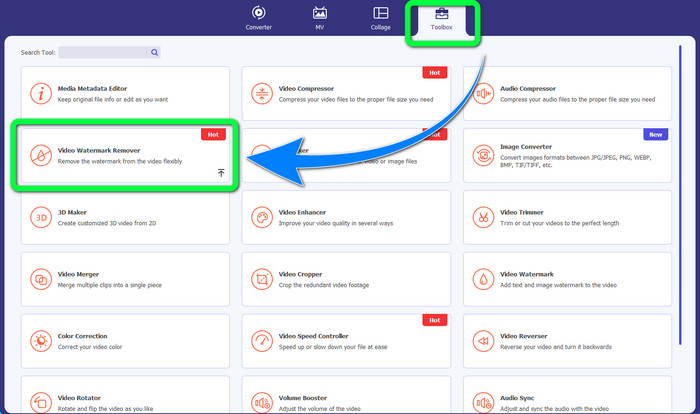
Steg 2: Starta programmet. Välj Toolbox > Video Watermark Remover.
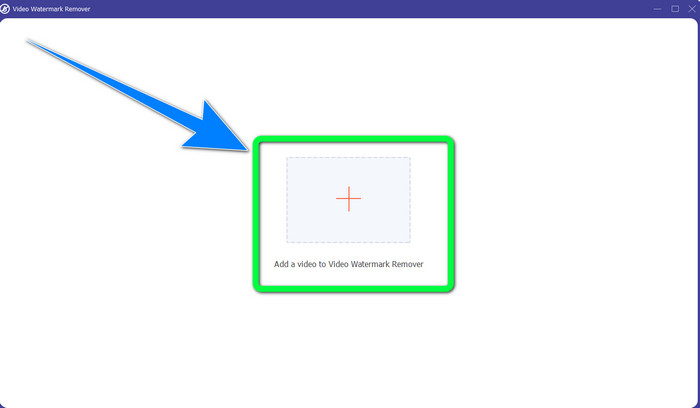
Steg 3: Ett nytt gränssnitt visas. Klicka på Plus-knappen och lägg till din MP4‑video med vattenstämpel.
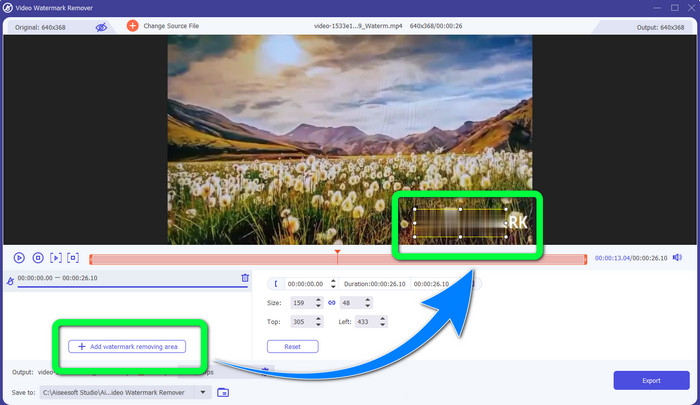
Steg 4: Klicka på knappen Add Watermark Removing Area. En liten ruta visas då på din video; dra den här rutan och använd den för att täcka vattenstämplarna i din video.
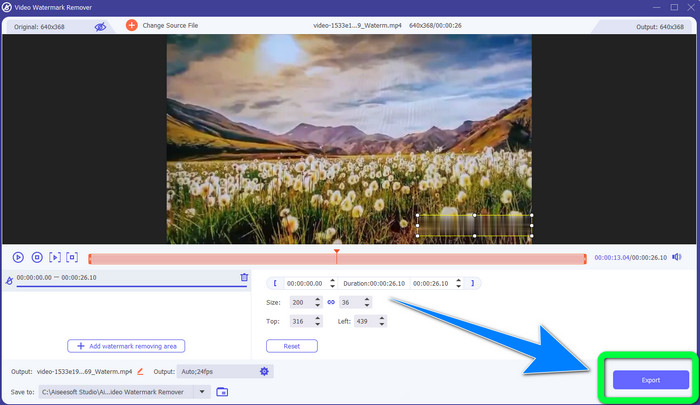
Steg 5: När du är klar med att ta bort vattenstämpeln klickar du på knappen Export för att spara dina videor. Nu kan du njuta av stunden genom att se dina favoritfilmer utan vattenstämplar.
2. Använda Video Cropper
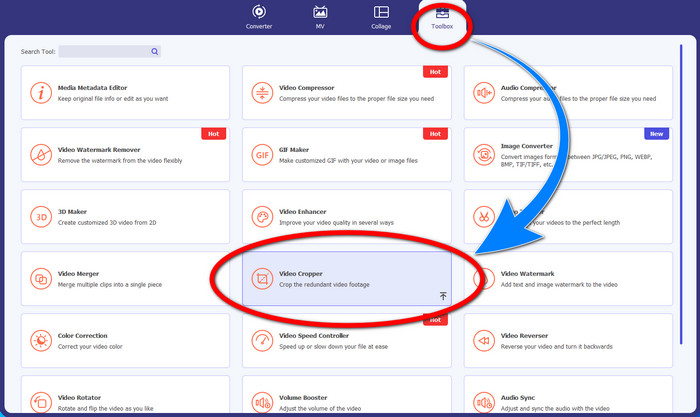
Steg 1: Starta Video Converter Ultimate. Klicka sedan på Toolbox > Video Cropper.
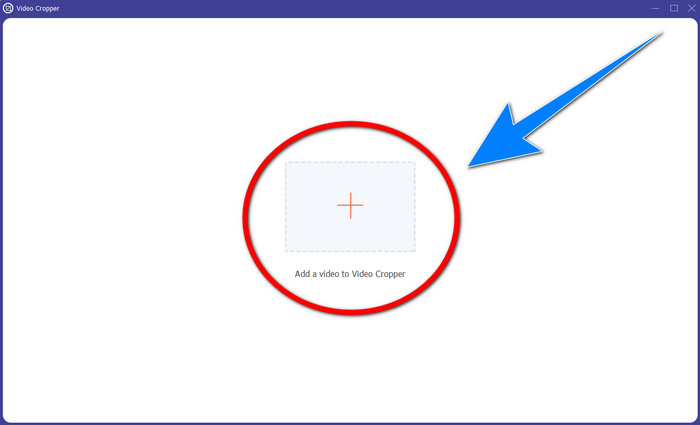
Steg 2: Ett nytt gränssnitt dyker upp efter att du klickat på Video Cropper. Klicka på Plus-symbolen för att lägga till din MP4‑video med vattenstämpel.
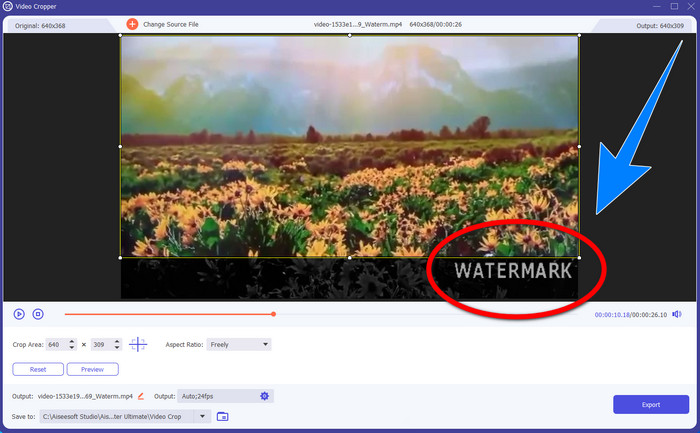
Steg 3: När du har lagt till din video kan du beskära din MP4‑video och ta bort vattenstämpeln.
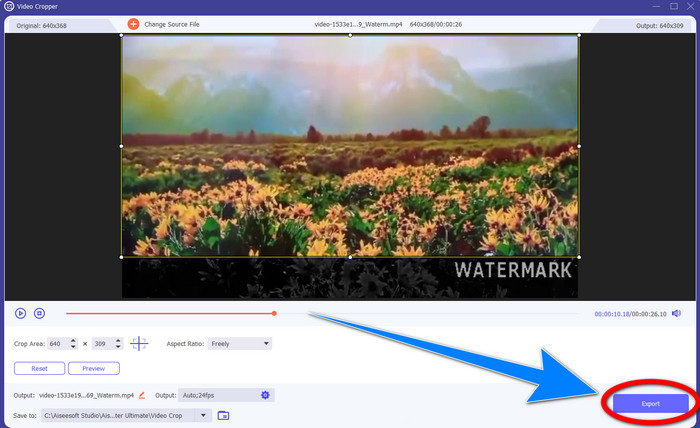
Steg 4: När du är klar med att beskära videon för att ta bort vattenstämpeln klickar du på knappen Export för att spara din video. På så sätt kan du titta på videon utan vattenstämpel.
Del 2: Ta bort vattenstämpel från MP4 Video Online
Letar du efter ett enastående program som du kan använda för att ta bort vattenstämplar från din MP4‑video online gratis? Då är HitPaw Online Watermark Remover det program du kan lita på. Dessutom kan du använda detta program utan att köpa något, eftersom det är helt gratis. Du kan dessutom ta bort vattenstämplar, logotyper och signaturer utan begränsningar, och det innehåller inga annonser. Det är också enkelt och lätt att använda. Du kan ta bort vattenstämplar i dina videor i bara tre steg, vilket är perfekt för nybörjare.
HitPaw Online Watermark Remover är tillgänglig för alla enheter, som Windows, Mac, iPhone och Android. Denna applikation är också säker och säkerställer att du är den enda som kan se och redigera dina videor. Men om du tar bort vattenstämplarna på dina videor blir området ibland suddigt och störande. Dessutom är sparprocessen långsam. Om du vill ta bort vattenstämplar på dina MP4-videor online, följ de enkla stegen nedan.
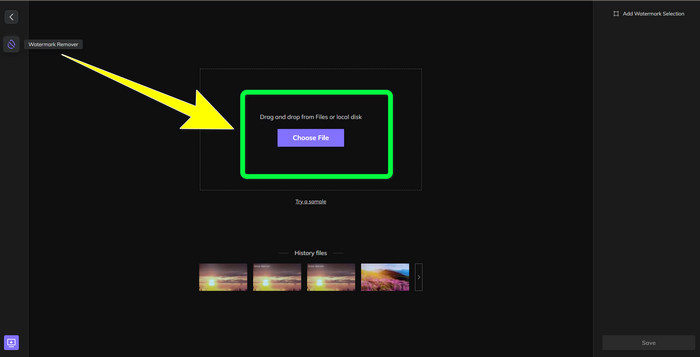
Steg 1: Gå till webbplatsen för HitPaw Online Watermark Remover. Klicka på Remove Watermark Now och välj sedan Choose File för att lägga till din MP4‑video med vattenstämplar.
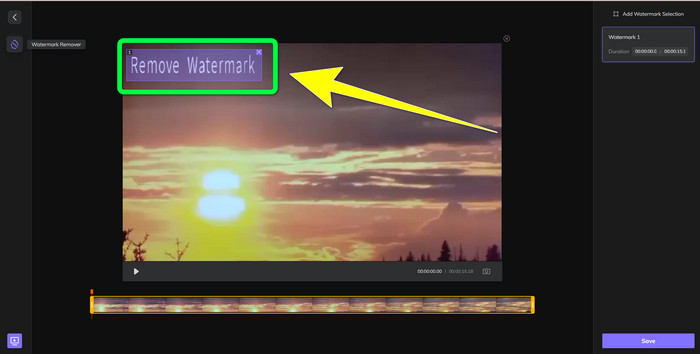
Steg 2: När du har lagt till din video visas en rektangel på videon. Dra den för att täcka och ta bort dina vattenstämplar.
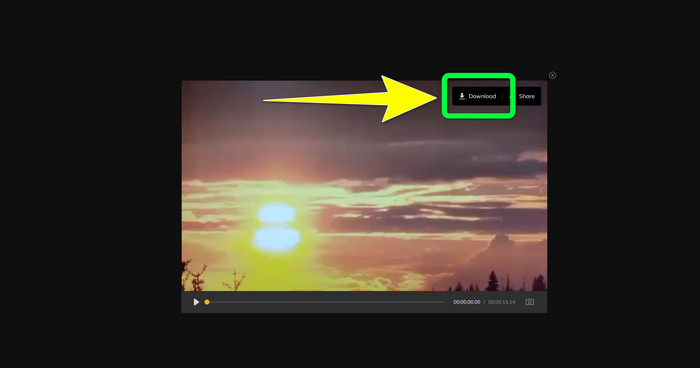
Steg 3: När du har tagit bort vattenstämplarna i din video klickar du på knappen Save. Vänta tills sparningsprocessen är klar och klicka sedan på knappen Download för att spara den på din enhet.
Del 3: Vanliga frågor om att ta bort vattenstämpel från MP4
Är det också möjligt att ta bort signaturer på mina videor?
Ja, det är möjligt. Video Converter Ultimate kan också ta bort signaturer i dina videor. Alla onödiga objekt som stör dina videor kan enkelt tas bort med detta program.
Är det tidskrävande att ta bort vattenstämplar från MP4-videor?
Det beror på vilka applikationer du använder. Om du vill ta bort vattenstämplar på dina MP4-videor, använd Video Converter Ultimate. Det kan ta bort vattenstämplar direkt.
Vilken är den bästa videovattenstämpelborttagaren jag kan använda?
Om du letar efter ett pålitligt program som kan ta bort vattenstämplar i din video är Video Converter Ultimate en utmärkt programvara att använda. Du kan ta bort vattenstämplar och spara dina videor utan att förlora kvalitet.
Kan jag använda beskärningsverktyget på HitPaw Online Watermark Remover för att eliminera vattenstämplar?
Absolut ja! Du kan också använda beskärningsverktyget i den här applikationen om du vill ta bort vattenstämplarna på dina videor, speciellt om vattenstämplarna var i hörnet eller kanten av dina videor.
Bortsett från att ta bort vattenstämplar, är det möjligt att lägga till vattenstämplar med Video Converter Ultimate på mina videor?
Defenitivt Ja! Video Converter Ultimate är inte bara begränsad till att ta bort vattenstämplar på dina videor. Denna applikation kan också lägga till vattenstämplar till dina videor, speciellt om du vill lägga in lite text, logotyper, signaturer, etc.
Slutsats
Som nämnts ovan kan du enkelt ta bort vattenstämplarna från dina MP4‑videor med Video Converter Ultimate. Dessutom visar den här artikeln några program du kan använda för att ta bort onödiga objekt från MP4‑videor online.
-
 Hur man tar bort Filmora Watermark på dina videor eller projekt gratis
 Hur tar man bort Filmora vattenstämpel? Den här frågan går runt på nätet, och här listar vi olika tillvägagångssätt du kan använda!
-
 Snabbaste knep för att ta bort Adobe Stock Watermark från en video [Tutorial]
 Har du problem med Adobe Stocks vattenstämpel? Läs det här och lär dig hur du tar bort Adobe Stock-vattenstämpeln från videon.
-
 5 sätt att ta bort en vattenstämpel från en video på ett professionellt sätt
 Behöver du ta bort en vattenstämpel från en video för att få den att se professionell ut? Tja, läs den här artikeln när vi lägger till en handledning om hur man gör det!
