


 Video Converter Ultimate
 Skärminspelare
 Video reparation
 Säker nedladdning
Hur man tar bort vattenstämpeln från ursprungsdiagrammet effektivt på grafen
Du kan behöva använda Origin Graph för att skapa en mall för matematiska eller vetenskapliga data som är för komplicerade för att beskrivas med ord. Denna programvara har redan hjälpt studenter, forskare, professorer, personer inom näringslivet och andra som behöver skapa ett eget diagram. Med dess uppsättning mallar att välja mellan kan du skapa ett tilltalande diagram som fångar betraktarens uppmärksamhet. Det problem du sannolikt kan stöta på om du använder gratisversionen är att den lägger till en textvattenstämpel i slutresultatet. Har du svårt att hantera vattenstämpeln? Säg inte mer! För vi har lösningen. Här presenterar vi användbara tips om hur du tar bort vattenstämpeln från Origin Graph och sedan använder grafen i ditt Word- eller PowerPoint-bildspel.

Del 1. Hur man tar bort vattenstämpel från Origin Graph med Online Image Watermark Remover
FVC Free Watermark Remover Online är ett förstklassigt verktyg för att ta bort textvattenstämplar som du kan använda för att eliminera vattenstämpeln från Origin Graph. Det här verktyget är mycket effektivt för att ta bort alla objekt på dina bilder så att de ser ännu mer professionella ut när du tagit bort vattenstämpeln. Med detta kan vi försäkra dig om att det är ett dedikerat verktyg för borttagning av vattenstämplar som du kan använda och lita på när du ställs inför detta problem. Undrar du om verktyget är enkelt att använda? Säg inte mer! För stegen vi lagt till nedan är de steg du kan följa för att bli av med textvattenstämpeln på bilden som Origin Graph lägger till.
Steg 1. Du kan klicka på denna länk för att öppna den webbaserade bildvattenstämpelborttagaren; den öppnas direkt i en ny flik där du kan använda verktyget.
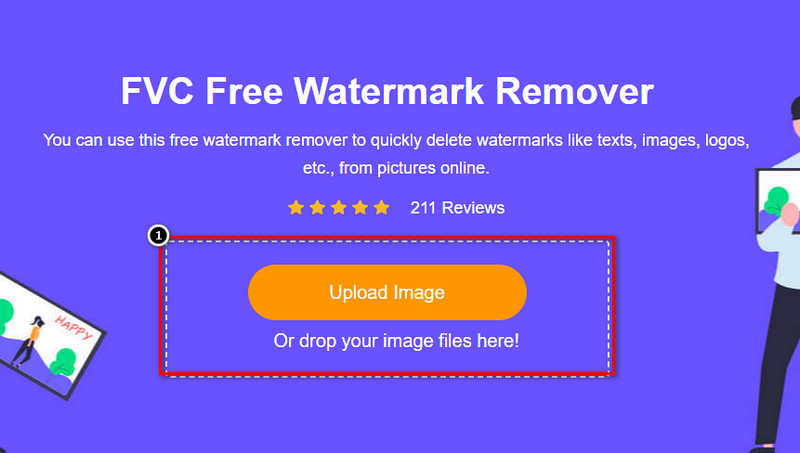
Steg 2. Tryck på Upload Image för att lägga till fotot med vattenstämpel här, leta upp bildfilen i mappen och klicka på Open för att ladda upp den.
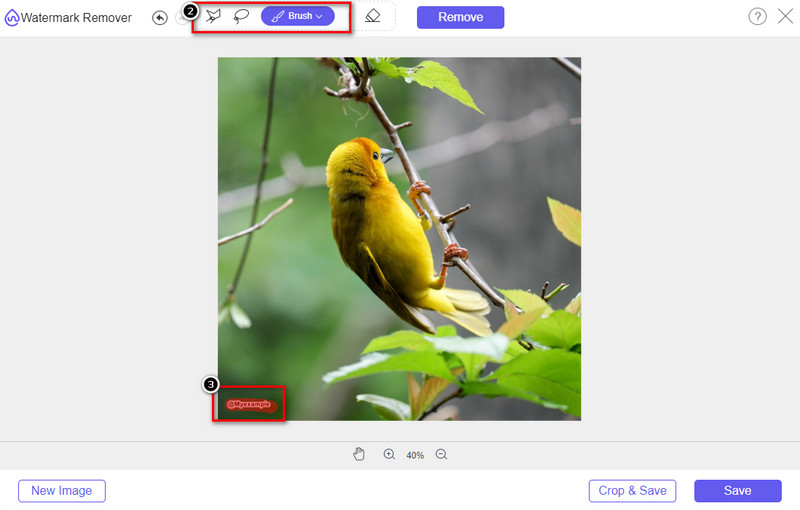
Steg 3. Du kan använda tre olika verktyg för att markera vattenstämpeln; även om de fungerar på olika sätt är de lika effektiva. Välj ett verktyg och markera sedan området på bilden där vattenstämpeln finns.
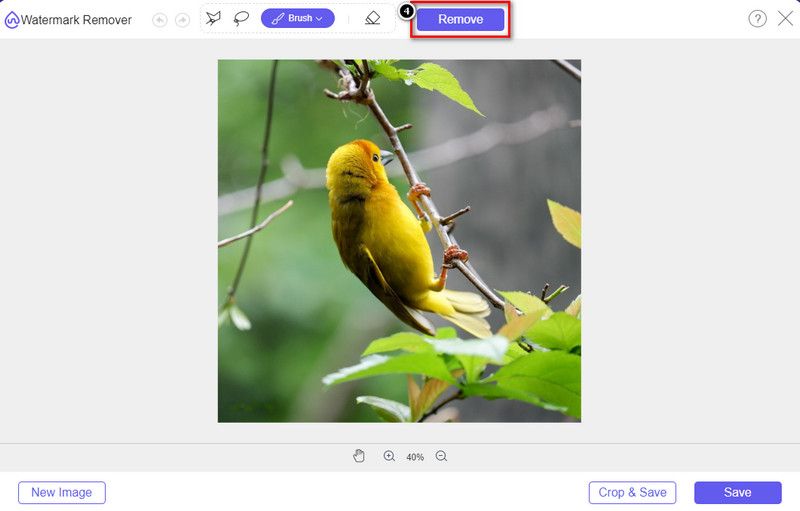
Steg 4. Se till att klicka på ikonen Remove efter att du markerat vattenstämpeln med verktyget. Detta steg är viktigt så att du får bilden utan vattenstämpel när du exporterar den.
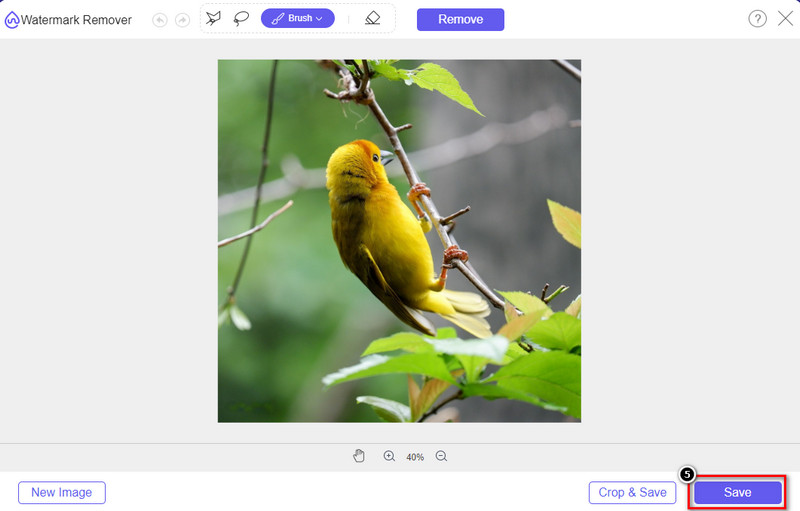
Steg 5. För att starta exportprocessen kan du nu klicka på knappen Save. Vänta tills processen är klar, och sedan kan du kontrollera bilden där vattenstämpeln från Origin Graph inte längre är synlig på området.
Fördelar
- En gratis webbaserad bildvattenstämpelborttagare som du kan komma åt på.
- Det fungerar effektivt för att ta bort vattenstämpeln med stöd för AI-teknik.
- Den stöder en mängd olika bildformat som du kan ha på din lokala enhet.
- Ingen vattenstämpel läggs till på exporterade bilder.
Nackdelar
- Behöver internetuppkoppling för att fungera.
- Dess fokus ligger på att ta bort vattenstämpeln och inget annat.
Del 2. Hur man kopierar grafer från ursprung till Word eller PowerPoint utan vattenstämpeln
I den här delen av artikeln kommer vi att ge dig proceduren du behöver veta för att lägga till grafen du har skapat på Origin Graph utan vattenstämpeln. Följ den i enlighet med det för att lägga till grafen du gör på Microsoft Word och PowerPoint utan vattenstämpel.
Du måste frigöra minst 1,9 GB på grund av dess enorma filstorlek. I filen på 1,9 GB kan du få den hjälp du behöver, men om du inte vill ha hjälp kan du ladda ner 652 MB-versionen av den via .zip eller .exe.
Steg för hur man skapar en graf på ursprungsdiagram utan vattenstämpeln:
Steg 1. Ladda först ner Origin Graph till ditt operativsystem genom att gå till dess officiella webbplats. Öppna programmet för att börja skapa den graf du vill ha.
Steg 2. Efter att du har startat programvaran lägger du till de värden i tabellen som du behöver. Du kan lägga till fler variabler och motsvarande antal grafer här.
Ytterligare: Du kan klicka på Plot för att se andra grafer du kan använda, såsom Basic 2D, Bar, Statistical och fler.
Steg 3. Klicka på File och tryck sedan på Save för att exportera grafen du har skapat här.
Steg 4. Du kan följa stegen vi lagt till i Del 1 och följa guiden för att ta bort vattenstämpeln från Origin Graph med hjälp av FVC Free Watermark Remover Online.
Hur man använder grafen på Word utan vattenstämpel:
Steg 1. Öppna Word-appen på din dator och klicka på Blank Page. Om du redan har skapat Word-dokument öppnar du den filen.
Steg 2. Gå till avsnittet Insert och klicka sedan på Pictures. Leta upp graffilen på din lokala enhet, klicka på den en gång och tryck sedan på Open för att ladda upp den till Word.
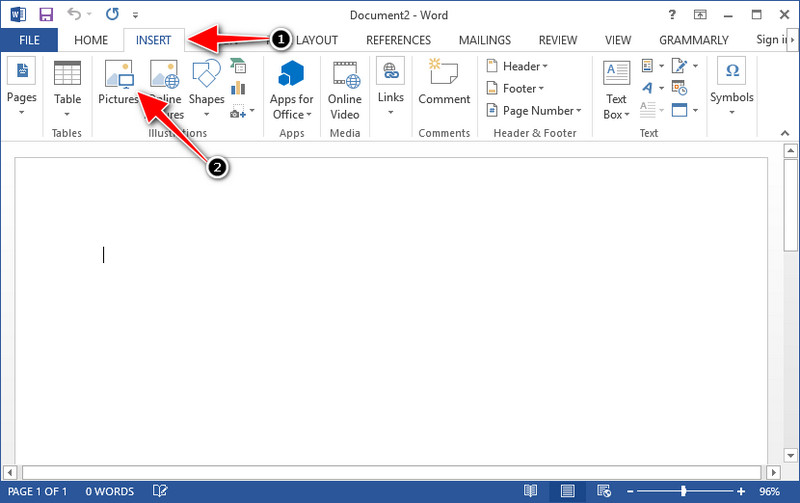
Steg 3. Den laddas automatiskt in i Word-dokumentet du har öppnat eller skapat; du kan nu placera grafen genom att hålla ned och dra den i Word.
Hur man använder grafen på Powerpoint utan vattenstämpel:
Steg 1. Starta PowerPoint på din dator och klicka på Blank Presentation. Du kan också titta på de senaste presentationerna du skapat till vänster. Om det finns den fil där du behöver lägga till grafen, klicka på den för att öppna den.
Steg 2. Tryck på Insert och klicka på Picture för att infoga bildgrafen du har skapat i Origin Graph.
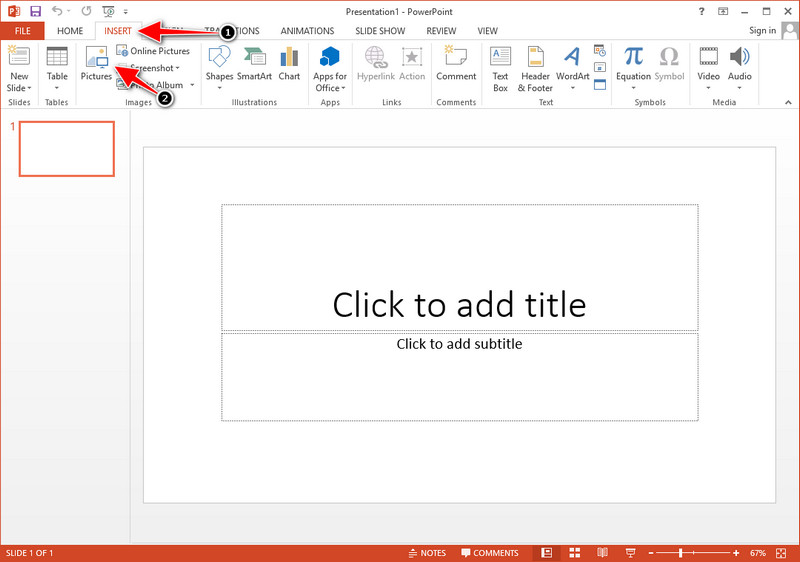
Steg 3. Justera graffbilden och placera den på bilden.
Vidare läsning:
Hur du tar bort B612-vattenstämpeln från dina bilder
Hur du tar bort WOW Slider-vattenstämpeln gratis
Del 3. Vanliga frågor om hur man tar bort vattenstämpel från Origin Graph
Hur mycket kostar Origin Pro?
För de enskilda användarna kan du få premiumversionen av Origin Graph för $435 från och med. Du kan besöka dess officiella butik på Origin Lab.
Var kan jag officiellt ladda ner Origin Graph?
Besök Origin Lab för att ladda ner Origin Graph. Innan du kan ladda ner programvaran på skrivbordet kommer den att ställa frågor. Efter det kommer det att finnas två alternativ för att ladda ner filen, om du vill ladda ner den med hjälp eller inte, i form av .exe eller zip.
Är Excel och Origin samma sak?
Excel och Origin har ett kalkylbladsliknande gränssnitt för att ordna data, beräkna och definiera etiketter. Excel fokuserar dock på att innehålla många kolumner och rader som du kan använda. Men med Origin är det för att ordna attribut som använder en kolumnformel snarare än en cellformel som det Excel stöder.
Slutsats
Nu när du har lärt dig hur du tar bort vattenstämpeln från Origin Graph är det din tid att använda grafen du har skapat och presentera den professionellt. Om ditt syfte är att använda det på Word eller Powerpoint kan du läsa del 2 för att lära dig hur du gör det. Att ta bort vattenstämpeln med det här verktyget är överlägset det mest önskade av alla som vill ta bort vattenstämpeln på bilder. Problemet är löst med detta verktyg. Om den här artikeln hjälpte dig, vänligen lämna fem stjärnor nedan.
-
 Hur man tar bort vattenstämpel med Pixlr i detaljerade steg [Effektivt]
 Vill du veta hur man tar bort en vattenstämpel med Pixlr? Om så är fallet, fortsätt att läsa nedan för att veta hur du gör det och vilka alternativ du kan använda.
-
 Ta bort Animotica Watermark på exporterade videor med 3 beprövade sätt
 Har du någonsin undrat om det är möjligt att ta bort vattenstämpeln Animotica på videor du exporterade? Den här artikeln ger en hur man gör.
-
 Gratis sätt att ta bort VideoShop-vattenstämpeln på videor [enkelt]
 För att ta bort VideoShop-vattenstämpeln behöver din enhet en vattenstämpelborttagare. För att veta vad dessa är, läs den här artikeln.
