


 Video Converter Ultimate
 Skärminspelare
 Video reparation
 Säker nedladdning
Hur man tar bort Viva-videovattenmärket på videor enkelt och effektivt
Viva Video är en app för videoredigering och videotillverkning som du kan ladda ner på dina mobila enheter för att skapa en enastående video som du inte kan uppnå med den andra videoredigeraren. Med detta kan du använda dess gratisversion eller premiumvideoredigering till din fördel. Således stöter användare på problem med att använda gratisversionen eftersom den lämnar en vattenstämpel, och andra redigeringsfunktioner är inte samma som proversionen. Vattenstämpeln som är inbäddad i videon kan hindra det visuella, och det är bättre att ta bort det.
Du kan dock använda några verktyg för att ta bort vattenstämpeln som du hittar på Play Store och App Store – men vilket är bäst? Fortsätt läsa den här artikeln, där vi presenterar verktyget du kan använda för att ta bort vattenstämpeln, tillsammans med en guide för hur du tar bort Viva Video‑vattenstämpeln i din video.

Del 1. Hur man tar bort Viva Video Watermark med de bästa apparna för borttagning av vattenstämpel
Video Eraser - Ta bort vattenstämpel/logotyp från video [Android]
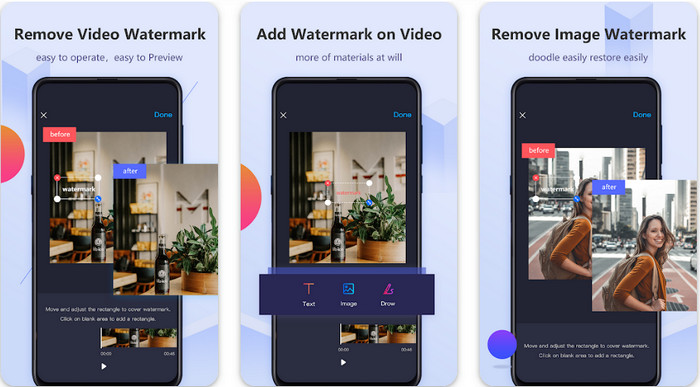
Video Eraser - Remove Watermark/Logo from Video är en kraftfull vattenstämpelborttagare som du kan ladda ned till din Android‑enhet för att ta bort vattenstämpeln inbäddad i din video. Med den här appen kan du ta bort alla typer av vattenstämplar i din video, såsom logotyper, text, stämplar osv. Du kan också dra nytta av appen om du vill lägga till en egen vattenstämpel, beskära, trimma, spela upp baklänges, komprimera och ändra videohastighet. Även om den har många funktioner kan du ladda ned verktyget gratis. För att ta bort Viva Video‑vattenstämpeln på din Android kan du följa stegen nedan.
Steg 1. Ladda först ned appen till din Android genom att gå till Play Store och tryck sedan på Ladda ned.
Steg 2. Öppna vattenstämpelborttagaren, klicka på Remove Watermark from Video, ge verktyget åtkomst till dina videor och ladda sedan upp videon med vattenstämpeln.
Steg 3. Placera rektangeln över vattenstämpeln för att täcka den.
Steg 4. Tryck på Done för att spara videon utan vattenstämpeln.
Relaterat:
Ta bort Pond5-vattenstämpel
Ta bort Dxtory-vattenstämpel
Video Eraser – Retuschborttagning [iOS]
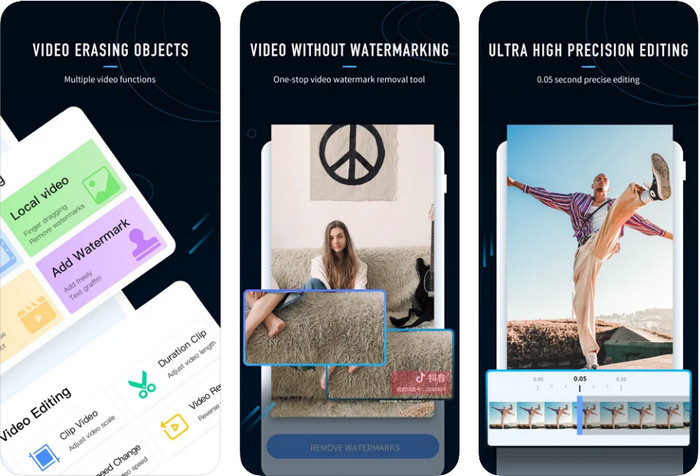
För iOS kan du ladda ned Video Eraser- Retouch Removal i App Store. Det är ett av Viva Video‑vattenstämpelborttagarverktygen du kan ladda ned gratis som effektivt låter dig bli av med märket i din video. Precis som vattenstämpelborttagaren för Android som vi nämner här, stöder den även andra redigeringsfunktioner du kan använda, såsom att förbättra videokvalitet, lägga till vattenstämpel, klippa, trimma, komprimera och vända. Allt detta finns här. Även om den har liknande funktioner som Android‑appen skiljer sig deras funktioner åt, och innan du kan använda det här verktyget för att ta bort vattenstämpeln behöver du köpa det. Du kan följa stegen nedan för att lära dig hur du tar bort vattenstämpeln från Viva Video du har exporterat; följ stegen nedan.
Steg 1. Ladda ned appen i App Store och öppna den efter att nedladdningen är klar.
Steg 2. När du har öppnat programmet klickar du på Local Video/GIF för att ladda upp videon med vattenstämpel. Se till att ge appen åtkomst till dina Bilder.
Steg 3. Tryck på den del av videon där vattenstämpeln finns; då visas en rektangulär form på skärmen.
Steg 4. Tryck på Eliminate Watermark för att exportera videon och spara den utan att vattenstämpeln stör.
Del 2. Hur man tar bort Viva Video Watermark på Windows och Mac [Ultimate Software]
Som Windows‑ och Mac‑användare behöver du effektiv programvara för att ta bort vattenstämpeln i din video på ett bra sätt utan att lämna några spår. FVC Video Converter Ultimate kan lära dig hur du tar bort Viva Video‑vattenstämpeln gratis och ändå få ett professionellt slutresultat. Precis som de vattenstämpelborttagningsappar du kan ladda ned på Android och iOS stöder detta verktyg ännu fler funktioner du kan dra nytta av. Det här verktyget erbjuder mer än de två vattenstämpelborttagningsapparna vi nämnt.
Vad gör det här verktyget imponerande? De borttagningsfunktioner som detta verktyg stöder är bättre än andra vattenstämpelborttagare som du kan använda på din video. Så om du använder detta kan du njuta av att titta på videon utan vattenstämpeln efter att ha tagit bort den här. Behöver du en handledning om hur man använder detta? Nästa detaljer låter dig veta hur du använder det här verktyget så enkelt som 1-2-3.
Steg 1. För att ladda ned det här avancerade programmet kan du klicka på nedladdningsknappen nedan och sedan installera programvaran på din enhet. Följ WinRAR‑installationen och klicka sedan på Start Now.
Gratis nedladdningFör Windows 7 eller senareSäker nedladdning
Gratis nedladdningFör MacOS 10.7 eller senareSäker nedladdning
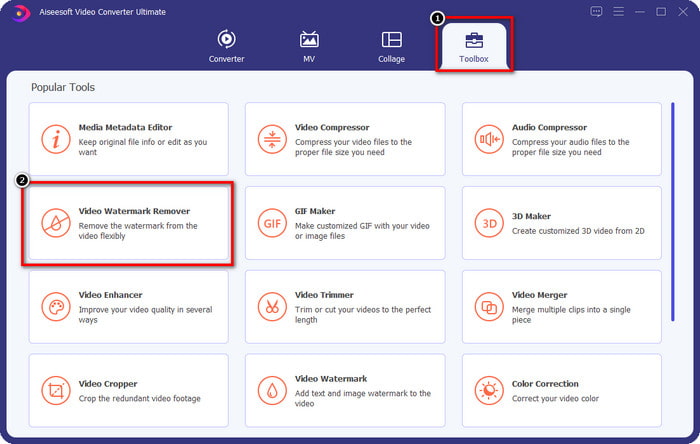
Steg 2. Gå till Toolbox och klicka sedan på Video Watermark Remover för att börja använda det här verktygets effektiva vattenstämpelborttagning.
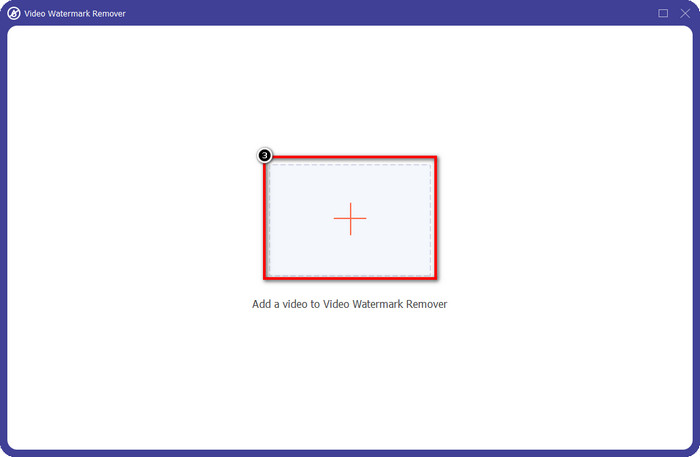
Steg 3. Du kan ladda upp Viva Video‑filen med vattenstämpel som är sparad på skrivbordet genom att klicka på +-ikonen. Leta upp videofilen i mappen som visas på skärmen och klicka på Open för att ladda upp den.
Steg 4. Klicka på Add Watermark Removing Area för att börja använda funktionen för att ta bort vattenstämpeln.
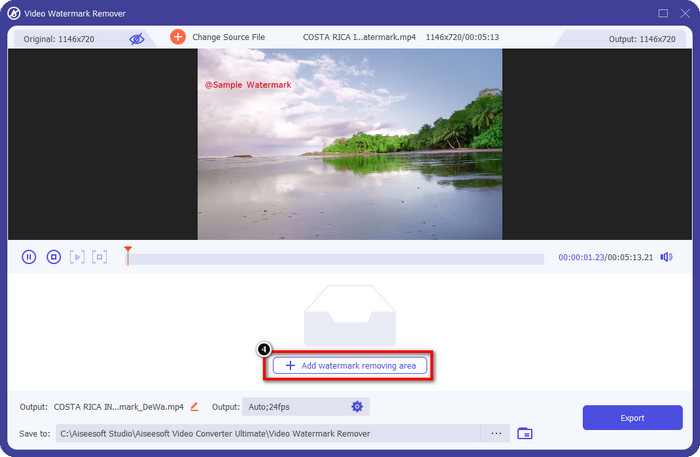
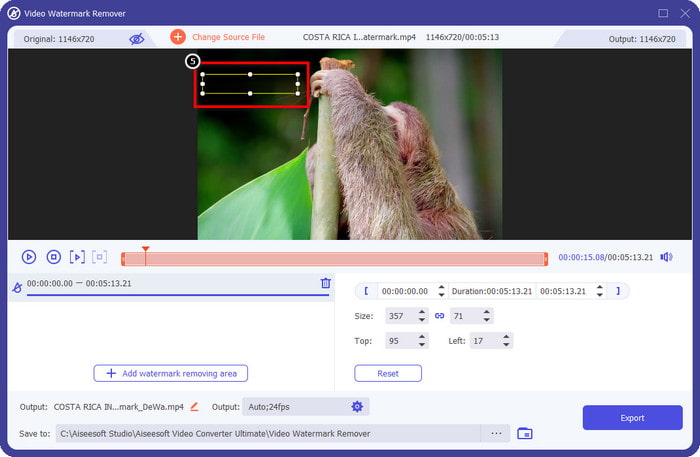
Steg 5. Dra och placera den rektangulära formen över vattenstämpeln i videon och täck hela området. Det är viktigt att täcka allt, för om du inte gör det lämnas spår av vattenstämpeln, och du kan ändra storlek på formen efter behov.
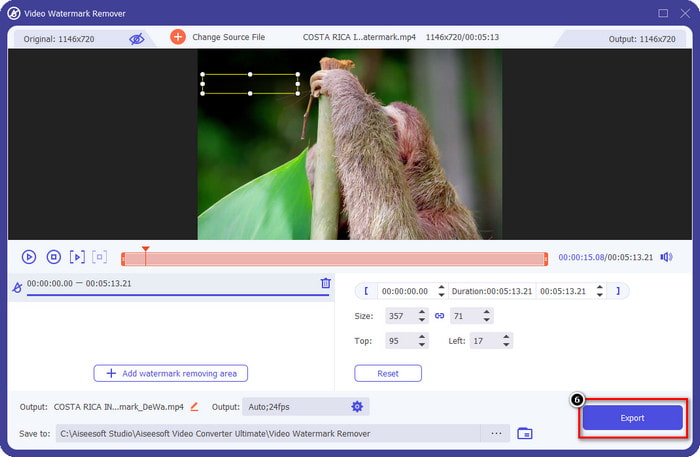
Steg 6. Klicka sedan på Export för att spara videon utan vattenstämpeln. Enkelt, eller hur? Det är precis vad det här avancerade verktyget är gjort för – enkelt men effektivt på alla sätt.
Del 3. Vanliga frågor om hur man tar bort Viva Video Watermark
Kan jag ladda ner Viva Video utan vattenstämpel?
Ja, du kan köpa proversionen av det här verktyget så att när du exporterar videon du redigerar här inte lämnar en vattenstämpel på videon. När du har köpt proversionen av det här verktyget kommer du också att använda den andra premiumfunktionen som detta verktyg har som inte är tillgänglig gratis.
Har Viva Video en stationär version?
Du kan bara ladda ner Viva Video-versionen på Android och iOS. Så om du vill ladda ner skrivbordsversionen hittar du ingen, men du kan söka efter de bästa alternativen för videoredigering som vad Viva Video erbjuder.
Har Viva Video spionprogram?
Under 2017 bekräftade rapporter om denna app senare att den har skadlig programvara. Så personer som laddade ner den här programvaran tog bort den här appen med våld på sina enheter för att undvika ytterligare konsekvenser.
Slutsats
Med denna artikels Viva Video-vattenstämpelborttagare kan du eliminera vattenstämpeln som Viva Video bäddar in på den exporterade videon. Du kan prova att använda apparna ovan och följ instruktionerna vi inkluderar om hur du tar bort vattenstämpeln. Men för Windows- och Mac-användare med en Viva Video-vattenstämpel är det bättre att använda den ultimata programvaran för att snabbt och effektivt ta bort vattenstämpeln och få ett professionellt resultat. Vad väntar du på? Klicka på nedladdningsknappen för att ta bort den ultimata vattenstämpeln på din enhet just nu och använd den genom att följa stegen ovan.
-
 Hur man tar bort Lomotif Watermark med dessa fantastiska verktyg
 Vill du lära dig hur du tar bort Lomotif vattenstämpel från din video? Läs den här artikeln för att veta de mest enastående metoderna för att ta bort den online och offline.
-
 Hur man tar bort turister från foton med hjälp av vattenstämpelborttagare
 Hur tar man bort turister från bilder? Om du vill lära dig hur du tar bort oönskade saker från ditt foto, kommer dessa verktyg att hjälpa dig. Läs den här artikeln för att veta mer.
-
 123rf Watermark Removers – Grundlig genomgång av de ultimata verktygen
 Om du vill veta vilka som är de mest enastående 123rf-vattenmärkesborttagningarna, läs den här artikeln noggrant. Den här artikeln ger en djupgående genomgång av verktygen.
