


 Video Converter Ultimate
 Skärminspelare
 Video reparation
 Säker nedladdning
Hur man tar bort vattenstämpeln i SmartDraw på 2 möjliga sätt
Om du behöver ett enkelt men kraftfullt sätt att skapa diagram, ritningar och kartor och sedan presentera dem i kvalitet på företagsnivå, ska du använda SmartDraw. Du kan använda din fantasi och förverkliga den med hjälp av SmartDraw. Är verktyget gratis? Du kan använda den sju dagar långa kostnadsfria provperioden som det erbjuder, för att använda verktyget gratis med en vattenstämpel på. Att behöva hantera en vattenstämpel på den exporterade filen kan vara jobbigt. Här presenterar vi därför det här blogginlägget där vi bara tar upp det bästa verktyget på marknaden för att effektivt ta bort vattenstämplar. Fortsätt läsa informationen nedan för att lära dig hur du tar bort vattenstämpeln i SmartDraw på två effektiva sätt.

Del 1. Hur man tar bort vattenstämpel i Smart Draw genom att köpa en licensnyckel [officiell version]
Hur tar man bort vattenstämpeln från SmartDraw? Det är det första sättet vi kommer att presentera för dig, och det är genom att köpa licensnyckeln för det här verktyget. Denna plattform erbjuder dig olika typer av planer du kan få som kommer att gynna ditt slut. Dessutom kan du inte köpa en månads åtkomst till det här verktyget, så om du planerar att köpa dess licensnyckel kommer du att faktureras månadsvis, men det totala beloppet du betalar är i dess årsversion. Om du uppskattar det här verktygets prestanda och vill köpa det kan du följa stegen vi lägger till nedan.
Steg för hur man tar bort vattenstämpel i SmartDraw med en licensnyckel:
Steg 1. Öppna SmartDraws officiella webbplats och försäkra dig om att du går in på rätt sida för att kunna genomföra en säker betalning.
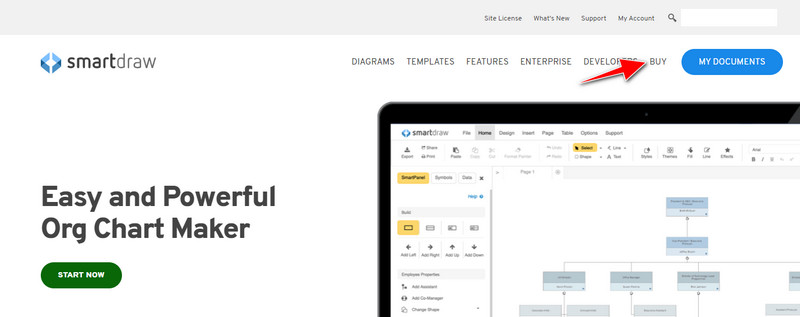
Steg 2. Klicka på Buy på webbplatsen för att se de tillgängliga abonnemangsplanerna.
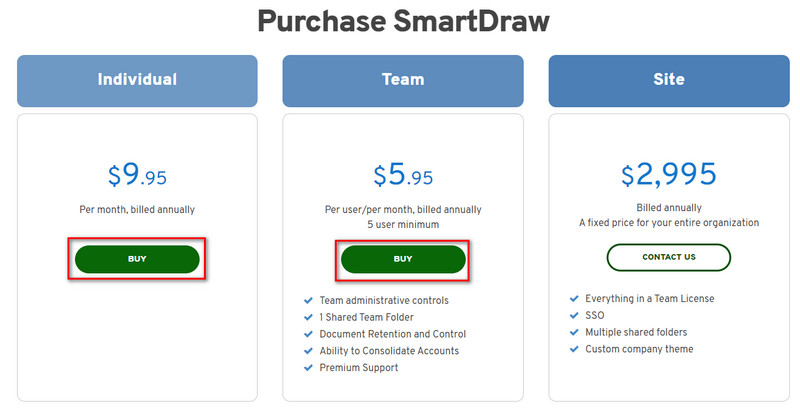
Steg 3. Du kan köpa SmartDraw som Individual, Team eller Site. Klicka på Buy Now om du ska köpa versionen för Individual eller Team.
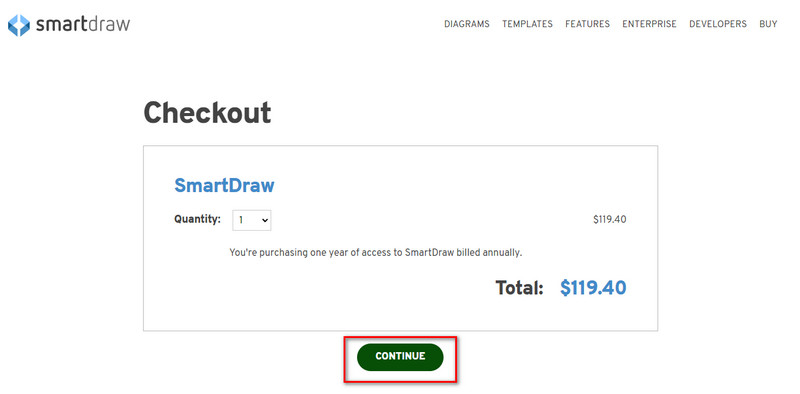
Steg 4. På höger sida ser du den totala kostnaden för verktyget per år; klicka på Continue för att fortsätta.
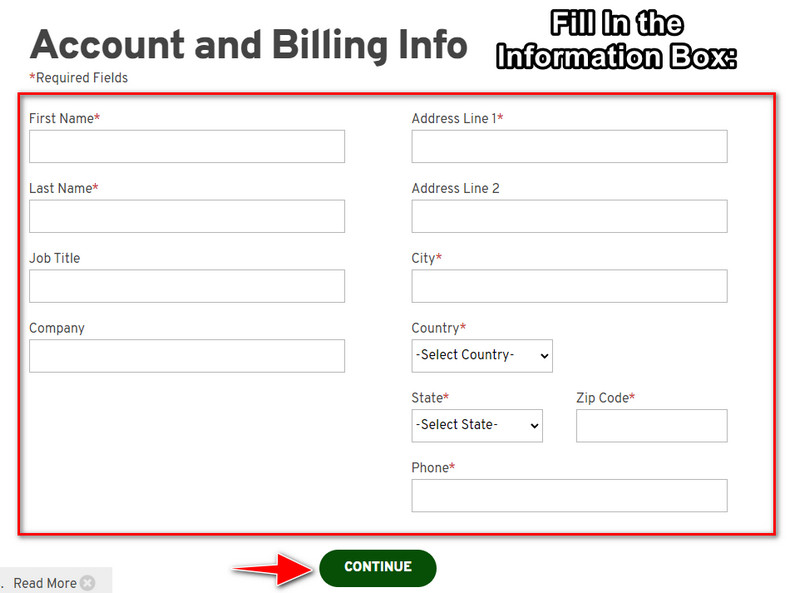
Steg 5. Lägg till dina konto- och faktureringsuppgifter som behöver fyllas i och tryck sedan på Continue för att gå vidare och få licensnyckeln.
Del 2. Hur man tar bort vattenstämpel i Smart Draw gratis med webbtjänst [Ingen kostnad]
Hur tar man bort vattenstämpeln från SmartDraws testversion utan att köpa? Då behöver du använda FVC Free Watermark Remover Online. Detta verktyg för borttagning av vattenstämplar är redo att användas av dig. Du behöver ingen expertkunskap för att ta bort vattenstämpeln på din bild eftersom det inte är krångligt att använda detta verktyg. Även om du är expert kan du fortfarande använda den här programvaran för att ta bort oönskade vattenstämplar eller objekt på din bild. Med hjälp av detta verktyg kommer det inte att finnas någon ”fläck” på din bild som det inte kan ta bort. Vill du prova denna programvara i stället för att köpa en licensnyckel? I så fall kan du följa guiden nedan för att effektivt ta bort vattenstämplar på bilder.
Steg för hur du tar bort vattenstämpeln från SmartDraw på graf eller diagram gratis:
Steg 1. I stället för att söka efter webbverktyget i din webbläsare kan du klicka på den här länken för att öppna det; då öppnas en ny flik i din webbläsare.
Steg 2. Använd musen för att dra och släppa det diagram eller den bild du har skapat i SmartDraw för att ladda upp den.
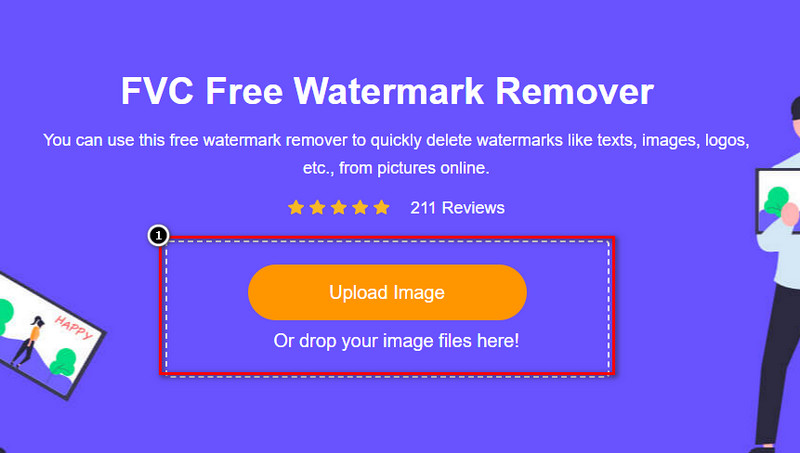
Steg 3. Nu när det webbaserade verktyget för borttagning av vattenstämplar har startats väljer du det verktyg du vill använda för att markera vattenstämpeln på bilden.
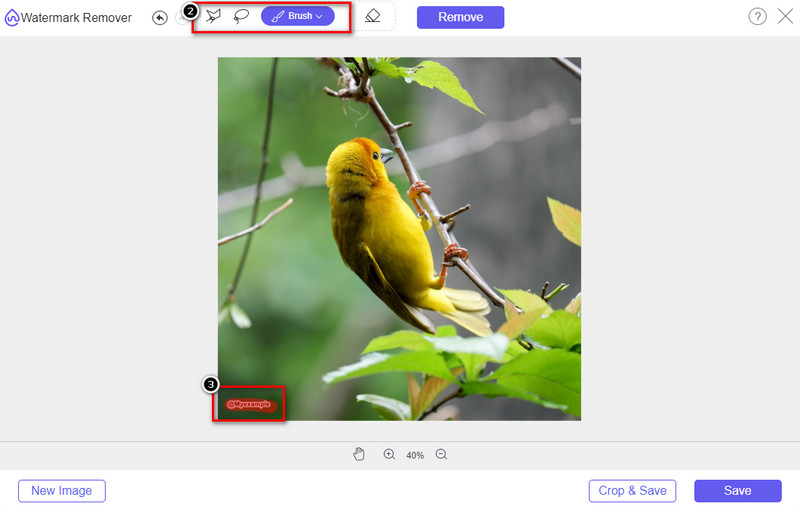
Steg 4. När du har markerat vattenstämpeln eller logotypen på din uppladdade bild trycker du på Remove.
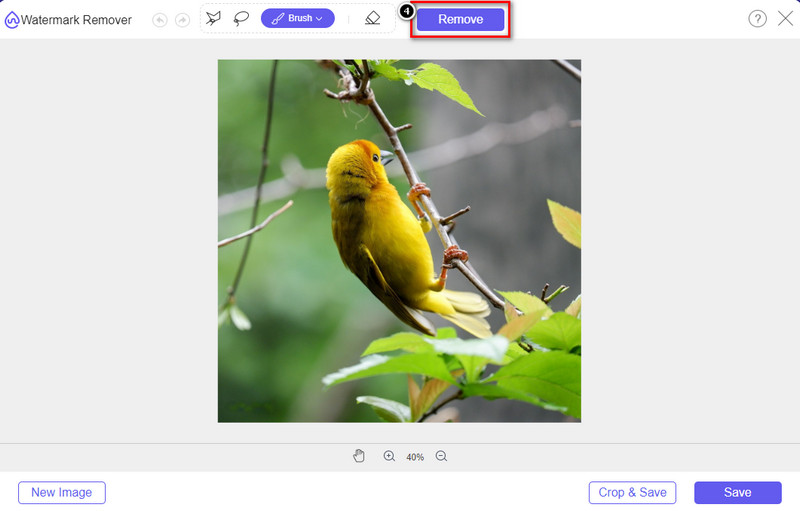
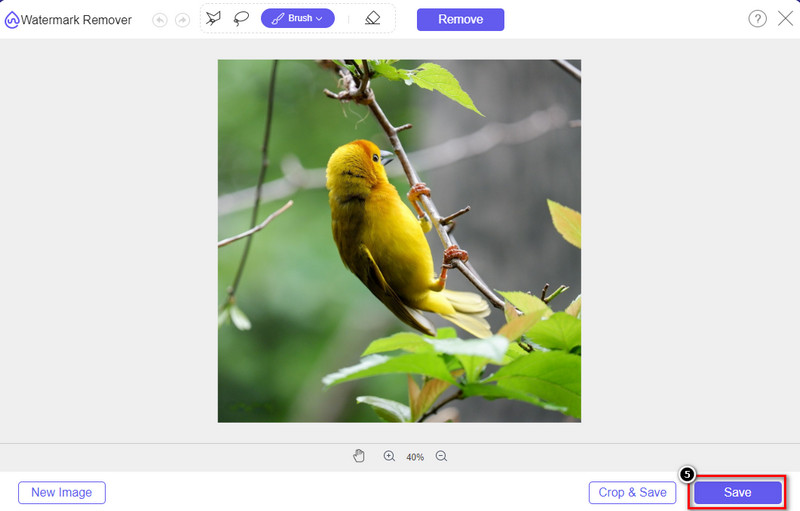
Steg 5. Vänta medan processen för att ta bort vattenstämpeln slutförs och klicka sedan på Save för att ladda ner diagrammet eller bilden du har laddat upp. En mapp visas på skärmen; kontrollera nu versionen av diagrammet eller bilden du har skapat utan vattenstämpel.
Fördelar med att använda FVC Free Watermark Remover Online:
◆ Det är inte nödvändigt att ladda ner appen eftersom den är tillgänglig på webben.
◆ Stöd ett brett utbud av bilder, och det kan ta bort vattenstämplar effektivt.
◆ Det är en dedikerad vattenstämpelborttagare som producerar utskrifter av hög kvalitet.
◆ Ingen vattenstämpel läggs till i slutresultatet när det väl har exporterats.
◆ Ingen begränsning på hur många gånger som ska användas och filstorlek.
Del 3. Ytterligare del – Hur man gör ett diagram, diagram eller diagram på SmartDraw med detaljerade steg
Den tidigare delen lär dig hur du blir av med SmartDraw-vattenstämpeln. I den här delen kommer vi att lära dig hur du gör ett diagram, graf och diagram med hjälp av SmartDraw; du kan följa stegen vi lägger till nedan för att veta hur du gör det.
Steg 1. Gå till dess officiella webbplats för att skapa ett diagram, en graf eller ett flödesschema.
Steg 2. När du har öppnat den officiella webbplatsen klickar du på Start Now och loggar in på ditt konto.
Steg 3. Välj vilken typ av mall du vill ha eller skapa i menyn till vänster.
Steg 4. Lägg till information i varje del av flödesschemat. Det finns fler alternativ som du kan använda i den vänstra delen av webbplatsen.
Steg 5. Klicka på knappen Export, välj vilket format du vill ha och klicka på det för att starta processen. Om du använder gratisversionen kommer det att finnas en vattenstämpel; du kan följa stegen i del 2 för att ta bort vattenstämpeln.
Vidare läsning:
Hur du tar bort B612-vattenstämpeln från dina bilder
Hur du tar bort WOW Slider-vattenstämpeln gratis
Del 4. Vanliga frågor om hur man tar bort SmartDraw Watermark
Kan SmartDraw exportera PNG-bilder?
Ja, du kan ha ett transparent diagram i PNG-format. Det kommer dock att lägga till en vattenstämpel om du använder gratisversionen. Du kan köpa den officiella versionen, så det kommer att finnas en vattenstämpel på den exporterade bilden.
Hur mycket är priset på SmartDraw?
Om du är på väg att köpa en plan på SmartDraw kan du köpa dess plan från $ 5.95. Du kan kolla in de andra priserna som tillhandahålls på den officiella webbplatsen.
Vad är fördelen med att köpa premiumversionen av SmartDraw?
Du kan få teamadministratörskontroll, teammapp, premiumsupport och exportera bilder utan vattenstämpel för individuella planer. För andra premiumfördelar kan du få, besöka den officiella webbplatsen och se vilka funktioner och funktioner du kan få.
Slutsats
Nu när du vet hur du sparar SmartDraw utan vattenstämpel med de två sätten vi lägger till. Antingen köper du den eller använder ett verktyg för att ta bort vattenstämpeln på den exporterade filen. Om du inte gillar att köpa verktyget måste du använda det eftersom det är det mest effektiva webbverktyget för att eliminera vattenstämpeln. Om du tror att den här artikeln hjälpte dig att lösa problemet så ger du oss en 5-stjärnig.
-
 4 bästa sätten att ta bort vattenstämpeln från GIF [Online & Offline]
 Behöver du ta bort vattenstämpel från GIF? Med verktyget i den här artikeln kommer du att lära dig de olika stilarna med olika vattenstämpelborttagare som finns på din plattform.
-
 5 enklaste sätten att ta bort metadata i alla mediefiler
 Hur tar man bort metadata? Är det svårt att göra det? Behöver jag köpa eller använda ett gratisverktyg för att ta bort taggar? Alla dessa frågor har svar i den här artikeln.
-
 Enastående Photobucket Watermark Remover online och offline
 Lär dig hur du tar bort Photobucket-vattenstämpeln från dina foton med denna fantastiska Photobucket-vattenstämpelborttagare. Läs den här artikeln för att lära dig sätten.
