


 Video Converter Ultimate
 Skärminspelare
 Video reparation
Hur man snabbar upp TikTok-videor på Tiktok eller använder den andra alternativa programvaran
En av de snabbast växande apparna för videounderhållning som du kan använda på din mobiltelefon är TikTok. Även om TikTok släpptes 2016 blev den omedelbart mycket populär bara några månader efter lanseringen. En populär typ av redigering här är också att snabba upp videon för att skapa en visuell effekt. Så om du är en av dem som vill veta hur man gör det, är du på rätt plats. Här går vi igenom olika verktyg som hjälper dig att lära dig hur man snabbar upp en video på TikTok.

Del 1. Hur man snabbar upp en video på TikTok
Som nämnts tidigare har TikTok blivit en av de mest kända plattformarna för korta videoklipp, så videoredigering här kan göras enkelt. Tänk på att du kan snabba upp videon medan du filmar och inte först efter att videon är färdig. Om du försöker snabba upp en video på TikTok måste du dessutom uppskatta den totala hastigheten utan att veta om det är precis den hastighet du vill uppnå. Men om du inte vill ladda ner ett tredjepartsverktyg för att snabba upp en video, räcker TikTok gott. Följ nu stegen nedan för att snabba upp en video på TikTok.
Steg för hur du filmar en uppsnabbad video på TikTok:
Steg 1. Ladda först ner TikTok på din mobiltelefon och starta appen när nedladdningen är klar.
Steg 2. Tryck på +-tecknet för att börja filma. Klicka sedan på ”lägg till ljud” för att lägga in bakgrundsmusik och filter om du vill. För att snabba upp videon klickar du sedan på Hastighet och väljer ett av alternativen därunder. För att starta inspelningen trycker du på den runda knappen och trycker på den igen om du vill stoppa inspelningen.
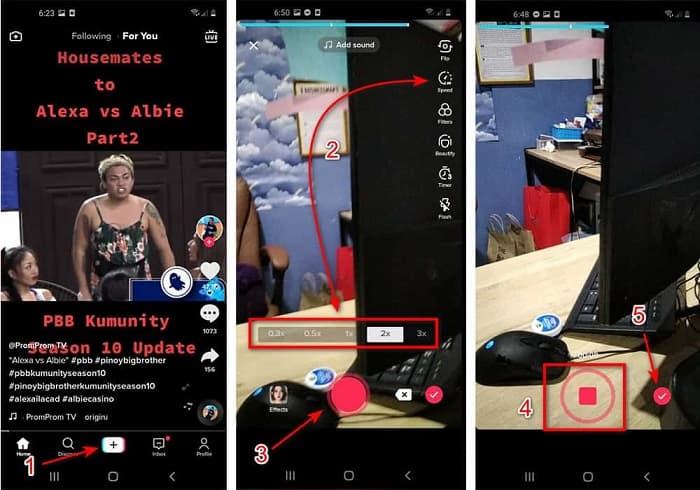
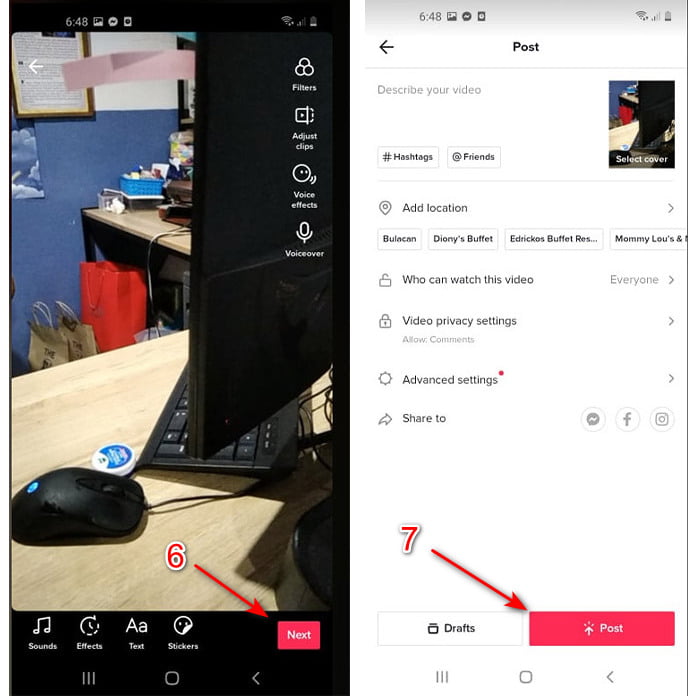
Steg 3. För att granska videon trycker du på bock-knappen och klickar på Nästa. Klicka sedan på Publicera för att ladda upp den till TikTok.
Del 2. Hur man snabbar upp alla TikTok-videor på Video Converter Ultimate
Till skillnad från den inbyggda redigeringsfunktionen som TikTok erbjuder låter Video Converter Ultimate dig justera hastigheten manuellt, men på ett enklare sätt. Dessutom får du en förhandsvisning medan du snabbar upp videon, så att du kan avgöra om videons hastighet passar din smak. Denna fenomenala programvara låter också sina användare ta del av avancerade redigeringsfunktioner på proffsnivå, men med förenklade steg. På grund av de avancerade funktionerna som detta verktyg erbjuder behöver du betala några dollar. Men oroa dig inte – det handlar varken om tusentals eller ens hundratals. Om du vill veta vilka fördelar eller nyckelfunktioner du får med detta verktyg kan du titta på listan nedan.
Bästa nyckelfunktionerna du hittar i Video Converter Ultimate:
◆ Detta är en plattformsoberoende programvara vilket innebär att du kan ladda ner den på din PC, Mac eller Linux.
◆ All avancerad redigering, konverterare, GIF-skapare och mer är tillgängliga i det här verktyget.
◆ Användbarheten av verktyget är mycket praktiskt för alla, även för proffs eller nybörjare inom redigering.
◆ Det låter användarna uttrycka sin kreativa sida genom olika redigeringsfunktioner som är tillgängliga här.
◆ Även om verktyget fortfarande betalas är det billigare och mycket prisvärt för alla som vill prova det.
Så om du nu vill veta hur man snabbar upp TikTok‑videor med denna fenomenala alternativa redigerare, läs och följ instruktionerna nedan för att lyckas utan problem.
Steg för hur du snabbar upp TikTok‑videor med Video Converter Ultimate:
Steg 1. För att använda programvaran måste du först ladda ner den till din PC eller Mac. Installera den sedan, gör den enkla grundläggande inställningen och klicka på ”Slutför” för att gå vidare.
Gratis nedladdningFör Windows 7 eller senareSäker nedladdning
Gratis nedladdningFör MacOS 10.7 eller senareSäker nedladdning
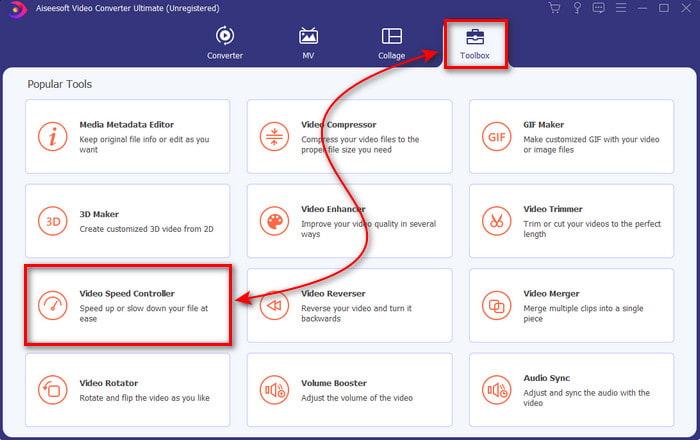
Steg 2. Tryck på Verktygslåda och välj Video Speed Controller därunder.
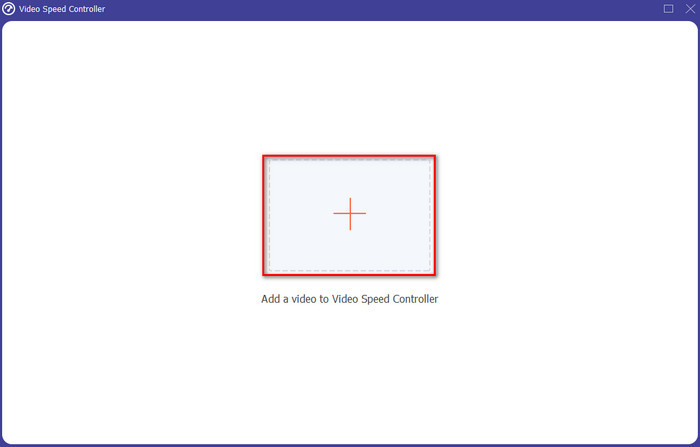
Steg 3. För att lägga till filen du vill snabba upp klickar du på +-knappen. Välj sedan filen i den mapp som visas och klicka på Öppna för att fortsätta.
Steg 4. För att justera videons hastighet väljer du hastighetsalternativet nedanför. För att ladda ner filen klickar du på Exportera för att starta exportprocessen.
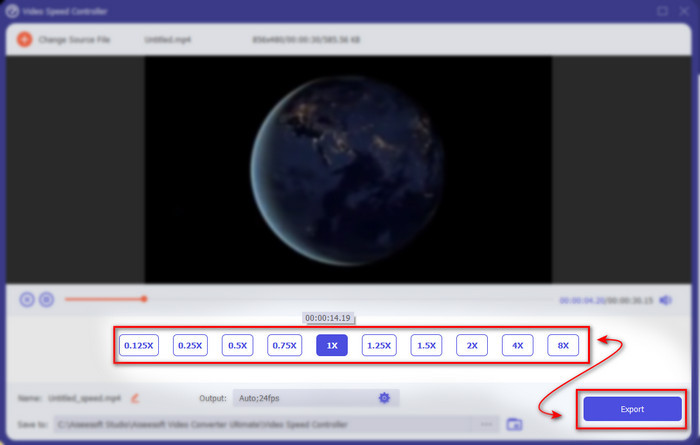
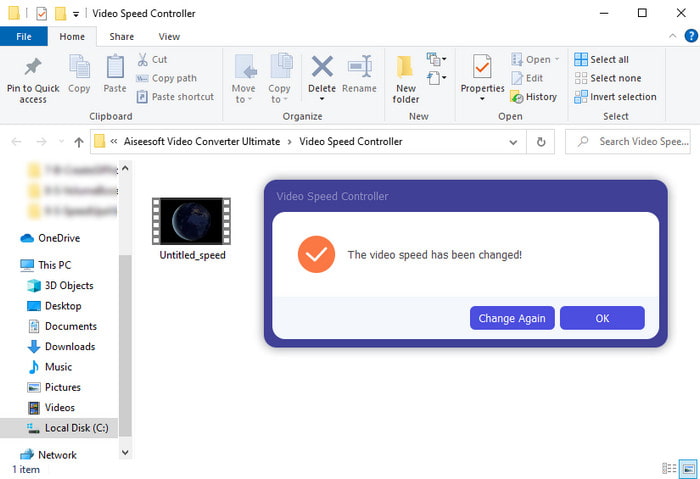
Steg 5. Du behöver inte vänta en hel minut, eftersom filen är klar efter några sekunder. Om en mapp sedan visas på skärmen betyder det att filen redan har exporterats. Klicka på filen för att titta på videon du har snabbat upp.
Relaterat:
Del 3. Vanliga frågor om att snabba upp en video på Tiktok
Hur snabbar man upp en TikTok-video som inte är din?
Om du vill snabba upp en video som inte är din egen måste du först ladda ner TikTok‑videon. Klicka på +-knappen och Ladda upp, och välj sedan videon i galleriet. Välj hastighetsalternativet och klicka på Nästa för att ladda upp den. Eller använd Video Converter Ultimate för att snabba upp den genom att följa stegen ovan.
Kan jag spela in en 3 minuters video på Tiktok?
Absolut Ja, du kan om de är separat inspelade men du kan inte spela in en rak 3-minuters video. Eftersom längden på inspelningen med detta appstöd är 15 till 60 hela sekunder. Så om videolängden du vill spela in är mer än en minut är det bättre att spela in den separat. Men om du är en av användarna som har valts ut av Tiktok att prova 3-minutersinspelningen så har du tur eftersom detta bara testades för en liten grupp människor.
Kan jag lägga till MP3 till mina videor på Tiktok?
När TikTok först släpptes fick användare lägga till musik till sin video men nu har de tagit bort den här funktionen. På grund av upphovsrättsfrågan som har lämnats in till TikTok. Så för att undvika problemet tar de bort det och lägger till ett exempel på musik eller så kan du använda en annan app för att göra det åt dig.
Har Tiktok en åldersbegränsning?
Enligt villkoren för TikTok måste 13 år eller äldre vara åldern på den användare som ska använda denna app. Dessutom har Tiktok ingen åldersverifiering när du registrerar dig, så förvänta dig att 16+ innehåll dyker upp i ditt flöde.
Slutsats
Och nu när du vet hur man snabbar upp en video på TikTok är det dags att börja ha roligt. Välj dessutom den lösning som du tycker passar dig bäst. Om du tycker att TikToks inbyggda funktion för att snabba upp videor är tillräckligt bra, använd den. Men om du vill uppleva en mycket bättre uppsnabbning med förhandsvisningar, använd Video Converter Ultimate. Oavsett vilket alternativ du väljer kan du förvänta dig ett bra resultat tack vare deras funktioner och prestanda.
-
 7 enkla steg för hur man åtgärdar OBS-ljudfördröjningsproblem [löst]
 Har du svårt att se ditt videoklipp efter inspelning på grund av ljudfördröjningen när du använder OBS Studio? Läs artikeln nedan för att lära dig hur du åtgärdar osynkroniserat ljud effektivt.
-
 Utmärkta sätt möjliga | Så här fixar du VLC-ljudfördröjning [2021]
 Har du svårt att se din favoritfilm på din VLC-mediaspelare på grund av ljudosäkerheten? Fortsätt läsa den här artikeln för att veta alla möjliga sätt att fixa VLC-ljudfördröjning.
-
 Bästa sätten att öka MP4-volymen online och offline
 Har du svårt att höra ljudet från ditt videoklipp? Läs artikeln nedan för att veta hur du ökar mp4-volymen på olika sätt.
