


 Video Converter Ultimate
 บันทึกหน้าจอ
 ซ่อมวิดีโอ
ตัวเลือกมากมายเกี่ยวกับกล้องสโลว์โมชั่นที่คุณควรพิจารณา
มีแอปพลิเคชัน ซอฟต์แวร์ และเครื่องมือออนไลน์หลากหลายประเภทที่ใช้สำหรับสร้างวิดีโอแบบสโลว์โมชั่น แต่ถ้าคุณสามารถบันทึกวิดีโอสโลว์โมชั่นด้วยกล้องของคุณเองได้ล่ะ? ขอแนะนำ กล้องถ่ายวิดีโอสโลว์โมชั่น กล้องประเภทนี้สามารถบันทึกวิดีโอแบบสโลว์โมชั่นได้โดยไม่ต้องพึ่งโปรแกรมตัดต่อ หากคุณยังตัดสินใจไม่ได้ว่าจะซื้อกล้องรุ่นไหนดีที่สุด ลองอ่านบทความนี้ต่อเพื่อดูรายละเอียดเฉพาะที่คุณควรพิจารณา.

ส่วนที่ 1. กล้องสโลว์โมชั่นคืออะไร?
กล้องสโลว์โมชั่นนั้นเป็นกล้องที่ถ่ายภาพในอัตราที่เร็วกว่าที่จะเล่นในตอนท้าย เวลาดูเหมือนจะเดินช้าเพราะต้องใช้ภาพนิ่งหลายเฟรมต่อวินาทีในการจับภาพ เมื่อเราพูดถึงสโลว์โมชั่น เราหมายถึงเอฟเฟกต์การสร้างภาพยนตร์บ่อยครั้งโดยที่วิดีโอเคลื่อนไหวช้ากว่าปกติ ก่อนหน้านี้เคยใช้เฉพาะในภาพยนตร์ โฆษณา และโทรทัศน์เท่านั้น อย่างไรก็ตาม ต้องขอบคุณการพัฒนาอย่างมากในเทคโนโลยีสมาร์ทโฟน แม้แต่สมาร์ทโฟนก็สามารถถ่ายสโลว์โมชั่นได้แล้ว
พิจารณากล้องความเร็วสูง Phantom HD เป็นตัวอย่าง กล้องนี้มีอัตราเฟรมสูงสุด 1,455 เฟรมต่อวินาทีเมื่อถ่ายด้วยความละเอียดสูง (ในขณะที่ฟิล์มปกติมักจะแสดงที่ 24 เฟรมต่อวินาที) การเคลื่อนไหวปกติสามารถเห็นได้โดยการถ่ายภาพที่ 24 เฟรมต่อวินาที และเล่นภาพที่ 24 เฟรมต่อวินาที คุณจะสังเกตเห็นการทำงานที่ช้าลงหากคุณถ่ายภาพด้วยอัตราเฟรมที่สูงกว่านั้น เช่น 1,455 เฟรมต่อวินาที แล้วเล่นกลับที่ 24 เฟรมต่อวินาที (เอฟเฟกต์สโลว์โมชั่น)
ส่วนที่ 2 3 กล้องสโลว์โมชั่นที่ดีที่สุด
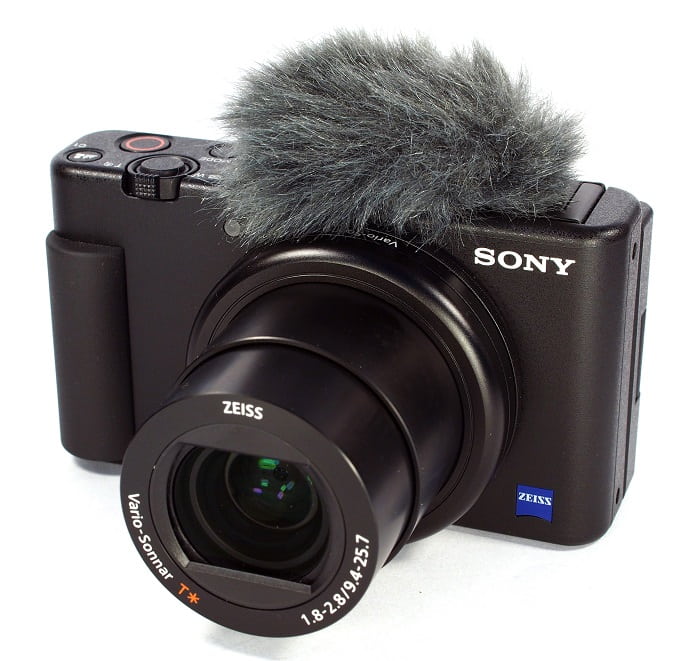
1. กล้อง Sony ZV-1
หนึ่งในกล้องที่โดดเด่นที่สุดสำหรับวิดีโอสโลว์โมชั่น 4K คือ Sony ZV-1 อุปกรณ์ Sony นี้เหมาะอย่างยิ่งสำหรับการทำวิดีโอบล็อกเพราะสามารถสลับไปมาระหว่างโหมดต่างๆ ได้โดยไม่สูญเสียโฟกัส พิจารณาอีกครั้งหากคุณเห็นว่ามันเป็นตัวแบบที่ยอดเยี่ยมสำหรับการถ่ายภาพ Sony ZV-1 สามารถทำสิ่งต่างๆ ได้มากมาย แต่การทำวิดีโอบล็อกคือจุดที่โดดเด่น ระบบจัดการโฟกัสและพร่ามัว นี่คือกลยุทธ์หลักที่ใช้ การใช้ในที่มืดอาจทำให้งานของคุณผิดพลาดได้ ออโต้โฟกัสและระบบป้องกันภาพสั่นไหวของ Sony ZV-1 นั้นเหนือกว่ากล้องวิดีโอของคู่แข่ง สำหรับ YouTubers นี่คือกล้อง แต่สิ่งต่าง ๆ ไม่สมบูรณ์แบบ ราคาของอุปกรณ์นี้ห้ามปราม เนื่องจากมีค่าใช้จ่าย $700 คุณอาจสงสัยว่าคุ้มค่าจริงหรือไม่ Sony ZV-1 มีขนาด 4.15 x 2.36 x 1.7 นิ้ว จับภาพที่ 21MP และบันทึกวิดีโอที่ 2160p เหตุผลหนึ่งที่ทำให้มีกล้องอย่าง Sony ZV-1 เป็นเพราะเหตุผลข้างต้นทั้งหมด
2. Canon PowerShot G7 X Mark III
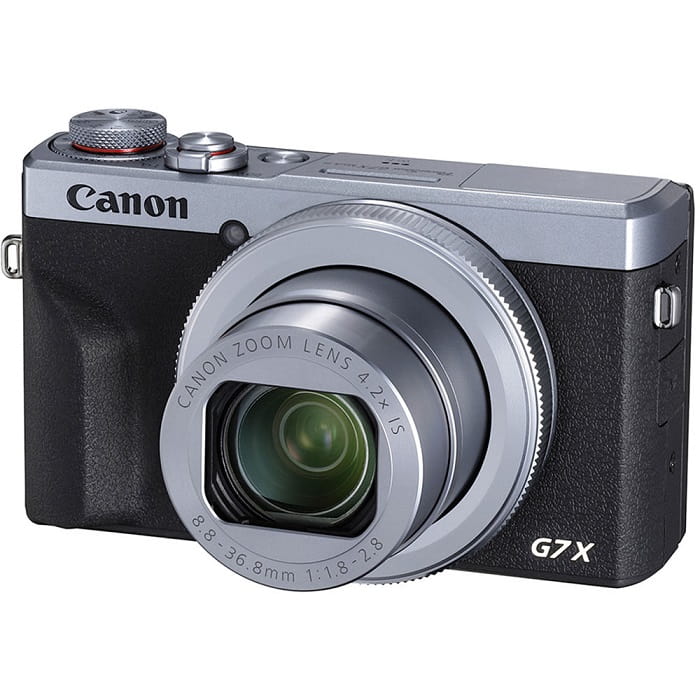
Canon PowerShot G7 X Mark III ซึ่งแตกต่างจาก Sony ZV-1 คือตัวเลือกที่ยอดเยี่ยมสำหรับการสตรีมแบบสด มีประโยชน์สำหรับผู้ที่สร้างวิดีโอในที่ร่ม เช่น วิดีโอบน YouTube ด้วยคุณภาพวิดีโอ 4K ที่ไม่ได้เจียระไนและ LCD ที่ยอดเยี่ยมสำหรับการถ่ายภาพเซลฟี่อย่างมีศิลปะ จึงรวมอยู่ในบทสรุปนี้ Canon PowerShot G7 X Mark III มีความละเอียดสูงสุด 20.1 ล้านพิกเซลสำหรับภาพถ่ายและวิดีโอ 4K 30p แต่ไม่มีตัวเลือก 4K 60p สิ่งนี้จะต้องนำมาพิจารณา กล้องเซลฟี่มีมุมมอง 180 องศา ช่วงความเร็วชัตเตอร์ 1/25600 ถึง 30 วินาที และระบบป้องกันภาพสั่นไหวแบบออปติคัล มีแนวโน้มมากขึ้นว่า Canon PowerShot G7 X Mark III นี้มีราคาประมาณ $750
3. โซนี่ A6400
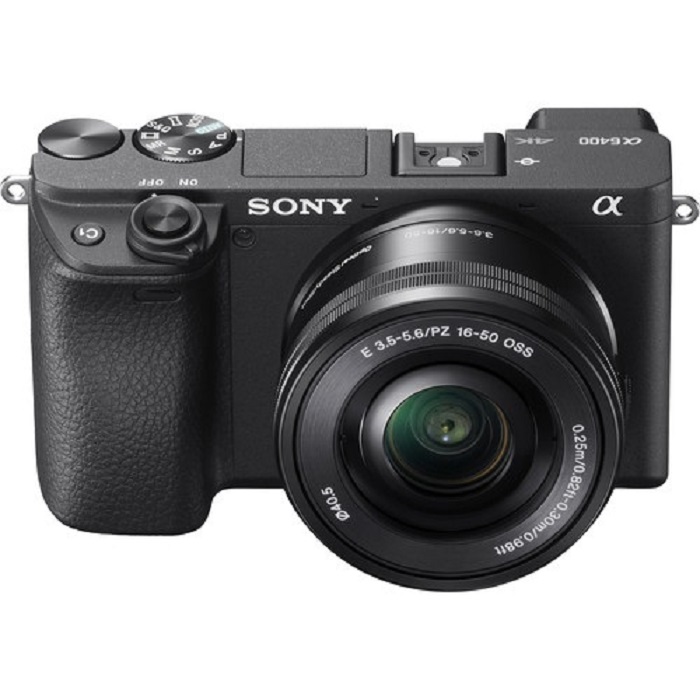
ในทางกลับกัน Sony A6400 นั้นใช้งานได้ดีกว่ารุ่นก่อนๆ ความน่าสนใจของอุปกรณ์อยู่ในความเก่งกาจที่โดดเด่น ซึ่งสามารถใช้สำหรับถ่ายวิดีโอระดับมืออาชีพ ทำ vlog ส่วนตัว และถ่ายภาพ นอกจากนี้ Sony A6400 ยังสามารถบันทึกในแบบสโลว์โมชั่นและไทม์แลปส์ ทำให้คุณมีตัวเลือกในการใช้เอฟเฟกต์เหล่านั้นในภาพยนตร์ของคุณ คุณภาพของภาพนั้นยอดเยี่ยม ด้วยภาพถ่ายที่คมชัด ชัดเจน และปราศจากสีเปื้อนด้วยความละเอียด 24 MP ของกล้อง อย่างไรก็ตาม กล้องนี้มีราคาแพงมากในกล้องสามตัวที่มีราคาประมาณ $1299
ส่วนที่ 3 ถ้าฉันไม่มีกล้องสโลว์โมชั่นล่ะ
กล้องทั้งหมดที่กล่าวมาข้างต้นสามารถให้ผลลัพธ์ของวิดีโอแบบสโลว์โมชั่นที่โดดเด่นและยอดเยี่ยมที่สุด เพราะมีฟีเจอร์นี้ติดตั้งมาในตัวและถูกออกแบบมาเพื่อถ่ายวิดีโอแบบสโลว์โมชั่นโดยเฉพาะ ข้อเสียก็คือ กล้องสโลว์โมชั่นมีราคาสูงและค่อนข้างซับซ้อนสำหรับการสร้างวิดีโอสโลว์โมชั่น เราขอแนะนำให้ใช้ Video Converter Ultimate เป็นตัวเลือกทางเลือกที่ดีที่สุด หากคุณไม่มีกล้องสโลว์โมชั่น แตกต่างจากกล้องสโลว์โมชั่น ซอฟต์แวร์นี้สามารถดาวน์โหลดได้ฟรี และผู้ใช้ทุกคนก็สามารถเข้าถึงได้ง่าย.
หนึ่งในเครื่องมือเด่นอย่าง Video Speed Controller สามารถเปลี่ยนวิดีโอความเร็วปกติให้กลายเป็นวิดีโอสโลว์โมชั่นที่คุณต้องการได้ เพียงคลิกไม่กี่ครั้งในแต่ละขั้นตอน คุณก็สามารถเพลิดเพลินกับการรับชมวิดีโอแบบสโลว์โมชั่นได้โดยไม่ต้องใช้กล้องราคาแพง หากต้องการทราบรายละเอียดเพิ่มเติมเกี่ยวกับซอฟต์แวร์ ต่อไปนี้คือขั้นตอนการใช้งาน:
ขั้นตอนที่ 1: ต้องดาวน์โหลดซอฟต์แวร์ก่อนจึงจะสามารถใช้งานได้ ในการทำเช่นนั้น ให้คลิกที่ลิงก์ ดาวน์โหลดฟรี ใต้ปุ่ม include จากนั้นติดตั้งให้เสร็จโดยดาวน์โหลดลงบนเดสก์ท็อปของคุณแล้วคลิกปุ่ม เริ่มเลย เพื่อเริ่มการติดตั้ง.
ดาวน์โหลดฟรีสำหรับ Windows 7 หรือใหม่กว่าดาวน์โหลดอย่างปลอดภัย
ดาวน์โหลดฟรีสำหรับ MacOS 10.7 หรือใหม่กว่าดาวน์โหลดอย่างปลอดภัย
ขั้นตอนที่ 2: เมื่อคุณติดตั้งโปรแกรมเสร็จแล้ว คุณจะเห็นกระบวนการแปลงไฟล์บนหน้าต่างหลักของซอฟต์แวร์ จากนั้นใช้ฟังก์ชัน กล่องเครื่องมือ (Toolbox) เพื่อค้นหาสิ่งที่คุณต้องการสำหรับการสร้างวิดีโอสโลว์โมชั่น เมื่อดูรายชื่อเครื่องมือที่มีอยู่ ให้เลือก Video Speed Controller หากคุณต้องการปรับความเร็วของวิดีโอหรือเพียงแค่ทำให้วิดีโอของคุณเป็นสโลว์โมชั่น.
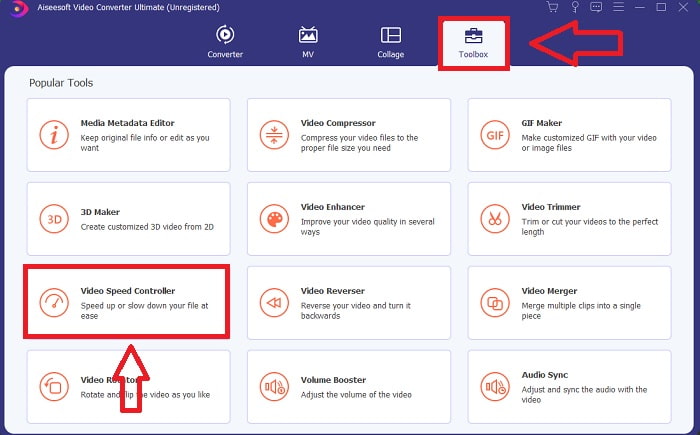
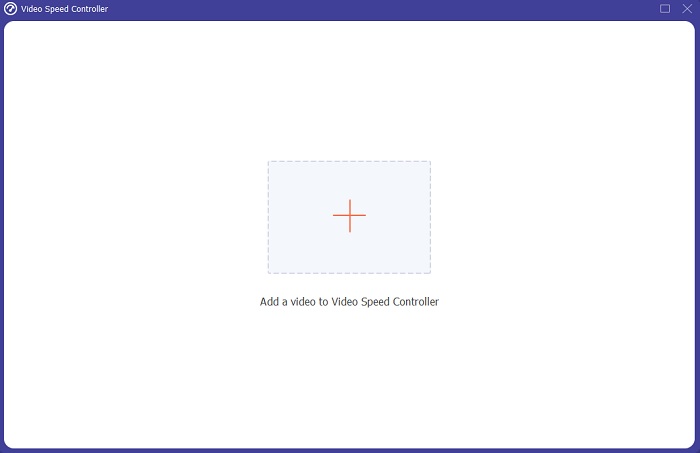
ขั้นตอนที่ 3: หากคุณเลือกดำเนินการต่อ จะมีหน้าต่างใหม่ปรากฏบนหน้าจอคอมพิวเตอร์ของคุณ จากนั้นคลิกที่สัญลักษณ์บวก + เพื่อเริ่มแก้ไขวิดีโอ.
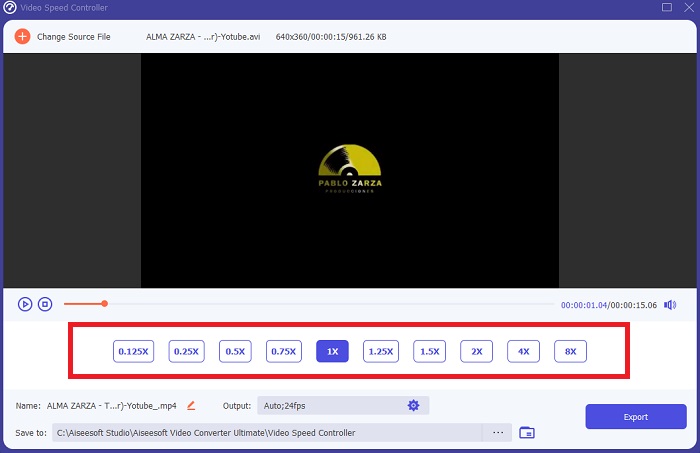
ขั้นตอนที่ 4: เริ่มจากอัตราเฟรมของวิดีโอ เลือกว่าควรเพิ่มหรือลดกี่เท่าระหว่างการเล่นเพื่อกำหนดความเร็วของวิดีโอว่าจะให้เร็วหรือช้าเพียงใด ซึ่งจะเป็นตัวกำหนดระดับเอฟเฟ็กต์สโลว์โมชั่นที่คุณจะใส่ให้กับวิดีโอของคุณ เนื่องจากคุณต้องการสร้างทางเลือกแทนกล้องสโลว์โมชั่น คุณจึงต้องลดความเร็วลงโดยเลือกความเร็วที่ต่ำกว่าความเร็วปกติ เพื่อให้เอฟเฟ็กต์สโลว์โมชั่นถูกนำไปใช้กับวิดีโอของคุณ.
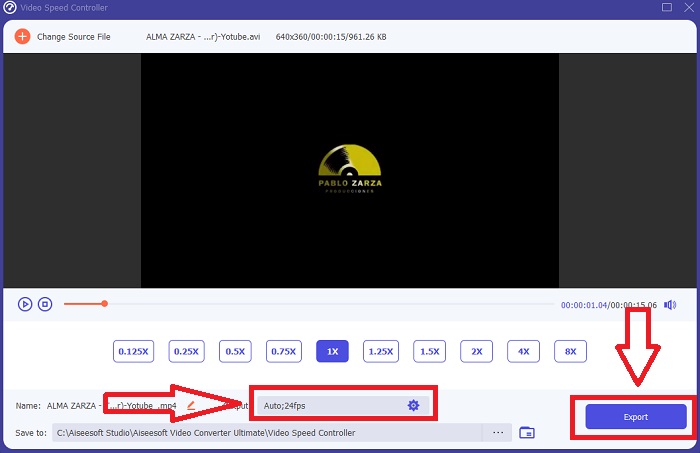
ขั้นตอนที่ 5: หากคุณพอใจกับความเร็วของวิดีโอแล้ว คุณสามารถปรับแต่งคุณภาพให้ละเอียดขึ้นได้โดยการเปลี่ยนรูปแบบไฟล์ ความละเอียด อัตราเฟรม และพารามิเตอร์อื่น ๆ นอกจากนี้คุณยังสามารถเปลี่ยนชื่อไฟล์วิดีโอเอาต์พุตได้อีกด้วย เมื่อต้องการบันทึกผลงานของคุณ ให้คลิก ส่งออก (Export) แล้วเลือกตำแหน่งจัดเก็บในระบบไฟล์ของคอมพิวเตอร์.
ที่เกี่ยวข้อง
วิธีเร่งความเร็ววิดีโอใน Windows Media Player
วิธีเปลี่ยนวิดีโอสโลว์โมชั่นให้กลับเป็นความเร็วปกติ
ส่วนที่ 4. คำถามที่พบบ่อยเกี่ยวกับกล้องสโลว์โมชั่น
กล้องสโลว์โมชั่นราคาเท่าไหร่?
เลือกกล้องที่มีอัตราเฟรมสูงหากคุณต้องการเอฟเฟกต์สโลว์โมชั่นคุณภาพสูง มันทำให้เรารู้สึกว่าไม่มีวิดีโอใดที่จะกระตุกหรือกระตุกหากกล้องมีอัตราเฟรมที่สูงหรือปานกลาง สิ่งที่ควรพิจารณาอีกอย่างคืองบประมาณของคุณ ภาพสโลว์โมชั่นไม่จำเป็นต้องซื้ออุปกรณ์ราคาแพง กล้องดังกล่าวเริ่มต้นที่ประมาณ $350 และสามารถสูงถึง $4,000 คุณสามารถบันทึกฟุตเทจฟรีเฟรมที่น่าทึ่งได้ด้วยกล้องที่มีสองคุณสมบัตินี้
อัตราเฟรมคืออะไร?
โดยปกติกำหนดเป็นเฟรมต่อวินาที อัตราเฟรมหมายถึงความถี่ในการแสดงภาพต่อเนื่องบนหน้าจอ (fps) อัตราเฟรมของวลีหมายถึงสิ่งเดียวกัน ไม่ว่าจะใช้เพื่ออธิบายกล้องฟิล์มหรือวิดีโอ คอมพิวเตอร์กราฟิก หรือระบบจับภาพการเคลื่อนไหว SMPTE (สมาคมบรรณาธิการภาพยนตร์และโทรทัศน์) กำหนดมาตรฐานอุตสาหกรรมสำหรับอัตราเฟรมภาพยนตร์และโทรทัศน์ (SMPTE)
มีแอพกล้องสโลว์โมชั่นหรือไม่?
ใช่ มีแอปพลิเคชั่นสโลว์โมชั่นมากมายในระบบปฏิบัติการ Android และ iOS สำหรับ iOS มี iMotion, SloPro, SlowCam เป็นต้น และสำหรับ Android, Slow Motion Video FX, Efectum, Coach's Eye เป็นต้น
สรุป
โดยสรุปแล้ว กล้องสโลว์โมชั่นค่อนข้างมีความเป็นเทคนิคระดับมืออาชีพ เนื่องจากมีราคาแพงและต้องอาศัยประสบการณ์มากในการใช้งาน โชคดีที่ด้วยซอฟต์แวร์ตัวใหม่ของเรา Video Converter Ultimate สามารถทำหน้าที่ทดแทนกล้องสโลว์โมชั่นได้ เพราะหนึ่งในเครื่องมือของโปรแกรมสามารถแปลงวิดีโอความเร็วปกติของคุณให้เป็นสโลว์โมชั่นได้ฟรี.
-
 [ง่าย] วิธีแก้ไขเสียงและวิดีโอที่ไม่ซิงค์
 สมมติว่าคุณกำลังจะกำหนดเวลาการสตรีมสำหรับวันพรุ่งนี้ แต่เมื่อคุณตรวจสอบการตั้งค่า เสียงและวิดีโอจะไม่ซิงค์กัน อ่านบทความนี้เพื่อให้คุณได้เรียนรู้เพิ่มเติมเกี่ยวกับข้อกังวลนี้
-
 7 ขั้นตอนง่าย ๆ ในการแก้ไขปัญหา OBS Audio Delay [แก้ไขแล้ว]
 คุณมีปัญหาในการดูวิดีโอคลิปของคุณหลังจากบันทึกเนื่องจากความล่าช้าของเสียงเมื่อใช้ OBS Studio หรือไม่? อ่านบทความด้านล่างเพื่อเรียนรู้วิธีแก้ไขเสียงไม่ซิงค์อย่างมีประสิทธิภาพ
-
 วิธีที่ยอดเยี่ยมที่เป็นไปได้ | วิธีแก้ไข VLC Audio Delay [2021]
 คุณมีช่วงเวลาที่ยากลำบากในการดูภาพยนตร์เรื่องโปรดบนเครื่องเล่นสื่อ VLC เนื่องจากความไม่แน่นอนของเสียงหรือไม่? อ่านบทความนี้ต่อเพื่อทราบวิธีแก้ไข VLC audio delay ที่เป็นไปได้ทั้งหมด
