


 Video Converter Ultimate
 บันทึกหน้าจอ
 ซ่อมวิดีโอ
วิธีแปลง MTV เป็น AVI ด้วยคุณภาพสูง: แนวทางที่ดีที่สุดที่คุณควรรู้
AVI (Audio Video Interleave) เป็นคอนเทนเนอร์วิดีโอที่ใช้บรรจุและเข้ารหัสทั้งข้อมูลเสียงและวิดีโอ แม้ว่าจะมีพลังในการบีบอัดน้อยกว่าคู่แข่งบางตัว แต่เครื่องเล่นดีวีดีส่วนใหญ่ก็สามารถเล่นไฟล์ในคอนเทนเนอร์นี้ได้ ต้องมีตัวแปลงสัญญาณ AVI (AVI codec) สำหรับโปรแกรมเล่นมัลติมีเดียจึงจะถอดรหัสข้อมูล AVI ได้ ไฟล์วิดีโอรูปแบบนี้สามารถใช้งานได้ในโปรแกรมเล่นวิดีโอและโปรแกรมตัดต่อวิดีโอแทบทุกตัว อย่างไรก็ตาม รูปแบบวิดีโอ MTV ไม่ค่อยเป็นที่นิยมในการใช้งานหรือแปลงไปเป็นรูปแบบอื่น หากคุณกำลังสงสัยว่าคุณจะ แปลงไฟล์ MTV เป็น AVI ได้อย่างไร ลองอ่านบทความต่อไปเพื่อทำความรู้จักรูปแบบทั้งสองนี้ให้มากขึ้น.

ส่วนที่ 1 วิธีการแปลง MTV เป็น AVI บน Windows และ Mac
มีหลายวิธีในการแปลงไฟล์ MTV เป็น AVI ซึ่งจะแตกต่างกันไปตามวัตถุประสงค์ คุณอาจดาวน์โหลดเป็นแอปพลิเคชัน ใช้งานผ่านเว็บทูลออนไลน์ หรือเป็นฟังก์ชันภายในโปรแกรมก็ได้ แต่คุณเคยคิดไหมว่ามีซอฟต์แวร์ที่สามารถแปลงวิดีโอได้หลายรูปแบบในเวลาอันรวดเร็ว? Video Converter Ultimate คือซอฟต์แวร์ที่บทความนี้แนะนำให้คุณใช้ ไม่เพียงเพราะเป็นโปรแกรมแปลงไฟล์ที่รวดเร็วและดาวน์โหลดได้ฟรีเท่านั้น แต่ยังมาพร้อมเครื่องมือเด่น ๆ มากมายที่ช่วยในการตัดต่อวิดีโอได้อย่างสะดวก หนึ่งในคุณสมบัติหลักที่คุณแทบหาไม่ได้จากแอปหรือเว็บทูลอื่น ๆ คือ การรองรับไฟล์ได้หลากหลายรูปแบบ รวมถึงการแปลง MTV เป็น AVI ด้วย หากคุณยังไม่สนใจ ลองอ่านรายละเอียดต่อไปนี้เพื่อทำความรู้จักซอฟต์แวร์นี้ให้มากขึ้น:
ขั้นตอนที่ 1. ก่อนอื่น คลิกปุ่ม ดาวน์โหลดฟรี ด้านล่างเพื่อเริ่มดาวน์โหลด คุณสามารถเลือกดาวน์โหลดซอฟต์แวร์สำหรับ Windows หรือ Mac ได้ตามที่ต้องการ เมื่อดาวน์โหลดเสร็จแล้ว ก่อนจะรันโปรแกรม คุณต้องติดตั้งลงในเดสก์ท็อปของคอมพิวเตอร์ให้เรียบร้อย แล้วจึงคลิก เริ่มเลย เพื่อเริ่มต้นใช้งาน.
ดาวน์โหลดฟรีสำหรับ Windows 7 หรือใหม่กว่าดาวน์โหลดอย่างปลอดภัย
ดาวน์โหลดฟรีสำหรับ MacOS 10.7 หรือใหม่กว่าดาวน์โหลดอย่างปลอดภัย
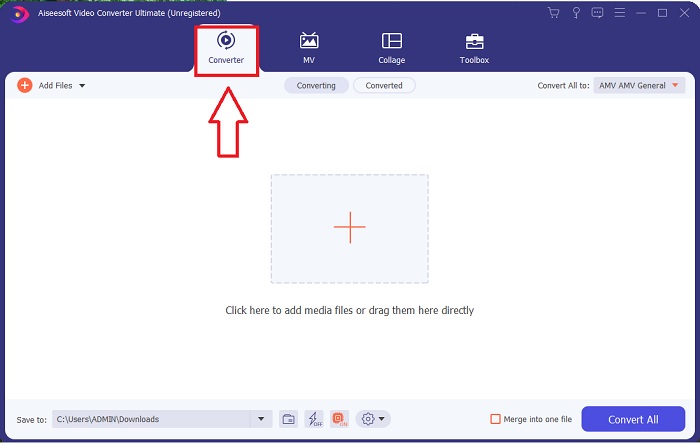
ขั้นตอนที่ 2. เปิดโปรแกรมที่ดาวน์โหลดมา เมื่อคุณเปิดโปรแกรมครั้งแรก จะมีหน้าต่างพร้อมอินเทอร์เฟซ Converter ปรากฏขึ้น ที่นี่คือหน้าที่คุณจะนำไฟล์วิดีโอเข้ามาและเริ่มการแปลง.
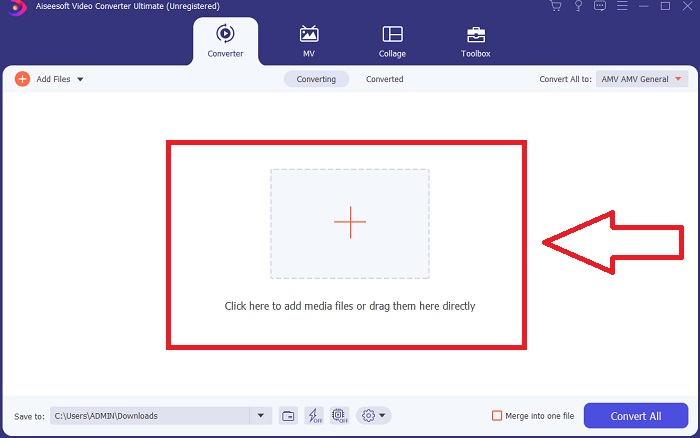
ขั้นตอนที่ 3. นำเข้าไฟล์ของคุณลงในตัวโปรแกรมแปลงไฟล์เพื่อเริ่มขั้นตอนการแปลง ลากและวางไฟล์วิดีโอที่คุณต้องการแปลงไปยังไอคอนเครื่องหมาย +.
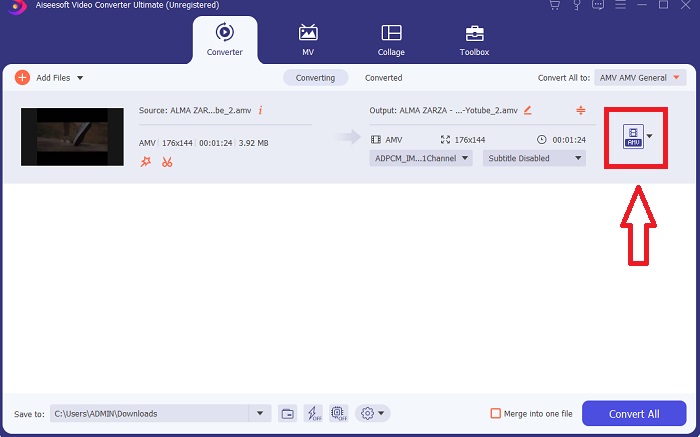
ขั้นตอนที่ 4 เลือกรูปแบบวิดีโอจากรายการที่มุมขวาบนของหน้าจอ ค้นหาและคลิกเมนูแบบดรอปดาวน์ Convert All to จากนั้นเลือก รูปแบบ AVI จากหมวดหมู่วิดีโอ อย่างไรก็ตาม หากไม่มีรูปแบบวิดีโอปลายทางที่คุณต้องการ คุณสามารถปรับการตั้งค่าคุณภาพให้ตรงตามต้องการได้ โดยคลิกไอคอนรูปเฟือง คุณจะสามารถเปลี่ยนความละเอียดของภาพ อัตราเฟรม ไปจนถึงคุณภาพเสียงได้ เมื่อตั้งค่าเสร็จแล้ว ให้คลิกปุ่ม Create New เพื่อบันทึกการเปลี่ยนแปลง.
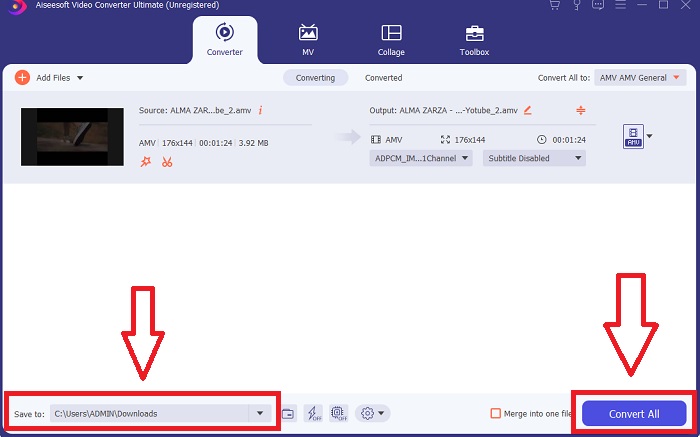
ขั้นตอนที่ 5. เมื่อคุณแก้ไขวิดีโอเสร็จและพร้อมสำหรับการแปลงแล้ว ให้คลิก แปลงทั้งหมด เพื่อเริ่มขั้นตอนการส่งออกไฟล์ไปยังคอมพิวเตอร์ของคุณ.
ส่วนที่ 2 วิธีการแปลง MTV เป็น AVI Online
วิธีที่ 1: Online-Convert.com
ด้วยการใช้โปรแกรมแปลงไฟล์ออนไลน์ฟรีนี้ คุณสามารถเปลี่ยนสื่อของคุณจากรูปแบบหนึ่งไปอีกรูปแบบหนึ่งได้อย่างง่ายดายและรวดเร็ว สามารถแปลงได้หลายรูปแบบโดยใช้เครื่องมือเว็บนี้ เช่นเดียวกับปลายทางที่หลากหลาย สำหรับคำอธิบายเพิ่มเติม นี่คือขั้นตอนสำหรับคุณ:
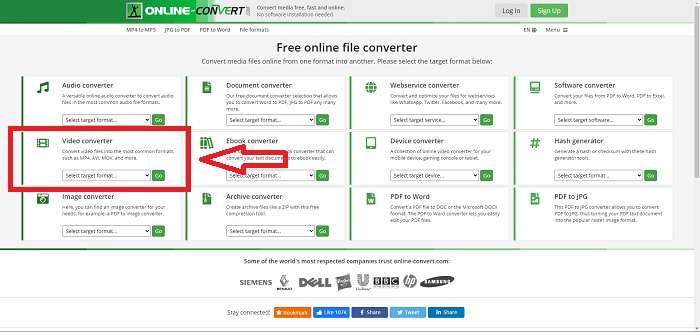
ขั้นตอนที่ 1 ค้นหาเว็บไซต์ online-convert ด้วยเสิร์ชเอนจินใดก็ได้ แล้วคลิกเข้าเว็บทูล หลังจากคลิกแล้ว อินเทอร์เฟซของเว็บจะปรากฏขึ้น ขั้นตอนต่าง ๆ ในการแปลงไฟล์จะแสดงเป็นตัวเลือกให้คุณ หากต้องการแปลง MTV เป็น AVI ให้เลือก Video Converter เมื่อเลือกแล้ว ให้คลิก Convert to AVI จากนั้นดำเนินการต่อด้วยการคลิก Go.
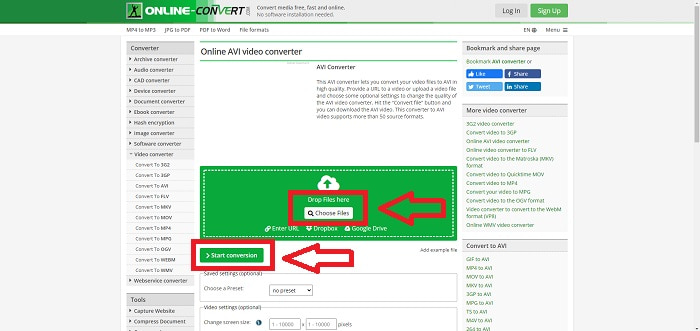
ขั้นตอนที่ 2 หลังจากดำเนินการต่อแล้ว อินเทอร์เฟซอีกหน้าหนึ่งจะปรากฏขึ้น คลิก Choose Files เพื่ออัปโหลดไฟล์ที่คุณต้องการแปลง รอประมาณหนึ่งนาทีหรือมากหรือน้อยขึ้นอยู่กับขนาดไฟล์ เพื่อให้ระบบประมวลผลวิดีโอของคุณ จากนั้นคลิก Start Conversion เพื่อแปลงไฟล์ของคุณเป็น AVI.
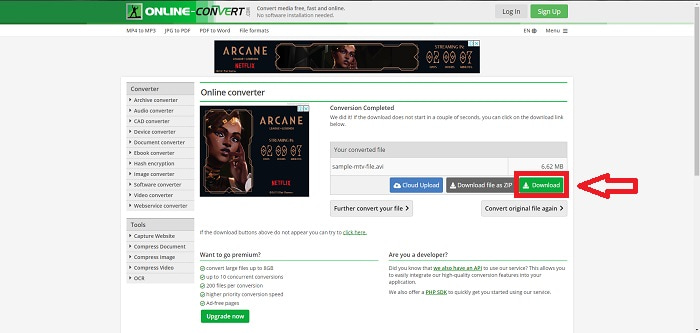
ขั้นตอนที่ 3 เมื่อต้องการเริ่มดาวน์โหลดไฟล์ที่แปลงเสร็จแล้ว ให้คลิก Download.
วิธีที่ 2: Video-Converter.com
ใช้ตัวแปลงวิดีโอออนไลน์ฟรีนี้เพื่อแก้ไขการตั้งค่าวิดีโอ เช่น รูปแบบวิดีโอ ความละเอียด และขนาดภายในเว็บเบราว์เซอร์ของคุณ หากต้องการทราบข้อมูลเพิ่มเติมเกี่ยวกับเครื่องมือเว็บออนไลน์ ต่อไปนี้คือขั้นตอนที่คุณจำเป็นต้องทราบ:
ขั้นตอนที่ 1 เปิดเว็บตัวแปลงวิดีโอผ่านเสิร์ชเอนจินใดก็ได้ คลิกเว็บทูลหลักแล้วจะมีหน้าต่างใหม่เด้งขึ้นมา บนอินเทอร์เฟซหลัก คุณจะเห็นขั้นตอนการแปลงไฟล์ทั้งหมดแสดงอยู่แล้ว เพื่อเริ่มต้น ให้คลิก Open File เพื่อเลือกและนำเข้าไฟล์วิดีโอที่คุณต้องการแปลง.
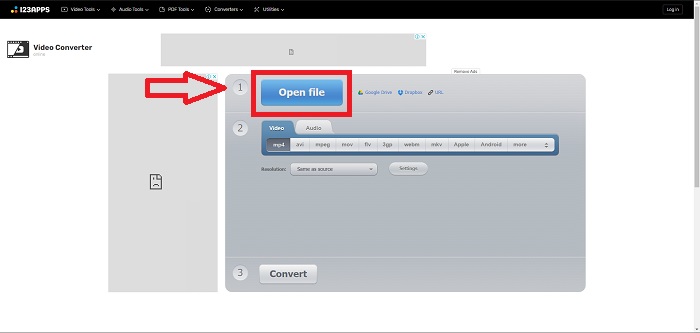
ขั้นตอนที่ 2 เลือกรูปแบบที่คุณต้องการแปลงวิดีโอจากรายการรูปแบบวิดีโอทั้งหมด เนื่องจากคุณต้องการแปลง MTV เป็น AVI ให้เลือก AVI คุณสามารถแก้ไขความละเอียดและรูปแบบไฟล์วิดีโอเอาต์พุตได้โดยคลิก Same as Source หรือ Settings.
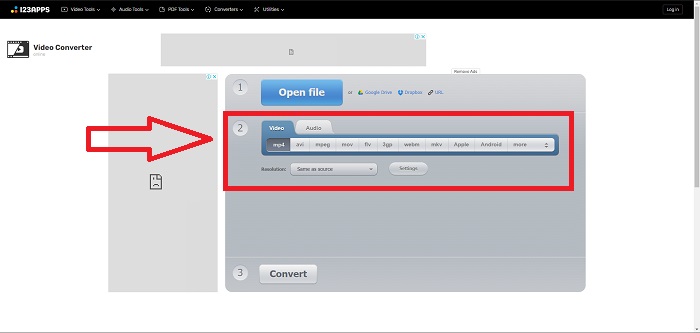
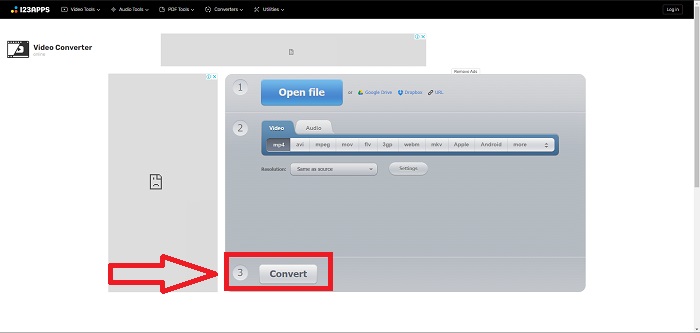
ขั้นตอนที่ 3 แปลงไฟล์โดยการคลิก Convert หลังจากแปลงไฟล์เสร็จแล้ว คุณสามารถดาวน์โหลดไฟล์ได้โดยการคลิกปุ่ม Download.
ส่วนที่ 3 ข้อเท็จจริงที่น่าสนใจเกี่ยวกับ MTV และ AVI
AVI คืออะไร?
รูปแบบไฟล์นี้ หรือที่รู้จักกันในชื่อ Audio Video Interleaved (AVI) เป็นการรวมข้อมูลเสียงและวิดีโอไว้ในไฟล์เดียวเพื่อเล่นพร้อมกันเป็นชุดเดียว โดยหลัก ๆ แล้วถูกใช้เป็นที่เก็บสื่ออิเล็กทรอนิกส์ เช่น รายการโทรทัศน์ ภาพยนตร์ และการบันทึกวิดีโออื่น ๆ หลังจากการเปิดตัว Windows 3.1 รูปแบบ AVI ก็เริ่มได้รับความนิยมอย่างแพร่หลาย วิดีโอและเสียงจะถูกผสานเข้าด้วยกันด้วยอัลกอริทึมการบีบอัดประสิทธิภาพสูง ซึ่งกลายเป็นมาตรฐานโดยทั่วไปสำหรับการเก็บไฟล์ภาพยนตร์บนพีซีระบบ Windows แม้ว่าวิดีโอ AVI จะไม่ใช่รูปแบบไร้การสูญเสีย (lossless) แต่ภาพและเสียงก็ยังคงคุณภาพสูงได้ ตรงกันข้าม AVI ใช้เนื้อที่จัดเก็บมาก บางครั้งใช้พื้นที่มากพอ ๆ กับดีวีดี นั่นจึงน่าจะเป็นเหตุผลที่ทำให้มีการพัฒนามาเป็น MPEG‑1 และต่อเนื่องมาจนถึง MPEG‑4 ในปัจจุบัน.
เอ็มทีวีคืออะไร?
ไฟล์ MTV ส่วนใหญ่เป็นทรัพย์สินของ MTV รูปแบบไฟล์ MTV ถูกสร้างขึ้นเพื่อให้สามารถเล่นวิดีโอบนเครื่องเล่น MP4 แบบพกพาที่ผลิตในจีนได้ในราคาประหยัดโดยไม่ต้องเพิ่มราคาของอุปกรณ์เหล่านี้ด้วยค่าลิขสิทธิ์ลิขสิทธิ์และพลังประมวลผลที่มากขึ้น MP4 Watch เป็นผลิตภัณฑ์หนึ่งที่ใช้รูปแบบไฟล์นี้
ส่วนที่ 4. คำถามที่พบบ่อยเกี่ยวกับ MTV และ AVI
AVI มีคุณภาพสูงหรือไม่?
AVI เป็นรูปแบบวิดีโอความละเอียดสูงที่พัฒนาโดย Microsoft รองรับโดย YouTube และช่วยให้คุณดูทีวีบนคอมพิวเตอร์ของคุณได้อย่างยอดเยี่ยม วิดีโอความละเอียดสูงต้องใช้รูปแบบการเข้ารหัสวิดีโอที่เรียกว่า Advanced Video Coding HD
AVI มักใช้ที่ไหน?
นับตั้งแต่การก่อตั้งของ Microsoft ในเดือนพฤศจิกายน พ.ศ. 2535 รูปแบบไฟล์ AVI ได้ถูกนำมาใช้อย่างแพร่หลายในการส่งและจัดเก็บข้อมูลวิดีโอและเสียง ไฟล์ AVI สามารถเล่นได้บนระบบปฏิบัติการที่หลากหลาย รวมถึง Windows, Mac OS X, Linux และ Unix ด้วยความเข้ากันได้ในระดับสูง
ฉันจะแปลงวิดีโอเป็นรูปแบบ MTV ได้อย่างไร
เมื่อใช้ AVS Video Converter คุณสามารถไปที่แถบเครื่องมือหลัก ไปที่แท็บรูปแบบแล้วคลิกปุ่มไปยัง MTV คุณสามารถเรียกดูไฟล์อินพุตได้โดยคลิกปุ่มเรียกดูในแถบเครื่องมือที่ด้านบน คลิกปุ่มเรียกดูด้านล่างแล้วพิมพ์ชื่อไฟล์เอาต์พุตที่คุณต้องการสร้าง ตัดสินใจเกี่ยวกับรูปลักษณ์ของ MTV โดยสร้างบัญชีกับ MTV
สรุป
โดยสรุป มีความแตกต่างระหว่างออนไลน์และซอฟต์แวร์ที่คุณต้องดาวน์โหลดก่อนใช้งานเสมอ มีข้อดีและข้อเสียในด้านต่างๆ แต่เราขอแนะนำให้ใช้ Video Converter Ultimate เพื่อความสะดวกและคุณภาพของเอาต์พุตพื้นฐาน ด้วยสิ่งนี้ คุณจะได้สัมผัสกับคอนเวอร์เตอร์และเอดิเตอร์ที่ชาญฉลาดพร้อมๆ กันในซอฟต์แวร์เดียว
-
 วิธีการแปลง TS เป็น AVI / MKV / MOV / WMV ออนไลน์และฟรีบน Win / Mac
 ต้องการแปลงไฟล์ TS เป็น AVI / MKV / MOV / WMV อย่างรวดเร็วหรือไม่? บทความนี้แสดงตัวแปลงวิดีโอออนไลน์และออฟไลน์พร้อมคู่มือฉบับสมบูรณ์ บางทีคุณอาจได้รับตัวแปลง TS ฟรีที่ดีที่สุดที่นี่
-
 4 วิธีที่มีประสิทธิภาพในการแปลง MOV เป็น AVI บนพีซีและ Mac [2021]
 คุณต้องการที่จะรู้ว่าอะไรคือตัวแปลง MOV เป็น AVI ที่ดีที่สุดบนเว็บ? และเหตุใด FVC Ultimate Video Converter จึงเหมาะสำหรับคุณ
-
 ทางเลือกที่ยอดเยี่ยมในการแปลง MKV เป็นรูปแบบ AVI
 เรียนรู้วิธีการแปลงวิดีโอ MKV ด้วยขั้นตอนง่าย ๆ ที่มีให้สำหรับคุณโดยเฉพาะ คุณต้องการที่จะรู้ว่าอย่างไร? จากนั้นคลิกลิงก์นี้เพื่อเรียนรู้เพิ่มเติม
