


 Video Converter Ultimate
 บันทึกหน้าจอ
 ซ่อมวิดีโอ
วิธีแปลง M4V เป็น AVI ฟรีด้วย 3 ซอฟต์แวร์ที่ดีที่สุด [ออนไลน์และออฟไลน์]
ผู้ใช้ Apple รู้จัก iTunes กันดีในฐานะโปรแกรมเล่นมีเดียบนเครื่อง สำหรับดูภาพยนตร์ ฟังเพลง และแม้แต่รายการทีวี ที่จริงแล้ว พวกเขายังใช้หนึ่งในฟอร์แมตเริ่มต้นของ Apple คือ M4V ด้วย อย่างไรก็ตาม ฟอร์แมตนี้ไม่สามารถเล่นด้วยโปรแกรมเล่นวิดีโอมาตรฐานบน Windows ได้ และซอฟต์แวร์ของบริษัทอื่นบางตัวก็ไม่รองรับฟอร์แมตนี้ แต่ไม่ต้องกังวลไป เพราะคุณยังสามารถดูไฟล์ M4V บนอุปกรณ์อื่นได้ด้วยการแปลงไฟล์ นอกจากนี้ คุณยังสามารถอ่านการเปรียบเทียบระหว่างทั้งสองฟอร์แมตได้ด้วย ตอนนี้เราจะสอนคุณว่าจะแปลง M4V เป็น AVI ฟรีได้อย่างไร จากรายการด้านล่างนี้.
ส่วนที่ 1 คำอธิบายโดยย่อสำหรับรูปแบบ M4V และ AVI
ตอนนี้ มาดูความแตกต่างระหว่างสองรูปแบบดังกล่าวในบทนำกัน เมื่อเราดำเนินการด้านล่าง เราจะเข้าใจทั้งสองรูปแบบแต่จากมุมมองที่แตกต่างกัน และก่อนที่คุณจะหันมา คุณก็รู้ว่าตัวแปลง M4V เป็น AVI ฟรีที่ดีที่สุดคืออะไร มาแยกความแตกต่างของทั้งสองรูปแบบก่อนโดยอ่านด้านล่าง
M4V
◆ รูปแบบไฟล์นี้เป็นกรรมสิทธิ์ของ iTunes และได้รับการคุ้มครองโดย DRM ที่นำปัญหาลิขสิทธิ์ไปใช้
◆ ใช้เพื่อเข้ารหัสไฟล์มีเดียที่ใช้เล่นวิดีโอ เสียง รายการทีวี และภาพยนตร์ด้วย
◆ การจัดเก็บและถ่ายโอนไฟล์ด้วยรูปแบบนี้ทำได้ง่ายและรวดเร็วยิ่งขึ้น
◆ มีโครงสร้างเกือบเหมือนกับรูปแบบ MP4
◆ เนื่องจากรูปแบบนี้ได้รับการปกป้องและจำกัดไว้เฉพาะอุปกรณ์ Apple จึงไม่ยืดหยุ่นเท่าโปรแกรมเล่นสื่ออื่นๆ ที่จะเล่นด้วย
AVI
◆ รูปแบบที่รู้จักกันดีในการเล่นและจัดเก็บไฟล์วิดีโอและไฟล์เสียงที่มีรายละเอียด
◆ ที่เก็บไฟล์สำหรับจัดเก็บการเล่นอย่างต่อเนื่อง
◆ ขนาดไฟล์ใหญ่กว่ามากเมื่อเทียบกับรูปแบบไฟล์อื่น เนื่องจากไม่ได้เข้ารหัส
◆ ต้องใช้คอมเพรสเซอร์หรือตัวแปลงสัญญาณเพื่อทำให้ไฟล์มีขนาดเล็กลง
ส่วนที่ 2 เรียนรู้ 3 วิธีในการแปลง M4V เป็น AVI
วิธีที่ 1 FVC Video Converter Ultimate
FVC Video Converter Ultimate เป็นหนึ่งในโปรแกรมแปลงไฟล์ M4V เป็น AVI ที่ยอดเยี่ยมซึ่งคุณสามารถดาวน์โหลดลง PC หรือ Mac ได้ ด้วยฟังก์ชันระดับสูงและคุณสมบัติแบบแอดวานซ์ที่มาพร้อมกัน โดยยังคำนึงถึงความสะดวกของผู้ใช้เพื่อลดความยุ่งยากในการแปลงไฟล์ เมื่อเทียบกับโปรแกรมแปลงไฟล์อื่น ๆ แล้ว ซอฟต์แวร์นี้แตกต่างออกไปอย่างมากในหลายด้าน เช่น รองรับฟอร์แมตได้หลากหลาย มีฟีเจอร์แก้ไขวิดีโอให้ใช้งานได้ง่าย ด้านประสิทธิภาพก็เร็วและดีกว่า เป็นต้น.
แม้ว่าการแปลงไฟล์ที่นี่จะฟรีและไม่มีข้อจำกัด คุณจะต้องซื้อก่อนที่จะใช้ แต่ก็มีราคาถูกมาก เรามาดูกันว่าจะต้องแปลงรูปแบบเป็นรูปแบบใหม่อย่างไรด้วยตัวแปลงนี้ หากคุณต้องการทราบวิธีการแปลงไฟล์ ให้ทำตามขั้นตอนแบบซิงโครนัสด้านล่าง
ขั้นตอนที่ 1. ดาวน์โหลดซอฟต์แวร์ลงบน PC หรือ Mac ของคุณก่อน หลังจากดาวน์โหลดเสร็จแล้ว ก็ถึงเวลาติดตั้งและตั้งค่าโปรแกรม.
ดาวน์โหลดฟรีสำหรับ Windows 7 หรือใหม่กว่าดาวน์โหลดอย่างปลอดภัย
ดาวน์โหลดฟรีสำหรับ MacOS 10.7 หรือใหม่กว่าดาวน์โหลดอย่างปลอดภัย
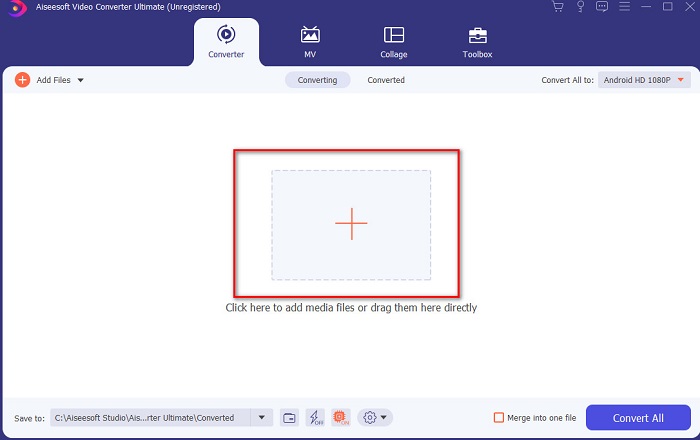
ขั้นตอนที่ 2. เปิดโปรแกรม แล้วคลิกปุ่ม + ตรงกลางหน้าต่างโปรแกรม จากนั้นจะมีหน้าต่างโฟลเดอร์เด้งขึ้นมา ให้ค้นหาไฟล์ของคุณแล้วคลิก จากนั้นกด Open เพื่อเพิ่มไฟล์ M4V เข้าไป.
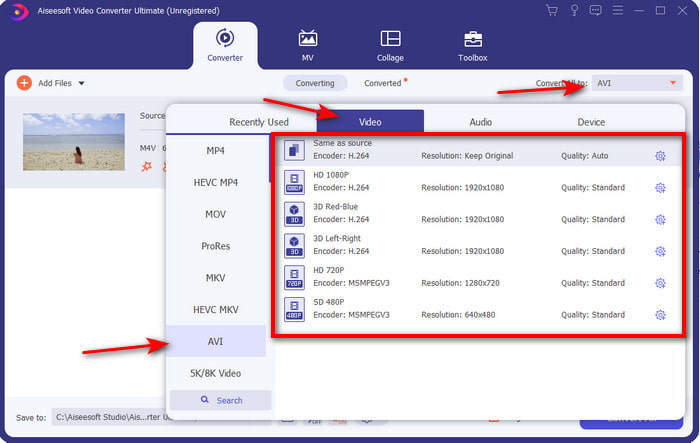
ขั้นตอนที่ 3. ก่อนเริ่มแปลงไฟล์ M4V เป็น AVI บน Mac หรือ PC คุณต้องคลิกปุ่ม drop-down แล้วค้นหาและเลือกฟอร์แมต AVI ก่อน.
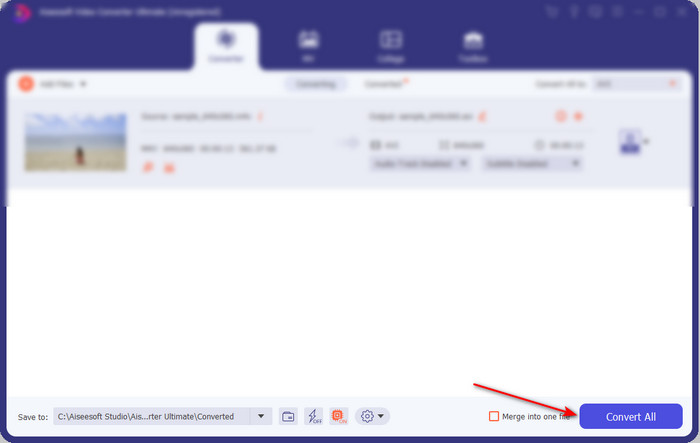
ขั้นตอนที่ 4. หลังจากเลือกฟอร์แมตเสร็จแล้ว ก็ถึงเวลาแปลงไฟล์ ที่ด้านล่างของหน้าต่างโปรแกรมให้คลิกปุ่ม Convert All.
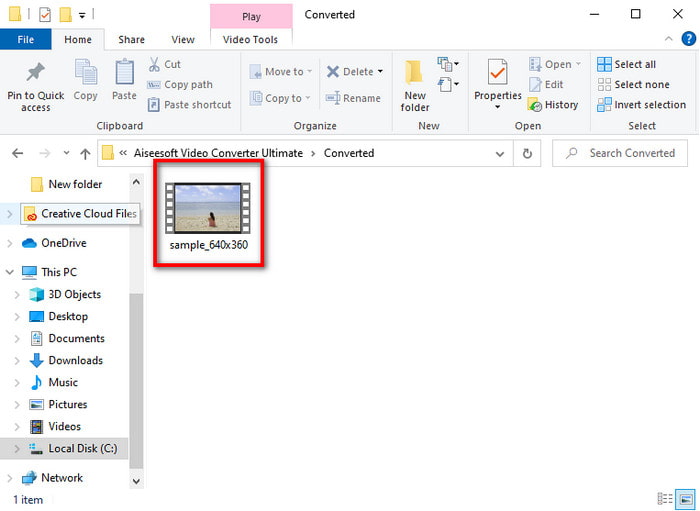
ขั้นตอนที่ 5. รอไม่กี่วินาทีเพื่อให้กระบวนการแปลงไฟล์เสร็จสิ้น หลังจากเสร็จแล้ว จะมีหน้าต่างโฟลเดอร์พร้อมไฟล์ที่แปลงแล้วปรากฏขึ้น ให้คลิกไฟล์นั้นเพื่อเล่นได้ทันที.
วิธีที่ 2 โปรแกรมแปลงวิดีโอ FVC ฟรี
หากคุณไม่ต้องการซื้อซอฟต์แวร์ด้านบน การใช้โปรแกรมแปลง M4V เป็น AVI แบบฟรีที่ใช้งานผ่านเว็บอย่าง FVC Free Video Converter ก็ถือเป็นตัวเลือกที่ดี และถ้าคุณต้องการผลลัพธ์การแปลงไฟล์ที่ดีใกล้เคียงกับ FVC Video Converter Ultimate เครื่องมือนี้ก็น่าจะตอบโจทย์ แม้ว่าเครื่องมือนี้จะให้การแปลงไฟล์ได้ดี แต่เว็บทูลนี้รองรับฟอร์แมตจำนวนน้อย ไม่มีฟีเจอร์แก้ไขวิดีโอ และแปลงไฟล์ได้ช้ากว่าโปรแกรมบนเดสก์ท็อป นอกจากนี้ คุณจำเป็นต้องมีการเชื่อมต่ออินเทอร์เน็ตจึงจะใช้งานได้ แต่ถ้าคุณกำลังมองหาตัวแปลงไฟล์แบบออนไลน์ นี่คือทางเลือกที่เหมาะสม ตอนนี้ให้ทำตามขั้นตอนด้านล่างเพื่อเรียนรู้วิธีใช้งาน.
ขั้นตอนที่ 1. คลิกลิงก์นี้เพื่อไปยังหน้าเว็บหลักของตัวแปลงไฟล์ FVC.
ขั้นตอนที่ 2. หากนี่เป็นครั้งแรกที่คุณใช้งาน ให้คลิก Add Files to Convert เพื่อดาวน์โหลดตัวเรียกใช้งาน (launcher) หลังจากดาวน์โหลดเสร็จแล้ว ให้คลิกปุ่มเดิมอีกครั้งเพื่อเปิด จากนั้นเลือกไฟล์ในโฟลเดอร์ของคุณแล้วคลิก Open.
ดาวน์โหลดเวอร์ชันเดสก์ท็อปเพื่อแปลงไฟล์แบบเป็นชุดได้.
ขั้นตอนที่ 3. เลือกฟอร์แมตที่มีอยู่ด้านล่างด้วยการคลิก ก่อนที่จะเริ่มกระบวนการแปลงไฟล์.
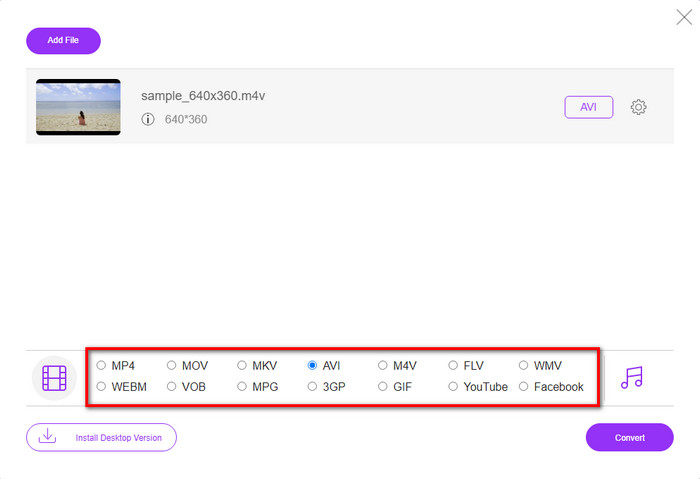
ขั้นตอนที่ 4. หลังจากเลือกฟอร์แมตเสร็จแล้ว ให้คลิก Convert เพื่อเริ่มกระบวนการแปลงฟอร์แมต.
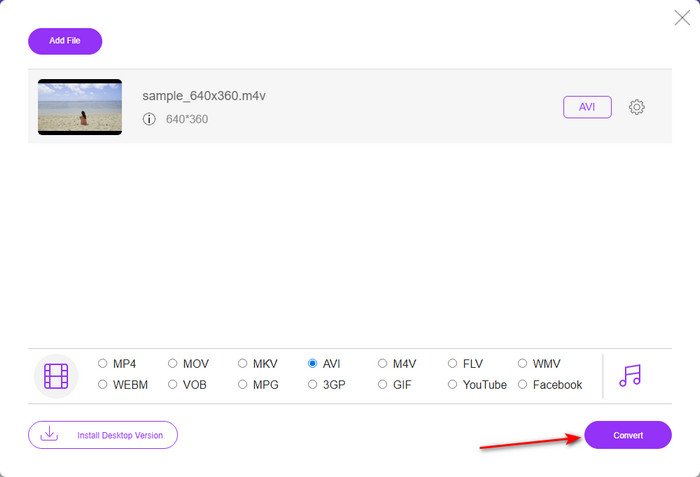
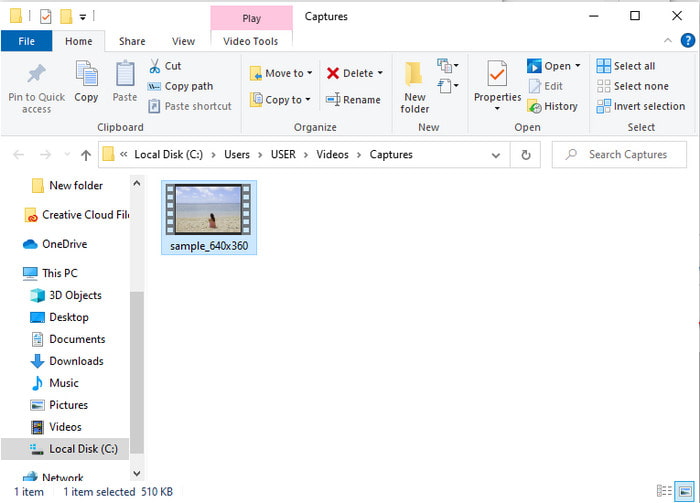
ขั้นตอนที่ 5. รอไม่กี่นาที และเมื่อไฟล์ถูกแปลงเสร็จแล้ว จะมีโฟลเดอร์ที่มีไฟล์ที่แปลงแล้วปรากฏขึ้น จากนั้นคลิกไฟล์เพื่อเล่นได้เลย.
วิธีที่ 3 WinX Video Converter ฟรี
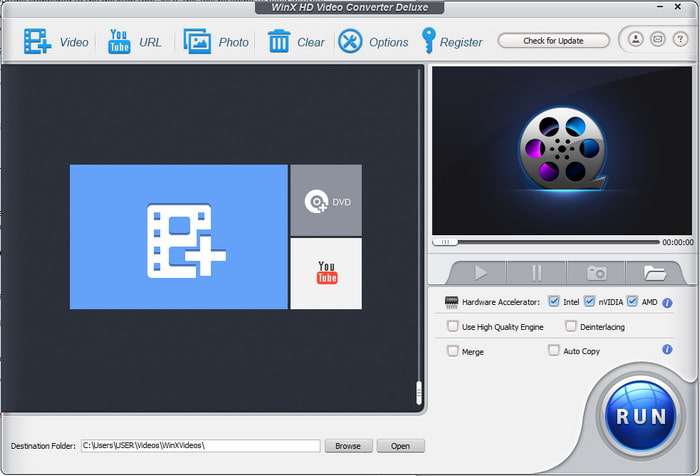
ซอฟต์แวร์อีกตัวที่เราเลือกมาเพื่อช่วยคุณแปลงฟอร์แมตไฟล์คือ WinX Video Converter Free เครื่องมือนี้ให้การแปลงไฟล์ที่ดีมาก และยังรองรับฟอร์แมตวิดีโอที่หลากหลาย แม้ประสิทธิภาพโดยรวมจะยอดเยี่ยม เหมาะแก่การดาวน์โหลดตัวแปลง M4V เป็น AVI ตัวนี้บน Mac หรือ PC อย่างไรก็ตาม ประสิทธิภาพยังไม่เทียบเท่าเครื่องมือหลักด้านบน หากคุณอยากลองใช้ ก็ทำตามขั้นตอนต่อไปนี้.
ขั้นตอนที่ 1. ดาวน์โหลดซอฟต์แวร์ลงบน PC หรือ Mac ของคุณ
ขั้นตอนที่ 2. จากนั้นคลิก Video เพื่อเพิ่มไฟล์ แล้วไปที่ PC General Manager และคลิก AVI Video จากนั้นกด OK.
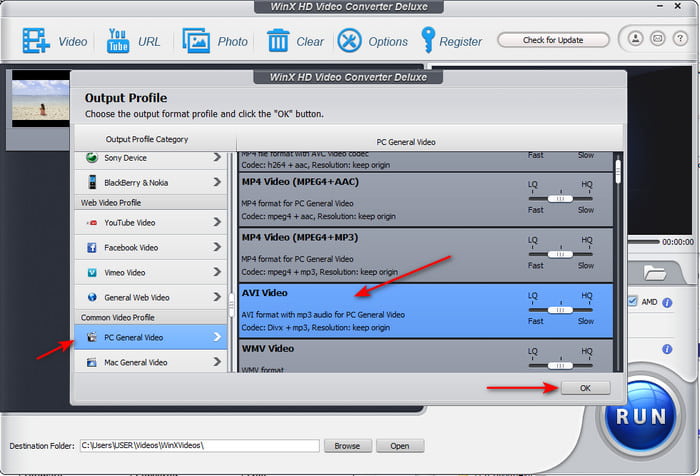
ขั้นตอนที่ 3. คลิก Run เพื่อเริ่มแปลงไฟล์.
ส่วนที่ 3 แผนภูมิเปรียบเทียบของ 3 M4V เพื่อ AVI Converter
| คุณสมบัติ | FVC Video Converter Ultimate | FVC แปลงวิดีโอฟรี | WinX Video Converter ฟรี |
| การแปลงรูปแบบ |  | | |
| การแปลงหลายรายการ | |  | |
| การเร่งฮาร์ดแวร์ | | | |
| แปลงเร็วมาก | | | |
| โปรแกรมที่รองรับ | มีอยู่ในทุกแพลตฟอร์ม | มีอยู่ในทุกแพลตฟอร์ม | มีอยู่ในทุกแพลตฟอร์ม |
M4V เทียบกับ AVI
M4V ได้รับการพัฒนาโดย Apple ซึ่งใช้ MPEG 4 เช่นกัน ไฟล์ M4V มักใช้เพื่อจัดเก็บวิดีโอที่ดาวน์โหลดจากร้าน iTunes ของ Apple เช่น มิวสิควิดีโอ รายการทีวี ฯลฯ คุณอาจพบว่าไฟล์ M4V บางไฟล์ได้รับการป้องกันการคัดลอกเนื่องจากใช้ การคุ้มครองลิขสิทธิ์ FairPlay DRM ของ Apple
ตามรูปแบบไฟล์การแลกเปลี่ยนทรัพยากร (RIFF) รูปแบบ AVI ถูกนำมาใช้โดย Microsoft ในปี 1992 สามารถบันทึกวิดีโอ/เสียงคุณภาพสูงได้ เนื่องจากใช้การบีบอัดน้อยกว่า แต่นั่นก็ทำให้ไฟล์ AVI มีขนาดใหญ่ขึ้นด้วย ซึ่งอาจเป็นปัญหาได้เมื่อมีเนื้อที่จำกัด
ส่วนที่ 4 คำถามที่พบบ่อยเกี่ยวกับรูปแบบ M4V และ AVI
เหตุใดฉันจึงต้องแปลงเป็นรูปแบบ M4V
ฟอร์แมต M4V รองรับเฉพาะบนอุปกรณ์ของ Apple เท่านั้น ดังนั้นหากคุณย้ายไฟล์ฟอร์แมตนี้ไปยัง Windows หรืออุปกรณ์อื่น ๆ ก็จะไม่สามารถเล่นได้ ดังนั้นจึงควรแปลงไฟล์ M4V ให้เป็นฟอร์แมตใหม่ เช่น MP4 หรือ AVI เพื่อให้เล่นได้.
แปลง M4V แล้ว คุณภาพลดลงไหม?
ที่จริงแล้ว การสูญเสียคุณภาพมีโอกาสน้อยที่จะเกิดขึ้นกับ M4V หรือรูปแบบอื่นๆ ที่เปลี่ยนเป็นรูปแบบใหม่ อย่างไรก็ตาม สิ่งนี้อาจทำให้ซอฟต์แวร์หรือตัวแปลงทำงานผิดพลาดได้เช่นกัน ดังนั้นจึงเป็นการดีที่สุดสำหรับคุณที่จะเลือกตัวแปลงที่ทำงานได้ดีและใช้งานง่าย
การแปลง M4V ลดขนาดไฟล์ลงหรือไม่
ขึ้นอยู่กับรูปแบบที่คุณกำลังจะเลือก เช่นเดียวกับถ้าคุณแปลงเป็น AVI คาดหวังว่าไฟล์จะใหญ่ขึ้นเล็กน้อยเนื่องจากไฟล์ไม่มีการบีบอัด ต่างจากถ้าคุณแปลงเป็น MP4 ขนาดไฟล์จะยังคงอยู่หรือลดลง แม้ว่าขนาดไฟล์จะยังคงเปลี่ยนรูปแบบใดก็ตามที่คุณเลือก คุณจะได้รับผลงานที่ยอดเยี่ยมในตอนท้าย
สรุป
สรุปแล้ว ทั้ง 3 เครื่องมือแบบออนไลน์และเดสก์ท็อปที่กล่าวมาทำงานได้ดีมาก และทำหน้าที่แปลงไฟล์ได้อย่างที่ควรจะเป็น เมื่อเราลองใช้งานซอฟต์แวร์แต่ละตัวที่ระบุไว้ ก็พบว่า FVC Video Converter Ultimate เป็นตัวเลือกที่ดีที่สุดสำหรับทุกคน เพราะใช้งานง่าย ราคาไม่แพงและยืดหยุ่น มีฟีเจอร์ขั้นสูงให้ใช้งาน และอีกมากมาย ดังนั้นหากคุณยังลังเลว่าจะเลือกใช้ตัวไหน ลองใช้โปรแกรมแปลงไฟล์สุดยอดตัวนี้ แล้วคุณจะได้สัมผัสประสบการณ์การแปลงไฟล์ที่รวดเร็วและง่ายดาย.
-
 M4V เป็น MP3 Converter - 4 วิธีที่ดีที่สุดในการแยก MP3 จากไฟล์ M4V
 เมื่อคุณต้องการแยกเสียง MP3 จากวิดีโอ M4V อย่างง่ายดายคุณสามารถเรียนรู้เพิ่มเติมเกี่ยวกับตัวแปลง M4V เป็น MP3 ที่ดีที่สุด 4 ตัวเพื่อรับไฟล์เสียงที่ต้องการจากบทความ
-
 วิธีที่ดีที่สุดในการแปลง GIF เป็น AVI คืออะไร [โอเพ่นซอร์ส & พรีเมียม]
 คุณต้องการแปลง GIF ของคุณเป็นรูปแบบ AVI โดยไม่สูญเสียคุณภาพของวิดีโอหรือไม่? อ่านต่อเพื่อเรียนรู้เกี่ยวกับวิธีการแปลงไฟล์ GIF เป็น AVI
-
 4 วิธีที่มีประสิทธิภาพในการแปลง MOV เป็น AVI บนพีซีและ Mac [2021]
 คุณต้องการที่จะรู้ว่าอะไรคือตัวแปลง MOV เป็น AVI ที่ดีที่สุดบนเว็บ? และเหตุใด FVC Ultimate Video Converter จึงเหมาะสำหรับคุณ

