


 Video Converter Ultimate
 บันทึกหน้าจอ
 ซ่อมวิดีโอ
2 วิธีที่รวดเร็วและง่ายดายในการแปลง M2TS เป็น AVI ด้วยขั้นตอนที่ให้มา
เมื่อเราเดินหน้าเข้าสู่อนาคตมากขึ้น รูปแบบไฟล์หลายชนิดเริ่มไม่ได้รับการรองรับมากนัก เช่น M2TS รูปแบบนี้ยังคงใช้คอนเทนเนอร์ Blu-ray Audio Video แบบเก่าที่ใช้สตรีม MPEG-2 ในการขนส่งข้อมูล คุณไม่สามารถใช้งานไฟล์ประเภทนี้บนอุปกรณ์บางชนิดอย่าง iPhone, iPod และแม้แต่ Android ได้ เพราะอุปกรณ์เหล่านี้ไม่สามารถอ่านโครงสร้างของไฟล์ฟอร์แมตนี้ได้ อย่างไรก็ตาม หากคุณยังมีไฟล์นามสกุลแบบนี้อยู่และอยากดู เราขอแนะนำให้แปลงไฟล์รูปแบบนี้เป็น AVI ดังนั้นตอนนี้ มาดูกันว่ามีวิธีใดที่เหมาะสมที่สุดที่จะช่วยคุณในภารกิจการแปลงไฟล์ M2TS นอกจากนี้ หากคุณอ่านบทความนี้ต่อไป คุณจะได้เรียนรู้วิธีแปลง M2TS เป็น AVI ทั้งแบบออนไลน์และออฟไลน์.

ส่วนที่ 1 M2TS กับ AVI
ตามที่เราอธิบายไว้ก่อนหน้านี้ ไฟล์ M2TS เคยเป็นคอนเทนเนอร์บน Blu-ray ที่รองรับวิดีโอ เสียง และสตรีมอื่นในคอนเทนเนอร์เดียว นอกจากนี้ หากนามสกุลไฟล์ของคุณบน Blu-ray หรือ AVCHD อยู่ในรูปแบบนี้ ให้คาดหวังว่าคุณภาพจะดีเยี่ยม แม้ว่ารูปแบบไฟล์นี้จะทำงานได้ดี แต่การสนับสนุนที่ได้รับจากเครื่องเล่นสื่อบางตัวก็ยังน้อย อีกประการหนึ่งคือ เมื่อคุณต้องการเล่นนามสกุลไฟล์ประเภทนี้ คุณจะต้องใช้ปลั๊กอิน ตัวแปลงสัญญาณ และส่วนประกอบบางอย่างเพื่อดูวิดีโอในรูปแบบนี้ ไม่เหมือนกับนามสกุลไฟล์ของคุณคือ .avi รูปแบบนี้ดึงดูดแฟน ๆ ทั่วทั้งเว็บเนื่องจากคุณภาพของวิดีโอที่รูปแบบนี้สามารถมีได้ อย่างไรก็ตาม ขนาดไฟล์เป็นปัญหาใหญ่เนื่องจากไม่มีตัวแปลงสัญญาณที่เหมาะสมในการลดขนาดไฟล์ของคุณ แต่ถ้าเราเปรียบเทียบ M2TS กับ AVI ทั้งคู่ก็ยอดเยี่ยม ถึงกระนั้นการรองรับก็ต่างกันและความยืดหยุ่นของรูปแบบ AVI ก็สามารถนำมาให้คุณได้
ส่วนที่ 2 วิธีแรกคือการแปลง M2TS เป็น AVI Online ด้วย Web-Tool ที่ง่ายที่สุด
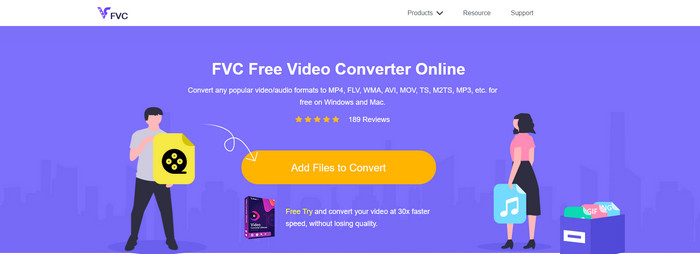
หากคุณกำลังสงสัยว่าจะแปลง M2TS เป็น AVI ได้ฟรีหรือไม่ ส่วนนี้คือคำตอบ โดยขอแนะนำ FVC Free Video Converter เครื่องมือออนไลน์ตัวนี้เป็นหนึ่งในเว็บคอนเวอร์เตอร์ที่ดีที่สุดที่คุณจะหาได้บนอินเทอร์เน็ต อีกทั้งหากคุณมีปัญหาในการแปลงไฟล์ฟอร์แมต เครื่องมือนี้ก็สามารถช่วยได้เช่นกัน คุณสามารถเปลี่ยนบิตเรต ความละเอียด และอัตราเฟรมได้ แม้ว่าเครื่องมือนี้จะรองรับรูปแบบไฟล์ในระดับปานกลางและยังไม่มีฟีเจอร์ระดับสูงมากนัก เพื่อให้ไฟล์ผลลัพธ์สุดท้ายโดดเด่นเหมือนที่ FVC Video Converter Ultimate ทำได้ อย่างไรก็ตาม หากคุณไม่ต้องการจ่ายเงินและมีการเชื่อมต่ออินเทอร์เน็ตอยู่แล้ว ตัวเลือกนี้เหมาะสำหรับคุณในการแปลงไฟล์เป็นรูปแบบใหม่.
ข้อดี
- ไม่จำเป็นต้องดาวน์โหลดซอฟต์แวร์เพราะสามารถเข้าถึงได้บนเว็บ
- รองรับรูปแบบสื่อกลางที่คุณสามารถเลือกได้
- ฟรีและไม่มีโฆษณาบนอินเทอร์เฟซของเว็บไซต์
จุดด้อย
- ต้องมีการเชื่อมต่ออินเทอร์เน็ตจึงจะสามารถเข้าถึงได้
- บางรูปแบบไม่ได้รับการสนับสนุนที่นี่ และมีการรองรับรูปแบบที่จำกัด
ขั้นตอนการใช้คอนเวอร์เตอร์ออนไลน์บนเว็บ
ขั้นตอนที่ 1. คลิกที่ลิงก์นี้เพื่อเปิดหน้าเว็บไซต์หลักของโปรแกรมแปลงไฟล์ออนไลน์ ไม่ต้องกังวลเพราะลิงก์นี้ปลอดภัย เราได้ทดลองใช้งานมาแล้ว.
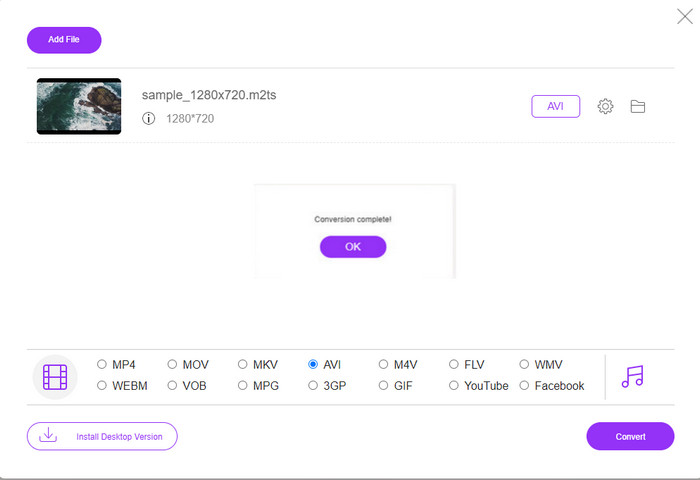
ขั้นตอนที่ 2. จากนั้นคลิก Add Files to Convert จะมีหน้าต่างโฟลเดอร์แสดงขึ้นบนหน้าจอ ให้เลือกไฟล์ที่มีนามสกุล .m2ts แล้วคลิก Open.
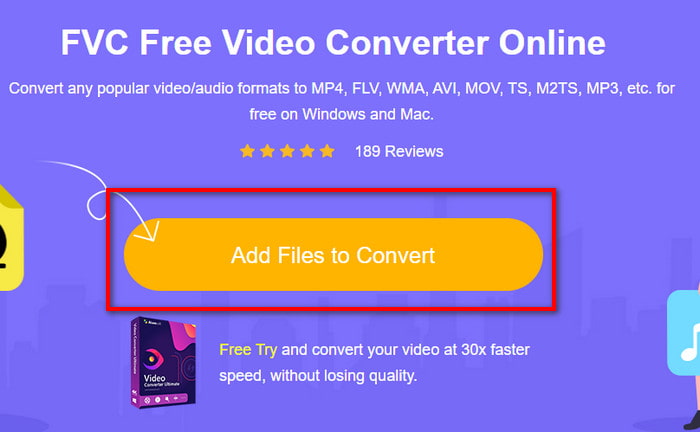
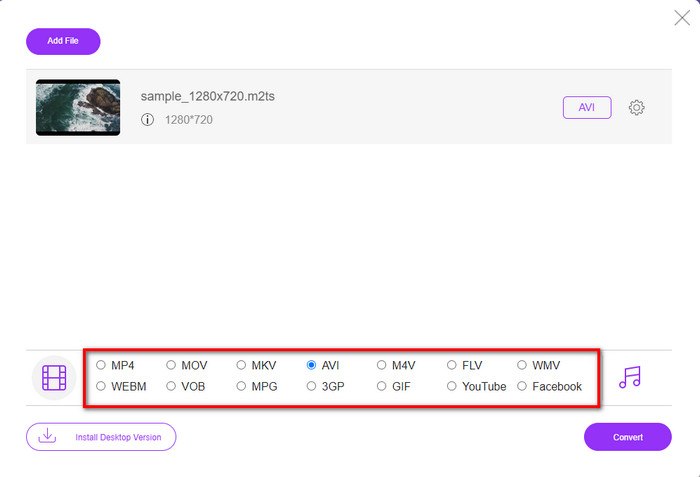
ขั้นตอนที่ 3. หลังจากใส่ไฟล์แล้ว คุณจะเห็นหน้าต่างอินเทอร์เฟซแสดงขึ้นมาบนหน้าจอ โดยมีตัวเลือกฟอร์แมตอยู่ด้านล่าง ให้เลือกฟอร์แมต AVI จากรายการ.
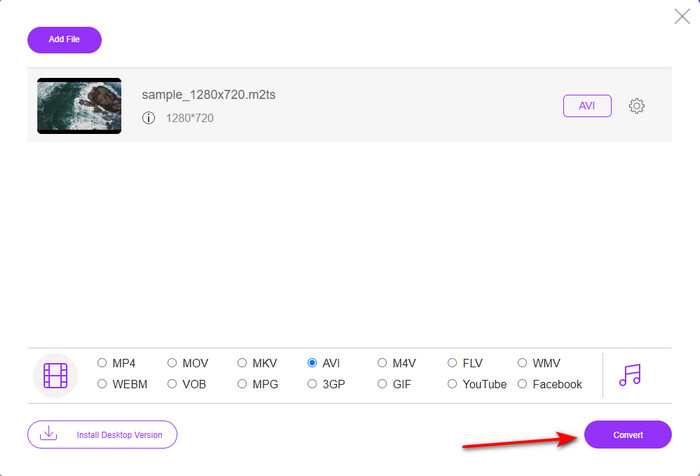
ขั้นตอนที่ 4. เมื่อเลือกฟอร์แมตเสร็จแล้ว ให้คลิก Convert เพื่อเริ่มแปลงไฟล์เป็น AVI.
ขั้นตอนที่ 5. การแปลงไฟล์จะใช้เวลาประมาณหนึ่งนาที จากนั้นจะมีหน้าต่างโฟลเดอร์แสดงไฟล์ที่แปลงเสร็จแล้วให้คุณเห็น.
ส่วนที่ 3 วิธีที่ 2 คือการใช้เครื่องมือขั้นสูงสุดเพื่อแปลง M2TS เป็น AVI ออฟไลน์
หากคุณต้องการเครื่องมือที่ทำงานได้ดีเยี่ยมยิ่งกว่าโปรแกรมแปลงไฟล์ออนไลน์หรือออฟไลน์ทั่วไป FVC Video Converter Ultimate คือเครื่องมือที่เหมาะที่สุดสำหรับคุณ โปรแกรมนี้ทำงานได้ดีมากในหลายงาน ไม่ว่าจะเป็นตัดต่อวิดีโอ สร้าง GIF เปลี่ยนฟอร์แมต เพิ่มระดับเสียง และอื่น ๆ อีกมากมาย มีการเพิ่มฟีเจอร์ขั้นสูงที่ใช้งานง่ายเข้ามาในซอฟต์แวร์นี้แล้ว เพื่อมอบผลลัพธ์ที่ดีที่สุดให้แก่ผู้ใช้ ใช่แล้ว คุณจำเป็นต้องเป็นลูกค้าก่อนจึงจะเข้าถึงเครื่องมือระดับสุดยอดนี้ได้ แต่อย่าเพิ่งกังวลเพราะราคาย่อมเยาและให้ประสิทธิภาพดีกว่าโปรแกรมแปลงไฟล์อื่น ๆ นอกจากนี้ เครื่องมือนี้รองรับทุกฟอร์แมตที่เป็นที่รู้จัก และแน่นอนว่ารองรับฟอร์แมตไฟล์ที่อุปกรณ์หรือคอมพิวเตอร์ของคุณใช้งานอยู่ด้วย หากคุณต้องการสัมผัสประสบการณ์การแปลงไฟล์ที่ดีที่สุด ให้ทำตามขั้นตอนที่ระบุไว้เกี่ยวกับการใช้โปรแกรมแปลง M2TS เป็น AVI ตัวนี้.
ข้อดี
- รองรับคุณสมบัติขั้นสูงอีกมากมายที่คุณชอบใช้
- สามารถแปลงไฟล์ได้ภายในไม่กี่วินาทีเนื่องจากการเร่งด้วยฮาร์ดแวร์และการแปลงที่รวดเร็วซึ่งเครื่องมือนี้มีให้
- ใช้ได้กับทุกแพลตฟอร์มและรองรับทุกรูปแบบ
จุดด้อย
- ในการเข้าถึงเครื่องมือ คุณจะต้องชำระเงิน
- ต้องดาวน์โหลดลงในไดรฟ์คอมพิวเตอร์ของคุณก่อน
ขั้นตอนการแปลงไฟล์วิดีโอ M2TS เป็นฟอร์แมต AVI แบบออฟไลน์
ขั้นตอนที่ 1. ดาวน์โหลดซอฟต์แวร์สำหรับแพลตฟอร์มของคุณโดยคลิกปุ่มดาวน์โหลดด้านล่าง จากนั้นติดตั้ง ทำการตั้งค่า แล้วเปิดโปรแกรม.
ดาวน์โหลดฟรีสำหรับ Windows 7 หรือใหม่กว่าดาวน์โหลดอย่างปลอดภัย
ดาวน์โหลดฟรีสำหรับ MacOS 10.7 หรือใหม่กว่าดาวน์โหลดอย่างปลอดภัย
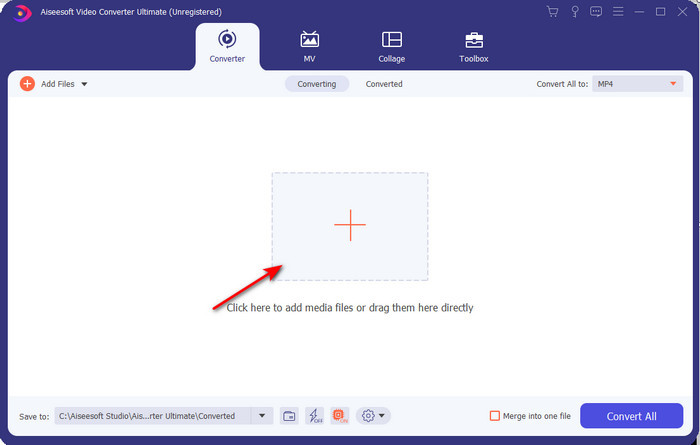
ขั้นตอนที่ 2. เปิดซอฟต์แวร์ จากนั้นคลิกปุ่ม + เพื่อเพิ่มไฟล์ .m2ts จากโฟลเดอร์ แล้วคลิก Open.
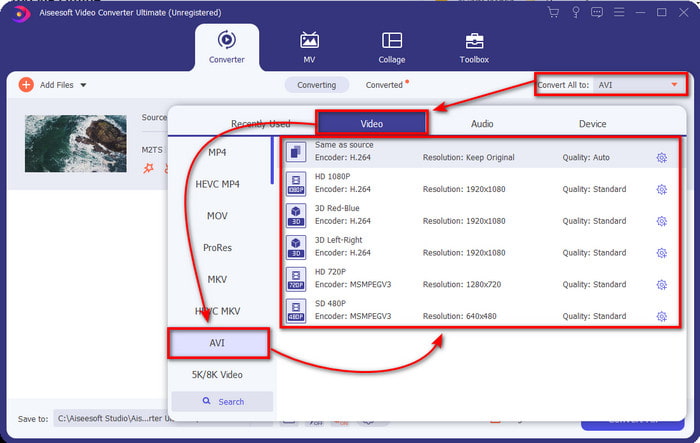
ขั้นตอนที่ 3. จากนั้นที่มุมขวาบนของอินเทอร์เฟซ คุณจะเห็นเมนู Convert All to ให้คลิก เมนูย่อยจะปรากฏขึ้นหลังจากคลิก ให้ค้นหาและเลือกฟอร์แมต AVI จากรายการ.
ขั้นตอนที่ 4. เมื่อเลือกฟอร์แมตเรียบร้อยแล้ว ให้เริ่มการแปลงไฟล์โดยคลิก Convert All.
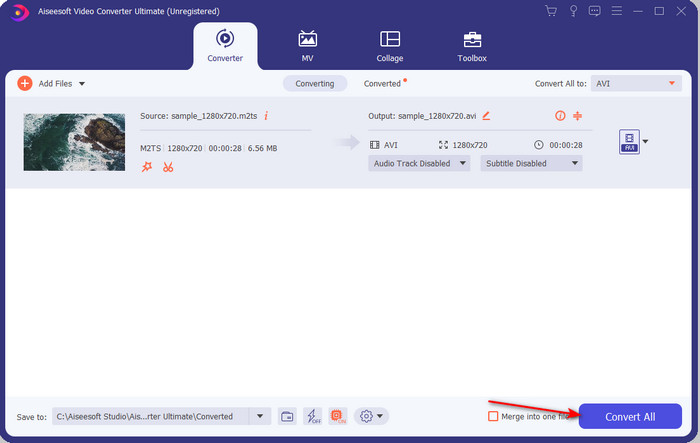
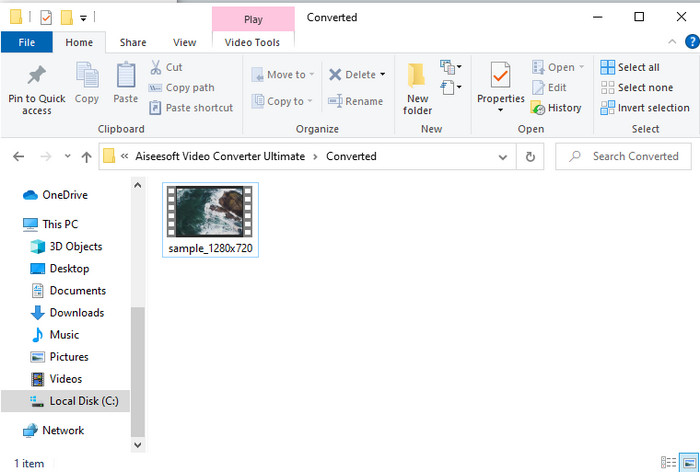
ขั้นตอนที่ 5. เมื่อการแปลงเสร็จสิ้น จะมีหน้าต่างโฟลเดอร์แสดงขึ้นบนหน้าจอ จากนั้นให้คลิกที่ไฟล์เพื่อดูวิดีโอ .m2ts ที่แปลงแล้ว.
ส่วนที่ 4 คำถามที่พบบ่อยเกี่ยวกับ M2TS และ AVI
หลังจากแปลง M2TS เป็น AVI แล้ว คุณภาพของมันยังคงอยู่หรือไม่
หลังจากแปลง M2TS เป็น AVI แล้ว คุณภาพของวิดีโอควรคงไว้ อย่างไรก็ตาม มีโอกาสที่คุณภาพจะเปลี่ยนแปลงหากคุณตั้งค่าเอาต์พุตคุณภาพเป็นปานกลางหรือต่ำ สิ่งนี้สามารถหลีกเลี่ยงได้หากคุณตั้งค่าเป็น 1080 หรือ 4k แต่ขนาดไฟล์จะใหญ่กว่าเมื่อเทียบกับไฟล์คุณภาพต่ำ
เหตุใดฉันจึงเล่น M2TS บน Windows Media Player ไม่ได้
มีเหตุผลหลักอย่างหนึ่งที่คุณไม่สามารถเล่นไฟล์นามสกุล .m2ts ได้ และเหตุผลนั้นก็คืออุปกรณ์ไม่รองรับ ดังนั้นหากคุณยังต้องการดูไฟล์ .m2ts ของคุณ คุณจำเป็นต้องแปลงไฟล์ หรือหาโปรแกรมเล่นสื่อของบุคคลที่สามตัวอื่นที่สามารถเล่นไฟล์ M2TS ได้.
MTS และ M2TS แตกต่างกันหรือไม่?
หากเราจะเปรียบเทียบฟอร์แมตทั้งสองนี้ คุณแทบจะไม่เห็นความแตกต่างที่ชัดเจน นอกจากนี้ ทั้งคู่ยังใช้ฟอร์แมตวิดีโอ AVCHD ที่จัดเก็บคุณภาพวิดีโอของคุณให้คมชัดสูงสุด หากต้องการข้อมูลเพิ่มเติมเกี่ยวกับไฟล์ MTS และ M2TS โปรดอ่านหัวข้อ What Is Difference Between MTS and M2TS.
สรุป
เราพบเทคนิคต่างๆ ในการแปลงไฟล์ M2TS เป็น AVI ร่วมกันแล้ว ขณะที่เราตรวจสอบแต่ละเครื่องมือ เราพบว่า FVC Video Converter Ultimate ทำงานได้ดีในการแปลงไฟล์ ดังนั้น ในตอนท้าย เราขอแนะนำให้คุณดาวน์โหลดโปรแกรมแปลงปรากฎการณ์เพื่อการแปลงที่ง่ายขึ้นและสัมผัสกับกระบวนการแปลงที่เร็วที่สุดเท่าที่เคยมีมา
-
 วิธีการแปลง M2TS เป็น MKV ฟรีและออนไลน์
 ต้องการแปลง M2TS เป็น MKV โดยที่ยังคงคุณภาพเดิมไว้หรือไม่? โพสต์นี้แสดงวิธีการฟรีและออนไลน์ในการเปลี่ยน M2TS เป็น MKV โดยไม่สูญเสีย
-
 [2021] 6 วิธีฟรีและออนไลน์ในการแปลง M2TS เป็น MP3
 ไฟล์ M2TS สามารถแปลงเป็น MP3 ได้หรือไม่? ในโพสต์นี้เราได้แสดงรายการวิธีฟรีและออนไลน์ 6 อันดับแรกเพื่อช่วยคุณแปลง M2TS เป็น MP3, AAC, AIFF และรูปแบบเสียงอื่น ๆ
-
 วิธีแปลง M2TS เป็น MOV ฟรี [ออนไลน์และออฟไลน์]
 ต้องการแปลง M2TS เป็น MOV เพื่อเล่นไฟล์วิดีโอบนเครื่องเล่นและแพลตฟอร์มต่างๆหรือไม่? บทความนี้จะช่วยคุณค้นหาวิธีการออนไลน์ / ออฟไลน์ที่ดีที่สุดในการแปลง M2TS เป็น MOV บน Windows / Mac
