


 Video Converter Ultimate
 บันทึกหน้าจอ
 ซ่อมวิดีโอ
2 ตัวแปลง M4V เป็น FLV ที่ดีที่สุดสำหรับ Windows/Mac/ออนไลน์
รูปแบบคอนเทนเนอร์วิดีโอและเสียงที่สร้างขึ้นมาเพื่อใช้งานบน Apple iTunes เป็นหลัก คือไฟล์ M4V รูปแบบนี้จะมีการป้องกันลิขสิทธิ์ด้วยระบบ DRM ทำให้เลี่ยงปัญหาการละเมิดลิขสิทธิ์ได้ ในกรณีนี้ ไฟล์จะเล่นได้ยากหากคุณไม่มีบัญชี iTunes พร้อมข้อมูลเข้าสู่ระบบ ดังนั้นหากคุณต้องการดูวิดีโอบนคอมพิวเตอร์หรือโทรศัพท์ Android จึงจำเป็นต้องแปลงไฟล์ให้เป็นรูปแบบ FLV ที่เล่นได้ หากต้องการรู้วิธีแปลง M4V เป็น FLV โปรดอ่านบทความนี้เพื่อทำความเข้าใจเบื้องต้นเกี่ยวกับ M4V และ FLV.

ส่วนที่ 1 ตัวเลือกที่ 1 ในการแปลง M4V เป็น FLV บน Mac & PC
นี่เป็นตัวแปลงไฟล์ที่มีประสิทธิภาพสูงมาก ซึ่งคุณน่าจะชื่นชอบการใช้งาน โดยเฉพาะหากคุณต้องการแปลง M4V เป็น FLV บน Mac หรือ PC FVC Video Converter Ultimate เป็นโปรแกรมแปลงไฟล์ยอดนิยมที่ผู้ใช้จำนวนมากไว้วางใจ นอกจากนี้ หากคุณอยากมีเครื่องมือสารพัดประโยชน์ที่ให้ผลลัพธ์ยอดเยี่ยม โปรแกรมนี้ถือว่าห้ามพลาด คุณยังสามารถแปลงไฟล์มีเดียใด ๆ ที่นี่ และตั้งค่าคุณภาพเป็น SD, HD, 1080 หรือแม้แต่ 4K ก็ได้ คาดหวังผลลัพธ์ที่ดีได้อย่างเต็มที่เมื่อคุณดาวน์โหลดเครื่องมือนี้ เพราะอย่างที่ชื่อบอกไว้ว่าเป็นเวอร์ชัน Ultimate นอกจากนี้ ให้ทำตามคู่มือด้านล่างหากคุณต้องการใช้งานความสามารถในการแปลงไฟล์สูงสุดของโปรแกรมนี้.
วิธีแปลง M4V เป็น FLV ด้วยความช่วยเหลือจาก FVC Video Converter Ultimate:
ขั้นตอนที่ 1. คลิกปุ่มดาวน์โหลดด้านล่าง แล้วเลือกระบบปฏิบัติการที่คุณใช้อยู่ หลังจากดาวน์โหลดเสร็จให้คลิก Install จากนั้นหน้าต่างต้อนรับจะปรากฏขึ้น แล้วกด Start Now.
ดาวน์โหลดฟรีสำหรับ Windows 7 หรือใหม่กว่าดาวน์โหลดอย่างปลอดภัย
ดาวน์โหลดฟรีสำหรับ MacOS 10.7 หรือใหม่กว่าดาวน์โหลดอย่างปลอดภัย
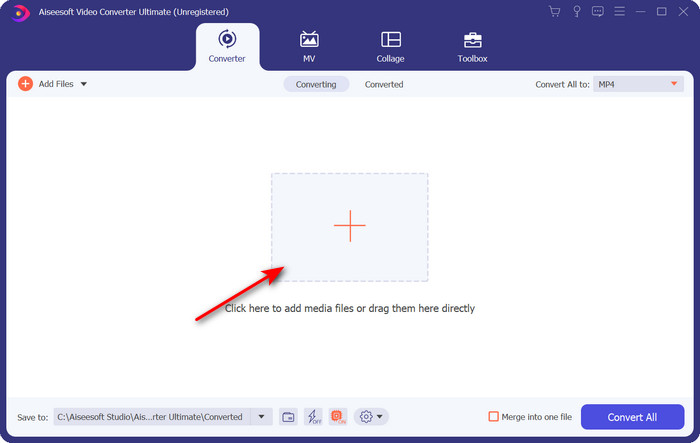
ขั้นตอนที่ 2. เปิดโปรแกรม คลิกสัญลักษณ์ + ตรงกลางหน้าต่างโปรแกรม แล้วเลือกไฟล์ .m4v จากโฟลเดอร์ที่ปรากฏขึ้น คลิกไฟล์นั้นและกด Open.
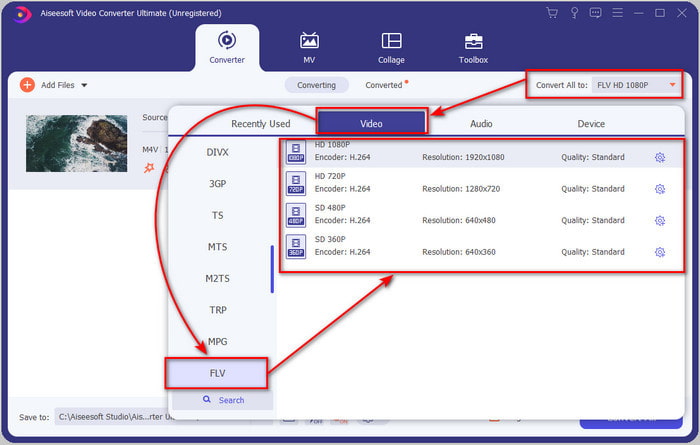
ขั้นตอนที่ 3. เมื่อไฟล์ .m4v ปรากฏบนหน้าโปรแกรมแล้ว ให้คลิก Convert All to และค้นหาไฟล์รูปแบบ FLV.
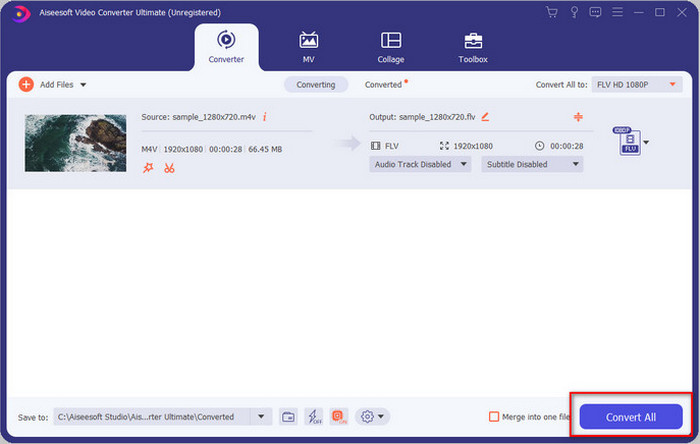
ขั้นตอนที่ 4. จากนั้นคลิก Convert All เพื่อเริ่มแปลงไฟล์จาก M4V เป็น FLV.
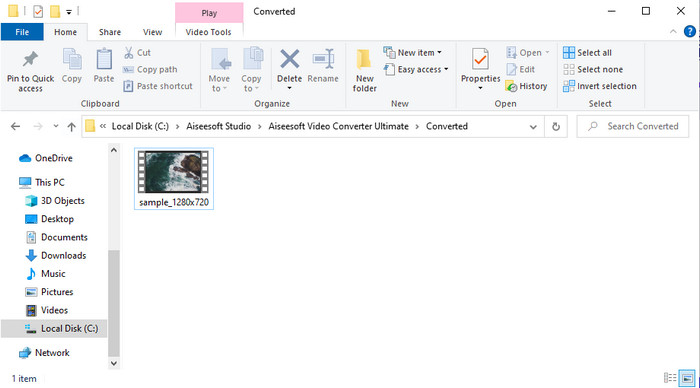
ขั้นตอนที่ 5. การแปลงไฟล์จะใช้เวลาไม่ถึงหนึ่งนาทีด้วยความเร็วในการแปลงสูงของโปรแกรมนี้ จากนั้นจะมีโฟลเดอร์แสดงไฟล์ที่แปลงเสร็จแล้วขึ้นมา ให้คลิกไฟล์เพื่อรับชม หรือแชร์ออนไลน์ได้ทันที.
ข้อดี
- การแปลงที่รวดเร็วและการเร่งด้วยฮาร์ดแวร์มีให้เพื่อประสบการณ์ที่ดีที่สุด
- ใช้ได้กับทุกแพลตฟอร์มเช่น PC หรือ Mac
- การตัดต่อวิดีโอเพื่อให้โดดเด่นสามารถเอาชนะได้ที่นี่
จุดด้อย
- ชำระเงินก่อนใช้งานแต่ราคาจับต้องได้
- ดาวน์โหลดซอฟต์แวร์ก่อนใช้งาน
ส่วนที่ 2 ตัวเลือกที่ 2 ในการแปลง M4V เป็น FLV ฟรีผ่าน Online
การแปลงไฟล์ของคุณแบบออนไลน์สามารถทำได้อย่างมีประสิทธิภาพ หากคุณใช้ตัวแปลง M4V เป็น FLV ออนไลน์ที่เหมาะสมอย่าง FVC Free Video Converter Online เครื่องมือออนไลน์ตัวนี้เป็นโปรแกรมแปลงไฟล์ที่ดีที่สุดตัวหนึ่งที่คุณเข้าถึงได้จากทุกเว็บเบราว์เซอร์เมื่อมีการเชื่อมต่ออินเทอร์เน็ต อีกทั้งคุณยังสามารถแปลงไฟล์ได้โดยไม่จำกัดขนาด แม้จะไม่รองรับการแปลงแบบครั้งละหลายไฟล์ (batch conversion) ก็ตาม ถึงแม้ซอฟต์แวร์ออนไลน์นี้จะยอดเยี่ยม แต่ก็ยังต้องใช้อินเทอร์เน็ตอยู่ดี หากคุณไม่มีอินเทอร์เน็ตก็จะใช้งานไม่ได้ เช่นเดียวกับเว็บแปลงไฟล์อื่น ๆ อย่างไรก็ตาม หากคุณมีอินเทอร์เน็ตและต้องการประสบการณ์แปลงไฟล์ออนไลน์ฟรีที่มีคุณภาพ คุณควรทำตามขั้นตอนด้านล่าง.
วิธีแปลง M4V เป็น FLV ด้วยความช่วยเหลือจาก FVC Free Video Converter Online:
ขั้นตอนที่ 1. คลิกลิงก์นี้เพื่อไปยังโปรแกรมแปลงไฟล์ออนไลน์ฟรีที่ FVC เตรียมไว้ให้คุณ.
ขั้นตอนที่ 2. บนหน้าเว็บให้คลิก Add Files to Convert เพื่อดาวน์โหลดตัวติดตั้ง เมื่อดาวน์โหลดตัวติดตั้งเสร็จแล้ว ให้กด Add Files to Convert อีกครั้ง จากนั้นจะมีโฟลเดอร์ขึ้นมา ให้เลือกไฟล์ M4V.
ดาวน์โหลดเวอร์ชันเดสก์ท็อปเพื่อแปลงไฟล์แบบเป็นชุดได้.
ขั้นตอนที่ 3. จะมีหน้าเว็บใหม่ปรากฏขึ้น ด้านล่างให้เลือกฟอร์แมต FLV โดยการคลิก.
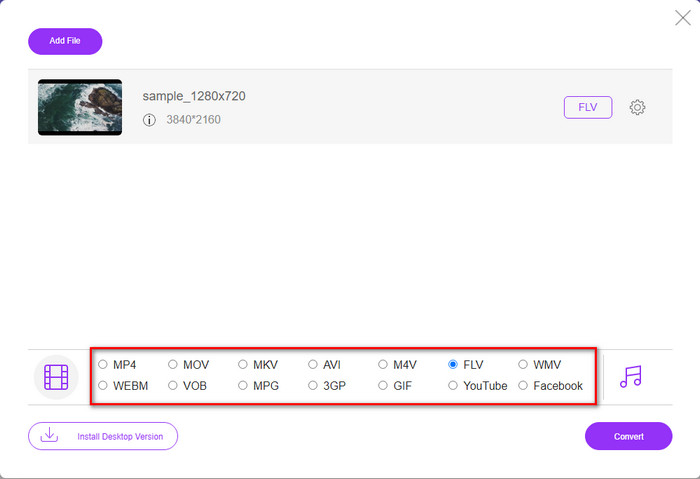
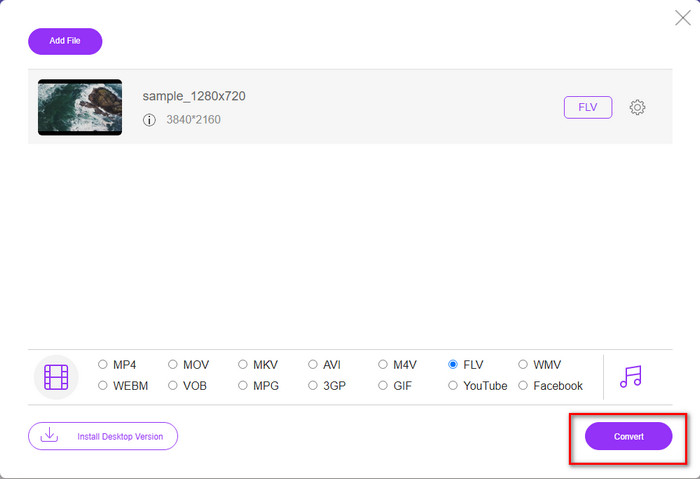
ขั้นตอนที่ 4. เพื่อเริ่มแปลง M4V เป็น FLV ฟรี ให้คลิก Convert.
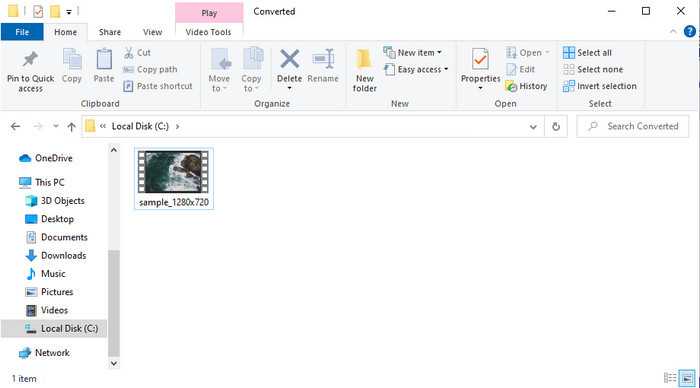
ขั้นตอนที่ 5. หลังจากแปลงไฟล์เสร็จแล้ว จะมีโฟลเดอร์แสดงบนหน้าเว็บ ให้คลิกไฟล์เพื่อเล่นด้วยโปรแกรมเล่นสื่อภายในเครื่องของคุณ.
ข้อดี
- ฟรีและเข้ากันได้กับทุกเว็บเบราว์เซอร์
- ขนาดไฟล์และการแปลงไม่จำกัด
- ปลอดภัยและไม่มีโฆษณาในเครื่องมือเว็บหลัก
จุดด้อย
- ต้องใช้การเชื่อมต่ออินเทอร์เน็ตเพื่อใช้เครื่องมือ
- รูปแบบที่รองรับน้อยกว่าในการอัปโหลดและแปลงเป็น
ส่วนที่ 3 ความแตกต่างระหว่างรูปแบบ M4V และ FLV
M4V เก็บคุณภาพวิดีโอสูงสุดที่ดาวน์โหลดจากร้าน Apple iTunes ของคุณ รูปแบบนี้คล้ายกับ MP4 เนื่องจากใช้ตัวแปลงสัญญาณ MPEG-4 เป็นคอมเพรสเซอร์ แต่วิดีโอ M4V ได้รับการคุ้มครองภายใต้การคุ้มครองลิขสิทธิ์ Apple FairPlay DRM ดังนั้น การเล่นวิดีโอในรูปแบบนี้จึงเป็นเรื่องยากเพราะจะไม่สามารถเล่นได้ทันทีหากคุณใส่ลงในเครื่องเล่นสื่ออื่นที่ไม่ใช่ iTunes หรือ Quicktime Player ไฟล์ M4V ที่ไม่มีการป้องกันสามารถเข้าถึงได้จากเครื่องเล่นสื่อของคุณโดยเปลี่ยนนามสกุลไฟล์เป็น .mp4
ในทางตรงกันข้าม FLV ใช้ในการถ่ายโอนข้อมูลวิดีโอและเสียงผ่านเว็บโดยเร็วที่สุด Flash Video เป็นรูปแบบที่เหมาะสมที่สุดซึ่งอยู่ในทุกเว็บไซต์ HTML 5 อย่างไรก็ตาม รูปแบบนี้ถูกยกเลิกเนื่องจาก Adobe Flash ได้เลิกใช้ไปแล้ว ถึงกระนั้น คุณยังสามารถเล่นได้บนปลั๊กอินเครื่องเล่นสื่อที่จำเป็นเมื่อคุณดาวน์โหลดหรือแปลงไฟล์
M4V เทียบกับ FLV
M4V ได้รับการพัฒนาโดย Apple ซึ่งใช้ MPEG 4 เช่นกัน ไฟล์ M4V มักใช้เพื่อจัดเก็บวิดีโอที่ดาวน์โหลดจากร้าน iTunes ของ Apple เช่น มิวสิควิดีโอ รายการทีวี ฯลฯ คุณอาจพบว่าไฟล์ M4V บางไฟล์ได้รับการป้องกันการคัดลอกเนื่องจากใช้ การคุ้มครองลิขสิทธิ์ FairPlay DRM ของ Apple
Adobe Flash Player ใช้ FLV เพื่อส่งเนื้อหาวิดีโอ เช่น ภาพยนตร์และรายการทีวี ปัจจุบัน Adobe ไม่ได้พัฒนาโปรแกรมเล่นอีกต่อไปและแนะนำให้ผู้ใช้ถอนการติดตั้งโปรแกรมดังกล่าวด้วยเหตุผลด้านความปลอดภัย อย่างไรก็ตาม คุณยังคงสามารถใช้รูปแบบ FLV ในโปรแกรมที่ไม่ใช่ Adobe/Macromedia จำนวนมากได้
ส่วนที่ 4 คำถามที่พบบ่อยเกี่ยวกับการแปลง M4V เป็น FLV
อันไหนดีกว่า; MP4 หรือ M4V?
หากคุณต้องการปกป้องไฟล์ของคุณ M4V ก็คือรูปแบบที่คุณต้องใช้ เนื่องจากมีให้ใช้งานได้เฉพาะใน Apples และได้รับการป้องกัน แต่สมมติว่าคุณต้องการรูปแบบที่เข้ากันได้กับเครื่องเล่นสื่อ โปรแกรมแก้ไข และอื่นๆ ทั้งหมด ในกรณีนั้น MP4 เป็นรูปแบบสื่อสากลที่คุณต้องการใช้
ฉันสามารถเล่น M4V บน VLC ได้หรือไม่?
VLC เป็นโปรแกรมฟรีที่รองรับทุกแพลตฟอร์ม และสามารถเล่นไฟล์มีเดียได้เกือบทุกรูปแบบ แต่ไฟล์ M4V ที่มีการป้องกันจะไม่สามารถเล่นได้เพราะถูกเข้าระบบป้องกันไว้ ดังนั้นหากคุณต้องการดูไฟล์ .m4v บน VLC จำเป็นต้องแปลงไฟล์ M4V ให้เป็น MP4 หรือ AVI ก่อน.
ฉันสูญเสียคุณภาพหลังจากแปลง M4V หรือไม่?
หลังจากแปลง M4V คุณภาพของมันควรจะรักษาอัตรามาตรฐานของคุณภาพ M4V ดั้งเดิม อย่างไรก็ตาม ตัวแปลงบางตัวไม่รองรับการแปลงวิดีโอเป็น HD, 1080 หรือ 4k ดังนั้น คุณควรเลือกเครื่องมือที่สมบูรณ์แบบ ไม่ใช่เครื่องมือที่เหมาะสมที่จะเพียงพอกับความต้องการของคุณในการแปลงไฟล์โดยไม่สูญเสียคุณภาพ
สรุป
โดยสรุปแล้ว เครื่องมือทั้งแบบออนไลน์และออฟไลน์สองตัวที่แนะนำไปนี้สร้างมาเพื่อตอบโจทย์การใช้งาน โดยเฉพาะหากคุณต้องการแปลง M4V เป็น FLV นอกจากนี้ เรายังได้ทำความเข้าใจเพิ่มเติมเกี่ยวกับสองฟอร์แมตนี้คือ M4V และ FLV แม้ว่าการแปลงไฟล์ M4V จะเป็นเรื่องจำเป็นสำหรับการรับชมไฟล์ที่มีการป้องกันลิขสิทธิ์ แต่การเลือกเครื่องมือที่ใช่สำหรับงานแต่ละแบบก็ไม่ใช่เรื่องง่าย ดังนั้นเราจึงนำเสนอเครื่องมือสองชนิดที่คุณสามารถใช้แปลงไฟล์ได้ฟรี คือ FVC Free Video Converter Online หรือหากต้องการประสบการณ์การแปลงไฟล์ในระดับที่สูงขึ้นก็สามารถใช้ FVC Video Converter Ultimate แล้วตอนนี้หากคุณอยากดูไฟล์ M4V แบบฟรี ๆ จะรออะไรอยู่ล่ะ เลือกหนึ่งในเครื่องมือด้านบน ทำตามขั้นตอนง่าย ๆ ที่อธิบายไว้ แล้วก็เพลิดเพลินกับวิดีโอได้เลย.
-
 [คำแนะนำ] วิธีแปลงวิดีโอ M4V เป็น GIF แบบเคลื่อนไหวบน Windows/Mac
 หากคุณต้องการสร้างไฟล์ GIF แบบเคลื่อนไหวจากวิดีโอ M4V ที่คุณชื่นชอบ คุณสามารถเรียนรู้เกี่ยวกับ 2 วิธีที่ง่ายและมีประสิทธิภาพในการแปลงวิดีโอ M4V เป็น GIF ด้วยการตั้งค่าแบบกำหนดเอง
-
 3 โปรแกรมแปลงวิดีโอที่ใช้ในการแปลง iTunes M4V เป็น AVI บน Mac
 ไม่มีความคิดเกี่ยวกับวิธีการแปลง MKV เป็นรูปแบบ AVI? ขณะที่เราอ่านบทความนี้ต่อไป เราจะรู้จักเครื่องมือ 3 อย่างที่สามารถช่วยคุณแปลงรูปแบบไฟล์นี้ได้
-
 ฟรี M4V เพื่อแปลง MOV – วิธีการแปลง M4V เป็น MOV
 หากเครื่องเล่นมีเดียของคุณ'ไม่รองรับ M4V คุณเคยลำบากในการดูภาพยนตร์บน iPhone หรือไม่? หัวข้อหลักของบทความนี้คือการแปลงเป็นไฟล์วิดีโอ MOV

