


 Video Converter Ultimate
 บันทึกหน้าจอ
 ซ่อมวิดีโอ
วิธีการที่ได้เปรียบในการแปลง DV เป็น FLV ได้อย่างง่ายดาย
ไฟล์ DV คือไฟล์ที่บรรจุวิดีโอดิจิทัล การวิเคราะห์ไฟล์ DV ของเราเผยให้เห็นว่าวิดีโอดิจิทัลเป็นหนึ่งในการใช้งานของรูปแบบนี้ เรายังไม่ได้อธิบายอย่างครบถ้วนว่าไฟล์เหล่านี้บรรจุอะไรอยู่ภายในหรือผู้ใช้ใช้งานอย่างไร แต่ทีมงานของเรากำลังทำงานกับไฟล์หลากหลายประเภทนับพันชนิด หากคุณมีข้อมูลเพิ่มเติมเกี่ยวกับรูปแบบไฟล์นี้ เราอยากรับฟังจากคุณ อย่างไรก็ตาม นามสกุลไฟล์ .flv ใช้ระบุไฟล์ FLV (Flash Video) ผู้ใช้สามารถใช้ Adobe Flash Player หรือ Adobe Air เพื่อสตรีมเนื้อหาเสียงและวิดีโอบนอินเทอร์เน็ตผ่าน FLV ได้ ไฟล์ FLV มีการเข้ารหัสข้อมูลในลักษณะเดียวกับไฟล์ SWF ในการแก้ปัญหารูปแบบวิดีโอ DV ผู้ใช้มักจะแปลงให้เป็นรูปแบบ FLV ซึ่งสามารถใช้งานร่วมกับโปรแกรมเล่นมีเดียได้หลากหลาย ดังนั้น หากคุณกำลังมองหาเครื่องมือที่สามารถแปลงไฟล์ DV เป็น FLV ได้ โปรดอ่านบทความนี้ต่อไป.

ส่วนที่ 1 วิธีที่ดีที่สุดในการแปลง DV เป็น FLV ออฟไลน์
Video Converter Ultimate เป็นหนึ่งในซอฟต์แวร์ที่ยอดเยี่ยมซึ่งช่วยคุณแปลงไฟล์วิดีโอ DV ให้เป็น FLV ได้ ด้วยระบบการเร่งความเร็วขั้นสูง คุณสามารถแปลง DV เป็น FLV ได้เพียงไม่กี่วินาทีซึ่งเครื่องมืออื่นไม่อาจเทียบได้ ต้องขอบคุณซอฟต์แวร์นี้ที่ทำให้คุณไม่ต้องกังวลกับการแปลง DV เป็นรูปแบบอื่น ๆ เพราะซอฟต์แวร์นี้รองรับรูปแบบไฟล์หลากหลายชนิดเกินกว่าที่คุณจะจินตนาการได้ เช่น MP4, MOV, 3GP, FLV, WMV, WEBM, MPEG เป็นต้น นอกจากการแปลงไฟล์แล้ว ซอฟต์แวร์นี้ยังมีเครื่องมือเด่นอื่น ๆ ให้ใช้งาน ไม่ว่าจะเป็นการตัดต่อ ปรับแต่งคุณภาพ รวมไฟล์ เร่งความเร็ว และเครื่องมืออื่น ๆ ที่ช่วยยกระดับวิดีโอของคุณไปอีกขั้น.

Video Converter Ultimate
6,357,200+ ดาวน์โหลด- รองรับรูปแบบวิดีโอและเสียงมากกว่า 1,000 รูปแบบ
- แปลงเร็วกว่าตัวแปลงอื่น 30 เท่า
- สามารถแปลงวิดีโอได้ถึงคุณภาพระดับ 4K HD
- มีเครื่องมือเด่นอื่น ๆ อีกมากมายที่ช่วยปรับปรุงวิดีโอของคุณ
- ไม่ต้องใช้ฮาร์ดแวร์บำรุงรักษาอย่างหนักเพื่อใช้งาน
ดาวน์โหลดฟรีสำหรับ Windows 7 หรือใหม่กว่าดาวน์โหลดอย่างปลอดภัย
ดาวน์โหลดฟรีสำหรับ MacOS 10.7 หรือใหม่กว่าดาวน์โหลดอย่างปลอดภัย
ขั้นตอนที่ 1: ดาวน์โหลดซอฟต์แวร์โดยคลิกที่ปุ่ม Free Download ที่อยู่ด้านบน จากนั้นคุณต้องติดตั้งซอฟต์แวร์ลงในคอมพิวเตอร์ของคุณ และเปิดใช้งานโดยคลิก Start Now หลังจากติดตั้งเสร็จ.
ขั้นตอนที่ 2: จากนั้นคุณจะเห็นหน้าต่างใหม่ปรากฏบนหน้าจอ ซอฟต์แวร์จะแสดงฟังก์ชัน Converter เพื่อเพิ่มไฟล์จากคอมพิวเตอร์ของคุณ ให้คลิกปุ่ม + ตรงกลางหน้าจอ หรือคุณสามารถลากไฟล์วิดีโอรูปแบบ DV ใด ๆ มาวางที่กึ่งกลางได้โดยตรง.
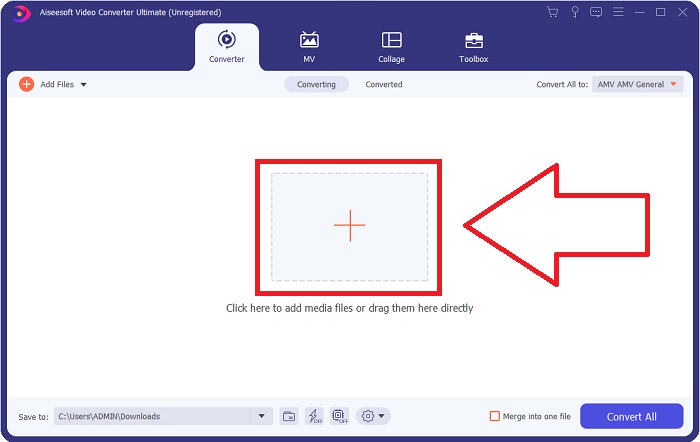
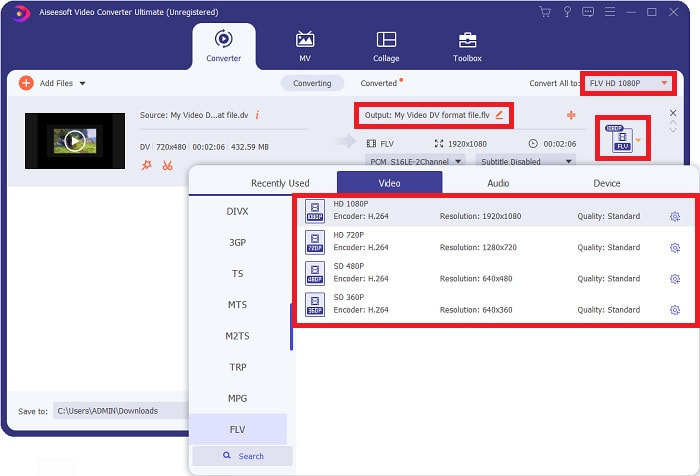
ขั้นตอนที่ 3: ตอนนี้คุณดำเนินการมาได้ครึ่งทางแล้ว ให้คลิกที่ไอคอนเลือกฟอร์แมตที่อยู่ถัดจากช่องผลลัพธ์ของวิดีโอของคุณ แล้วเลือกวิดีโอฟอร์แมต FLV หลังจากนั้นคุณยังสามารถเลือกคุณภาพวิดีโอที่แตกต่างกันซึ่งซอฟต์แวร์มีให้ได้อีกด้วย.
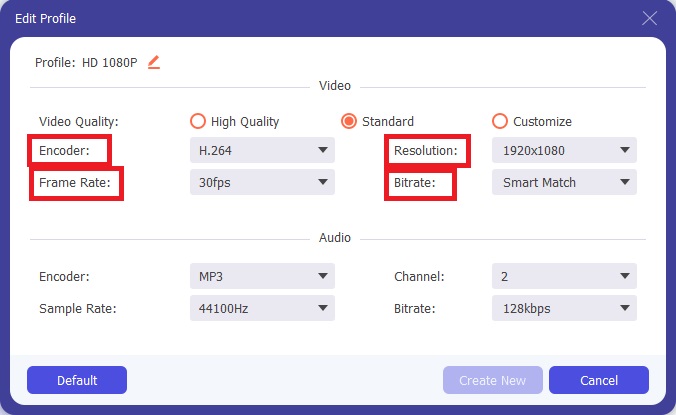
ขั้นตอนที่ 4: อีกเพียงเล็กน้อยก็จะเสร็จสิ้น หากคุณยังไม่พอใจกับคุณภาพวิดีโอที่มีให้เลือก คุณสามารถปรับแต่งคุณภาพวิดีโอของไฟล์เอาต์พุตได้เองโดยคลิกที่ไอคอนรูปเฟืองที่อยู่ถัดจากตัวเลือกคุณภาพวิดีโอ.
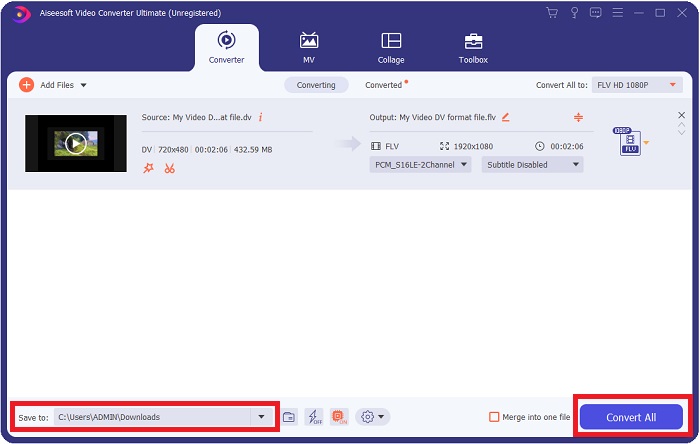
ขั้นตอนที่ 5: ตอนนี้คุณกำลังจะเข้าสู่ขั้นตอนสุดท้าย ไปที่ช่อง Save to ที่มุมอีกด้านหนึ่งเพื่อเลือกตำแหน่งจัดเก็บไฟล์ที่แปลงแล้ว หลังจากนั้นคุณสามารถแปลงไฟล์ของคุณได้โดยคลิกที่ปุ่ม Convert All ที่อยู่มุมล่างขวาของหน้าจอ.
ส่วนที่ 2 วิธีการแปลง DV เป็น FLV ออนไลน์
อินเทอร์เน็ตได้สร้างสรรค์และแนะนำเครื่องมือออนไลน์มากมายที่ช่วยคุณแปลงไฟล์ DV เป็น FLV แต่เครื่องมือออนไลน์ที่ชื่อว่า Free Video Converter Online นี้มีความแตกต่างจากเครื่องมืออื่นในด้านความเร็วในการแปลง เพราะสามารถแปลงไฟล์ได้ในเวลาเพียงเสี้ยววินาที อีกทั้งยังรองรับฟอร์แมตต่าง ๆ เช่น MP4, FLV, MOV, M4A, TS, WMV, ASF, VOB, AAC, WMA และอื่น ๆ อีกมากมาย นอกจากนี้ยังสามารถแปลงวิดีโอเป็นวิดีโอความละเอียดสูง (HD) ได้โดยไม่สูญเสียคุณภาพ เครื่องมือแปลงวิดีโอฟรีนี้มีชื่อเสียงในด้านการแปลงไฟล์และช่วยให้ผู้ใช้สามารถปรับแต่งผลงานวิดีโอของตนได้อย่างง่ายดาย มาดูขั้นตอนทั้งหมดที่จะช่วยให้คุณใช้งานตัวแปลงออนไลน์นี้กัน.
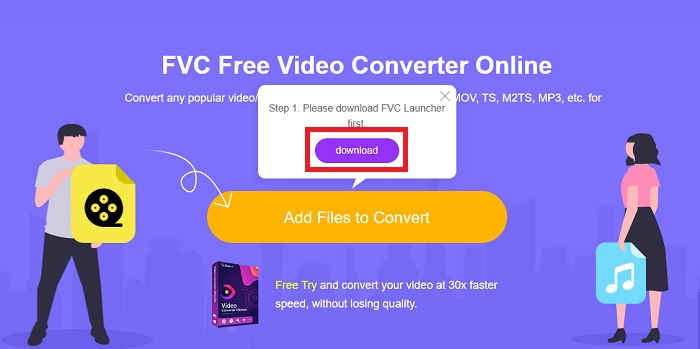
ขั้นตอนที่ 1: เพื่อเข้าสู่หน้าเว็บหลักของเครื่องมือนี้ ให้คลิกที่ลิงก์นี้แล้วดำเนินการต่อ จากนั้นคลิกปุ่ม Add Files to Convert บนหน้าจอหลักของคอมพิวเตอร์ของคุณเพื่อดาวน์โหลดตัวเรียกใช้งาน (launcher) ที่จะทำให้คุณสามารถใช้เครื่องมือออนไลน์นี้ได้ หลังจากนั้นให้คลิกปุ่มเดิมอีกครั้งเพื่ออัปโหลดไฟล์.
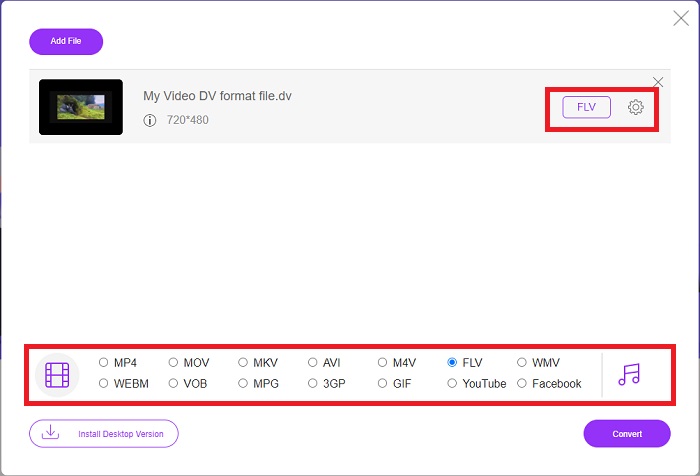
ขั้นตอนที่ 2: เมื่อคุณมีไฟล์ที่ต้องการแปลงแล้ว คุณต้องเลือกวิดีโอฟอร์แมต FLV จากแถบเลือกฟอร์แมตวิดีโอที่ด้านล่างของหน้าจอ คุณยังสามารถปรับค่าต่าง ๆ ของวิดีโอได้โดยเปลี่ยนการตั้งค่าวิดีโอต่าง ๆ เช่น ความละเอียด อัตราเฟรม เป็นต้น โดยคลิกที่ไอคอนรูปเฟือง.
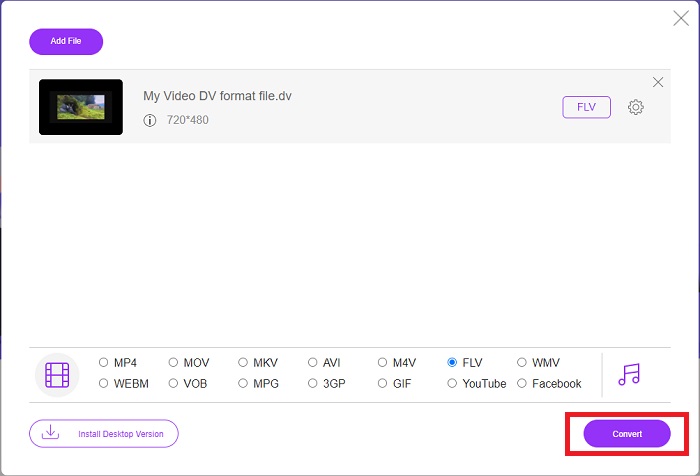
ขั้นตอนที่ 3: หลังจากนั้นคุณสามารถเริ่มแปลงไฟล์ได้โดยคลิกปุ่ม Convert ที่อยู่มุมล่างซ้ายของหน้าต่าง.
ส่วนที่ 3 แผนภูมิเปรียบเทียบ: DV กับ FLV
ไฟล์วิดีโอดิจิทัล (DV) ถูกสร้างขึ้นโดยกล้องดิจิตอลและบันทึกในรูปแบบดิบที่ผู้ใช้ใช้เสมอ ไฟล์ Digital Video (DV) ประกอบด้วย Digital Interface Blocks (DIF) โดยแต่ละไฟล์มีขนาด 80 ไบต์ เสียง วิดีโอ และข้อมูลเมตาทั้งหมดสามารถรวมอยู่ในบล็อก DIF บล็อก DIF สามารถจัดเก็บเป็นไฟล์คอมพิวเตอร์ในรูปแบบดิบหรือในรูปแบบไฟล์ที่ล้อมรอบได้ โดยแบ่งบล็อกออกเป็นลำดับ 150 บล็อก เฟรมวิดีโอสามารถมีได้ถึงสิบหรือสิบสองลำดับ
อย่างไรก็ตาม บริการสตรีมมิงวิดีโออย่าง YouTube, Hulu และ Vevo ใช้รูปแบบไฟล์ Flash Video ของ Adobe Systems สำหรับวิดีโอออนไลน์ของตน Adobe Flash Player (รวมถึงปลั๊กอินของเบราว์เซอร์) และซอฟต์แวร์ของบุคคลที่สามสามารถอ่านและเล่นไฟล์ FLV ได้บนเกือบทุกระบบปฏิบัติการ (ยกเว้น iOS) iPhone และ Android สามารถเล่นไฟล์ FLV ได้โดยใช้ซอฟต์แวร์โอเพ่นซอร์สและเบราว์เซอร์เฉพาะทาง Flash ยังคงเป็นปัญหาสำหรับ iOS ไฟล์ FLV สามารถดูได้ผ่านซอฟต์แวร์เล่นไฟล์ FLV เท่านั้น และผู้ใช้สามารถใช้ซอฟต์แวร์จับภาพหน้าจอและบันทึกหน้าจอเพื่อบันทึกวิดีโอ FLV ได้.
| นามสกุลไฟล์ | ดีวี (.dv) | FLV (.flv) |
| ชื่อไฟล์ | วิดีโอดิจิทัล | ไฟล์วิดีโอแฟลช |
| พัฒนาโดย | ผู้ผลิตกล้องวิดีโอหลายราย | Adobe System Incorporated |
| ข้อดี | ◆ Mini DV มาตรฐานมีความจุ 19.5 GB ซึ่งใช้ได้ถึงประมาณ 25 เซ็นต์ต่อพื้นที่เก็บข้อมูล GB ◆การแปลง HD เป็นมาตรฐานที่ใช้งานง่าย ◆ เทปติดฉลากได้ง่ายและเหมาะสำหรับการจัดเก็บในระยะยาว | เมื่อพูดถึงการสร้างหน้าเว็บแบบไดนามิกและโต้ตอบได้ Adobe Flash สามารถเป็นสินทรัพย์ขนาดใหญ่ได้ กระบวนการนี้เรียบง่าย แต่ผลลัพธ์อาจมีนัยสำคัญ ในช่วงรุ่งเรือง Flash ยังถูกนำมาใช้กันอย่างแพร่หลายสำหรับวิดีโอเกมง่ายๆ |
| จุดด้อย | ◆ จำเป็นต้องมีการเชื่อมต่อแบบ firewire (พีซีส่วนใหญ่ไม่มีสิ่งนี้) ◆ คุณภาพของการบันทึกจะลดลงเมื่อผ่านไปแต่ละครั้ง ◆ บันทึกได้ครั้งละ 60 ถึง 90 นาทีเท่านั้น | มันเป็นข้อเสียที่ FLV ได้รับความนิยมลดลงในช่วงหลายปีที่ผ่านมา การสร้างเนื้อหา FLV อาจใช้เวลานานและต้องใช้เงินเป็นจำนวนมาก นอกจากนี้ ผู้ใช้ไม่สามารถดูเนื้อหา Flash บนอุปกรณ์ iOS ได้ ซึ่งเป็นการจำกัดความสามารถในการดึงดูดผู้ติดตามใหม่อย่างรุนแรง |
| โปรแกรมที่รองรับไฟล์ | ◆ VLC Media Player | ◆ ผู้เล่นจริง ◆ Apple QuickTime Player ◆ VLC Media Player ◆ MPlayer |
ส่วนที่ 4 คำถามที่พบบ่อยเกี่ยวกับการแปลง DV เป็น FLV
DV ความละเอียดเท่าไร?
สำหรับ DV ความละเอียดมาตรฐานจะบันทึกพิกเซลแนวนอน 720 พิกเซลและเส้นอินเทอร์เลซ 480 เส้นในประเทศที่ใช้กระแสไฟฟ้า 60Hz และ 576 เส้นที่มีกระแสไฟฟ้า 50Hz วิดีโอดิจิทัลเวอร์ชันความละเอียดสูง (HDV) เป็นมาตรฐาน HDV อย่างเป็นทางการ และ DVCPRO HD ของ Panasonic เป็นตัวอย่างของรูปแบบดังกล่าว (ดู HDV และ DVCPRO)
วิดีโอ DV เป็นแบบอินเทอร์เลซหรือไม่
มักจะมีภาพ DV อยู่ด้านล่างเสมอ ภาพอื่นๆ อาจปรากฏขึ้นก่อน ตีความคลิปที่นำเข้าอีกครั้งโดยเปิดการแบ่งช่อง ให้ต่ำลงก่อน (ไฟล์ > แปลภาพ > ส่วนกลาง) เพื่อดูว่ามีการอินเทอร์เลซหรือไม่ จากนั้น ในหน้าต่างของโปรเจ็กต์ ให้ใช้ปุ่มลัด Alt-ดับเบิลคลิกเพื่อเข้าถึง ใช้ปุ่ม page up/Dn เพื่อไปยังส่วนต่างๆ ของวิดีโอ การอินเทอร์เลซจะเกิดขึ้นหากวิดีโอเปลี่ยนไปทุกครั้งที่คุณกดปุ่มเล่น การเคลื่อนไหวที่กระตุกแสดงว่าลำดับฟิลด์ไม่ถูกต้อง และภาพควรได้รับการตีความใหม่โดยใช้ลำดับฟิลด์อื่น
FLV เป็นรูปแบบวิดีโอที่เหมาะสมหรือไม่
Adobe Flash Player บันทึกไฟล์วิดีโอในรูปแบบ FLV แพลตฟอร์มวิดีโอและเบราว์เซอร์ทั้งหมดยอมรับให้เป็นหนึ่งในรูปแบบวิดีโอที่รองรับ แพลตฟอร์มการสตรีมวิดีโอออนไลน์ เช่น YouTube ได้ประโยชน์จากการใช้รูปแบบ FLV เนื่องจากไฟล์มีขนาดเล็ก จึงดาวน์โหลดได้อย่างรวดเร็วและตรงไปตรงมา
สรุป
เพื่อสรุปทุกหัวข้อที่กล่าวมา คุณจะเห็นว่าตัวแปลงไฟล์ที่บทความนี้แนะนำให้คุณใช้งานมากที่สุดคือซอฟต์แวร์ Video Converter Ultimate และเครื่องมือออนไลน์ Free Video Converter Online เนื่องจากตัวแปลงทั้งสองนี้โดดเด่นเหนือเครื่องมืออื่น ๆ มีเครื่องมือระดับมืออาชีพให้ใช้งานหลากหลาย และยังมีส่วนติดต่อผู้ใช้ที่ใช้งานง่าย.
-
 กลยุทธ์ที่ดีที่สุดในการแปลงไฟล์ DV เป็นรูปแบบ AVI พร้อมขั้นตอนโดยละเอียด
 คุณต้องการแปลงไฟล์ DV ของคุณเป็น AVI หรือไม่? จากนั้นอ่านบทความนี้เพื่อทราบเครื่องมือเฉพาะที่คุณสามารถใช้ในการแปลงและโปรแกรมเล่นสื่อเพื่อเล่น DV ของคุณบนพีซีหรือ Mac
-
 2 วิธียอดนิยมในการแปลงไฟล์ DV เป็น MOV ฟรีในเดสก์ท็อปและออนไลน์
 มีปัญหาในการแปลงไฟล์ DV เป็น MOV บน Mac ของคุณหรือไม่? หากนั่นคือปัญหาของคุณ เราสามารถแก้ปัญหาร่วมกันได้หากเราอ่านบทความนี้
-
 MP4 เป็น FLV | ตัวแปลงฟรี 3 อันดับแรก (ออนไลน์ / Mac / Windows)
 โพสต์นี้เป็นคำแนะนำโดยละเอียดเกี่ยวกับการแปลง MP4 เป็น FLV คุณสามารถใช้ตัวแปลงฟรี 3 อันดับแรกเพื่อเปลี่ยน MP4 เป็น FLV ทางออนไลน์บนคอมพิวเตอร์ Windows หรือ Mac ได้อย่างง่ายดาย
