


 Video Converter Ultimate
 บันทึกหน้าจอ
 ซ่อมวิดีโอ
 แปลง MOD เป็นรูปแบบใดก็ได้เช่น MP4, MOV, AVI, MP3 เป็นต้น
7 MOD Converters ฟรีที่มีอยู่ในแพลตฟอร์มของคุณเพื่อเปลี่ยนรูปแบบ MOD ได้อย่างง่ายดาย
ต้องการเปลี่ยนไฟล์ MOD ของคุณใช่ไหม? ถ้าเป็นแบบนั้นล่ะก็ คุณไม่จำเป็นต้องกังวลอีกต่อไปหรือเสียเวลาไปกับโปรแกรมแปลงไฟล์หลายตัวให้ยุ่งยาก ไม่ต้องเครียดเลย เพราะวันนี้เรามีวิธีให้คุณเรียบร้อยแล้ว ต่อไปนี้เราจะแนะนำวิธีที่ดีที่สุดในการแปลงไฟล์ MOD เป็น MP4 รวมถึง MOV, MPEG2, DVD หรือจะเป็นไฟล์วิดีโอรูปแบบใดก็ได้ที่คุณต้องการ พร้อมขั้นตอนให้ทำตามได้ง่าย ๆ.

ส่วนที่ 1 ตัวแปลง MOD ฟรี 7 อันดับแรกเพื่อแปลงไฟล์ MOD ออนไลน์และออฟไลน์
1. FVC Video Converter Ultimate – ตัวแปลง MOD ที่ดีที่สุดบน Windows & Mac
ตัวแรกในลิสต์ของเราคือโปรแกรมแปลงไฟล์ MOD ที่ได้รับเลือกใช้มากที่สุดบนหลากหลายแพลตฟอร์ม นั่นคือ FVC Video Converter Ultimate โปรแกรมนี้มอบกระบวนการแปลงไฟล์ที่เร็วเป็นพิเศษให้กับผู้ใช้ และตามเคยคือแทบไม่เคยทำให้ผู้ใช้ผิดหวัง แม้จะใช้เวลาแปลงไฟล์สั้นมาก แต่คุณภาพวิดีโอจะไม่ถูกลดทอน เพราะมีการปกป้องคุณภาพเดิมไว้ในขณะเปลี่ยนรูปแบบไฟล์.
มีอะไรมากกว่ากระบวนการความเร็วฟ้าผ่า? นอกจากนี้ยังรองรับรูปแบบขนาดใหญ่ที่คุณสามารถนำเข้าหรือส่งออกได้ เช่น MOD, MP4, MOV, MKV, FLV, WMV และอื่นๆ อีกมากมาย เนื่องจากรูปแบบที่รองรับ ลูกค้าจึงชื่นชอบเครื่องมือนี้ และหลายคนแนะนำสิ่งนี้ให้กับผู้ใช้รายอื่นที่ต้องการแปลงรูปแบบของตน ดังนั้น หากคุณต้องการความช่วยเหลือในการแปลง MOD เป็น MP4 หรือรูปแบบวิดีโอใด ๆ ที่คุณต้องการ เครื่องมือนี้เป็นตัวช่วยที่ยอดเยี่ยมโดยทำตามขั้นตอนที่ระบุด้านล่าง
ขั้นตอนที่ 1 หากต้องการดาวน์โหลดโปรแกรมลงบนเดสก์ท็อป ให้คลิกปุ่มดาวน์โหลดด้านล่าง จากนั้นเลือกแพลตฟอร์มที่คุณใช้งานอยู่ ต่อไปให้ทำตามขั้นตอนการติดตั้งอย่างรวดเร็วและเปิดซอฟต์แวร์ขึ้นมา หากคุณเป็นมือใหม่ในการแปลงไฟล์ ไม่ต้องกังวล เพราะขั้นตอนที่ให้ไว้ที่นี่จะช่วยให้คุณแปลงไฟล์ MOD ได้อย่างถูกต้อง.
ดาวน์โหลดฟรีสำหรับ Windows 7 หรือใหม่กว่าดาวน์โหลดอย่างปลอดภัย
ดาวน์โหลดฟรีสำหรับ MacOS 10.7 หรือใหม่กว่าดาวน์โหลดอย่างปลอดภัย
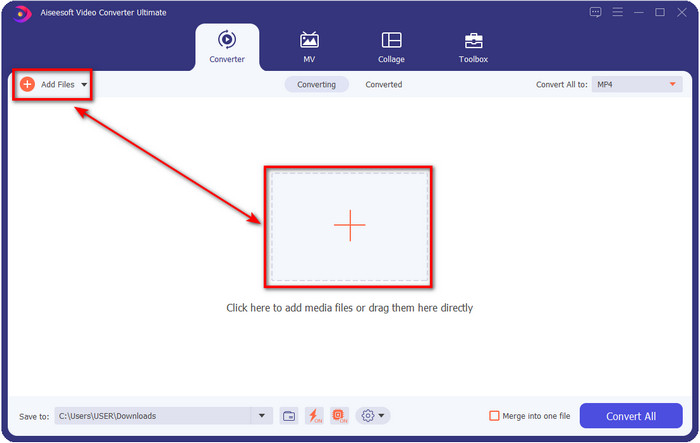
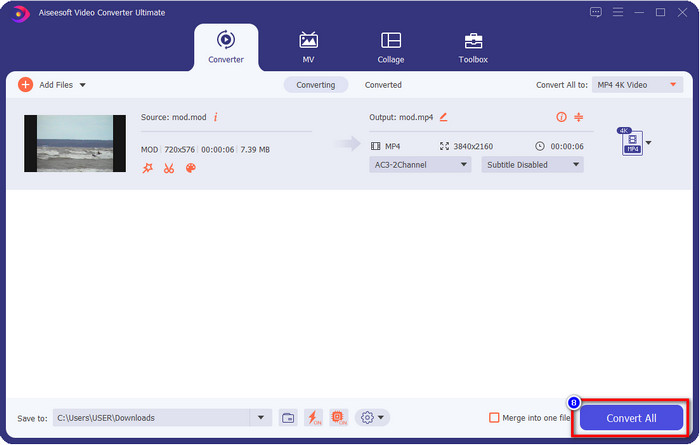
ขั้นตอนที่ 2 อัปโหลดไฟล์ MOD โดยคลิกที่ Add Files หรือกดปุ่ม + ขนาดใหญ่ตรงกลางหน้าต่างโปรแกรม หลังจากนั้นหน้าต่างโฟลเดอร์ของคอมพิวเตอร์จะปรากฏขึ้นบนหน้าจอ จากนั้นให้ค้นหาและคลิกเลือกไฟล์ MOD แล้วกด Open เพื่อไปยังขั้นตอนถัดไป.
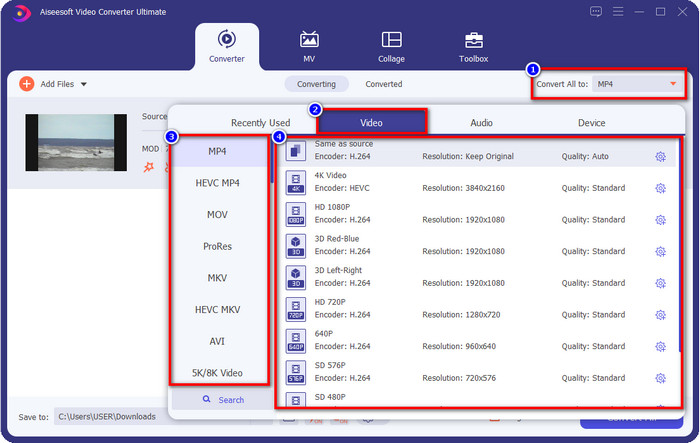
ขั้นตอนที่ 3 หากต้องการเปลี่ยนรูปแบบไฟล์เป็น MP4, MOV, MKV หรือรูปแบบอื่นที่ต้องการ ให้กดที่ Convert All to แล้วเลือกฟอร์แมตที่ต้องการ.
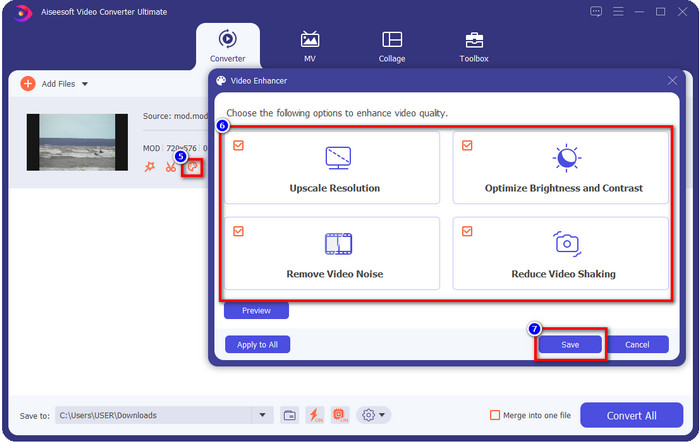
ตัวเลือกเพิ่มเติม หนึ่งในฟีเจอร์ที่ยอดเยี่ยมของโปรแกรมนี้คือเครื่องมือปรับแต่งคุณภาพวิดีโอ หากคุณคลิกที่ไอคอนถาดสี จะมีหน้าต่างย่อยแสดงขึ้นมา คุณสามารถปรับแต่งวิดีโอของคุณได้อย่างมีนัยสำคัญโดยการติ๊กที่ช่องตัวเลือกต่าง ๆ เมื่อเสร็จแล้วให้คลิก Save เพื่อบันทึกการเปลี่ยนแปลงที่คุณทำกับวิดีโอ MOD.
ขั้นตอนที่ 4 เมื่อทำทุกขั้นตอนเสร็จเรียบร้อยแล้ว ก็ถึงเวลาแปลงไฟล์ MOD โดยคลิกที่ Convert All ง่ายเหมือนนับ 1-2-3 คุณก็ได้เรียนรู้การแปลงไฟล์ MOD ไปเป็นฟอร์แมตใหม่แล้ว.
ข้อดี
- แปลง MOD เป็น MP4, MOV, MKV, FLV, AVI หรือเป็นรูปแบบ 200+ อย่างมีประสิทธิภาพ
- คุณสมบัติการแก้ไขขั้นสูงรวมถึงการตัดแต่ง การตัด การครอบตัด และอื่นๆ
- การดาวน์โหลดนั้นปลอดภัยและปราศจากมัลแวร์
- พร้อมให้ดาวน์โหลดบนแพลตฟอร์มเดสก์ท็อปทั้งหมดเช่น Windows และ Mac
จุดด้อย
- คุณจะต้องซื้อเครื่องมือเพื่อใช้คุณสมบัติขั้นสูงทั้งหมด
2. iMovieSoft โปรแกรมแปลง TOD ฟรี
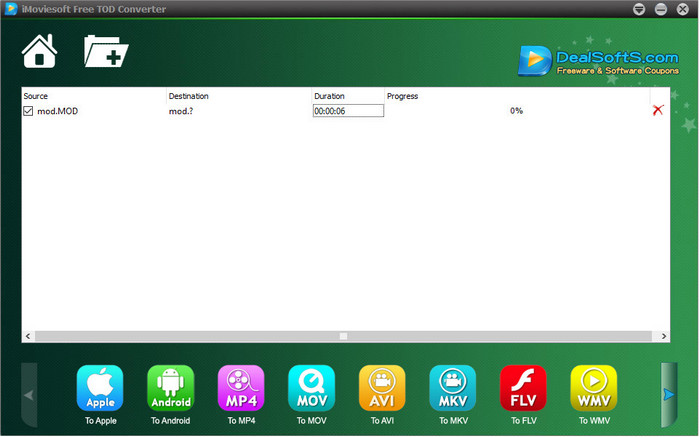
อีกหนึ่งโปรแกรมแปลงไฟล์ที่คุณสามารถดาวน์โหลดลงเดสก์ท็อปได้คือ iMoiveSoft Free TOD Converter โปรแกรมนี้ช่วยให้คุณแปลงไฟล์ MOD ไปเป็นฟอร์แมตที่รองรับได้อย่างง่ายดาย ถึงแม้ฟอร์แมตที่โปรแกรมนี้รองรับจะไม่หลากหลายมากนัก แต่ฟอร์แมตยอดนิยมก็มีให้ใช้งาน นอกจากนี้ เว็บไซต์หลักของโปรแกรมยังไม่มีการเข้ารหัสการเชื่อมต่อ แม้จะมีคำเตือน แต่เราก็ได้ลองดาวน์โหลดลงในระบบของเราเพื่อจะได้อธิบายขั้นตอนการแปลงไฟล์ MOD เป็น MOV, MP4, AVI ฯลฯ.
ขั้นตอนที่ 1 ดาวน์โหลดโปรแกรมแปลงไฟล์ลงเดสก์ท็อปแล้วเปิดโปรแกรม.
ขั้นตอนที่ 2 คลิกที่ Folder แล้วค้นหาไฟล์ MOD ที่ต้องการเพิ่มเข้าไป.
ขั้นตอนที่ 3 กดเลือกฟอร์แมตที่ด้านล่าง จากนั้นกด Convert.
ข้อดี
- สามารถดาวน์โหลดได้ฟรีบน Windows และ Mac
- ง่ายต่อการใช้.
- มีคุณลักษณะการแก้ไขพื้นฐาน
จุดด้อย
- เว็บไซต์หลักไม่ปลอดภัยในการเชื่อมต่อ
- มีตัวเลือกรูปแบบที่คุณสามารถเลือกได้
- UI จำเป็นต้องปรับปรุง
3. iOrgSoft Converter
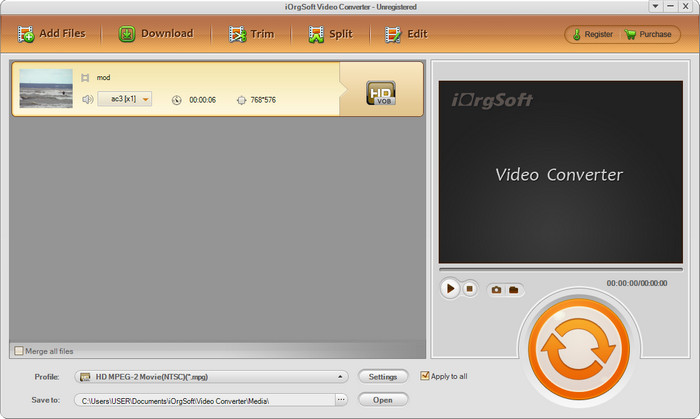
iOrgSoft Converter เป็นอีกตัวเลือกหนึ่งหากคุณต้องการแปลงไฟล์ MOD เป็น MPEG2 ได้อย่างง่ายดาย เว็บไซต์หลักของโปรแกรมนี้ก็มีการเชื่อมต่อที่ไม่ปลอดภัยเช่นเดียวกับ iMovieSoft คุณสามารถใช้ลิงก์ภายนอกเพื่อดาวน์โหลดโปรแกรมได้เช่นกัน แม้โปรแกรมจะมีตัวเลือกให้ใช้งานอยู่บ้าง แต่ส่วนของหน้าตาผู้ใช้ถูกให้ความสำคัญน้อย จึงอย่าคาดหวังกับ UI ที่ดูสวยงามมากนัก นอกจากนี้ยังมีโอกาสเกิดอาการค้างหรือรวนในระหว่างที่กำลังแปลงไฟล์.
ขั้นตอนที่ 1 ค้นหาเว็บเพจหลักของโปรแกรมแล้วดาวน์โหลดจากที่นั่น.
ขั้นตอนที่ 2 เปิดโปรแกรมแปลงไฟล์ คลิก Add Files เพื่อเพิ่มไฟล์ MOD คลิกแถบฟอร์แมตแล้วเลือกฟอร์แมตที่ต้องการ.
ขั้นตอนที่ 3 กดปุ่ม Convert เพื่อเริ่มกระบวนการแปลงไฟล์.
ข้อดี
- รองรับรูปแบบมากกว่า iMovieSoft
- ใช้งานง่ายและเข้าใจง่าย
- ดาวน์โหลดบน Windows และ Mac
จุดด้อย
- การเชื่อมต่อที่ไม่ปลอดภัยกับเว็บไซต์หลัก
- อินเทอร์เฟซผู้ใช้แย่มาก
4. FFmpeg
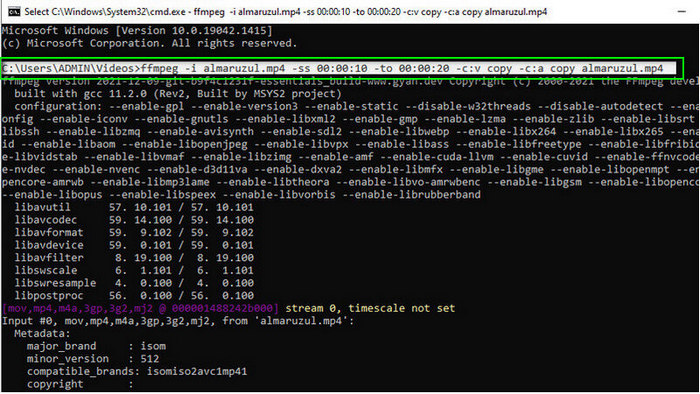
หากคุณต้องการโปรแกรมฟรีสำหรับแปลง MOD เป็น MOV แล้วล่ะก็ FFmpeg พร้อมช่วยคุณ แตกต่างจากโปรแกรมอื่นในรายการนี้ เพราะมันใช้ส่วนติดต่อแบบบรรทัดคำสั่ง (CLI) ในการสื่อสารกับโปรแกรมผ่านข้อความ ถึงแม้รูปแบบนี้อาจไม่คุ้นเคยสำหรับหลายคน แต่ก็ยังมีผู้ใช้จำนวนหนึ่งที่เลือกใช้ FFmpeg เป็นตัวแปลงไฟล์ ดังนั้นหากโปรแกรมนี้ดึงดูดความสนใจของคุณ ลองทำตามขั้นตอนด้านล่างนี้.
ขั้นตอนที่ 1 ดาวน์โหลด FFmpeg แล้วรันไฟล์ exe.
ขั้นตอนที่ 2 เปิด CMD คุณจะสามารถสื่อสารกับโปรแกรมผ่านหน้าต่างนี้ได้.
ขั้นตอนที่ 3 ใช้ Command Prompt เพื่อค้นหาตำแหน่งของไฟล์ หลังจากนั้นให้คัดลอกและวางคำสั่งนี้ ffmpeg -i input.mod -vn -ar 44100 -ac 2 -b:a 192k output.mp4 เพื่อแปลงเป็น MP4 นอกจากนี้คุณยังสามารถเปลี่ยนให้ส่งออกเป็น MOV, MKV, AVI และฟอร์แมตอื่น ๆ ได้เช่นกัน เมื่อพร้อมแล้วให้กด Enter บนแป้นพิมพ์เพื่อเริ่มกระบวนการ.
ข้อดี
- ตัวแปลงวิดีโอที่ไม่ซ้ำใครมีให้ใช้งานบนแพลตฟอร์มส่วนใหญ่
- ปลอดภัยในการใช้งาน
- มีความน่าเชื่อถือในการแปลงรูปแบบของคุณ
จุดด้อย
- มันไม่ง่ายเลยที่จะใช้
- ไม่ใช่ตัวเลือกที่ดีที่สุดสำหรับผู้เริ่มต้นหรือผู้เริ่มต้นในการแปลงรูปแบบ
5. CloudConvert
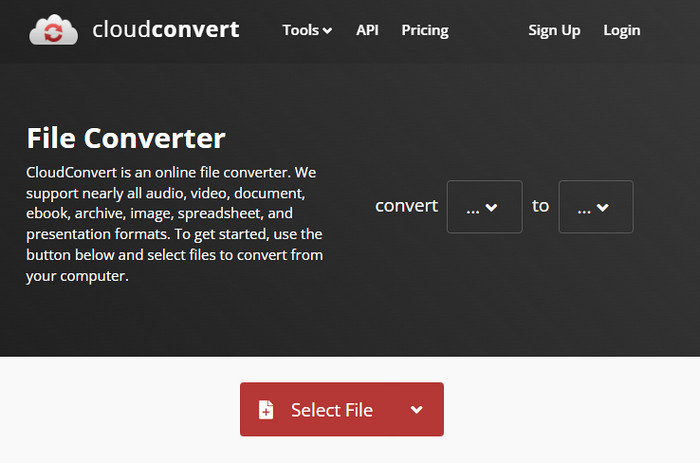
ไม่อยากดาวน์โหลดโปรแกรมแปลงไฟล์ลงเดสก์ท็อปใช่ไหม? ถ้าอย่างนั้น คุณยังสามารถแปลงไฟล์ MOD ออนไลน์ด้วย CloudConvert ได้ เครื่องมือออนไลน์นี้มีขั้นตอนการแปลงที่เรียบง่ายแต่ได้ผลดีให้กับผู้ใช้ อีกทั้งยังรองรับการแปลงไฟล์ประเภทอื่น ๆ เช่น PDF, ไฟล์บีบอัด, อีบุ๊ก และอื่น ๆ ให้เป็นฟอร์แมตใหม่ได้ด้วย.
ขั้นตอนที่ 1 ค้นหา CloudConvert บนเบราว์เซอร์ที่คุณใช้งานเป็นประจำ.
ขั้นตอนที่ 2 คลิก Select File แล้วอัปโหลดไฟล์ MOD กดปุ่มรายการแบบดรอปดาวน์ แล้วเลือกฟอร์แมตที่ต้องการ จากนั้นคลิก Convert.
ขั้นตอนที่ 3 เมื่อแปลงเสร็จแล้ว ให้คลิก Download เพื่อบันทึกไฟล์รูปแบบใหม่ลงในไดรฟ์ของคุณ.
ข้อดี
- ไม่จำเป็นต้องดาวน์โหลดเครื่องมือ
- เครื่องมือเว็บออนไลน์ฟรี
- ใช้งานง่าย
จุดด้อย
- ขึ้นอยู่กับเครือข่าย
- ขั้นตอนของกระบวนการจะขึ้นอยู่กับความเร็วของอินเทอร์เน็ตของคุณ
6. Converter365
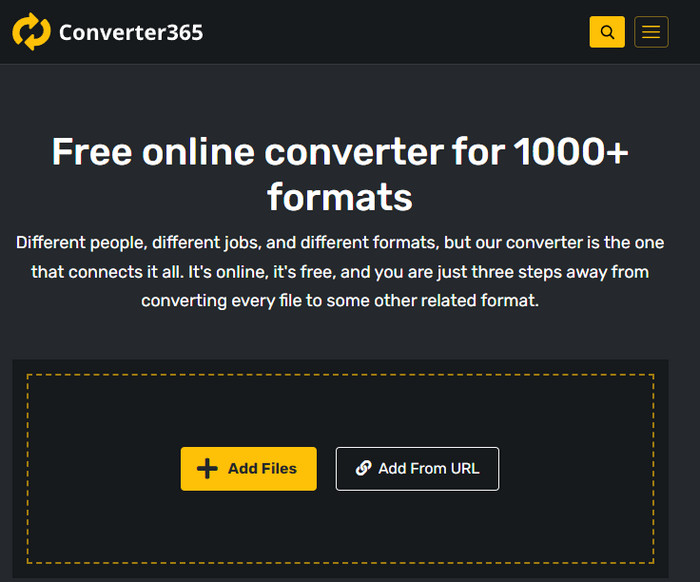
อีกหนึ่งเว็บแปลงไฟล์ MOD เป็น MP4 แบบออนไลน์ฟรีที่คุณใช้ได้คือ Converter365 นี่เป็นหนึ่งในเครื่องมือออนไลน์ที่เรามองว่ามีหน้าตาอินเทอร์เฟซที่ดูหรูหรา เพราะแบบนี้จึงทำให้การใช้งานดูเป็นมืออาชีพ อย่างไรก็ตาม เราพบปัญหาในการแปลงไฟล์วิดีโอบนเว็บไซต์นี้ เนื่องจากมักเกิดอาการค้าง นอกจากนี้ หากคุณต้องการแปลงไฟล์ MOD อย่างง่าย ๆ เครื่องมือนี้ก็อาจช่วยคุณได้.
ขั้นตอนที่ 1 เปิดเบราว์เซอร์แล้วค้นหา Converter365.
ขั้นตอนที่ 2 คลิก Add Files จากนั้นค้นหาไฟล์ .mod เมื่อพบไฟล์แล้วให้เลือกฟอร์แมตที่ต้องการโดยการคลิกปุ่มรายการแบบดรอปดาวน์.
ขั้นตอนที่ 3 กด Start Conversion แล้วกระบวนการแปลงไฟล์จะเริ่มต้นขึ้น.
ข้อดี
- ตัวแปลงสามารถเข้าถึงได้ผ่านทางเว็บ
- ให้การแปลงที่เรียบง่ายแต่มีประสิทธิภาพ
- ส่วนต่อประสานกับผู้ใช้ดูเป็นมืออาชีพ
จุดด้อย
- ต้องใช้การเชื่อมต่ออินเทอร์เน็ตเพื่อใช้งาน
- บางครั้งเกิดข้อผิดพลาดขณะแปลงรูปแบบ
7. ซัมซาร์
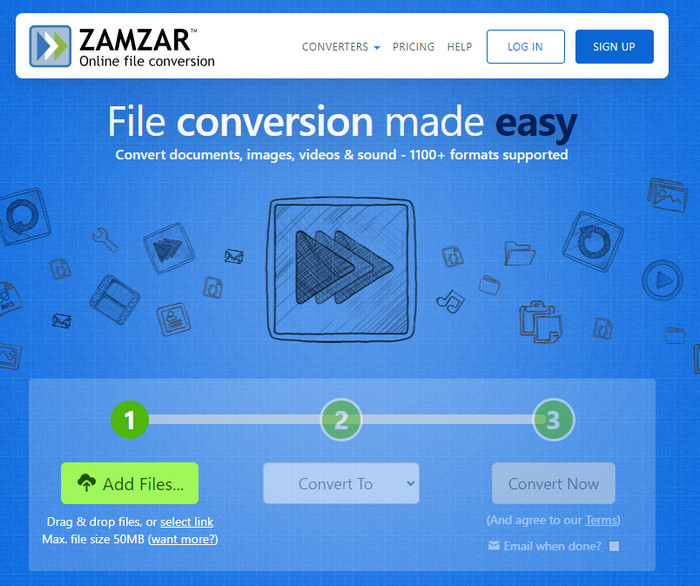
หากคุณต้องการตัวเลือกง่าย ๆ และใช้งานได้จริงสำหรับการแปลงไฟล์ MOD แบบออนไลน์ Zamzar ก็เป็นตัวช่วยที่ดี เครื่องมือนี้มีขั้นตอนการแปลงไฟล์ .mod ที่ตรงจุด ไม่ซับซ้อน นอกจากนี้ยังถือเป็นหนึ่งในโปรแกรมแปลงไฟล์ที่ปลอดภัยที่สุดบนเว็บอีกด้วย หากคุณอยากลองใช้เครื่องมือนี้ สามารถทำตามขั้นตอนด้านล่างได้เลย.
ขั้นตอนที่ 1 เข้าเว็บไซต์ Zamzar โดยค้นหาผ่านเบราว์เซอร์ที่คุณใช้ประจำ.
ขั้นตอนที่ 2 กด Add File เพื่อเพิ่มไฟล์ MOD ที่ต้องการแปลง กด Convert To แล้วเลือกฟอร์แมตที่คุณต้องการ.
ขั้นตอนที่ 3 คลิก Convert Now แล้วรอให้กระบวนการเสร็จสิ้น จากนั้นกด Download เพื่อบันทึกไฟล์ลงในไดรฟ์ของคอมพิวเตอร์.
ข้อดี
- หนึ่งในตัวเลือกที่ดีที่สุดหากคุณต้องการแปลงรูปแบบ
- มันมีกระบวนการที่ตรงไปตรงมาของการแปลง
- มีอยู่ในเว็บเบราว์เซอร์ทั้งหมด
จุดด้อย
- ขึ้นอยู่กับอินเทอร์เน็ตไม่มีอินเทอร์เน็ตที่คุณใช้งานไม่ได้
- รองรับตัวเลือกรูปแบบน้อยลง
ที่เกี่ยวข้อง:
ส่วนที่ 2 คำถามที่พบบ่อยเกี่ยวกับ MOD Converters
MOD คืออะไร?
MOD เป็นรูปแบบสองทางที่สามารถใช้เป็นเสียงสำหรับแอปพลิเคชันติดตามเพลงดิจิทัลมาตรฐาน ประกอบด้วยรูปแบบโน้ต หมายเลขเครื่องดนตรี และตัวควบคุมข้อความพร้อมแทร็กต่างๆ สำหรับเสียงตัวอย่าง ตามที่กล่าวไว้ มันเป็นแบบสองทาง; คุณยังสามารถใช้รูปแบบนี้เป็นรูปแบบวิดีโอสำหรับกล้องวิดีโอดิจิทัลที่ผลิตโดย Panasonic และ JVC แม้ว่ารูปแบบนี้จะได้รับการสนับสนุนจากแบรนด์ที่เป็นที่รู้จัก แต่ก็ค่อนข้างจะล้าสมัยหากเราจะเปรียบเทียบกับคอนเทนเนอร์วิดีโออื่นๆ
เครื่องเล่นสื่อรองรับนามสกุล .mod หรือไม่
เครื่องเล่นสื่อบางตัวไม่รองรับรูปแบบนี้ โดยเฉพาะอย่างยิ่งถ้าเครื่องเล่นของคุณไม่มีตัวแปลงสัญญาณวิดีโอ MPEG-2 อยู่ภายใน มันค่อนข้างเป็นปัญหาสำหรับทุกคน คุณสามารถดาวน์โหลดส่วนขยายวิดีโอ MPEG-2 ได้หากต้องการเล่น แต่คุณยังสามารถแปลงไฟล์ให้อยู่ในรูปแบบที่รองรับลงในแพลตฟอร์มของคุณได้ นี่เป็นวิธีที่ง่ายที่สุดและปลอดภัยที่สุด ดังนั้น หากคุณต้องการแปลงไฟล์ MOD ของคุณ คุณอาจต้องการใช้ FVC Video Converter Ultimate แทน ไม่มีความคิดเกี่ยวกับเครื่องมือนี้หรือ ในกรณีนั้น ให้อ่านรายละเอียดด้านบน
MOD เข้ากันได้กับเครื่องเล่นดีวีดีหรือไม่?
มันเข้ากันไม่ได้กับเครื่องเล่นดีวีดี อย่างไรก็ตาม คุณสามารถเขียนลงในดีวีดีเพื่อให้เข้ากันได้กับเครื่องเล่นดีวีดี
สรุป
ทั้งเจ็ดเครื่องมือนี้ถือเป็นตัวเลือกที่ดีที่สุด หากคุณต้องการโปรแกรมแปลงไฟล์ MOD เพราะทั้งประสิทธิภาพและความเสถียรจากการใช้งาน เราได้ทดลองใช้ซอฟต์แวร์ทุกตัวอย่างละเอียด และพบว่า FVC Video Converter Ultimate ให้ผลลัพธ์และฟีเจอร์ที่ยอดเยี่ยมกว่าตัวอื่นอย่างชัดเจน ดังนั้นหากคุณอยากสัมผัสความสามารถของโปรแกรมนี้ด้วยตัวเอง สามารถดาวน์โหลดลงเดสก์ท็อปแล้วใช้งานได้ตามต้องการ.

FVC Video Converter Ultimate
2,999,368+ ดาวน์โหลด- แปลง MOD เป็นรูปแบบยอดนิยมใด ๆ
- ปรับปรุงคุณภาพวิดีโออย่างเป็นธรรมชาติ
- สร้างภาพตัดปะวิดีโอได้อย่างราบรื่นด้วยเอาต์พุตคุณภาพสูง
- แก้ไขวิดีโออย่างมืออาชีพ รวมถึงการครอบตัด หมุน เพิ่มตัวกรอง ฯลฯ
ดาวน์โหลดฟรีสำหรับ Windows 7 หรือใหม่กว่าดาวน์โหลดอย่างปลอดภัย
ดาวน์โหลดฟรีสำหรับ MacOS 10.7 หรือใหม่กว่าดาวน์โหลดอย่างปลอดภัย
-
 2 สุดยอดตัวแปลง MPG เพื่อแปลง MPG เป็น WMV ฟรี
 คุณต้องการแปลง MPG เป็น WMV ฟรีหรือไม่? ในกรณีนั้น คุณโชคดีเพราะเราพบว่ามีสองเครื่องมือที่คุณสามารถใช้เพื่อแปลงไฟล์ MPG ของคุณ
-
 วิธีเปลี่ยน iTunes M4V เป็น MKV บน Mac และ Windows วิธีที่รวดเร็วที่สุด
 หากคุณต้องการแปลง M4V เป็น MKV บน Mac คุณต้องอ่านบทความนี้ เนื่องจากเราให้ข้อเท็จจริงเกี่ยวกับตัวแปลงที่จะช่วยคุณในกระบวนการแปลง
-
 ตัวแปลง MPEG เป็น MKV ฟรี 5 อันดับแรกที่มีอยู่ในทุกแพลตฟอร์ม
 ตัวแปลง MPEG เป็น MKV ที่มีอยู่มีอะไรบ้าง ต้องการทราบข้อมูลเพิ่มเติมเกี่ยวกับตัวแปลง MPEG ที่มีอยู่ในแพลตฟอร์มของคุณหรือไม่ บทความนี้เหมาะสำหรับคุณ
