


 Video Converter Ultimate
 บันทึกหน้าจอ
 ซ่อมวิดีโอ
วิธีลบลายน้ำออกจากวิดีโออย่างรวดเร็ว
ต้องการลบลายน้ำออกจากวิดีโอแบบง่าย ๆ ใช่ไหม? ถ้าอย่างนั้นคุณจำเป็นต้องใช้เครื่องมือที่เหมาะสม ตัวอย่างเช่น ผู้ใช้มักต้องการลบข้อความหรือโลโก้ลายน้ำเหล่านี้ออก เพื่อจะได้ดูวิดีโอได้อย่างเต็มอรรถรส อย่างไรก็ตาม งานลักษณะนี้ค่อนข้างยุ่งยากสำหรับโปรแกรมตัดต่อบางตัว เพราะไม่ใช่ทุกโปรแกรมจะมีฟังก์ชันลบลายน้ำที่มีประสิทธิภาพ ปกติแล้วคุณอาจต้องซื้อโปรแกรมตัดต่อราคาแพงมาใช้สำหรับงานนี้ และถึงอย่างนั้นก็ไม่ได้หมายความว่าทุกตัวจะทำงานได้ดี แต่วันนี้ เราจะนำเสนอทางออกที่ดีที่สุดสำหรับปัญหาของคุณ ไม่ว่าคุณจะใช้คอมพิวเตอร์หรืออุปกรณ์ iOS นอกจากนี้ ซอฟต์แวร์ทุกตัวที่เราแนะนำในบทความนี้ล้วนผ่านการคัดเลือกมาอย่างดีแล้ว ดังนั้นโดยไม่ให้เสียเวลา มาเจาะลึกกันเลยว่าวิธีลบลายน้ำออกจากวิดีโอทุกแบบนั้นต้องทำอย่างไร.

ส่วนที่ 1 ทางออกที่ดีที่สุดเพื่อลบลายน้ำจากวิดีโอใด ๆ บน Windows & Mac
การเรียนรู้วิธีลบลายน้ำออกจากวิดีโอจะกลายเป็นเรื่องง่าย เมื่อใช้โปรแกรมตัดต่อวิดีโอระดับมืออาชีพอย่าง Video Converter Ultimate คุณไม่จำเป็นต้องมีประสบการณ์ตัดต่อมาก่อน เพราะเครื่องมือนี้มีอินเทอร์เฟซที่ใช้งานง่ายและเข้าใจไม่ยาก นอกจากนี้ ยังมีฟีเจอร์ขั้นสูงให้ใช้อีกมากมาย เช่น การรวมคลิป การตัดต่อ การปรับสี การเล่นย้อนกลับ เครื่องมือเพิ่มคุณภาพวิดีโอ และอื่น ๆ อีกมากมาย.
สำหรับวันนี้ ผู้ใช้จำนวนมากได้ดาวน์โหลดเครื่องมือนี้แล้ว และทุกคนก็พอใจเพราะได้ดาวน์โหลดเครื่องมือนี้แล้ว น่าประทับใจใช่มั้ย? ต้องการลองใช้เครื่องมือนี้หรือไม่? ในกรณีนั้น ให้ตรวจสอบขั้นตอนด้านล่างและดูว่าเครื่องมือนี้เป็นทางออกที่ดีที่สุดสำหรับปัญหาของเราเกี่ยวกับลายน้ำหรือไม่

FVC Video Converter Ultimate
5,689,200+ ดาวน์โหลด- เป็นตัวเลือกที่ดีที่สุดสำหรับทุกคนที่ต้องการลบลายน้ำในวิดีโอใดๆ
- เครื่องมือขั้นสูงสุดนี้เป็นเครื่องมือเดียวที่ทำหน้าที่เป็นตัวแปลง, ครอปเปอร์, ควบรวมกิจการ, คัตเตอร์
- มีให้ดาวน์โหลดในแพลตฟอร์มเดสก์ท็อปทั้งหมด เช่น Windows และ Mac
- ใช้งานง่าย แต่ก็เป็นตัวเลือกที่ดีที่สุดเกี่ยวกับปัญหาในวิดีโอของพวกเขา
ดาวน์โหลดฟรีสำหรับ Windows 7 หรือใหม่กว่าดาวน์โหลดอย่างปลอดภัย
ดาวน์โหลดฟรีสำหรับ MacOS 10.7 หรือใหม่กว่าดาวน์โหลดอย่างปลอดภัย
ขั้นตอนที่ 1 ดาวน์โหลดโปรแกรมตัวนี้ลงในคอมพิวเตอร์ของคุณ โดยเลือกให้ตรงกับระบบปฏิบัติการ Windows หรือ Mac หลังจากดาวน์โหลดเสร็จ ให้ทำตามขั้นตอนการติดตั้ง แล้วคลิก Start Now เพื่อรันโปรแกรมบนระบบของคุณ.
ดาวน์โหลดฟรีสำหรับ Windows 7 หรือใหม่กว่าดาวน์โหลดอย่างปลอดภัย
ดาวน์โหลดฟรีสำหรับ MacOS 10.7 หรือใหม่กว่าดาวน์โหลดอย่างปลอดภัย
ขั้นตอนที่ 2 ไปที่เมนู Toolbox จากนั้นคลิก Video Watermark Remover เพื่อเริ่มลบลายน้ำออกจากวิดีโอ.
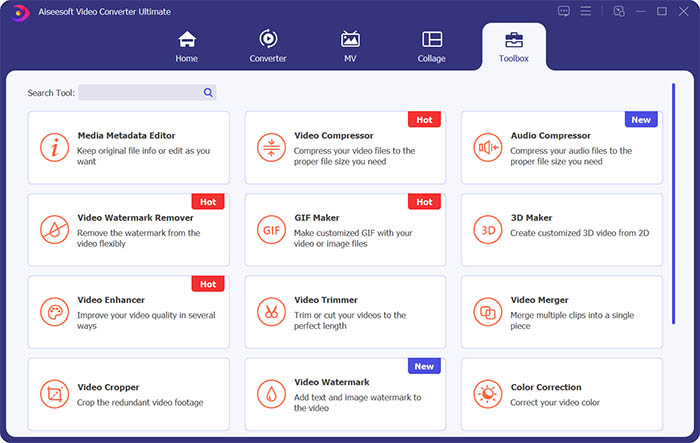
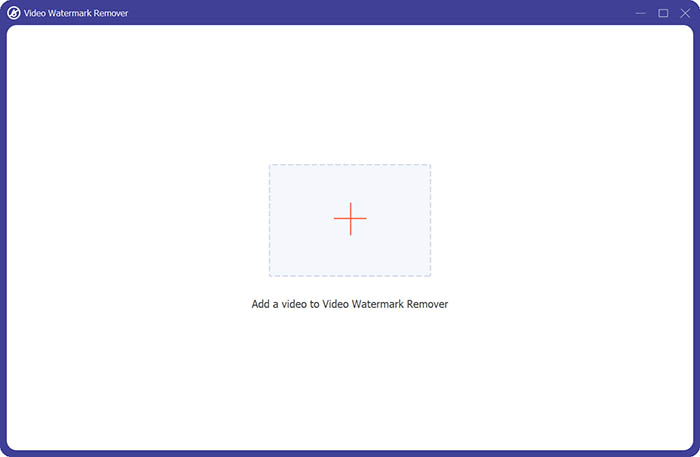
ขั้นตอนที่ 3 ต่อไปให้คลิกสัญลักษณ์บวกตรงกลางหน้าจอ เพื่อเพิ่มวิดีโอที่คุณต้องการลบลายน้ำ.
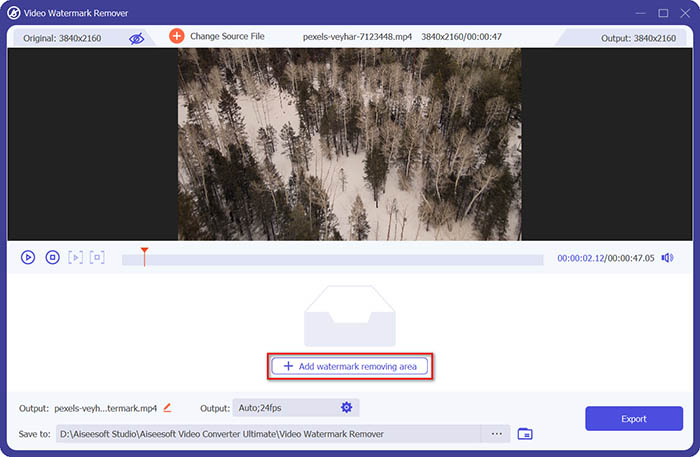
ขั้นตอนที่ 4 หลังจากเพิ่มวิดีโอลงในเครื่องมือลบลายน้ำแล้ว ให้คลิกปุ่ม Add watermark removing area เพื่อเลือกบริเวณที่มีลายน้ำ.
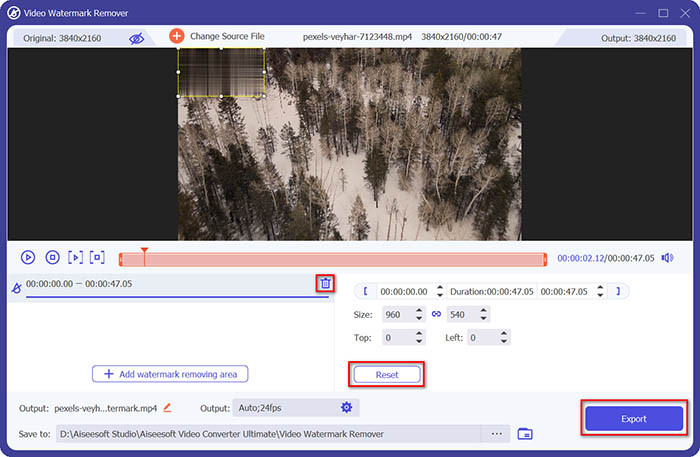
ขั้นตอนที่ 5 เมื่อจัดการเรียบร้อยแล้ว ให้คลิกปุ่ม Export เพื่อบันทึกวิดีโอที่ไม่มีลายน้ำ.
ส่วนที่ 2 วิธีการลบลายน้ำจากวิดีโอใด ๆ บน iPhone
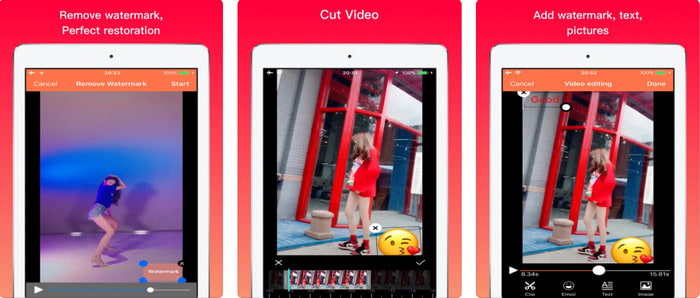
แอป Video Eraser - Remove Logo 4+ ช่วยผู้ใช้ iOS จำนวนมากจัดการปัญหาเรื่องลายน้ำได้เป็นอย่างดี แอปนี้โหลดได้ฟรีจาก App Store ทุกประเทศ และยังมีการซื้อภายในแอปสำหรับอัปเกรดเป็นเวอร์ชันโปรด้วย แม้ว่าแอปนี้จะลบลายน้ำได้ค่อนข้างมีประสิทธิภาพ แต่ก็ยังมีข้อจำกัดบางอย่าง เช่น คุณภาพวิดีโอที่ได้หลังจากส่งออกอาจไม่เท่าไฟล์ต้นฉบับ และลายน้ำจะถูกเบลอมากกว่าการลบออกจริง ๆ นอกจากนี้ การอัปโหลดไฟล์เข้าแอปก็อาจใช้เวลานาน แม้ว่าวิดีโอจะยาวไม่ถึง 30 วินาทีก็ตาม แต่ถ้าคุณต้องการเรียนรู้วิธีลบลายน้ำออกจากวิดีโอบน iPhone ให้ทำตามขั้นตอนด้านล่างนี้.
ขั้นตอนที่ 1 ดาวน์โหลดแอปจาก App Store แล้วเปิดขึ้นมา กดปุ่ม + เพื่อเพิ่มวิดีโอที่มีลายน้ำ.
ขั้นตอนที่ 2 แตะปุ่ม information แล้วเลือก Remove Watermark จากนั้นแตะที่ตำแหน่งลายน้ำ แล้วกด Start.
ขั้นตอนที่ 3 หลังจากประมวลผลเสร็จ ลายน้ำก็จะถูกลบออกจากวิดีโอ.
ส่วนที่ 3 วิธีกำจัดลายน้ำบนวิดีโอใด ๆ บนเว็บ
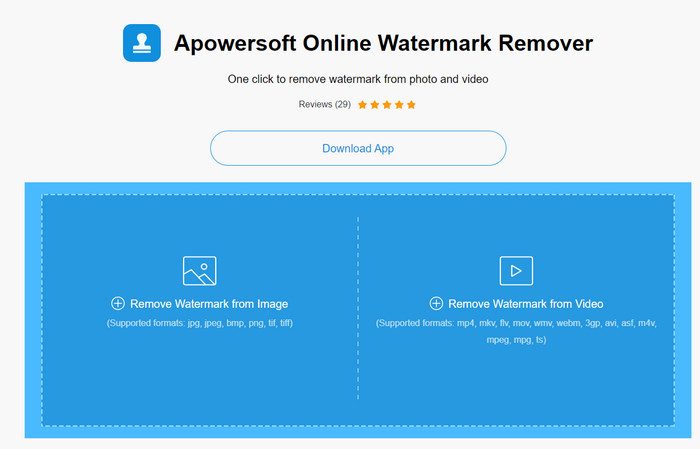
Apowersoft Online Watermark Remover เป็นเครื่องมือออนไลน์ฟรีที่คุณสามารถใช้เพื่อลบลายน้ำได้อย่างสะดวก เครื่องมือบนเว็บตัวนี้ลบลายน้ำได้อย่างมีประสิทธิภาพ แม้คุณจะไม่ต้องดาวน์โหลดโปรแกรมลงเครื่องก็ตาม เพราะทุกอย่างทำงานผ่านเบราว์เซอร์ อย่างไรก็ตาม คุณจำเป็นต้องมีการเชื่อมต่ออินเทอร์เน็ตที่เสถียรเพื่อให้กระบวนการเสร็จสมบูรณ์ มิฉะนั้นอาจต้องเริ่มใหม่ตั้งแต่ต้น ดังนั้น หากคุณมีงบจำกัดและอยากรู้วิธีลบลายน้ำจากวิดีโอแบบออนไลน์ นี่คือเครื่องมือที่เหมาะกับคุณ.
ขั้นตอนที่ 1 ค้นหา Apowersoft Online Watermark Remover บนเว็บเบราว์เซอร์ที่คุณใช้เป็นประจำ แล้วเปิดหน้าเว็บ.
ขั้นตอนที่ 2 กด Remove Watermark from Video เพื่ออัปโหลดไฟล์วิดีโอที่มีลายน้ำ จากนั้นรอให้ระบบอัปโหลดเสร็จ.
ขั้นตอนที่ 3 บนหน้าพรีวิววิดีโอ ให้กดปุ่มเมาส์ซ้ายค้างแล้วลากครอบบริเวณลายน้ำ เมื่อพื้นที่ลายน้ำอยู่ภายในกรอบเส้นประแล้วให้ปล่อยเมาส์ จากนั้นกด Erase เพื่อเริ่มลบลายน้ำ แล้วคลิก Download เพื่อบันทึกไฟล์ลงคอมพิวเตอร์ของคุณ.
ส่วนที่ 4 คำถามที่พบบ่อยเกี่ยวกับการลบลายน้ำออกจากวิดีโอ
ทำไมฉันต้องกำจัดลายน้ำในวิดีโอ
เราจำเป็นต้องลบลายน้ำที่น่ารำคาญออกเพื่อเพลิดเพลินกับวิดีโอโดยรวม ใช้ได้เฉพาะสำหรับการใช้งานส่วนตัวเท่านั้น แต่อาจมีผลที่ตามมาหากคุณใช้เพื่อใช้ประโยชน์หากคุณโพสต์ออนไลน์และรับผลประโยชน์จากงานของอีกฝ่าย
วิธีอื่นในการลบลายน้ำคืออะไร?
คุณสามารถปกปิดลายน้ำหรือแทนที่ด้วยลายน้ำของคุณได้หากต้องการ กระบวนการนี้กำลังซ้อนทับ จะทำงานได้ดีที่สุดก็ต่อเมื่อลายน้ำมีขนาดเล็กหรือด้านข้างของวิดีโอ หรือคุณสามารถตัดวิดีโอด้วยลายน้ำแล้วรวมเข้ากับวิดีโออื่น ขั้นตอนการตัดนี้จะได้ผลดีที่สุดก็ต่อเมื่อลายน้ำปรากฏขึ้น มีสองวิธีในการลบลายน้ำ: การเบลอและการครอบตัดวิดีโอ ทั้งสองใช้งานได้กับเครื่องมือที่เรานำเสนอข้างต้น
จะเพิ่มลายน้ำบน Photoshop ได้อย่างไร?
หากคุณต้องการใส่ลายน้ำบนภาพด้วย Photoshop ให้คลิกที่ลิงก์นี้ และอ่านให้ละเอียดเพื่อทำความเข้าใจขั้นตอน.
สรุป
ด้วยเครื่องมือต่าง ๆ ที่นำเสนอในบทความนี้ คุณสามารถลบลายน้ำออกจากวิดีโอได้ฟรี หรือจะเลือกใช้โปรแกรมตัวหลักและซื้อเวอร์ชันเต็มก็ได้ แม้ว่าเครื่องมือลบลายน้ำทั้งหมดที่กล่าวมาจะใช้งานง่าย แต่เรายังคงเชื่อว่า Video Converter Ultimate มีอินเทอร์เฟซที่เข้าใจง่ายที่สุดและยังให้ผลลัพธ์ที่มีประสิทธิภาพที่สุด ดังนั้น หากคุณสนใจโปรแกรมนี้ สามารถคลิกปุ่มดาวน์โหลดด้านบนเพื่อทดลองใช้งานและดูว่าเหมาะกับคุณหรือไม่.
-
 2 วิธียอดนิยมในการแปลงรูปแบบ DivX เป็น MKV [แก้ไขแล้ว]
 เหตุใดฉันจึงต้องแปลง DivX เป็น MKV ฉันสามารถใช้ตัวแปลงอะไรได้บ้าง คุณมีความคิดแบบเดียวกันหรือไม่? จากนั้น บทความนี้จะช่วยให้คุณทราบข้อมูลเพิ่มเติมเกี่ยวกับ DivX และ MKV
-
 2 สุดยอดตัวแปลง MPG เพื่อแปลง MPG เป็น WMV ฟรี
 คุณต้องการแปลง MPG เป็น WMV ฟรีหรือไม่? ในกรณีนั้น คุณโชคดีเพราะเราพบว่ามีสองเครื่องมือที่คุณสามารถใช้เพื่อแปลงไฟล์ MPG ของคุณ
-
 วิธีเปลี่ยน iTunes M4V เป็น MKV บน Mac และ Windows [วิธีที่เร็วที่สุด]
 หากคุณต้องการแปลง M4V เป็น MKV บน Mac คุณต้องอ่านบทความนี้ เนื่องจากเราให้ข้อเท็จจริงเกี่ยวกับตัวแปลงที่จะช่วยคุณในกระบวนการแปลง
