


 Video Converter Ultimate
 บันทึกหน้าจอ
 ซ่อมวิดีโอ
วิธีแปลงไฟล์ WebM เป็น WMV อย่างง่ายดาย
WebM เป็นรูปแบบไฟล์มีเดียที่รองรับโดยเว็บเบราว์เซอร์ส่วนใหญ่ เช่น Google Chrome, Mozilla Firefox, Microsoft Edge, Opera และอื่น ๆ มักถูกใช้กับวิดีโอ HTML5 และเสียง HTML5 สำหรับการสตรีม อย่างไรก็ตาม ไฟล์ WebM ไม่รองรับบนอุปกรณ์ Mac และ iOS หากไม่ใช้เครื่องมืออื่น ดังนั้น หากคุณต้องการเปิดไฟล์ WebM บนอุปกรณ์ใด ๆ เราขอแนะนำให้แปลงเป็นไฟล์ WMV ซึ่งได้รับการรองรับอย่างกว้างขวางจากอุปกรณ์และโปรแกรมเล่นเกือบทุกชนิด ในบทความนี้ เราได้รวบรวมรายชื่อ โปรแกรมแปลงไฟล์ WebM เป็น WMV ที่ดีที่สุดมาให้คุณลองใช้.

ส่วนที่ 1 เครื่องมือ 3 อันดับแรกในการแปลงไฟล์ WebM เป็น WMV แบบไม่สูญเสียข้อมูล
FVC Video Converter Ultimate
FVC Video Converter Ultimate เป็นที่นิยมอย่างมากบนโลกออนไลน์เมื่อพูดถึงโปรแกรมแปลงไฟล์ โปรแกรมนี้ช่วยให้คุณแปลงไฟล์ WebM เป็น WMV ได้อย่างง่ายดาย นอกจากนี้ยังมีฟีเจอร์พิเศษที่ให้คุณตัดต่อไฟล์ ปรับแต่งคุณภาพ และบีบอัดไฟล์ได้โดยไม่ทำให้คุณภาพเสียไป อีกทั้งยังรองรับการแปลงไฟล์หลากหลายรูปแบบ รวมถึง WMV ด้วย ดังนั้น หากคุณต้องการแปลงไฟล์ WebM เป็น WMV อย่างมีประสิทธิภาพ แอปนี้คือคำตอบสำหรับคุณ.
ข้อดี
- ให้คุณแก้ไข ปรับปรุง และบีบอัดไฟล์ของคุณ
- สามารถแปลงไฟล์รูปแบบต่างๆ รวมทั้ง WebM, WMV, MP4, M4V, MOV, AVI และอื่นๆ
- อินเทอร์เฟซที่ใช้งานง่าย
จุดด้อย
- คุณต้องดาวน์โหลดแอปก่อนจึงจะสามารถใช้งานได้
FVC แปลงวิดีโอฟรี
FVC Free Video Converter เป็นโปรแกรมแปลงไฟล์ออนไลน์ฟรีที่ช่วยให้คุณแปลงไฟล์หลากหลายรูปแบบ รวมถึง WebM เป็น WMV, MP4, FLV, MOV และอื่น ๆ เครื่องมือนี้ใช้งานง่ายเพราะมีหน้าตาอินเทอร์เฟซที่เรียบง่าย ยิ่งไปกว่านั้น คุณไม่จำเป็นต้องดาวน์โหลดโปรแกรม เพราะเป็นเครื่องมือบนเว็บ อย่างไรก็ตาม เนื่องจากเป็นตัวแปลงไฟล์ออนไลน์ คุณอาจเจอปัญหาความล่าช้าในการแปลงไฟล์เพราะต้องพึ่งพาการเชื่อมต่ออินเทอร์เน็ต ถึงอย่างนั้นก็ยังมีคนใช้งานเครื่องมือนี้เป็นจำนวนมากและยืนยันว่าเป็นหนึ่งในโปรแกรมแปลงไฟล์ออนไลน์ที่ดีที่สุดสำหรับการแปลง WebM เป็น WMV ออนไลน์ฟรี.
ข้อดี
- ไม่มีโฆษณาที่รบกวน
- ให้คุณแปลงไฟล์ได้หลายรูปแบบ รวมทั้ง WebM, WMV, MP4, FLV, WMA และอื่นๆ
- คุณไม่จำเป็นต้องดาวน์โหลดแอป
จุดด้อย
- มันอาจจะช้าในการแปลง
- มีคุณสมบัติจำกัดการใช้งานเท่านั้น
SavetheVideo.com
SavetheVideo.com เป็นโปรแกรมแปลงไฟล์ออนไลน์ฟรีที่รองรับการแปลงไฟล์วิดีโอหลัก ๆ หลายรูปแบบ ด้วยโปรแกรมนี้ คุณสามารถแปลงวิดีโอจากโซเชียลมีเดียชื่อดังอย่าง Facebook, Twitter, Instagram, TikTok และอื่น ๆ ได้ อย่างไรก็ตาม คุณอาจเจอปัญหาระหว่างการแปลงไฟล์ โดยเฉพาะหากไฟล์นั้นไม่อยู่ในรูปแบบที่รองรับ.
ข้อดี
- สามารถแปลงวิดีโอได้มากถึง 420 รูปแบบบนอุปกรณ์ใดก็ได้
- คุณสามารถแปลงจากอุปกรณ์ Android และ iphone
จุดด้อย
- มีอินเทอร์เฟซที่ยากต่อการติดตาม
- คุณอาจพบการแปลงที่ช้า
ส่วนที่ 2 วิธีการแปลง WebM เป็น WMV โดยใช้ FVC Video Converter Ultimate
ส่วนนี้ของบทความจะแสดงวิธีแปลงไฟล์ WebM เป็นรูปแบบไฟล์ WMV โดยใช้ FVC Video Converter Ultimate เพราะเราเชื่อว่าตัวนี้คือโปรแกรมที่ดีที่สุดในบรรดาตัวแปลงที่ได้รับความนิยมในท้องตลาดทุกวันนี้ เมื่อเทียบกับโปรแกรมแปลง WebM เป็น WMV ตัวอื่น ๆ ที่มีอยู่ในปัจจุบัน โปรแกรมแปลงไฟล์ออนไลน์ฟรีนี้แสดงให้เห็นถึงประสิทธิภาพที่น่าประทับใจ โดยเฉพาะในด้านฟีเจอร์การใช้งานที่ยอดเยี่ยม.

FVC Video Converter Ultimate
5,689,200+ ดาวน์โหลด- รองรับการแปลง WebM เป็น WMV, MP4, MOV, MKV หรือเป็นรูปแบบมากกว่า 200 รูปแบบภายในไม่กี่คลิก
- มีการแปลงเป็นชุดเพื่อแปลงไฟล์ WebM หลายไฟล์พร้อมกัน
- การแปลงที่รวดเร็วเป็นพิเศษช่วยให้คุณมีกระบวนการแปลงที่รวดเร็วภายในไม่กี่วินาที
- มีคุณสมบัติการแก้ไขที่คุณสามารถหมุน ตัด ผสาน และอื่นๆ
ดาวน์โหลดฟรีสำหรับ Windows 7 หรือใหม่กว่าดาวน์โหลดอย่างปลอดภัย
ดาวน์โหลดฟรีสำหรับ MacOS 10.7 หรือใหม่กว่าดาวน์โหลดอย่างปลอดภัย
ขั้นตอนการแปลง WebM เป็น WMV โดยใช้ FVC Video Converter Ultimate:
ขั้นตอนที่ 1. หากต้องการดาวน์โหลดโปรแกรมนี้ ให้คลิกปุ่ม ดาวน์โหลด ด้านล่าง จากนั้นทำตามขั้นตอนการติดตั้งและเปิดแอป.
ดาวน์โหลดฟรีสำหรับ Windows 7 หรือใหม่กว่าดาวน์โหลดอย่างปลอดภัย
ดาวน์โหลดฟรีสำหรับ MacOS 10.7 หรือใหม่กว่าดาวน์โหลดอย่างปลอดภัย
ขั้นตอนที่ 2. หลังจากเปิดโปรแกรมแล้ว ให้คลิกปุ่ม Add Files หรือคุณอาจคลิกปุ่ม + เพื่ออัปโหลดไฟล์ WebM ของคุณบนหน้าหลักของโปรแกรม แล้วจะมีหน้าต่างโฟลเดอร์คอมพิวเตอร์ปรากฏขึ้นเพื่อให้คุณเลือกตำแหน่งไฟล์ WebM จากนั้นกดปุ่ม Open เพื่ออัปโหลดไฟล์ นอกจากนี้คุณยังสามารถเพิ่มไฟล์ WebM ได้หลายไฟล์ เนื่องจากโปรแกรมนี้รองรับการแปลงแบบหลายไฟล์พร้อมกัน (batch conversion).
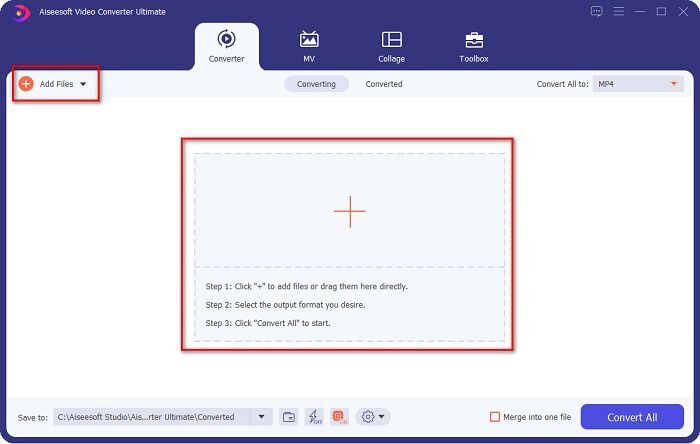
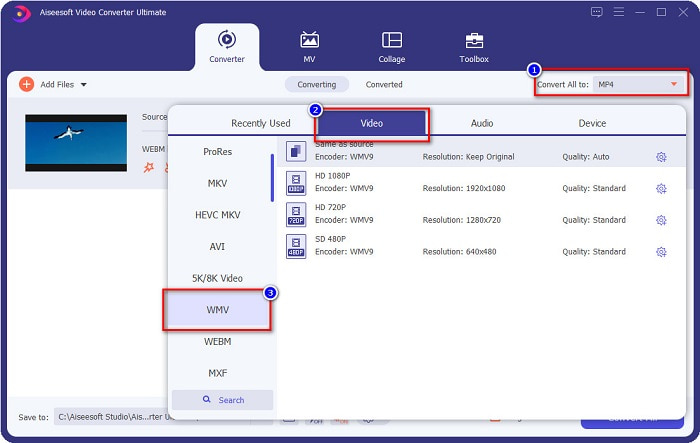
ขั้นตอนที่ 3. ที่มุมขวาบนของโปรแกรม คุณจะเห็นปุ่ม Convert All to ให้คลิก จากนั้นเลือกฟอร์แมต WMV จากรายการ เพื่อเปลี่ยนรูปแบบไฟล์จาก WebM เป็น WMV.
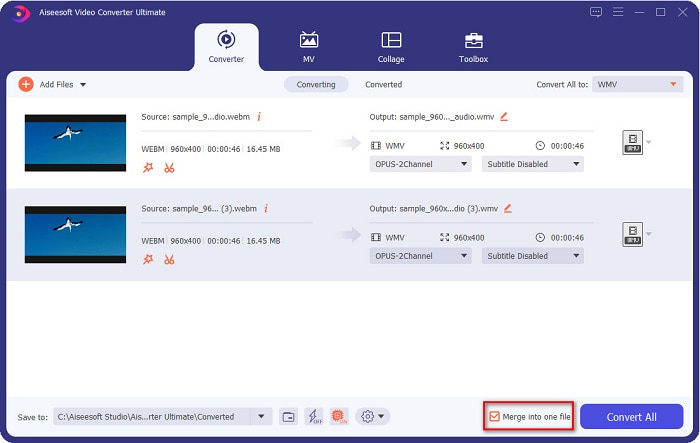
ตัวเลือกเพิ่มเติม. ต้องการรวมไฟล์ WebM หลายไฟล์ให้เป็นไฟล์เดียวหรือไม่? โปรแกรมตัวนี้มีฟีเจอร์ที่ทรงพลังในการรวมไฟล์หลายไฟล์ให้เป็นไฟล์เดียว เพื่อทำเช่นนั้น ให้ติ๊กที่ช่องเครื่องหมายซึ่งอยู่มุมขวาล่างของโปรแกรม เมื่อติ๊กแล้ว เมื่อคุณแปลงไฟล์ ไฟล์ทั้งหมดจะถูกรวมเป็นไฟล์เดียวโดยอัตโนมัติ แต่ถ้าคุณไม่ต้องการรวมไฟล์ ก็สามารถข้ามส่วนนี้และไปยังขั้นตอนถัดไปได้เลย.
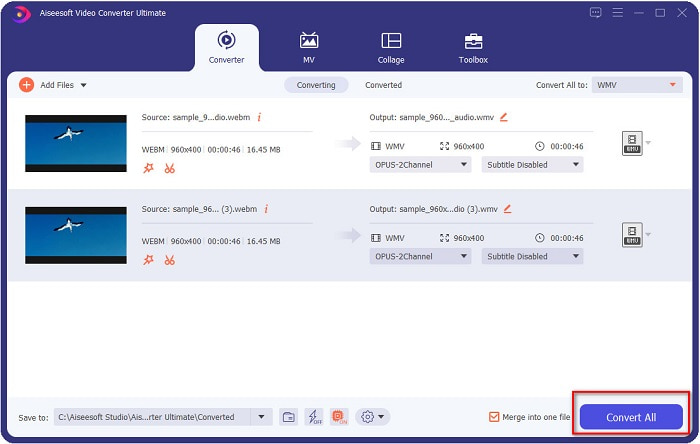
ขั้นตอนที่ 4. เมื่อคุณเลือกฟอร์แมตไฟล์ที่ต้องการแล้ว ให้คลิกปุ่ม Convert All เพื่อเริ่มแปลงไฟล์ WebM เป็น WMV เสร็จแล้ว! ตอนนี้ไฟล์ WebM ของคุณถูกแปลงเป็นไฟล์ WMV เรียบร้อยแล้ว
คุณสามารถแปลงไฟล์ WebM ของคุณเป็นไฟล์ WMV ได้อย่างง่ายดายด้วยขั้นตอนง่ายๆ เหล่านั้น
ส่วนที่ 3 ความรู้เพิ่มเติมเกี่ยวกับ WebM และ WMV
เพื่อความเข้าใจในสองไฟล์นี้มากขึ้น เราจะแก้ไขปัญหาในส่วนนี้ของบทความนี้
ไฟล์ WebM เป็นรูปแบบไฟล์วิดีโอที่รองรับโดยเว็บเบราว์เซอร์อย่างแพร่หลาย เว็บไซต์ HTML5 ใช้รูปแบบนี้เพื่อการสตรีมวิดีโอ นอกจากนี้ ไฟล์ประเภทนี้ยังบรรจุสตรีมวิดีโอที่ถูกบีบอัดด้วยตัวแปลงสัญญาณ (codec) VP8 หรือ VP9 ในขณะที่ WMV หรือ Windows Media Video ถูกพัฒนาโดย Windows ดังนั้นไฟล์ประเภทนี้มักถูกเล่นบนระบบ Windows และยังมีเอนโค้ดเดอร์จำนวนมากที่รองรับไฟล์ประเภทนี้ อีกทั้งรูปแบบไฟล์นี้ยังใช้ตัวบีบอัดที่ช่วยลดขนาดไฟล์ให้เล็กลงโดยไม่ทำให้คุณภาพเสียหาย.
ส่วนที่ 4 คำถามที่พบบ่อยเกี่ยวกับการแปลง WebM เป็น WMV
สุดยอดตัวแปลงวิดีโอสามารถแปลงไฟล์ WebM เป็นรูปแบบไฟล์ MP4 ได้หรือไม่?
แน่นอน คุณสามารถใช้ FVC Video Converter Ultimate เพื่อแปลงไฟล์ WebM ของคุณเป็น MP4 ได้ คุณสามารถคลิกลิงก์นี้และอ่านรายละเอียดเพิ่มเติมเกี่ยวกับ การแปลงไฟล์ WebM เป็นรูปแบบไฟล์ MP4.
QuickTime รองรับไฟล์ WebM หรือไม่
QuickTime ไม่รองรับไฟล์รูปแบบ WebM เนื่องจาก QuickTime ไม่มีตัวแปลงสัญญาณ (codec) หลายตัวเหมือนโปรแกรมเล่นสื่ออื่น ๆ คุณจึงสามารถแปลงไฟล์ WebM ของคุณเป็นรูปแบบไฟล์ เช่น MOV ซึ่งได้รับการรองรับโดย codec ของ QuickTime หากต้องการข้อมูลเพิ่มเติมเกี่ยวกับ การแปลง WebM เป็น MOV ให้คลิกลิงก์นี้.
Internet Explorer รองรับไฟล์ WebM หรือไม่
ใช่. Internet Explorer รองรับไฟล์ WebM ถึงกระนั้น Internet Explorer ก็ถูกเลิกใช้ไปแล้ว
สรุป
โดยสรุปแล้ว โปรแกรมแปลงไฟล์ WebM เป็น WMV ที่นำเสนอไว้ข้างต้น จะช่วยให้คุณแปลงไฟล์ WebM เป็น WMV ได้อย่างง่ายดาย นอกจากนี้ เครื่องมือเหล่านี้ยังมีฟีเจอร์ต่างกันไป ทำให้คุณทำอะไรได้มากขึ้นในระหว่างการแปลงไฟล์ แต่เราเชื่อว่า FVC Video Converter Ultimate คือเครื่องมือที่ดีที่สุดที่ช่วยตอบโจทย์ความต้องการของคุณ ยังคงตัดสินใจไม่ได้ว่าจะใช้โปรแกรมไหนอยู่หรือไม่? ดาวน์โหลดแล้วลองใช้เลย!
-
 3 วิธีในการแปลง WebM เป็น MP3 โดยไม่สูญเสียคุณภาพเสียง
 มีปัญหาเพราะไม่สามารถใช้ไฟล์ WebM เพื่อเล่นเสียงที่คุณบันทึกได้ใช่หรือไม่ จากนั้น อ่านบทความนี้ในขณะที่เราให้ความช่วยเหลืออย่างมีประสิทธิภาพโดยการแปลง WebM เป็น MP3
-
 3 ซอฟต์แวร์อันน่าทึ่งที่ใช้ในการแปลงไฟล์ WebM เป็นรูปแบบ AVI
 ไม่รู้ว่าจะแปลง WebM เป็น AVI ได้อย่างไร แล้วมาเริ่มอ่านบทความนี้กัน ในขณะที่เราระบุรายละเอียดทั้งหมดบน WebM และตัวแปลงสามตัวที่คุณสามารถใช้เพื่อแปลง
-
 ทางเลือกสูงสุดอันดับต้น ๆ ของ WebM เป็น FLV Converter ฟรีบนเว็บและเดสก์ท็อป
 คุณมีปัญหาเดียวกันในการเล่นไฟล์ WebM บนสมาร์ทโฟนของคุณหรือไม่? จากนั้นใช้เวลา 5 นาทีในการอ่านบทความนี้เพื่อทราบวิธีการแปลง WebM เป็น FLV
