


 Video Converter Ultimate
 บันทึกหน้าจอ
 ซ่อมวิดีโอ
คู่มือฉบับย่อเกี่ยวกับการแปลง WMV เป็น MKV บน Mac และ Windows ได้อย่างง่ายดาย
หากคุณเป็นคนที่คลั่งไคล้ภาพยนตร์ และต้องการรูปแบบไฟล์ที่สามารถจัดการแทร็กเสียงต่างๆ พร้อมคำบรรยายได้ คุณอาจต้องการแปลงไฟล์ WMV ของคุณเป็นไฟล์ MKV และหากคุณมีปัญหาในการมองหาตัวแปลง WMV เป็น MKV ที่เข้ากันได้กับ Windows และ Mac เราพบตัวแปลงที่ดีที่สุดที่คุณสามารถใช้ได้ทั้งแบบออนไลน์และออฟไลน์ บทความนี้นำเสนอตัวแปลงที่ดีที่สุดในการแปลง WMV เป็น MKV บน Mac และ Windows

ส่วนที่ 1 ทำไมต้องแปลง WMV เป็น MKV
WMV หรือ Windows Media Video เป็นรูปแบบไฟล์ที่เครื่องเล่นสื่อเกือบทั้งหมดรองรับอย่างกว้างขวาง เป็นรูปแบบไฟล์ที่สามารถจัดเก็บคลิปวิดีโอ แอนิเมชั่น รายการทีวี และภาพยนตร์ได้ นอกจากนี้ยังเป็นไฟล์บีบอัด ดังนั้นจึงมีขนาดไฟล์ที่เล็ก เหตุใดคุณจึงต้องแปลง WMV เป็น MKV MKV หรือ Matroska เป็นคอนเทนเนอร์ไฟล์ที่สามารถรวมแทร็กเสียง วิดีโอ และคำบรรยายได้ไม่จำกัด
นอกจากนี้ รูปแบบไฟล์นี้รองรับอนาคต ซึ่งหมายความว่าจะไม่ล้าสมัยในอนาคต นอกจากนี้ยังสามารถจัดการสตรีมคำบรรยายและแทร็กเสียงได้หลายภาษาในหลายภาษา ดังนั้น หากคุณเป็นผู้ที่ชื่นชอบภาพยนตร์ คุณอาจต้องการแปลงไฟล์ WMV เป็นรูปแบบไฟล์ MKV
ส่วนที่ 2 แปลง WMV เป็น MKV โดยใช้ตัวแปลงออฟไลน์ที่ดีที่สุด
ตัวแปลงตัวนี้ได้รับการพิสูจน์แล้วว่าเป็นโปรแกรมแปลงไฟล์ออฟไลน์ที่ดีที่สุดในท้องตลาด FVC Video Converter Ultimate เป็นเครื่องมือออฟไลน์ฟรีที่สามารถให้ผลลัพธ์ระดับมืออาชีพได้โดยไม่ยุ่งยาก อีกทั้งยังรองรับหลากหลายรูปแบบไฟล์เพื่อแปลงไฟล์ WMV ของคุณเป็น MKV, AVI, MP4, MOV, FLV และอื่น ๆ หากยังไม่พอใจกับความสามารถของมัน คุณยังสามารถตัดต่อวิดีโอด้วยฟีเจอร์ตัดต่อวิดีโอขั้นสูงภายในโปรแกรมนี้ได้ด้วย ทำตามขั้นตอนง่าย ๆ ด้านล่างเพื่อเรียนรู้วิธีใช้ตัวแปลง WMV เป็น MKV ฟรีตัวนี้.
ขั้นตอนที่ 1 ดาวน์โหลดโปรแกรมโดยคลิกปุ่ม ดาวน์โหลด ด้านล่าง จะมีให้เลือกดาวน์โหลดทั้งสำหรับ Mac และ Windows จากนั้นเปิดโปรแกรม.
ดาวน์โหลดฟรีสำหรับ Windows 7 หรือใหม่กว่าดาวน์โหลดอย่างปลอดภัย
ดาวน์โหลดฟรีสำหรับ MacOS 10.7 หรือใหม่กว่าดาวน์โหลดอย่างปลอดภัย
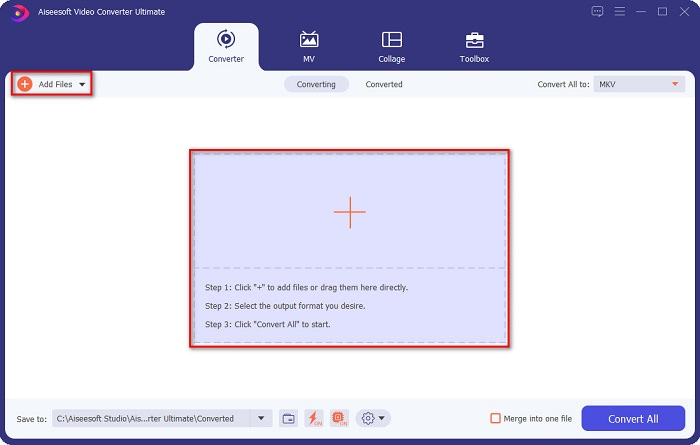
ขั้นตอนที่ 2 หลังจากเปิดโปรแกรมแล้ว ให้คลิกปุ่ม Add Files หรือปุ่ม + เพื่ออัปโหลดไฟล์ของคุณในหน้าต่างแรกของซอฟต์แวร์ จากนั้นจะมีหน้าต่างใหม่ปรากฏขึ้น ให้คุณเลือกไฟล์ WMV.
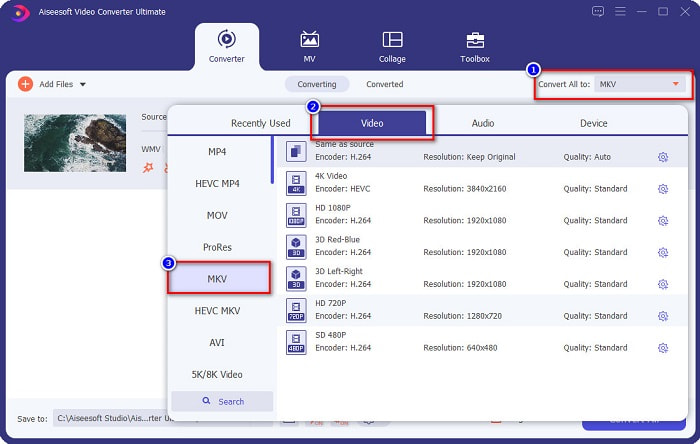
ขั้นตอนที่ 3 จากนั้นคลิกปุ่ม Convert All to เพื่อเลือกรูปแบบไฟล์ผลลัพธ์ที่คุณต้องการ ในกรณีนี้ ให้เลือกเป็นรูปแบบ MKV.
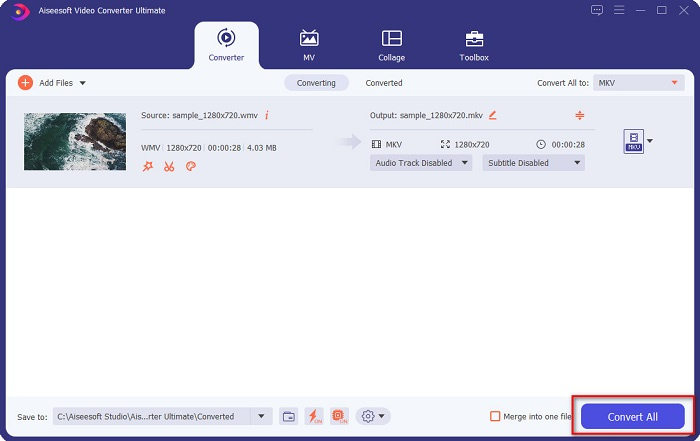
ขั้นตอนที่ 4 สุดท้ายให้คลิกปุ่ม Convert All เพื่อแปลงไฟล์ WMV ของคุณเป็นไฟล์ MKV แล้วรอเพียงไม่กี่วินาที เท่านี้ก็เสร็จเรียบร้อย นอกจากนี้ คุณยังสามารถ แปลง WMV เป็นไฟล์ MOV ได้อย่างรวดเร็วด้วยการทำตามขั้นตอนง่าย ๆ เหล่านี้เช่นกัน.
ส่วนที่ 3 แปลง WMV เป็น MKV โดยใช้ 3 เครื่องมือออนไลน์ที่ดีที่สุด
ไม่ต้องสงสัยเลยว่าเครื่องมือออนไลน์นั้นสะดวกที่สุดเพราะคุณไม่จำเป็นต้องดาวน์โหลดอะไรเลย ส่วนนี้นำเสนอตัวแปลง WMV เป็น MKV ที่ดีที่สุดที่มีอยู่บนเว็บ
FVC แปลงวิดีโอออนไลน์ฟรี
FVC Free Online Video Converter เป็นตัวแปลงไฟล์ออนไลน์ที่มีอินเทอร์เฟซใช้งานง่าย รองรับรูปแบบไฟล์หลากหลาย และสามารถแปลง WMV เป็น MKV, AVI, MOV, MP4, MP3, TS และอื่น ๆ ได้ อย่างไรก็ตาม ตัวแปลงไฟล์นี้ต้องพึ่งพาการเชื่อมต่ออินเทอร์เน็ต ซึ่งหมายความว่าความเร็วในการแปลงจะขึ้นอยู่กับอินเทอร์เน็ตของคุณ ถึงอย่างนั้น ก็ยังถือเป็นหนึ่งในตัวแปลง WMV เป็น MKV ออนไลน์ที่ดีที่สุดตัวหนึ่งอย่างไม่ต้องสงสัย.
นี่คือขั้นตอนในการแปลงไฟล์ WMV เป็น MKV ผ่าน FVC Free Online Video Converter:
ขั้นตอนที่ 1 ไปยังหน้าเว็บของพวกเขาโดยคลิกลิงก์นี้ link หรือพิมพ์ค้นหา FVC Free Online Video Converter บนเบราว์เซอร์ของคุณ.
ขั้นตอนที่ 2 จากนั้นคลิกปุ่ม Add Files to Convert แล้วเปิดใช้งานแอปพลิเคชัน หลังจากเปิดใช้งานแอปแล้ว เมื่อมีหน้าต่างไฟล์คอมพิวเตอร์ของคุณปรากฏขึ้น ให้เลือกไฟล์ WMV ของคุณ.
ดาวน์โหลดเวอร์ชันเดสก์ท็อปเพื่อแปลงไฟล์แบบเป็นชุดได้.
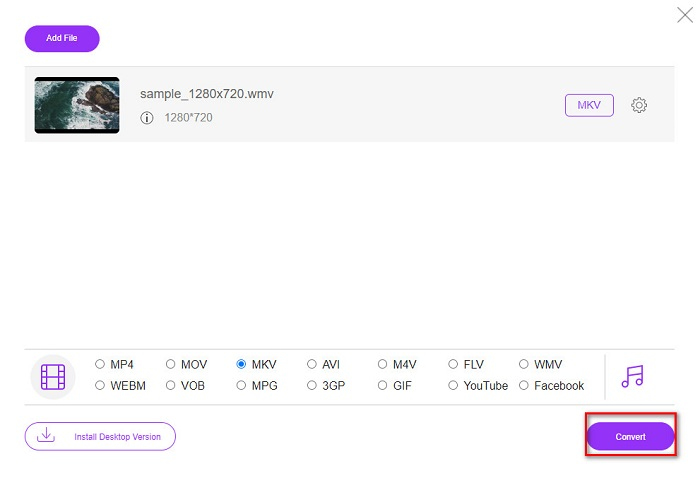
ขั้นตอนที่ 3 จากนั้น เพื่อเลือกรูปแบบไฟล์ผลลัพธ์ที่คุณต้องการ ให้คลิก MKV ที่อยู่ด้านล่างอินเทอร์เฟซที่สองของซอฟต์แวร์.
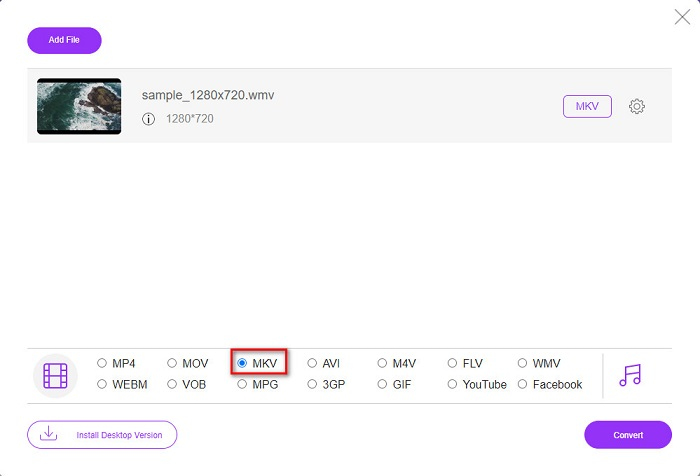
ขั้นตอนที่ 4 เพื่อเสร็จขั้นตอน ให้คลิกปุ่ม Convert แล้วไฟล์ WMV เป็น MKV ของคุณจะเริ่มแปลง รอให้การแปลงเสร็จสิ้น เท่านี้ก็เรียบร้อย โดยทำตามขั้นตอนเหล่านี้ คุณก็สามารถแปลง WMV เป็น MKV ออนไลน์ได้อย่างง่ายดาย.
Convertio
ตัวแปลงไฟล์ออนไลน์อีกตัวที่กำลังเป็นที่นิยมบนเว็บคือ Convertio ตัวแปลงไฟล์ออนไลน์ฟรีตัวนี้ก็ใช้งานง่ายเช่นกัน แต่แม้จะเป็นเช่นนั้น ภายในตัวแปลงจะมีโฆษณาที่อาจรบกวนคุณบ้าง อย่างไรก็ตาม มันก็ยังสะดวกมากในการใช้แปลงไฟล์ WMV ของคุณเป็น MKV.
ขั้นตอนที่ 1 ในเบราว์เซอร์ของคุณ ให้ค้นหาคำว่า Convertio จากนั้นคลิกปุ่ม Choose Files บนหน้าจอหลักของซอฟต์แวร์เพื่อเลือกไฟล์ WMV ของคุณ.

ขั้นตอนที่ 2 ต่อมา ให้คลิกปุ่ม drop-down เพื่อเลือกรูปแบบไฟล์ MKV เป็นรูปแบบผลลัพธ์ของคุณ.
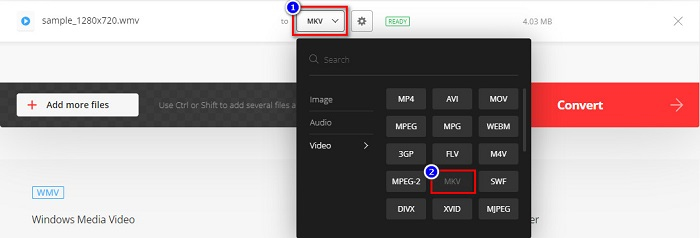
ขั้นตอนที่ 3 ขั้นตอนสุดท้าย ให้คลิกปุ่ม Convert ที่มุมขวาล่างของอินเทอร์เฟซซอฟต์แวร์ แล้วไฟล์ของคุณจะเริ่มกระบวนการแปลง.

MConverter
MConverter เป็นตัวแปลง WMV เป็น MKV ออนไลน์ที่รองรับไฟล์เสียง วิดีโอ และไฟล์รูปภาพหลากหลายประเภท มีขั้นตอนการแปลง WMV เป็น MKV ที่เรียบง่าย อย่างไรก็ตาม การใช้ตัวแปลงนี้มีข้อจำกัดด้านขนาดไฟล์ ถึงกระนั้น มันก็ยังสามารถแปลงไฟล์ WMV ของคุณเป็น MKV ได้อย่างมีประสิทธิภาพและง่ายดาย.
ขั้นตอนที่ 1 พิมพ์คำว่า MConverter บนเบราว์เซอร์ที่คุณใช้ จากนั้นคุณจะถูกนำไปยังหน้าเว็บของพวกเขา.
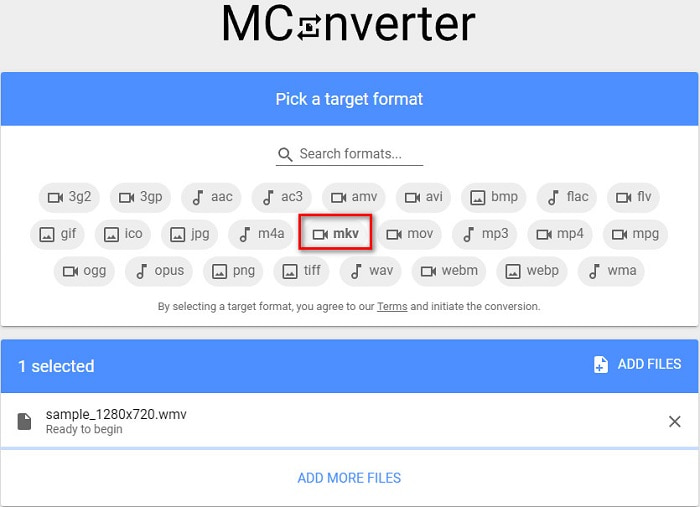
ขั้นตอนที่ 2 จากนั้นให้ลากไฟล์ WMV ของคุณมาวางในกรอบสี่เหลี่ยม หรือคุณอาจเลือกคลิกคำว่า browse เพื่อเลือกไฟล์ WMV ของคุณก็ได้.

ขั้นตอนที่ 3 หลังจากเลือกไฟล์ WMV ของคุณแล้ว ให้เลือกไฟล์ MKV เป็นรูปแบบไฟล์ผลลัพธ์โดยการคลิกปุ่ม MKV ทันทีที่คุณคลิก MKV การแปลง WMV เป็น MKV จะเริ่มขึ้น จากนั้นรอให้ไฟล์ของคุณแปลงให้เสร็จ.
WMV เทียบกับ MKV
ผลิตโดย Microsoft WMV เป็นหนึ่งในรูปแบบวิดีโอที่พบบ่อยที่สุดในยุค 2000 สามารถดูได้ทางเว็บและเล่นโดยโปรแกรมเล่นสื่อต่างๆ บน Windows และยังเป็นรูปแบบไฟล์วิดีโอเริ่มต้นของ Windows Media Player แต่รูปแบบอื่นๆ กลับถูกยึดครองไปเมื่อเร็วๆ นี้
รูปแบบคอนเทนเนอร์มัลติมีเดีย Matroska ซึ่งเปิดตัวในปี 2545 เป็นรูปแบบโอเพนซอร์สที่สามารถรวมแทร็กวิดีโอ เสียง รูปภาพ และคำบรรยายได้จำนวนหนึ่ง ดังนั้น คุณสามารถใช้เพื่อเก็บคลิปวิดีโอสั้น รายการทีวี และภาพยนตร์ได้อย่างง่ายดาย ค่อนข้างเป็นที่นิยมสำหรับแฟนอนิเมะ
ส่วนที่ 4 คำถามที่พบบ่อยเกี่ยวกับการแปลง WMV เป็น MKV
คุณสามารถเล่น MKV บน Mac ได้หรือไม่?
ไม่ รองรับไม่ได้ macOS ไม่รองรับไฟล์รูปแบบ MKV อย่างไรก็ตาม คุณสามารถใช้โปรแกรมเล่นวิดีโอของบุคคลที่สาม หรือแปลงไฟล์ MKV ของคุณเป็นรูปแบบไฟล์ที่ Mac รองรับได้ โดย MP4 เป็นหนึ่งในรูปแบบไฟล์ที่ Mac รองรับมากที่สุด หากต้องการทราบข้อมูลเพิ่มเติมเกี่ยวกับการแปลง MKV เป็น MP4 ให้คลิกลิงก์นี้.
คุณสามารถบีบอัดขนาดไฟล์ของไฟล์ MKV ได้หรือไม่?
ได้ คุณสามารถบีบอัดไฟล์ของคุณได้ด้วยโปรแกรมบีบอัดไฟล์ FVC Video Converter Ultimate ก็มีฟีเจอร์สำหรับบีบอัดไฟล์เช่นกัน.
Window Media Player รองรับไฟล์ MKV หรือไม่?
Windows Media Player ไม่รองรับไฟล์ MKV คุณอาจพบว่าได้ยินแค่เสียง หรือเกิดปัญหาในการเล่นเมื่อเปิดไฟล์ MKV บน Windows Media Player หากต้องการเล่นไฟล์ MKV ใน Windows Media Player คุณจำเป็นต้องดาวน์โหลดและติดตั้ง MKV codec.
สรุป
มีหลายวิธีในการแปลง WMV เป็น MKV บน Mac และ Windows เพื่อสรุป เครื่องมือออนไลน์และออฟไลน์ที่แสดงด้านบนแสดงประสิทธิภาพที่มีแนวโน้มว่าจะแปลงไฟล์ WMV ของคุณเป็น MKV อย่างไรก็ตาม หากคุณต้องการตัวแปลงที่ช่วยให้คุณมีรูปแบบเอาต์พุตที่ยอดเยี่ยม ให้ใช้ FVC Video Converter Ultimate เพราะมันมีคุณสมบัติพิเศษทั้งหมดที่คุณต้องการเมื่อทำการแปลงไฟล์
-
 WMV เป็น MP3 – วิธีแปลงวิดีโอเป็นเสียงฟรี [เดสก์ท็อป/ออนไลน์ ]
 ขณะดูวิดีโอ WMV คุณพบว่าส่วนเสียงนั้นน่าสนใจ ดังนั้น คุณจึงต้องการเล่นบนเครื่องเล่น MP3 ของคุณ แต่แน่นอนว่าเครื่องเล่นของคุณไม่รองรับรูปแบบ WMV ที่ทำให้คุณสงสัยว่ามีวิธีแปลง WMV เป็น MP3 หรือไม่
-
 2 วิธีที่ง่ายที่สุดในการแปลงไฟล์ WMV เป็น FLV บน PC/Mac
 คุณจะแปลง WMV เป็น FLV ได้อย่างไร ประการแรก คุณต้องอ่านคำแนะนำของเราและค้นหาวิธีการที่คุณชอบ จากนั้นทำตามคำแนะนำของเราเพื่อทำงานอย่างรวดเร็ว
-
 [2 โซลูชั่น] วิธีแปลงวิดีโอ WMV เป็นไฟล์ GIF ฟรี
 ถ้าคุณต้องการตัดส่วนที่ยอดเยี่ยมของวิดีโอ WMV และสร้าง GIF จากวิดีโอ คุณสามารถเรียนรู้เกี่ยวกับวิธีการง่ายๆ 2 วิธีในการถ่ายโอนวิดีโอ WMV ไปยัง GIF ในบทความนี้

