


 Video Converter Ultimate
 บันทึกหน้าจอ
 ซ่อมวิดีโอ
ตัวแก้ไขข้อมูลเมตา MKV ที่ดีที่สุดในการเพิ่ม/เปลี่ยน/ลบข้อมูลเมตาบน MKV
There isn't a wide variety of MKV metadata editors on the market because the MKV isn't much supported. But it doesn't mean that we can't edit the tags on our MKV files, so don't look gloomy. So for you to find out what is the best metadata editor that supports MKV, you can read the full scope of this article as we review different tools. What are you waiting for? Keep the ball on a roll because this won't last more than 7 minutes to have a tag editor.

ส่วนที่ 1 ตัวแก้ไขแท็ก MKV ที่ดีที่สุดที่แนะนำสำหรับ Windows & Mac: FVC Video Converter Ultimate
FVC Video Converter Ultimate is the most popular MKV metadata editor on Windows and Mac. This tool lives up to its name and expectation, so downloading the software to edit the metadata is the best choice you will make. Its powerful features and functions will easily handle the job as if it is a piece of cake. Furthermore, this tool supports other formats to upload, such as MP4, AVI, MOV, FLV, WMV, and the 1000+ media formats without re-encoding the file for a less hassle experience.
มีอะไรอีก? สมมติว่าคุณดาวน์โหลดเครื่องมือ คุณจะมีเครื่องมือที่เร็วที่สุดในการเพิ่มข้อมูลเมตาบน MKV และ GUI ที่สวยงามที่สุดของตัวแก้ไขข้อมูลเมตาที่เครื่องมืออื่นไม่สามารถนำเสนอได้ หากคุณสนใจที่จะใช้ตัวแก้ไข โปรดอ่านตอนที่ 2 ต่อเนื่องจากเราจะอธิบายวิธีแก้ไขข้อมูลของไฟล์ MKV
ส่วนที่ 2 วิธีการแก้ไข MKV Metadata ด้วย MKV Metadata Editor ที่แนะนำ
ทำตามขั้นตอนตามลำดับ เริ่มตั้งแต่การดาวน์โหลดเครื่องมือเป็นต้น มาเริ่มกันโดยใช้ตัวแก้ไขข้อมูลเมตา MKV ที่ดีที่สุดที่คุณสามารถดาวน์โหลดได้บน Windows หรือ macOS ของคุณ
Step 1. Tick the download button we present below; select which operating systems you are currently using. Install it immediately after you've downloaded the file, follow the installation process, and we promise that you wouldn't get wrong, then open it to proceed. Before we start, you'll need to get familiarized with the tool to have a smooth sailing process using the MKV tag editor.
ดาวน์โหลดฟรีสำหรับ Windows 7 หรือใหม่กว่าดาวน์โหลดอย่างปลอดภัย
ดาวน์โหลดฟรีสำหรับ MacOS 10.7 หรือใหม่กว่าดาวน์โหลดอย่างปลอดภัย
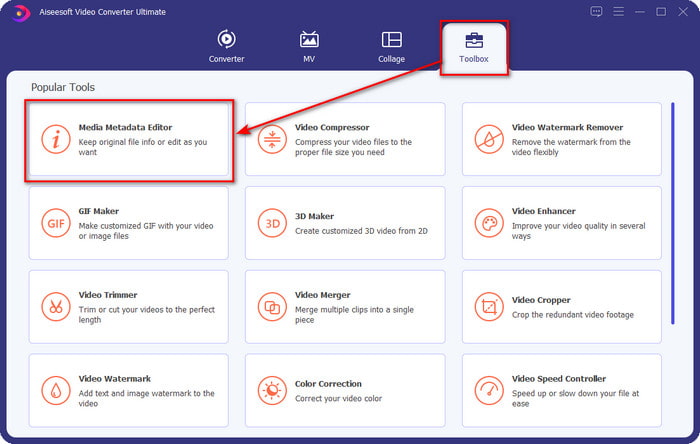
Step 2. Open the Toolbox, look for the Media Metadata Editor, and tap it to open.
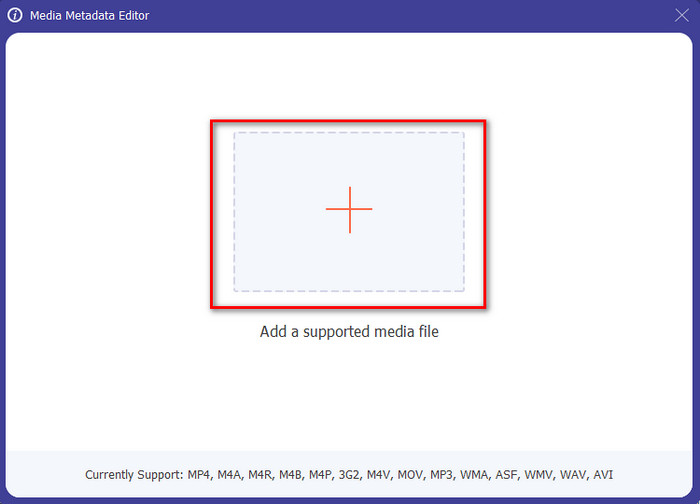
Step 3. Upload your MKV file by clicking the + icon, and a file folder will show, select the MKV file and press Open.
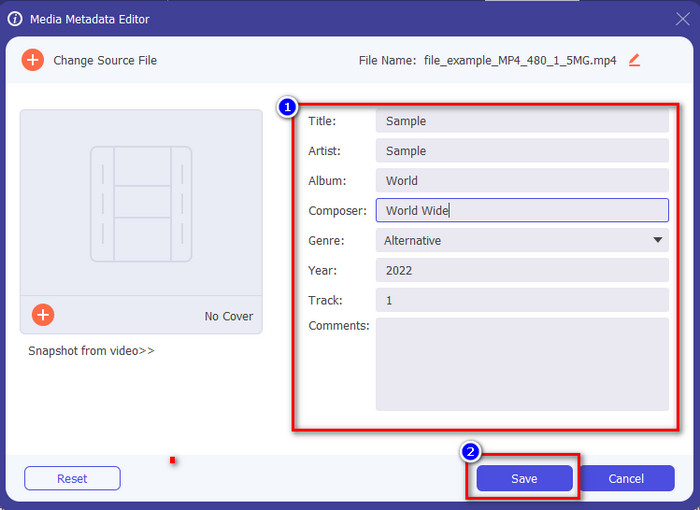
Step 4. Edit the metadata textbox; you can either fill them or remove them, do what you want to do with the metadata. After all of that, click Save to apply the change you've made earlier. With that, you have now edited the MKV tags.
ส่วนที่ 3 ตัวแก้ไขแท็ก MKV ฟรี 3 ตัวที่คุณควรทราบว่ามีให้ใช้งานบน Windows, Mac และ Online
GROUPDOCS.Metadata [ฟรีบนเว็บ]
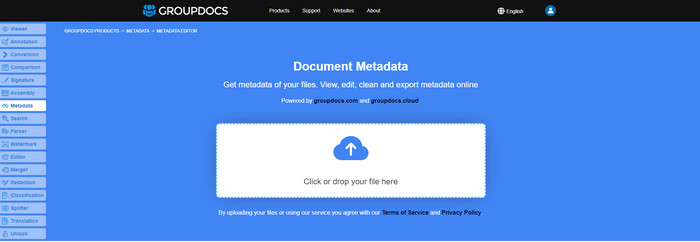
If you want to use an MKV metadata editor for free on the web, we highly suggest you try the GROUPDOCS.Metadata. It is the best choice to view and edit the metadata on your MKV as it works on all platforms, which means it is flexible and adaptable in any case. Moreover, it can easily manipulate the search and update of the tag according to the properties you will need, and if it needs to be removed, it will automatically do it. However, the tool can be challenging to handle on specific tasks, like updating the file's tags. So to get the hang of using the web tool, you will need to use it most of the time to improve your knowledge about the website functions and make it easier to handle.
คุณสมบัติบน Windows [ตัวแก้ไขในตัวบน Windows]
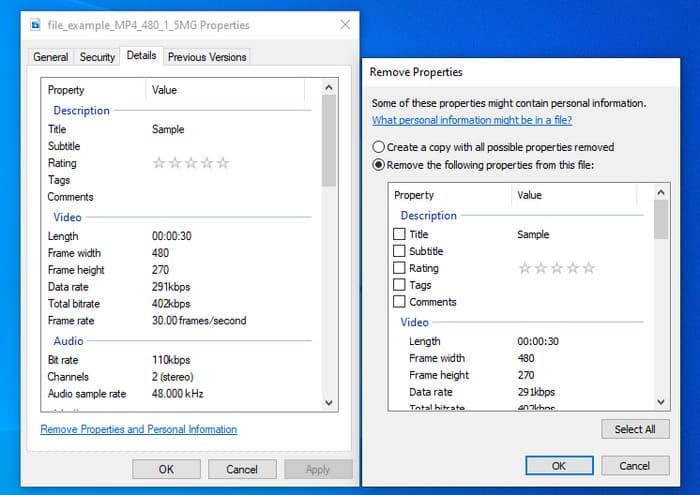
ไม่ต้องการดาวน์โหลดเครื่องมือเพื่อเปลี่ยนข้อมูลเมตาของ MKV และต้องการใช้ฟังก์ชันในตัวบน Windows เพื่อแก้ไขข้อมูลเมตาใช่หรือไม่ ถ้าอย่างนั้น จะเป็นการดีที่สุดถ้าคุณใช้คุณสมบัติบน Windows ฟังก์ชันนี้มีอยู่ในพีซี Windows ทุกเครื่อง และคุณไม่จำเป็นต้องดาวน์โหลดเครื่องมือหรืออินเทอร์เน็ตเพื่อใช้งาน คุณสามารถดูข้อมูลเมตาและแก้ไขได้อย่างรวดเร็วด้วยคุณสมบัติฟรีนี้ อย่างไรก็ตาม มีรายงานบางฉบับเกี่ยวกับแท็กที่หายไปหลังจากที่พวกเขาลองใช้คุณลักษณะนี้ ตามผู้ใช้ มันสามารถลบแท็กในไฟล์ของคุณโดยอัตโนมัติ แทนที่จะใช้คุณสมบัตินี้ พวกเขาตั้งใจที่จะดาวน์โหลดเครื่องมือที่เหมาะสมเพื่อเสียความพยายามกับแท็กที่รวมไว้ใน MKV หรือไฟล์สื่อ แต่ถ้าคุณต้องการดูว่าฟีเจอร์นี้อยู่ที่ไหน เพียงกดคลิกขวาบนไฟล์ ส่วนใหญ่จะอยู่ที่ส่วนล่าง
iFlicks [สำหรับ Mac]
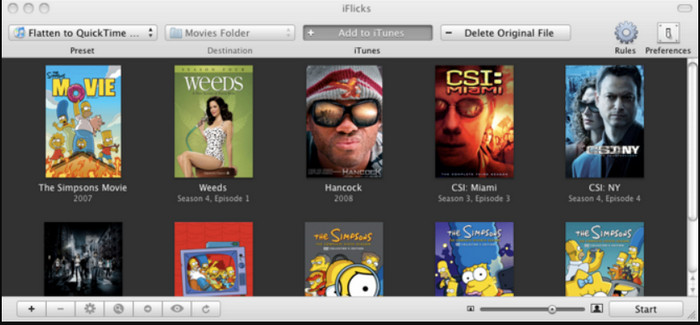
iFlicks สามารถช่วยคุณแปลง MKV ให้อยู่ในรูปแบบที่เล่นได้ หรือสอนวิธีแก้ไขข้อมูลเมตา MKV บน Mac เครื่องมือนี้โต้ตอบกับ iTunes ได้ดี เนื่องจากมีข้อมูลเมตาโดยละเอียดในทุกไฟล์มีเดีย ด้วยซอฟต์แวร์นี้ คุณสามารถเพิ่มข้อมูลต่างๆ เกี่ยวกับไฟล์ของคุณได้ เช่น แท็กไลน์ ประเภท วันที่ การให้คะแนน ความละเอียด และอื่นๆ จะถูกดึงมาจากฐานข้อมูลออนไลน์ นอกจากนี้ ซอฟต์แวร์นี้ยังรวบรวมข้อมูลเมตาที่คุณสามารถดาวน์โหลดและนำไปใช้กับไฟล์ได้โดยอัตโนมัติ อย่างไรก็ตาม การทดลองใช้ฟรีสามารถทำได้เพียงเจ็ดวันเท่านั้น ดังนั้น หากคุณต้องการใช้เครื่องมือนี้อีกครั้ง คุณจะต้องชำระค่าสมัครรับข้อมูล
ส่วนที่ 4 คำถามที่พบบ่อยเกี่ยวกับ MKV Metadata Editor
MKV สามารถเล่นได้บน Mac หรือไม่
MKV is playable on Mac if you use a third-party tool, such as the Blu-ray Player. But if you intentionally play the video on Quicktime, it won't work because it is unsupported. So, if you want to watch your MKV files on Mac, we highly recommend that you use a third-party Blu-ray Player, or you can convert the MKV format into MOV with the help of FVC Video Converter Ultimate.
ฉันจำเป็นต้องแปลง MKV ก่อนแก้ไขข้อมูลเมตาหรือไม่
หากเครื่องมือที่คุณต้องการใช้ไม่รองรับการอัปโหลดรูปแบบ MKV เราขอแนะนำให้คุณแปลงรูปแบบเป็นรูปแบบที่เข้ากันได้ก่อน แต่ด้วยค่าผ่านทางที่เรากล่าวถึงด้านบน คุณไม่จำเป็นต้องแปลงไฟล์ให้อยู่ในรูปแบบที่รองรับ อย่างไรก็ตาม ไม่มีตัวเลือกหรือเครื่องมือมากมายในการแก้ไขแท็ก MKV เนื่องจากไม่ทราบรูปแบบ แม้ว่าจะค้นหาได้ยาก แต่เราพยายามอย่างเต็มที่เพื่อค้นหาตัวแก้ไขทั้งหมดที่คุณสามารถใช้เพื่ออัปเดตหรือเปลี่ยนข้อมูลเมตาที่รองรับรูปแบบ MKV
ทำไมไฟล์ MKV ถึงใหญ่เกินไป?
The main reason why MKV files are big is that they can contain multiple contents of a video, audio, and subtitle with different codecs and elements. And you've added metadata on that file, and the file size will become even enormous. So, the best way to save space while having an MKV file on your drive is to compress it without destroying the quality or losing the information on the file. Click this link to learn more about compressing video files.
สรุป
Even though there is a limited MKV metadata editor on the market, there are still powerful tools you can depend on available on different platforms. As we reviewed different software you can use, it is always still on your hands; which do you prefer to use on changing the metadata of your MKV file. Indeed, it is a tough decision because all of the tools are awesome to use. If you haven't decided which you prefer, we suggest you use the FVC Video Converter Ultimate because it is the most flexible software and has more advanced features that anyone can use. By pressing the download button, you will attain the best tag editor you can have on Windows and Mac!
-
 5 วิธีที่ง่ายที่สุดในการลบข้อมูลเมตาในไฟล์มีเดียต่างๆ
 จะลบข้อมูลเมตาได้อย่างไร ทำยากไหม? ฉันจำเป็นต้องซื้อหรือใช้เครื่องมือฟรีเพื่อลบแท็กหรือไม่ คำถามเหล่านี้ทั้งหมดมีคำตอบในบทความนี้
-
 5 ตัวแก้ไขข้อมูลเมตา MP4 อันดับต้น ๆ [อัปเดต 2022]
 ฉันจะเปลี่ยนข้อมูลเมตา MP4 ได้อย่างไร วิธีที่ดีที่สุดในการเปลี่ยนข้อมูลเมตาของ MP4 คือการใช้ตัวแก้ไขแท็กที่รองรับรูปแบบ MP4 เช่นตัวอย่างที่เราแสดงรายการด้านล่าง
-
 เครื่องมือแก้ไขแท็กวิดีโอ AVI ยอดนิยม 5 อันดับแรกสำหรับปี 2022
 ตัวแก้ไขแท็ก AVI ที่ดีที่สุดที่ฉันสามารถใช้ได้คืออะไร ตลาดเครื่องมือแก้ไขแท็กสำหรับไฟล์ AVI นั้นกว้างเกินไป ดังนั้นวันนี้เราจะนำเสนอห้าบรรณาธิการที่ได้รับการคัดเลือกมากที่สุดในปี 2565
