


 Video Converter Ultimate
 บันทึกหน้าจอ
 ซ่อมวิดีโอ
วิธีที่ง่ายที่สุดในการแปลง MPG เป็น MKV โดยใช้ตัวแปลงที่ดีที่สุด [ฟรี]
น่าเสียดายที่ไฟล์ MPG ไม่มีแทร็กคำบรรยายอยู่ภายใน อย่างไรก็ตาม คุณสามารถแปลงไฟล์ของคุณไปเป็นรูปแบบไฟล์ที่รองรับการเก็บแทร็กคำบรรยายจำนวนมากได้หลายภาษา และหากคุณกำลังมองหาวิธีแปลงไฟล์ MPG เป็น MKV แบบง่าย ๆ เรามีขั้นตอนที่ไม่ซับซ้อนในการแปลง MPG เป็น MKV ทั้งแบบออนไลน์และออฟไลน์ ให้อ่านบทความนี้จนจบ.

ส่วนที่ 1 ทำไมต้องแปลง MPG เป็น MKV
รูปแบบไฟล์ MPG เป็นรูปแบบไฟล์ที่ใช้บ่อยที่สุดรูปแบบหนึ่งบนเว็บ รูปแบบไฟล์นี้พัฒนาโดย MPEG หรือกลุ่มผู้เชี่ยวชาญด้านภาพเคลื่อนไหว นอกจากนี้ ไฟล์ประเภทนี้สามารถจัดเก็บวิดีโอ เสียง และข้อมูลเมตาได้ นอกจากนี้ โปรแกรมเล่นสื่อเกือบทั้งหมดยังรองรับไฟล์ประเภทนี้อย่างกว้างขวาง ในทางตรงกันข้าม ไฟล์ MKV หรือ Matroska เป็นที่เก็บไฟล์สื่อที่เก็บแทร็กวิดีโอ เสียง และคำบรรยายไว้ในไฟล์เดียว ไฟล์ประเภทนี้มีชื่อเสียงสำหรับผู้ชื่นชอบภาพยนตร์เช่นกัน เพราะสามารถจัดการแทร็กเสียงในภาษาต่างๆ ได้
ส่วนที่ 2 วิธีที่เร็วที่สุดในการแปลง MPG เป็น MKV ออฟไลน์
มีโปรแกรมแปลงไฟล์มากมายในท้องตลาดที่สามารถแปลง MPG เป็น MKV ได้ อย่างไรก็ตาม หากคุณต้องการตัวแปลงที่ทำงานได้รวดเร็วเป็นพิเศษ FVC Video Converter Ultimate ถือเป็นเครื่องมือที่ดีที่สุด และหากคุณต้องการลบลายน้ำออกจากวิดีโอ โปรแกรมนี้ก็มีฟีเจอร์รองรับเช่นกัน นอกจากนี้ยังรองรับการแปลงแบบแบตช์เพื่อรวมไฟล์หลายรูปแบบให้กลายเป็นไฟล์เดียว อยากรู้ข้อดีของการใช้โปรแกรมแปลง MPG เป็น MKV ตัวนี้หรือไม่ หากใช่ ให้ดูรายละเอียดด้านล่าง.

FVC Video Converter Ultimate
5,689,200+ ดาวน์โหลด- แก้ไขและปรับปรุงวิดีโอของคุณอย่างชัดเจน
- มีกระบวนการแปลงที่รวดเร็วเป็นพิเศษในตัวแปลงนี้
- สามารถแปลงไฟล์ MPG เป็น MKV, WMV, AVI, MP4 และรูปแบบไฟล์อื่น ๆ กว่า 1,000 รูปแบบ
- ใช้ได้กับทุกระบบปฏิบัติการ เช่น Windows และ macOS
ดาวน์โหลดฟรีสำหรับ Windows 7 หรือใหม่กว่าดาวน์โหลดอย่างปลอดภัย
ดาวน์โหลดฟรีสำหรับ MacOS 10.7 หรือใหม่กว่าดาวน์โหลดอย่างปลอดภัย
ทำตามขั้นตอนด้านล่างเพื่อแปลงไฟล์ MPG เป็น MKV
ขั้นตอนที่ 1 ดาวน์โหลด FVC Converter Ultimate โดยคลิกปุ่ม Download ด้านล่างสำหรับ Windows หรือ macOS จากนั้นทำตามขั้นตอนการติดตั้งและเปิดใช้งานโปรแกรม.
ดาวน์โหลดฟรีสำหรับ Windows 7 หรือใหม่กว่าดาวน์โหลดอย่างปลอดภัย
ดาวน์โหลดฟรีสำหรับ MacOS 10.7 หรือใหม่กว่าดาวน์โหลดอย่างปลอดภัย
ขั้นตอนที่ 2 ในขั้นตอนต่อไป คลิกปุ่ม Add Files หรือปุ่มสัญลักษณ์ + เพื่ออัปโหลดไฟล์ MPG ของคุณไปยังอินเทอร์เฟซหลักของซอฟต์แวร์.
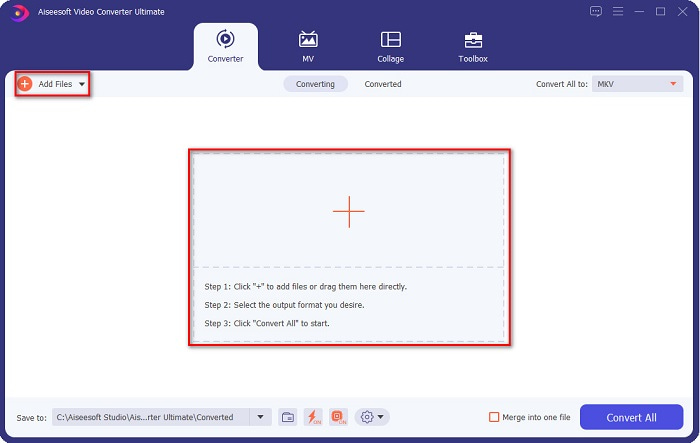
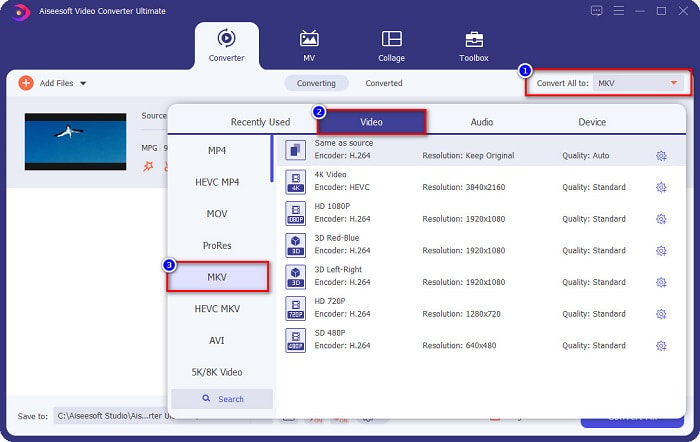
ขั้นตอนที่ 3 หลังจากอัปโหลดไฟล์ MPG ของคุณแล้ว ให้เลือกชนิดไฟล์ผลลัพธ์โดยคลิกปุ่ม Convert All to ในกรณีนี้ ให้เลือกไฟล์รูปแบบ MKV.
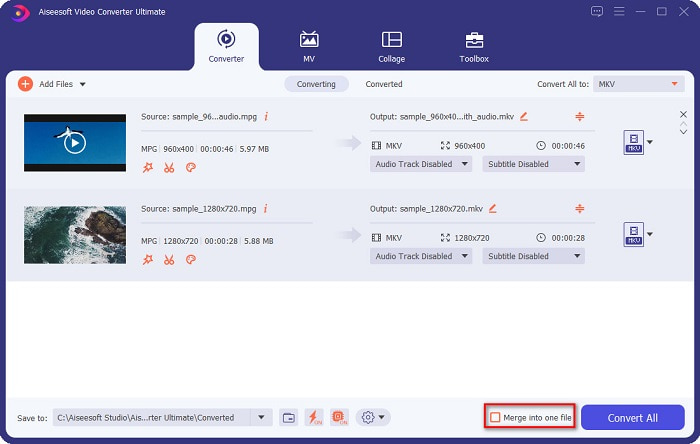
ตัวเลือกเพิ่มเติม หากคุณต้องการแปลงไฟล์ MPG หลายไฟล์ให้กลายเป็นไฟล์เดียว ให้ติ๊กถูกที่ช่อง Merge into one file หากไม่ต้องการ ให้ข้ามไปยังขั้นตอนถัดไป.
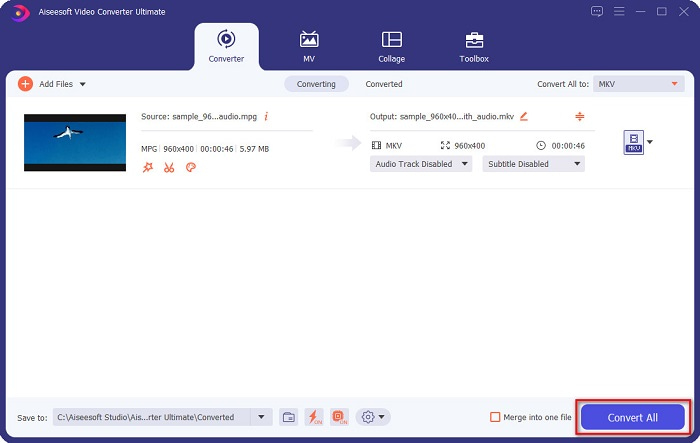
ขั้นตอนที่ 4 เพื่อจบขั้นตอน ให้คลิกปุ่ม Convert All เพื่อแปลงไฟล์ MPG ของคุณเป็นไฟล์ MKV รอสักครู่ แค่นั้นเอง! ง่าย ๆ แบบนี้ คุณก็สามารถแปลง MPG เป็น MKV ได้ไม่ยาก.
ส่วนที่ 3 แปลง MPG เป็น MKV โดยใช้เครื่องมือฟรีแวร์
เคยสงสัยหรือไม่ว่าโปรแกรมฟรีที่ดีที่สุดสำหรับแปลง MPG เป็น MKV คืออะไร จากที่เราสังเกต ผู้ใช้จำนวนมากเลือกใช้ HandBrake เป็นตัวเลือกแรก โปรแกรมฟรีนี้สามารถแปลงไฟล์ MPG เป็น MKV, WebM และ MP4 ได้ นอกจากนี้ยังมีอินเทอร์เฟซที่ใช้งานง่าย ซึ่งเป็นข้อดีสำหรับผู้เริ่มต้น อย่างไรก็ตาม มันรองรับรูปแบบไฟล์ได้อย่างจำกัด แต่ถึงอย่างนั้นก็ยังเป็นเครื่องมือที่มีประสิทธิภาพสำหรับการแปลง MPG เป็น MKV.
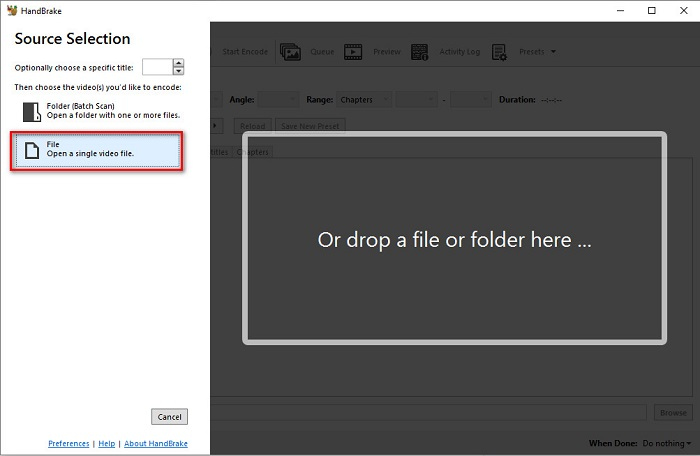
ขั้นตอนที่ 1 ดาวน์โหลด HandBrake บนอุปกรณ์ของคุณ จากนั้นเปิดโปรแกรม หลังจากเปิดแล้ว ให้คลิกตัวเลือก File ทางด้านขวาของอินเทอร์เฟซซอฟต์แวร์ เมื่อตัวจัดการไฟล์บนคอมพิวเตอร์ปรากฏขึ้น ให้เลือกไฟล์ MPG ของคุณ.
ขั้นตอนที่ 2 จากนั้นเลือกชนิดไฟล์ผลลัพธ์ที่คุณต้องการบนปุ่ม แบบดรอปดาวน์ ข้างคำว่า Format แล้วคลิกปุ่ม Browse เพื่อเลือกตำแหน่งปลายทางที่ต้องการบันทึกไฟล์.
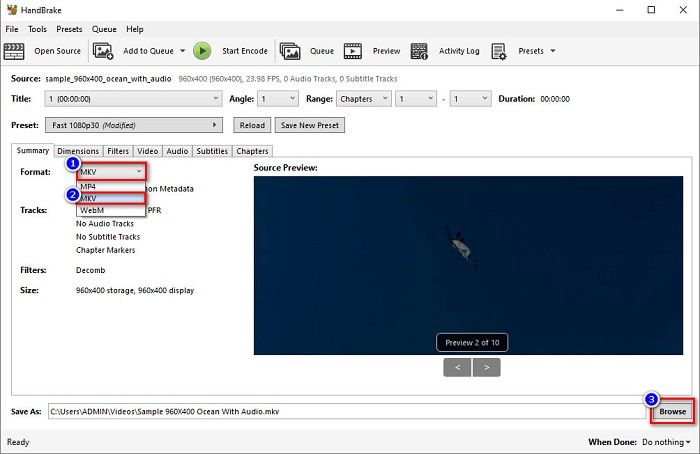
ขั้นตอนที่ 3 สุดท้ายคลิกปุ่ม Start Encode เพื่อแปลงไฟล์ MPG ของคุณเป็นไฟล์รูปแบบ MKV.
คุณสามารถแปลง MPG เป็น MKV โดยใช้โปรแกรมแปลงฟรีแวร์โดยทำตามขั้นตอนง่าย ๆ ด้านบน
ส่วนที่ 4 2 วิธีในการแปลง MPG เป็น MKV ออนไลน์
การแปลงผ่านตัวแปลงออนไลน์อาจเป็นตัวเลือกที่สะดวกที่สุด นอกจากนี้ คุณจะไม่ต้องดาวน์โหลดอะไรเมื่อใช้ตัวแปลงออนไลน์ แต่คุณสามารถแปลงออนไลน์ได้โดยตรงแทน อย่างไรก็ตาม ความเร็วในการแปลงของคุณจะขึ้นอยู่กับความเร็วของการเชื่อมต่ออินเทอร์เน็ตของคุณ อย่างไรก็ตาม เราได้แสดงรายการวิธีที่ดีที่สุดสองวิธีในการแปลงไฟล์ MPG เป็น MKV ไว้ด้านล่าง
วิธีที่ 1 ใช้ FVC Free Online Video Converter
FVC Free Online Video Converter เป็นโปรแกรมแปลงไฟล์ออนไลน์ฟรีที่ช่วยคุณแปลงไฟล์ได้หลายรูปแบบอย่างสะดวกสบาย รองรับรูปแบบไฟล์อย่าง MPG เป็น MKV, AVI, MP4, MOV, MP3 และอื่น ๆ อีกมากมาย นอกจากนี้ยังเหมาะสำหรับผู้เริ่มต้นเพราะมีส่วนติดต่อผู้ใช้ที่เข้าใจง่าย อีกทั้งยังมีฟีเจอร์ให้คุณเปลี่ยนบิตเรตของวิดีโอและเสียงได้ ดังนั้น หากคุณสนใจตัวแปลง MPG เป็น MKV ออนไลน์ตัวนี้ ให้ทำตามขั้นตอนด้านล่าง.
ขั้นตอนที่ 1 บนเบราว์เซอร์ของคุณ ให้ค้นหา FVC Free Online Video Converter หรือไปยังหน้าเว็บโดยตรงด้วยการคลิกที่ ลิงก์นี้ จากนั้นเปิดใช้งานแอปบนเว็บ.
ขั้นตอนที่ 2 หลังจากเปิดใช้งานแอปแล้ว ให้คลิกปุ่ม Add Files to Convert จากนั้นหน้าต่างไฟล์ในคอมพิวเตอร์ของคุณจะปรากฏขึ้น ให้เลือกไฟล์ MPG ของคุณ.
ดาวน์โหลดเวอร์ชันเดสก์ท็อปเพื่อแปลงไฟล์แบบเป็นชุดได้.
ขั้นตอนที่ 3 จากนั้นเลือก MKV เป็นรูปแบบไฟล์ผลลัพธ์.
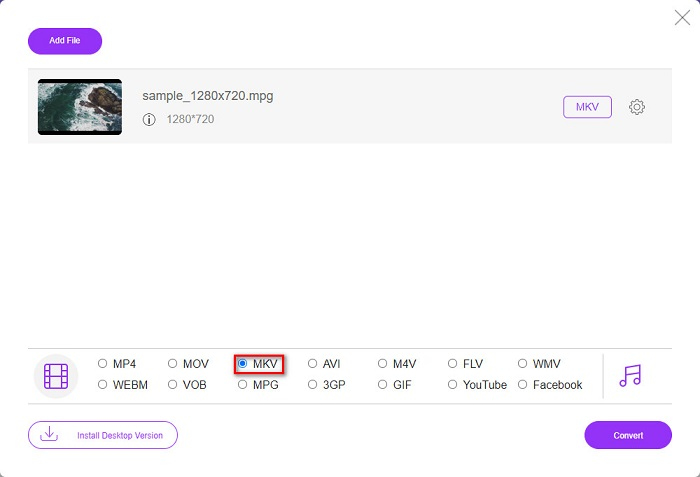
ขั้นตอนที่ 4 สำหรับขั้นตอนสุดท้าย ให้คลิกปุ่ม Convert จากนั้นการแปลงไฟล์ MPG เป็น MKV ของคุณจะเริ่มต้นขึ้น.
วิธีที่ 2. ใช้ CloudConvert
อีกหนึ่งโปรแกรมแปลงไฟล์ออนไลน์ที่คุณสามารถใช้ได้คือ CloudConvert เครื่องมือนี้ใช้งานได้มีประสิทธิภาพเพราะมีอินเทอร์เฟซที่เรียบง่าย นอกจากนี้คุณยังสามารถบีบอัดไฟล์ของคุณได้เมื่อใช้โปรแกรมนี้ อย่างไรก็ตาม มันรองรับรูปแบบไฟล์เพียงบางประเภทเท่านั้น แม้จะมีข้อจำกัด แต่ก็ยังมีผู้ใช้จำนวนมากเลือกใช้เพราะความสะดวก.
ขั้นตอนที่ 1 บนเบราว์เซอร์ของคุณ ให้ค้นหา CloudConvert เมื่อเข้าสู่หน้าเว็บแล้ว ให้คลิกปุ่ม Select Files จากนั้นเมื่อหน้าต่างไฟล์คอมพิวเตอร์ปรากฏขึ้น ให้เลือกไฟล์ MPG ของคุณ.
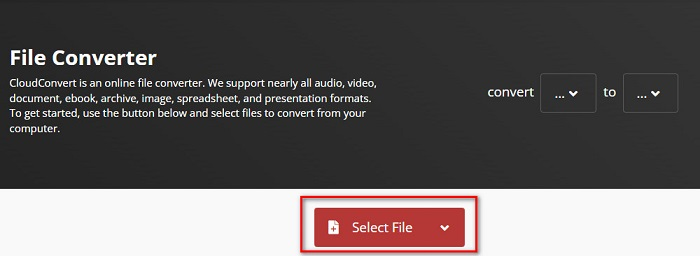
ขั้นตอนที่ 2 จากนั้นเลือกไฟล์ MKV เป็นรูปแบบผลลัพธ์บนปุ่ม แบบดรอปดาวน์.
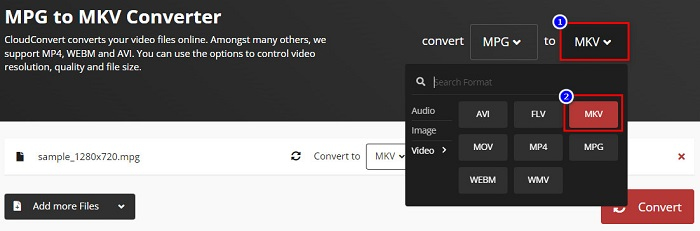
ขั้นตอนที่ 3 สุดท้ายให้คลิกปุ่ม Convert จากนั้นรอจนกว่าไฟล์ของคุณจะถูกแปลง เสร็จเรียบร้อย! เพียงสามขั้นตอนง่าย ๆ คุณก็สามารถเปลี่ยน MPG เป็น MKV ได้แล้ว.
MPG เทียบกับ MKV
จัดทำโดยกลุ่มผู้เชี่ยวชาญด้านภาพเคลื่อนไหว (MPEG) MPG เป็นรูปแบบวิดีโอดิจิทัลทั่วไปสำหรับจัดเก็บข้อมูลวิดีโอ เสียง และข้อมูลเมตา มีประโยชน์มากเมื่อสร้างภาพยนตร์เพื่อแชร์บนอินเทอร์เน็ต ไฟล์เหล่านั้นใน MPG มักจะมีการบีบอัดวิดีโอ/เสียง MPEG-1 หรือ MPEG-2
รูปแบบคอนเทนเนอร์มัลติมีเดีย Matroska ซึ่งเปิดตัวในปี 2545 เป็นรูปแบบโอเพนซอร์สที่สามารถรวมแทร็กวิดีโอ เสียง รูปภาพ และคำบรรยายได้จำนวนหนึ่ง ดังนั้น คุณสามารถใช้เพื่อเก็บคลิปวิดีโอสั้น รายการทีวี และภาพยนตร์ได้อย่างง่ายดาย ค่อนข้างเป็นที่นิยมสำหรับแฟนอนิเมะ
ส่วนที่ 5. คำถามที่พบบ่อยเกี่ยวกับการแปลง MPG เป็น MKV
การแปลง MPG เป็น MKV ส่งผลต่อขนาดไฟล์หรือไม่
ใช่ แม้ว่าจะไม่ส่งผลกระทบมากนักเมื่อคุณแปลงไฟล์ MPG เป็น MKV แต่ขนาดไฟล์จะเพิ่มขึ้น
ซึ่งมีขนาดไฟล์ที่ใหญ่กว่า?
ไฟล์ MKV มีขนาดไฟล์ที่ใหญ่กว่าเมื่อเทียบกับไฟล์ MPG เนื่องจากไฟล์ MKV มีวิดีโอ เสียง และแทร็กคำบรรยายหลายไฟล์เป็นไฟล์เดียว
คุณสามารถบีบอัดไฟล์ MKV ได้หรือไม่?
คุณสามารถบีบอัดไฟล์ MKV ได้โดยใช้โปรแกรมบีบอัดไฟล์ FVC Video Converter Ultimate มีฟีเจอร์ที่ช่วยให้คุณบีบอัดไฟล์วิดีโอขนาดใหญ่ของคุณได้.
สรุป
บทความนี้ช่วยคุณได้หากคุณกำลังมองหาวิธีที่ดีที่สุดในการแปลงไฟล์ MPG เป็น MKV ตัวแปลงทั้งหมดที่นำเสนอข้างต้นแสดงประสิทธิภาพที่ดีเมื่อทำการแปลงไฟล์ แต่ถ้าคุณกำลังมองหาตัวแปลงที่มีคุณสมบัติโดดเด่นมากมาย คุณอาจต้องการลองใช้ FVC Video Converter Ultimate เป็นตัวเลือกแรกของคุณ หากคุณยังไม่มั่นใจ ให้ดาวน์โหลดเพื่อลองใช้ตัวแปลงที่ดีที่สุดที่คุณสามารถใช้ได้
-
 3 วิธีง่ายๆ ในการแปลงไฟล์ MPG เป็น MOV บน Mac/Windows/Online
 ต้องการแปลงไฟล์ MPG ของคุณและโอนย้ายในภายหลังบน iOS, iPod, iPad หรือ Mac ของคุณหรือไม่? บทความนี้จะช่วยหาวิธีแปลง MPG เป็น MOV ด้วยขั้นตอนต่างๆ
-
 วิธีแปลง MPG เป็น FLV โดยไม่สูญเสียคุณภาพ [พิสูจน์แล้ว]
 คุณต้องชมภาพยนตร์เรื่องโปรดด้วยเครื่องเล่นสื่อนี้ แต่ไม่รองรับ MPG ลองแปลงไฟล์ MPG ของคุณเป็น FLV โดยใช้ตัวแปลงเหล่านี้ในบทความนี้
-
 2 สุดยอดตัวแปลง MPG เพื่อแปลง MPG เป็น WMV ฟรี
 คุณต้องการแปลง MPG เป็น WMV ฟรีหรือไม่? ในกรณีนั้น คุณโชคดีเพราะเราพบว่ามีสองเครื่องมือที่คุณสามารถใช้เพื่อแปลงไฟล์ MPG ของคุณ

