


 Video Converter Ultimate
 บันทึกหน้าจอ
 ซ่อมวิดีโอ
VLC Metadata Editor & ทางเลือกที่ดีที่สุดสำหรับการแก้ไข Metadata อย่างง่ายดาย
VLC Media Player became one of the known video players you can download on any device such as Windows, Mac, Android, and iOS. With its supported formats and codecs, playing videos here became as swiftly as it is. In addition to its ability to play multiple formats, this tool has various features and functions that you would love to use. One of them is editing metadata. Keep reading this article to know more about the VLC metadata editor and its other competitive alternatives.

ส่วนที่ 1 VLC Metadata Editor รีวิว/ข้อดี & ข้อเสีย/ ทางเลือกที่ดีที่สุดสำหรับ VLC Metadata Editor
บทนำสู่ฟังก์ชันแก้ไขข้อมูลเมตาของ VLC Media Player
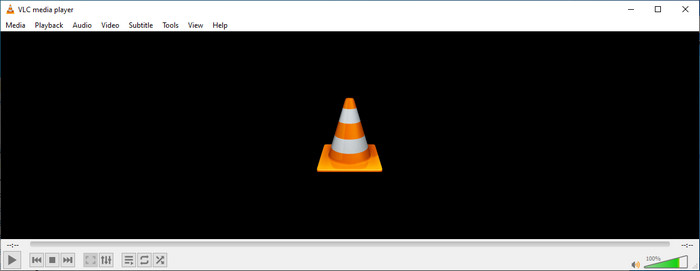
วัตถุประสงค์หลักของตัวแก้ไขข้อมูลเมตา VLC ไม่ใช่ในฐานะตัวแก้ไข แต่ในฐานะผู้เล่น เครื่องมือนี้เล่นรูปแบบที่หลากหลายซึ่งโปรแกรมเล่นสื่อของเราไม่รองรับ แทนที่จะดาวน์โหลดตัวแปลงสัญญาณลงในไฟล์ของคุณ เครื่องมือนี้ทำให้งานไม่ยุ่งยากโดยการเพิ่มไฟล์และเพลิดเพลินกับการรับชม หลังจากเปิดตัวครั้งแรกในปี 2544 นักพัฒนาซอฟต์แวร์ได้ปรับปรุงฟังก์ชันและคุณสมบัติของโปรแกรมเล่นสื่อโดยรวมเพื่อแข่งขันกับซอฟต์แวร์อื่นๆ แม้ว่าจะมีการเพิ่มคุณลักษณะและฟังก์ชันจำนวนมากลงในเครื่องมือ แต่ก็ยังไม่เพียงพอที่จะแข่งขันกับโปรแกรมแก้ไขข้อมูลเมตาเฉพาะอื่นๆ
ข้อเสียข้อดี
ตอนนี้เรามีแนวคิดเกี่ยวกับความสามารถในการแก้ไขข้อมูลเมตาของ VLC แล้ว มาดูกันว่าคุณควรใช้ตัวแก้ไขแท็กในอุดมคติหรือไม่ หากคุณต้องการทราบข้อมูลเพิ่มเติมเกี่ยวกับตัวแก้ไขข้อมูลเมตา VLC บน Android, iOS, Windows และ macOS คุณควรอ่านข้อดีข้อเสียต่อไป
ข้อดี
- เป็นฟรีแวร์ซึ่งหมายความว่าคุณไม่จำเป็นต้องซื้อเครื่องมือเพื่อดาวน์โหลด
- รองรับรูปแบบที่หลากหลายเพื่อแก้ไขข้อมูลเมตาของคุณได้อย่างง่ายดาย
- มันสามารถเพิ่มประสิทธิภาพการเล่นสำหรับวิดีโอและเสียงของอุปกรณ์ที่คุณเลือก
- ขยายได้ด้วยปลั๊กอินหากคุณทำได้
จุดด้อย
- โปรแกรมแก้ไขข้อมูลเมตาของวิดีโอ VLC ไม่เหมาะกับการแก้ไขข้อมูลเมตาของไฟล์
- เครื่องมือนี้ไม่ได้สร้างมาเพื่อการตัดต่อ คุณจึงไม่อาจมองว่าเป็นเครื่องมือตัดต่อวิดีโอระดับมืออาชีพได้
- การหยุดทำงานและการค้างเกิดขึ้นบ่อยครั้งขณะใช้ซอฟต์แวร์
- การอัปเดต GUI ไม่ดี
แม้ว่าจะไม่ใช่ตัวเลือกที่ดีที่สุดในการแก้ไขข้อมูลเมตา แต่เรายังคงเชื่อว่านี่คือโปรแกรมเล่นสื่อที่ดีที่สุดที่คุณสามารถดาวน์โหลดได้ฟรี ซึ่งสามารถทำงานได้ดีกว่าโปรแกรมเล่นสื่อในตัวอื่นๆ ในอุปกรณ์ของคุณ รายละเอียดที่ตามมาจะช่วยคุณกำหนดทางเลือกที่ดีที่สุดสำหรับการแก้ไขแท็กมากกว่า VLC
ส่วนที่ 2 3 ของ Competetive & Best Alternatives สำหรับ VLC Metadata Editor
Video Converter Ultimate
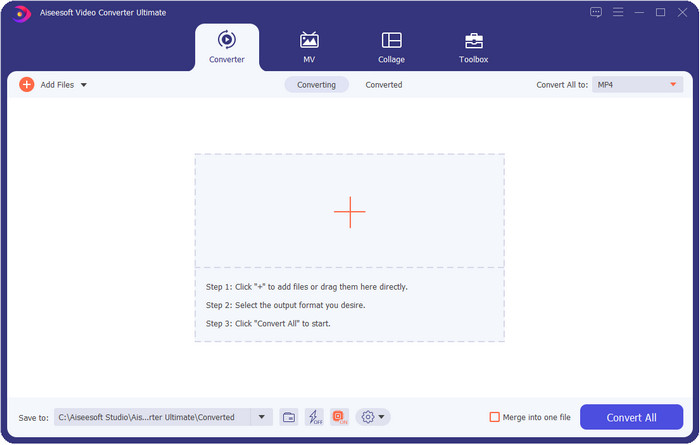
Video Converter Ultimate is the most competitive in editing the tags; it is better than what VLC metadata editor can offer. With this tool, you can easily manipulate all of the tags on your MP4, MOV, M4V, AVI, WMV on any 1000+ formats that you have. Adding the tags has never been easy for most of us, but if you use this tool, you can add the titles, artist name, album, comments, other information, and even images on the file as a part of metadata. Although you can do basic editing on tags while using VLC, it is not enough, and if you want to do more, you must choose the ultimate tool. To help you add the needed tags that the VLC or other metadata editor on the market can't provide on you effortlessly. If you want to know what you can get if you download the ultimate tool, we will write some of the features you can get with the tool.

Video Converter Ultimate
5,689,200+ ดาวน์โหลด- มันสามารถแก้ไขแท็กของไฟล์สื่อของคุณเช่น MP4, AVI, FLV, RMVB และอื่นๆ
- มีกระบวนการแปลงที่รวดเร็วเป็นพิเศษและการเร่งด้วยฮาร์ดแวร์
- คุณลักษณะและฟังก์ชันขั้นสูงเพิ่มเติมอยู่ใน Toolbox
- รองรับการแปลงแบตช์เพื่อให้งานเสร็จพร้อมกัน
- ดาวน์โหลดได้ทั้งบน Windows และ macOS
ดาวน์โหลดฟรีสำหรับ Windows 7 หรือใหม่กว่าดาวน์โหลดอย่างปลอดภัย
ดาวน์โหลดฟรีสำหรับ MacOS 10.7 หรือใหม่กว่าดาวน์โหลดอย่างปลอดภัย
MetaZ
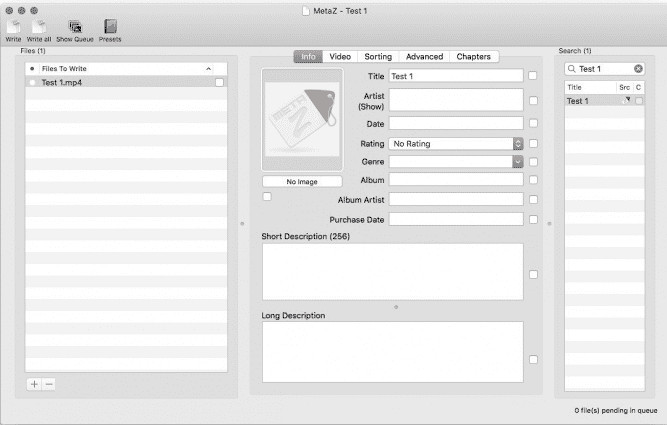
If you want to have a free VLC video metadata editor on Mac, then MetaZ is a tool you must use. This tool is a dedicated meta-tagger you can download on Mac, and its primary purpose is to add or edit tags to media files. Also, if you want to use this you can automatically search for the tags and add them if you have an internet connection. With this tool, you can also transfer the tags using the archive export feature that you can only use on MetaZ. Although the tool seems promising, the tool's compatibility with another os, such as on Windows, is a problem. In addition, it supports an average format, so before you use this, you must know that there are restrictions on adding files here. Other than that, there's nothing else problem using the tool.
เครื่องสแกนแท็ก
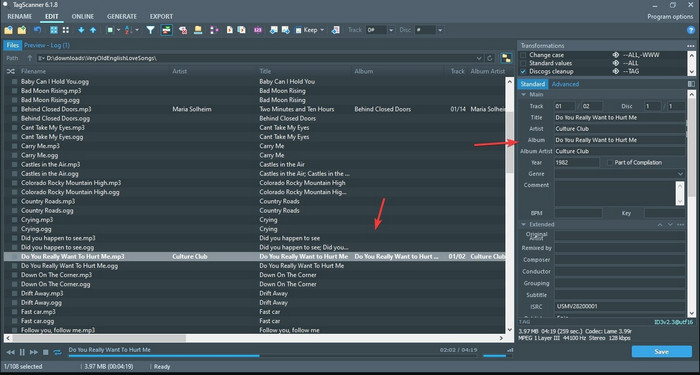
Tag Scanner is a better version of MKV metadata editor VLC. This tool can edit and organize the media file tags with ease. While using the tool, you will notice that it has a detailed GUI compared to VLC regarding editing the tags, which means you can add more details to your file's data. Like MetaZ, this tool can look for the tags you will need on your file by searching them on a different database. With the heavy interface it provides, using it is a bit different than a usual metadata editor, which means you will need to spend time to get the hang of it. Nevertheless, we can easily see that this tool is far better than VLC and other competitors, but it isn't as user-friendly as the others on the market.
ส่วนที่ 3 คำถามที่พบบ่อยเกี่ยวกับ VLC Metadata Editor
ฉันจะดาวน์โหลด VLC ได้ที่ไหน
คุณสามารถดาวน์โหลด VLC อย่างเป็นทางการได้ที่ videolan.org ตรวจสอบให้แน่ใจว่าคุณดาวน์โหลดจากเว็บไซต์อย่างเป็นทางการเพื่อหลีกเลี่ยงสถานการณ์เช่นไวรัสบนเดสก์ท็อปของคุณ
ฉันสามารถแก้ไขวิดีโอโดยใช้ VLC ได้หรือไม่
Well, yes, you can edit using VLC. However, it is not a professional editor that you will need for doing complicated video editing. If you are an aspirant vlogger or content creator and looking for the best video editor on Windows, click this link, but if you are a Mac user, then click this link to know the top video editor on Mac.
จะแก้ไขความล่าช้าของเสียงบน VLC ได้อย่างไร?
Click this link to showcase the best solution to fix the audio delay on VLC with detailed steps.
สรุป
VLC is a fantastic tool that you can have for free. With this tool, you can play any video and audio type or even edit their tags. But regarding editing tags on VLC, we can say that it is not as good as the other dedicated tag editor available on the market, and yet it is capable of doing it. If your task is editing or fixing the media file tags, VLC is a choice but not the best. So now, what should you do? Well, we list the best alternatives you can use to edit tags that are better than VLC, and one of them is the Video Converter Ultimate. Unlike the other alternatives and VLC metadata editor, this tool has many advanced features to offer, so download it now to have it all.
-
 วิธีแก้ไขและแก้ไขข้อมูลเมตา MP4 อย่างชาญฉลาด
 คุณต้องการทราบวิธีการแก้ไขข้อมูลเมตา MP4 หรือไม่? ในกรณีนั้น ให้อ่านเนื้อหาทั้งหมดของบทความนี้เพื่อทราบเคล็ดลับในการแก้ไขแท็ก MP4 อย่างง่ายดาย
-
 4 วิธีที่ดีที่สุดในการแก้ไขและแก้ไขข้อมูลเมตา MP3 บน Windows และ Mac
 ต้องการทราบเคล็ดลับของการแก้ไขข้อมูลเมตา MP3 อย่างง่ายดายหรือไม่? บล็อกนี้จะสอนเทคนิคต่างๆ แก่คุณด้วยเครื่องมือต่างๆ ที่คุณเข้าถึงได้ง่าย
-
 2 วิธีที่ดีที่สุดในการแก้ไขข้อมูลเมตา OGG ที่คุณควรลองใช้ฟรี
 ต้องการแก้ไขข้อมูลเมตา OGG หรือไม่ คุณสามารถจัดการแก้ไขแท็กได้อย่างง่ายดายโดยใช้ซอฟต์แวร์ที่ถูกต้อง หากคุณไม่มีอ่านบทความนี้เป็นสิ่งจำเป็น
