


 Video Converter Ultimate
 บันทึกหน้าจอ
 ซ่อมวิดีโอ
 ดาวน์โหลดอย่างปลอดภัย
แนวทางแก้ไขข้อมูลเมตา WebM สำหรับ Windows & Mac
ความจำเป็นในการใส่แท็กเพื่อเพิ่มข้อมูลเพิ่มเติมเกี่ยวกับเนื้อหาของไฟล์ WebM เป็นหนึ่งในเหตุผลที่เราต้องแก้ไขข้อมูลเมตาของรูปแบบไฟล์นี้ บางครั้งจำเป็นต้องแก้ไขให้ถูกต้องทันทีเพื่อให้ผู้ใช้ ระบบ และแอปพลิเคชันมองเห็นได้ จุดประสงค์หนึ่งก็เพื่อให้ทราบให้ชัดเจนว่าไฟล์นั้นมีเนื้อหาอะไรอยู่ ดังนั้นก่อนโอนย้ายข้อมูลขึ้นออนไลน์ การรู้ว่าจะแก้ไขข้อมูลเมตาของ WebM อย่างไรจึงเป็นเรื่องสำคัญ มาศึกษาและเรียนรู้วิธีทำได้จากบทความด้านล่างนี้.

ส่วนที่ 1 วิธีที่เร็วที่สุดในการแก้ไขข้อมูลเมตา WebM บน Windows & Mac [รุ่นง่าย]
FVC Video Converter Ultimate มาพร้อมการแก้ไขข้อมูลเมตาที่สะดวกไม่ยุ่งยาก เพื่อให้ผู้ใช้และลูกค้าที่เลือกใช้โปรแกรมนี้สามารถทำงานได้อย่างง่ายดาย ด้วยตัวแก้ไขข้อมูลเมตานี้ คุณสามารถปรับหรือเอาแท็กในไฟล์ WebM, MOV, TS, RMVB และไฟล์อีกกว่า 1000+ รูปแบบที่เครื่องมือนี้รองรับออกได้อย่างมืออาชีพ เครื่องมือนี้สมกับชื่อและความคาดหวังของผู้ใช้ ดังนั้นหากคุณต้องการซอฟต์แวร์ที่เหมาะทั้งสำหรับผู้เริ่มต้นและมือโปร คุณต้องเลือกเครื่องมือนี้ ที่แตกต่างจากซอฟต์แวร์อื่นคือ คุณสามารถอัปเดตข้อมูลเมตาของ WebM ด้วยข้อมูลที่ถูกต้องโดยการเพิ่มข้อมูลด้วยตนเอง.
ต้องการมากขึ้น? เครื่องมือนี้มีความยอดเยี่ยมในการแก้ไขข้อมูลเมตาและสาขาอื่นๆ ในการแก้ปัญหาวิดีโอและเสียง เช่น ตัด ตัดแต่ง แก้ไข สร้าง GIF เพิ่มความเร็ววิดีโอ และทำสิ่งต่างๆ ได้มากขึ้นด้วยเครื่องมือนี้ในเวลาไม่ถึงนาที และเพื่อพิสูจน์ให้คุณเห็นว่าซอฟต์แวร์นี้มีชื่อและประสิทธิภาพสูงสุด การสาธิตเป็นลายลักษณ์อักษรด้านล่างจะสอนวิธีแก้ไขข้อมูลเมตาของ WebM โดยไม่ต้องใช้ความพยายามมากเกินไปกับปัญหานี้
ขั้นตอนในการแก้ไขแท็ก WebM ด้วย FVC Video Converter Ultimate:
ขั้นตอนที่ 1. หากต้องการมีซอฟต์แวร์ขั้นสุดยอดนี้ คุณสามารถคลิกปุ่มดาวน์โหลดด้านล่างแล้วเลือกระบบปฏิบัติการที่คุณใช้อยู่ จากนั้นทำตามขั้นตอนการติดตั้งหลังจากคลิกไฟล์ที่ดาวน์โหลด แล้วเปิดโปรแกรมโดยคลิก Start Now.
ดาวน์โหลดฟรีสำหรับ Windows 7 หรือใหม่กว่าดาวน์โหลดอย่างปลอดภัย
ดาวน์โหลดฟรีสำหรับ MacOS 10.7 หรือใหม่กว่าดาวน์โหลดอย่างปลอดภัย
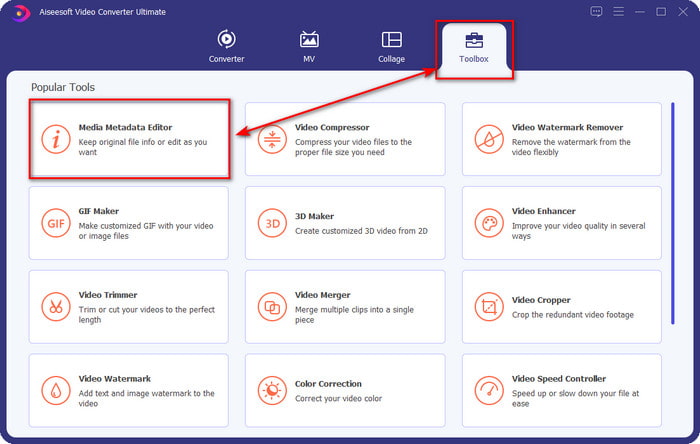
ขั้นตอนที่ 2. เปิดส่วน Toolbox แล้วค้นหา Media Metadata Editor ในรายการเครื่องมือที่จะแสดงด้านล่าง.
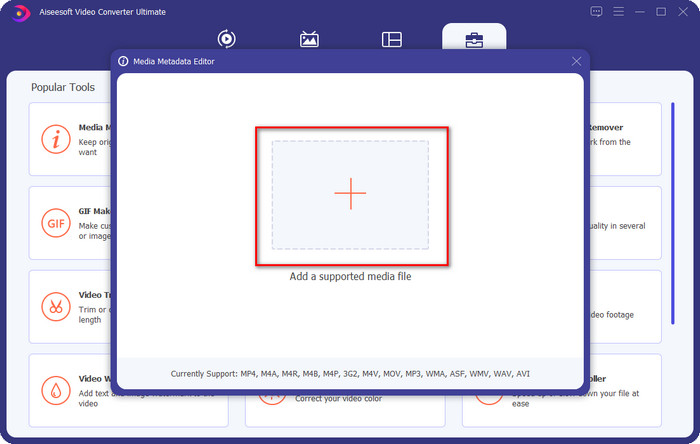
ขั้นตอนที่ 3. เพิ่มไฟล์ WebM โดยคลิกปุ่ม + ค้นหาไฟล์ในตัวจัดการโฟลเดอร์ของคุณ แล้วคลิก Open เพื่อดำเนินการต่อ.
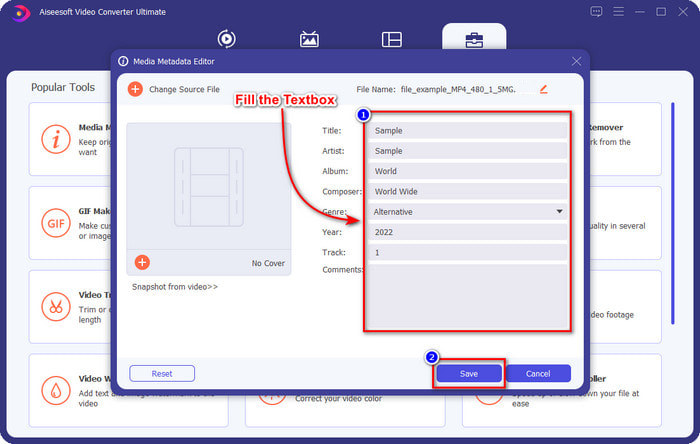
ขั้นตอนที่ 4. พิมพ์ข้อมูลทั้งหมดที่คุณต้องการเพิ่มเป็นแท็กในไฟล์ WebM ของคุณลงในแต่ละช่องข้อความ เมื่อเพิ่มข้อมูลครบทุกอย่างที่ต้องการเป็นแท็กแล้ว ให้คลิก Save ง่ายใช่ไหม นี่คือวิธีเพิ่มข้อมูลเมตาให้กับไฟล์ WebM ด้วยโซลูชันขั้นสุดยอดที่คุณสามารถใช้ได้ทั้งบน Windows และ Mac.
ส่วนที่ 2 วิธีแก้ไขข้อมูลเมตาของ WEBM โดยใช้ซอฟต์แวร์บรรทัดคำสั่งบนเดสก์ท็อป
FFmpeg
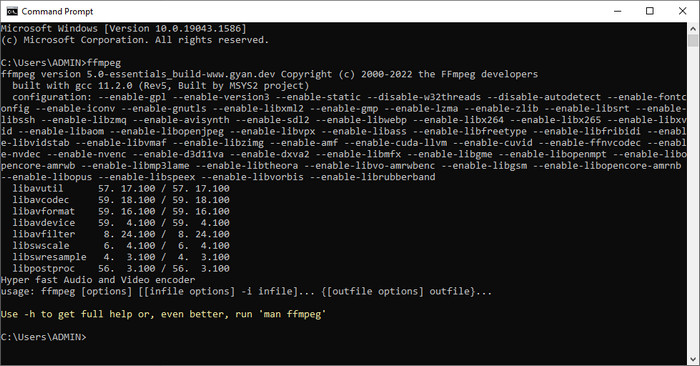
FFmpeg เป็นโซลูชันที่เป็นที่รู้จักสำหรับปัญหาที่เกี่ยวข้องกับสื่อทุกประเภท เช่น การแก้ไขข้อมูลเมตา แตกต่างจากเครื่องมือแรก ตรงที่คุณต้องใช้โค้ดเฉพาะเป็นคำสั่งเพื่อทำงานแต่ละอย่าง เช่น สั่งให้แก้ไขข้อมูลเมตาของไฟล์นั้นด้วยตนเอง แม้ว่าโปรแกรมโอเพนซอร์ซนี้จะใช้หลักการเชิงเทคนิคที่ผู้ใช้บางคนอาจไม่เข้าใจ แต่ก็ยังน่าชื่นชมในความสามารถของตัวแก้ไขนี้ อ่านต่อเพื่อเรียนรู้วิธีแก้ไขข้อมูลเมตาของ WebM โดยใช้หนึ่งในซอฟต์แวร์แบบบรรทัดคำสั่งจากรายการนี้.
ขั้นตอนการแก้ไขแท็ก WebM ด้วย Ffmpeg:
ขั้นตอนที่ 1. ดาวน์โหลดและติดตั้งซอฟต์แวร์ลงบนเดสก์ท็อปของคุณ ค้นหาตำแหน่งของไฟล์ WebM แล้วคัดลอกชื่อไฟล์.
ขั้นตอนที่ 2. คลิกปุ่มWindows พิมพ์คำว่า command prompt ในช่องค้นหา แล้วคลิกเพื่อเปิด จากนั้นคัดลอกโค้ดนี้ ffmpeg -i fileexample.webm -metadata title='samplemetadata' -c copy fileexample.webm ไปวางลงในหน้าต่างพรอมต์.
หมายเหตุ: filexample.webm คือชื่อของไฟล์ webm ที่เราใช้สำหรับงานนี้ เพิ่มชื่อไฟล์ตามชื่อไฟล์ของคุณ
ขั้นตอนที่ 3. กด Enter เพื่อเริ่มกระบวนการและปล่อยให้ซอฟต์แวร์เขียนทับไฟล์ต้นฉบับให้เรียบร้อย.
เครื่องมือ EXIF
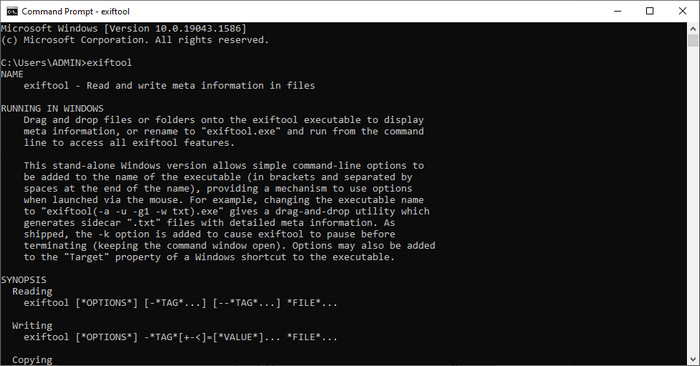
เช่นเดียวกับ FFmpeg EXIF Tool เป็นซอฟต์แวร์ฟรีแบบบรรทัดคำสั่งที่คุณสามารถดาวน์โหลดได้เกือบทุกระบบปฏิบัติการเดสก์ท็อป ด้วยซอฟต์แวร์นี้ คุณสามารถอ่าน แก้ไข และสร้างข้อมูลเมตาในไฟล์ที่มีอยู่ของคุณ ซึ่งไฟล์สื่ออื่น ๆ ไม่สามารถทำให้คุณได้อย่างครบถ้วน ซอฟต์แวร์นี้สามารถแก้ไขแท็กในไฟล์วิดีโอ เสียง รูปภาพ และ PDF เพื่อให้ข้อมูลถูกต้องแม่นยำอย่างแท้จริง ก่อนหน้านี้เราได้บอกไปแล้วว่ามันคล้ายกับ FFmpeg ซึ่งเป็นเรื่องจริง แต่โค้ดของทั้งสองต่างกัน ดังนั้นหากคุณต้องการใช้เครื่องมือนี้ คุณจะต้องเรียนรู้ชุดคำสั่งอีกชุดหนึ่งที่ไม่เกี่ยวข้องกับ FFmpeg ยากไหม เราได้เพิ่มขั้นตอนที่เข้าใจง่ายในการแก้ไขข้อมูลเมตาของ WebM ด้วยเครื่องมือนี้ไว้ให้แล้ว.
ขั้นตอนการแก้ไขแท็ก WebM ด้วย EXIF Tool:
ขั้นตอนที่ 1. ดาวน์โหลดซอฟต์แวร์จากเว็บไซต์ทางการ จากนั้นติดตั้งเพื่อไปยังขั้นตอนถัดไป.
ขั้นตอนที่ 2. เปิดตัวจัดการไฟล์ เลือกไฟล์ แล้วคัดลอกชื่อไฟล์ จากนั้นเปิด CMD แล้วพิมพ์โค้ดนี้ exiftool –common fileexample.webm เพื่อดูข้อมูลพื้นฐานเกี่ยวกับไฟล์ WebM ของคุณ.
หมายเหตุ: CMD เหมือนกับพรอมต์คำสั่ง คุณสามารถค้นหาได้จากหน้าต่างและพิมพ์ CDM
ขั้นตอนที่ 3. เพิ่มโค้ดนี้ในพรอมต์เพื่อเปลี่ยนไฟล์ exiftool -filename='metadtasample' fileexample.mkv แล้วกด Enter เพื่อเริ่มกระบวนการเพิ่มข้อมูลเมตา.
ส่วนที่ 3 คำถามที่พบบ่อยเกี่ยวกับ WebM Metadata Editor
เหตุใดรูปแบบ WebM จึงเป็นที่นิยมสำหรับเว็บไซต์ HTML 5
รูปแบบ WebM เป็นหนึ่งในรูปแบบค่าลิขสิทธิ์ทางเลือกที่เติบโตเร็วที่สุดซึ่งประกอบด้วยองค์ประกอบวิดีโอและเสียง HTML 5 รูปแบบนี้ใช้ตัวแปลงสัญญาณสองแบบคือ VP8 และ VP9 ที่ WebM Project ได้พัฒนาขึ้น
ฉันสามารถรวมไฟล์ WebM ได้หรือไม่
คุณสามารถรวมไฟล์ WebM หลายไฟล์เป็นลำดับเดียวกันก่อนเพิ่มข้อมูลเมตาให้พวกมันได้ ดังนั้นหากคุณต้องการรู้ว่าจะรวมไฟล์ WebM หลายไฟล์ได้อย่างง่ายดายอย่างไร ให้คลิกลิงก์นี้เพื่อดูรายละเอียดเพิ่มเติม.
ไหนดีกว่ากัน? WebM หรือ MP4?
ทั้งสองรูปแบบไฟล์นั้นยอดเยี่ยมในด้านการเก็บวิดีโอในแบบของตัวเอง แต่เป้าหมายการใช้งานต่างกัน แม้ว่า WebM จะเป็นหนึ่งในรูปแบบที่ดีที่สุดสำหรับการแชร์ออนไลน์ แต่ก็ยังมีข้อกังวลเรื่องความเข้ากันได้กับอุปกรณ์บางชนิด หากคุณมีปัญหาเดียวกันกับไฟล์ WebM เราขอแนะนำให้แปลงรูปแบบเป็น MP4 หากต้องการมีเครื่องมือไว้ใช้งานได้สะดวกรวดเร็ว คุณสามารถอ่านเนื้อหาในบทความนี้ได้โดยคลิกที่ลิงก์นี้.
สรุป
ตอนนี้เมื่อเรามีข้อมูลครบถ้วนและได้เรียนรู้วิธีแก้ไขข้อมูลเมตาของ WebM แล้ว ก็ถึงเวลาที่จะเลือกวิธีที่เหมาะสม หากคุณต้องการลองใช้เครื่องมือแบบบรรทัดคำสั่ง FFmpeg และ EXIF Tool คือโซลูชันที่ดีที่สุดในการแก้ไขข้อมูลเมตาของไฟล์ WebM ของคุณ เพียงทำตามบทเรียนที่เราให้ไว้ คุณก็สามารถทำงานได้อย่างรวดเร็ว แต่หากคุณต้องการวิธีที่ง่ายกว่าในการแก้ไขข้อมูลเมตาของ WebM แล้วล่ะก็ FVC Video Converter Ultimate คือเครื่องมือที่ต้องมี หากคุณยังลังเลอยู่ เราขอแนะนำให้ดาวน์โหลดซอฟต์แวร์ลงเดสก์ท็อปแล้วลองใช้งานได้เลยตอนนี้
-
 ตัวเปลี่ยนวันที่ไฟล์ 4 อันดับแรกสำหรับ Windows PC และ Mac [อัปเดต 2022]
 มีปัญหากับการเปลี่ยนแท็กเวลาและวันที่ในไฟล์ของคุณหรือไม่? หากคุณต้องการทราบวิธีการทำ คุณสามารถอ่านบทความนี้ต่อไปเพื่อทราบ
-
 เคล็ดลับและเทคนิคง่ายๆ ในการเพิ่มแท็กลงในไฟล์อย่างง่ายดาย
 ต้องการเพิ่มแท็กบนไฟล์อย่างง่ายดายหรือไม่? บทความนี้จะให้วิธีที่ดีที่สุดและง่ายที่สุดที่คุณสามารถพึ่งพางานนี้ได้อย่างรวดเร็ว
-
 เครื่องมือแก้ไขข้อมูลเมตา FLAC 3 อันดับแรกบน Mac และ Windows [อัปเดต 2022]
 คุณต้องการเปลี่ยนข้อมูลเมตา FLAC หรือไม่ ในกรณีนี้ คุณต้องอ่านบทความนี้ เนื่องจากเราให้ความรู้เพียงพอเกี่ยวกับตัวแก้ไขข้อมูลเมตา FLAC ล่าสุดจึงจะสามารถใช้ได้
