


 Video Converter Ultimate
 บันทึกหน้าจอ
 ซ่อมวิดีโอ
 ดาวน์โหลดอย่างปลอดภัย
เปลี่ยนข้อมูลเมตาของวิดีโออย่างรวดเร็วบน iPhone อย่างมืออาชีพในเวลาไม่ถึงนาที
ทุกวันนี้ การจัดระเบียบไฟล์กลายเป็นสิ่งจำเป็นสำหรับใครหลายคน โดยเฉพาะผู้ใช้ iPhone เราสามารถกำหนดตำแหน่งของไฟล์และจัดระเบียบไฟล์มีเดียในคลังหรือโฟลเดอร์ต่าง ๆ ด้วยการใส่แท็กให้เหมาะสม บางครั้งผู้ใช้ iOS อาจรู้สึกไม่สะดวกเมื่อต้องค้นหาไฟล์บน iPhone ที่มีข้อมูลเมตาไม่ถูกต้อง เพราะทำให้ค้นหาได้ยาก อยากรู้ไหมว่าจะแก้ปัญหานี้ได้อย่างไร? วิธีแก้ปัญหาข้อมูลเมตาบน iPhone ที่เหมาะสมคือการแก้ไขให้ตรงตามที่คุณต้องการ เพื่อให้ไฟล์มองเห็นได้ง่ายและเป็นระเบียบ เรียนรู้และทำความเข้าใจวิธีเปลี่ยนข้อมูลเมตาวิดีโอบน iPhone ได้จากบทความนี้.

ส่วนที่ 1 2 ของแอพที่ดีที่สุดในการเปลี่ยนข้อมูลเมตาของวิดีโอบน iPhone
Metapho – ตัวแก้ไขแท็กวิดีโอและรูปภาพบน iPhone
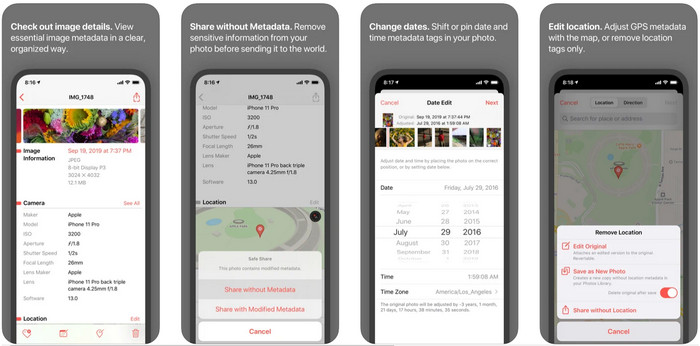
Metapho เป็นหนึ่งในแอปแก้ไขแท็กที่ดีที่สุดที่คุณสามารถดาวน์โหลดมาใช้เพื่อเปลี่ยนข้อมูลเมตาวิดีโอบน iPhone แอปนี้เป็นตัวแก้ไขแบบเรียบง่ายที่ช่วยให้คุณเปลี่ยนวันที่ ชื่อไฟล์ ขนาดไฟล์ รุ่นอุปกรณ์ ความเร็วชัตเตอร์ และตำแหน่งที่ตั้งได้ ด้วยแอปนี้คุณยังสามารถดูข้อมูลเมตาของ Live Photo ทุกภาพที่ถ่าย และแก้ไขได้อย่างถูกต้องหากต้องการ แม้ว่าแอปนี้จะดูน่าใช้ แต่คุณจำเป็นต้องซื้อเวอร์ชันเต็มเพื่อแก้ไขข้อมูลเมตา หากไม่ซื้อคุณจะทำได้เพียงดูข้อมูลเมตาฟรีเท่านั้น แต่ไม่ต้องกังวล เพราะเป็นการซื้อแบบครั้งเดียว ทำให้คุณสามารถใช้งานแอปได้อย่างเต็มที่หลังจากซื้อแล้ว.
ขั้นตอนที่ 1. เปิด App Store แล้วดาวน์โหลด Metapho ลงบน iPhone ของคุณ.
ขั้นตอนที่ 2. เปิดแอป จากนั้นเลือกหนึ่งไฟล์ที่คุณต้องการจากในแอป Photos แล้วแตะเพื่อดำเนินการต่อ จากนั้นจะมีรายการตัวเลือกการแก้ไขแท็กให้คุณเลือก แก้ไขตามที่คุณต้องการ.
ขั้นตอนที่ 3. แตะปุ่ม Save เมื่อคุณแก้ไขแท็กเสร็จแล้ว.
ข้อมูลเมตา Exif – โปรแกรมแก้ไขแท็กภาพถ่ายและภาพถ่ายสดบน iPhone
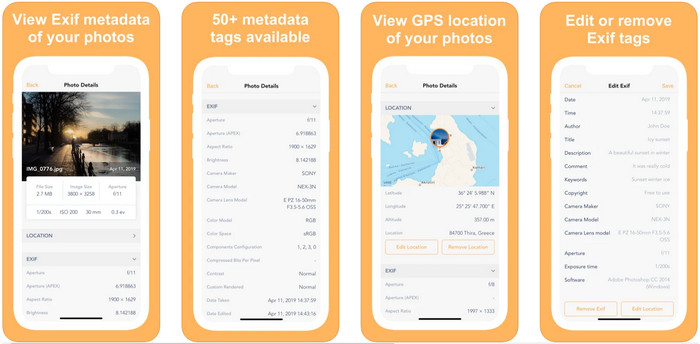
EXIF Metadata ทำงานในแบบที่เครื่องมือแก้ไขข้อมูลเมตาควรทำ เพื่อช่วยให้ผู้ใช้ iPhone แก้ไขแท็กได้ เครื่องมือนี้มีหน้าตาโปรแกรม (GUI) ที่โดดเด่นและดึงดูดสายตามากกว่า Metapho ด้วยแอปนี้ คุณสามารถดูข้อมูลเชิงลึกของรูปภาพได้ฟรี แม้ว่าแอปจะมีเวอร์ชันโปรให้เลือกใช้ แต่ฟังก์ชันการแก้ไขที่คุณต้องใช้ก็มีครบแล้วในเวอร์ชันฟรี หากต้องการเพิ่มข้อมูลเมตาให้ละเอียดขึ้น ก็สามารถอัปเกรดเป็นเวอร์ชันโปรได้ ข้อเสียอย่างหนึ่งของแอปนี้คือรองรับเฉพาะไฟล์รูปภาพเท่านั้น จึงไม่สามารถเปลี่ยนข้อมูลเมตาของวิดีโอได้ ดังนั้น หากคุณต้องการเปลี่ยนข้อมูลเมตาของรูปภาพบน iPhone ให้ทำตามขั้นตอนด้านล่างนี้.
ขั้นตอนที่ 1. ดาวน์โหลดและติดตั้งแอปลงบน iPhone ของคุณ.
ขั้นตอนที่ 2. เปิดแอป แล้วแตะปุ่ม + จากนั้นเลือกแท็กรูปภาพที่คุณต้องการเปลี่ยน.
ขั้นตอนที่ 3. แตะ Edit เพิ่มข้อมูลที่คุณต้องการ แล้วแตะ Save.
ส่วนที่ 2 ตัวแก้ไขข้อมูลเมตาสื่อที่ดีที่สุดสำหรับ Windows & Mac – FVC Video Converter Ultimate
ไม่ใช่ข้อมูลทุกอย่างที่คุณต้องการเปลี่ยนในข้อมูลเมตาจะรองรับบนแอปที่กล่าวถึงข้างต้น หากคุณต้องการเพิ่มข้อมูลบนแท็กให้ละเอียดมากขึ้น เราขอแนะนำให้ใช้โปรแกรมแก้ไขแท็กที่ดีที่สุดบน Windows และ Mac อย่าง FVC Video Converter Ultimate ซอฟต์แวร์นี้ช่วยให้คุณเพิ่มข้อมูลแท็กให้กับไฟล์มีเดียได้ด้วยไม่กี่คลิก ไม่ว่าคุณจะเป็นมืออาชีพหรือมือใหม่ การเพิ่มข้อมูลเมตาลงในไฟล์ก็ไม่ใช่ปัญหาใหญ่เมื่อใช้ซอฟต์แวร์ตัวนี้.
บางทีคุณอาจกังวลว่าไฟล์ของคุณได้รับการสนับสนุนที่นี่หรือไม่ เครื่องมือนี้รองรับรูปแบบมากกว่า 1,000+ และรองรับรูปแบบที่คุณมีอย่างแท้จริง เพื่อให้คุณได้ทราบล่วงหน้าเกี่ยวกับวิธีการเปลี่ยนข้อมูลเมตาของวิดีโอใน iPhone โปรดอ่านข้อมูลโดยละเอียดที่เราสมัครด้านล่างเพื่อปฏิบัติตามเพราะความสำเร็จกำลังมาถึง
ขั้นตอนที่ 1. คลิกปุ่มดาวน์โหลดด้านล่างเพื่อรับเครื่องมือเวอร์ชันสำหรับทั้ง Windows และ Mac จากนั้นคลิกไฟล์ที่คุณดาวน์โหลดมาเพื่อติดตั้งลงในไดรฟ์ แล้วเปิดโปรแกรม.
ดาวน์โหลดฟรีสำหรับ Windows 7 หรือใหม่กว่าดาวน์โหลดอย่างปลอดภัย
ดาวน์โหลดฟรีสำหรับ MacOS 10.7 หรือใหม่กว่าดาวน์โหลดอย่างปลอดภัย
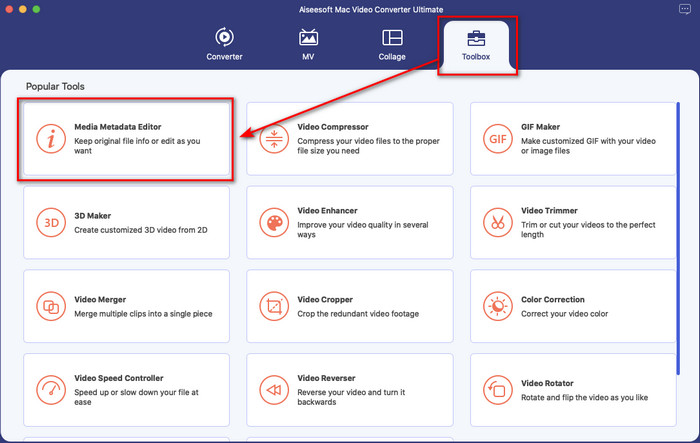
ขั้นตอนที่ 2. ไปที่เมนู Toolbox แล้วเลือก Media Metadata Editor จากชุดฟีเจอร์ที่มี.
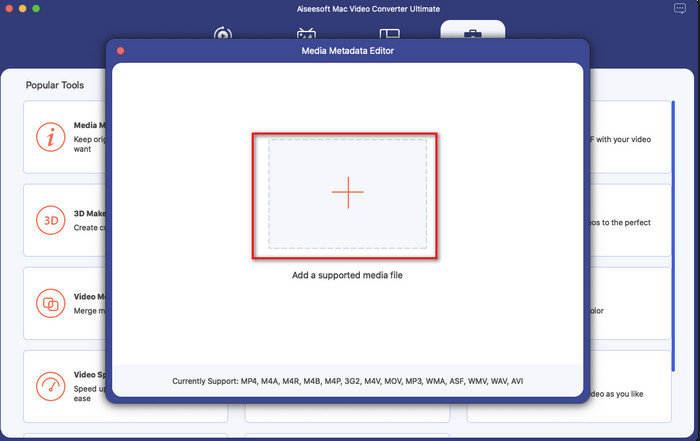
ขั้นตอนที่ 3. กดปุ่ม + แล้วหน้าต่างโฟลเดอร์ไฟล์จะแสดงบนหน้าจอ ค้นหาไฟล์ที่คุณต้องการเพิ่มข้อมูลเมตา จากนั้นคลิก Open เพื่ออัปโหลดไฟล์.
ขั้นตอนที่ 4. ในหน้าต่างใหม่ คุณสามารถแก้ไขหรือลบข้อมูลเมตาของไฟล์ได้ ให้คลิกที่แต่ละช่องข้อความแล้วพิมพ์ข้อมูลที่คุณต้องการใส่เป็นข้อมูลเมตาเพิ่มเติม นอกจากนี้ คุณยังสามารถเพิ่มภาพปกอัลบั้มให้ไฟล์มีเดียได้โดยการกดปุ่ม + จากนั้นค้นหารูปภาพปกในไฟล์แล้วคลิก Open เพื่อแทรก.
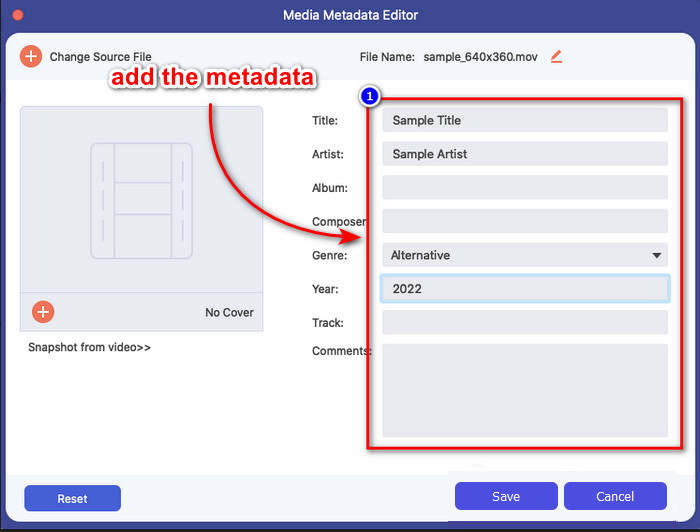
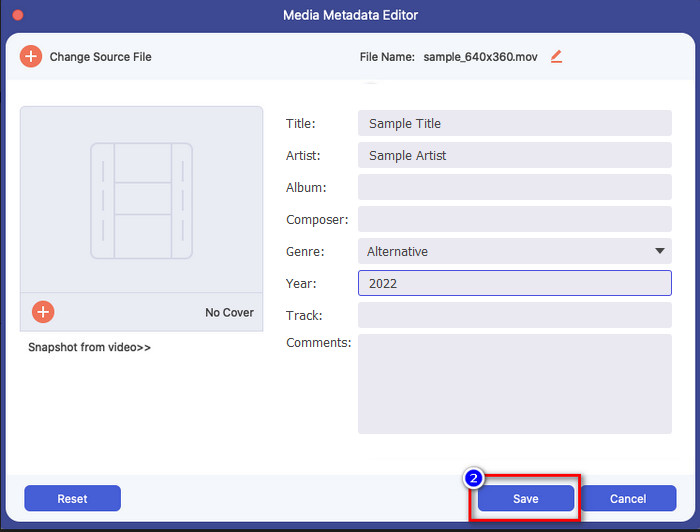
ขั้นตอนที่ 5. เมื่อคุณแก้ไขและเปลี่ยนแปลงไฟล์มีเดียเรียบร้อยแล้ว ให้คลิก Save ทันทีที่ทำเสร็จ คุณก็ได้เปลี่ยนข้อมูลเมตาของไฟล์มีเดียแล้ว ด้วยไม่กี่คลิกง่าย ๆ และความช่วยเหลือจากเครื่องมือนี้ ทุกอย่างก็เป็นไปได้.
ส่วนที่ 3 คำถามที่พบบ่อยเกี่ยวกับตัวแก้ไขข้อมูลเมตาของ iPhone
ฉันสามารถแก้ไขข้อมูลเมตาบน iPhone ได้หรือไม่
ได้ คุณสามารถแก้ไขข้อมูลเมตาบน iPhone ของคุณได้ แต่คุณได้รับอนุญาตให้แก้ไขตำแหน่งและดูแท็กพื้นฐานของไฟล์เท่านั้น แต่จะแก้ไขไม่ได้ หากคุณต้องการเปลี่ยนรายละเอียดข้อมูลเมตาของไฟล์ เราขอแนะนำให้คุณใช้แอปของบุคคลที่สามที่เพียงพอต่อความต้องการของคุณเกี่ยวกับปัญหาข้อมูลเมตาของคุณ
เหตุใดฉันจึงต้องลบข้อมูลเมตา
เราลบข้อมูลเมตาเพื่อปกป้องความเป็นส่วนตัว เพราะบางคนอาจดึงข้อมูลเชิงลึกเกี่ยวกับตัวเราออกมาจากข้อมูลเมตาได้ โดยที่คุณอาจไม่รู้เลยว่าข้อมูลเมตาสามารถเก็บตำแหน่งที่แน่นอน วันที่ เวลา พิกัด ไปจนถึงหมายเลขโทรศัพท์มือถือได้ หากคุณไม่ต้องการให้ข้อมูลส่วนตัวของตัวเองถูกเปิดเผย เราขอแนะนำให้ลบข้อมูลเมตาออกจากไฟล์ของคุณ อยากรู้วิธีทำหรือไม่? หากใช่ บทความนี้จะช่วยคุณลบข้อมูลเมตาออกจากไฟล์ได้ในเวลาไม่ถึงหนึ่งนาที.
เปลี่ยนข้อมูลเมตาบน iPhone ง่ายไหม
ใช่แล้ว การเปลี่ยนข้อมูลเมตาบน iPhone เป็นเรื่องง่ายด้วยความช่วยเหลือของตัวแก้ไขข้อมูลเมตาที่ถูกต้อง แม้ว่างานจะดูค่อนข้างยาก แต่ก็ยังสามารถจัดการได้สำหรับผู้ใช้ทุกคน หากคุณต้องการทราบเครื่องมือที่ดีที่สุดเพื่อทำงานนี้ให้สำเร็จ คุณต้องอ่านข้อมูลเกี่ยวกับเครื่องมือทั้งสองที่เราให้ไว้ข้างต้น เพื่อช่วยให้คุณเสร็จสิ้นการเปลี่ยนแท็กบน iPhone อย่างมืออาชีพ
สรุป
ตอนนี้คุณอ่านมาถึงตอนท้ายแล้ว จะเห็นได้ว่าการเปลี่ยนข้อมูลเมตาวิดีโอบน iPhone นั้นไม่ยากเลย ด้วยความช่วยเหลือจากบทความนี้และความตั้งใจของคุณ ทุกอย่างก็เป็นไปได้ ตอนนี้เหลือเพียงคุณต้องเลือกว่าตัวเลือกไหนเหมาะกับคุณมากที่สุด แม้ว่า FVC Video Converter Ultimate จะยังไม่มีให้ใช้บน iPhone แต่ก็ยังเป็นหนึ่งในซอฟต์แวร์ที่ดีที่สุดบน Mac และ Windows สำหรับการแก้ไขแท็ก เครื่องมือนี้รองรับการเพิ่มข้อมูลเชิงลึกให้กับไฟล์มีเดียของคุณ เพื่อช่วยให้จัดระเบียบและมองเห็นได้ชัดเจนยิ่งขึ้น อยากรู้ฟีเจอร์และฟังก์ชันอื่น ๆ ของซอฟต์แวร์ตัวนี้ไหม? คลิกปุ่มดาวน์โหลดด้านบนเพื่อดูรายละเอียดเพิ่มเติม.
-
 เครื่องมือแก้ไขข้อมูลเมตา FLAC 3 อันดับแรกบน Mac และ Windows [อัปเดต 2022]
 คุณต้องการเปลี่ยนข้อมูลเมตา FLAC หรือไม่ ในกรณีนี้ คุณต้องอ่านบทความนี้ เนื่องจากเราให้ความรู้เพียงพอเกี่ยวกับตัวแก้ไขข้อมูลเมตา FLAC ล่าสุดจึงจะสามารถใช้ได้
-
 วิธีที่ดีที่สุดในการแก้ไขข้อมูลเมตา MKV อย่างมืออาชีพ [ง่าย]
 ไม่รู้ว่าจะแก้ไขข้อมูลเมตาของ MKV ได้อย่างไร? ผู้ใช้บางคนพบว่าการแก้ไขแท็กใน MKV เป็นเรื่องยาก หากคุณเป็นหนึ่งในนั้น โปรดอ่านบทความนี้
-
 เทคนิคที่ดีที่สุดในการแก้ไขข้อมูลเมตาของ WebM อย่างรวดเร็ว
 อ่านรายละเอียดทั้งหมดที่เราให้ไว้ด้านล่างในขณะที่เราแทรกบทช่วยสอนเกี่ยวกับวิธีการแก้ไขข้อมูลเมตาของ WebM คลิกลิงค์นี้เพื่อทราบข้อมูลเพิ่มเติม
