


 Video Converter Ultimate
 บันทึกหน้าจอ
 ซ่อมวิดีโอ
 ดาวน์โหลดอย่างปลอดภัย
5 ตัวแปลง MPEG เป็น DivX ระดับแนวหน้าที่คุณต้องใช้ฟรี
มีตัวแปลงไฟล์ MPEG เป็น DivX แบบออนไลน์และออฟไลน์มากมายให้คุณเลือกใช้ในท้องตลาด อย่างไรก็ตาม โปรแกรมเหล่านี้ไม่ได้มีฟีเจอร์และความสามารถเหมือนกันทั้งหมด ดังนั้นเราจึงคัดสรรตัวแปลงแบบออนไลน์และออฟไลน์ที่ดีที่สุด 5 อันดับมาให้คุณเลือกใช้ เตรียมตัวให้ดี เพราะเราจะมาแนะนำ 5 สุดยอดโปรแกรมแปลง MPEG เป็น DivX ที่สามารถใช้ได้ทั้งบน Windows และ Mac.

ส่วนที่ 1 5 ตัวแปลงออนไลน์และออฟไลน์ที่ดีที่สุดที่คุณต้องไม่พลาด
การมองหาตัวแปลงที่ดีที่สุดในการแปลงไฟล์ MPEG เป็นไฟล์ DivX นั้นค่อนข้างยาก นั่นคือเหตุผลที่เราได้ทำส่วนนั้นให้กับคุณ เราลองใช้ตัวแปลงที่ดีที่สุดที่พบในอินเทอร์เน็ตและได้ออกคำแนะนำด้านล่างนี้
FVC Video Converter Ultimate
แน่นอนว่าตัวแปลงไฟล์นี้ต้องติดอยู่ในลิสต์แน่ ๆ FVC Video Converter Ultimate เป็นหนึ่งในตัวแปลงไฟล์ออฟไลน์ที่มีประสิทธิภาพสูงที่สุดในท้องตลาด นอกจากนี้ โปรแกรมแปลง MPEG เป็น DivX ตัวนี้ยังรองรับรูปแบบไฟล์จำนวนมาก เช่น MPEG, DivX, AVI, MP4, M4V, WMV, WebM, 3GP และอีกกว่า 1000 รูปแบบ และถ้าคุณต้องการแปลงไฟล์ MPEG หลายไฟล์พร้อมกัน โปรแกรมนี้ก็มีฟีเจอร์นั้นให้ใช้เช่นกัน อีกทั้งยังสามารถสร้างไฟล์เอาต์พุตคุณภาพระดับมืออาชีพได้โดยไม่ยุ่งยากในการใช้งานฟีเจอร์เฉพาะตัวของมัน.
ข้อดี
- รองรับรูปแบบไฟล์ที่รู้จักมากกว่า 1,000 รูปแบบ รวมถึง MPEG, DivX, MP4, AVI, MOV, MPG และอื่นๆ
- มีคุณสมบัติที่คุณสามารถปรับสีของวิดีโอได้
- มีกระบวนการแปลงที่รวดเร็วเป็นพิเศษเพื่อให้มีกระบวนการแปลงด้วยความเร็วสูง
- พร้อมใช้งานบนแพลตฟอร์มข้ามสื่อทั้งหมด เช่น Windows และ Mac
จุดด้อย
- ก่อนเข้าถึงคุณสมบัติพิเศษอย่างเต็มรูปแบบ คุณต้องซื้อแอพก่อน
แปลงฟรีเป็น DivX, AVI, WMV, MP4, MPEG Converter
ตัวแปลงไฟล์ออฟไลน์อีกตัวที่คุณสามารถใช้ได้คือ Free Convert to DivX, AVI, WMV, MP4, MPEG Converter โปรแกรมแปลงไฟล์นี้ใช้งานได้ง่ายมาก เหมาะสำหรับผู้เริ่มต้นเพราะมีอินเทอร์เฟซที่เรียบง่าย และยังสามารถแปลงไฟล์ได้อย่างรวดเร็ว อย่างไรก็ตาม มันรองรับเพียงไม่กี่รูปแบบไฟล์ ได้แก่ DivX, AVI, WMV, MP4 และ MPEG เท่านั้น.
ข้อดี
- มันมี GUI ที่เรียบง่ายซึ่งเป็นมิตรกับผู้เริ่มต้น
- คุณสามารถดาวน์โหลดได้ฟรีบน Windows
จุดด้อย
- รองรับรูปแบบไฟล์ที่จำกัด
- คุณต้องซื้อแอปเพื่อเข้าถึงคุณสมบัติพิเศษ
FileProInfo
FileProInfo เป็นตัวแปลงไฟล์ออนไลน์ที่สามารถแปลงไฟล์ MPEG ของคุณเป็น DivX ได้อย่างง่ายดาย ตัวแปลงไฟล์นี้มีส่วนติดต่อผู้ใช้ที่เรียบง่าย ทำให้คุณใช้งานได้ไม่ยาก อย่างไรก็ตาม ภายในเว็บไซต์มีโฆษณารบกวนอยู่มากซึ่งค่อนข้างน่ารำคาญ แต่ถึงอย่างนั้นก็ยังมีคนจำนวนมากเลือกใช้เป็นตัวแปลงไฟล์ออนไลน์อยู่ดี.
ข้อดี
- มีความปลอดภัยในการใช้งาน
- อินเทอร์เฟซซอฟต์แวร์ที่ใช้งานง่าย
- ไม่จำเป็นต้องมีกระบวนการติดตั้ง
จุดด้อย
- มันมีโฆษณารบกวนมากมาย
- คุณอาจพบว่ามีกระบวนการแปลงที่ช้าเนื่องจากขึ้นอยู่กับอินเทอร์เน็ต
ออนไลน์แปลงฟรี
อีกหนึ่งเครื่องมือที่ยอดเยี่ยมในการแปลงไฟล์ MPEG ของคุณเป็นไฟล์ DivX คือ onlineconvertfree เครื่องมือนี้เป็นหนึ่งในตัวแปลงไฟล์ออนไลน์ยอดนิยมที่คุณสามารถพบได้บนเว็บ นอกจากนี้ยังมีอินเทอร์เฟซซอฟต์แวร์ที่เรียบง่าย และรองรับรูปแบบไฟล์มาตรฐานเกือบทั้งหมดที่คุณพบได้บนอินเทอร์เน็ต แม้ว่าในเว็บไซต์จะมีโฆษณาที่อาจสร้างความรำคาญให้คุณก็ตาม และเนื่องจากเป็นบริการบนเว็บ จึงจำเป็นต้องใช้อินเทอร์เน็ตความเร็วสูงเพื่อให้แปลงไฟล์ได้อย่างรวดเร็ว.
ข้อดี
- คุณไม่จำเป็นต้องดาวน์โหลดอะไรเพื่อใช้ตัวแปลงนี้
- มีส่วนต่อประสานผู้ใช้ที่เรียบง่าย
จุดด้อย
- มันมีโฆษณาที่รบกวน
Convertio
และตัวสุดท้ายแต่ไม่ท้ายสุดคือ Convertio Convertio เป็นหนึ่งในตัวแปลงไฟล์ออนไลน์ยอดนิยมที่คุณสามารถพบได้บนเว็บ ตัวแปลงไฟล์ออนไลน์นี้รองรับรูปแบบไฟล์มากกว่า 300 รูปแบบ และรองรับอุปกรณ์เกือบทุกประเภท นอกจากนี้ การใช้งานโปรแกรมนี้ยังมีความปลอดภัยสูงเพราะความเป็นส่วนตัวของคุณได้รับการรับรองแบบ 100% อย่างไรก็ตาม เนื่องจากเป็นตัวแปลงไฟล์ที่ทำงานผ่านเบราว์เซอร์ คุณอาจพบกับกระบวนการแปลงไฟล์ที่ค่อนข้างช้าได้.
ข้อดี
- มี GUI ที่ใช้งานง่าย
- มีการตั้งค่าขั้นสูงเพื่อแก้ไขคุณภาพ อัตราเฟรม และปรับขนาดไฟล์ของคุณ
จุดด้อย
- มีโฆษณาที่อาจรบกวน
- ไฟล์ของคุณจะเสียหายหากอินเทอร์เน็ตของคุณถูกขัดจังหวะ
ส่วนที่ 2 วิธีการแปลง MPEG เป็น DivX โดยใช้ FVC Video Converter Ultimate
เครื่องมือที่ง่ายที่สุดและน่าสนใจกว่าคือ FVC Video Converter Ultimate ตามตัวแปลงที่ระบุไว้ข้างต้น และถ้าคุณอ่านคำอธิบายอย่างละเอียด คุณก็จะตกลงตามนั้น ต่อไปนี้เป็นขั้นตอนในการแปลงโดยใช้ตัวแปลง MPEG เป็น DivX ขั้นสูงสุดโดยไม่ต้องกังวลใจอีกต่อไป
ขั้นตอนที่ 1. ดาวน์โหลดตัวแปลงไฟล์โดยคลิกปุ่ม ดาวน์โหลด ด้านล่างสำหรับ Windows หรือ Mac ทำตามขั้นตอนการติดตั้ง จากนั้นเปิดแอป.
ดาวน์โหลดฟรีสำหรับ Windows 7 หรือใหม่กว่าดาวน์โหลดอย่างปลอดภัย
ดาวน์โหลดฟรีสำหรับ MacOS 10.7 หรือใหม่กว่าดาวน์โหลดอย่างปลอดภัย
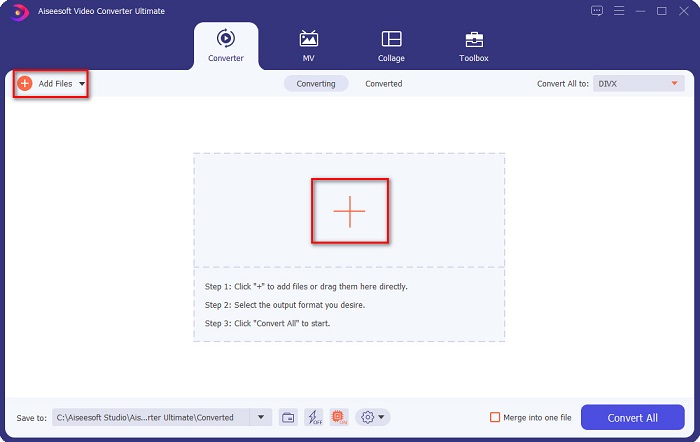
ขั้นตอนที่ 2. หลังจากเปิดแอป อินเทอร์เฟซแรกของซอฟต์แวร์จะปรากฏบนหน้าจอของคุณ บนหน้าอินเทอร์เฟซแรกของซอฟต์แวร์ ให้คลิกปุ่ม Add Files หรือปุ่มสัญลักษณ์ + เพื่ออัปโหลดไฟล์ MPEG ของคุณ.
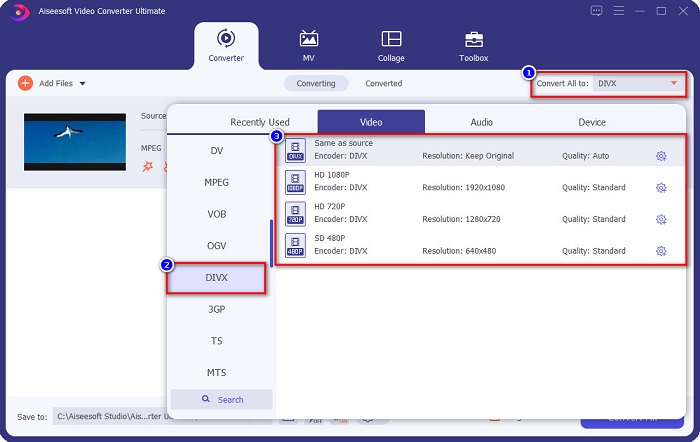
ขั้นตอนที่ 3. จากนั้นคลิกปุ่ม Convert All to เพื่อเลือกรูปแบบเอาต์พุตที่คุณต้องการ แล้วคลิกรูปแบบไฟล์ DivX.
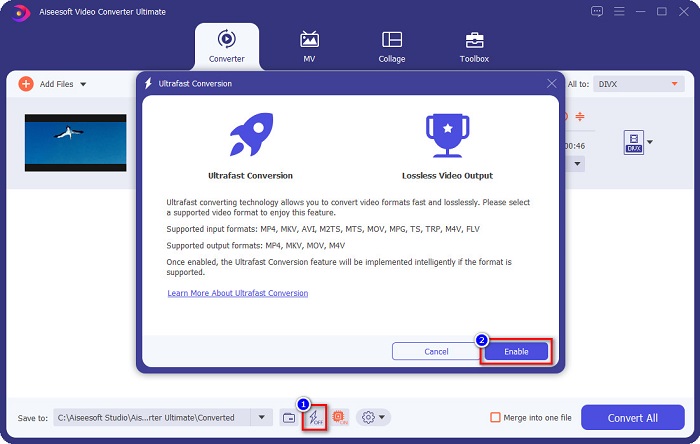
เคล็ดลับ. ติ๊กไอคอนรูปสายฟ้าเพื่อเปิดใช้งานการแปลงความเร็วสูงพิเศษ เพื่อให้ได้ความเร็วการแปลงระดับสายฟ้าแลบ จากนั้นคลิกปุ่ม enable.
ขั้นตอนที่ 4. สุดท้าย คลิกปุ่ม Convert All เพื่อแปลงไฟล์ MPEG ของคุณเป็น DivX เพียงรอสักครู่จนไฟล์ของคุณแปลงเสร็จ แค่นั้นเอง!
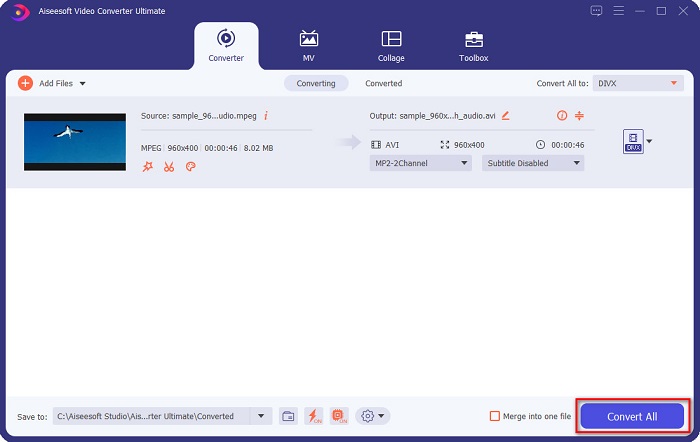
คุณสามารถแปลงไฟล์ MPEG เป็น Divx ได้ง่ายๆ
ส่วนที่ 3 สิ่งที่มองหาในตัวแปลง
การมองหาตัวแปลงที่ดีที่สุดและมาตรฐานนั้นเป็นสิ่งที่ท้าทายที่จะทำ ดังนั้นเราจึงแสดงรายการคุณสมบัติที่คุณต้องพิจารณาในการเลือกตัวแปลง MPEG เป็น DivX ที่ดีที่สุดที่จะใช้
ลักษณะเฉพาะ 1. ปลอดภัยต่อการใช้งาน
ตัวแปลงที่คุณจะใช้ต้องปลอดภัย ดังนั้นเพื่อให้คุณทราบว่าตัวแปลงที่คุณจะใช้นั้นปลอดภัยหรือไม่ ให้ดูข้อมูลเว็บไซต์บนลิงค์ของหน้าเว็บ
ลักษณะเฉพาะ 2. ส่วนต่อประสานผู้ใช้อย่างง่าย
ไม่สะดวกอย่างยิ่งหากอินเทอร์เฟซซอฟต์แวร์ของตัวแปลงนั้นเข้าใจยาก ดังนั้น ควรพิจารณาใช้อินเทอร์เฟซซอฟต์แวร์ที่ใช้งานง่ายเสมอเมื่อเลือกตัวแปลงที่ดีที่สุดที่จะใช้
ลักษณะเฉพาะ 3. กระบวนการแปลงความเร็ว
หลายคนกำลังมองหาตัวแปลงที่มีความเร็วสูงสุดเมื่อต้องแปลงไฟล์ ดังนั้นในการเลือกตัวแปลงที่จะใช้ ให้เลือกตัวแปลงที่สามารถแปลงได้อย่างรวดเร็วโดยไม่ต้องอาศัยความเร็วของอินเทอร์เน็ต ตัวแปลงออฟไลน์มักมีลักษณะนี้
ลักษณะเฉพาะ 4. รูปแบบไฟล์ที่รองรับ
จะไม่มีความหมายหากตัวแปลงที่คุณใช้ไม่รองรับรูปแบบไฟล์ที่คุณต้องการแปลง และตัวแปลงบางตัวไม่รองรับไฟล์หลายรูปแบบ ดังนั้น เลือกตัวแปลงที่สามารถรองรับรูปแบบไฟล์เกือบทั้งหมดที่มี
ส่วนที่ 4 คำถามที่พบบ่อยเกี่ยวกับการแปลง MPEG เป็น DivX
QuickTime รองรับรูปแบบ MPEG หรือไม่
ใช่. หากไฟล์ไม่เสียหายหรือเสียหาย คุณสามารถเล่นไฟล์ MPEG ได้ในโปรแกรมเล่น QuickTime
DivX เป็นรูปแบบไฟล์มาตรฐานหรือไม่
ใช่. DivX เป็นรูปแบบไฟล์ทั่วไปรูปแบบหนึ่งที่มีให้ใช้งานบนเว็บ มันสามารถบีบอัดไฟล์สื่อของคุณและเปลี่ยนตัวแปลงสัญญาณของคุณเป็น DivX โดยไม่กระทบต่อคุณภาพ นอกจากนี้ยังมีคุณภาพวิดีโอที่ยอดเยี่ยมโดยไม่ต้องใช้พื้นที่บนอุปกรณ์ของคุณมากนัก
คุณสามารถแปลงไฟล์ DivX เป็นรูปแบบไฟล์ MOV ได้หรือไม่
มีตัวแปลงไฟล์จำนวนมากที่สามารถแปลงไฟล์ DivX เป็น MOV ได้อย่างแน่นอน แต่ถ้าคุณต้องการทราบวิธีแปลงไฟล์ DivX เป็น MOV ให้ลองอ่านบทความนี้เพื่อเรียนรู้ขั้นตอนแบบทีละขั้นตอน.
สรุป
มีตัวแปลง MPEG เป็น DivX ออนไลน์และออฟไลน์มากมายที่คุณสามารถใช้ได้ อย่างไรก็ตาม มีคุณลักษณะและประสิทธิภาพที่แตกต่างกัน แต่ถ้าคุณต้องการตัวแปลงที่สามารถทำอะไรหลายๆ อย่างกับไฟล์ของคุณ FVC Video Converter Ultimate เป็นเครื่องมือที่ดีที่สุดสำหรับคุณ มีลักษณะทั้งหมดที่นำเสนอข้างต้น และหลายคนใช้ตัวแปลงนี้ ดังนั้น ดาวน์โหลดตัวแปลงนี้เดี๋ยวนี้ และทดลองใช้ฟรี!
-
 เทคนิคที่ดีที่สุด 3 อันดับแรกเกี่ยวกับวิธีการแปลง MPEG เป็น FLV บน PC & Mac
 ต้องการแปลงไฟล์ MPEG เป็นรูปแบบ FLV หรือไม่ หากเป็นกรณีนี้ โปรดอ่านบทความนี้เพื่อทำความเข้าใจวิธีแปลงไฟล์และตัวแปลงใดบ้างที่คุณสามารถใช้ได้
-
 3 วิธีในการแปลง MPEG เป็น WMV โดยไม่สูญเสียคุณภาพ
 คุณต้องการดูวิดีโอของคุณบนเครื่องเล่นที่คุณต้องการ แต่ไม่รองรับรูปแบบวิดีโอใช่หรือไม่ อ่านบทความนี้ในขณะที่เราจัดเตรียมวิธีแปลง MPEG เป็น WMV อย่างมีประสิทธิภาพสูงสุดให้คุณ
-
 ตัวแปลง MPEG เป็น MKV ฟรี 5 อันดับแรกที่มีอยู่ในทุกแพลตฟอร์ม
 ตัวแปลง MPEG เป็น MKV ที่มีอยู่มีอะไรบ้าง ต้องการทราบข้อมูลเพิ่มเติมเกี่ยวกับตัวแปลง MPEG ที่มีอยู่ในแพลตฟอร์มของคุณหรือไม่ บทความนี้เหมาะสำหรับคุณ
