


 Video Converter Ultimate
 บันทึกหน้าจอ
 ซ่อมวิดีโอ
 ดาวน์โหลดอย่างปลอดภัย
รีวิวเกี่ยวกับ Pitch Changer บน Windows, Mac, Online และ Phones
บ่อยครั้งด้วยตัวปรับโทนเสียง (pitch changer) เราสามารถเพิ่มหรือลดโทนเสียงต้นฉบับได้อย่างรวดเร็ว โปรดิวเซอร์ส่วนใหญ่มักใช้ pitch shifter เพื่อเพิ่มเอฟเฟกต์เมโลดี้ ทำให้เพลงออกมาดีกว่าเวอร์ชันดิบของมัน ในทางกลับกัน การซื้อชุดเครื่องมือสำหรับเปลี่ยนโทนเสียงอาจต้องใช้เงินหลายดอลลาร์และต้องใช้เวลาเรียนรู้วิธีใช้งาน ทั้งแพงและเข้าใจยาก แทนที่จะเสียเงินไปกับชุดอุปกรณ์เหล่านั้น ลองใช้ซอฟต์แวร์ที่ช่วยให้คุณเปลี่ยนโทนเสียงของวิดีโอหรือไฟล์เสียงที่คุณมีแทนจะดีกว่าไหม.
จากการตรวจสอบนี้ เราได้รวบรวมแอปและโปรแกรมที่ดีที่สุดสี่แอปที่คุณสามารถใช้เปลี่ยนระดับเสียงได้โดยไม่ต้องใช้เงินมหาศาล อ่านบทความนี้ต่อไปเพื่อทราบว่าเรากำลังพูดถึงอะไร

ส่วนที่ 1 ตัวเปลี่ยนระดับเสียง 4 อันดับแรกที่มีให้ใช้งานบนเดสก์ท็อป ออนไลน์ และอุปกรณ์พกพา
Video Converter Ultimate – โปรแกรมเปลี่ยนระดับเสียงวิดีโอที่ดีที่สุดบน Windows และ Mac
ดาวน์โหลดฟรีสำหรับ Windows 7 หรือใหม่กว่าดาวน์โหลดอย่างปลอดภัย
ดาวน์โหลดฟรีสำหรับ MacOS 10.7 หรือใหม่กว่าดาวน์โหลดอย่างปลอดภัย
โปรแกรมที่รองรับ: Windows และ Mac
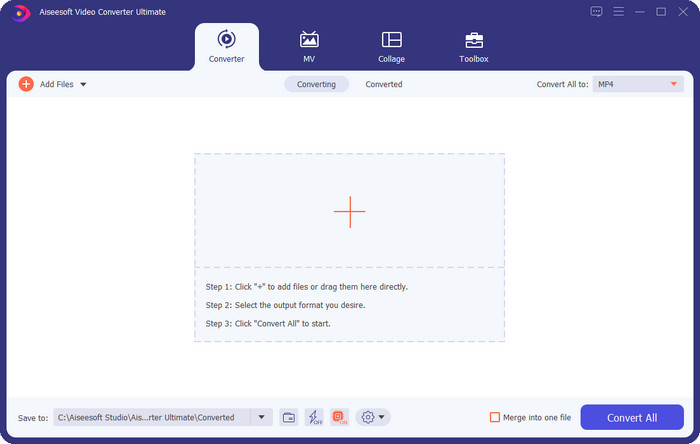
ตัวแรกในรายการของเราคือโปรแกรมเปลี่ยนโทนเสียงวิดีโอที่ดีที่สุดบนระบบปฏิบัติการ Windows และ Mac ของคุณ Video Converter Ultimate เป็นเครื่องมือทรงพลังที่คุณสามารถใช้ปรับแต่งโทนเสียงของไฟล์เสียงได้ด้วยการเพิ่มหรือลดความเร็วของวิดีโอที่คุณมี แตกต่างจากซอฟต์แวร์อื่น ๆ ที่คุณดาวน์โหลดลงเดสก์ท็อปซึ่งทำได้คล้าย ๆ กัน เครื่องมือนี้ไม่ทำให้คุณต้องเสียเวลามากในการเรียนรู้ เพราะใช้งานได้ง่ายตรงไปตรงมา คุณสามารถปรับปรุงโทนเสียงของไฟล์เสียงให้ดีกว่าเวอร์ชันต้นฉบับที่คุณอัดไว้ได้ภายในเวลาไม่ถึงนาที.
นอกจากความสามารถในการเปลี่ยนระดับเสียงแล้ว คุณยังสามารถขยายความดังของเสียงให้มีศักยภาพสูงสุดได้โดยใช้ Volume Booster ใต้กล่องเครื่องมือ ในฟีเจอร์นี้ คุณสามารถเพิ่มหรือลดแอมพลิจูดหรือเกนของเสียงในวิดีโอของคุณได้อย่างรวดเร็วโดยใช้แถบเลื่อน แม้ว่าคุณจะไม่ใช่โปรดิวเซอร์ที่ต้องการทำสิ่งนี้ แต่ก็ยังสนุกและทำได้อย่างรวดเร็วด้วยความช่วยเหลือของเครื่องมือขั้นสูงสุดนี้ที่มีอยู่ใน Windows และ macOS ดังนั้น หากคุณต้องการใช้เครื่องมือขั้นสูงสุดนี้ เราจะแสดงวิธีใช้เครื่องมือนี้ในส่วนที่สองโดยมีขั้นตอนโดยละเอียดซึ่งคุณสามารถทำตามเพื่อให้เสร็จสิ้นได้ภายในเวลาไม่ถึงนาที
Vocal Remover.org
โปรแกรมที่รองรับ: ออนไลน์
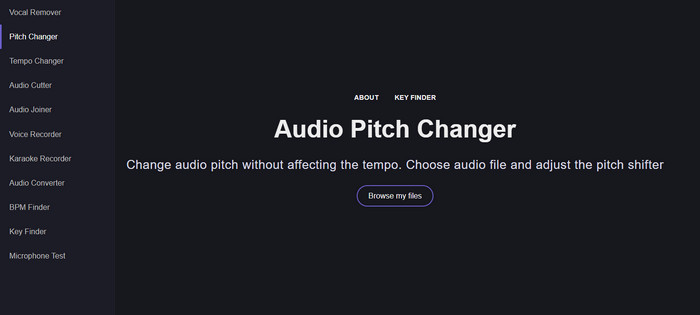
หากคุณต้องการเปลี่ยนโทนเสียงแบบออนไลน์ Vocal Remover.org ก็คือเครื่องมือที่เหมาะอย่างยิ่งในการทำงานนี้ให้สำเร็จ แตกต่างจากเครื่องมือแรก เครื่องมือนี้โดดเด่นด้านการปรับแต่งและเพิ่มคุณภาพเสียง ด้วยเครื่องมือนี้ คุณสามารถเปลี่ยนโทนเสียง (pitch) ของไฟล์เสียงได้อย่างง่ายดาย และตรวจดูได้ว่าตัวเพลงใช้คีย์อะไร นอกจากนี้ยังมีตัวบ่งชี้ที่ช่วยให้คุณเลือกจำนวนเซมิโทนของเสียงได้ ไม่ว่าคุณจะเลือกปรับด้วยตนเองทีละสเต็ปเมื่อเลื่อนแถบสไลด์ ส่วนใหญ่ผู้ใช้ที่เคยใช้เครื่องมือนี้ต่างพอใจกับผลลัพธ์ของเอฟเฟกต์การเปลี่ยนโทนเสียง.
เครื่องมือนี้ใช้งานได้ดี แต่คุณสามารถอัปโหลดได้เฉพาะไฟล์รูปแบบเสียงที่จำกัดที่นี่ และไม่รองรับรูปแบบวิดีโอ การอัปโหลดไฟล์อาจทำให้เครื่องมือค่อนข้างแข็ง เนื่องจากรองรับรูปแบบเสียงเพียงไม่กี่รูปแบบเท่านั้น แม้ว่านี่อาจเป็นปัญหาสำหรับทุกคน แต่เรายังคงถือว่าเครื่องมือนี้เป็นหนึ่งในเครื่องมือออนไลน์ที่ดีที่สุดที่คุณสามารถเข้าถึงได้บนเว็บ แต่ให้แน่ใจว่าคุณเข้าถึงเว็บไซต์ที่ถูกต้องเพื่อหลีกเลี่ยงความยุ่งยากและปัญหาอื่นๆ นอกจากนี้ อย่าลืมมีการเชื่อมต่ออินเทอร์เน็ตที่เสถียร เนื่องจากเครื่องมือนี้จะทำงานได้ดีที่สุดหากอินเทอร์เน็ตของคุณมีสัญญาณแรง
Up Tempo: ระดับเสียง, ตัวเปลี่ยนความเร็ว
โปรแกรมที่รองรับ: Android
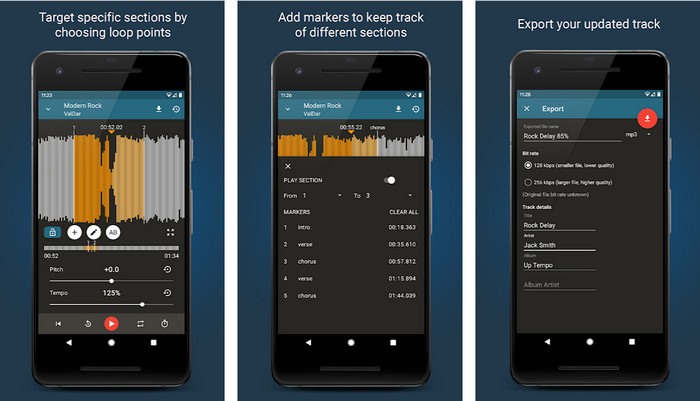
คุณสามารถดาวน์โหลดแอปเปลี่ยนโทนเสียงนี้สำหรับผู้ใช้ Android เพื่อทำงานได้แม้ในเวลาที่ไม่มีคอมพิวเตอร์อยู่ใกล้ตัว ด้วยแอป Up Tempo: Pitch, Speed Changer งานการเปลี่ยนความเร็วการเล่นและโทนเสียงจึงกลายเป็นเรื่องง่ายและทุกคนสามารถจัดการได้ อินเทอร์เฟซ (GUI) ของแอปรองรับการแสดงรูปคลื่นเสียง ซึ่งช่วยให้คุณมองเห็นและเลือกได้ว่าต้องการปรับปรุงหรือเปลี่ยนส่วนไหนของเสียง เช่นเดียวกับเครื่องมือออนไลน์ แอปนี้สามารถจัดการไฟล์เพลงได้ และจะมีประโยชน์มากเมื่อคุณต้องใช้งาน.
แม้ว่าแอปจะดาวน์โหลดฟรี แต่ก็มีบางสิ่งที่คุณต้องพิจารณาหากต้องการใช้แอปนี้ ผู้ใช้ส่วนใหญ่พบว่าแอปตรวจไม่พบไฟล์เสียงใหม่ที่ดาวน์โหลดบนโทรศัพท์ของคุณ หากคุณพบปัญหานี้ ไฟล์นั้นอาจไม่รองรับไฟล์เสียงในแอพนี้ หรืออาจเกิดข้อผิดพลาดขึ้น อย่างไรก็ตาม หากคุณมีโทรศัพท์ Android อยู่ในมือ ให้ดาวน์โหลดแอปนี้และลองดูว่าเป็นแอปที่แก้ปัญหาได้หรือไม่
TimePitch-Pitch, ตัวเปลี่ยนความเร็ว 4+
โปรแกรมที่รองรับ: iOS
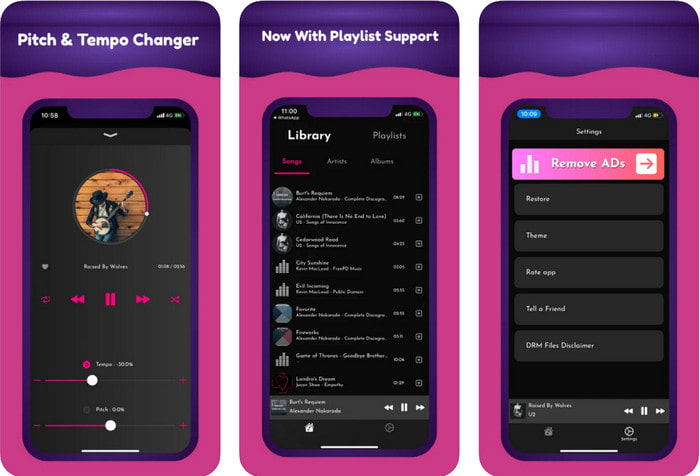
หากคุณเป็นผู้ใช้ iOS คุณควรรู้ว่าแอปเปลี่ยนโทนเสียงนี้สามารถช่วยแก้ปัญหานี้ให้คุณได้ TimePitch-Pitch, Speed Changer 4+ เป็นทั้งเครื่องเล่นเพลง ไลบรารี และตัวเปลี่ยนโทนเสียงที่คุณสามารถใช้บนอุปกรณ์ iOS ของคุณได้ แอปนี้ทำงานต่างจากตัวอื่น เพราะคุณสามารถเปลี่ยนโทนเสียงของไฟล์เสียงที่คุณกำลังฟังอยู่แบบเรียลไทม์ นั่นหมายความว่าเมื่อคุณปรับ โทนเสียงที่เปลี่ยนจะไม่ถูกบันทึกไว้ แต่เรื่องนี้อาจกลายเป็นจุดแข็งของแอป เพราะคุณไม่ต้องรอการประมวลผล เพียงแค่ขยับปรับ คุณก็สามารถเปลี่ยนโทนเสียงให้ตรงกับความชอบได้ทันที.
อย่างไรก็ตาม นี่อาจเป็นจุดอ่อนของมันด้วย หากคุณโอนไฟล์บนอุปกรณ์อื่น ระดับเสียงที่คุณเปลี่ยนโดยใช้แอปนี้จะไม่มีผลกับเครื่องรับ นอกจากนี้ คุณจะต้องจำไว้ว่าหากคุณซื้อเพลงบน iTunes หรือ Apple Music คุณจะไม่สามารถใช้แอพนี้เพื่อเปลี่ยนระดับเสียง ทำไม เนื่องจากไฟล์ที่มีการป้องกันจะไม่อนุญาตให้แอปของบุคคลที่สามเช่นนี้เข้าถึงไฟล์ได้ โดยไม่คำนึงถึงการอัปโหลดไฟล์เพลง เรายังคงรวมแอปนี้ไว้ในบทความนี้เพราะทำงานได้ดีที่สุดบนอุปกรณ์ iOS ทุกเครื่อง
ส่วนที่ 2 วิธีการเปลี่ยนระดับเสียงของวิดีโอโดยใช้ซอฟต์แวร์ Ultimate Pitch Changer
ทำตามขั้นตอนด้านล่างเพื่อทราบวิธีใช้ระดับเสียงสูงต่ำของเพลงนี้และตัวเปลี่ยนความเร็วที่คุณมีบนเดสก์ท็อปได้ ดังนั้น โปรดอ่านรายละเอียดต่อไปนี้หากคุณต้องการคำแนะนำง่ายๆ แต่มีประสิทธิภาพเกี่ยวกับการใช้ซอฟต์แวร์ขั้นสูงสุด
ขั้นตอนที่ 1 กรุณากดปุ่มดาวน์โหลดเพื่อติดตั้งซอฟต์แวร์ตัวเต็มลงบนเดสก์ท็อปของคุณ เลือกว่าใช้โปรแกรม Windows หรือ Mac จากนั้นรอให้ดาวน์โหลดเสร็จ คลิกไฟล์ที่คุณดาวน์โหลดมาแล้วติดตั้งให้เรียบร้อย หลังจากขั้นตอนการตั้งค่าและติดตั้งเสร็จสิ้น ให้เปิดโปรแกรมเพื่อเริ่มใช้งานเครื่องมืออเนกประสงค์นี้.
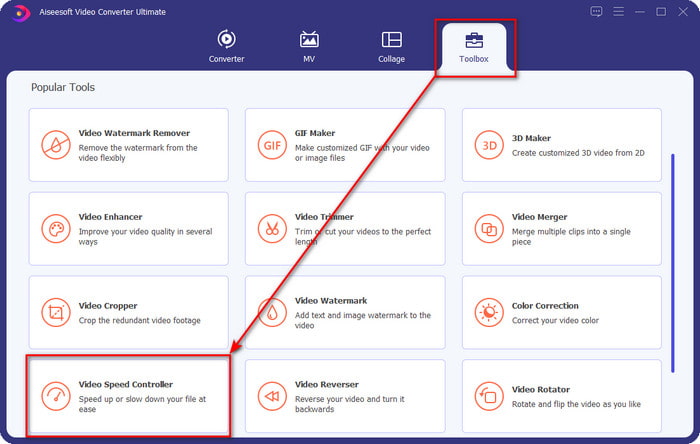
ขั้นตอนที่ 2 เปิดเมนู Toolbox และภายใต้เมนูนั้นให้หา Video Speed Controller แล้วคลิกเพื่อเปิด เลื่อนลงไปด้านล่างเพื่อดูฟีเจอร์ที่อยู่ใกล้ส่วนล่างของหน้า.
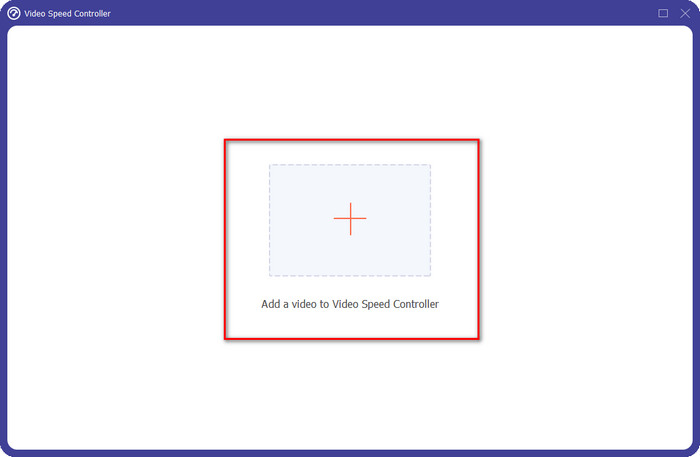
ขั้นตอนที่ 3 หน้าต่างเล็ก ๆ ใหม่จะปรากฏขึ้นบนหน้าจอของคุณ ให้คลิกปุ่ม + จากนั้นค้นหาไฟลว์ิดีโอที่คุณต้องการเปลี่ยนโทนเสียง แล้วคลิก Open เพื่ออัปโหลดไฟล์วิดีโอ.
ขั้นตอนที่ 4 ในส่วนนี้ คุณสามารถเริ่มเปลี่ยนความเร็วเสียงได้แล้ว คุณจะสังเกตได้ว่าโทนเสียงจะเปลี่ยนไปตามความเร็วที่คุณปรับ คุณสามารถได้ยินและดูตัวอย่างได้อัตโนมัติบนหน้าจอตัวอย่าง.
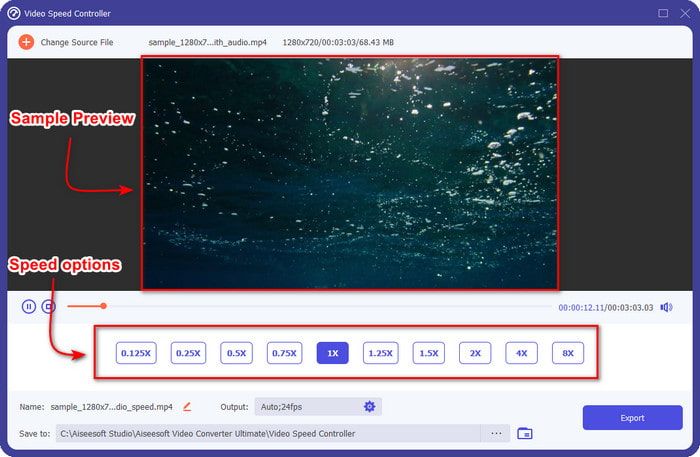
คุณสามารถเล่นตัวอย่างวิดีโอได้ภายใต้ความเร็ว 2x เท่านั้น คุณจะสังเกตเห็นว่า 4x และ 8x จะไม่อนุญาตให้คุณดูตัวอย่างวิดีโอเพื่อหลีกเลี่ยงความขัดแย้ง แต่จะไม่ทำให้คุณภาพของวิดีโอและเสียงลดลง
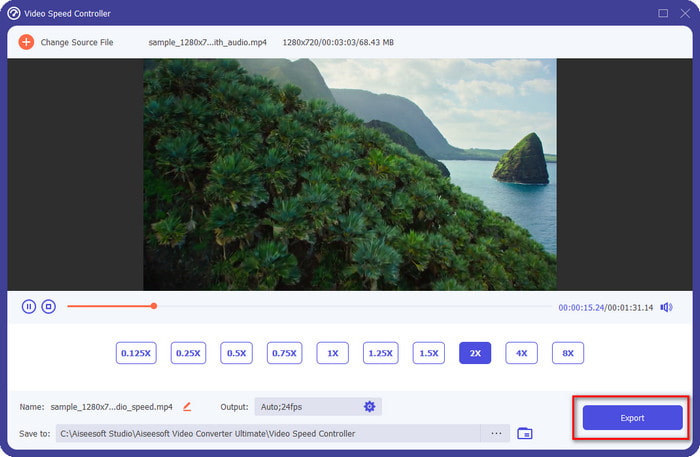
ขั้นตอนที่ 5 หากคุณพอใจกับโทนเสียงที่ได้แล้ว ให้คลิกปุ่ม Export ได้เลย ง่ายใช่ไหมล่ะ? ด้วยความช่วยเหลือของซอฟต์แวร์แบบนี้ คุณก็สามารถจัดการปัญหาวิดีโอและเสียงหลากหลายรูปแบบได้ภายในไม่กี่นาที.
ที่เกี่ยวข้อง:
ส่วนที่ 3 คำถามที่พบบ่อยเกี่ยวกับ Pitch Changer
สนามคืออะไร?
โดยจะประเมินคุณภาพที่สอดคล้องกับเสียงของคุณโดยการวัดค่าในช่วง ไม่ว่าจะสูงหรือต่ำ เป็นคลื่นเสียงที่คล้ายกับความถี่ แต่ไม่เหมือนกัน
ระดับเสียงของมนุษย์สามารถได้ยินได้สูงแค่ไหน?
ยิ่ง Hz ต่ำลง คุณยังคงได้ยินมันอย่างมีสติ แต่มีเพียงไม่กี่คนที่ได้ยินมันเมื่อ Hz สูงเท่านั้น ตามที่นักวิจัย ทุกคนสามารถฟัง 8000 Hz ได้ และถ้าคุณได้ยิน 12,000 Hz แสดงว่าหูของคุณดีพอๆ กับผู้ที่มีอายุต่ำกว่า 50 ปี และอายุต่ำกว่า 40 ปี คุณยังสามารถได้ยิน 15,000 Hz ได้ แต่สำหรับอายุต่ำกว่า 30 ปี อายุปี 16,000 Hz ก็ยังฟังได้นะครับ สำหรับทุกๆ 25 ปีหรือต่ำกว่า คุณจะยังคงได้ยิน 17,000 Hz และสำหรับอายุต่ำกว่า 20 ปี คุณจะได้ยิน 20,000 Hz ยิ่งเราอายุมากขึ้น ระดับเสียงที่เราได้ยินจะมีประสิทธิภาพน้อยลงในบางครั้ง ดังนั้น หากคุณไม่ได้ยินความถี่ที่เราพูดถึง คุณต้องไปพบแพทย์เพื่อตรวจดูว่ามีปัญหาหรือไม่
เราจะคำนวณพิสัยพิทช์ได้อย่างไร?
ช่วงพิทช์ใช้อ็อกเทฟในการคำนวณ ซึ่งช่วยให้นักร้องและเครื่องมือในการพิจารณาว่านั่นเป็นระดับเสียงที่เหมาะสมในเพลงหรือไม่ ด้วยการสั่นสะเทือน คุณจะสังเกตเห็นความถี่สูงและต่ำที่คลื่นเสียงก่อตัวขึ้น
สรุป
ด้วยโปรแกรมเปลี่ยนโทนเสียงวิดีโอและเสียงที่กล่าวมาข้างต้น ตอนนี้เราสามารถปรับโทนเสียงของไฟล์เสียงที่มีอยู่ในมือได้อย่างง่ายดาย แทนที่จะต้องซื้ออุปกรณ์เฉพาะทางเพื่อทำงานนี้ คุณสามารถใช้ซอฟต์แวร์ข้างต้นแทนได้ แม้ว่าพวกมันจะมีความแตกต่างกันด้านฟีเจอร์และการทำงาน แต่เราก็ยังเห็นได้ว่าทุกตัวมีจุดเด่นของตัวเองอย่างไร แต่ถ้าคุณใช้คอมพิวเตอร์ คุณควรดาวน์โหลด Video Converter Ultimate ลงบนเดสก์ท็อป เพราะเครื่องมือนี้ช่วยคุณเปลี่ยนโทนเสียงและทำสิ่ง “มหัศจรรย์” อื่น ๆ เพื่อให้วิดีโอและเสียงของคุณดียิ่งขึ้น อยากรู้ไหมว่าเครื่องมือนี้ทำอะไรพิเศษได้บ้าง? งั้นดาวน์โหลดได้เลยตอนนี้โดยคลิกปุ่มดาวน์โหลดด้านบน.
-
 3 วิธีในการเพิ่มความเร็ววิดีโอบน iPhone [พิสูจน์แล้ว]
 มีปัญหาในการปรับความเร็วในการเล่นวิดีโอของคุณเนื่องจากคุณกำลังใช้ iPhone? นี่เป็นบทความที่ยอดเยี่ยมที่จะช่วยคุณแก้ปัญหา
-
 Windows Media Player | เรียนรู้วิธีเพิ่มความเร็ววิดีโอ [พิสูจน์แล้ว]
 คุณต้องการทำให้คลิปวิดีโอของคุณช้าลงโดยใช้ Windows Media Player แต่กำลังประสบปัญหาเกี่ยวกับวิธีการทำหรือไม่ บทความนี้เหมาะสำหรับการอ่านและสามารถให้ความกระจ่างในมุมมองของคุณเกี่ยวกับวิธีเพิ่มความเร็ววิดีโอโดยใช้ Windows Media Player
-
 วิธีเปลี่ยนวิดีโอสโลว์โมชั่นเป็นความเร็วปกติ [ขั้นตอนง่าย ๆ ]
 ต้องการทราบวิธีการย้อนกลับวิดีโอสโลว์โมชั่นที่คุณดาวน์โหลดจากอินเทอร์เน็ตหรือบันทึกแบบสโลว์โมชั่นโดยไม่ได้ตั้งใจหรือไม่? เรียนรู้วิธีแปลงวิดีโอสโลว์โมชั่นเป็นความเร็วปกติบน Mac, Windows, iOS และ Android
