


 Video Converter Ultimate
 บันทึกหน้าจอ
 ซ่อมวิดีโอ
 ดาวน์โหลดอย่างปลอดภัย
ตัวควบคุมความเร็ววิดีโออันทรงพลัง - DaVinci Resolve Speed Editor
หากคุณต้องการใช้ตัวแก้ไขความเร็ววิดีโอที่ทรงพลัง คุณน่าจะอยากใช้เครื่องมือนี้ DaVinci Resolve Speed Editor เป็นเครื่องมือปรับความเร็ววิดีโอที่ใช้คีย์บอร์ด USB เครื่องมือนี้ให้การควบคุมฮาร์ดแวร์แบบกำหนดเองที่ช่วยให้คุณปรับความเร็ววิดีโอได้อย่างง่ายดาย ดังนั้น หากคุณสงสัยว่าเครื่องมือนี้ทำอะไรได้มากกว่านี้บ้าง โปรดอ่านบทความนี้เพื่อเรียนรู้เพิ่มเติมเกี่ยวกับ DaVinci Resolve Speed Editor.

ส่วนที่ 1 ข้อมูลพื้นฐาน คุณสมบัติ ฟังก์ชัน และราคาของ DaVinci Resolve Speed Editor
บรรณาธิการมืออาชีพจำนวนมากใช้ DaVinci Resolve Speed Editor เพื่อเปลี่ยนความเร็วของวิดีโอของตน และหากคุณเพิ่งเริ่มใช้ DaVinci Resolve Speed Editor คุณก็คงอยากรู้ข้อมูล ฟังก์ชัน และราคาของเครื่องมือนี้ ในส่วนนี้ คุณจะได้รู้ข้อมูลพื้นฐาน ฟังก์ชัน และราคาของ Speed Editor ตัวนี้.
ข้อมูลพื้นฐาน
DaVinci Resolve เป็นแป้นพิมพ์แบบ USB ที่ให้คุณแก้ไขไฟล์ได้ หากคุณต้องการเครื่องมือที่สามารถเปลี่ยนความเร็วของวิดีโอได้ เครื่องมือนี้เหมาะที่สุดสำหรับคุณ DaVinci Resolve เป็นวิธีที่เร็วและง่ายกว่าในการตัดต่อวิดีโอ เป็นมากกว่าแป้นพิมพ์เพราะมีคุณสมบัติการแก้ไขมากมายที่คุณสามารถใช้ได้ รวมถึงตัวแก้ไขความเร็ววิดีโอ การควบคุมแป้นหมุนค้นหา เอฟเฟกต์เพิ่ม/ลบ ซิงค์การเลือกกล้องหลายตัวในถังซิงค์ และอื่นๆ นอกจากนั้น เครื่องมือแก้ไขความเร็วนี้ยังมีเวอร์ชันไร้สายอีกด้วย
เมื่อคุณซื้อแป้นพิมพ์ DaVinci Resolve คุณจะเห็นสาย USB และไฟแสดงสถานะแบตเตอรี่ เมื่อคุณถอดสาย USB ออกจากด้านหลังของอุปกรณ์ บลูทูธจะพยายามจับคู่บนอุปกรณ์ของคุณโดยอัตโนมัติ
นอกจากนี้ หากคุณกำลังขอตัวแก้ไขความเร็วของเครื่องมือนี้ คุณสามารถใช้ปุ่มควบคุม jog wheel ตัวควบคุมการเล่น และแก้ไขและตัดส่วนควบคุมบนคีย์บอร์ดของคุณได้
คุณสมบัติและฟังก์ชัน
หากคุณสงสัยว่าคุณลักษณะและฟังก์ชันของ DaVinci Resolve คืออะไร เราขอนำเสนอคุณลักษณะและฟังก์ชันที่พบบ่อยที่สุดของเครื่องมือนี้ที่ด้านล่าง
Speed Editor
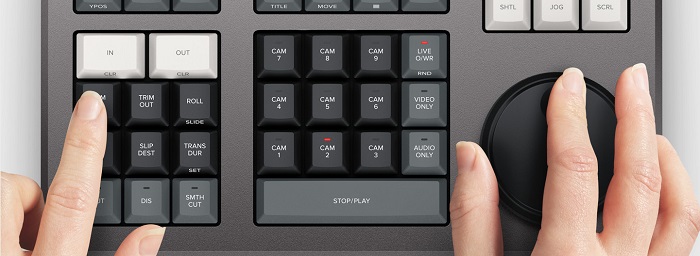
DaVinci Resolve Speed Editor ถูกสร้างมาสำหรับผู้ตัดต่อมืออาชีพที่ต้องการปรับปรุงเอฟเฟกต์ทรานซิชันในวิดีโอของตน โดยใช้ ตัวควบคุมความเร็ววิดีโอ นี้ คุณสามารถทำให้ fps ของวิดีโอช้าลงหรือเร็วขึ้นเพื่อเน้นฉากที่ดีที่สุดของวิดีโอของคุณ มีหลายวิธีในการใช้ DaVinci Resolve เพื่อเร่งความเร็วคลิป ◆ ใช้จุด In และ Out โดยเพียงหมุนแป้นหมุนค้นหา (search dial) แล้ววางจุด In และ Out บนไทม์ไลน์วิดีโอของคุณ จากนั้นไปที่ฟังก์ชันการตัดต่อเพื่อแก้ไขวิดีโอของคุณ ◆ ใช้ปุ่ม Trim in และ Trim out โดยเพียงกดปุ่ม Trim ค้างไว้แล้วหมุนแป้นหมุนค้นหา ตัวบ่งชี้อัจฉริยะ (smart indicator) บนไทม์ไลน์จะช่วยให้คุณเห็นว่ากำลังตัดส่วนใดอยู่.
เพิ่มและลบเอฟเฟกต์.
ด้วย DaVinci Resolve Speed Editor คุณยังสามารถเพิ่มและลบเอฟเฟกต์ในวิดีโอของคุณได้ ตัวบ่งชี้อัจฉริยะบนไทม์ไลน์จะเป็นตัวกำหนดว่าคุณกำลังแก้ไขที่จุดตัดต่อใด กดปุ่ม CUT เพื่อลบเอฟเฟกต์ที่จุดตัดต่อ และหากคุณต้องการใส่เอฟเฟกต์เฟดซ้อนที่จุดตัดต่อบนไทม์ไลน์ ให้กดปุ่ม DIS (dissolve) นอกจากนี้ หากคุณต้องการทรานซิชันแบบตัดต่อเนียน ๆ (smooth cut) ที่จุดตัดต่อ ให้กด SMTH CUT (smooth cut).
สีสัน (Color)
Sync Bin.



ฟังก์ชัน sync bin คือส่วนที่คุณสามารถค้นหาวิดีโอหรือช็อตที่ถูกซิงก์ไว้บนไทม์ไลน์การตัดต่อได้ จากนั้นคุณสามารถใช้ปุ่มกล้อง (camera keys) เพื่อเลือกช็อตทางเลือกและแก้ไขลงบนไทม์ไลน์ของคุณ
ฟังก์ชันนี้ช่วยให้คุณเปลี่ยนคอนทราสต์ อุณหภูมิ เสียงกลาง ความอิ่มตัว และอื่นๆ หน้าสีเป็นหนึ่งในฟังก์ชันที่ได้รับความนิยมมากที่สุดของ DaVinci Resolve และสามารถใช้งานได้ง่ายโดยผู้เริ่มต้น
ระดับเสียงและมาร์ก (Audio Level and Mark)
DaVinci Resolve ยังสามารถปรับเสียงในวิดีโอของคุณได้ด้วย หากต้องการตั้งค่า ระดับเสียง ในคลิปของคุณ ให้กดปุ่มค้างไว้แล้วปรับระดับเสียงด้วยแป้นหมุนค้นหา หากคุณกดปุ่มระดับเสียงสองครั้ง จะเป็นการเพิ่มมาร์กเกอร์ และหากคุณกดปุ่มสองครั้งแล้วกดค้าง จะสามารถตั้งค่าสีของมาร์กเกอร์ได้.
โหมดดูเต็มหน้าจอและรีวิว (Full-Screen Viewer and Review)
เพิ่มทรานซิชัน.
การใช้ปุ่ม Transition จะเพิ่มทรานซิชันแบบกำหนดเองให้กับวิดีโอของคุณ การทำงานคล้ายกับปุ่ม Cut และ Smooth Cut
คีย์นี้ช่วยให้คุณเปลี่ยนผู้ดูให้เป็นแบบเต็มหน้าจอ มีสีแดงเพื่อให้คุณสามารถหาได้ง่าย หากคุณกดปุ่มนี้สองครั้ง จะเป็นการอธิษฐานจากการแก้ไขครั้งล่าสุดของคุณ
Snapper และ Viewer
การกดปุ่ม Snap จะเปิดโหมดสแน็ปบนไทม์ไลน์ของคุณ และหากคุณกดปุ่ม Snap ค้างไว้ จะเป็นการปรับขนาดหน้าต่างแสดงผล (viewer).
Ripple Delete
หากคุณต้องการวิธีที่ง่ายกว่าสำหรับแก้ไขความเร็ววิดีโอ ให้ใช้ FVC Video Converter Ultimate ซอฟต์แวร์นี้ช่วยให้คุณเร่งหรือชะลอความเร็ววิดีโอได้อย่างง่ายดาย ด้วยกระบวนการทำงานที่รวดเร็ว คุณจึงไม่ต้องเสียเวลามากในการปรับความเร็ววิดีโอ นอกจากนี้ ยังมีพรีเซ็ตความเร็วให้เลือกหลายแบบสำหรับวิดีโอของคุณ และหากคุณสงสัยว่ายังทำอะไรได้อีก เครื่องมือนี้มีฟีเจอร์ตัดต่อมากมาย เช่น ตัวบีบอัดเสียง (audio compressor) ตัวบีบอัดวิดีโอ (video compressor) ตัวแก้ไขเมทาดาทาวิดีโอ และอื่น ๆ อีกทั้งยังรองรับรูปแบบไฟล์หลากหลาย เช่น MP4, MKV, MOV, AVI, FLV, WMV และมากกว่า 1000 รูปแบบ หากต้องการรู้เพิ่มเติมเกี่ยวกับซอฟต์แวร์นี้ โปรดอ่านคำอธิบายด้านล่าง.
ข้อดีของการใช้ FVC Video Converter Ultimate:
Ripple delete ช่วยให้คุณสามารถลบคลิปในจุดเล่น มันทำให้ไทม์ไลน์กระเพื่อมเพื่อลบช่องว่างระหว่างสองคลิป Ripple delete เป็นวิธีที่ดีในการลดระยะเวลาในไทม์ไลน์ของวิดีโอของคุณ
ราคา
คุณสามารถซื้อ DaVinci Resolve Speed Editor สำหรับ $395 และหากคุณกำลังมองหาเวอร์ชันซอฟต์แวร์ของเครื่องมือนี้ คุณสามารถดาวน์โหลดได้ฟรีบน Windows, Mac และ Linux อย่างไรก็ตาม เวอร์ชันซอฟต์แวร์ของเครื่องมือนี้ใช้งานได้ยาก
ทางเลือกสำหรับ DaVinci Resolve Video Speed Editor
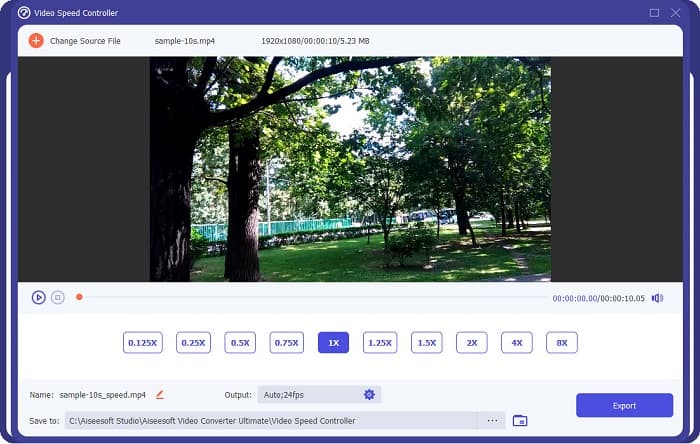
คำถามทั้งหมดของคุณเกี่ยวกับ DaVinci Resolve Video Speed Editor ได้รับคำตอบแล้ว ด้วยเครื่องมือสำหรับปรับความเร็ววิดีโอโดยเฉพาะ คุณสามารถทำให้วิดีโอช้าลงหรือเร็วขึ้น และสร้างทรานซิชันที่สวยงามได้อย่างง่ายดาย แต่หากคุณกำลังมองหาเครื่องมือที่สะดวกและใช้งานง่ายกว่า ลองใช้ FVC Video Converter Ultimate ฟรีได้เลย!.
Advantages of using FVC Video Converter Ultimate:
1. มีส่วนต่อประสานกับผู้ใช้ที่ใช้งานง่าย
2. ช่วยให้คุณสามารถเปลี่ยนความเร็ววิดีโอของคุณได้จาก 0.125x, 0.50x, 0.75x, 1.25x, 1.5x, 2x, 4x และ 8x ความเร็วที่ตั้งไว้ล่วงหน้า
3. มีคุณสมบัติการแก้ไขขั้นสูงมากมายที่จะใช้ เช่น ตัวตัดวิดีโอ การรวมวิดีโอ ตัวสร้าง 3 มิติ และอื่นๆ
4. พร้อมใช้งานบนแพลตฟอร์มสื่อทั้งหมด รวมทั้ง Windows, Mac และ Linux
ส่วนที่ 2 คำถามที่พบบ่อยเกี่ยวกับ DaVinci Resolve Video Speed Editor
DaVinci Resolve Video Speed Editor คุ้มหรือไม่
ด้วยราคาของมัน เครื่องมือแก้ไขความเร็ววิดีโอนี้จึงคุ้มค่าที่จะใช้เพราะสามารถให้ผลลัพธ์ที่มีคุณภาพดีเยี่ยมและมีคุณสมบัติการแก้ไขมากมายที่จะใช้
DaVinci Video Speed Editor เข้ากันได้กับรูปแบบใด ๆ หรือไม่?
ไม่รองรับรูปแบบไฟล์ทั้งหมด อย่างไรก็ตาม รองรับไฟล์ได้หลายรูปแบบ รวมถึง MOV, MXF, DNG, DCP, ARI, MTS เป็นต้น
DaVinci Resolve Video Speed Editor มีเวอร์ชันฟรีหรือไม่?
DaVinci Resolve Video Speed Editor มีรุ่นทดลองใช้ฟรีในระยะเวลาจำกัดเท่านั้น หากต้องการใช้งานตลอดชีวิต ให้ซื้อเครื่องมือสำหรับ $395
สรุป
All your queries about DaVinci Resolve Video Speed Editor are now answered. With the tool meant for video speed editor, you can easily slow down or speed up your video and create beautiful transitions with this tool. But, if you are searching for a more convenient tool and easier to use, try FVC Video Converter Ultimate for free!
-
 วิธีกรอวิดีโอบน iPhone อย่างเร็ว – ปรับความเร็ววิดีโอ
 ฉันจะกรอวิดีโอบน iPhone ของฉันอย่างรวดเร็วได้อย่างไร วิธีกรอวิดีโอบน iPhone โดยใช้ iMovie อย่างรวดเร็ว เรียนรู้ 3 วิธีในการเร่งความเร็ววิดีโอบนอุปกรณ์ iPhone และ iPad
-
 วิธีเพิ่มความเร็ววิดีโอใน Premiere Pro และทางเลือกอื่น
 คุณต้องการทราบวิธีใช้ Premiere Pro เพื่อเพิ่มความเร็ววิดีโอหรือไม่? ถ้าอย่างนั้นคุณก็มาถูกบทความแล้ว เพราะเรามีขั้นตอนและทางเลือกอื่นๆ ในราคาที่เอื้อมถึง
-
 2 วิธีง่ายๆ ในการเร่งความเร็ววิดีโอบน TikTok
 คุณต้องการทราบเคล็ดลับในการเร่งความเร็ววิดีโอบน TikTok หรือไม่? จากนั้นอ่านบทความนี้เพื่อให้มีแนวคิดในการทำและรู้ว่าเครื่องมืออีก 2 อย่างจะช่วยคุณได้อย่างไร
