


 Video Converter Ultimate
 บันทึกหน้าจอ
 ซ่อมวิดีโอ
 ดาวน์โหลดอย่างปลอดภัย
วิธีง่ายๆในการลบ Coub Watermark ออนไลน์และออฟไลน์
Coub เป็นเว็บไซต์ที่ใช้สำหรับแชร์วิดีโอออนไลน์ เป็นเว็บไซต์ยอดนิยมที่ผู้ใช้ใช้สร้างและแชร์วิดีโอที่มีความยาวได้สูงสุดสิบวินาที แตกต่างจาก GIF ตรงที่วิดีโอของ Coub มีเสียงคุณภาพสูง ทำให้เป็นที่นิยมในหมู่ผู้ใช้จำนวนมาก อย่างไรก็ตาม เมื่อคุณบันทึกหรือดาวน์โหลดวิดีโอจาก Coub วิดีโอจะมีลายน้ำติดมาด้วย ดังนั้น หากคุณต้องการลบลายน้ำ Coub คุณจำเป็นต้องใช้เครื่องมือที่สามารถลบลายน้ำได้ บทความนี้จะแนะนำเครื่องมือที่ยอดเยี่ยมที่สุดที่จะช่วยให้คุณลบลายน้ำ Coubออกจากวิดีโอของคุณได้อย่างง่ายดาย.

ส่วนที่ 1 4 วิธีในการลบ Coub Watermark
ตอนนี้หลายคนสนใจที่จะรับชมและดาวน์โหลดวิดีโอ Coub ทางออนไลน์ แต่เมื่อคุณดาวน์โหลดวิดีโอจาก coub จะมีลายน้ำ คุณจะรู้วิธีลบลายน้ำ Coub โดยใช้สี่วิธีง่ายๆ เหล่านี้
FVC Video Converter Ultimate
FVC Video Converter Ultimate เป็นโปรแกรมเดสก์ท็อปที่สามารถลบลายน้ำทุกชนิดออกจากวิดีโอของคุณ เครื่องมือนี้ใช้งานง่ายเพราะมีอินเทอร์เฟซที่เรียบง่ายและดาวน์โหลดได้ไม่ยาก นอกจากนี้ คุณยังไม่ต้องกังวลเรื่องรูปแบบไฟล์ที่รองรับ เพราะรองรับไฟล์วิดีโอหลากหลายรูปแบบ เช่น MP4, MKV, AVI, MOV, M4V, WEBM, FLV และมากกว่า 1000 รูปแบบ.
นอกจากนี้ยังมีคุณสมบัติการแก้ไขขั้นสูง รวมถึงตัวแก้ไขข้อมูลเมตาของสื่อ การควบรวมวิดีโอ ตัวบีบอัดวิดีโอ และอื่นๆ จากกล่องเครื่องมือ และเมื่อคุณลบลายน้ำออกจากวิดีโอ คุณจะกำหนดขนาดของพื้นที่ที่จะลบได้ คุณยังจะได้เห็นวิดีโอตัวอย่างไฟล์ของคุณเพื่อที่คุณจะได้ตรวจสอบผลลัพธ์ของวิดีโอของคุณ หากคุณต้องการใช้ตัวแปลงนี้เพื่อลบลายน้ำ Coub ให้ทำตามขั้นตอนด้านล่าง
ขั้นตอนที่ 1. ดาวน์โหลด FVC Video Converter Ultimate บนเดสก์ท็อปของคุณโดยคลิกปุ่ม Download ด้านล่าง จากนั้นทำตามขั้นตอนการติดตั้งและเปิดโปรแกรม.
ดาวน์โหลดฟรีสำหรับ Windows 7 หรือใหม่กว่าดาวน์โหลดอย่างปลอดภัย
ดาวน์โหลดฟรีสำหรับ MacOS 10.7 หรือใหม่กว่าดาวน์โหลดอย่างปลอดภัย
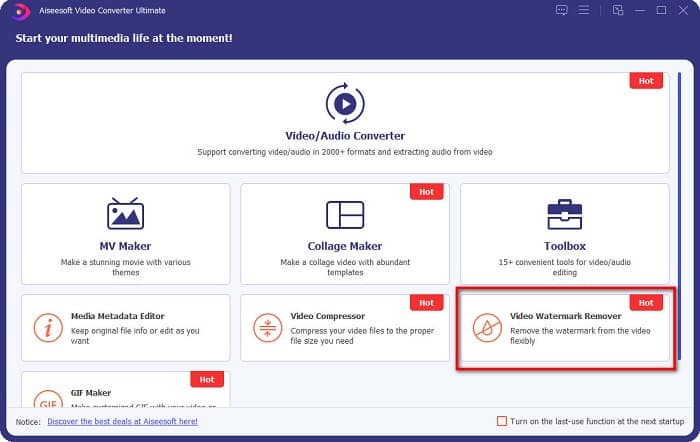
ขั้นตอนที่ 2. จากนั้น บนอินเทอร์เฟซแรกของซอฟต์แวร์ ให้ไปที่ Video Watermark Remover ถ้าคุณหาไม่เจอบนอินเทอร์เฟซแรก ให้คลิกที่ Toolbox.
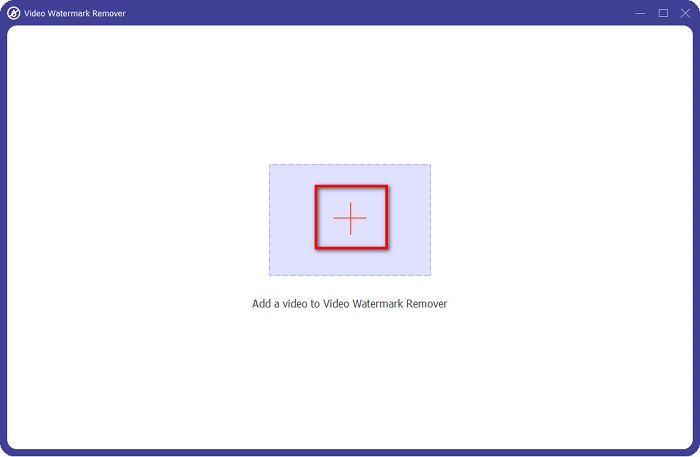
ขั้นตอนที่ 3. คลิกปุ่มสัญลักษณ์ + เพื่ออัปโหลดวิดีโอ coub บนอินเทอร์เฟซถัดไป จากนั้นจะมีหน้าต่างไฟล์คอมพิวเตอร์เด้งขึ้นมา ให้คุณเลือกวิดีโอและคลิก Open.
ขั้นตอนที่ 4. ต่อไป คลิกปุ่ม Add watermark removing area เพื่อให้พื้นที่สำหรับลบลายน้ำปรากฏขึ้น จากนั้นย้ายกรอบพื้นที่ลบไปวางทับบนลายน้ำ coub คุณจะเห็นว่าบริเวณที่เลือกจะเบลอ.
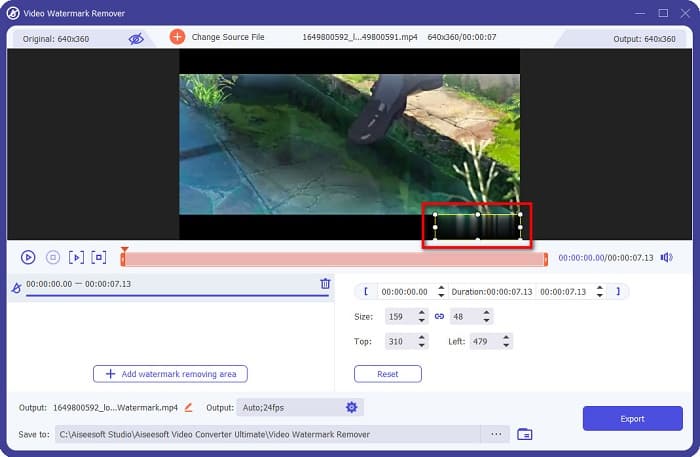
ขั้นตอนที่ 5. ท้ายสุด คลิกปุ่ม Export เพื่อลบลายน้ำ Coub แล้วไฟล์ผลลัพธ์ของคุณจะถูกบันทึกลงในโฟลเดอร์บนคอมพิวเตอร์โดยอัตโนมัติ.

ง่ายใช่ไหม? เพียงทำตามขั้นตอนง่าย ๆ ด้านบน คุณก็สามารถลบลายน้ำ coub บนวิดีโอของคุณได้แล้ว คลิกที่นี่เพื่อเรียนรู้วิธีลบลายน้ำ TikTok.
น้ำยาล้างลายน้ำ Hitpaw
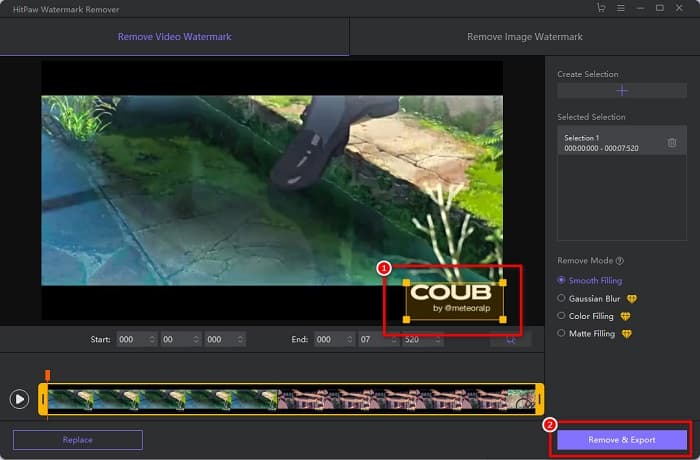
Hitpaw Watermark Remover เป็นหนึ่งในโปรแกรมลบลายน้ำแบบดาวน์โหลดที่ได้รับความนิยม ซึ่งช่วยให้คุณลบลายน้ำ coub ออกจากวิดีโอได้อย่างง่ายดาย หากคุณต้องการวิดีโอ Coub แบบไม่มีลายน้ำ คุณสามารถใช้เครื่องมือนี้เพื่อลบออกได้ อีกทั้งเครื่องมือนี้ยังมีอินเทอร์เฟซที่เรียบง่าย ทำให้ใช้งานได้ไม่ยุ่งยาก.
การลบลายน้ำบนบางส่วนของวิดีโอจะเป็นเรื่องง่ายสำหรับคุณด้วยการเลื่อนแถบเลื่อน ยิ่งไปกว่านั้น คุณยังสามารถเติมน้ำได้เรียบเนียนเมื่อเอาลายน้ำออก นอกจากนี้ยังสามารถดาวน์โหลดได้ฟรีบนอุปกรณ์สื่อเกือบทั้งหมด
ขั้นตอนที่ 1. ก่อนอื่น ดาวน์โหลด Hitpaw Watermark Remover ทำตามขั้นตอนการติดตั้ง แล้วเปิดโปรแกรม.
ขั้นตอนที่ 2. จากนั้น คลิกปุ่ม Choose File บนอินเทอร์เฟซหลักของซอฟต์แวร์เพื่ออัปโหลดวิดีโอ coub ของคุณ จะมีหน้าต่างไฟล์คอมพิวเตอร์เด้งขึ้นมาเพื่อให้คุณเปิดวิดีโอ coub.
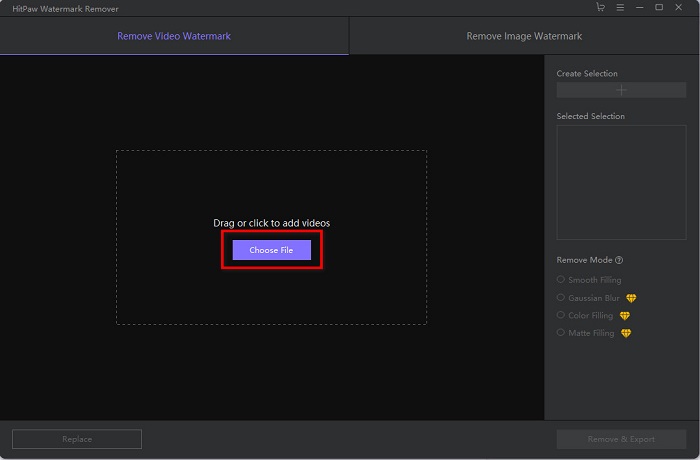
ขั้นตอนที่ 3. เลื่อนพื้นที่ลบไปยังตำแหน่งลายน้ำ coub จากนั้นคลิกปุ่ม Remove & Export ที่มุมขวาล่างของอินเทอร์เฟซเพื่อทำการลบลายน้ำอย่างถาวร.
Media.io
Media.io เป็นเครื่องมือลบลายน้ำวิดีโอแบบออนไลน์ เครื่องมือนี้สามารถลบลายน้ำต่าง ๆ ได้ เช่น โลโก้ ตัวอักษร และตราประทับ หากนี่เป็นครั้งแรกที่คุณใช้ตัวลบลายน้ำ คุณก็จะไม่ยุ่งยากกับการใช้งานเครื่องมือตัวนี้เพราะใช้งานง่าย นอกจากนี้ ยังรองรับรูปแบบวิดีโอยอดนิยม เช่น MP4, MKV, AVI, FLV, MOV และอื่น ๆ อีกมากมาย คุณยังสามารถเลือกไฟล์วิดีโอจาก Dropbox, Google Drive และ Youtube ได้อีกด้วย อีกทั้งยังปลอดภัยและใช้ฟรี Media.io สามารถเข้าใช้งานได้บนทุกเบราว์เซอร์ เช่น Google, Firefox และ Safari.
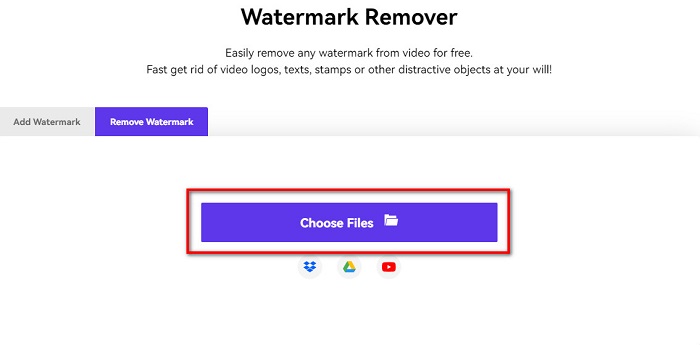
ขั้นตอนที่ 1. บนเบราว์เซอร์ที่คุณใช้งาน ให้ค้นหา Media.io แล้วไปที่หน้าเว็บของพวกเขา จากนั้นบนอินเทอร์เฟซหลักของเครื่องมือ ให้คลิกปุ่ม Choose Files.
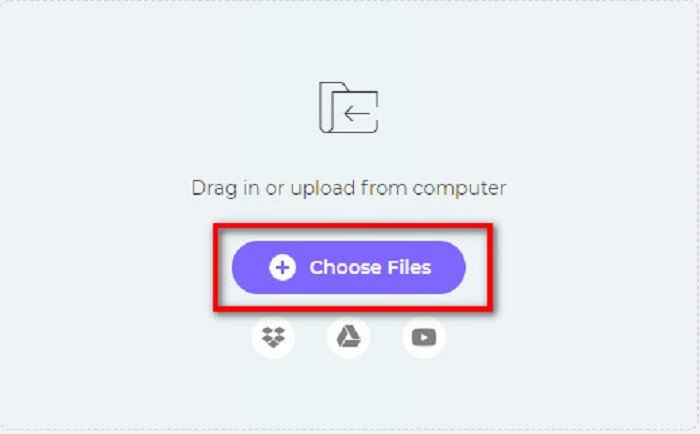
ขั้นตอนที่ 2. จะมีอินเทอร์เฟซใหม่เด้งขึ้นมา ให้คุณคลิกปุ่ม Choose Files หรือจะลากและวางวิดีโอ Coub ของคุณลงบนอินเทอร์เฟซของเครื่องมือก็ได้ รอให้วิดีโออัปโหลดเสร็จ จากนั้นจึงไปยังขั้นตอนถัดไป.
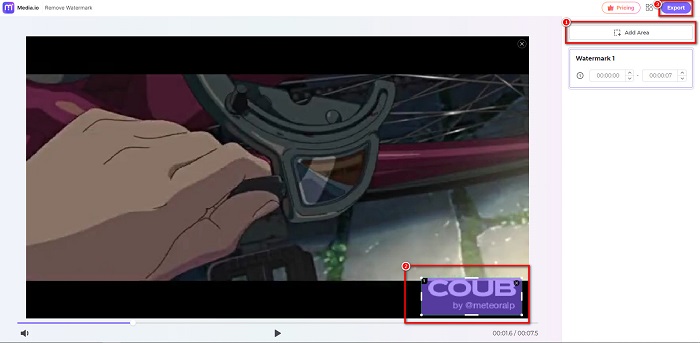
ขั้นตอนที่ 3. จากนั้น คลิก Add Area ที่มุมซ้ายของอินเทอร์เฟซ แล้วเลื่อนพื้นที่ลบไปบนลายน้ำ coub คลิกปุ่ม Export เพื่อลบลายน้ำ แล้วไฟล์ของคุณจะถูกบันทึกลงในอุปกรณ์โดยอัตโนมัติ คุณยังสามารถใช้วิธีนี้เพื่อลบลายน้ำบนวิดีโอได้ด้วย.
บีคัท
BeeCut เป็นอีกหนึ่งวิธีในการลบลายน้ำ Coub แบบออนไลน์ เครื่องมือนี้สะดวกมากเพราะคุณไม่จำเป็นต้องดาวน์โหลดอะไรลงบนอุปกรณ์ นอกจากนี้ยังใช้ฟรีและปลอดภัยต่อการใช้งาน ที่น่าสนใจก็คือเครื่องมือนี้รองรับไฟล์วิดีโอหลากหลายรูปแบบ รวมถึง MP4, AVI, MKV, FLV และรูปแบบยอดนิยมอื่น ๆ.
นอกจากนี้ยังเป็นเครื่องมือที่เป็นมิตรกับผู้เริ่มต้นเนื่องจากมีอินเทอร์เฟซผู้ใช้ที่ใช้งานง่าย อย่างไรก็ตาม คุณอาจประสบกับกระบวนการทำงานที่ช้าเมื่อการเชื่อมต่ออินเทอร์เน็ตของคุณช้าเนื่องจากขึ้นอยู่กับอินเทอร์เน็ต หากต้องการลบลายน้ำ coub โดยใช้ BeeCut ให้ทำตามคำแนะนำง่ายๆ ด้านล่าง
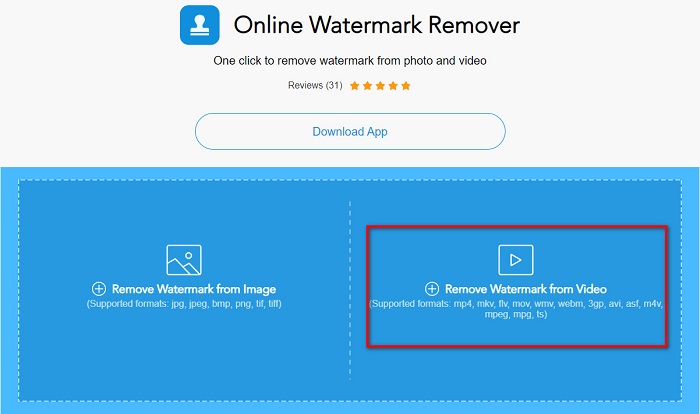
ขั้นตอนที่ 1. ค้นหา BeeCut บนเบราว์เซอร์ของคุณ จากนั้นคลิก Remove Watermark from Video บนอินเทอร์เฟซหลักของเครื่องมือ อัปโหลดวิดีโอของคุณโดยเปิดจากไฟล์ในคอมพิวเตอร์.
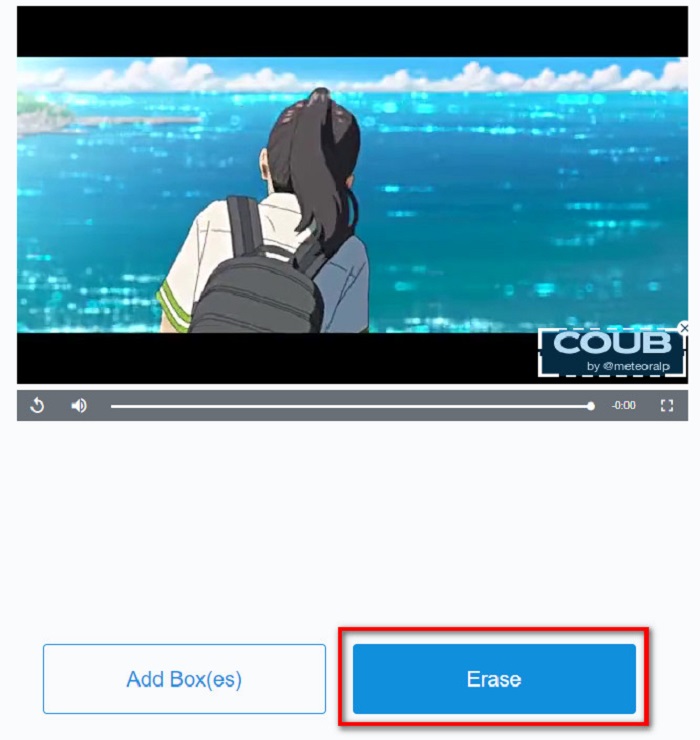
ขั้นตอนที่ 2. บนอินเทอร์เฟซถัดไป ให้เลื่อนพื้นที่ลบไปยังลายน้ำ coub ที่คุณต้องการลบ และหากมีลายน้ำ โลโก้ หรือสัญลักษณ์อื่น ๆ บนวิดีโอ คุณสามารถเพิ่มกล่องลบอีกอันได้โดยคลิก Add Box(es).
ขั้นตอนที่ 3. สุดท้ายให้คลิกปุ่ม Erase เพื่อลบลายน้ำ coub บนวิดีโอของคุณ ผลลัพธ์จะถูกบันทึกลงในโฟลเดอร์บนคอมพิวเตอร์ของคุณ.
ส่วนที่ 2 คำถามที่พบบ่อยเกี่ยวกับการเอา Coub Watermark
คุณสามารถรับวิดีโอ coub โดยไม่มีลายน้ำได้หรือไม่?
ขออภัย ไม่มีวิธีหรือเครื่องมือเฉพาะในการดาวน์โหลดวิดีโอ coub โดยไม่มีลายน้ำ อย่างไรก็ตาม การลบลายน้ำจะช่วยให้คุณมีวิดีโอ coub ที่ไม่มีลายน้ำ
การลบลายน้ำทำให้ขนาดไฟล์วิดีโอของคุณลดลงหรือไม่?
ไม่ การลบลายน้ำออกจากวิดีโอของคุณจะไม่มีผลกับขนาดไฟล์ของวิดีโอของคุณ
ทำไมพื้นที่ลายน้ำจึงเบลอหลังจากที่คุณลบออก
มีภาพเบลอบนพื้นที่ลายน้ำที่คุณลบออกเพราะนั่นคือวิธีที่เครื่องมือลบลายน้ำบนรูปภาพหรือวิดีโอของคุณ
สรุป
การลบลายน้ำ Coub บนวิดีโออาจฟังดูซับซ้อน แต่เมื่อคุณใช้เครื่องมือที่กล่าวมาข้างต้น คุณก็สามารถลบลายน้ำ Coubออกจากวิดีโอของคุณได้อย่างง่ายดาย อย่างไรก็ตาม หากคุณต้องการใช้ตัวลบลายน้ำที่ประมวลผลได้รวดเร็วและมีฟีเจอร์ให้ใช้งานมากมาย แนะนำให้ดาวน์โหลด FVC Video Converter Ultimate.
-
 4 วิธีที่ดีที่สุดในการลบลายน้ำออกจาก GIF [ออนไลน์และออฟไลน์]
 ต้องการลบลายน้ำออกจาก GIF หรือไม่ ด้วยเครื่องมือในบทความนี้ คุณจะได้เรียนรู้รูปแบบต่างๆ ด้วยน้ำยาล้างลายน้ำต่างๆ ที่มีอยู่ในแพลตฟอร์มของคุณ
-
 Photobucket Watermark Remover ที่โดดเด่นทั้งออนไลน์และออฟไลน์
 เรียนรู้วิธีลบลายน้ำ Photobucket ออกจากภาพถ่ายของคุณโดยใช้ตัวลบลายน้ำ Photobucket ที่น่าทึ่งเหล่านี้ อ่านบทความนี้เพื่อเรียนรู้วิธีต่างๆ
-
 ลบลายน้ำออกจาก PDF อย่างง่ายดายด้วยขั้นตอนง่าย ๆ
 ลบลายน้ำออกจาก PDF โดยทำตามขั้นตอนง่าย ๆ เหล่านี้ เรียนรู้วิธีลบลายน้ำออกจากไฟล์ PDF ของคุณอย่างง่ายดายโดยใช้เครื่องมือที่น่าทึ่งเหล่านี้
