


 Video Converter Ultimate
 บันทึกหน้าจอ
 ซ่อมวิดีโอ
คู่มือฉบับย่อเกี่ยวกับวิธีที่ Pixlr ลบลายน้ำบนรูปภาพ
มีหลายกรณีที่การลบลายน้ำเป็นสิ่งจำเป็นและเหมาะสม ตัวอย่างเช่น คุณอาจจำเป็นต้องลบลายน้ำหากวางไม่ถูกต้อง ใหญ่เกินไป หรือรบกวนสายตา หรือส่งผลกระทบต่อคุณภาพงานขั้นสุดท้าย สิ่งสำคัญคือต้องเคารพกฎหมายลิขสิทธิ์และลบลายน้ำเฉพาะจากเนื้อหาที่คุณเป็นเจ้าของหรือได้รับอนุญาตให้แก้ไขเท่านั้น
หากคุณสังเกตเห็นว่าสัญลักษณ์ลายน้ำที่คุณสร้างขึ้นปรากฏไม่ถูกต้องหรือรบกวนภาพที่ส่งออก บทความนี้จะแนะนำวิธีลบลายน้ำใน Pixlrได้อย่างง่ายดาย นอกจากนี้ อย่าพลาดโอกาสเรียนรู้ทางเลือกที่ดีที่สุดในการลบลายน้ำออกจากรูปภาพของคุณ มาไม่ต้องเสียเวลา ไปเริ่มกันเลย!

ตอนที่ 1. Pixlr คืออะไร?
Pixlr เป็นเครื่องมือแก้ไขรูปภาพออนไลน์อันทรงพลังที่เปิดตัวในปี 2008 ในช่วงแรกได้รับการออกแบบมาเป็นแพลตฟอร์มบนเว็บสำหรับการแก้ไขรูปภาพขั้นพื้นฐาน แต่ในไม่ช้าก็ได้รับความนิยมเนื่องจากมีอินเทอร์เฟซที่ใช้งานง่ายและฟีเจอร์ที่เข้าถึงได้ ช่วยให้ผู้ใช้สามารถแก้ไขรูปภาพได้
คุณสมบัติหลัก:
• ลบลายน้ำด้วย Clone Stamp และ Healing Brush ใน Pixlr Editor
• แก้ไขเป็นชุดและลบลายน้ำจากรูปภาพหลายภาพ
• แก้ไขอย่างราบรื่นหลังจากลบลายน้ำด้วยเครื่องมือรีทัช
• รองรับรูปแบบเอาต์พุต JPG, PNG, WEBP และ PDF
• ทำงานได้อย่างราบรื่นบน Windows และ macOS
คุณสามารถใช้ Pixlr เพื่อลบลายน้ำได้หรือไม่?
ได้ คุณสามารถใช้ Pixlr เพื่อลบลายน้ำได้ แพลตฟอร์มนี้มีเครื่องมือต่าง ๆ เช่น Clone Stamp, Healing Brush เป็นต้น ที่ช่วยลบหรือลบลายน้ำออกจากภาพได้อย่างมีประสิทธิภาพ ยิ่งไปกว่านั้น ฟีเจอร์เหล่านี้ใช้งานง่ายมาก จึงเหมาะอย่างยิ่งสำหรับการลบลายน้ำออกจากรูปภาพ.
ส่วนที่ 2 วิธีการลบลายน้ำใน Pixlr?
ตอนนี้คุณรู้จัก Pixlr และฟีเจอร์ต่างๆ ของมันแล้ว ถึงเวลาเรียนรู้วิธีใช้งานเพื่อลบลายน้ำออกจากรูปภาพ เครื่องมือนี้ใช้งานง่ายมาก และแม้แต่ผู้เริ่มต้นก็สามารถใช้งานได้เช่นกัน ด้านล่างนี้คือคำแนะนำทีละขั้นตอนเกี่ยวกับวิธีการลบลายน้ำใน Pixlr:
ขั้นตอนที่ 1 ก่อนอื่นให้คุณเปิดเว็บเบราว์เซอร์แล้วค้นหา Pixlr ในช่องค้นหา.
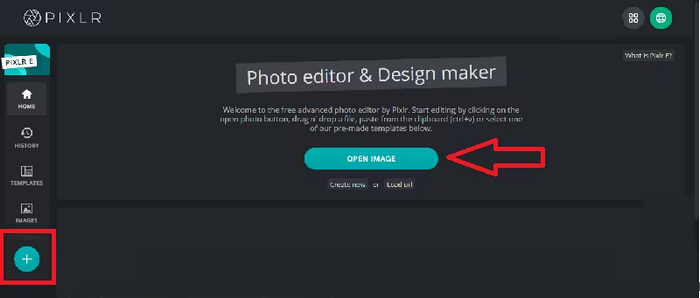
ขั้นตอนที่ 2 เมื่อคุณพบเครื่องมือแล้ว ให้คลิกเพื่อเข้าใช้งาน จากนั้นคลิกปุ่ม Open Image เพื่ออัปโหลดรูปภาพที่มีลายน้ำที่คุณต้องการลบ หรือคุณสามารถคลิกปุ่ม + ที่แผงด้านซ้ายของหน้าจอเพื่ออัปโหลดรูปภาพก็ได้.
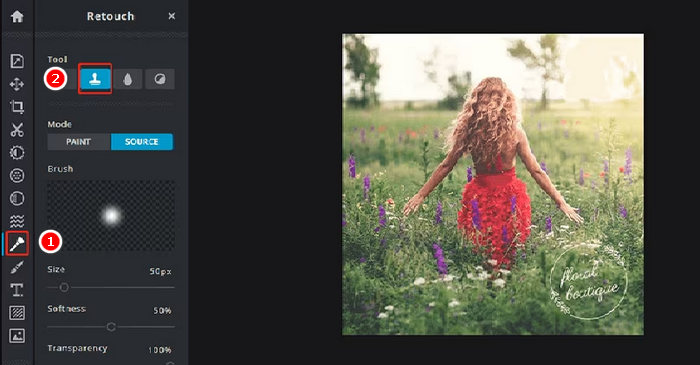
ขั้นตอนที่ 3 เมื่อรูปภาพของคุณโหลดเรียบร้อยแล้ว ให้คลิกปุ่ม Retouch ที่ด้านซ้ายของหน้าจอ แล้วแผงเครื่องมือจะปรากฏขึ้น หลังจากนั้นให้เลือก Clone Stamp จากเมนูเครื่องมือ.
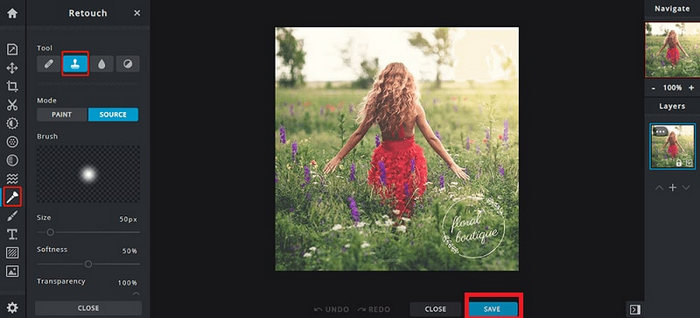
ขั้นตอนที่ 4 จากนั้นกดเมาส์ค้างไว้แล้วเลื่อนเคอร์เซอร์ไปยังบริเวณลายน้ำที่คุณต้องการลบ เมื่อคุณลบลายน้ำด้วย Pixlr เสร็จแล้ว ให้คลิกปุ่ม Save.
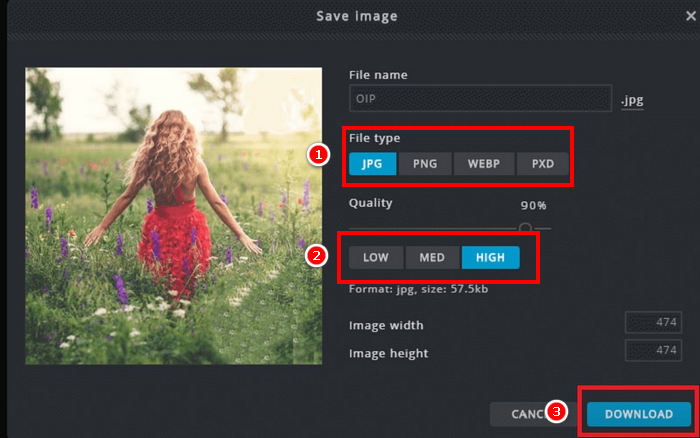
ขั้นตอนที่ 5 ก่อนดาวน์โหลดไฟล์รูปภาพ ให้เลือกความละเอียดและชนิดของไฟล์รูปภาพให้เรียบร้อย เมื่อเสร็จแล้วให้คลิกปุ่ม Download.
ควรซูมเข้าทุกครั้งเมื่อลบลายน้ำใน Pixlr การทำงานอย่างใกล้ชิดกับรายละเอียดเล็กๆ น้อยๆ จะช่วยให้คุณผสมผสานพื้นที่ที่แก้ไขได้เป็นธรรมชาติมากขึ้น และหลีกเลี่ยงจุดหยาบหรือไม่สม่ำเสมอในภาพสุดท้าย
ส่วนที่ 3 ทางเลือกฟรีสำหรับการลบลายน้ำออกจากรูปภาพ
ในขณะเดียวกัน หากคุณกำลังมองหาทางเลือกฟรีนอกเหนือจากการใช้ Pixlr เพื่อลบลายน้ำออกจากรูปภาพ คุณควรลองใช้ FVC Free Watermark Remover นี่เป็นเครื่องมือบนเว็บที่เปิดโอกาสให้ผู้ใช้ลบลายน้ำออกจากรูปภาพของตนเองได้โดยตรง FVC รองรับรูปแบบไฟล์ภาพที่ใช้กันทั่วไป เช่น JPG/JPEG, PNG, BMP และอื่น ๆ ทำให้ผู้ใช้สามารถจัดการรูปภาพได้หลากหลายชนิดตามที่ต้องการลบลายน้ำ นอกจากนี้ ยังมีวิธีการเลือกและลบลายน้ำที่ยืดหยุ่น คุณสามารถวาดเส้นรอบรูปแบบหลายเหลี่ยม ใช้เครื่องมือเชือก (lasso) หรือใช้แปรงทาทับบริเวณลายน้ำ ซึ่งช่วยให้คุณปรับการเลือกให้เหมาะกับรูปทรงและขนาดของลายน้ำได้อย่างง่ายดาย.
คุณสมบัติหลัก:
• ลบลายน้ำข้อความ รูปภาพ และโลโก้จากภาพถ่าย
• รองรับไฟล์รูปภาพแบบ JPG, JPEG, PNG และ BMP.
• รักษาคุณภาพรูปภาพดั้งเดิมไว้หลังจากลบลายน้ำออก
• ใช้แปรง บ่วง หรือโครงร่างหลายเหลี่ยมเพื่อเลือกพื้นที่ลายน้ำ
• ครอบตัดรูปภาพก่อนหรือหลังการลบลายน้ำ
• ลบและเลือกพื้นที่ใหม่ด้วยเครื่องมือยางลบ
• ใช้งานได้กับ Windows และ macOS
ต่อไปนี้คือคำแนะนำทีละขั้นตอนเกี่ยวกับวิธีลบลายน้ำในรูปภาพด้วย FVC:
ขั้นตอนที่ 1 ก่อนอื่น คุณต้องเข้าเว็บไซต์อย่างเป็นทางการของเครื่องมือนี้ ดังนั้นให้ค้นหา FVC Free Watermark Remover บนเครื่องมือค้นหาของคุณ.
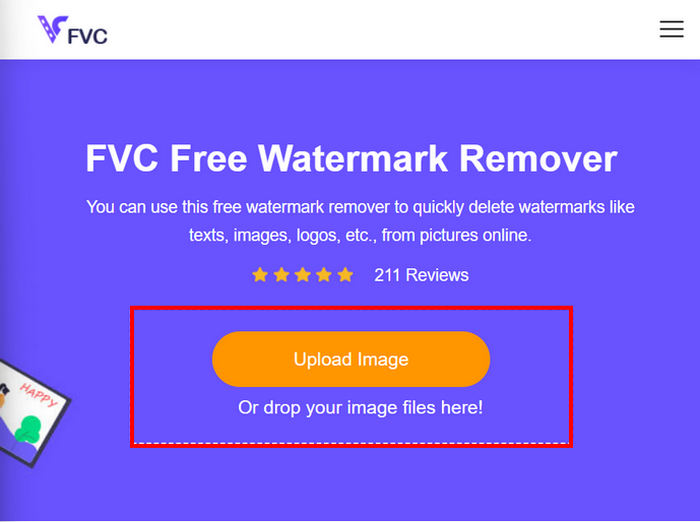
ขั้นตอนที่ 2 เมื่อเจอเว็บไซต์แล้ว ให้คลิกปุ่ม Upload Image เพื่ออัปโหลดรูปภาพที่มีลายน้ำที่คุณต้องการลบ.
ขั้นตอนที่ 3 จากนั้นที่เมนูด้านบน ให้เลือกเครื่องมือที่คุณต้องการใช้เพื่อลบลายน้ำบนรูปภาพของคุณ ในที่นี้เราเลือกใช้เครื่องมือ Brush แล้วระบายทับบริเวณลายน้ำด้วยการเลื่อนเคอร์เซอร์ไปบนมัน เมื่อคลุมบริเวณลายน้ำจนหมดแล้ว ให้คลิกปุ่ม Remove ด้านบน และคลิก Save เพื่อดาวน์โหลดรูปภาพ.
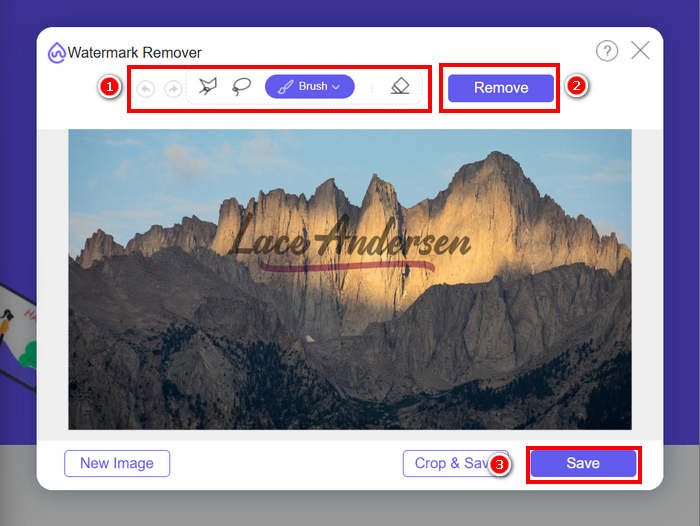
เมื่อลบลายน้ำ ให้เลือกเครื่องมือที่เหมาะสมกับรูปร่างของลายน้ำมากที่สุด ใช้แปรงสำหรับลายน้ำขนาดเล็กหรือลายน้ำที่ไม่สม่ำเสมอ ใช้บ่วงบาศสำหรับรูปทรงโค้งหรือรูปทรงอิสระ และใช้โครงร่างรูปหลายเหลี่ยมสำหรับลายน้ำที่มีขอบตรงหรือเหลี่ยม การเลือกเครื่องมือที่เหมาะสมจะช่วยให้คุณได้ผลลัพธ์ที่ชัดเจนและแม่นยำยิ่งขึ้น
ส่วนที่ 4 คำถามที่พบบ่อยเกี่ยวกับการลบลายน้ำของ Pixlr
โปรแกรมลบลายน้ำ Pixlr ปลอดภัยหรือไม่?
ใช่ Pixlr ปลอดภัยสำหรับการลบลายน้ำออกจากรูปภาพ เป็นโปรแกรมแก้ไขรูปภาพออนไลน์ที่เชื่อถือได้ซึ่งใช้เซิร์ฟเวอร์ที่ปลอดภัยเพื่อปกป้องข้อมูลผู้ใช้ เพียงตรวจสอบให้แน่ใจว่าคุณกำลังเข้าถึงเว็บไซต์ Pixlr อย่างเป็นทางการเพื่อหลีกเลี่ยงความเสี่ยงที่อาจเกิดขึ้น
จะทำให้พื้นหลังโปร่งใสใน Pixlr ได้อย่างไร?
ในการสร้างพื้นหลังโปร่งใสใน Pixlr ให้เลือก Create a New Image ในโปรแกรมแก้ไข Pixlr ของคุณ พิมพ์ชื่อไฟล์ ทำเครื่องหมายในช่อง Transparent แล้วคลิก OK จากนั้นคลิก Layers ในเมนูด้านบน และเลือก Open Image as Layer เพื่ออัปโหลดรูปภาพที่คุณต้องการแก้ไข ใช้เครื่องมือ Wand จากแถบเครื่องมือ แล้วคลิกบนพื้นที่พื้นหลังที่คุณต้องการลบ ปรับการตั้งค่า Tolerance หากจำเป็นเพื่อปรับแต่งการเลือก กด Delete เพื่อลบพื้นหลัง หากยังมีพื้นหลังเหลืออยู่ ให้ใช้เครื่องมือ Eraser เพื่อลบด้วยตนเอง เมื่อเสร็จแล้ว ให้คลิก File แล้วคลิก Save ป้อนชื่อไฟล์ เลือก PNG เป็นรูปแบบไฟล์เพื่อรักษาความโปร่งใส แล้วคลิก OK เลือกตำแหน่งที่จะบันทึกรูปภาพของคุณ แล้วคลิก Save
Pixlr watermark remover ไม่ฟรีอีกต่อไปแล้วหรือ?
Pixlr มีทั้งเวอร์ชันฟรีและพรีเมียม เครื่องมือลบลายน้ำพื้นฐานอย่าง Clone Stamp และ Healing Brush พร้อมให้บริการสำหรับผู้ใช้ฟรี อย่างไรก็ตาม ฟีเจอร์ขั้นสูงบางอย่างและตัวเลือกการส่งออกคุณภาพสูงกว่าอาจต้องสมัครสมาชิก Pixlr Premium
สรุป
การลบลายน้ำออกจากรูปภาพสามารถทำได้ง่ายและมีประสิทธิภาพหากใช้เครื่องมือที่เหมาะสม ตอนนี้เมื่อคุณรู้แล้ววิธีลบลายน้ำด้วย Pixlr คุณก็สามารถใช้ประโยชน์จากแพลตฟอร์มที่ใช้งานง่ายนี้ในการลบลายน้ำได้อย่างสะดวก Pixlr มอบตัวเลือกที่เข้าถึงได้ทั้งสำหรับผู้เริ่มต้นและผู้ใช้ที่มีประสบการณ์ นอกจากนี้ หากคุณกำลังมองหาทางเลือกฟรี FVC Free Watermark Remover ก็มีเครื่องมือที่ยืดหยุ่นและรองรับไฟล์ภาพหลายรูปแบบเพื่อการแก้ไขที่ราบรื่น อย่าลืมเคารพสิทธิ์ความเป็นเจ้าของเสมอเมื่อแก้ไขรูปภาพ และเลือกเครื่องมือที่เหมาะสมที่สุดกับความต้องการของคุณเพื่อให้ได้ผลลัพธ์ที่สะอาดและดูเป็นมืออาชีพ.
-
 วิธีลบลายน้ำ DeviantArt ออนไลน์ [5 วิธีแก้ไข]
 ต้องการเรียนรู้วิธีลบลายน้ำ DeviantArt บนรูปภาพของคุณหรือไม่? ด้วยการใช้ตัวลบลายน้ำ DeviantArt ที่โดดเด่นที่สุด คุณสามารถลบลายน้ำที่น่ารำคาญเหล่านั้นออกได้อย่างง่ายดาย
-
 วิธีง่ายๆในการลบลายน้ำ Shootproof
 ลบลายน้ำ Shootproof โดยทำตามวิธีการง่าย ๆ เหล่านี้ ใช้น้ำยาลบลายน้ำที่น่าทึ่งเหล่านี้เพื่อลบลายน้ำ Shootproof ออกจากภาพของคุณได้อย่างง่ายดาย
-
 5 วิธีในการลบลายน้ำ B612 โดยใช้เครื่องมือที่ดีที่สุด
 ต้องการทราบวิธีการลบลายน้ำ B612 ออกจากภาพถ่ายของคุณหรือไม่? คุณสามารถลบลายน้ำ B612 ออกจากรูปภาพของคุณได้อย่างง่ายดายโดยใช้เครื่องมือที่โดดเด่นเหล่านี้
