


 Video Converter Ultimate
 บันทึกหน้าจอ
 ซ่อมวิดีโอ
 ดาวน์โหลดอย่างปลอดภัย
วิธีลบลายน้ำวิดีโอ Viva บนวิดีโออย่างง่ายดายและมีประสิทธิภาพ
Viva Video เป็นแอปตัดต่อวิดีโอและสร้างวิดีโอที่คุณสามารถดาวน์โหลดบนอุปกรณ์มือถือของคุณเพื่อสร้างวิดีโอที่โดดเด่นซึ่งคุณไม่สามารถทำได้ด้วยโปรแกรมตัดต่อวิดีโออื่น ด้วยเหตุนี้ คุณสามารถใช้เวอร์ชันฟรีหรือการตัดต่อวิดีโอระดับพรีเมียมให้เป็นประโยชน์ได้ ดังนั้น ผู้ใช้พบปัญหาในการใช้เวอร์ชันฟรีเนื่องจากมีลายน้ำ และคุณลักษณะการแก้ไขอื่นๆ ไม่เหมือนกับเวอร์ชัน Pro ลายน้ำที่ฝังอยู่ในวิดีโออาจขัดขวางการมองเห็น และการนำออกจะดีกว่า
อย่างไรก็ตาม คุณสามารถใช้เครื่องมือบางอย่างที่มีให้ดาวน์โหลดบน Play Store และ App Store เพื่อเอาลายน้ำออกได้ แต่ตัวไหนดีที่สุด? อ่านบทความนี้ต่อไป เพราะเราจะแนะนำเครื่องมือที่คุณสามารถใช้ลบลายน้ำ พร้อมคำแนะนำแบบละเอียดเกี่ยวกับวิธีลบลายน้ำ Viva Video ออกจากวิดีโอของคุณ.

ส่วนที่ 1 วิธีลบลายน้ำวิดีโอ Viva โดยใช้แอพ Watermark Remover ที่ดีที่สุด
ยางลบวิดีโอ - ลบลายน้ำ/โลโก้ออกจากวิดีโอ [Android]
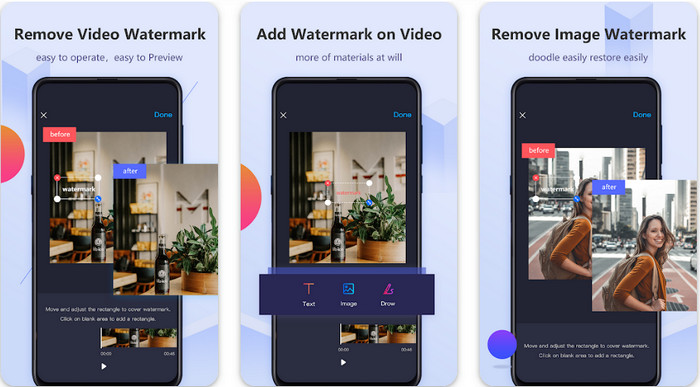
Video Eraser - Remove Watermark/Logo from Video เป็นแอปลบลายน้ำที่ทรงพลังซึ่งคุณสามารถดาวน์โหลดมาใช้บนอุปกรณ์ Android เพื่อเอาลายน้ำที่ฝังอยู่ในวิดีโอของคุณออกได้ แอปนี้ช่วยลบลายน้ำได้ทุกประเภท ไม่ว่าจะเป็นโลโก้ ข้อความ ตราประทับ ฯลฯ นอกจากนี้ คุณยังใช้แอปนี้เพื่อเพิ่มลายน้ำส่วนตัวของคุณเอง ตัดครอป ตัดต่อ วิดีโอย้อนกลับ บีบอัด และปรับความเร็ววิดีโอได้อีกด้วย แม้ว่าจะมีฟีเจอร์มากมาย แต่คุณสามารถดาวน์โหลดเครื่องมือนี้ได้ฟรี ดังนั้น หากต้องการลบลายน้ำ Viva Video บน Android คุณสามารถทำตามขั้นตอนด้านล่างได้เลย.
ขั้นตอนที่ 1 ขั้นแรก ดาวน์โหลดแอปบน Android ของคุณโดยไปที่ Play Store จากนั้นแตะดาวน์โหลด.
ขั้นตอนที่ 2 เปิดแอปลบลายน้ำ แตะ Remove Watermark from Video อนุญาตให้แอปเข้าถึงวิดีโอของคุณ แล้วอัปโหลดวิดีโอที่มีลายน้ำอยู่.
ขั้นตอนที่ 3 เลื่อนและวางสี่เหลี่ยมทับบริเวณลายน้ำให้ครอบคลุม.
ขั้นตอนที่ 4 กด Done เพื่อบันทึกวิดีโอแบบไม่มีลายน้ำ.
ที่เกี่ยวข้อง:
ยางลบวิดีโอ - การลบรีทัช [iOS]
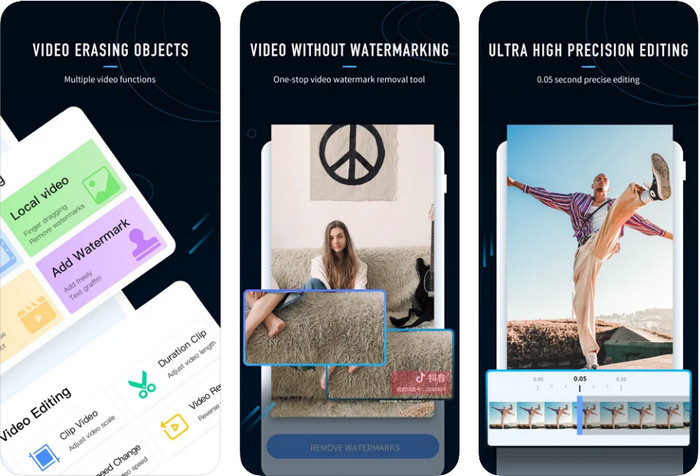
สำหรับ iOS คุณสามารถดาวน์โหลด Video Eraser- Retouch Removal ได้จาก App Store ซึ่งเป็นหนึ่งในเครื่องมือลบลายน้ำ Viva Video ที่ดาวน์โหลดได้ฟรีและช่วยให้คุณกำจัดลายน้ำบนวิดีโอได้อย่างมีประสิทธิภาพ เช่นเดียวกับแอปลบลายน้ำบน Android ที่เราแนะนำไว้ แอปนี้ยังรองรับฟีเจอร์ตัดต่ออื่น ๆ เช่น ขยายความละเอียดวิดีโอ เพิ่มลายน้ำ ตัดต่อ บีบอัด และพลิกวิดีโอ ทุกอย่างรวมอยู่ที่นี่แล้ว แม้ว่าจะมีฟีเจอร์คล้ายกับแอปบน Android แต่ลักษณะการทำงานจะแตกต่างกันออกไป และก่อนที่คุณจะใช้แอปนี้เพื่อลบลายน้ำได้ คุณจะต้องซื้อฟีเจอร์ดังกล่าวก่อน คุณสามารถทำตามขั้นตอนด้านล่างนี้เพื่อเรียนรู้วิธีลบลายน้ำจากวิดีโอ Viva Video ที่คุณส่งออกมาแล้ว เพียงทำตามขั้นตอนที่ระบุไว้ต่อไปนี้.
ขั้นตอนที่ 1 ดาวน์โหลดแอปจาก App Store จากนั้นเปิดแอปหลังจากติดตั้งเสร็จ.
ขั้นตอนที่ 2 หลังจากเปิดโปรแกรมแล้ว แตะ Local Video/GIF เพื่ออัปโหลดวิดีโอที่มีลายน้ำ อย่าลืมอนุญาตให้แอปเข้าถึงรูปภาพของคุณ.
ขั้นตอนที่ 3 แตะบริเวณวิดีโอที่มีลายน้ำ จากนั้นจะมีรูปทรงสี่เหลี่ยมปรากฏบนหน้าจอ.
ขั้นตอนที่ 4 แตะ Eliminate Watermark เพื่อส่งออกวิดีโอและบันทึกไฟล์โดยไม่มีลายน้ำรบกวนอีกต่อไป.
ส่วนที่ 2 วิธีลบ Viva Video Watermark บน Windows & Mac [Ultimate Software]
หากคุณเป็นผู้ใช้ Windows และ Mac คุณจะต้องใช้ซอฟต์แวร์ที่มีประสิทธิภาพในการลบลายน้ำออกจากวิดีโอได้อย่างสะอาดโดยไม่ทิ้งร่องรอยไว้ FVC Video Converter Ultimate สามารถสอนคุณได้ว่าจะแบบลายน้ำ Viva Video ฟรีอย่างไร พร้อมผลลัพธ์ระดับมืออาชีพ เช่นเดียวกับแอปลบลายน้ำที่คุณสามารถดาวน์โหลดได้บน Android และ iOS เครื่องมือนี้ยังรองรับฟีเจอร์และฟังก์ชันเพิ่มเติมที่คุณสามารถนำไปใช้ประโยชน์ได้อีกมากมาย เครื่องมือนี้ให้คุณได้มากกว่าแอปลบลายน้ำสองตัวที่เราได้กล่าวถึง.
อะไรทำให้เครื่องมือนี้น่าประทับใจ คุณลักษณะการลบที่เครื่องมือนี้สนับสนุนดีกว่าตัวลบลายน้ำอื่น ๆ ที่คุณสามารถใช้ได้กับวิดีโอของคุณ ดังนั้น หากคุณใช้สิ่งนี้ คุณสามารถเพลิดเพลินกับการรับชมวิดีโอโดยไม่ต้องใส่ลายน้ำหลังจากลบที่นี่ ต้องการคำแนะนำเกี่ยวกับวิธีการใช้งานหรือไม่? รายละเอียดต่อไปจะช่วยให้คุณทราบวิธีการใช้เครื่องมือนี้อย่างง่ายดายเหมือน 1-2-3
ขั้นตอนที่ 1 ในการดาวน์โหลดซอฟต์แวร์เวอร์ชัน Ultimate คุณสามารถคลิกปุ่มดาวน์โหลดด้านล่าง จากนั้นติดตั้งซอฟต์แวร์บนอุปกรณ์ของคุณ ทำตามขั้นตอนการติดตั้งด้วย WinRAR แล้วคลิก Start Now.
ดาวน์โหลดฟรีสำหรับ Windows 7 หรือใหม่กว่าดาวน์โหลดอย่างปลอดภัย
ดาวน์โหลดฟรีสำหรับ MacOS 10.7 หรือใหม่กว่าดาวน์โหลดอย่างปลอดภัย
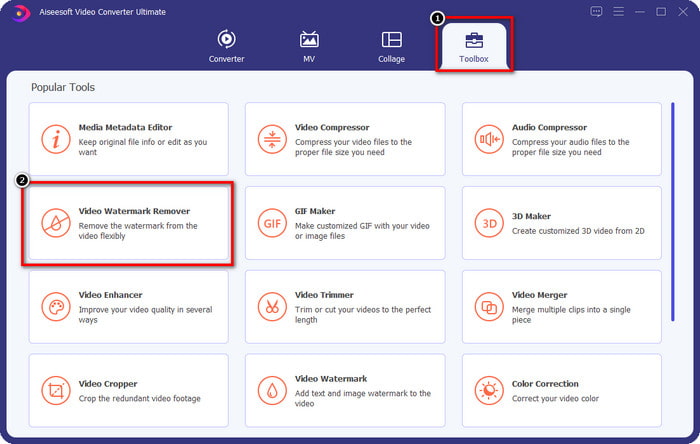
ขั้นตอนที่ 2 ไปที่เมนู Toolbox จากนั้นคลิก Video Watermark Remover เพื่อเริ่มใช้งานฟังก์ชันลบลายน้ำอันทรงประสิทธิภาพของเครื่องมือนี้.
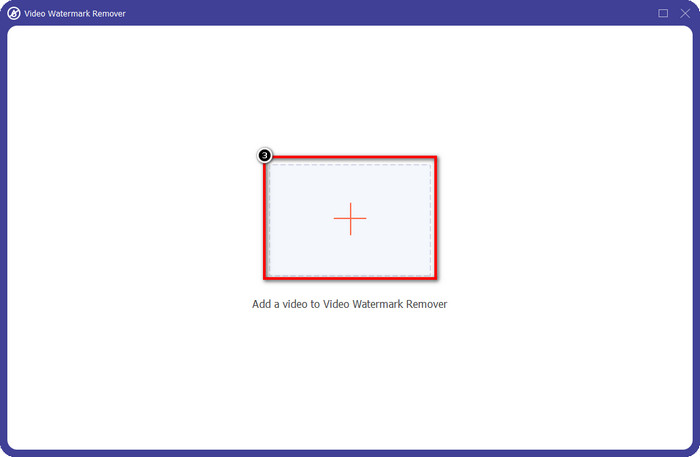
ขั้นตอนที่ 3 คุณสามารถอัปโหลดวิดีโอ Viva Video ที่มีลายน้ำซึ่งบันทึกไว้บนเดสก์ท็อปได้โดยการคลิกไอคอนเครื่องหมาย + จากนั้นค้นหาไฟล์วิดีโอในโฟลเดอร์ที่ปรากฏบนหน้าจอ แล้วคลิก Open เพื่ออัปโหลดให้สำเร็จ.
ขั้นตอนที่ 4 คลิก Add Watermark Removing Area เพื่อเริ่มใช้ฟังก์ชันลบลายน้ำ.
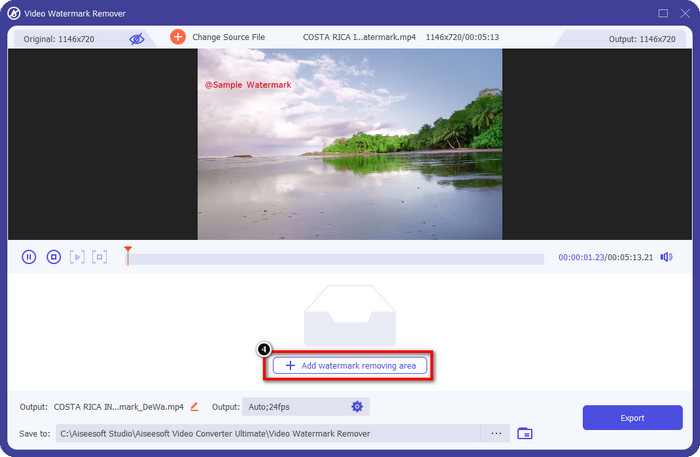
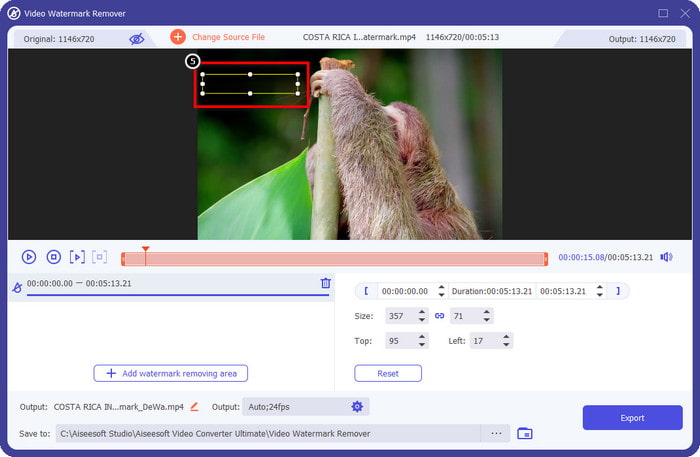
ขั้นตอนที่ 5 ลากและวาง รูปทรงสี่เหลี่ยมไปยังบริเวณลายน้ำบนวิดีโอของคุณ และครอบคลุมให้หมด ทั้งนี้จำเป็นต้องครอบคลุมลายน้ำทั้งหมด เพราะถ้าคลุมไม่มิดจะทิ้งร่องรอยของลายน้ำไว้ และคุณยังสามารถปรับขนาดสี่เหลี่ยมตามต้องการได้.
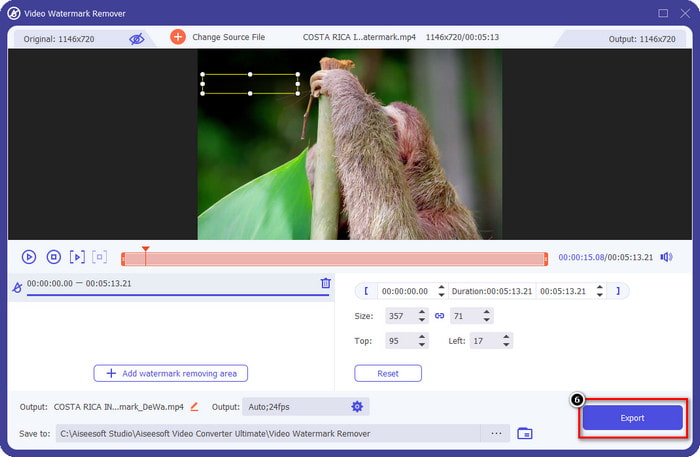
ขั้นตอนที่ 6 จากนั้นคลิก Export เพื่อบันทึกวิดีโอโดยไม่มีลายน้ำ ง่ายไหม? นั่นแหละคือจุดเด่นของเครื่องมือ Ultimate นี้ ที่ออกแบบมาให้ใช้งานง่ายแต่ทรงพลังในทุกด้าน.
ส่วนที่ 3 คำถามที่พบบ่อยเกี่ยวกับวิธีการลบ Viva Video Watermark
ฉันสามารถดาวน์โหลด Viva Video โดยไม่มีลายน้ำได้หรือไม่?
ได้ คุณสามารถซื้อเครื่องมือเวอร์ชันโปรได้ เพื่อที่เมื่อคุณส่งออกวิดีโอที่คุณแก้ไขที่นี่ จะไม่ทิ้งลายน้ำไว้ในวิดีโอ นอกจากนี้ หลังจากที่คุณซื้อเครื่องมือเวอร์ชันโปร คุณจะใช้ฟีเจอร์พรีเมียมอื่นๆ ที่เครื่องมือนี้มีซึ่งไม่มีให้ใช้งานฟรี
Viva Video มีเวอร์ชันเดสก์ท็อปหรือไม่
คุณสามารถดาวน์โหลดเวอร์ชัน Viva Video ได้บน Android และ iOS เท่านั้น ดังนั้น หากคุณต้องการดาวน์โหลดเวอร์ชันเดสก์ท็อป คุณจะไม่พบสิ่งใดเลย แต่คุณสามารถค้นหาทางเลือกที่ดีที่สุดสำหรับการตัดต่อวิดีโอ เช่นเดียวกับที่ Viva Video นำเสนอ
Viva Video มีสปายแวร์หรือไม่?
ในปี 2560 รายงานเกี่ยวกับแอพนี้ในภายหลังยืนยันว่ามีมัลแวร์ ดังนั้น ผู้ที่ดาวน์โหลดซอฟต์แวร์นี้บังคับลบแอปนี้ในอุปกรณ์ของตนโดยเด็ดขาด เพื่อหลีกเลี่ยงผลกระทบที่ตามมา
สรุป
ด้วยตัวลบลายน้ำ Viva Video ของบทความนี้ คุณสามารถกำจัดลายน้ำที่ Viva Video ฝังในวิดีโอที่ส่งออกได้ คุณสามารถลองใช้แอพที่กล่าวถึงข้างต้นและทำตามคำแนะนำที่เรารวมไว้เกี่ยวกับวิธีลบลายน้ำ แต่สำหรับผู้ใช้ Windows และ Mac ที่มีลายน้ำ Viva Video ควรใช้ซอฟต์แวร์ขั้นสูงสุดเพื่อลบลายน้ำอย่างรวดเร็วและมีประสิทธิภาพและได้ผลลัพธ์ระดับมืออาชีพ คุณกำลังรออะไรอยู่? คลิกปุ่มดาวน์โหลดเพื่อลบลายน้ำสุดท้ายบนอุปกรณ์ของคุณตอนนี้ และใช้โดยทำตามขั้นตอนด้านบน
-
 วิธีลบลายน้ำ Lomotif โดยใช้เครื่องมือที่ยอดเยี่ยมเหล่านี้
 คุณต้องการเรียนรู้วิธีลบลายน้ำ Lomotif ออกจากวิดีโอของคุณหรือไม่? อ่านบทความนี้เพื่อทราบวิธีการที่โดดเด่นที่สุดในการลบออนไลน์และออฟไลน์
-
 วิธีลบนักท่องเที่ยวออกจากภาพถ่ายโดยใช้ Watermark Remover
 จะลบนักท่องเที่ยวออกจากภาพถ่ายได้อย่างไร? หากคุณต้องการเรียนรู้วิธีลบสิ่งที่ไม่ต้องการออกจากรูปภาพ เครื่องมือเหล่านี้จะช่วยคุณได้ อ่านบทความนี้เพื่อทราบข้อมูลเพิ่มเติม
-
 น้ำยาล้างลายน้ำ 123rf – การตรวจสอบอย่างละเอียดของเครื่องมือขั้นสูงสุด
 หากคุณต้องการทราบว่าตัวลบลายน้ำ 123rf ที่โดดเด่นที่สุดคืออะไร โปรดอ่านบทความนี้อย่างละเอียด บทความนี้ให้การทบทวนเชิงลึกเกี่ยวกับเครื่องมือต่างๆ
