


 Video Converter Ultimate
 บันทึกหน้าจอ
 ซ่อมวิดีโอ
 ดาวน์โหลดอย่างปลอดภัย
วิธียอดนิยมในการลบลายน้ำ VideoShop บนแพลตฟอร์มต่างๆ [ฟรี]
Videoshop เป็นโปรแกรมตัดต่อวิดีโอแบบครบวงจรที่คุณสามารถใช้บนอุปกรณ์มือถือของคุณ และจนถึงขณะนี้ แอปได้รับการอัปเดตเป็นประจำ เนื่องจากแอปได้รับการอัปเดตเป็นประจำและมีการเพิ่มคุณสมบัติใหม่เมื่อได้รับการอัปเดต ผู้ใช้อุปกรณ์เคลื่อนที่จึงมักเลือกใช้โปรแกรมนี้เป็นโปรแกรมตัดต่อวิดีโอ แม้ว่าแอปจะมีคุณลักษณะการตัดต่อวิดีโอที่เกือบจะสมบูรณ์ แต่ผู้ใช้จำนวนมากยังคงพบข้อเสีย เช่น อินเทอร์เฟซที่สับสนและลายน้ำที่เพิ่มลงในวิดีโอที่ส่งออก ดังนั้น ในบทความของวันนี้ เราจะอธิบายให้คุณทราบถึงวิธีการต่างๆ ที่คุณสามารถใช้เพื่อลบลายน้ำ Videoshop ที่คุณสามารถดาวน์โหลดได้บน iOS และ Android รวมถึงซอฟต์แวร์ขั้นสูงสุดที่คุณสามารถใช้ได้บนเดสก์ท็อปของคุณ

ส่วนที่ 1 วิธีลบลายน้ำ VideoShop ด้วยเครื่องมือที่มีประสิทธิภาพสูงสุดบนแพลตฟอร์มของคุณ
FVC Video Converter Ultimate - ทางออกที่ดีที่สุดในการลบลายน้ำบน Windows & Mac
FVC Video Converter Ultimate คือเครื่องมือที่เราเลือกมาแนะนำในบทความวันนี้ เพราะมีประสิทธิภาพสูงในการลบลายน้ำที่ไม่ต้องการออกจากวิดีโอของคุณ เครื่องมือนี้อัดแน่นไปด้วยฟีเจอร์การลบลายน้ำที่คุณสามารถเรียนรู้และใช้งานได้คล่องตั้งแต่ครั้งแรกที่ลอง คุณจะไม่สับสนตอนลบลายน้ำหากเลือกใช้ตัวนี้ เพราะมีอินเทอร์เฟซที่ใช้งานง่ายและโปรแกรมมีขนาดเบา นอกจากนี้ ด้วยเครื่องมือนี้คุณยังสามารถทำสิ่งเจ๋ง ๆ ได้อีกมากมาย เช่น เพิ่มลายน้ำ ปรับขนาด บีบอัด ตัด แบ่ง และอื่น ๆ อีกมากมาย.
ทางออกที่ดีที่สุดสำหรับลายน้ำอยู่ที่นี่ หากคุณต้องการคำแนะนำเกี่ยวกับวิธีการลบลายน้ำของ Videoshop ให้ทำตามขั้นตอนที่ระบุด้านล่าง และใช้เครื่องมือขั้นสูงสุดเพื่อกำจัดลายน้ำ
ขั้นตอนที่ 1. ก่อนอื่น คุณต้องดาวน์โหลดเครื่องมือลงบนเดสก์ท็อปของคุณโดยเลือกเวอร์ชันระบบปฏิบัติการที่ใช้งานอยู่ จากนั้นดำเนินการติดตั้งให้เสร็จสิ้น และเปิดซอฟต์แวร์ขึ้นมาเพื่อเริ่มใช้งาน.
ดาวน์โหลดฟรีสำหรับ Windows 7 หรือใหม่กว่าดาวน์โหลดอย่างปลอดภัย
ดาวน์โหลดฟรีสำหรับ MacOS 10.7 หรือใหม่กว่าดาวน์โหลดอย่างปลอดภัย
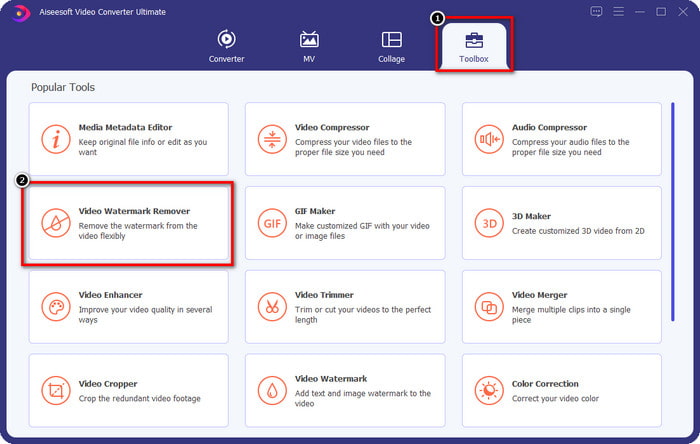
ขั้นตอนที่ 2. เปิด Toolbox โดยคลิกที่เมนูนี้ จากนั้นค้นหา Video Watermark Remover ในรายการฟีเจอร์ที่จะแสดงบนหน้าจอของคุณ.
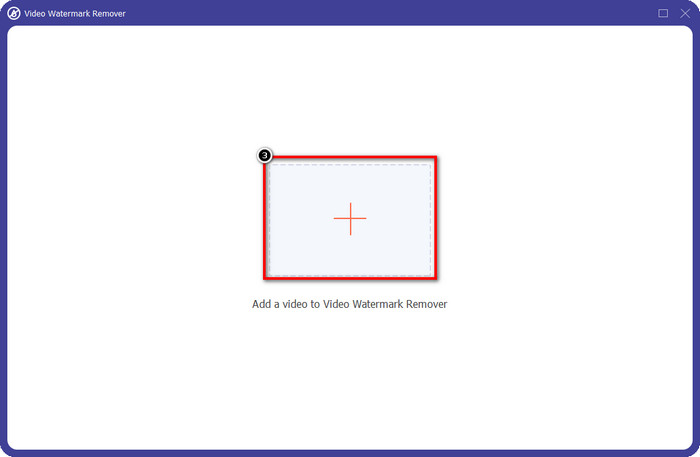
ขั้นตอนที่ 3. จากนั้นคลิกสัญลักษณ์ + เพื่อเพิ่มไฟล์วิดีโอที่มีลายน้ำของ Videoshop อยู่ในนั้น ค้นหาไฟล์วิดีโอในตัวจัดการไฟล์ คลิกหนึ่งครั้ง แล้วกด Open เพื่ออัปโหลด.
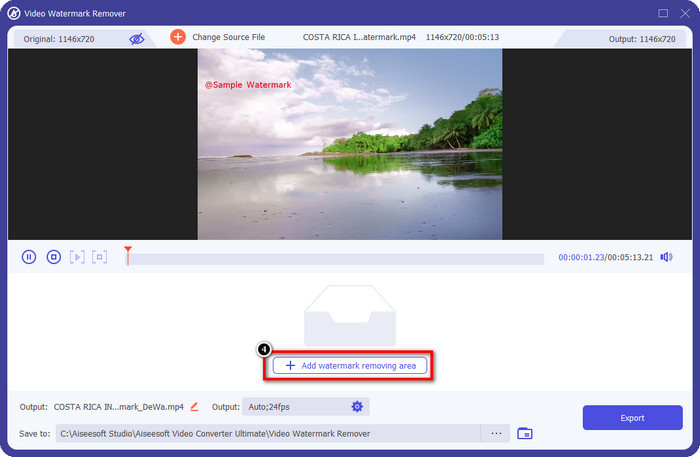
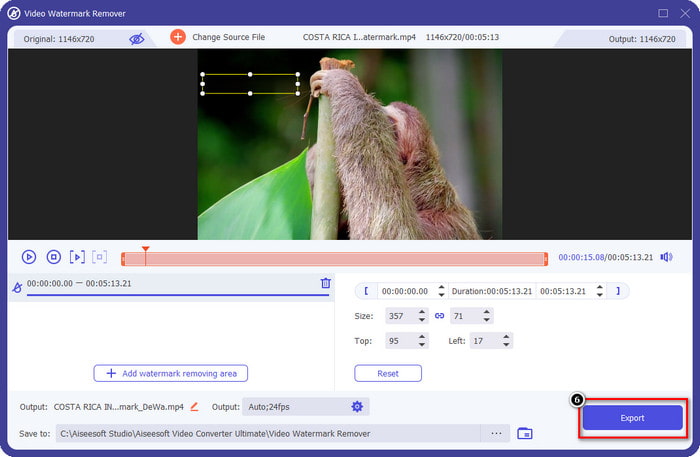
ขั้นตอนที่ 4. คลิก Add Watermark Removing Area ในหน้าต่างถัดไปที่จะแสดงขึ้นหลังจากอัปโหลดไฟล์เรียบร้อยแล้ว.
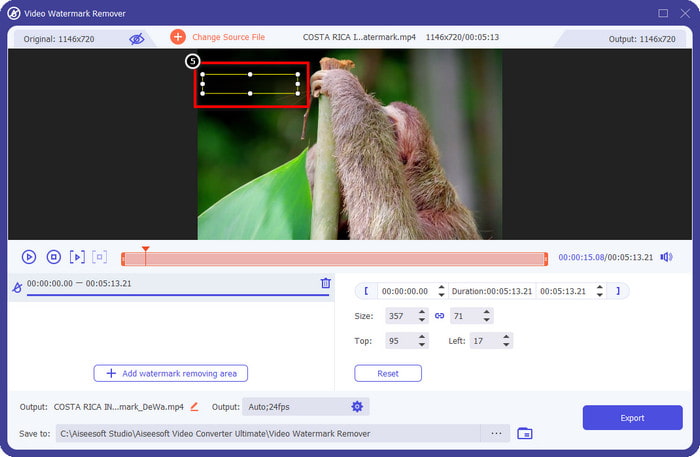
ขั้นตอนที่ 5. วาง กรอบสี่เหลี่ยมทับบนลายน้ำเพื่อปิดให้มิด กรุณาตรวจสอบให้แน่ใจว่ารูปสี่เหลี่ยมในหน้าต่าง Preview ปิดทับลายน้ำบนวิดีโอของคุณทั้งหมด เพื่อที่เมื่อตอนคุณดาวน์โหลดไฟล์แล้วจะไม่มีลายน้ำเหลืออยู่.
ขั้นตอนที่ 6. กด Export เพื่อบันทึกวิดีโอจาก Videoshop ที่แก้ไขแล้วโดยไม่มีลายน้ำลงในเดสก์ท็อปของคุณ คุณสามารถตรวจสอบไฟล์ได้ในโฟลเดอร์ไฟล์ที่จะเด้งขึ้นมาหลังจากกระบวนการส่งออกเสร็จสิ้น.
ที่เกี่ยวข้อง:
Photo Retouch [iOS] - ลบลายน้ำที่ดีที่สุดบนอุปกรณ์ iOS
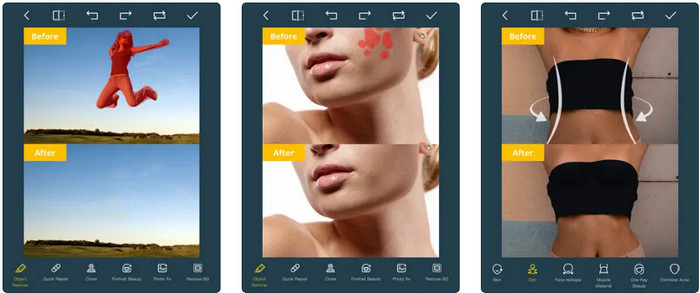
Photo Retouch เป็นแอปบน iOS สำหรับลบลายน้ำในวิดีโอของคุณโดยไม่ทิ้งร่องรอยใด ๆ หลังจากส่งออกไฟล์ แอปนี้ดาวน์โหลดได้ฟรีบน App Store คุณสามารถลองใช้งานได้ แม้ชื่อแอปจะระบุว่าเป็น Photo แต่คุณก็สามารถใช้ความสามารถด้านการลบลายน้ำบนวิดีโอเพื่อกำจัดวัตถุใด ๆ ที่คุณไม่ต้องการในวิดีโอได้เช่นกัน หากคุณอยากทดสอบแอปนี้ สามารถดูวิธีลบลายน้ำ Videoshop ตามบทเรียนด้านล่างได้.
ขั้นตอนที่ 1. ดาวน์โหลดแอปพลิเคชันจาก App Store โดยค้นหาชื่อแอปและกด Get.
ขั้นตอนที่ 2. จากนั้นเปิดแอป คลิกไอคอน + แล้วเลือก Video Eraser จากนั้นเลือกไฟล์วิดีโอที่มีลายน้ำอยู่.
ขั้นตอนที่ 3. ลากครอบลายน้ำ บนวิดีโอของคุณโดยใช้เครื่องมือต่าง ๆ ด้านล่าง คุณสามารถใช้รูปทรงมาร์กที่แอปนี้รองรับเพื่อไฮไลต์ลายน้ำบนวิดีโอของคุณ.
ขั้นตอนที่ 4. กระบวนการส่งออกจะเริ่มขึ้นโดยอัตโนมัติหลังจากที่คุณไฮไลต์ลายน้ำบนวิดีโอแล้ว อย่าปิดอุปกรณ์ iOS ของคุณเพื่อหลีกเลี่ยงการขัดจังหวะ และรอจนเสร็จสิ้น 100%.
ลบและเพิ่มลายน้ำ [Android] - ตัวลบลายน้ำยอดนิยมสำหรับอุปกรณ์ Android
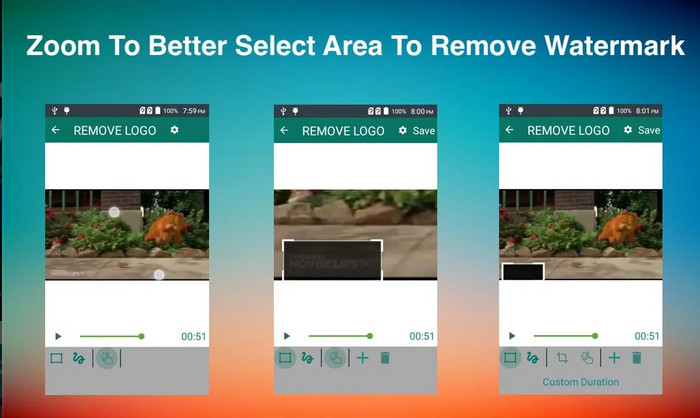
จะลบลายน้ำ Videoshop บน Android ได้อย่างไร ผู้ใช้ Android ไม่ต้องกังวลเพราะคุณสามารถดาวน์โหลด Remove & Add Watermark บนอุปกรณ์ของคุณได้ แอพนี้ให้ดาวน์โหลดฟรี คุณสามารถไปที่ Playstore ในภายหลังได้หากต้องการดาวน์โหลดแอปบนอุปกรณ์ของคุณ อะไรที่ทำให้แอพนี้รวมเป็นพิเศษ? เป็นเพราะคุณสมบัติการลบลายน้ำที่มีประสิทธิภาพซึ่งมีให้ในรูปภาพและวิดีโอ ด้วยแอพนี้ คุณยังสามารถเพิ่มลายน้ำส่วนตัวของคุณบนสื่อภาพที่คุณมีได้หากต้องการ ทำตามคำแนะนำด้านล่างหากคุณต้องการใช้แอพนี้เพื่อลบลายน้ำที่ Videoshop ทิ้งไว้ในวิดีโอของคุณ
ขั้นตอนที่ 1. เพื่อใช้งานแอป คุณต้องดาวน์โหลดจาก Play Store ก่อน โดยพิมพ์ชื่อแอปในช่องค้นหา.
ขั้นตอนที่ 2. เปิดแอป คลิก Select Video จะมีตัวเลือกให้สองแบบ ให้คลิก Remove Watermark อัปโหลดวิดีโอที่คุณต้องการจากแกลเลอรี.
ขั้นตอนที่ 3. ใช้การเลือกแบบสี่เหลี่ยมหรือเครื่องมือ Lasso เพื่อไฮไลต์ลายน้ำในวิดีโอของคุณ.
ขั้นตอนที่ 4. คลิก Save เพื่อดาวน์โหลดวิดีโอที่คุณอัปโหลดที่นี่ออกมาโดยไม่มีลายน้ำ.
ส่วนที่ 2 คำถามที่พบบ่อยเกี่ยวกับวิธีการลบ Videoshop Watermark
Videoshop ราคาเท่าไหร่คะ?
ราคาของเวอร์ชัน Videoshop Pro คือ $2.99 ด้วยราคาที่ไม่แพงนี้ คุณสามารถมีโปรแกรมตัดต่อวิดีโอที่ดีที่สุดบนอุปกรณ์ของคุณด้วย Videoshop
Videoshop มีให้ดาวน์โหลดบน Android และ iOS หรือไม่
ใช่ สามารถดาวน์โหลด Videoshop บน Android และ iOS ดังนั้น ไม่จำเป็นต้องกังวลเกี่ยวกับผู้ใช้แบบหลายแพลตฟอร์ม เนื่องจากโปรแกรมตัดต่อวิดีโอนี้มีให้ใช้งานในระบบปฏิบัติการที่แตกต่างกันสองระบบซึ่งมีคุณลักษณะและฟังก์ชันเหมือนกัน
ฉันจะชำระเงินในแอป Videoshop ได้อย่างไร
สำหรับผู้ใช้ iOS คุณสามารถโหลดบัญชี iTunes ของคุณเพื่อทำธุรกรรมได้ง่ายขึ้น โดยจะเรียกเก็บเงินจากบัญชีของคุณโดยอัตโนมัติ ขึ้นอยู่กับแผนการสมัครสมาชิกที่คุณเลือก แต่จะมีหนึ่งวันก่อน สำหรับผู้ใช้ Android คุณสามารถใช้ Google Pay เพื่อใช้เวอร์ชันโปรได้
สรุป
บทความนี้มีไว้สำหรับผู้ใช้ที่กำลังมองหาบทช่วยสอนเกี่ยวกับการลบลายน้ำ Videoshop บนแพลตฟอร์มต่างๆ อย่างมีประสิทธิภาพ ด้วยแอพที่เรารวมไว้ที่นี่ การลบลายน้ำโดยไม่มีร่องรอยเป็นไปได้หากทำตามขั้นตอนที่เรารวมไว้ในบทความนี้ ไม่ต้องกังวลว่าจะใช้มันเพราะเราลองใช้มันก่อนและพอใจกับผลลัพธ์ที่เราได้รับ เราจึงนำมาแบ่งปันกันในวันนี้ แม้ว่าคุณจะไม่คุ้นเคยกับการลบลายน้ำ คุณยังสามารถลองใช้ตัวลบลายน้ำที่เรารวมไว้ได้ เราหวังว่าเราจะช่วยเหลือคุณในบทความนี้ คุณสามารถอ่านบทความที่เป็นประโยชน์อื่นๆ ด้านล่างได้หากต้องการ
-
 วิธีการลบลายน้ำจาก Wondershare DVD Creator อย่างง่ายดาย
 บทความนี้ครอบคลุมข้อมูลเกี่ยวกับวิธีการเอาลายน้ำออกจาก Wondershare DVD Creator ในการรับข้อมูลทั้งหมดที่คุณต้องการ คุณจะต้องอ่านสิ่งนี้
-
 ลบลายน้ำออกจาก PDF อย่างง่ายดายด้วยขั้นตอนง่าย ๆ
 ลบลายน้ำออกจาก PDF โดยทำตามขั้นตอนง่าย ๆ เหล่านี้ เรียนรู้วิธีลบลายน้ำออกจากไฟล์ PDF ของคุณอย่างง่ายดายโดยใช้เครื่องมือที่น่าทึ่งเหล่านี้
-
 วิธีลบ Coub Watermark ด้วยขั้นตอนง่าย ๆ
 เรียนรู้วิธีลบลายน้ำ coub บนวิดีโอของคุณโดยใช้ตัวลบลายน้ำยอดนิยมเหล่านี้ อ่านบทความนี้เพื่อทราบเครื่องมือที่น่าทึ่งเหล่านี้และวิธีใช้งาน
