


 Video Converter Ultimate
 บันทึกหน้าจอ
 ซ่อมวิดีโอ
 ดาวน์โหลดอย่างปลอดภัย
ลบลายน้ำ Dreamstime ด้วย 4 วิธีที่คุณต้องรู้
หากคุณต้องการภาพที่พร้อมใช้งานสำหรับการนำเสนอหรือโครงการของคุณ คุณจะเลือก Dreamstime ได้อย่างไม่มีที่ติ แอปนี้สามารถให้ภาพสต็อกปลอดค่าลิขสิทธิ์แก่คุณพร้อมใช้ทุกเมื่อ ได้ช่วยผู้ใช้ในการค้นหาภาพเฉพาะด้วยผลงานคุณภาพสูงในราคาต่ำ แม้ว่าคุณจะสามารถดาวน์โหลดรูปภาพ 15 รูปได้ฟรีที่นี่ แต่ผลิตภัณฑ์นี้ทิ้งลายน้ำไว้เพื่อโปรโมตแอปเมื่อคุณใช้รูปภาพที่คุณดาวน์โหลดที่นี่
เราไม่อาจปฏิเสธได้ว่าใช้งานได้ดีเยี่ยมและราคาภาพก็ต่ำ แต่ก็ไม่ใช่ทุกคนที่จะมีงบพอซื้อเครดิตได้ ไม่ต้องกังวลอีกต่อไป! เพราะเราจัดการให้คุณแล้ว ข้อมูลด้านล่างนี้คือวิธีที่คุณสามารถทำตามเพื่อลบลายน้ำ Dreamstimeที่ติดอยู่บนไฟล์ภาพสุดท้ายได้.

ส่วนที่ 1 วิธีลบลายน้ำ Dreamstime โดยการซื้อเครดิต
เราไม่สามารถทิ้งตัวเลือกการซื้อไว้ข้างหลังได้ เนื่องจากเป็นตัวเลือกในการขจัดลายน้ำ Dreamstime ที่มีประสิทธิภาพมากที่สุดที่คุณสามารถใช้ได้ ก่อนที่เราจะดำเนินการต่อ คุณจะต้องรู้ว่า Dreamstime ต้องการให้คุณซื้อภาพโดยไม่มีลายน้ำ เครดิตชื่อเป็นสกุลเงิน Dreamstime; ใช้เงินจริงและแปลงเป็นเงินดิจิทัลที่ Dreamstime ยอมรับ สมมติว่าคุณไม่มีเครดิตใน Dreamstime ในกรณีดังกล่าว คุณสามารถทำตามขั้นตอนต่อไปนี้เพื่อซื้อเครดิตเพื่อดาวน์โหลดและให้รูปภาพไม่มีโลโก้ของผลิตภัณฑ์เหลืออยู่
ขั้นตอนที่ 1. เปิดเว็บไซต์ทางการของ Dreamstime จากนั้นคุณต้องสร้างบัญชีก่อนจึงจะสามารถซื้อเครดิตบน Dreamstime ได้ หากคุณมีบัญชีอยู่แล้ว ให้ล็อกอินให้เรียบร้อยก่อนใช้งาน.
ขั้นตอนที่ 2. เมื่อล็อกอินบัญชีของคุณใน Dreamstime แล้ว ให้คลิกที่ Price and Download Plans จากนั้นไปที่ Credit Package เพื่อดูอัตราราคาและแพ็คเกจเครดิตที่มีให้เลือก.
ขั้นตอนที่ 3. กรอกรายละเอียดข้อมูลที่ระบบต้องการให้ครบถ้วน แล้วคลิก Complete Checkout เพื่อดำเนินการชำระเงิน หลังจากนั้นคุณก็จะซื้อเครดิตไว้ใช้เป็นสกุลเงินสำหรับซื้อภาพบน Dreamstime ได้อย่างง่ายดาย.
ส่วนที่ 2 วิธีลบลายน้ำ Dreamstime ฟรีบนเว็บ
FVC ฟรี Watermark Remover ออนไลน์
หนึ่งในเครื่องมือลบลายน้ำ Dreamstime ที่รู้จักกันดีที่สุดทางออนไลน์ที่คุณสามารถใช้ได้คือ FVC Free Watermark Remover Online คุณสามารถใช้ประโยชน์จากเครื่องมือนี้เพื่อลบลายน้ำที่อยู่ในภาพที่คุณมี เครื่องมือออนไลน์ที่ชาญฉลาดด้านประสิทธิภาพนี้มีความสามารถมากกว่าที่คุณคิด โดยเฉพาะอย่างยิ่งในการลบโลโก้ ลายน้ำ ตราประทับ วันที่ วัตถุ ฯลฯ บนรูปภาพ คุณยังสงสัยเครื่องมือนี้หรือไม่? ในกรณีดังกล่าว ให้อ่านขั้นตอนที่เราเพิ่มไว้ด้านล่าง และคุณสามารถปฏิบัติตามขั้นตอนเหล่านี้เพื่อลบลายน้ำที่เพิ่ม Dreamstime ได้
ขั้นตอนที่ 1. คลิกที่ลิงก์นี้ แท็บใหม่จะเปิดขึ้นในเบราว์เซอร์ของคุณ.
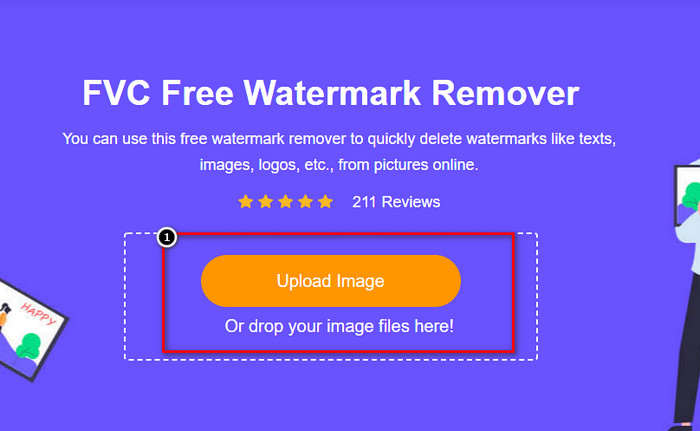
ขั้นตอนที่ 2. คลิก Upload Image เพื่อนำเข้ารูปภาพที่คุณดาวน์โหลดจาก Dreamstime ซึ่งยังมีลายน้ำอยู่.
ขั้นตอนที่ 3. คุณสามารถใช้เครื่องมือต่าง ๆ เพื่อไล่เส้นตามลายน้ำ เลือกเครื่องมือที่ต้องการ แล้วลากเพื่อระบุตำแหน่งลายน้ำ.
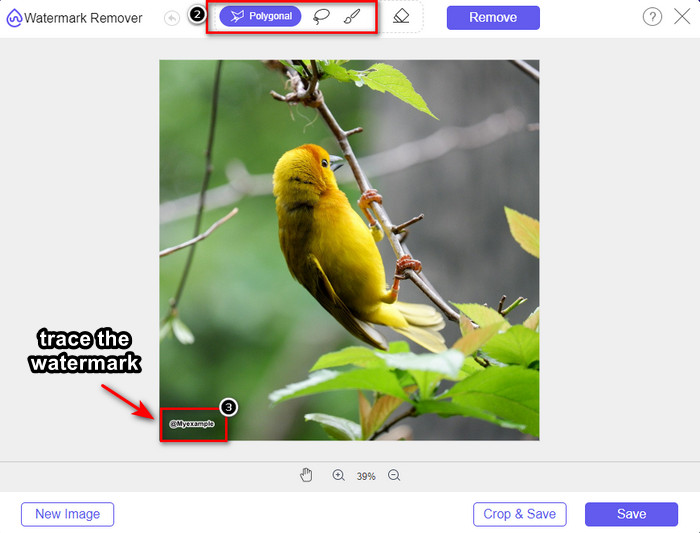
ขั้นตอนที่ 4. คลิกไอคอน Remove ก่อนที่คุณจะดำเนินการส่งออกภาพ.

ขั้นตอนที่ 5. สุดท้ายให้คลิก Download เพื่อบันทึกรูปภาพโดยไม่มีลายน้ำที่เคยฝังอยู่ในตำแหน่งที่คุณเลือก.

WatermarkRemover.IO

WatermarkRemover.io เป็นเครื่องมือออนไลน์สำหรับลบลายน้ำออกจากรูป Dreamstime ที่คุณสามารถใช้งานได้บนเว็บ ช่วยคุณในขั้นตอนนี้ได้เป็นอย่างดี เครื่องมือนี้ให้ใช้ได้ฟรี เช่นเดียวกับตัวลบลายน้ำออนไลน์ตัวแรกที่กล่าวถึงไปแล้ว คุณไม่ต้องกังวลเรื่องการสมัครใช้งาน เพราะสามารถใช้ได้ผ่านเบราว์เซอร์แทบทุกตัว อีกทั้งยังใช้เทคโนโลยี AI ในการลบลายน้ำออกจากรูปภาพของคุณเมื่อใช้งาน เพื่อให้คุณทำตามได้ง่ายขึ้น โปรดอ่านข้อมูลต่อไปนี้.
ขั้นตอนที่ 1. เปิดเว็บไซต์ทางการของตัวลบลายน้ำนี้โดยค้นหาผ่านเบราว์เซอร์ของคุณ.
ขั้นตอนที่ 2. คลิกไอคอน Upload Image เพื่ออัปโหลดรูปภาพที่มีลายน้ำซึ่งคุณต้องการลบ.
ขั้นตอนที่ 3. เมื่อตัวคุณอัปโหลดภาพที่มีลายน้ำเสร็จแล้ว ให้กด Download Image ได้เลย เพราะระบบจะลบลายน้ำออกจากภาพของคุณโดยอัตโนมัติ.
ส่วนที่ 3 วิธีการลบลายน้ำ Dreamstime บนวิดีโอโดยใช้ Ultimate Solution
คุณสามารถดาวน์โหลดโปรแกรมลบลายน้ำ Dreamstime สำหรับวิดีโอได้ เช่น FVC Video Converter Ultimate ซึ่งเป็นเครื่องมือที่ยืดหยุ่นสูง ใช้งานได้ทันทีและทำงานเสร็จได้ทุกเมื่อที่คุณต้องการ เครื่องมือนี้ช่วยจัดการปัญหาต่าง ๆ ที่อาจเกิดขึ้นกับวิดีโอของคุณ เช่น เสียงคุณภาพต่ำ ความละเอียดต่ำ ไฟล์ฟอร์แมตไม่รองรับ และลายน้ำที่รบกวนสายตา เมื่อเทียบกับซอฟต์แวร์ลบลายน้ำตัวอื่นแล้ว ตัวนี้โดดเด่นด้านประสิทธิภาพ ความเร็วในการประมวลผล และความง่ายในการใช้งานมาก ๆ โปรดตามให้ทัน เพราะเราจะสอนวิธีลบลายน้ำออกจากวิดีโอของคุณแบบทีละขั้นตอนอย่างละเอียด.
ขั้นตอนที่ 1. ก่อนอื่นคุณต้องดาวน์โหลดซอฟต์แวร์ลงบนเดสก์ท็อปของคุณโดยคลิกปุ่มดาวน์โหลดด้านล่าง เลือกเวอร์ชันที่ถูกต้องสำหรับอุปกรณ์ ติดตั้งด้วยขั้นตอนสั้น ๆ จากนั้นเปิดโปรแกรม.
ดาวน์โหลดฟรีสำหรับ Windows 7 หรือใหม่กว่าดาวน์โหลดอย่างปลอดภัย
ดาวน์โหลดฟรีสำหรับ MacOS 10.7 หรือใหม่กว่าดาวน์โหลดอย่างปลอดภัย
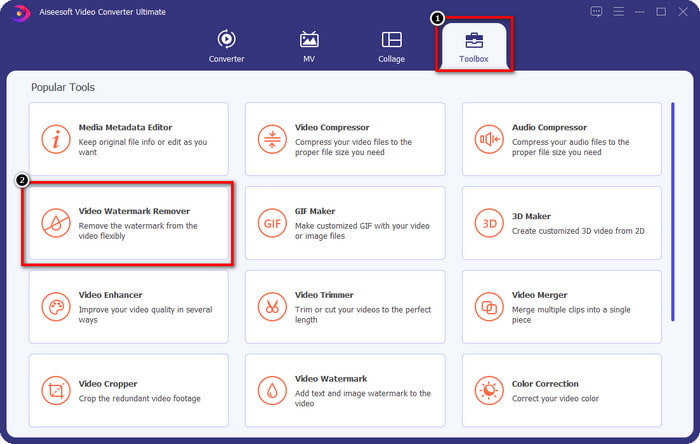
ขั้นตอนที่ 2. เปิด Toolbox อเนกประสงค์ที่อยู่ในโปรแกรม แล้วเลือก Video Watermark Remover.
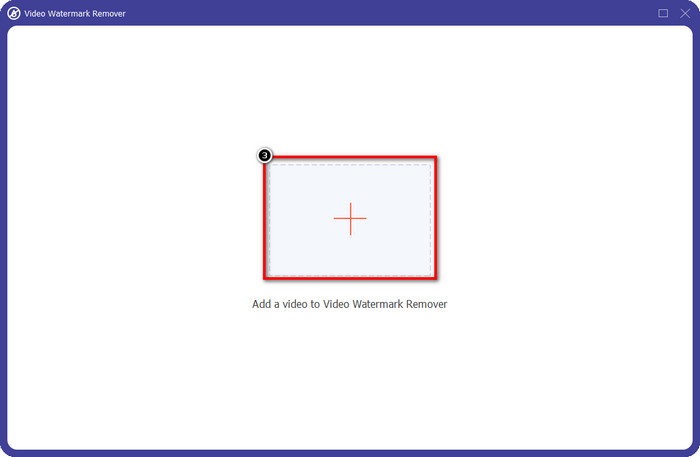
ขั้นตอนที่ 3. จากนั้นคลิกไอคอน + เพื่ออัปโหลดวิดีโอที่คุณดาวน์โหลดมา แล้วเริ่มลบลายน้ำ Dreamstime.
ขั้นตอนที่ 4. จากนั้นคลิก Add Watermark Removing Area เพื่อวางกรอบเลือกลงบนตำแหน่งลายน้ำ.
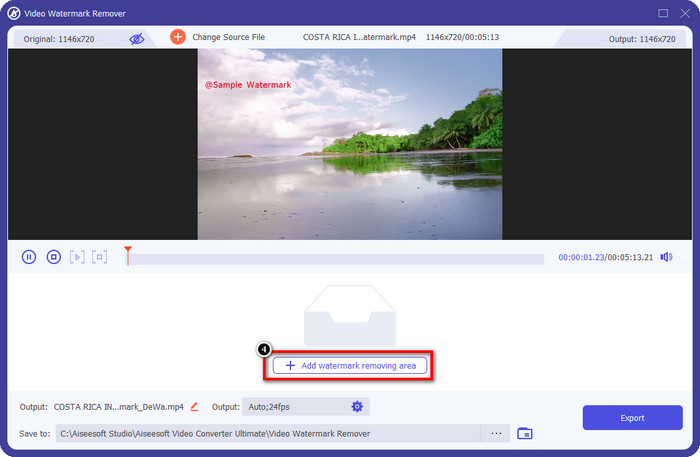
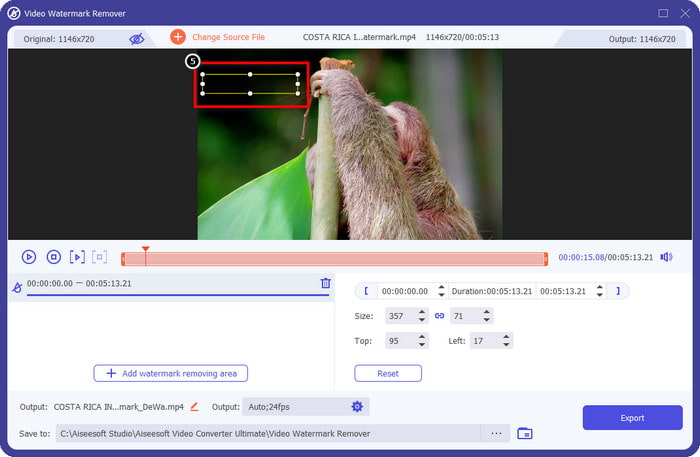
ขั้นตอนที่ 5. หลังจากคลิก Add Watermark Removing Area จะมีสี่เหลี่ยมผืนผ้าปรากฏขึ้นบนหน้าจอ ให้ลากไปวางทับบริเวณลายน้ำเพื่อทำการลบ.
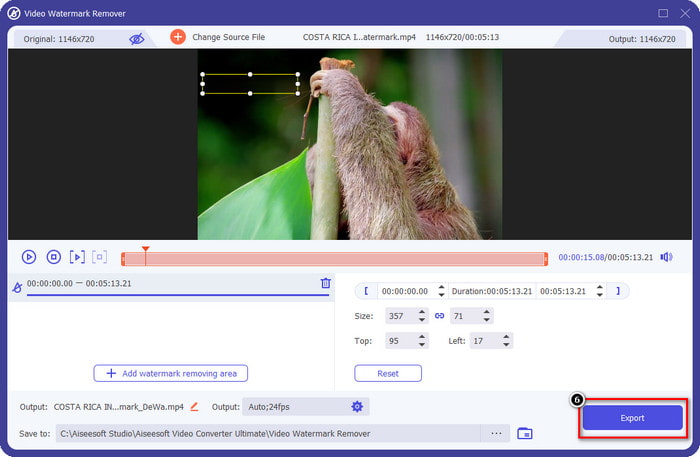
ขั้นตอนที่ 6. คลิกปุ่ม Export เพื่อดาวน์โหลดวิดีโอที่ไม่มีลายน้ำของ Dreamstime แล้ว.
ที่เกี่ยวข้อง:
ส่วนที่ 4 คำถามที่พบบ่อยเกี่ยวกับวิธีการลบ Dreamtime Watermark
ฉันสามารถลบลายน้ำบน Dreamtime ได้ไม่จำกัดหลังจากซื้อมันหรือไม่?
คุณไม่สามารถซื้อเครดิตได้ แต่คุณสามารถเลื่อนลงมาอีกหน่อยได้ และคุณจะเห็นว่ามีการเข้าถึงรูปภาพแบบไม่จำกัดที่คุณสามารถใช้ประโยชน์ได้หากคุณใช้สิ่งนี้เป็นประจำ ราคาของมันไม่เหมือนกันในภูมิภาคหรือสถานที่ต่างๆทั่วโลก
Dreamstime รองรับการ์ดประเภทใด
ตอนนี้คุณได้ตัดสินใจซื้อเครดิตหรือค่าธรรมเนียมการสมัครสมาชิกที่นี่แล้ว คุณสามารถใช้ Master Card, Visa, AMEX และบัตรเครดิตรายใหญ่อื่นๆ คุณสามารถตรวจสอบได้จากเว็บไซต์ทางการเพื่อทำความรู้จักกับผู้อื่น
ฉันสามารถใช้เครดิตใน Dreamstime เพื่อซื้อวิดีโอที่ไม่มีลายน้ำได้หรือไม่
คุณสามารถใช้เครดิตเพื่อซื้อวิดีโอหรือผลิตภัณฑ์ใดๆ ที่แพลตฟอร์มนี้มี วัตถุประสงค์ของการให้เครดิตไม่ได้มีไว้สำหรับรูปภาพและวิดีโอเท่านั้น คุณยังสามารถใช้เพื่อซื้อเสียงได้ที่นี่
สรุป
จะลบลายน้ำ Dreamstime ได้อย่างไร? คุณรู้อยู่แล้วว่าจะจัดการกับลายน้ำในภาพของคุณด้วยเครื่องมือสองอย่างที่เราสมัครเข้าร่วมและวิดีโอด้วยเครื่องมือกำจัดลายน้ำขั้นสูงสุดที่คุณสามารถใช้ได้ ดังนั้น หากคุณมีปัญหาลายน้ำบนวิดีโอหรือรูปภาพ คุณสามารถใช้ซอฟต์แวร์ด้านบนได้อย่างอิสระและทำตามบทช่วยสอนที่เราเพิ่มเข้าไป บอกลาปัญหาไม่ได้เพราะมันแก้ได้!
-
 2 วิธีในการลบ VSDC Watermark บน Windows & Mac อย่างรวดเร็ว
 คุณกำลังมองหาวิธีลบลายน้ำ VSDC บนวิดีโอของคุณหรือไม่? ในบทความนี้ เรามีเครื่องมือที่คุณสามารถใช้กำจัดลายน้ำได้
-
 ลบลายน้ำ Animoto บนวิดีโออย่างง่ายดายและมีประสิทธิภาพ
 จะลบลายน้ำ Animoto ในวิดีโอได้อย่างไร? อ่านบทความนี้ต่อไปในขณะที่เรามีบทแนะนำที่สมบูรณ์เกี่ยวกับวิธีการทำ
-
 วิธีลบลายน้ำออกจากวิดีโอโดยใช้ Final Cut Pro [คู่มือฉบับสมบูรณ์]
 มีปัญหากับลายน้ำบนวิดีโอ? ไม่ต้องพูดอีกต่อไป เพราะเราได้จัดเตรียมบทแนะนำเกี่ยวกับวิธีลบลายน้ำออกจากวิดีโอโดยใช้ Final Cut Pro
