


 Video Converter Ultimate
 บันทึกหน้าจอ
 ซ่อมวิดีโอ
 ดาวน์โหลดอย่างปลอดภัย
วิธีลบลายน้ำ Animaker ด้วยเครื่องมือกำจัดลายน้ำที่ดีที่สุด
คุณเคยลองใช้ Animaker เพื่อตัดต่อวิดีโอของคุณหรือไม่? ถ้าไม่ได้ก็อย่าพลาดโอกาสดีๆ แพลตฟอร์มนี้ช่วยให้นักออกแบบ นักสร้างแอนิเมชั่น ผู้เริ่มต้นใช้งาน มืออาชีพ ผู้สร้างเนื้อหา และอื่นๆ หลายคนสามารถสร้างภาพยนตร์แอนิเมชั่นได้ในไม่ช้า และใช่ มันเป็นเครื่องมือที่สมบูรณ์ เทมเพลตทั้งหมดที่คุณต้องการมีอยู่ที่นี่ ด้วยคุณสมบัติแอนิเมชั่นและการแสดงสดทั้งหมด คุณต้องซื้อซอฟต์แวร์เพื่อใช้เป็นประจำโดยไม่มีปัญหากับลายน้ำและข้อจำกัด
คุณกำลังรู้สึกเศร้าเพราะไม่สามารถซื้อซอฟต์แวร์ได้ใช่ไหม โชคดีที่เครื่องมือที่เราแนะนำต่อไปนี้สามารถลบลายน้ำที่ถูกใส่ไว้ในแอนิเมชันที่คุณสร้างได้ ที่นี่เราจะสอนคุณวิธีลบลายน้ำ Animaker ภายในเวลาไม่ถึง 5 นาที อ่านบทความนี้ต่อไปเพื่อทำความเข้าใจ แล้วคุณจะรู้ในภายหลังว่าทำไมเราจึงเลือกเครื่องมือเหล่านี้.

ส่วนที่ 1 วิธีลบ Animaker Watermark บน Windows, macOS และออนไลน์ [ฟรีและจ่ายเงิน]
Animaker มีลายน้ำหรือไม่? ใช่ มันเพิ่มลายน้ำในวิดีโอแอนิเมชันที่คุณแก้ไขที่นี่ โดยเฉพาะอย่างยิ่งหากคุณไม่ได้ใช้เวอร์ชันเชิงพาณิชย์ คุณสามารถหลีกเลี่ยงลายน้ำที่เพิ่มเข้าไปได้หากคุณซื้อเวอร์ชันเชิงพาณิชย์ แต่ถ้าคุณไม่ต้องการใช้ คุณต้องใช้ตัวลบลายน้ำที่เราเพิ่มด้านล่าง
FVC Video Converter Ultimate [Windows และ macOS]
สมมติว่าคุณต้องการเครื่องมือที่ทรงพลังเพื่อจัดการกับลายน้ำอย่างมีประสิทธิภาพ คุณควรเลือกใช้ FVC Video Converter Ultimate เครื่องมือนี้สามารถใช้งานได้บนเดสก์ท็อปทุกเครื่อง ไม่ว่าคุณจะเป็นผู้ใช้ Windows หรือ Mac ด้วยเครื่องมือนี้ คุณสามารถลบลายน้ำบนวิดีโอแอนิเมชันที่สร้างด้วย Animaker ได้อย่างมีประสิทธิภาพโดยไม่ทิ้งคราบหรือร่องรอยไว้ แม้ว่าคุณจะไม่มีประสบการณ์ในการแก้ปัญหานี้มาก่อน คุณก็สามารถใช้ซอฟต์แวร์นี้ได้ เพราะใช้งานง่ายและมีอินเทอร์เฟซที่เข้าใจไม่ยาก.
ไม่เพียงแต่เครื่องมือนี้เป็นการลบลายน้ำที่มีประสิทธิภาพเท่านั้น แต่ยังเป็นเครื่องมือโดยรวมที่มีประสิทธิภาพสำหรับวัตถุประสงค์อื่นอีกด้วย คุณสามารถดาวน์โหลดเครื่องมือบนเดสก์ท็อปของคุณเพื่อตรวจสอบว่ามีฟังก์ชันอื่นๆ อะไรบ้าง หากคุณต้องการมีวิดีโอ ส่งออกบน Animaker โดยไม่มีลายน้ำ ทำตามขั้นตอนด้านล่าง
ขั้นตอนที่ 1. หากต้องการมีเครื่องมืออเนกประสงค์นี้ ให้คลิกปุ่มดาวน์โหลดเพื่อรับเวอร์ชันสำหรับ Windows หรือ Mac ของคุณ ติดตั้งซอฟต์แวร์ จากนั้นคลิก Start Now เพื่อเปิดเครื่องมือนี้.
ดาวน์โหลดฟรีสำหรับ Windows 7 หรือใหม่กว่าดาวน์โหลดอย่างปลอดภัย
ดาวน์โหลดฟรีสำหรับ MacOS 10.7 หรือใหม่กว่าดาวน์โหลดอย่างปลอดภัย
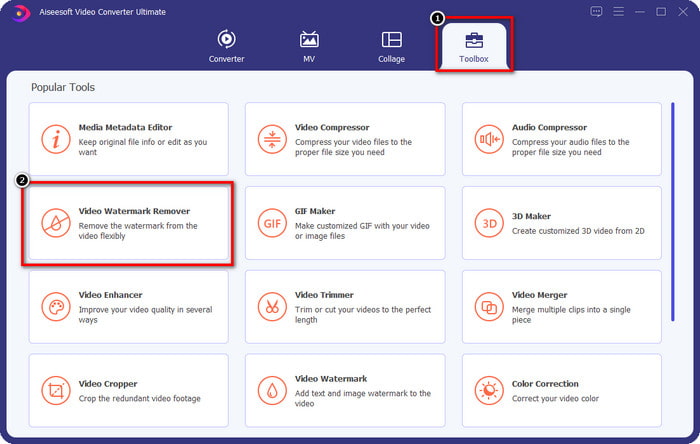
ขั้นตอนที่ 2. ที่ส่วนบนซ้ายของอินเทอร์เฟซ คลิก Toolbox แล้วเปิด Video Watermark Remover ภายใต้เมนู Toolbox คุณจะเห็นว่ามีฟีเจอร์และฟังก์ชันอื่น ๆ อีกมากมายที่เครื่องมือนี้มีให้.
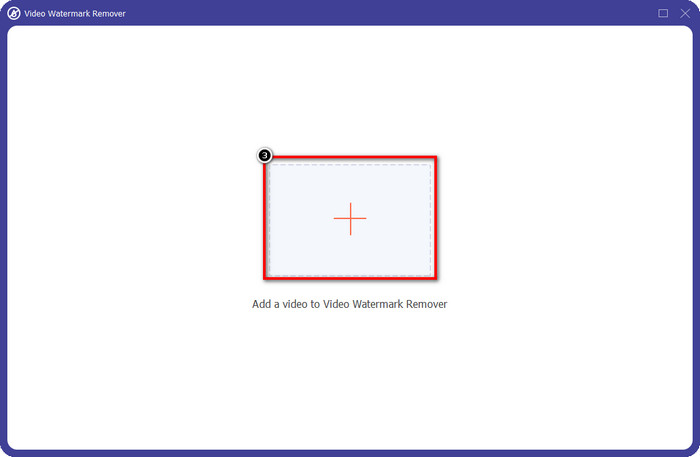
ขั้นตอนที่ 3. อัปโหลดวิดีโอแอนิเมชันที่คุณสร้างใน Animaker โดยคลิกไอคอน + เลือกไฟล์จากไดรฟ์ภายในเครื่องของคุณ คลิกไฟล์นั้น แล้วกด Open.
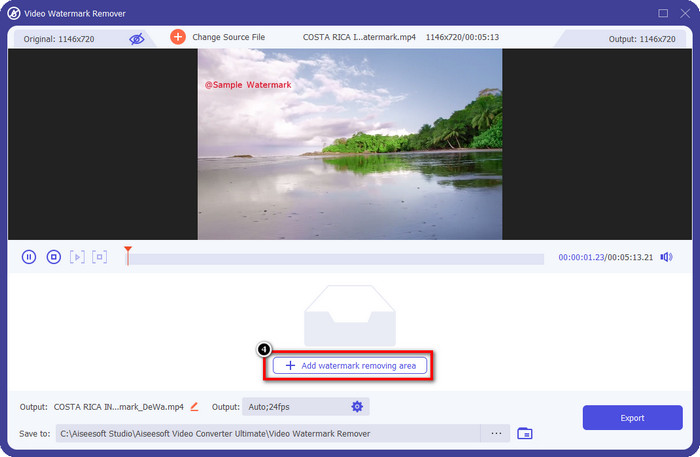
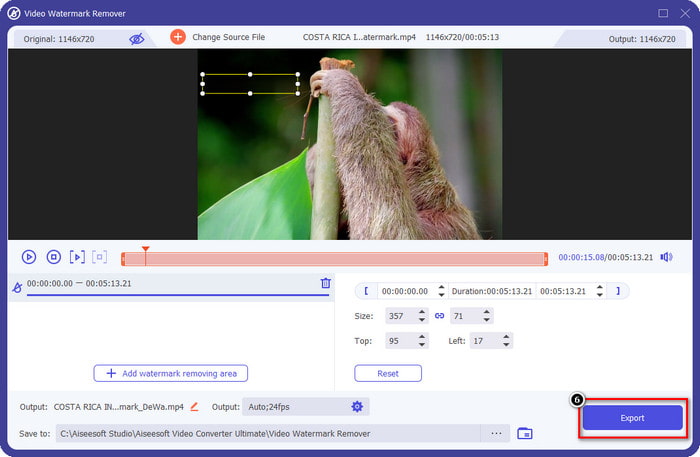
ขั้นตอนที่ 4. เพื่อดำเนินการใช้ตัวลบลายน้ำ ให้คลิก Add Watermark Removing Area.
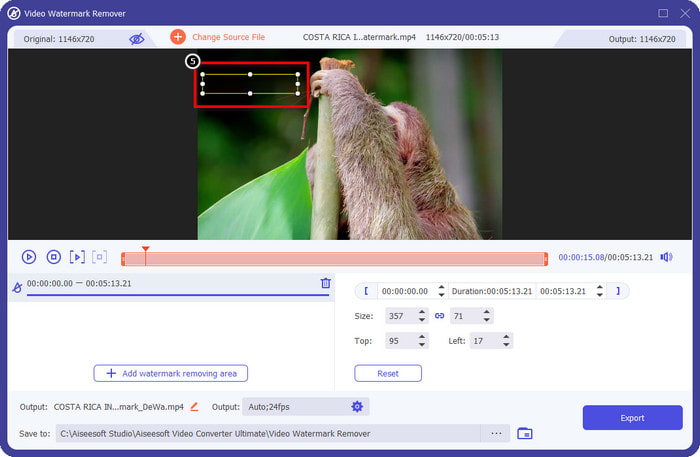
ขั้นตอนที่ 5. วางกรอบตัวเลือกไปยังตำแหน่งบริเวณลายน้ำ เพื่อให้การลบลายน้ำเริ่มทำงานในจุดนั้น.
ขั้นตอนที่ 6. กด Export เพื่อดาวน์โหลดวิดีโอที่ไม่มีลายน้ำ Animaker ติดอยู่ ง่ายใช่ไหม เพราะอินเทอร์เฟซที่ใช้งานง่าย ทำให้การเลือกใช้เครื่องมือนี้กลายเป็นตัวเลือกที่ดีที่สุดสำหรับการลบลายน้ำ.
ลบโลโก้ออกจากวิดีโอผ่าน 123 APPS [ออนไลน์]
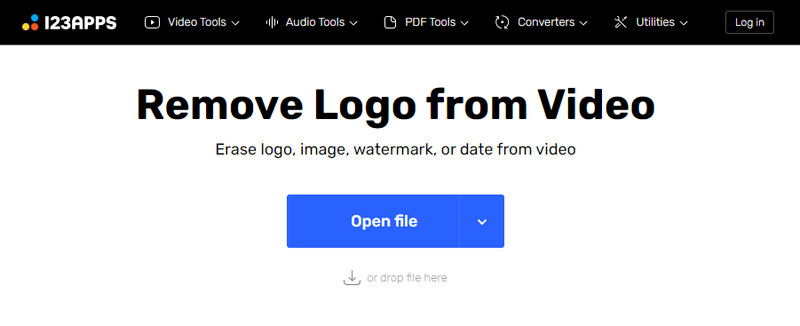
Remove Logo from Videos via 123 APPS ช่วยให้คุณจัดการกับลายน้ำในวิดีโอได้อย่างมีประสิทธิภาพด้วยฟีเจอร์ลบลายน้ำของมัน แตกต่างจากโปรแกรมลบลายน้ำแบบติดตั้งลงเครื่อง คุณไม่จำเป็นต้องลงโปรแกรมใด ๆ เพื่อใช้ตัวลบลายน้ำนี้บนอุปกรณ์ เพราะมันสามารถใช้งานได้ผ่านเว็บ อีกทั้งยังปลอดภัยต่อการใช้งาน จึงไม่น่าแปลกใจที่มันกลายเป็นตัวลบลายน้ำที่น่าเชื่อถือในการจัดการลายน้ำบนวิดีโอ ต้องการใช้ตัวลบลายน้ำออนไลน์ตัวนี้เพื่อให้ได้วิดีโอที่ไม่มีลายน้ำ Animaker หรือไม่ ขั้นตอนด้านล่างนี้จะสอนวิธีใช้งานให้คุณ.
ขั้นตอนที่ 1. เปิดเว็บเบราว์เซอร์ของคุณเพื่อเข้าสู่เว็บไซต์ตัวลบลายน้ำออนไลน์.
ขั้นตอนที่ 2. บนเว็บไซต์ทางการ ให้คลิก Open File เพื่ออัปโหลดวิดีโอที่คุณต้องการใช้งานและลบลายน้ำออกจากวิดีโอ.
ขั้นตอนที่ 3. เลือกบริเวณที่มีลายน้ำอยู่บนวิดีโอของคุณ.
ขั้นตอนที่ 4. คลิกปุ่ม Save เพื่อดาวน์โหลดวิดีโอแอนิเมชันที่ไม่มีลายน้ำ.
เครื่องมือกำจัดลายน้ำวิดีโอ Gilisoft [Windows]
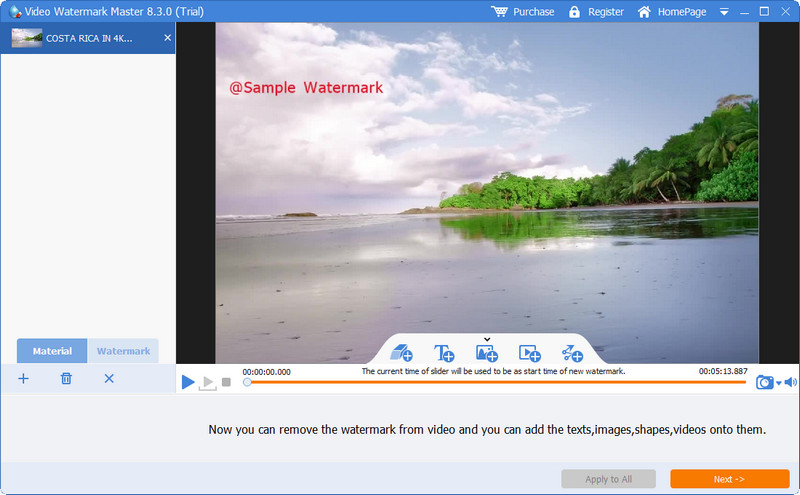
Gilisoft Video Watermark Removal Tool เป็นโปรแกรมลบลายน้ำบน Windows ที่คุณสามารถใช้เพื่อกำจัดลายน้ำบนวิดีโอแอนิเมชันที่คุณสร้างจาก Animaker เป็นเครื่องมือที่คุณต้องดาวน์โหลดลงบน Windows เพื่อใช้ลบลายน้ำจากวิดีโอที่บันทึกไว้ในไดรฟ์ภายในเครื่อง สำหรับผู้ใช้ Mac ซอฟต์แวร์นี้ยังไม่รองรับบนระบบปฏิบัติการของคุณ นอกจากนี้ คุณยังสามารถเพิ่มลายน้ำในรูปแบบรูปภาพ ข้อความ และรูปร่างได้หากจำเป็น อ่านต่อเพื่อเรียนรู้วิธีลบลายน้ำ Animaker ด้วยโปรแกรมลบลายน้ำที่ดีที่สุดบน Windows.
ขั้นตอนที่ 1. ดาวน์โหลดโปรแกรมลบลายน้ำลงบน Windows ของคุณ ทำตามขั้นตอนการติดตั้ง จากนั้นคลิก Launch Video Watermark Master.
ขั้นตอนที่ 2. กด Add File/s เพื่อเพิ่มวิดีโอแอนิเมชันที่คุณตัดต่อบน Animaker เวอร์ชันฟรีที่ยังมีลายน้ำติดอยู่.
ขั้นตอนที่ 3. คลิกไอคอน eraser เพื่อเพิ่มพื้นที่ลบลายน้ำ แล้วนำไปวางยังบริเวณที่มีลายน้ำ.
ขั้นตอนที่ 4. เมื่อคุณกำหนดพื้นที่ลบลายน้ำบนวิดีโอเรียบร้อยแล้ว คลิก Next จากนั้นหน้าต่างขนาดเล็กจะปรากฏบนหน้าจอ คุณสามารถปรับรูปแบบไฟล์ เปลี่ยนโฟลเดอร์ผลลัพธ์ตามต้องการ แล้วคลิก Start เพื่อเริ่มกระบวนการ.
อ่านเพิ่มเติม:
วิธีลบลายน้ำ B612 ออกจากรูปภาพของคุณ
วิธีลบลายน้ำ WOW Slider ได้ฟรี
ส่วนที่ 2 คำถามที่พบบ่อยเกี่ยวกับวิธีการลบลายน้ำ Animaker
เหตุใดฉันจึงใช้เทมเพลตอื่นบน Animaker ไม่ได้
เป็นเพราะเวอร์ชันฟรีจำกัดการเข้าถึงเทมเพลตที่มีอยู่ใน Animaker เทมเพลตพรีเมียมไม่พร้อมใช้งานสำหรับ Animaker ที่ไม่ได้ลงทะเบียน หากคุณต้องการเข้าถึงเวอร์ชัน Pro คุณจะต้องดูแผนการกำหนดราคาที่เครื่องมือนี้มีให้
ฉันสามารถดาวน์โหลดเทมเพลตใน Animaker เวอร์ชันฟรีได้กี่ครั้ง
Animaker เวอร์ชันฟรีช่วยให้ผู้ใช้สามารถสร้างและดาวน์โหลดวิดีโอแอนิเมชั่นได้ห้าครั้งโดยมีลายน้ำในแต่ละวิดีโอ สมมติว่าคุณต้องการสร้างวิดีโอแอนิเมชั่นเพิ่มเติมด้วยแพลตฟอร์มนี้ ในกรณีนั้น คุณจะต้องซื้อเวอร์ชันพื้นฐาน สตาร์ทเตอร์ โปร หรือองค์กร
ทำไมฉันไม่สามารถสร้างวิดีโอแอนิเมชั่นความยาว 6 นาทีบน Animaker ได้
สมมติว่าคุณใช้ Animaker เวอร์ชันฟรี ในกรณีนี้ คุณจะมีปัญหาในการอัปโหลดหรือสร้างวิดีโอที่มีความยาว 6 นาที คุณสามารถแก้ปัญหานี้ได้โดยใช้แผนในเครื่องมือนี้หรือใช้ FVC Video Converter Ultimate เพื่อสร้างวิดีโอโดยไม่จำกัดความยาว
สรุป
คุณชอบใช้เครื่องมือใด คุณสามารถเลือกเครื่องมือต่างๆ ได้ที่นี่ เมื่อคุณได้อ่านรายละเอียดของแต่ละเครื่องมือแล้ว และเราสอนวิธีลบลายน้ำ Animaker ในแต่ละอัน มีปัญหากับสิ่งที่จะเลือก? ถ้าใช่ การเลือก FVC Video Converter Ultimate จะเป็นซอฟต์แวร์ที่ปลอดภัยที่สุดที่คุณสามารถใช้ได้ เพราะมันทำงานได้อย่างมีประสิทธิภาพในปัญหาต่าง ๆ เมื่อคุณใช้เครื่องมือนี้ คุณจะ; จำเป็นต้องกังวลอีกต่อไปเกี่ยวกับลายน้ำที่คุณมีในวิดีโอของคุณ โซลูชันอยู่ในมือคุณ หากคุณเลือกซอฟต์แวร์ขั้นสูงสุดบน Windows & Mac
-
 3 วิธีในการลบลายน้ำวิดีโอ Viva บนวิดีโอ [วิธีที่เร็วที่สุด]
 คุณจะต้องใช้ตัวลบลายน้ำโดยเฉพาะเพื่อลบลายน้ำ Viva Video บนวิดีโอ อ่านบทความนี้เพื่อทราบข้อมูลเพิ่มเติม!
-
 สุดยอดเครื่องมือในการลบลายน้ำออกจากวิดีโอที่ส่งออก Renderforest
 ในการลบลายน้ำออกจาก Renderforest คุณจะต้องมีตัวลบลายน้ำบนอุปกรณ์ของคุณ เครื่องมือทั้งหมดที่คุณสามารถใช้ได้อยู่ที่นี่
-
 ทบทวนผลิตภัณฑ์ล้างลายน้ำ PlaceIt อย่างมีประสิทธิภาพ [2022]
 น้ำยาล้างลายน้ำ PlaceIt ที่เราตรวจสอบที่นี่เป็นเครื่องมือที่มีประสิทธิภาพที่คุณสามารถใช้เพื่อลบลายน้ำบนวิดีโอที่คุณส่งออกบน PlaceIt
