


 Video Converter Ultimate
 บันทึกหน้าจอ
 ซ่อมวิดีโอ
 ดาวน์โหลดอย่างปลอดภัย
วิธีลบลายน้ำใน SmartDraw ด้วย 2 วิธีที่เป็นไปได้
หากคุณต้องการวิธีที่ง่ายแต่ทรงพลังในการสร้างกราฟ แผนผัง และแผนที่ แล้วนำไปนำเสนอในระดับคุณภาพองค์กร (enterprise-grade) ให้ใช้ SmartDraw คุณสามารถใช้จินตนาการของคุณและเปลี่ยนให้เป็นจริงได้ด้วยความช่วยเหลือของ SmartDraw เครื่องมือนี้ฟรีหรือไม่? คุณสามารถใช้รุ่นทดลองใช้งานฟรี 7 วัน ซึ่งให้ใช้เครื่องมือได้ฟรีแต่จะมีลายน้ำบนงานของคุณ การต้องจัดการกับลายน้ำบนไฟล์ที่ส่งออกอาจสร้างความลำบากได้ ดังนั้น เราขอแนะนำบทความนี้ เพราะเราจะเสนอเฉพาะเครื่องมือที่ดีที่สุดในตลาดซึ่งช่วยลบลายน้ำได้อย่างมีประสิทธิภาพ โปรดอ่านข้อมูลด้านล่างเพื่อเรียนรู้วิธีลบลายน้ำใน SmartDraw อย่างได้ผล 2 วิธี.

ส่วนที่ 1 วิธีลบลายน้ำใน Smart Draw โดยการซื้อรหัสใบอนุญาต [เวอร์ชันอย่างเป็นทางการ]
จะลบลายน้ำออกจาก SmartDraw ได้อย่างไร? นี่เป็นวิธีแรกที่เราจะแนะนำให้คุณรู้จัก โดยการซื้อคีย์ใบอนุญาตสำหรับเครื่องมือนี้ แพลตฟอร์มนี้เสนอแผนประเภทต่างๆ ที่คุณจะได้รับซึ่งจะเป็นประโยชน์ต่อจุดจบของคุณ นอกจากนี้ คุณไม่สามารถซื้อการเข้าถึงเครื่องมือนี้เป็นเวลา 1 เดือน ดังนั้นหากคุณวางแผนที่จะซื้อรหัสสัญญาอนุญาต คุณจะถูกเรียกเก็บเงินรายเดือน แต่ยอดรวมที่คุณจะจ่ายเป็นเวอร์ชันรายปี หากคุณพอใจในประสิทธิภาพของเครื่องมือนี้และต้องการซื้อ คุณสามารถทำตามขั้นตอนที่เราเพิ่มด้านล่าง
ขั้นตอนเกี่ยวกับวิธีการลบลายน้ำใน SmartDraw ด้วยรหัสใบอนุญาต:
ขั้นตอนที่ 1. เปิดเว็บไซต์ทางการของ SmartDraw และตรวจสอบให้แน่ใจว่าคุณเข้าถูกเว็บไซต์เพื่อให้การทำธุรกรรมปลอดภัย.
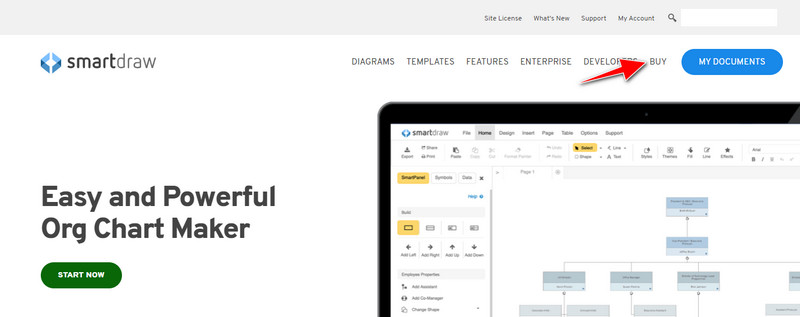
ขั้นตอนที่ 2. บนหน้าเว็บไซต์ ให้คลิกที่ Buy เพื่อดูแพ็กเกจที่มีให้เลือก.
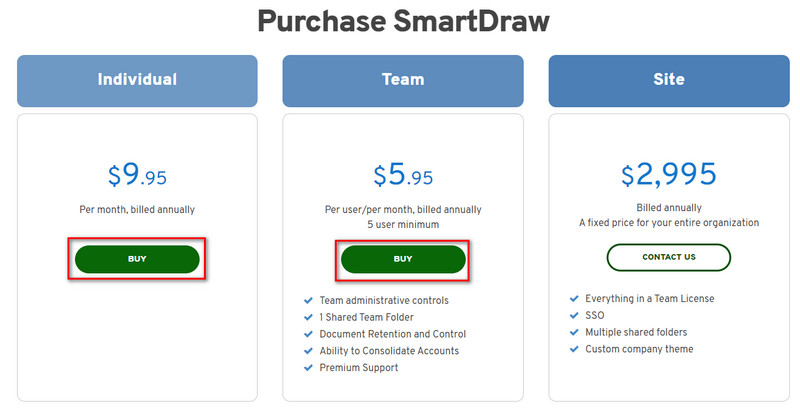
ขั้นตอนที่ 3. คุณสามารถซื้อ SmartDraw ได้ในรูปแบบ Individual, Team หรือ Site คลิก Buy Now หากคุณต้องการซื้อเวอร์ชัน Individual หรือ Team.
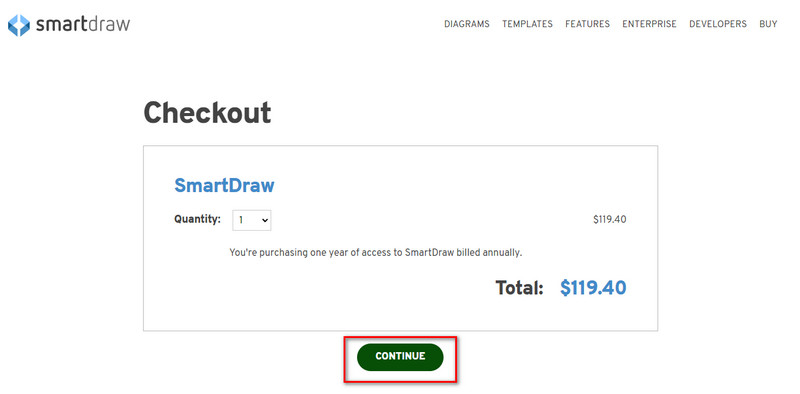
ขั้นตอนที่ 4. ที่ด้านขวาของหน้า คุณจะเห็นยอดชำระทั้งหมดของเครื่องมือแบบรายปี จากนั้นคลิก Continue เพื่อดำเนินการต่อ.
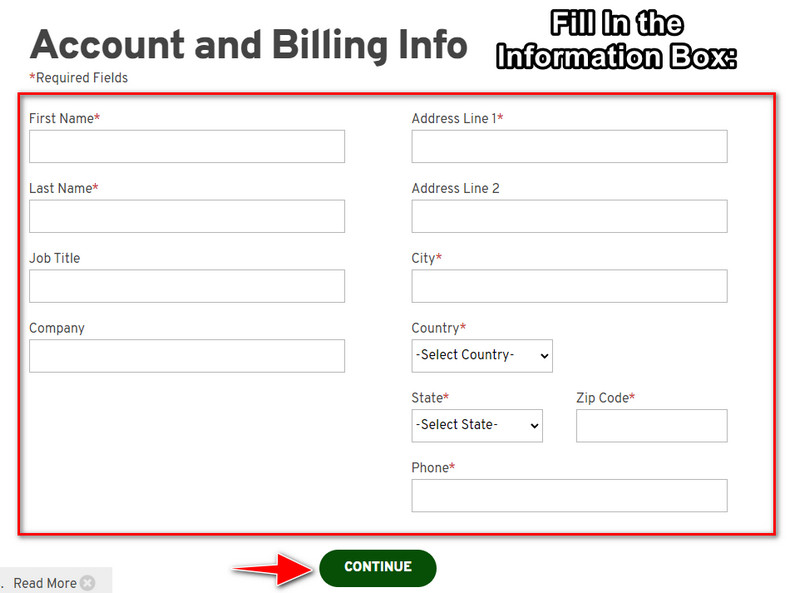
ขั้นตอนที่ 5. กรอกข้อมูลบัญชีและข้อมูลการเรียกเก็บเงินที่จำเป็นให้ครบ แล้วกด Continue เพื่อดำเนินการต่อและรับรหัสไลเซนส์.
ส่วนที่ 2 วิธีลบลายน้ำใน Smart Draw ฟรีโดยใช้บริการเว็บ [ไม่มีค่าใช้จ่าย]
จะลบลายน้ำออกจากเวอร์ชันทดลองของ SmartDraw โดยไม่ต้องซื้อได้อย่างไร? คุณจำเป็นต้องใช้ FVC Free Watermark Remover Online เครื่องมือลบลายน้ำนี้พร้อมให้คุณใช้งาน โดยที่คุณไม่จำเป็นต้องมีความเชี่ยวชาญเฉพาะทางในการลบลายน้ำบนรูปภาพ เพราะเครื่องมือนี้ใช้งานไม่ยุ่งยาก แม้ว่าคุณจะเป็นผู้เชี่ยวชาญ คุณก็ยังสามารถใช้ซอฟต์แวร์นี้เพื่อลบลายน้ำหรือวัตถุที่ไม่ต้องการออกจากภาพได้ ด้วยความช่วยเหลือของตัวลบลายน้ำนี้ จะไม่มีก้อนรอยหรือคราบใด ๆ บนภาพที่มันลบไม่ได้ อยากลองใช้ซอฟต์แวร์นี้แทนการซื้อรหัสไลเซนส์หรือไม่? ถ้าใช่ ให้ทำตามบทเรียนที่เราเพิ่มไว้ด้านล่างนี้เพื่อช่วยลบลายน้ำบนภาพอย่างมีประสิทธิภาพ.
ขั้นตอนเกี่ยวกับวิธีการลบลายน้ำของ SmartDraw บนกราฟหรือไดอะแกรมฟรี:
ขั้นตอนที่ 1. แทนที่จะค้นหาเครื่องมือออนไลน์นี้ในเว็บเบราว์เซอร์ของคุณ คุณสามารถคลิกที่ ลิงก์นี้ เพื่อเปิด ซึ่งจะเปิดแท็บใหม่ในโปรแกรมค้นหาของคุณ.
ขั้นตอนที่ 2. ใช้เมาส์ของคุณลากและวางกราฟหรือไดอะแกรมภาพที่คุณสร้างใน SmartDraw เพื่ออัปโหลด.
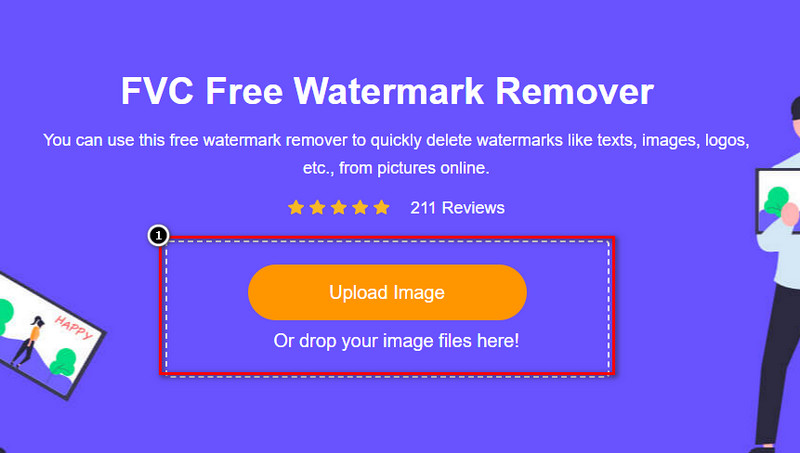
ขั้นตอนที่ 3. เมื่อเปิดตัวลบลายน้ำออนไลน์แล้ว ให้เลือกเครื่องมือที่คุณต้องการใช้เพื่อไฮไลต์ลายน้ำบนภาพ.
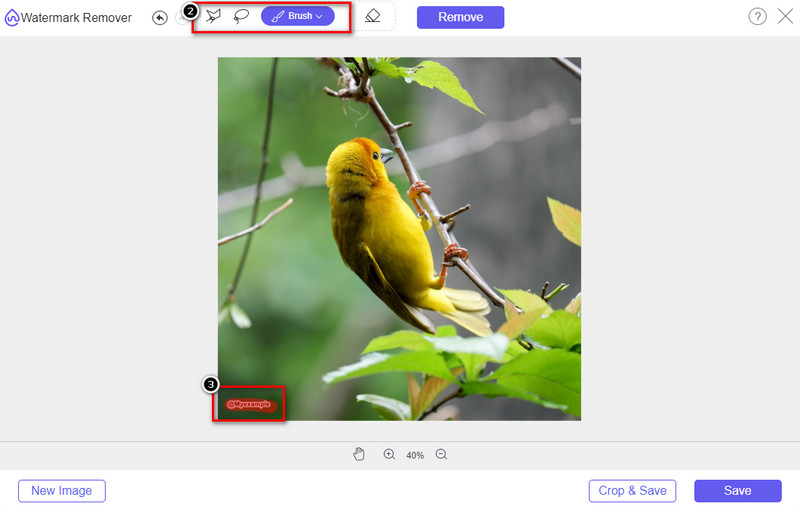
ขั้นตอนที่ 4. หลังจากไฮไลต์ลายน้ำหรือโลโก้บนภาพที่คุณอัปโหลดแล้ว ให้กด Remove.
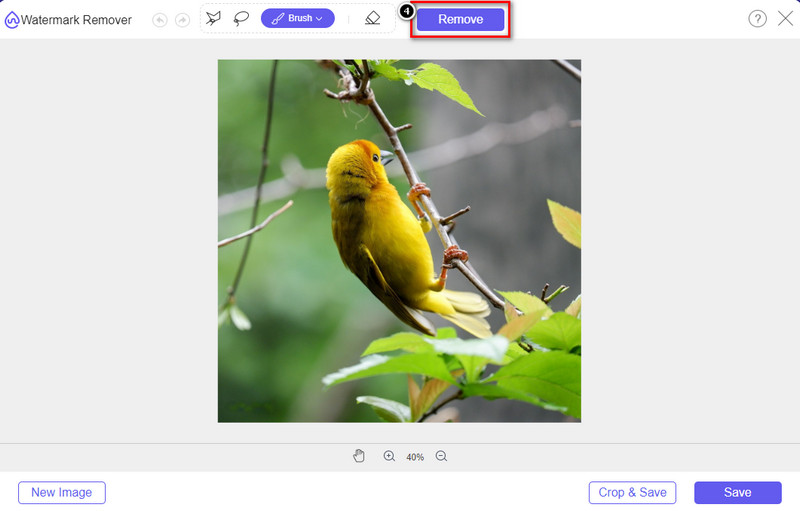
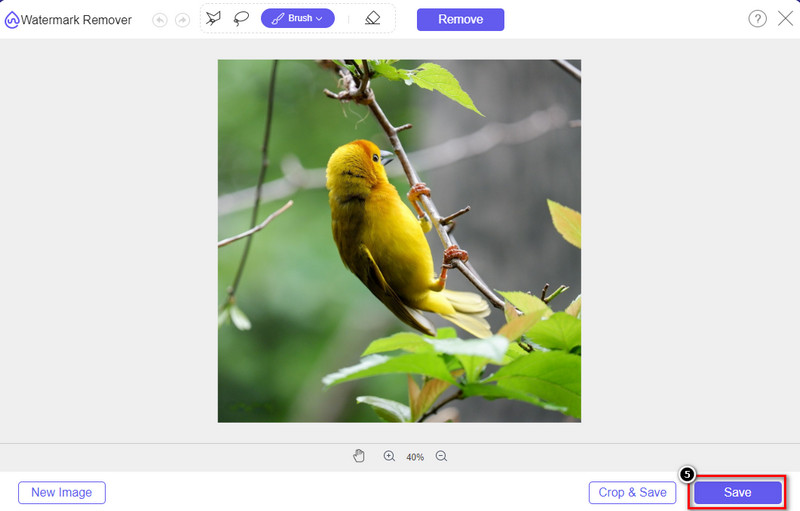
ขั้นตอนที่ 5. รอให้กระบวนการลบลายน้ำเสร็จสิ้น แล้วคลิก Save เพื่อดาวน์โหลดกราฟหรือไดอะแกรมที่คุณอัปโหลด จะมีหน้าต่างโฟลเดอร์เด้งขึ้นมาบนหน้าจอ จากนั้นตรวจสอบเวอร์ชันกราฟหรือไดอะแกรมที่คุณสร้างขึ้นใหม่โดยไม่มีลายน้ำ.
ข้อดีของการใช้ FVC Free Watermark Remover Online:
◆ ไม่จำเป็นต้องดาวน์โหลดแอปเพราะมีให้บริการบนเว็บ
◆ รองรับรูปภาพได้หลากหลาย และสามารถลบลายน้ำได้อย่างมีประสิทธิภาพ
◆ เป็นโปรแกรมลบลายน้ำโดยเฉพาะซึ่งให้ผลลัพธ์คุณภาพสูง
◆ ไม่มีการเพิ่มลายน้ำในผลลัพธ์สุดท้ายเมื่อส่งออก
◆ ไม่จำกัดจำนวนครั้งในการใช้งานและขนาดไฟล์
ส่วนที่ 3 ส่วนเพิ่มเติม – วิธีการสร้างแผนภูมิ กราฟ หรือไดอะแกรมบน SmartDraw พร้อมขั้นตอนโดยละเอียด
ส่วนก่อนหน้าจะสอนวิธีกำจัดลายน้ำ SmartDraw ในส่วนนี้ เราจะสอนวิธีสร้างแผนภูมิ กราฟ และไดอะแกรมโดยใช้ SmartDraw คุณสามารถทำตามขั้นตอนที่เราเพิ่มด้านล่างเพื่อทราบวิธีการดำเนินการ
ขั้นตอนที่ 1. ไปที่เว็บไซต์อย่างเป็นทางการของมันเพื่อสร้างกราฟ แผนภูมิ หรือไดอะแกรม.
ขั้นตอนที่ 2. เมื่อคุณเปิดเว็บไซต์อย่างเป็นทางการแล้ว ให้คลิก Start Now และเข้าสู่บัญชีของคุณ.
ขั้นตอนที่ 3. ที่แถบด้านซ้าย ให้เลือกประเภทเทมเพลตที่คุณต้องการใช้หรือสร้าง.
ขั้นตอนที่ 4. เพิ่มข้อมูลลงในแต่ละส่วนของแผนผังลำดับงาน (flow chart) จะมีตัวเลือกเพิ่มเติมให้คุณใช้ในส่วนด้านซ้ายของเว็บไซต์.
ขั้นตอนที่ 5. คลิกปุ่ม Export เลือกประเภทไฟล์ที่คุณต้องการ แล้วคลิกเพื่อเริ่มกระบวนการ หากคุณใช้เวอร์ชันฟรีจะมีลายน้ำ คุณสามารถคัดลอกขั้นตอนในส่วนที่ 2 เพื่อใช้ลบลายน้ำได้.
อ่านเพิ่มเติม:
วิธีลบลายน้ำ B612 ออกจากรูปภาพของคุณ
วิธีลบลายน้ำ WOW Slider ได้ฟรี
ส่วนที่ 4 คำถามที่พบบ่อยเกี่ยวกับวิธีการลบ SmartDraw Watermark
SmartDraw สามารถส่งออกภาพ PNG ได้หรือไม่
ได้ คุณสามารถมีแผนภูมิโปร่งใสในรูปแบบ PNG ได้ อย่างไรก็ตาม จะเพิ่มลายน้ำหากคุณใช้เวอร์ชันฟรี คุณสามารถซื้อเวอร์ชันอย่างเป็นทางการได้ ดังนั้นจะมีลายน้ำบนรูปภาพที่ส่งออก
SmartDraw ราคาเท่าไหร่?
หากคุณกำลังจะซื้อแผนบน SmartDraw คุณสามารถซื้อแผนได้ตั้งแต่ $ 5.95 คุณสามารถตรวจสอบราคาอื่น ๆ ที่มีให้บนเว็บไซต์ทางการ
ข้อดีของการซื้อ SmartDraw รุ่นพรีเมี่ยมคืออะไร?
คุณสามารถควบคุมผู้ดูแลระบบของทีม โฟลเดอร์ทีม การสนับสนุนระดับพรีเมียม และส่งออกรูปภาพโดยไม่มีลายน้ำสำหรับแต่ละแผน สำหรับข้อได้เปรียบระดับพรีเมียมอื่นๆ คุณสามารถเข้าไปที่เว็บไซต์ทางการ และดูคุณสมบัติและฟังก์ชันที่คุณจะได้รับ
สรุป
ตอนนี้คุณรู้วิธีบันทึก SmartDraw โดยไม่มีลายน้ำแล้ว ด้วยสองวิธีที่เราเพิ่มเข้าไป ไม่ว่าคุณจะซื้อหรือใช้เครื่องมือเพื่อลบลายน้ำในไฟล์ที่ส่งออก หากคุณไม่ต้องการซื้อเครื่องมือ คุณต้องใช้มันเพราะเป็นเครื่องมือเว็บที่มีประสิทธิภาพที่สุดในการกำจัดลายน้ำ หากคุณคิดว่าบทความนี้ช่วยคุณแก้ปัญหาได้ แสดงว่าคุณให้คะแนนเรา 5 ดาว
-
 4 วิธีที่ดีที่สุดในการลบลายน้ำออกจาก GIF [ออนไลน์และออฟไลน์]
 ต้องการลบลายน้ำออกจาก GIF หรือไม่ ด้วยเครื่องมือในบทความนี้ คุณจะได้เรียนรู้รูปแบบต่างๆ ด้วยน้ำยาล้างลายน้ำต่างๆ ที่มีอยู่ในแพลตฟอร์มของคุณ
-
 5 วิธีที่ง่ายที่สุดในการลบข้อมูลเมตาในไฟล์มีเดียต่างๆ
 จะลบข้อมูลเมตาได้อย่างไร ทำยากไหม? ฉันจำเป็นต้องซื้อหรือใช้เครื่องมือฟรีเพื่อลบแท็กหรือไม่ คำถามเหล่านี้ทั้งหมดมีคำตอบในบทความนี้
-
 Photobucket Watermark Remover ที่โดดเด่นทั้งออนไลน์และออฟไลน์
 เรียนรู้วิธีลบลายน้ำ Photobucket ออกจากภาพถ่ายของคุณโดยใช้ตัวลบลายน้ำ Photobucket ที่น่าทึ่งเหล่านี้ อ่านบทความนี้เพื่อเรียนรู้วิธีต่างๆ
