


 Video Converter Ultimate
 บันทึกหน้าจอ
 ซ่อมวิดีโอ
 ดาวน์โหลดอย่างปลอดภัย
วิธีลบลายน้ำใน Lunapic โดยใช้ 3 วิธีที่มีประสิทธิภาพ [ใช้ฟรี]
สำหรับโปรแกรมแก้ไขรูปภาพที่เหมาะกับมือใหม่ คุณสามารถลองใช้ Lunapic บนเว็บเพื่อแก้ไขรูปภาพของคุณได้ จริง ๆ แล้ว เครื่องมือนี้สามารถเพิ่มและลบลายน้ำบนรูปภาพของคุณได้ด้วยเครื่องมือที่ใช้งานได้จริงสองอย่าง ที่นี่ เราจะอธิบายเทคนิคที่คุณสามารถใช้กับรูปภาพเพื่อกำจัดลายน้ำ กรุณาอ่านบทความนี้ให้จบเพื่อเรียนรู้วิธีลบลายน้ำใน Lunapicตามขั้นตอนที่เราให้ไว้ด้านล่าง.

ส่วนที่ 1. 2 เทคนิคในการลบลายน้ำออกจากรูปภาพโดยใช้ Lunapic ที่คุณต้องรู้
Lunapic ลบลายน้ำบนรูปภาพโดยใช้สองวิธีที่แตกต่างกัน การครอบตัดและการลบวัตถุ แต่วิธีใดมีประสิทธิภาพมากกว่าและวิธีใดมีประสิทธิภาพน้อยกว่า มาพูดคุยกันก่อนที่เราจะดำเนินการตามขั้นตอน
วิธีที่ 1 ตัดลายน้ำบนรูปภาพ
คุณลักษณะการครอบตัดที่มีให้นั้นไม่มีอะไรพิเศษ ซึ่งหมายความว่าจะทำสิ่งที่ชื่อระบุเพื่อครอบตัดรูปภาพ คุณสามารถใช้คุณสมบัตินี้ได้หากลายน้ำอยู่ด้านข้าง ครอบตัดลายน้ำและบันทึกส่วนของภาพโดยไม่มีลายน้ำ หากคุณสนใจคุณสามารถทำตามขั้นตอนที่เราเพิ่มได้
ขั้นตอนที่ 1 เปิดเว็บไซต์ทางการของ Lunapic โดยค้นหาในเบราว์เซอร์ของคุณ คลิกที่ Upload เลือกรูปภาพจากโฟลเดอร์ที่ปรากฏ แล้วกด Open เพื่ออัปโหลด.
ขั้นตอนที่ 2 คลิก Edit ที่เมนูด้านบน จากนั้นเลือก Crop Image เพื่อใช้ฟังก์ชันการครอบตัด.
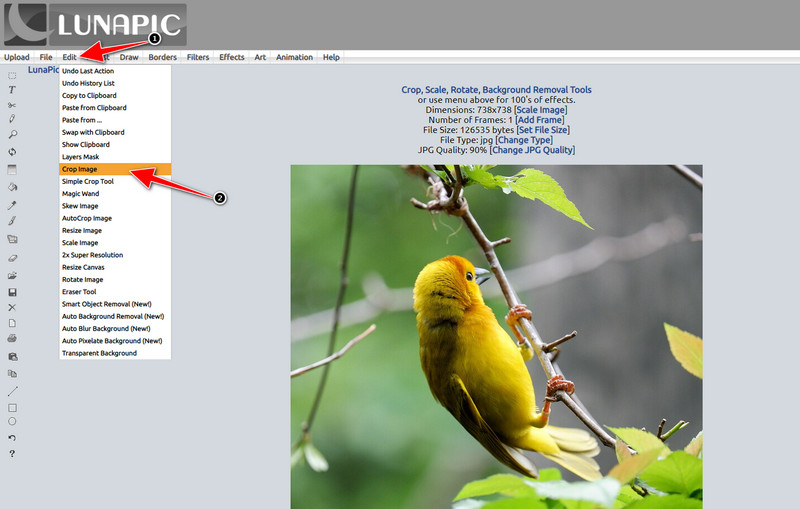
ขั้นตอนที่ 3 กดปุ่ม drop-down บริเวณ Tool แล้วเลือกเครื่องมือครอบตัดที่คุณต้องการใช้ ปรับกรอบครอบตัดให้เรียบร้อยและตรวจสอบให้แน่ใจว่าไม่รวมลายน้ำอยู่ในกรอบ.
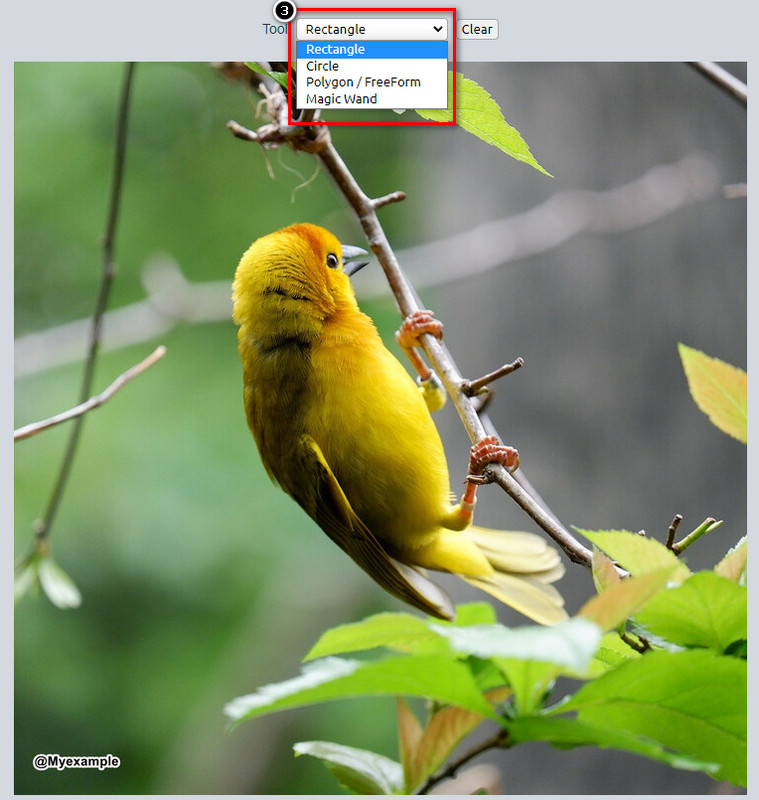
ขั้นตอนที่ 4 เมื่อคลิกปุ่ม Crop คุณจะเห็นตัวอย่างผลลัพธ์สุดท้ายก่อนส่งออกไฟล์ หากคุณพอใจกับผลลัพธ์แล้ว ให้กด Save เพื่อดาวน์โหลดไฟล์รูปภาพที่ครอบเสร็จแล้วลงในไดรฟ์ในเครื่องของคุณ.
วิธีที่ 2 ลบลายน้ำบนรูปภาพด้วยการลบวัตถุ
ต่างจากการครอบตัด การลบวัตถุเกี่ยวข้องกับการลบวัตถุบนรูปภาพโดยไม่เปลี่ยนขนาดของรูปภาพมากกว่า ในคุณสมบัตินี้ คุณจะต้องเน้นลายน้ำ จากนั้น คุณสามารถลบออกได้ด้วยเครื่องมือ มันไม่น่าทึ่งเหรอ? หากคุณรู้สึกทึ่งมากจนต้องการใช้งาน ขั้นตอนด้านล่างนี้จะให้วิธีที่สมบูรณ์ในการล้างลายน้ำด้วย Lunapic
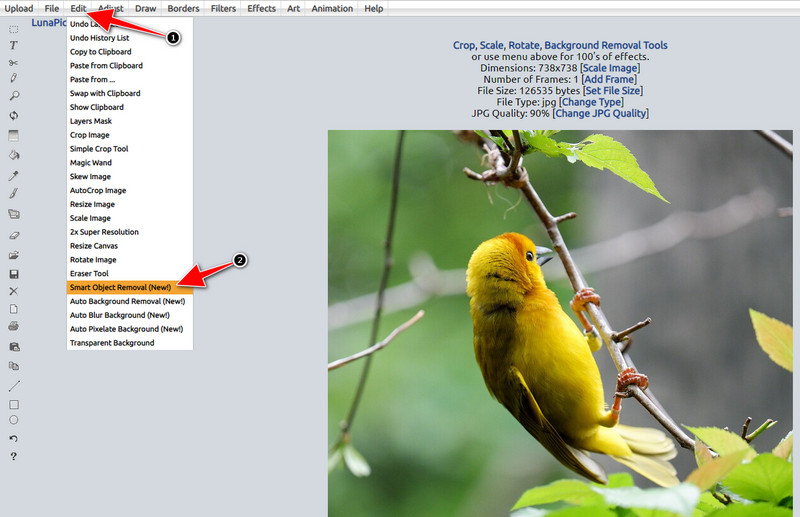
ขั้นตอนที่ 1 ทำซ้ำขั้นตอนเดียวกับขั้นตอนแรกของฟังก์ชันครอบตัด เพื่อทำการนำเข้ารูปภาพที่มีลายน้ำอีกครั้ง.
ขั้นตอนที่ 2 เปิดเมนู Edit แต่คราวนี้ให้เลือก Smart Object Removal เพื่อใช้ฟีเจอร์อีกแบบหนึ่งที่ช่วยลบลายน้ำได้.
ขั้นตอนที่ 3 ไฮไลต์บริเวณลายน้ำด้วยแปรงที่เครื่องมือมีให้ คุณยังสามารถปรับขนาดแปรงตามที่คุณต้องการได้.
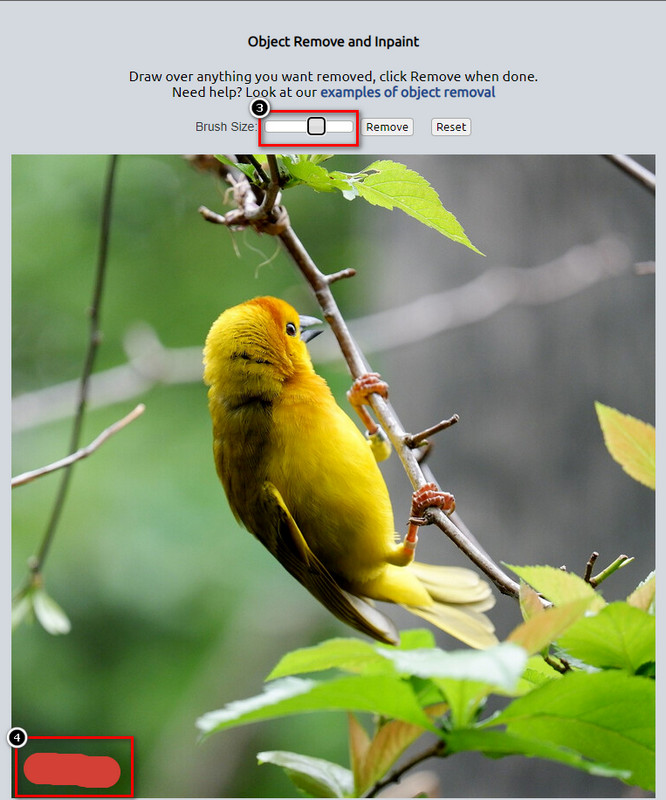
ขั้นตอนที่ 4 คลิกปุ่ม Remove เพื่อลบลายน้ำออก และดูว่ารูปภาพจะมีลักษณะอย่างไรก่อนที่คุณจะส่งออกไฟล์.
ขั้นตอนที่ 5 คลิก Save เพื่อดาวน์โหลดไฟล์รูปภาพที่แก้ไขเสร็จแล้วลงในไดรฟ์ในเครื่องของคุณ.
ส่วนที่ 2 ทางเลือกที่ดีที่สุดสำหรับ Lunapic เพื่อลบลายน้ำในคลิกเดียวฟรี
หากคุณต้องการตัวเลือกอื่นนอกจาก Lunapic สำหรับลบลายน้ำ คุณสามารถใช้ FVC Free Watermark Remover ได้ เช่นเดียวกับ Lunapic คุณสามารถใช้เครื่องมือนี้บนเว็บโดยไม่ต้องสมัครสมาชิก ไม่ต้องดาวน์โหลด และไม่มีโฆษณาบนหน้าเว็บอินเทอร์เฟซ คุณสามารถใช้งานเครื่องมือนี้ได้อย่างไม่จำกัด และประสิทธิภาพของมันก็มีความเสถียรตั้งแต่เปิดให้บริการมาแล้ว ปัจจุบันช่วยผู้ใช้งานบนเว็บไปแล้วนับล้านคน หากคุณต้องการความช่วยเหลือในการลบวัตถุออกจากรูปภาพของคุณ สามารถเริ่มทำตามขั้นตอนที่เราให้ไว้ด้านล่างได้เลย.
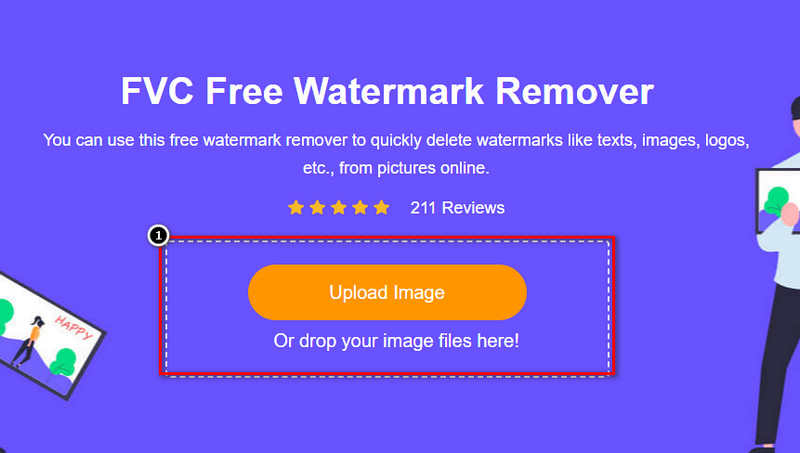
ขั้นตอนที่ 1 เปิดเว็บไซต์ทางการของเครื่องมือนี้โดยคลิกที่ลิงก์นี้ ระบบจะเปิดแท็บใหม่ในเบราว์เซอร์ที่คุณใช้งานอยู่โดยอัตโนมัติ และคุณจะเห็นหน้าอินเทอร์เฟซของตัวลบลายน้ำตัวนี้.
ขั้นตอนที่ 2 โดยการกดที่ Upload Photo คุณสามารถนำเข้ารูปภาพที่มีลายน้ำหรือวัตถุที่ไม่ต้องการจากไดรฟ์ในเครื่องของคุณเข้ามาได้.
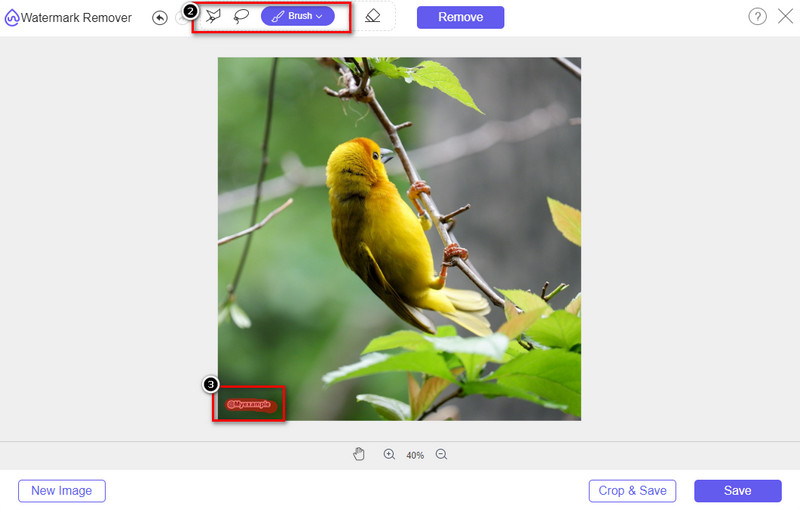
ขั้นตอนที่ 3 จะมีตัวเลือกให้คุณใช้ในการไฮไลต์ลายน้ำบนรูปภาพที่อัปโหลดขึ้นมาทั้งหมดสามแบบ เลือกหนึ่งตัวเลือกแล้วใช้เครื่องมือนั้นไฮไลต์บริเวณลายน้ำ.
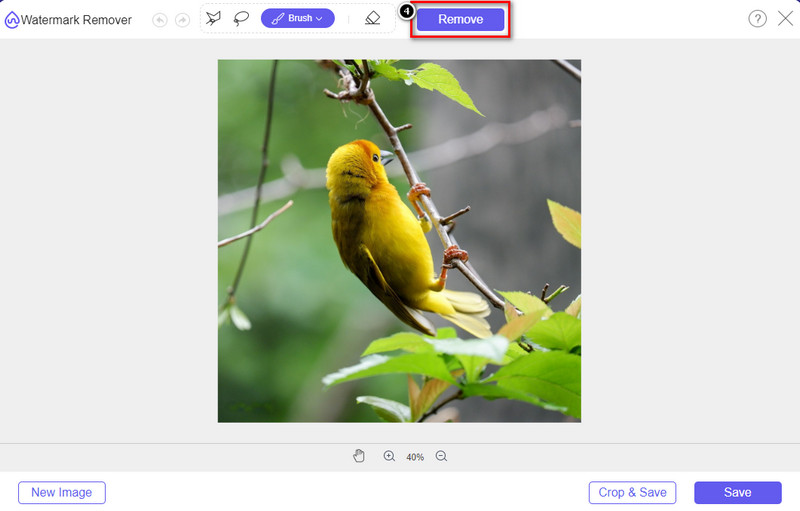
ขั้นตอนที่ 4 กดปุ่ม Remove เพื่อลบวัตถุที่คุณไฮไลต์ไว้ในขั้นตอนที่ 3 ทุกจุดที่คุณไฮไลต์ในรูปภาพจะถูกลบออก.
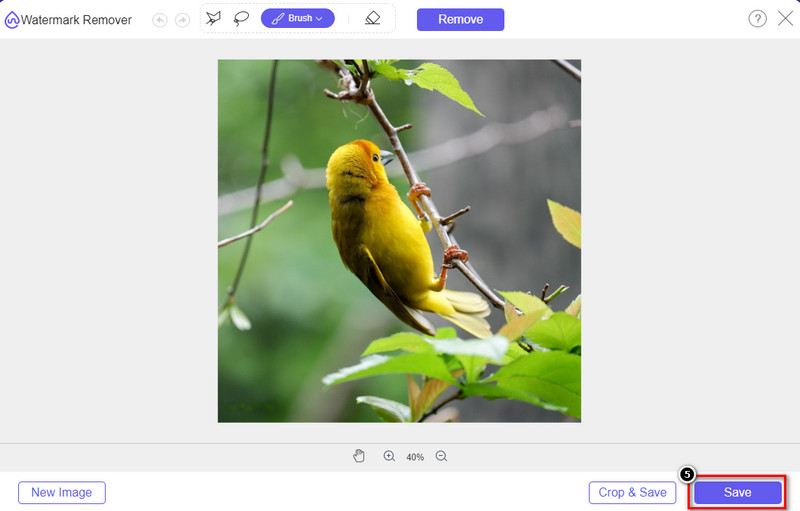
ขั้นตอนที่ 5 กดปุ่ม Save เพื่อดาวน์โหลดรูปภาพที่แก้ไขเสร็จแล้ว จากนั้นคุณสามารถไปยังโฟลเดอร์ที่ปรากฏบนหน้าจอเพื่อค้นหารูปภาพนั้นได้.
อ่านเพิ่มเติม:
วิธีลบลายน้ำ B612 ออกจากรูปภาพของคุณ
วิธีลบลายน้ำ WOW Slider ได้ฟรี
ส่วนที่ 3 คำถามที่พบบ่อยเกี่ยวกับวิธีการลบลายน้ำใน Lunapic
Lunapic เพิ่มลายน้ำบนภาพที่แก้ไขหรือไม่?
แม้ว่าโปรแกรมแก้ไขออนไลน์นี้จะเข้าถึงได้ฟรีบนเว็บ แต่ก็ไม่ได้ฝังลายน้ำของผลิตภัณฑ์ลงในภาพที่คุณแก้ไขที่นี่ คุณไม่จำเป็นต้องสมัครสมาชิกเพื่อใช้เครื่องมือระดับพรีเมียมที่มีให้ สนุกกับการใช้เครื่องมือโดยไม่มีข้อจำกัด! เยี่ยมชมเว็บไซต์อย่างเป็นทางการเพื่อดูและใช้เครื่องมือที่คุณสามารถใช้เพื่อแก้ไขภาพ
ฉันสามารถเพิ่มลายน้ำของฉันบน Lunapic ได้หรือไม่
แน่นอน คุณสามารถเพิ่มความแตกต่างให้กับภาพที่คุณสร้างขึ้นเพื่อทำให้ผู้อื่นคัดลอกภาพได้ยาก เมื่อเปิดเว็บไซต์ ให้คลิกอัปโหลดเพื่อเพิ่มรูปภาพที่คุณต้องการแก้ไข คลิกไอคอน T ที่ด้านซ้ายของแถบเครื่องมือ และเพิ่มลายน้ำข้อความที่คุณต้องการเพิ่มลงในรูปภาพที่คุณอัปโหลด
Lunapic มีน้ำยาล้างพื้นหลังหรือไม่?
ใช่ Lunapic รองรับเทคโนโลยี AI ที่สามารถตรวจจับพื้นหลังของรูปภาพและลบออกได้อย่างมีประสิทธิภาพทันที ชื่อของคุณสมบัตินี้คือการลบพื้นหลังอัตโนมัติ เปิดเครื่องมือแล้วคลิกแก้ไข คุณจะเห็นคุณลักษณะที่เรากำลังพูดถึงซึ่งสามารถช่วยคุณลบพื้นหลังของภาพได้ นอกจากนี้ยังรองรับการเพิ่มพื้นหลังเบลอหากคุณต้องการใช้
Lunapic มีผลอย่างไร?
Lunapic รองรับการเลือกที่หลากหลายในแง่ของเอฟเฟกต์ ซึ่งคุณสามารถใช้เพื่อเพิ่มรูปภาพ รูปภาพ การไล่ระดับสี การมาสก์ การ์ตูน ความผิดพลาด และอื่นๆ อีกมากมายที่คุณสามารถนำไปใช้กับรูปภาพของคุณ
สรุป
การลบลายน้ำออกจากรูปภาพโดยใช้ Lunapic นั้นง่ายมากอย่างเหลือเชื่อด้วยบทช่วยสอนที่เราเพิ่มในบทความนี้ คุณสามารถทำตามขั้นตอนที่เราเพิ่มในบล็อกนี้เพื่อครอบตัดหรือลบลายน้ำบนรูปภาพที่คุณบันทึกไว้ในไดรฟ์ในเครื่องของคุณ แม้ว่าคุณจะไม่มีประสบการณ์เพียงพอในการลบลายน้ำ แต่คุณก็สามารถใช้เครื่องมือนี้ได้อย่างเชี่ยวชาญ แต่ถ้าคุณต้องการสัมผัสประสบการณ์ใหม่ของการเอาลายน้ำออกโดยอัตโนมัติ คุณสามารถใช้ทางเลือกอื่นที่เราเพิ่มในบทความนี้ เยี่ยมชมเว็บไซต์อย่างเป็นทางการโดยคลิกที่ชื่อและดูว่าความสามารถของเครื่องมือนี้ที่เราพลาดไปคืออะไร หากคุณสนุกกับการอ่านบล็อกนี้ ให้คะแนนเรา 5 ดาว
-
 เคล็ดลับและคำแนะนำในการลบลายน้ำตัวกรอง Picsart ได้อย่างง่ายดาย
 หากต้องการลบลายน้ำตัวกรอง Picsart คุณจะต้องใช้เครื่องมือ อ่านบทความนี้ต่อไปเพื่อลบลายน้ำ
-
 วิธีแปลงรูปภาพความละเอียดต่ำเป็นรูปภาพความละเอียดสูงออนไลน์
 หากคุณต้องการเรียนรู้วิธีแปลงรูปภาพความละเอียดต่ำเป็นรูปภาพความละเอียดสูงทางออนไลน์ บทความนี้เหมาะสำหรับคุณ อ่านทั้งหมดเพื่อเรียนรู้วิธีการ
-
 วิธีง่ายๆในการลบลายน้ำ Shootproof
 ลบลายน้ำ Shootproof โดยทำตามวิธีการง่าย ๆ เหล่านี้ ใช้น้ำยาลบลายน้ำที่น่าทึ่งเหล่านี้เพื่อลบลายน้ำ Shootproof ออกจากภาพของคุณได้อย่างง่ายดาย
