


 Video Converter Ultimate
 บันทึกหน้าจอ
 ซ่อมวิดีโอ
 ดาวน์โหลดอย่างปลอดภัย
วิธีลบลายน้ำที่กัดได้ออกจากวิดีโอของคุณอย่างง่ายดาย
หากคุณกำลังมองหาวิธีที่ดีและง่ายที่สุดในการลบลายน้ำของ Biteable ออกจากวิดีโอของคุณ คุณไม่จำเป็นต้องลำบากอีกต่อไป โดยพูดกันตามตรง การดูวิดีโอที่มีลายน้ำอยู่บนจอนั้นน่ารำคาญและน่าหงุดหงิด คุณไม่สามารถเพลิดเพลินกับวิดีโอที่กำลังดูได้ นอกจากนี้ ลายน้ำเหล่านี้ยังรบกวนสายตาผู้ชมอีกด้วย เข้าใจได้ว่าลายน้ำมีไว้เพื่อความปลอดภัยของเจ้าของวิดีโอ แต่การใส่ลายน้ำขนาดใหญ่นั้นไม่ใช่เรื่องดี เพราะจะทำให้คนที่ชอบดูวิดีโอรู้สึกไม่ดี ตัวอย่างหนึ่งก็คือลายน้ำ Biteable ลายน้ำเหล่านี้มาจากแอปพลิเคชัน Biteable ซึ่งจะใส่ลายน้ำลงในวิดีโอให้อัตโนมัติหลังจากสร้างหรือบันทึกวิดีโอ โชคดีที่คุณสามารถใช้แอปพลิเคชันต่าง ๆ เพื่อลบลายน้ำเหล่านี้ออกจากวิดีโอของคุณได้ คุณจึงสามารถดูวิดีโอโปรดได้โดยไม่รู้สึกรำคาญหรือหงุดหงิด หากคุณต้องการรู้ว่าแอปพลิเคชันใดที่ดีที่สุดและน่าเชื่อถือที่สุดสำหรับการลบลายน้ำเหล่านี้จากวิดีโอของคุณ โปรดอ่านบทความนี้ต่อไป.

ตอนที่ 1: วิธีที่ดีที่สุดในการลบลายน้ำที่กัดได้ออกจากวิดีโอ
Video Converter Ultimate คือแอปพลิเคชันที่ยอดเยี่ยมที่สุดที่คุณสามารถใช้เพื่อลบลายน้ำ Biteable ออกจากวิดีโอของคุณ นอกจากนี้ ซอฟต์แวร์สุดยอดนี้ยังสามารถลบวัตถุอื่น ๆ ที่ไม่เกี่ยวข้องและรบกวนสายตาได้ เช่น โลโก้ ข้อความ ลายเซ็น ฯลฯ อีกทั้งกระบวนการลบและบันทึกไฟล์ยังทำได้อย่างรวดเร็ว คุณไม่ต้องเสียเวลาเป็นเวลานาน นอกจากนี้ Video Converter Ultimate ยังมี 2 วิธีง่าย ๆ ในการลบลายน้ำจากวิดีโอของคุณ ได้แก่ การครอปวิดีโอ และฟังก์ชันลบลายน้ำวิดีโอ นอกจากนี้ยังมีเครื่องมือแก้ไขอื่น ๆ ให้ใช้งานอย่างจุใจ เช่น ตัวปรับความเร็ววิดีโอ โปรแกรมแปลงวิดีโอ โปรแกรมบีบอัดวิดีโอ การปรับสี การทำคอลลาจ การทำ GIF เครื่องมือครอปวิดีโอ โปรแกรมแปลงรูปภาพ และอื่น ๆ อีกมากมาย จุดเด่นที่สุดของเครื่องมือนี้คือใช้งานได้ง่าย เพราะมีอินเทอร์เฟซที่เรียบง่าย เหมาะสำหรับผู้เริ่มต้น และยังรองรับรูปแบบไฟล์หลากหลาย เช่น MP4, MOV, FLV, MKV, OGV, DIVX และอื่น ๆ สุดท้ายนี้ Video Converter Ultimate สามารถใช้งานได้ทั้งบน Windows และ Mac ซึ่งสะดวกต่อผู้ใช้มาก หากคุณต้องการลบลายน้ำออกจากวิดีโอ ให้ทำตามขั้นตอนง่าย ๆ ต่อไปนี้.
ใช้เครื่องมือลบลายน้ำวิดีโอ
ขั้นตอนที่ 1: ไปที่เว็บไซต์ของ Video Converter Ultimate และดาวน์โหลดแอปพลิเคชัน จากนั้นดำเนินการติดตั้งให้เสร็จสิ้น หลังการติดตั้งให้เปิดโปรแกรมขึ้นมา.
ดาวน์โหลดฟรีสำหรับ Windows 7 หรือใหม่กว่าดาวน์โหลดอย่างปลอดภัย
ดาวน์โหลดฟรีสำหรับ MacOS 10.7 หรือใหม่กว่าดาวน์โหลดอย่างปลอดภัย
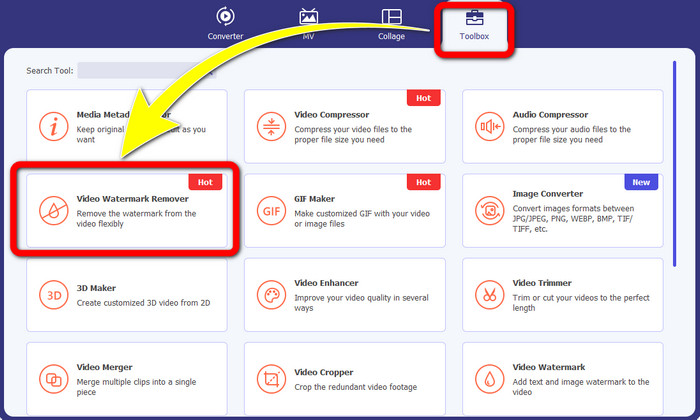
ขั้นตอนที่ 2: หลังจากเปิด Video Converter Ultimate แล้ว ให้คลิกปุ่ม Toolbox > Video Watermark Remover จากนั้นจะมีอินเทอร์เฟซอีกหน้าต่างหนึ่งแสดงบนหน้าจอ.
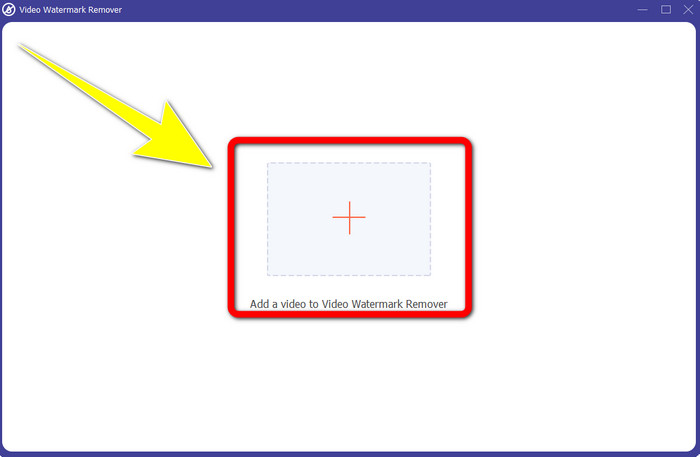
ขั้นตอนที่ 3: เมื่ออินเทอร์เฟซใหม่ปรากฏบนหน้าจอแล้ว ให้คลิกปุ่มสัญลักษณ์ เครื่องหมายบวก เพื่อเพิ่มวิดีโอที่มีลายน้ำ Biteable ของคุณ.
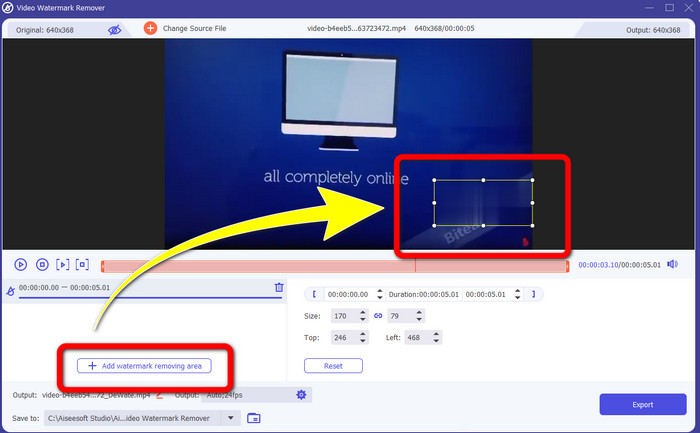
ขั้นตอนที่ 4: หลังจากที่คุณเพิ่มวิดีโอแล้ว ให้คลิก Add Watermark Removing Area จากนั้นจะมีกรอบขนาดเล็กปรากฏบนวิดีโอของคุณ ลากกรอบไปครอบบริเวณที่มีลายน้ำ.
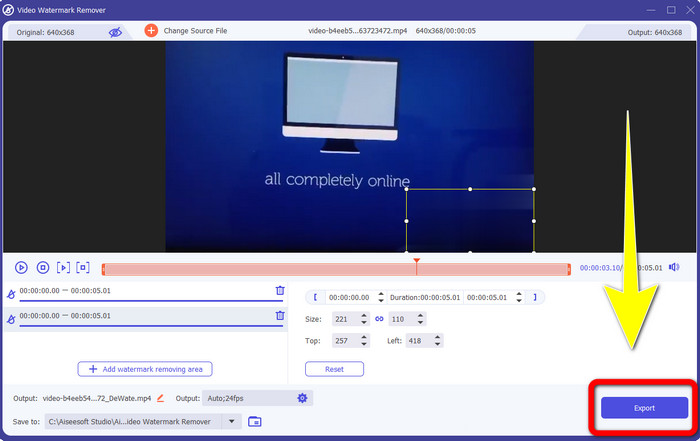
ขั้นตอนที่ 5: เมื่อคุณลบลายน้ำ Biteable ออกจากวิดีโอเรียบร้อยแล้ว ให้คลิกปุ่ม Export เพื่อบันทึกผลงานสุดท้ายของคุณ.
ใช้เครื่องมือ Video Cropper
ขั้นตอนที่ 1: เปิดโปรแกรม Video Converter Ultimate คลิกปุ่ม Toolbox > Video Cropper.
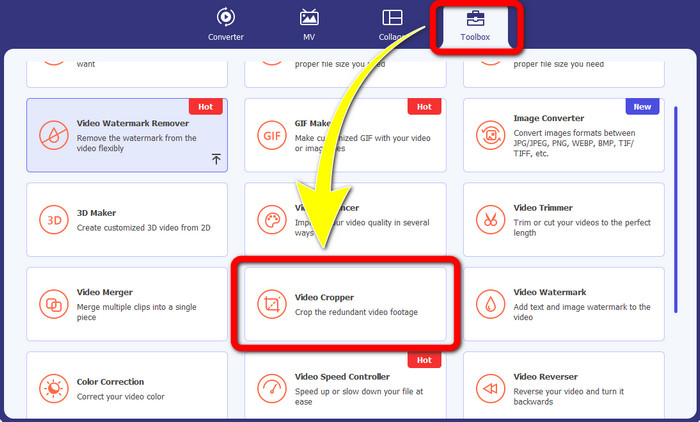
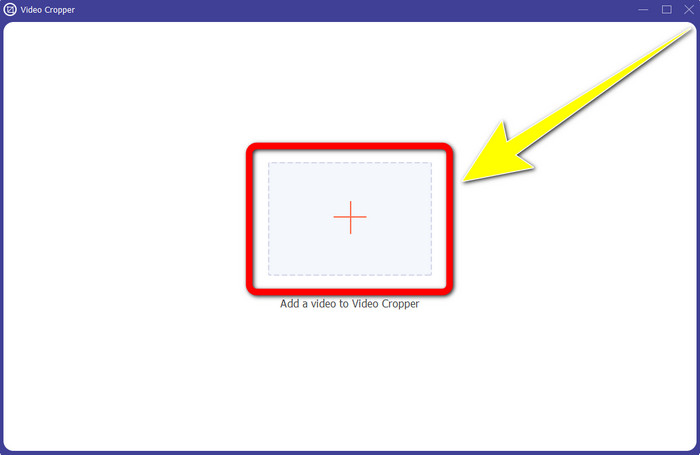
ขั้นตอนที่ 2: หลังจากคลิก Video Cropper แล้ว จะมีอินเทอร์เฟซใหม่ปรากฏบนหน้าจอของคุณ คลิกไอคอน เครื่องหมายบวก แล้วเพิ่มวิดีโอที่มีลายน้ำ Biteable
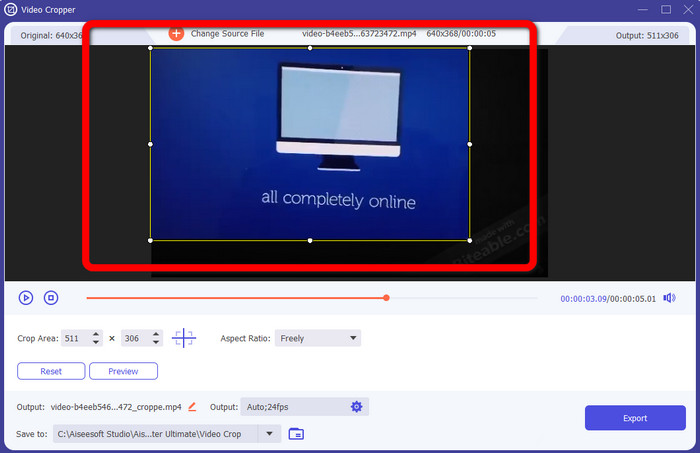
ขั้นตอนที่ 3: เมื่อคุณเพิ่มวิดีโอเรียบร้อยแล้ว คุณสามารถ ครอป วิดีโอเพื่อเอาลายน้ำออกได้ทันที.
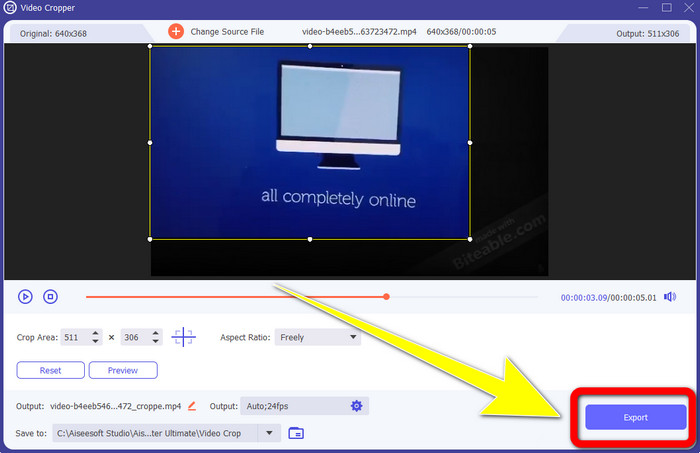
ขั้นตอนที่ 4: เมื่อคุณครอปวิดีโอเสร็จแล้ว ให้คลิกปุ่ม Export และบันทึกวิดีโอของคุณโดยไม่มีลายน้ำ Biteable.
ตอนที่ 2: วิธีลบลายน้ำที่กัดได้ออกจากวิดีโอออนไลน์
1. การใช้บีคัท
หากคุณต้องการลบลายน้ำที่กัดได้ฟรีทางออนไลน์ BeeCut เป็นแอปพลิเคชั่นออนไลน์ที่ดีที่สุดที่คุณสามารถใช้ได้ สามารถลบลายน้ำออกจากวิดีโอของคุณได้ เป็นเครื่องมือออนไลน์ง่ายๆ ที่คุณสามารถใช้ได้ ซึ่งเหมาะสำหรับผู้เริ่มต้น คุณสามารถลบลายน้ำกัดออกจากวิดีโอสี่รายการได้ในไม่กี่ขั้นตอน
ยิ่งไปกว่านั้น BeeCut ยังมีเครื่องมือแก้ไขมากมาย เช่น การตัดแต่ง การตัด การแยก และการรวมวิดีโอ นอกจากนี้ หากคุณต้องการสร้างวิดีโอ คุณสามารถเพิ่มคำบรรยายลงในวิดีโอของคุณด้านล่าง ซึ่งสะดวกสำหรับผู้ชม อย่างไรก็ตาม การอัปโหลดไฟล์และการบันทึกกระบวนการโดยใช้เครื่องมือนี้ทำได้ช้า นอกจากนี้ คุณไม่สามารถใช้เครื่องมือนี้หากคุณไม่มีการเชื่อมต่ออินเทอร์เน็ต หากคุณต้องการลบลายน้ำที่กัดได้ออกจากวิดีโอของคุณโดยใช้เครื่องมือออนไลน์นี้ ให้ทำตามขั้นตอนด้านล่าง
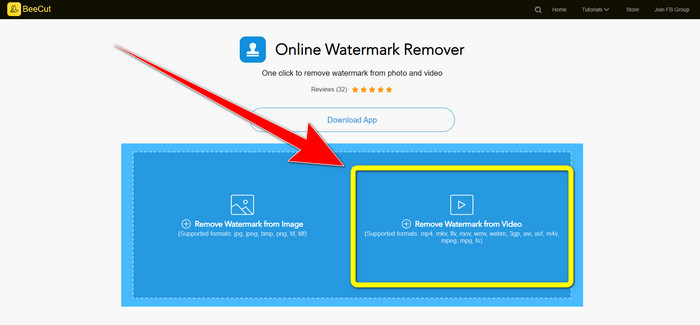
ขั้นตอนที่ 1: เข้าไปที่เว็บไซต์ BeeCut จากนั้นคลิกปุ่ม Remove Watermark from Video แล้วเพิ่มวิดีโอที่มีลายน้ำ Biteable ของคุณ.
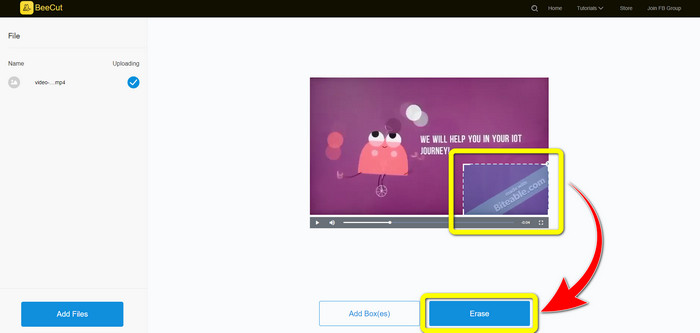
ขั้นตอนที่ 2: หลังจากเพิ่มไฟล์แล้ว จะมีกล่องขนาดเล็กปรากฏบนวิดีโอของคุณ ให้ลากกล่องนั้นไปครอบบริเวณลายน้ำ Biteable จากนั้นเมื่อครอบลายน้ำเรียบร้อยแล้ว ให้คลิกปุ่ม Erase.
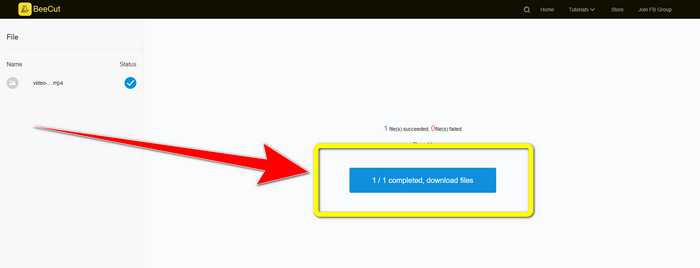
ขั้นตอนที่ 3: เมื่อคุณคลิกปุ่ม Erase แล้ว ให้รอกระบวนการลบลายน้ำ จากนั้นคุณสามารถดาวน์โหลดไฟล์และเพลิดเพลินกับการดูวิดีโอได้โดยไม่มีลายน้ำ Biteable.
2. การใช้ Blur Video Online
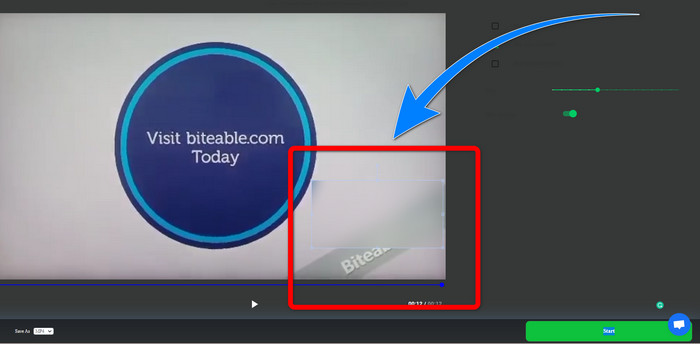
หากคุณยังคงมองหาแอปพลิเคชั่นอื่นที่คุณสามารถใช้เพื่อลบลายน้ำที่กัดได้ออกจากวิดีโอของคุณทางออนไลน์ Blur Video Online เป็นเครื่องมือที่ยอดเยี่ยมสำหรับคุณ Blur Video Online พร้อมใช้งานสำหรับอุปกรณ์และเบราว์เซอร์เกือบทั้งหมด เช่น Google Chrome, Opera, IE, Mozilla Firefox และอื่นๆ อย่างไรก็ตาม แอปพลิเคชันที่ขึ้นกับเว็บนี้นำเข้าไฟล์วิดีโอช้าเกินไป และกระบวนการลบลายน้ำใช้เวลานาน นอกจากนี้ยังเป็นเครื่องมือที่ขึ้นอยู่กับอินเทอร์เน็ต ซึ่งหมายความว่าจะทำงานได้ก็ต่อเมื่อคุณมีการเชื่อมต่ออินเทอร์เน็ต ทำตามขั้นตอนง่ายๆ ด้านล่างเพื่อลบ/เบลอลายน้ำ Biteable จากวิดีโอของคุณ
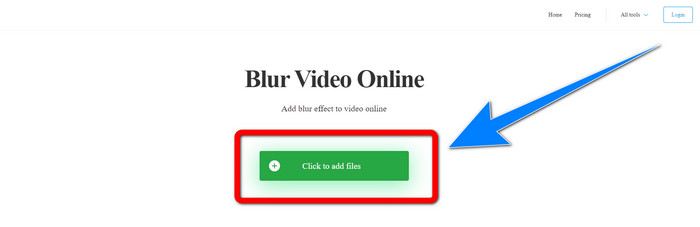
ขั้นตอนที่ 1: ไปที่เว็บไซต์ของ Blur Video Online จากนั้นคลิกปุ่ม Click to Add File และเพิ่มวิดีโอที่มีลายน้ำของคุณ.
ขั้นตอนที่ 2: เมื่อคุณเพิ่มวิดีโอเรียบร้อยแล้ว จะมีกล่องปรากฏบนวิดีโอของคุณ ให้ลากกล่องไปครอบบริเวณลายน้ำและบันทึกผลงานสุดท้ายของคุณ.
ที่เกี่ยวข้อง:
วิธีที่ดีที่สุดในการลบลายน้ำจาก Camtasia 9 บน Windows ของคุณ
วิธีลบแบนเนอร์ลายน้ำจาก AVS Video Editor อย่างรวดเร็ว
ส่วนที่ 3: คำถามที่พบบ่อยเกี่ยวกับการลบลายน้ำที่กัดได้ออกจากวิดีโอ
ฉันสามารถลบการประทับวันที่โดยใช้ Video Converter Ultimate ได้หรือไม่
ใช่คุณสามารถ! Video Converter Ultimate สามารถช่วยคุณกำจัดสิ่งที่รบกวนออกจากวิดีโอของคุณ เช่น การประทับวันที่ ลายน้ำ ข้อความ ฯลฯ
การลบลายน้ำออกจากวิดีโอใช้เวลานานไหม
ขึ้นอยู่กับแอปพลิเคชันที่คุณใช้ บางแอปพลิเคชันสามารถลบลายน้ำออกจากวิดีโอของคุณได้ทันที และบางแอปพลิเคชันอาจใช้เวลาในการลบลายน้ำออก
มีโปรแกรมลบลายน้ำที่ฉันสามารถใช้ได้โดยไม่สูญเสียคุณภาพของวิดีโอหรือไม่
มีแน่นอน! คุณสามารถใช้ Video Converter Ultimate ได้ โปรแกรมนี้ไม่เพียงเก่งเรื่องการลบลายน้ำและตัดต่อวิดีโอเท่านั้น แต่ยังช่วยให้คุณลบลายน้ำออกจากวิดีโอได้โดยไม่ทำให้คุณภาพไฟล์ลดลงอีกด้วย.
สรุป
การลบลายน้ำออกจากวิดีโอเป็นเรื่องที่ดีมาก โดยเฉพาะอย่างยิ่งถ้าคุณต้องการดูวิดีโอโปรดโดยไม่มีวัตถุที่ไม่จำเป็นมาบดบัง บทความนี้ได้แนะนำแอปพลิเคชันที่ใช้งานได้จริงสำหรับการลบลายน้ำ Biteable ออกจากวิดีโอของคุณไว้ให้แล้ว สุดท้าย หากคุณกำลังมองหาแอปพลิเคชันที่ยอดเยี่ยมและทรงพลังที่สุดในการลบลายน้ำออกจากวิดีโอของคุณ การใช้ Video Converter Ultimate ถือเป็นตัวเลือกที่ดีที่สุด.
-
 วิธีลบลายน้ำ Powtoon โดยใช้ 4 วิธีที่มีประสิทธิภาพ
 อ่านบทความนี้เพื่อเรียนรู้วิธีลบลายน้ำ Powtoon โดยใช้เครื่องมือที่ดีที่สุดที่เรารวมไว้ที่นี่และบทช่วยสอน
-
 Apowersoft Watermark Remover Review - คุณสมบัติข้อดี & ข้อเสียและราคา
 Apowersoft Watermark Remover เป็นหนึ่งในการลบลายน้ำที่ดีที่สุดที่รองรับออนไลน์และออฟไลน์ คลิกที่นี่เพื่อทราบข้อมูลเพิ่มเติม!
-
 3 จาก Shutterstock Watermark Remover ล่าสุดที่คุณต้องการ
 ไม่ชอบลายน้ำ Shutterstock ที่แนบมากับวิดีโอที่ส่งออกใช่หรือไม่ คุณสามารถใช้ตัวลบลายน้ำของ Shutterstock เพื่อลบออกได้อย่างมีประสิทธิภาพ
