


 Video Converter Ultimate
 บันทึกหน้าจอ
 ซ่อมวิดีโอ
 ดาวน์โหลดอย่างปลอดภัย
วิธีออนไลน์และออฟไลน์ที่มีประสิทธิภาพมากที่สุดในการแปลง MTV เป็น MKV
มีบางกรณีที่ไฟล์วิดีโอรูปแบบ MTV ของคุณไม่รองรับกับอุปกรณ์หรือโปรแกรมที่ใช้งานอยู่ วิธีที่ดีที่สุดคือเปลี่ยนรูปแบบไฟล์วิดีโอของคุณ โชคดีที่เรามีวิธีการที่ยอดเยี่ยมที่สุดเตรียมไว้ให้ บทความนี้จะแนะนำแอปพลิเคชันหลายตัวที่คุณสามารถใช้เพื่อแปลงไฟล์ MTV เป็น MKVได้ทันที อย่าข้ามบทความนี้ถ้าคุณอยากรู้ว่าโปรแกรมแปลง MTV เป็น MKV ตัวไหนดีที่สุด

ส่วนที่ 1: ข้อมูลโดยละเอียดเกี่ยวกับ MTV และ MKV
เอ็มทีวีคืออะไร?
MTV ย่อมาจาก Music Television ในวันที่ 1 สิงหาคม ค.ศ. 1981 MTV ได้เปิดตัวในฐานะช่องเคเบิลทีวีของอเมริกา รูปแบบไฟล์นี้ถูกสร้างขึ้นเพื่อให้สามารถเล่นวิดีโอบนอุปกรณ์เล่น MP4 พกพาราคาถูกที่ผลิตในจีนได้ โดยไม่ต้องเพิ่มมูลค่าให้กับอุปกรณ์ด้วยค่าลิขสิทธิ์ต่าง ๆ เครื่องเล่น MTV ถูกผลิตในประเทศจีนและสามารถแสดงวิดีโอ ไฟล์ข้อความ และรูปภาพได้ สุดท้ายแล้วมันทำงานโดยการแสดงชุดเฟรมภาพดิบแบบไม่บีบอัดในรูปแบบ rgb565/555 ต่อเนื่องกัน พร้อมกับเล่นเสียง MP3 ไปด้วย.
MKV คืออะไร?
MKV ย่อมาจาก Matroska Video เป็นไฟล์คอนเทนเนอร์มัลติมีเดีย คล้ายกับรูปแบบ MOV และ AVI แต่รองรับแทร็กซับไตเติลและเสียงได้มากกว่าภายในไฟล์เดียว คอนเทนเนอร์มัลติมีเดีย Matroska นี้ถูกใช้สำหรับวิดีโอ และยังมีพื้นฐานมาจาก Extensible Binary Meta Language ความแตกต่างระหว่างรูปแบบ MKV กับรูปแบบวิดีโออื่น ๆ คือ รูปแบบอื่นมักเป็นโค้เดก ในขณะที่ MKV เป็นคอนเทนเนอร์.
ส่วนที่ 2: วิธีแปลง MTV เป็น MKV โดยไม่สูญเสียข้อมูล
การแปลงไฟล์ MTV เป็น MKV แบบไม่สูญเสียคุณภาพสามารถทำได้ง่าย ๆ ด้วยโปรแกรม Video Converter Ultimate แอปพลิเคชันนี้สามารถแปลงไฟล์ได้หลายชนิด เช่น MOV, MTS, XVID, FLV, AVI, MP4 และอื่น ๆ ในด้านกระบวนการแปลง โปรแกรมนี้มีความเร็วการแปลงสูงถึง 30 เท่า ซึ่งเหนือกว่าตัวแปลงไฟล์อื่น นอกจากนี้คุณยังสามารถแปลงไฟล์หลายไฟล์พร้อมกันได้ เพราะรองรับการแปลงแบบกลุ่ม อีกทั้งหากต้องการปรับแต่งและทำให้วิดีโอของคุณดูน่าสนใจยิ่งขึ้น ก็สามารถใช้เครื่องมือนี้ได้เช่นกัน ภายในโปรแกรมมีเครื่องมือมากมายให้ลองใช้ในการตัดต่อและเพิ่มคุณภาพวิดีโอ เช่น ตัวเพิ่มคุณภาพวิดีโอที่ช่วยปรับเพิ่มความละเอียดของวิดีโอ กำจัดสัญญาณรบกวน ปรับให้ความสว่างและคอนทราสต์เหมาะสม และลดอาการสั่นของวิดีโอ ด้วยฟังก์ชันเหล่านี้คุณจึงมั่นใจได้ว่าวิดีโอของคุณจะน่าพึงพอใจมากขึ้น นอกจากนี้หากคุณต้องการเพิ่มลายน้ำลงในวิดีโอ ก็สามารถทำได้ด้วยเครื่องมือนี้ เพราะรองรับการเพิ่มลายน้ำในวิดีโอเช่นกัน นี่เป็นเพียงบางส่วนของฟังก์ชันในโปรแกรม หากคุณอยากค้นพบความสามารถที่ยอดเยี่ยมอื่น ๆ ต้องลองใช้ Video Converter Ultimate ด้วยตนเอง.
คุณสมบัติ:
◆ สามารถสร้างภาพตัดปะ
◆ นำเสนอเครื่องมือตัดต่อวิดีโอ เช่น Enhancer, Watermark Remover, Compressor เป็นต้น
◆ ให้คุณสร้างมิวสิควิดีโอ
◆ แปลงรูปแบบไฟล์วิดีโอมากมาย
ข้อดี
- มีกระบวนการแปลงเร็วขึ้น 30 เท่า
- เหมาะสำหรับผู้ใช้ที่ไม่ใช่มืออาชีพ
- สามารถแปลงไฟล์ได้หลายรูปแบบ เช่น MP4, MOV, MTV, MKV เป็นต้น
- ไม่มีการใช้ลายน้ำ
- เข้าได้กับ Windows และ Mac
จุดด้อย
- คุณต้องซื้อแอปพลิเคชันเพื่อสัมผัสกับคุณสมบัติที่ยอดเยี่ยมยิ่งขึ้น
ทำตามคำแนะนำโดยละเอียดเหล่านี้เพื่อแปลง MTV เป็น MKV ทันที
ขั้นตอนที่ 1: ดาวน์โหลด Video Converter Ultimate บนคอมพิวเตอร์ Windows หรือ Mac ของคุณโดยคลิกปุ่ม ดาวน์โหลด ด้านล่าง จากนั้นติดตั้งซอฟต์แวร์ลงในอุปกรณ์ แล้วเปิดโปรแกรมขึ้นมา.
ดาวน์โหลดฟรีสำหรับ Windows 7 หรือใหม่กว่าดาวน์โหลดอย่างปลอดภัย
ดาวน์โหลดฟรีสำหรับ MacOS 10.7 หรือใหม่กว่าดาวน์โหลดอย่างปลอดภัย
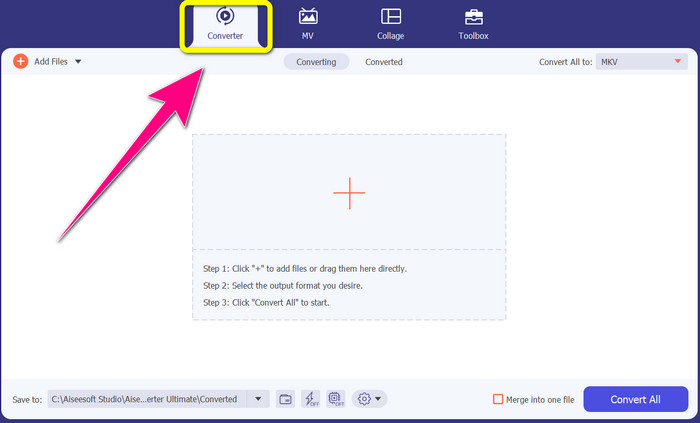
ขั้นตอนที่ 2: คุณจะเห็นตัวเลือกหลัก 4 ส่วนที่ด้านบนของหน้าต่างโปรแกรม ได้แก่ Converter, MV, Collage และ Toolbox ให้เลือกที่แถบ Converter.
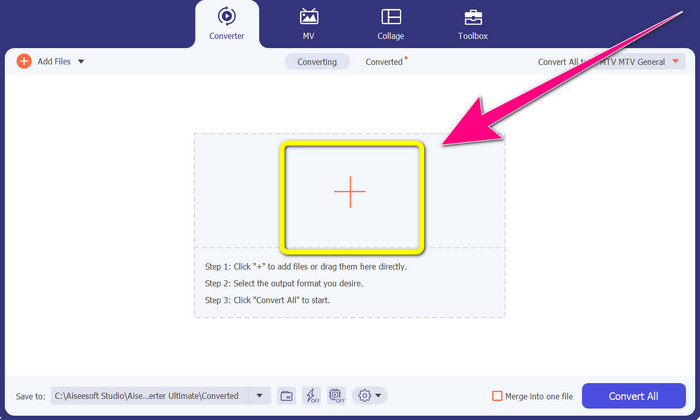
ขั้นตอนที่ 3: จากนั้นคลิกไอคอนเครื่องหมาย + เพื่อเพิ่มไฟล์วิดีโอ MTV ที่คุณต้องการแปลง.
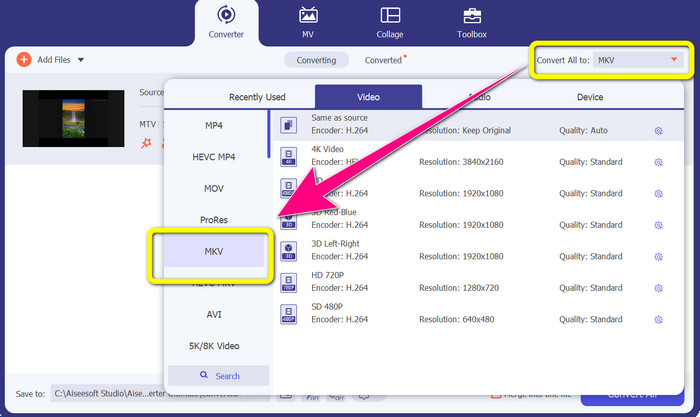
ขั้นตอนที่ 4: เมื่อคุณเพิ่มวิดีโอเรียบร้อยแล้ว ให้คลิกตัวเลือก Convert all to จากนั้นค้นหารูปแบบไฟล์ MKV จากตัวเลือกรูปแบบ แล้วคลิกเลือก.
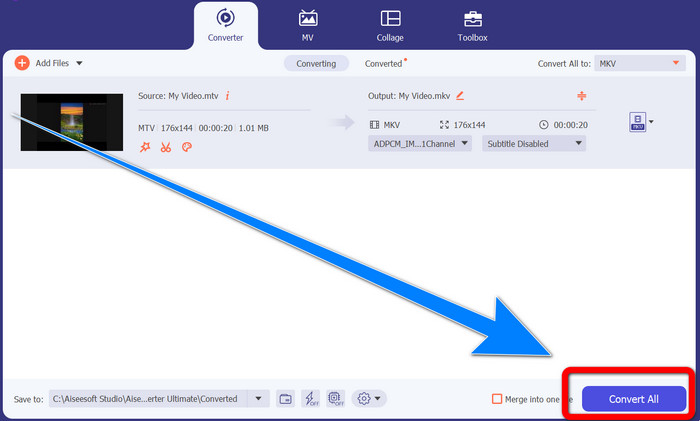
ขั้นตอนที่ 5: หลังจากเลือกรูปแบบไฟล์ MKV แล้ว คุณสามารถคลิกปุ่ม Convert All เพื่อเริ่มแปลงและบันทึกวิดีโอสุดท้ายของคุณได้ทันที.
ส่วนที่ 3: ซอฟต์แวร์ออนไลน์เพื่อแปลง MTV เป็น MKV
ใช้โปรแกรมช่วยแปลง
คุณได้เรียนรู้วิธีแปลงไฟล์ MTV เป็น MKV บน Windows และ Mac แล้ว ต่อไปจะเป็นขั้นตอนการแปลงไฟล์แบบออนไลน์ ตัวแปลงไฟล์ที่มีประโยชน์ตัวหนึ่งที่คุณสามารถใช้ได้คือ Converthelper เครื่องมือออนไลน์นี้เป็นบริการฟรีที่คุณใช้แปลงไฟล์หลากหลายรูปแบบ เช่น MTV, MKV, DDAT, AVE, PS GFP, WMF เป็นต้น นอกจากนี้ยังมีขั้นตอนการแปลงเพียงไม่กี่ขั้น เหมาะสำหรับผู้เริ่มต้น และคุณสามารถแปลงไฟล์ได้จำนวนมากโดยไม่จำกัดผ่าน Converthelper อย่างไรก็ตาม ตัวแปลงไฟล์ออนไลน์ฟรีนี้มีความเร็วในการแปลงค่อนข้างช้า ซึ่งอาจใช้เวลาพอสมควรกว่าจะแปลงไฟล์เสร็จสมบูรณ์ อีกทั้งประสิทธิภาพของเครื่องมือนี้ยังขึ้นอยู่กับความเร็วอินเทอร์เน็ตของคุณ ดังนั้นหากต้องการแปลงไฟล์ด้วย Converthelper คุณจำเป็นต้องมีการเชื่อมต่ออินเทอร์เน็ตที่ดี ทำตามขั้นตอนด้านล่างเพื่อแปลงไฟล์ MTV เป็น MKV ออนไลน์.
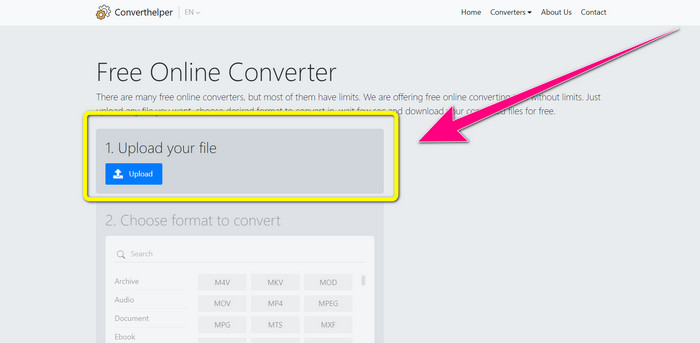
ขั้นตอนที่ 1: เข้าสู่เว็บไซต์ Converthelper บนเบราว์เซอร์ของคุณ จากนั้นคลิกปุ่มอัปโหลดและเพิ่มวิดีโอที่มีไฟล์รูปแบบ MTV.
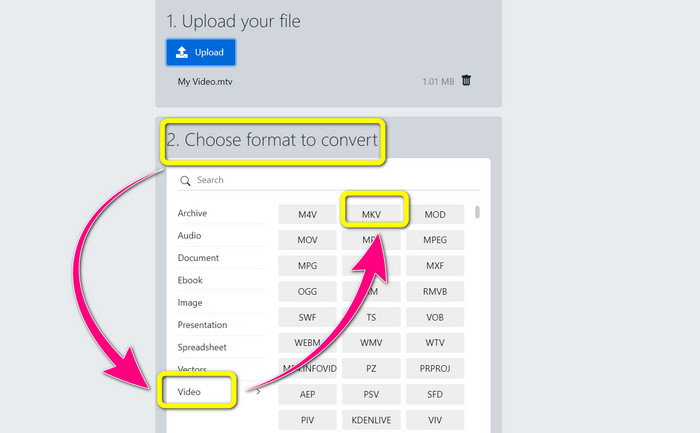
ขั้นตอนที่ 2: หลังจากอัปโหลดไฟล์ของคุณแล้ว ให้ไปที่หมายเลข 2 และเลือกตัวเลือกรูปแบบ คลิกปุ่ม Video จากนั้นมองหารูปแบบไฟล์ MKV แล้วคลิกเลือก.
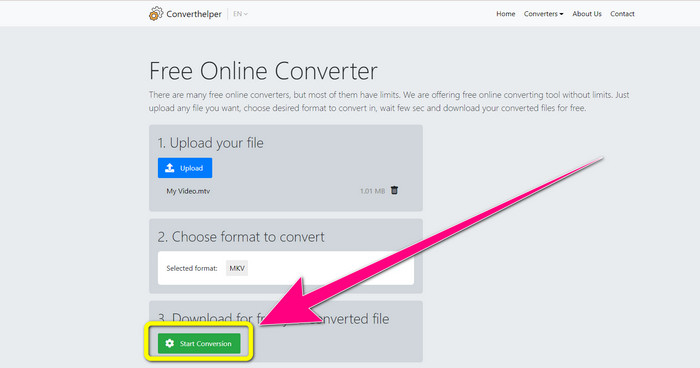
ขั้นตอนที่ 3: สำหรับขั้นตอนสุดท้าย ให้คลิกปุ่ม Start Conversion เพื่อแปลงไฟล์ MTV ของคุณเป็นรูปแบบ MKV รอให้กระบวนการแปลงเสร็จสิ้น แล้วดาวน์โหลดวิดีโอสุดท้ายของคุณในรูปแบบไฟล์ MKV.
ใช้การแปลงออนไลน์
เครื่องมือออนไลน์อื่นที่คุณสามารถใช้เพื่อแปลง MTV เป็น MKV คือ Online Convert นอกเหนือจากรูปแบบ MTV และ MKV แล้ว ยังรองรับรูปแบบอื่นๆ อีก เช่น MP4, AVI, GIF, FLAC, FLV, VOB, DIVX, MOV, WMV และอื่นๆ ไม่เพียงแต่เชื่อถือได้ในการแปลงไฟล์วิดีโอเท่านั้น คุณยังสามารถแปลงรูปภาพ เอกสาร เสียง และรูปแบบอื่นๆ เครื่องมือออนไลน์นี้ยังดีสำหรับผู้ใช้ใหม่เพราะใช้งานง่ายและมีเพียงไม่กี่ขั้นตอนในการแปลงไฟล์ต่างๆ อย่างไรก็ตาม เครื่องมือออนไลน์นี้มีขีดจำกัดขนาดไฟล์ ซึ่งสูงสุด 3Mb เช่นเดียวกับเครื่องมือบนเว็บอื่น ๆ คุณไม่สามารถใช้งานได้หากคุณไม่มีการเชื่อมต่ออินเทอร์เน็ต มีบางครั้งที่ซอฟต์แวร์นี้ทำงานได้ไม่ดี หากต้องการแปลงไฟล์ MTV เป็นรูปแบบไฟล์ MKV ให้ใช้ขั้นตอนด้านล่าง
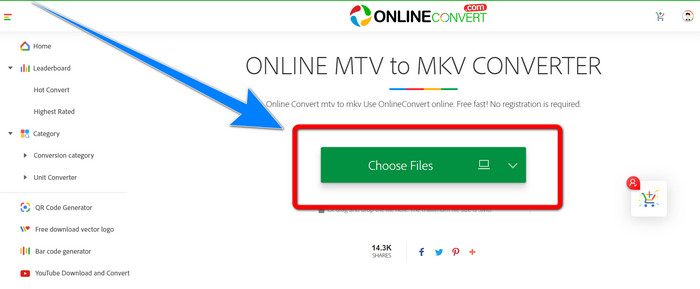
ขั้นตอนที่ 1: ไปที่เว็บไซต์ Online Convert แล้วคลิกปุ่ม Choose Files เพื่อเพิ่มวิดีโอที่มีรูปแบบไฟล์ MTV.
ขั้นตอนที่ 2: เมื่อต้องอัปโหลดวิดีโอที่มีรูปแบบไฟล์ MTV แล้ว ให้ไปที่ตัวเลือกรูปแบบและเลือกเป็นรูปแบบ MKV.
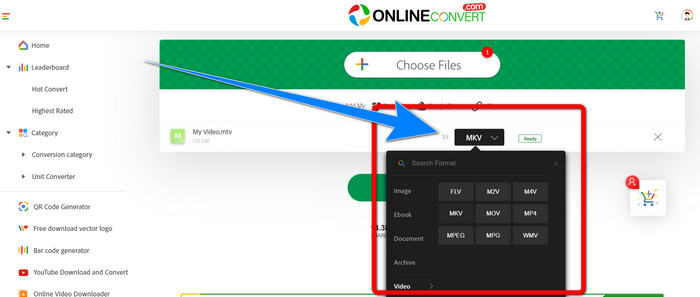
ขั้นตอนที่ 3: สำหรับขั้นตอนสุดท้าย ให้คลิกปุ่ม Convert เพื่อแปลงรูปแบบ MTV ของคุณเป็นไฟล์รูปแบบ MKV จากนั้นรอกระบวนการแปลงและบันทึกวิดีโอที่แปลงแล้วของคุณ.
อ่านเพิ่มเติม:
ขั้นตอนที่ดีที่สุดเกี่ยวกับวิธีการแปลง AMV เป็น MKV ฟรี
[ออนไลน์ & ฟรี] จะแปลง MKV เป็น MP4 บน Windows/Mac ได้อย่างไร
ส่วนที่ 4: คำถามที่พบบ่อยเกี่ยวกับการแปลง MTV เป็น MKV
รูปแบบ MKV เหมือนกับ MP4 หรือไม่
ไม่พวกเขาไม่ MKF มีคุณสมบัติพิเศษเพิ่มเติม เช่น คำบรรยายและแทร็กเสียงหลายรายการ ดังนั้น MKV จึงมีขนาดไฟล์ที่ใหญ่กว่ารูปแบบ MP4 นอกจากนี้ MKV ยังมีความละเอียดสูงกว่า MP4 เนื่องจากมีตัวแปลงสัญญาณขั้นสูงที่มีอัตราส่วนการบีบอัดที่สูงกว่า
ฉันสามารถแปลง MKV เป็นรูปแบบอื่นได้หรือไม่
แน่นอนว่าทำได้! คุณสามารถแปลง MKV เป็นรูปแบบอื่นได้ด้วยซอฟต์แวร์ที่รองรับไฟล์ MKV อย่างเช่น Video Converter Ultimate ดาวน์โหลดแอปลงใน Windows หรือ Mac ของคุณ แล้วเพลิดเพลินกับการแปลงไฟล์ได้เลย.
รูปแบบ MKV นั้นยอดเยี่ยมหรือไม่?
ใช่แล้ว. ไม่มีข้อกำหนดด้านใบอนุญาต รองรับคุณสมบัติที่ยอดเยี่ยม เช่น แทร็กและคำบรรยายหลายรายการ และอื่นๆ
สรุป
วิธีที่กล่าวมาข้างต้นคือวิธีที่ดีที่สุดในการแปลงไฟล์ MTV เป็น MKVด้วยโปรแกรมแปลงคุณภาพดี หากคุณต้องการแปลงไฟล์หลายไฟล์อย่างง่ายดายและไม่สูญเสียคุณภาพ ให้ใช้ Video Converter Ultimate.
-
 Free MP4 to MKV Converter - วิธีการแปลง MP4 เป็น MKV ได้อย่างง่ายดาย
 เมื่อคุณต้องการแปลง MP4 เป็น MKV ฟรีคุณสามารถเรียนรู้เพิ่มเติมเกี่ยวกับ 4 วิธีที่มีประสิทธิภาพที่สุดในการเปลี่ยนไฟล์ MP4 เป็นวิดีโอ MKV สำหรับสถานการณ์ต่างๆ
-
 วิธีแปลง MKV เป็น DivX ออนไลน์และออฟไลน์ฟรี
 คุณกำลังมองหาวิธีที่ดีที่สุดในการแปลง MKV เป็นรูปแบบ DivX ฟรี อ่านต่อเพื่อทำความรู้จักกับตัวแปลง MKV เป็น DivX ออนไลน์และออฟไลน์ที่ดีที่สุด
-
 4 ตัวแปลง MKV เป็น 3GP ที่ดีที่สุดสำหรับ Windows และ Mac
 หากคุณกำลังมองหาตัวแปลง MKV เป็น 3GP ที่ใช้งานง่าย คุณโชคดีแล้ว! เราพบตัวแปลง MKV เป็น 3GP ที่ดีที่สุดและฟรีที่คุณต้องลอง
